2019 FORD TAURUS warning light
[x] Cancel search: warning lightPage 277 of 515
*Traction: The traction grades,
from highest to lowest are AA, A,
B, and C. The grades represent the
tire's ability to stop on wet
pavement as measured under
controlled conditions on specified
government test surfaces of
asphalt and concrete. A tire
marked C may have poor traction
performance.
*
Temperature: The temperature
grades are A (the highest), B and
C, representing the tire's
resistance to the generation of
heat and its ability to dissipate
heat when tested under controlled
conditions on a specified indoor
laboratory test wheel.
M. Maximum Inflation
Pressure:
Indicates the tire
manufacturers' maximum
permissible pressure or the
pressure at which the maximum
load can be carried by the tire. This
pressure is normally higher than
the vehicle manufacturer's
recommended cold inflation
pressure which can be found on
the Safety Compliance
Certification Label (affixed to
either the door hinge pillar,
door-latch post, or the door edge
that meets the door-latch post,
next to the driver's seating
position), or Tire Label which is
located on the B-Pillar or the edge
of the driver ’s door. The cold
inflation pressure should never be
set lower than the recommended
pressure on the vehicle label. The tire suppliers may have
additional markings, notes or
warnings such as standard load
or radial tubeless.
Additional Information
Contained on the Tire Sidewall
for LT Type Tires
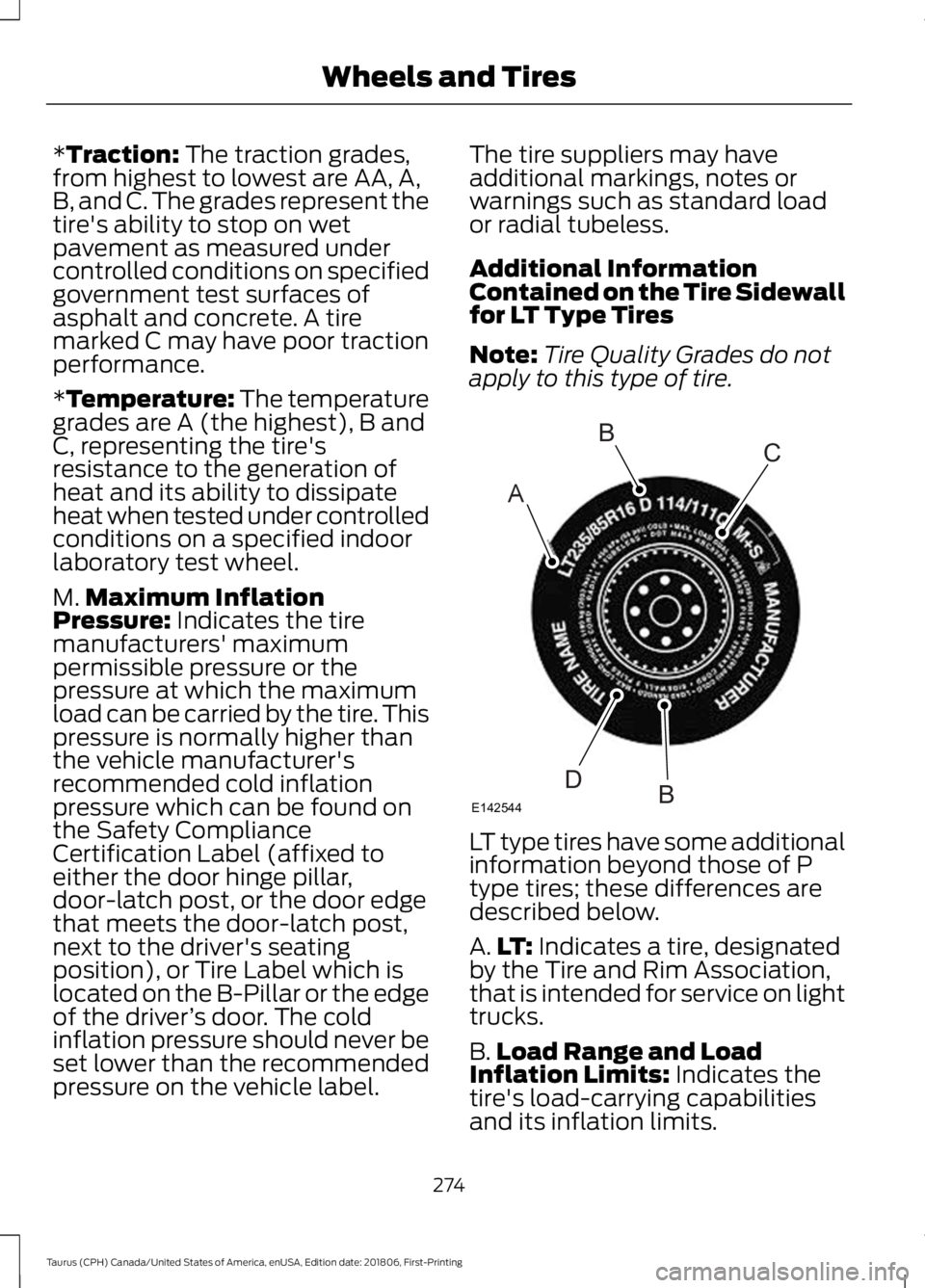
Note:
Tire Quality Grades do not
apply to this type of tire. LT type tires have some additional
information beyond those of P
type tires; these differences are
described below.
A.
LT:
Indicates a tire, designated
by the Tire and Rim Association,
that is intended for service on light
trucks.
B. Load Range and Load
Inflation Limits:
Indicates the
tire's load-carrying capabilities
and its inflation limits.
274
Taurus (CPH) Canada/United States of America, enUSA, Edition date: 201806, First-Printing Wheels and TiresA
BC
BDE142544
Page 288 of 515
Understanding Your Tire Pressure
Monitoring System
The tire pressure monitoring system
measures pressure in your four road tires
and sends the tire pressure readings to
your vehicle. The low tire pressure warning
light will turn on if the tire pressure is
significantly low. Once the light is
illuminated, your tires are under-inflated
and need to be inflated to the
manufacturer
’s recommended tire
pressure. Even if the light turns on and a
short time later turns off, your tire pressure
still needs to be checked. When Your Temporary Spare Tire is
Installed
When one of your road tires needs to be
replaced with the temporary spare, the
system will continue to identify an issue to
remind you that the damaged road wheel
and tire assembly needs to be repaired and
put back on your vehicle.
To restore the full function of the tire
pressure monitoring system, have the
damaged road wheel and tire assembly
repaired and remounted on your vehicle.
When You Believe Your System is Not
Operating Properly
The main function of the tire pressure
monitoring system is to warn you when
your tires need air. It can also warn you in
the event the system is no longer capable
of functioning as intended. See the
following chart for information concerning
your tire pressure monitoring system:
285
Taurus (CPH) Canada/United States of America, enUSA, Edition date: 201806, First-Printing Wheels and Tires
Page 289 of 515
Customer action required
Possible cause
Low tire pressure
warning light
Make sure tires are at the proper pres-
sure. See Inflating your tires in this
chapter. After inflating your tires to the
manufacturer’s recommended pressure
as shown on the Tire Label (located on
the edge of driver ’s door or the B-Pillar),
the vehicle must be driven for at least
two minutes over 20 mph (32 km/h)
before the light turns off.
Tire(s) under-inflated
Solid warning light
Repair the damaged road wheel and tire
assembly and reinstall it on the vehicle
to restore system function. For a
description on how the system functions,
see
When your temporary spare tire
is installed in this section.
Spare tire in use
If the tires are properly inflated and the
spare tire is not in use but the light
remains on, contact your authorized
dealer as soon as possible.
TPMS malfunction
Repair the damaged road wheel and tire
assembly and reinstall it on the vehicle
to restore system function. For a
description on how the system functions,
see
When your temporary spare tire
is installed in this section.
Spare tire in use
Flashing warning
light
If the tires are properly inflated and the
spare tire is not in use but the light
remains on, contact your authorized
dealer as soon as possible.
TPMS malfunction
When Inflating Your Tires
When putting air into your tires (such as at
a gas station or in your garage), the tire
pressure monitoring system may not
respond immediately to the air added to
your tires. It may take up to two minutes of driving
over 20 mph (32 km/h) for the light to turn
off after you have filled your tires to the
recommended inflation pressure.
286
Taurus (CPH) Canada/United States of America, enUSA, Edition date: 201806, First-Printing Wheels and Tires
Page 290 of 515
How Temperature Affects Your Tire
Pressure
The tire pressure monitoring system
monitors tire pressure in each pneumatic
tire. While driving in a normal manner, a
typical passenger tire inflation pressure
may increase about 2
–4 psi (14– 28 kPa)
from a cold start situation. If the vehicle is
stationary overnight with the outside
temperature significantly lower than the
daytime temperature, the tire pressure may
decrease about 3 psi (21 kPa) for a drop of
30°F (17°C) in ambient temperature. This
lower pressure value may be detected by
the tire pressure monitoring system as
being significantly lower than the
recommended inflation pressure and
activate the system warning light for low
tire pressure. If the low tire pressure
warning light is on, visually check each tire
to verify that no tire is flat. If one or more
tires are flat, repair as necessary. Check
the air pressure in the road tires. If any tire
is under-inflated, carefully drive the vehicle
to the nearest location where air can be
added to the tires. Inflate all the tires to
the recommended inflation pressure.
CHANGING A ROAD WHEEL
(If
Equipped) WARNING:
If the tire pressure
monitor sensor becomes damaged it
may not function.
Note: The use of tire sealant may damage
your tire pressure monitoring system and
should only be used in roadside
emergencies. Note:
The tire pressure monitoring system
indicator light will illuminate when the spare
tire is in use. To restore the full function of
the monitoring system, all road wheels
equipped with tire pressure monitoring
sensors must be mounted on the vehicle.
If you get a flat tire while driving, do not
apply the brake heavily. Instead, gradually
decrease your speed. Hold the steering
wheel firmly and slowly move to a safe
place on the side of the road.
Have a flat serviced by an authorized
dealer in order to prevent damage to the
tire pressure monitoring system sensors.
See
Tire Pressure Monitoring System
(page 283). Replace the spare tire with a
road tire as soon as possible. During
repairing or replacing of the flat tire, have
the authorized dealer inspect the tire
pressure monitoring system sensor for
damage.
Dissimilar Spare Wheel and Tire
Assembly Information WARNING:
Failure to follow these
guidelines could result in an increased
risk of loss of vehicle control, injury or
death.
If you have a dissimilar spare wheel and
tire, then it is intended for temporary use
only. This means that if you need to use it,
you should replace it as soon as possible
with a road wheel and tire assembly that
is the same size and type as the road tires
and wheels that were originally provided
by Ford. If the dissimilar spare tire or wheel
is damaged, it should be replaced rather
than repaired.
A dissimilar spare wheel and tire assembly
is defined as a spare wheel and tire
assembly that is different in brand, size or
appearance from the road tires and wheels
and can be one of three types:
287
Taurus (CPH) Canada/United States of America, enUSA, Edition date: 201806, First-Printing Wheels and Tires
Page 312 of 515

Always handle discs by their edges only.
Clean the disc with an approved CD
cleaner only. Wipe it from the center of
the disc toward the edge. Do not clean in
a circular motion.
Do not expose discs to direct sunlight or
heat sources for extended periods.
MP3 and WMA Track and Folder
Structure
Audio systems capable of recognizing and
playing MP3 and WMA individual tracks
and folder structures work as follows:
•
There are two different modes for MP3
and WMA disc playback: MP3 and
WMA track mode (system default) and
MP3 and WMA folder mode.
• MP3 and WMA track mode ignores any
folder structure on the MP3 and WMA
disc. The player numbers each MP3
and WMA track on the disc (noted by
the MP3 or WMA file extension) from
T001 to a maximum of T255. The
maximum number of playable MP3 and
WMA files may be less depending on
the structure of the CD and exact
model of radio present.
• MP3 and WMA folder mode represents
a folder structure consisting of one
level of folders. The CD player numbers
all MP3 and WMA tracks on the disc
(noted by the MP3 or WMA file
extension) and all folders containing
MP3 and WMA files, from F001 (folder)
T001 (track) to F253 T255.
• Creating discs with only one level of
folders helps with navigation through
the disc files.
If you are burning your own MP3 and WMA
discs, it is important to understand how
the system reads the structures you create.
While various files may be present (files
with extensions other than MP3 and
WMA), only files with the MP3 and WMA extension are played; other files are
ignored by the system. This enables you to
use the same MP3 and WMA disc for a
variety of tasks on your work computer,
home computer and your in-vehicle
system.
In track mode, the system displays and
plays the structure as if it were only one
level deep (all MP3 and WMA files play,
regardless of being in a specific folder). In
folder mode, the system only plays the
MP3 and WMA files in the current folder.
AUDIO UNIT - VEHICLES WITH:
SYNC
WARNING: Driving while
distracted can result in loss of vehicle
control, crash and injury. We strongly
recommend that you use extreme
caution when using any device that may
take your focus off the road. Your
primary responsibility is the safe
operation of your vehicle. We
recommend against the use of any
hand-held device while driving and
encourage the use of voice-operated
systems when possible. Make sure you
are aware of all applicable local laws
that may affect the use of electronic
devices while driving.
Note: Some features, such as satellite
radio, may not be available in your location.
Check with an authorized dealer.
Note: Depending on your vehicle option
package, your system may look different
from what you see here.
Accessing the Auxiliary Media
Sources Press and release to access or
switch between media devices.
309
Taurus (CPH) Canada/United States of America, enUSA, Edition date: 201806, First-Printing Audio SystemE265277
Page 447 of 515
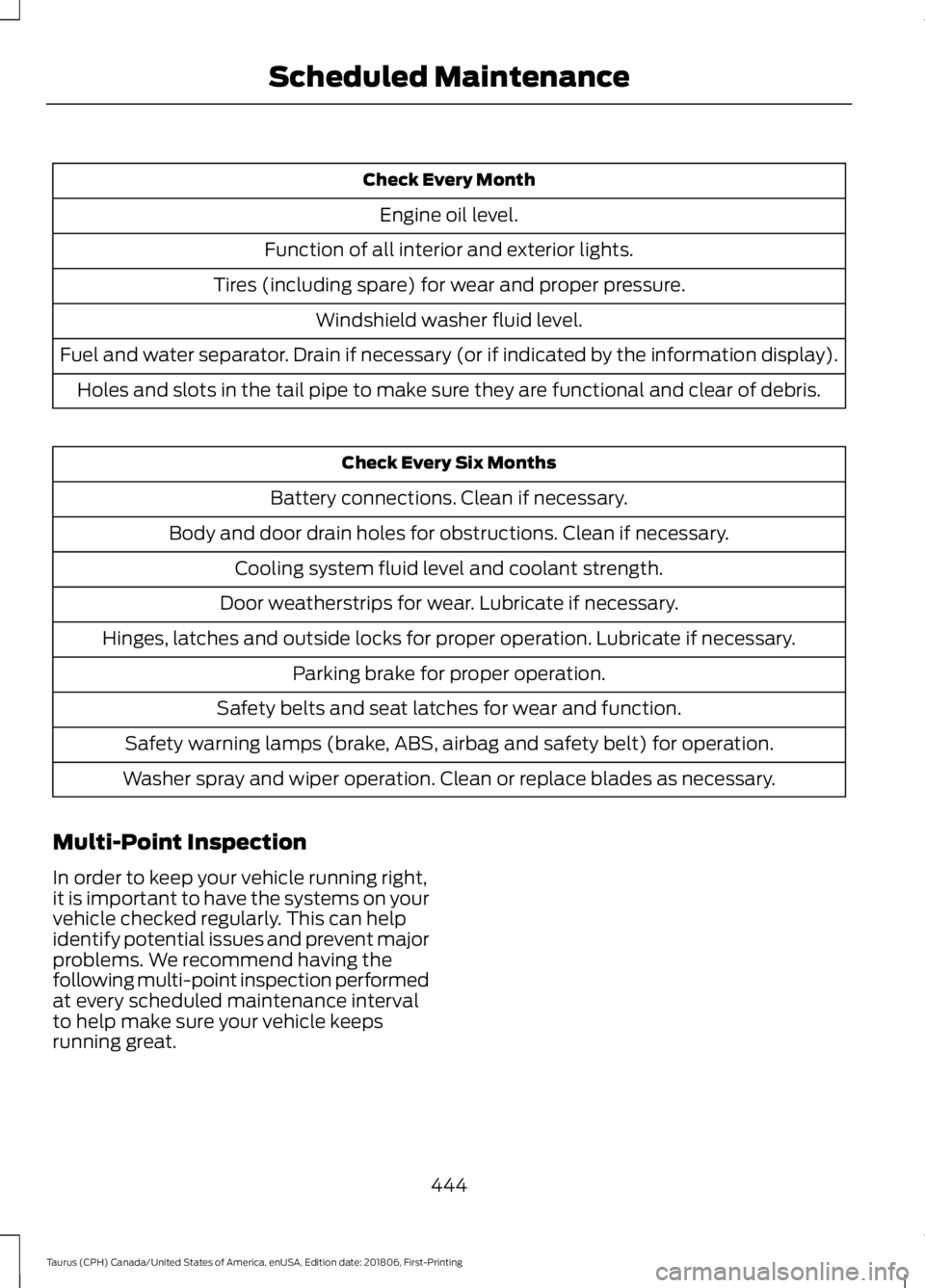
Check Every Month
Engine oil level.
Function of all interior and exterior lights.
Tires (including spare) for wear and proper pressure. Windshield washer fluid level.
Fuel and water separator. Drain if necessary (or if indicated by the information display). Holes and slots in the tail pipe to make sure they are functional and clear of debris. Check Every Six Months
Battery connections. Clean if necessary.
Body and door drain holes for obstructions. Clean if necessary. Cooling system fluid level and coolant strength.
Door weatherstrips for wear. Lubricate if necessary.
Hinges, latches and outside locks for proper operation. Lubricate if necessary. Parking brake for proper operation.
Safety belts and seat latches for wear and function.
Safety warning lamps (brake, ABS, airbag and safety belt) for operation.
Washer spray and wiper operation. Clean or replace blades as necessary.
Multi-Point Inspection
In order to keep your vehicle running right,
it is important to have the systems on your
vehicle checked regularly. This can help
identify potential issues and prevent major
problems. We recommend having the
following multi-point inspection performed
at every scheduled maintenance interval
to help make sure your vehicle keeps
running great.
444
Taurus (CPH) Canada/United States of America, enUSA, Edition date: 201806, First-Printing Scheduled Maintenance
Page 504 of 515

A
A/C
See: Climate Control......................................... 105
About This Manual...........................................7
ABS See: Brakes........................................................... 160
ABS driving hints See: Hints on Driving With Anti-Lock
Brakes................................................................. 161
Accessories....................................................438 Exterior Style....................................................... 438
Interior Style........................................................ 438
Lifestyle................................................................. 438
Peace of Mind..................................................... 438
Accessories See: Replacement Parts
Recommendation............................................ 12
ACC See: Using Adaptive Cruise Control..............177
Active Park Assist.........................................168 Automatic Steering into Parking
Space................................................................. 170
Deactivating the Park Assist Feature...........171
Troubleshooting the System........................... 171
Using Active Park Assist.................................. 169
Adjusting the Headlamps
..........................251
Horizontal Aim Adjustment........................... 252
Vertical Aim Adjustment.................................. 251
Adjusting the Pedals
....................................66
Adjusting the Steering Wheel...................64
Airbag Disposal...............................................45
Air Conditioning See: Climate Control......................................... 105
Air Filter See: Changing the Engine Air Filter.............253
Alarm See: Anti-Theft Alarm........................................ 63
All-Wheel Drive
.............................................153
Ambient Lighting............................................73
Adjusting the Brightness.................................... 73
Changing the Color.............................................. 73
Switching Ambient Lighting Off...................... 73
Switching Ambient Lighting On...................... 73
Anti-Theft Alarm
............................................63
Arming the Alarm................................................. 63
Disarming the Alarm........................................... 63
Appendices...................................................460 Apps
.................................................................407
........................................................................\
.......... 407
SiriusXM Traffic and Travel Link.................. 409
At a Glance........................................................15
Audible Warnings and Indicators.............84 Headlamps On Warning Chime..................... 84
Key in Ignition Warning Chime........................ 84
Keyless Warning Alert........................................ 84
Parking Brake On Warning Chime.................84
Audio Control..................................................64 Seek, Next or Previous....................................... 64
Audio Input Jack
............................................318
Audio System...............................................308 General Information......................................... 308
Audio Unit - Vehicles With: Sony Audio System...........................................................315
Accessing the Sound Settings....................... 315
Adjusting the Volume........................................ 315
Changing Radio Stations................................. 315
Selecting the Audio Modes............................. 315
Switching the Audio Unit On and Off.........315
Using Seek, Fast Forward and Reverse.............................................................. 316
Audio Unit - Vehicles With: SYNC 3
........................................................................\
314
Adjusting the Volume........................................ 314
Changing Radio Stations................................. 314
Ejecting the CD.................................................... 314
Inserting a CD....................................................... 314
Switching the Audio Unit On and Off.........314
Using Seek, Fast Forward and Reverse.............................................................. 314
Audio Unit - Vehicles With: SYNC.........309 Accessing the Auxiliary Media
Sources............................................................ 309
Accessing the Clock Settings......................... 310
Accessing the Menu.......................................... 310
Accessing the Phone Features...................... 310
Accessing the Sound Settings....................... 310
Adjusting the Volume....................................... 310
Changing Radio Stations................................. 310
Ejecting the CD..................................................... 311
Listening to a CD.................................................. 311
Listening to Satellite Radio.............................. 311
Listening to the Radio........................................ 311
Menu Structure..................................................... 311
Muting the Audio.................................................. 311
Playing or Pausing Media.................................. 311
501
Taurus (CPH) Canada/United States of America, enUSA, Edition date: 201806, First-Printing Index
Page 507 of 515
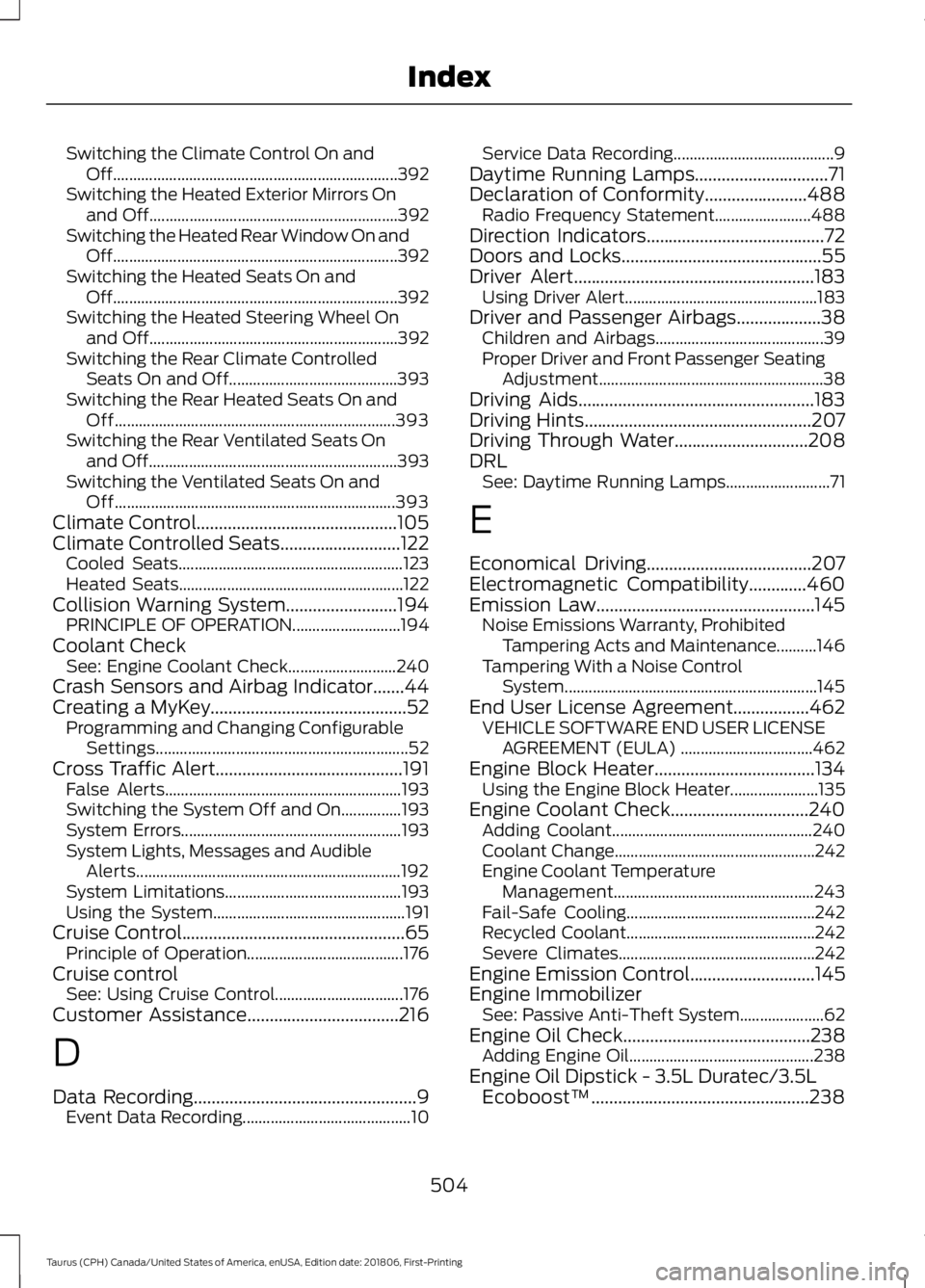
Switching the Climate Control On and
Off....................................................................... 392
Switching the Heated Exterior Mirrors On and Off.............................................................. 392
Switching the Heated Rear Window On and Off....................................................................... 392
Switching the Heated Seats On and Off....................................................................... 392
Switching the Heated Steering Wheel On and Off.............................................................. 392
Switching the Rear Climate Controlled Seats On and Off.......................................... 393
Switching the Rear Heated Seats On and Off...................................................................... 393
Switching the Rear Ventilated Seats On and Off.............................................................. 393
Switching the Ventilated Seats On and Off...................................................................... 393
Climate Control.............................................105
Climate Controlled Seats...........................122 Cooled Seats........................................................ 123
Heated Seats........................................................ 122
Collision Warning System.........................194 PRINCIPLE OF OPERATION........................... 194
Coolant Check See: Engine Coolant Check........................... 240
Crash Sensors and Airbag Indicator.......44
Creating a MyKey............................................52 Programming and Changing Configurable
Settings............................................................... 52
Cross Traffic Alert..........................................191 False Alerts........................................................... 193
Switching the System Off and On...............193
System Errors....................................................... 193
System Lights, Messages and Audible Alerts.................................................................. 192
System Limitations............................................ 193
Using the System................................................ 191
Cruise Control..................................................65 Principle of Operation....................................... 176
Cruise control See: Using Cruise Control................................ 176
Customer Assistance..................................216
D
Data Recording..................................................9
Event Data Recording.......................................... 10Service Data Recording........................................
9
Daytime Running Lamps..............................71
Declaration of Conformity.......................488 Radio Frequency Statement........................ 488
Direction Indicators........................................72
Doors and Locks.............................................55
Driver Alert
......................................................183
Using Driver Alert................................................ 183
Driver and Passenger Airbags...................38 Children and Airbags.......................................... 39
Proper Driver and Front Passenger Seating Adjustment........................................................ 38
Driving Aids
.....................................................183
Driving Hints...................................................207
Driving Through Water..............................208
DRL See: Daytime Running Lamps.......................... 71
E
Economical Driving
.....................................207
Electromagnetic Compatibility.............460
Emission Law.................................................145 Noise Emissions Warranty, Prohibited
Tampering Acts and Maintenance..........146
Tampering With a Noise Control System............................................................... 145
End User License Agreement.................462 VEHICLE SOFTWARE END USER LICENSE
AGREEMENT (EULA) ................................. 462
Engine Block Heater....................................134 Using the Engine Block Heater...................... 135
Engine Coolant Check...............................240 Adding Coolant.................................................. 240
Coolant Change.................................................. 242
Engine Coolant Temperature Management.................................................. 243
Fail-Safe Cooling............................................... 242
Recycled Coolant............................................... 242
Severe Climates................................................. 242
Engine Emission Control
............................145
Engine Immobilizer See: Passive Anti-Theft System..................... 62
Engine Oil Check..........................................238 Adding Engine Oil.............................................. 238
Engine Oil Dipstick - 3.5L Duratec/3.5L Ecoboost™.................................................238
504
Taurus (CPH) Canada/United States of America, enUSA, Edition date: 201806, First-Printing Index