2019 FORD TAURUS lights
[x] Cancel search: lightsPage 268 of 515

•
When inflating a tire or other objects,
use the black air hose only. Do not use
the transparent hose which is designed
for sealant application only.
• Operating the kit could cause an
electrical disturbance in radio, CD, and
DVD player operation.
What to do when a Tire Is
Punctured
A tire puncture within the tire tread area
can be repaired in two stages with the kit.
• In the first stage, the tire will be
reinflated with a sealing compound
and air. After the tire has been
reinflated, you will need to drive the
vehicle a short distance 4 mi (6 km) to
distribute the sealant in the tire.
• In the second stage, you will need to
check the tire pressure and adjust, if
necessary, to the vehicle tire inflation
pressure.
First Stage: Reinflating the Tire
with Sealing Compound and Air WARNING: Do not stand directly
over the kit while inflating the tire. If you
notice any unusual bulges or
deformations in the tire's sidewall during
inflation, stop and call roadside
assistance. WARNING:
If the tire does not
inflate to the recommended tire pressure
within 15 minutes, stop and call roadside
assistance.
Preparation: Park the vehicle in a safe, level
and secure area, away from moving traffic.
Turn the hazard lights on. Apply the parking
brake and turn the engine off. Inspect the
flat tire for visible damage. Sealant compound contains latex. To
avoid any allergic reactions, use the
non-latex gloves in the accessory box on
the underside of the kit housing.
Do not remove any foreign object that has
pierced the tire. If a puncture is in the tire
sidewall, stop and call roadside assistance.
1. Remove the valve cap from the tire
valve.
2. Unwrap the clear tube from the compressor housing.
3. Remove the tube cap and fasten the metal connector of the tube to the tire
valve, turning clockwise. Make sure the
connection is tightly fastened. 4. Plug the power cable into the 12-volt
power point in the vehicle.
5. Remove the warning sticker on the canister and place it on the top of the
instrument panel or the center of the
dash.
6. Start the vehicle only if the vehicle is outdoors or in a well-ventilated area.
265
Taurus (CPH) Canada/United States of America, enUSA, Edition date: 201806, First-Printing Wheels and TiresE144619
Page 310 of 515

BULB SPECIFICATION CHART
The specified replacement bulbs are in the
chart below. Headlamp bulbs must be
marked with an authorized D.O.T.
(Department of Transportation) for North
America to affirm lamp performance, light
brightness and pattern and safe visibility.
The correct bulbs will not damage the
lamp assembly or void the lamp assembly
warranty and will provide quality bulb burn
time. Trade number
Function
D3S
Headlamp (high intensity discharge) Low
and High 1
LED
Side marker - front 1
LED
Park lamp - front 1
7444NA
Turn lamp - front 1
LED
Signal indicator mirror lamp
LED
Approach lamp
LED
Tail and brake lamp 1
LED
Turn lamp - rear 1
LED
Backup lamp 1
W5W
License plate lamp
LED
High-mount brake lamp 1
W5W
Interior lamps
1 To replace these lamps, see an authorized dealer.
Note: To replace instrument panel lights, see an authorized dealer.
Note: LED lamps are not serviceable. See an authorized dealer if they fail.
307
Taurus (CPH) Canada/United States of America, enUSA, Edition date: 201806, First-Printing Capacities and Specifications
Page 403 of 515
3D city models are complete 3D models
of entire city areas including navigable
roads, parks, rivers and rendered buildings.
3D landmarks and city models appear in
3D map mode only. Coverage of these
varies and improves with updated map
releases.
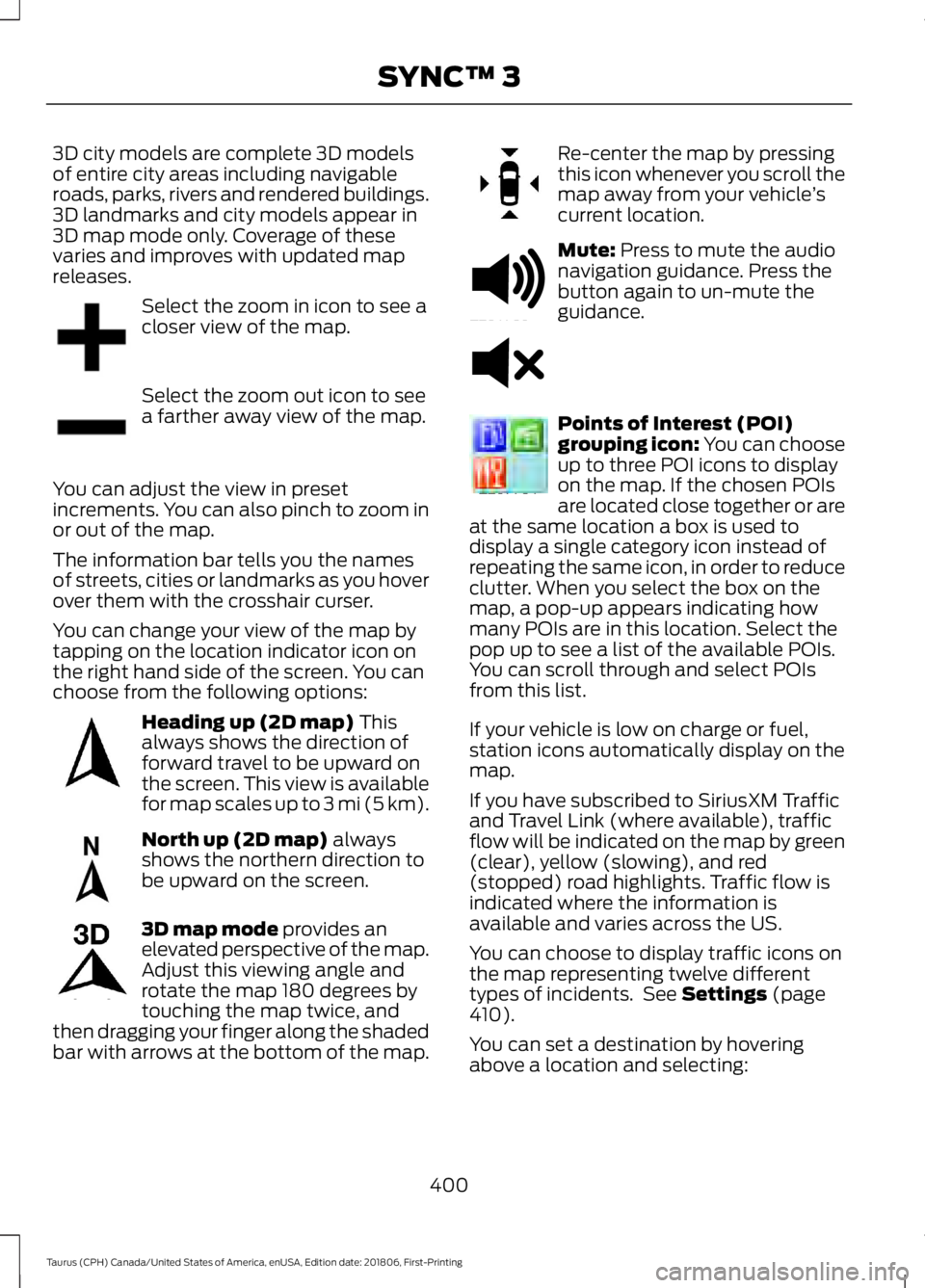
Select the zoom in icon to see a
closer view of the map.
Select the zoom out icon to see
a farther away view of the map.
You can adjust the view in preset
increments. You can also pinch to zoom in
or out of the map.
The information bar tells you the names
of streets, cities or landmarks as you hover
over them with the crosshair curser.
You can change your view of the map by
tapping on the location indicator icon on
the right hand side of the screen. You can
choose from the following options: Heading up (2D map) This
always shows the direction of
forward travel to be upward on
the screen. This view is available
for map scales up to
3 mi (5 km). North up (2D map)
always
shows the northern direction to
be upward on the screen. 3D map mode
provides an
elevated perspective of the map.
Adjust this viewing angle and
rotate the map 180 degrees by
touching the map twice, and
then dragging your finger along the shaded
bar with arrows at the bottom of the map. Re-center the map by pressing
this icon whenever you scroll the
map away from your vehicle
’s
current location. Mute:
Press to mute the audio
navigation guidance. Press the
button again to un-mute the
guidance. Points of Interest (POI)
grouping icon: You can choose
up to three POI icons to display
on the map. If the chosen POIs
are located close together or are
at the same location a box is used to
display a single category icon instead of
repeating the same icon, in order to reduce
clutter. When you select the box on the
map, a pop-up appears indicating how
many POIs are in this location. Select the
pop up to see a list of the available POIs.
You can scroll through and select POIs
from this list.
If your vehicle is low on charge or fuel,
station icons automatically display on the
map.
If you have subscribed to SiriusXM Traffic
and Travel Link (where available), traffic
flow will be indicated on the map by green
(clear), yellow (slowing), and red
(stopped) road highlights. Traffic flow is
indicated where the information is
available and varies across the US.
You can choose to display traffic icons on
the map representing twelve different
types of incidents. See
Settings (page
410).
You can set a destination by hovering
above a location and selecting:
400
Taurus (CPH) Canada/United States of America, enUSA, Edition date: 201806, First-Printing SYNC™ 3E207752 E207753 E207750 E207749 E207748 E207751 E251780 E251779 E207754
Page 425 of 515
Note:
Data you share, e.g. the Vehicle
Identification Number (VIN), SIM Card ID,
and data plan usage, between us and the
vehicle network carrier is used to provide
the Vehicle Hotspot service in accordance
with your vehicle network carrier agreement,
coverage and availability, and may be used
to enable a seamless transition from an old
to new embedded modem and to confirm
any successfully delivered updates.
Note: For your convenience data usage may
be available for monitoring under Settings
but may not reflect actual or current usage.
The vehicle network carrier is responsible
for providing information about your
account. Please contact the vehicle network
carrier for more information.
Note: We may need to update operating
system software on your vehicle, including
security updates and bug fixes, to keep
connected services current, like Vehicle
Hotspot, without prior notice to you.
Note: If you do not have an active vehicle
hotspot data plan, open your web browser
and go to a website using the HTTP protocol
to be automatically redirected to the vehicle
network carrier landing page where you can
purchase data. Websites using HTTPS will
not automatically redirect. Ambient Lighting (If Equipped)
Tap a color once to active ambient lighting.
This sets the color to the highest intensity.
You can drag the colors up and down to
increase or decrease the intensity.
To switch ambient lighting off, press the
active color once or drag the active color
all the way down to zero intensity.
Vehicle
Note: Your vehicle may not have all of
these features.
You can select the following features to
update their settings.
Door Keypad Code (If equipped)
Select this button to add or erase a
personal door keypad code. To add or
erase a personal code, you first need to
enter the five-digit factory set code. You
can find this code on the owner's wallet
card in the glove box or from your
authorized dealer.
Camera Settings
To make adjustments using the touchscreen, select: Action and Description
Message
Camera Settings
Then select from the following: When the reverse sensing system detects an object, it displays red,
yellow and green highlights at the top of the image.
Enhanced Park
Aids
You can enable or disable this option using the slider.
Rear Camera
Delay
You can find more information on the rear-view camera system in the parking aids chapter
of your owner manual.
422
Taurus (CPH) Canada/United States of America, enUSA, Edition date: 201806, First-Printing SYNC™ 3
Page 447 of 515
Check Every Month
Engine oil level.
Function of all interior and exterior lights.
Tires (including spare) for wear and proper pressure. Windshield washer fluid level.
Fuel and water separator. Drain if necessary (or if indicated by the information display). Holes and slots in the tail pipe to make sure they are functional and clear of debris. Check Every Six Months
Battery connections. Clean if necessary.
Body and door drain holes for obstructions. Clean if necessary. Cooling system fluid level and coolant strength.
Door weatherstrips for wear. Lubricate if necessary.
Hinges, latches and outside locks for proper operation. Lubricate if necessary. Parking brake for proper operation.
Safety belts and seat latches for wear and function.
Safety warning lamps (brake, ABS, airbag and safety belt) for operation.
Washer spray and wiper operation. Clean or replace blades as necessary.
Multi-Point Inspection
In order to keep your vehicle running right,
it is important to have the systems on your
vehicle checked regularly. This can help
identify potential issues and prevent major
problems. We recommend having the
following multi-point inspection performed
at every scheduled maintenance interval
to help make sure your vehicle keeps
running great.
444
Taurus (CPH) Canada/United States of America, enUSA, Edition date: 201806, First-Printing Scheduled Maintenance
Page 507 of 515
Switching the Climate Control On and
Off....................................................................... 392
Switching the Heated Exterior Mirrors On and Off.............................................................. 392
Switching the Heated Rear Window On and Off....................................................................... 392
Switching the Heated Seats On and Off....................................................................... 392
Switching the Heated Steering Wheel On and Off.............................................................. 392
Switching the Rear Climate Controlled Seats On and Off.......................................... 393
Switching the Rear Heated Seats On and Off...................................................................... 393
Switching the Rear Ventilated Seats On and Off.............................................................. 393
Switching the Ventilated Seats On and Off...................................................................... 393
Climate Control.............................................105
Climate Controlled Seats...........................122 Cooled Seats........................................................ 123
Heated Seats........................................................ 122
Collision Warning System.........................194 PRINCIPLE OF OPERATION........................... 194
Coolant Check See: Engine Coolant Check........................... 240
Crash Sensors and Airbag Indicator.......44
Creating a MyKey............................................52 Programming and Changing Configurable
Settings............................................................... 52
Cross Traffic Alert..........................................191 False Alerts........................................................... 193
Switching the System Off and On...............193
System Errors....................................................... 193
System Lights, Messages and Audible Alerts.................................................................. 192
System Limitations............................................ 193
Using the System................................................ 191
Cruise Control..................................................65 Principle of Operation....................................... 176
Cruise control See: Using Cruise Control................................ 176
Customer Assistance..................................216
D
Data Recording..................................................9
Event Data Recording.......................................... 10Service Data Recording........................................
9
Daytime Running Lamps..............................71
Declaration of Conformity.......................488 Radio Frequency Statement........................ 488
Direction Indicators........................................72
Doors and Locks.............................................55
Driver Alert
......................................................183
Using Driver Alert................................................ 183
Driver and Passenger Airbags...................38 Children and Airbags.......................................... 39
Proper Driver and Front Passenger Seating Adjustment........................................................ 38
Driving Aids
.....................................................183
Driving Hints...................................................207
Driving Through Water..............................208
DRL See: Daytime Running Lamps.......................... 71
E
Economical Driving
.....................................207
Electromagnetic Compatibility.............460
Emission Law.................................................145 Noise Emissions Warranty, Prohibited
Tampering Acts and Maintenance..........146
Tampering With a Noise Control System............................................................... 145
End User License Agreement.................462 VEHICLE SOFTWARE END USER LICENSE
AGREEMENT (EULA) ................................. 462
Engine Block Heater....................................134 Using the Engine Block Heater...................... 135
Engine Coolant Check...............................240 Adding Coolant.................................................. 240
Coolant Change.................................................. 242
Engine Coolant Temperature Management.................................................. 243
Fail-Safe Cooling............................................... 242
Recycled Coolant............................................... 242
Severe Climates................................................. 242
Engine Emission Control
............................145
Engine Immobilizer See: Passive Anti-Theft System..................... 62
Engine Oil Check..........................................238 Adding Engine Oil.............................................. 238
Engine Oil Dipstick - 3.5L Duratec/3.5L Ecoboost™.................................................238
504
Taurus (CPH) Canada/United States of America, enUSA, Edition date: 201806, First-Printing Index
Page 514 of 515

Radio Frequency Certifications for Cruise
Control Module............................................. 498
Radio Frequency Certifications for Mid Range Radar.................................................... 491
Radio Frequency Certifications for Passive Anti-Theft System....................................... 492
Radio Frequency Certifications for Radio Transceiver Module..................................... 495
Radio Frequency Certifications for SYNC 3........................................................................\
.. 498
Radio Frequency Certifications for Tire Pressure Monitoring Sensor(s)...............488
Radio Frequency Certifications for Wireless Charging.......................................................... 498
Radio Frequency Statement for Audio Unit.................................................................... 499
U
Under Hood Overview - 3.5L Duratec.........................................................235
Engine Shield....................................................... 236
Under Hood Overview - 3.5L Ecoboost™..................................................237
Universal Garage Door Opener................124 HomeLink Wireless Control System............124
USB Port..........................................................319
Using Adaptive Cruise Control.................177 Automatic Cancellation.................................. 180
Blocked Sensor.................................................... 181
Canceling the Set Speed................................ 180
Changing the Set Speed................................. 180
Detection Issues................................................. 180
Following a Vehicle............................................ 178
Hilly Condition Usage....................................... 180
Overriding the Set Speed................................. 179
Resuming the Set Speed................................ 180
Setting the Adaptive Cruise Speed..............178
Setting the Gap Distance................................. 179
Switching Adaptive Cruise Control Off....................................................................... 180
Switching Adaptive Cruise Control On........................................................................\
178
Switching to Normal Cruise Control............182
System Not Available........................................ 181
Using All-Wheel Drive
.................................153
Driving In Special Conditions With
All-Wheel Drive (AWD)............................... 155Operating AWD Vehicles With Mismatched
Tires.................................................................... 155
Operating AWD Vehicles With Spare Tires.................................................................... 154
Using Cruise Control....................................176 Canceling the Set Speed................................. 176
Changing the Set Speed.................................. 176
Resuming the Set Speed.................................. 177
Setting the Cruise Speed................................. 176
Switching Cruise Control Off........................... 177
Switching Cruise Control On........................... 176
Using MyKey With Remote Start Systems..........................................................53
Using Snow Chains.....................................282
Using Stability Control
...............................165
Using Summer Tires...................................282
Using SYNC™ With Your Media Player.............................................................342
Accessing Your Play Menu.............................. 347
Connecting Your Digital Media Player to the USB Port........................................................... 342
Media Menu Features...................................... 345
Media Voice Commands................................ 344
System Settings................................................. 349
What's Playing?................................................. 344
Using SYNC™ With Your Phone............326 Accessing Features Through the Phone
Menu.................................................................. 330
Accessing Your Phone Settings.................... 335
Making a Call....................................................... 329
Pairing Subsequent Cell Phones.................. 327
Pairing Your Cell Phone for the First Time ........................................................................\
..... 326
Phone Options during an Active Call.........329
Phone Voice Commands................................. 327
Receiving Calls.................................................... 329
System Settings................................................. 336
Text Messaging................................................... 333
Using Traction Control
................................163
Switching the System Off............................... 163
System Indicator Lights and Messages.......................................................... 163
Using a Switch..................................................... 163
Using the Information Display Controls............................................................. 163
Using Voice Recognition............................323 Audio Voice Commands.................................. 375
511
Taurus (CPH) Canada/United States of America, enUSA, Edition date: 201806, First-Printing Index