2019 FORD TAURUS steering
[x] Cancel search: steeringPage 41 of 515
While the system is designed to help
reduce serious injuries, contact with a
deploying airbag may also cause abrasions
or swelling. Temporary hearing loss is also
a possibility as a result of the noise
associated with a deploying airbag.
Because airbags must inflate rapidly and
with considerable force, there is the risk of
death or serious injuries such as fractures,
facial and eye injuries or internal injuries,
particularly to occupants who are not
properly restrained or are otherwise out of
position at the time of airbag deployment.
Thus, it is extremely important that
occupants be properly restrained as far
away from the airbag module as possible
while maintaining vehicle control.
Routine maintenance of the airbags is not
required.
DRIVER AND PASSENGER
AIRBAGS
WARNING: Do not place your arms
on the airbag cover or through the
steering wheel. Failure to follow this
instruction could result in personal injury. WARNING: Keep the areas in front
of the airbags free from obstruction. Do
not affix anything to or over the airbag
covers. Objects could become projectiles
during airbag deployment or in a sudden
stop. Failure to follow this instruction
could result in personal injury or death. WARNING:
Airbags can kill or
injure a child in a child restraint. Never
place a rear-facing child restraint in front
of an active airbag. If you must use a
forward-facing child restraint in the front
seat, move the seat upon which the child
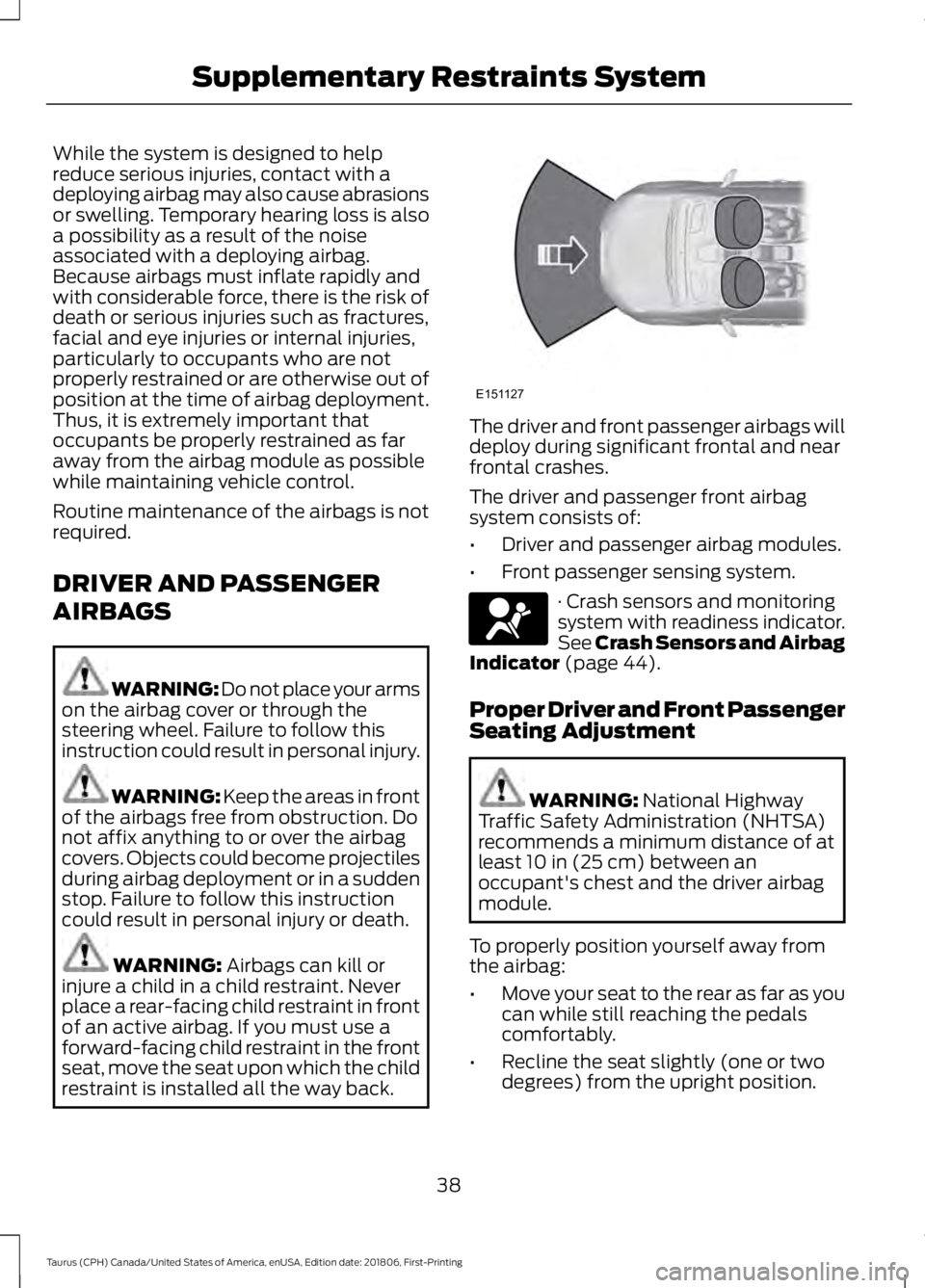
restraint is installed all the way back. The driver and front passenger airbags will
deploy during significant frontal and near
frontal crashes.
The driver and passenger front airbag
system consists of:
•
Driver and passenger airbag modules.
• Front passenger sensing system. · Crash sensors and monitoring
system with readiness indicator.
See Crash Sensors and Airbag
Indicator
(page 44).
Proper Driver and Front Passenger
Seating Adjustment WARNING:
National Highway
Traffic Safety Administration (NHTSA)
recommends a minimum distance of at
least
10 in (25 cm) between an
occupant's chest and the driver airbag
module.
To properly position yourself away from
the airbag:
• Move your seat to the rear as far as you
can while still reaching the pedals
comfortably.
• Recline the seat slightly (one or two
degrees) from the upright position.
38
Taurus (CPH) Canada/United States of America, enUSA, Edition date: 201806, First-Printing Supplementary Restraints SystemE151127 E67017
Page 53 of 515

Note:
If you remote start your vehicle with
an integrated keyhead transmitter, you must
switch the ignition on before driving your
vehicle. If you remote start your vehicle with
an intelligent access transmitter, you must
press the push button ignition switch on the
instrument panel once while applying the
brake pedal before driving your vehicle.
The power windows do not work during
remote start and the radio does not turn
on automatically.
The parking lamps remain on and the
vehicle runs for 5, 10 or 15 minutes,
depending on the setting.
Extending the Engine Running Time
To extend the engine running time duration
of your vehicle during remote start, repeat
steps 1 and 2 while the engine is running.
If the duration is set to 10 minutes, the
duration extends by another 10 minutes.
For example, if your vehicle had been
running from the first remote start for 5
minutes, your vehicle continues to run now
for a total of 20 minutes. You can extend
the remote start up to a maximum of 35
minutes.
Wait at least five seconds before remote
starting after the engine stops running.
Turning Your Vehicle Off After Remote
Starting Press the button once. The
parking lamps turn off.
You may have to be closer to your vehicle
to remotely switch off your vehicle after
remote starting. This is due to the added
noise of your running vehicle.
You can switch this feature on or off in the
information display. See General
Information (page 85). Memory Feature
(If Equipped)
You can use the remote control to recall
memory settings for the driver seat, power
mirrors, power steering column and power
adjustable foot pedals. Press the unlock
button on the remote control or unlock
your vehicle with the intelligent access key
to recall the memory positions. You can
program the remote control or intelligent
access key to recall memory positions. See
Memory Function
(page 120).
REPLACING A LOST KEY OR
REMOTE CONTROL
Replacement keys or remote controls can
be purchased from an authorized dealer.
Authorized dealers can program remote
controls for your vehicle. See
Passive
Anti-Theft System (page 62).
50
Taurus (CPH) Canada/United States of America, enUSA, Edition date: 201806, First-Printing Keys and Remote ControlsE138625
Page 67 of 515
ADJUSTING THE STEERING
WHEEL
WARNING: Do not adjust the
steering wheel when your vehicle is
moving.
Note: Make sure that you are sitting in the
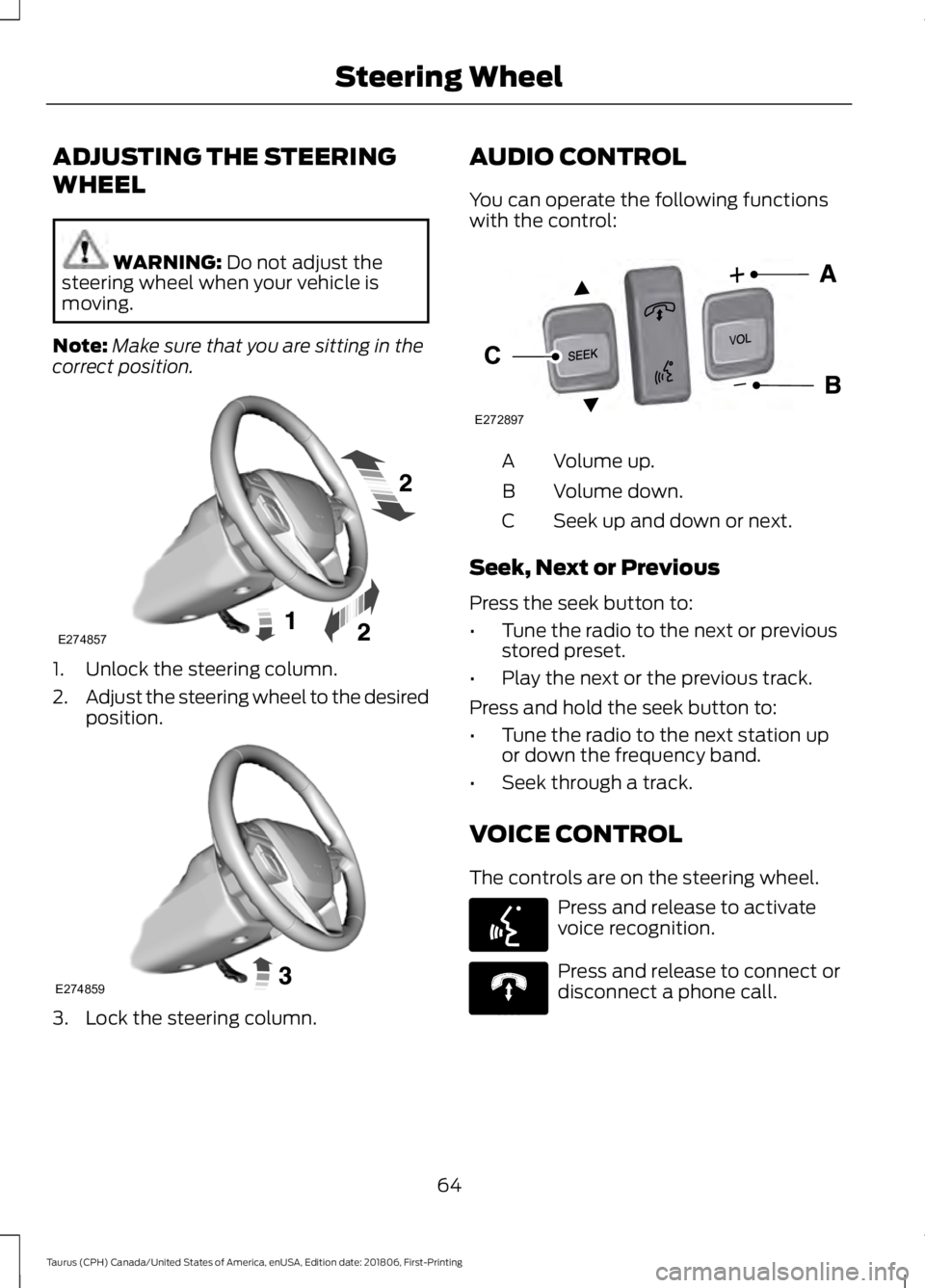
correct position. 1. Unlock the steering column.
2.
Adjust the steering wheel to the desired
position. 3. Lock the steering column. AUDIO CONTROL
You can operate the following functions
with the control:
Volume up.
A
Volume down.
B
Seek up and down or next.
C
Seek, Next or Previous
Press the seek button to:
• Tune the radio to the next or previous
stored preset.
• Play the next or the previous track.
Press and hold the seek button to:
• Tune the radio to the next station up
or down the frequency band.
• Seek through a track.
VOICE CONTROL
The controls are on the steering wheel. Press and release to activate
voice recognition.
Press and release to connect or
disconnect a phone call.
64
Taurus (CPH) Canada/United States of America, enUSA, Edition date: 201806, First-Printing Steering WheelE274857 E274859 E272897
V E142599 E270559
Page 68 of 515
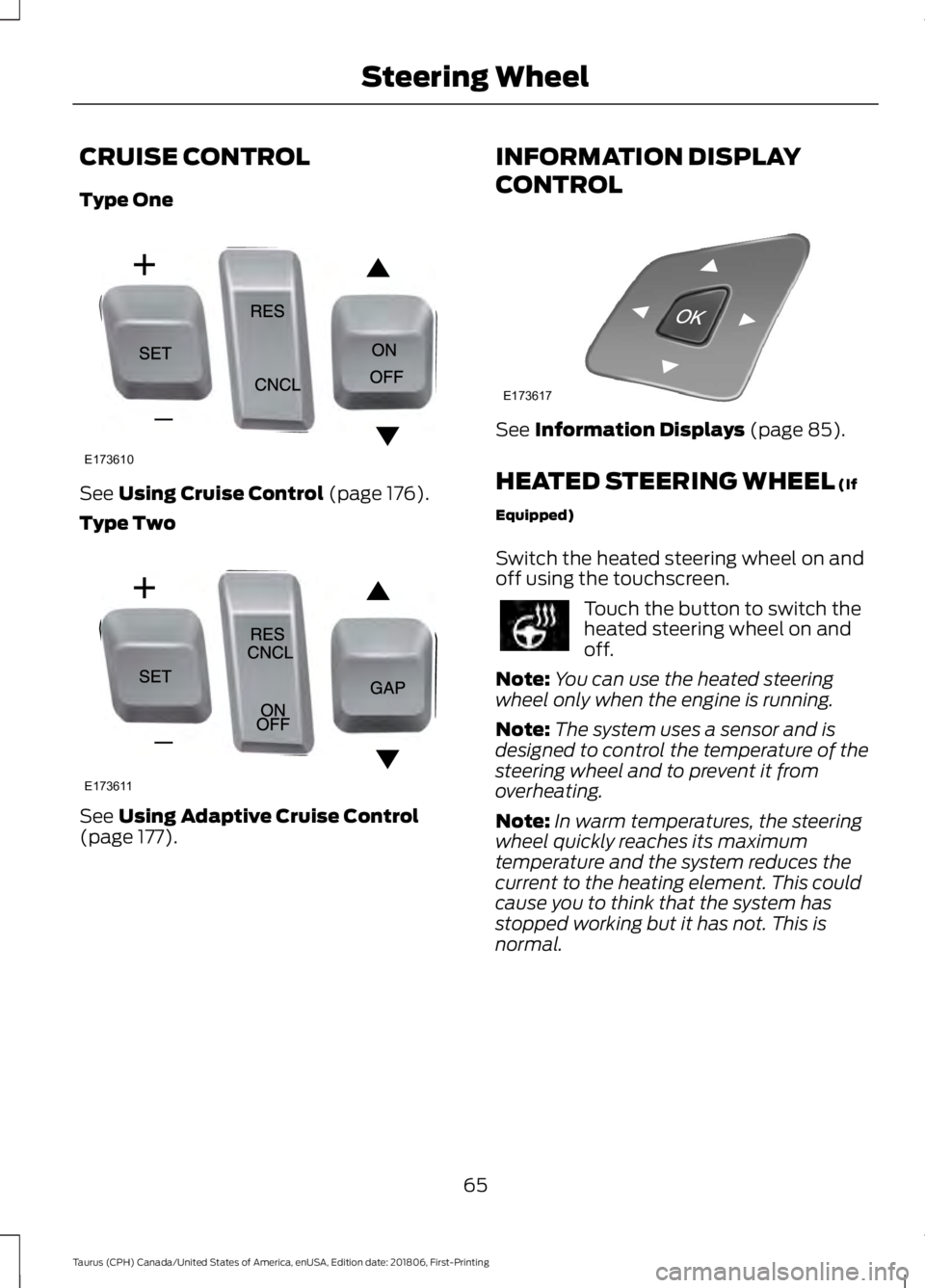
CRUISE CONTROL
Type One
See Using Cruise Control (page 176).
Type Two See
Using Adaptive Cruise Control
(page 177). INFORMATION DISPLAY
CONTROL See
Information Displays (page 85).
HEATED STEERING WHEEL
(If
Equipped)
Switch the heated steering wheel on and
off using the touchscreen. Touch the button to switch the
heated steering wheel on and
off.
Note: You can use the heated steering
wheel only when the engine is running.
Note: The system uses a sensor and is
designed to control the temperature of the
steering wheel and to prevent it from
overheating.
Note: In warm temperatures, the steering
wheel quickly reaches its maximum
temperature and the system reduces the
current to the heating element. This could
cause you to think that the system has
stopped working but it has not. This is
normal.
65
Taurus (CPH) Canada/United States of America, enUSA, Edition date: 201806, First-Printing Steering WheelE173610 E173611 E173617
Page 69 of 515
ADJUSTING THE PEDALS
WARNING: Never use the controls
while your feet are on the accelerator
and brake pedals and the vehicle is
moving.
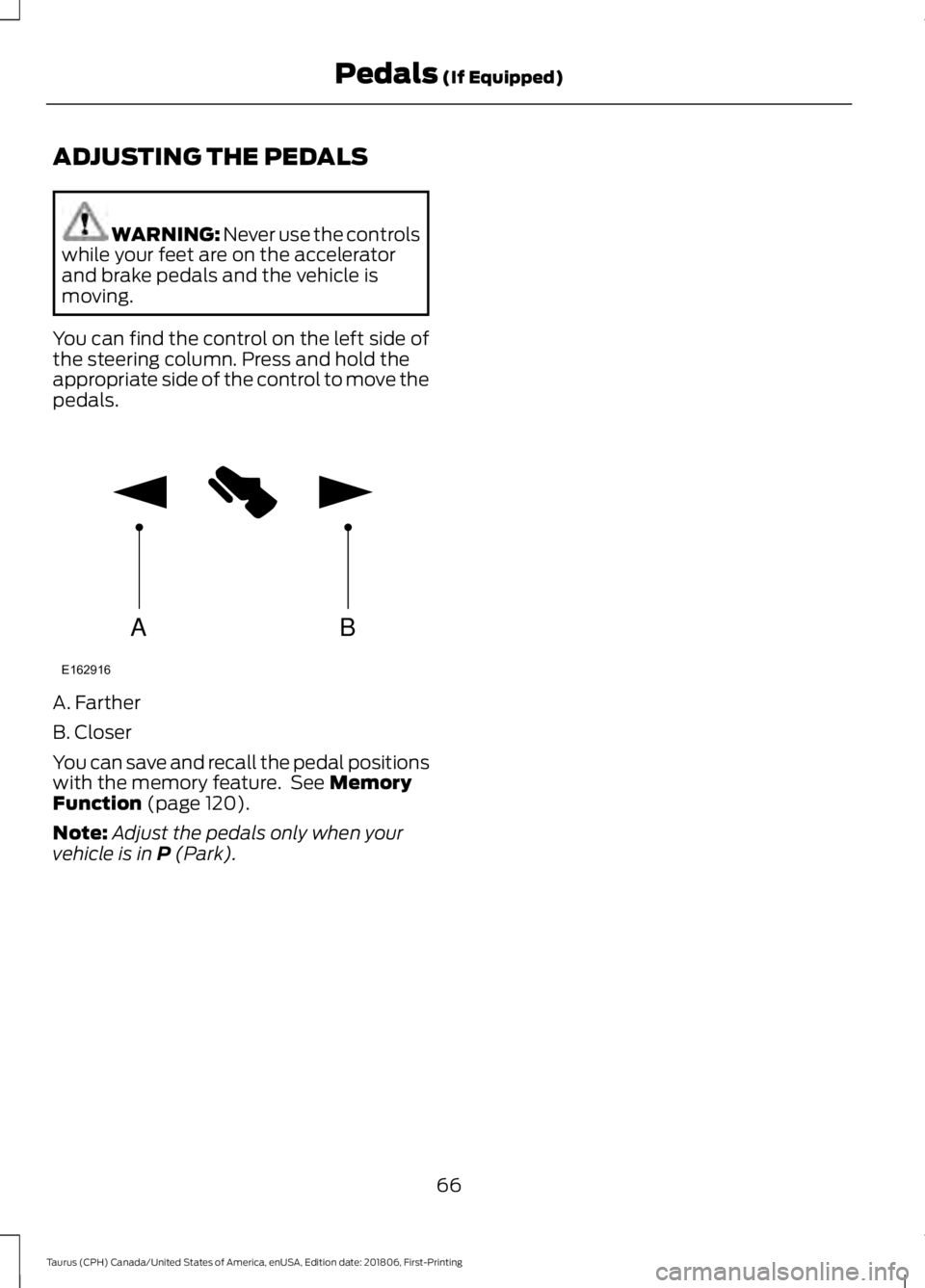
You can find the control on the left side of
the steering column. Press and hold the
appropriate side of the control to move the
pedals. A. Farther
B. Closer
You can save and recall the pedal positions
with the memory feature. See
Memory
Function (page 120).
Note: Adjust the pedals only when your
vehicle is in
P (Park).
66
Taurus (CPH) Canada/United States of America, enUSA, Edition date: 201806, First-Printing Pedals
(If Equipped)AB
E162916
Page 88 of 515

GENERAL INFORMATION
WARNING: Driving while
distracted can result in loss of vehicle
control, crash and injury. We strongly
recommend that you use extreme
caution when using any device that may
take your focus off the road. Your
primary responsibility is the safe
operation of your vehicle. We
recommend against the use of any
hand-held device while driving and
encourage the use of voice-operated
systems when possible. Make sure you
are aware of all applicable local laws
that may affect the use of electronic
devices while driving.
You can control various systems on your
vehicle using the information display
controls on the steering wheel.
Corresponding information appears in the
information display. Information Display Controls
(Type 1)
•
Press the up and down arrow buttons
to scroll through and highlight the
options within a menu.
• Press the right arrow button to enter a
submenu.
• Press the left arrow button to exit a
submenu.
• Press the
OK button to choose and
confirm settings or messages. This icon gives you the ability to
switch a feature on or off. A
check in the box indicates the
feature is enabled, and unchecked
indicates the feature is disabled.
85
Taurus (CPH) Canada/United States of America, enUSA, Edition date: 201806, First-Printing Information DisplaysE215242 E204495
Page 89 of 515

Trip 1 & 2
You can access the menu using the
information display control.
Note:
Some options may appear slightly
different or not at all if the items are
optional. Trip 1 & 2
Digital Speedometer Hold OK to Reset
Trip Odometer
Trip Timer
Average Fuel
• Digital Speedometer - Shows a digital
display of your vehicle speed.
• Trip Odometer — Registers the
distance of individual journeys. •
Trip Timer — The timer stops when you
turn your vehicle off and restarts when
you restart your vehicle.
• Average Fuel — Shows the average fuel
economy for a given trip.
Note: Press and hold OK on the current
screen to reset the respective trip, distance,
time and fuel information.
Fuel Economy Fuel Economy
Dist to empty
Inst Fuel Econ
Average Fuel
• Distance to Empty - Shows the
approximate distance your vehicle can
travel before running out of fuel.
• Instantaneous Fuel Economy - Shows
a visual graph of your instantaneous
fuel economy along with your Avg MPG
since the function was last reset.
• Average MPG — Shows the average
fuel economy since last reset. Note:
You can reset your average fuel
economy by pressing and holding the
OK
button on the left hand steering wheel
controls.
86
Taurus (CPH) Canada/United States of America, enUSA, Edition date: 201806, First-Printing Information Displays
Page 94 of 515

Trip 1 & 2
Trip distance
Trip 1 & 2
Elapsed trip time
Average fuel economy
Hold OK to Reset
• Trip distance — shows the accumulated trip distance.
• Elapsed trip time— timer stops when the vehicle is turned off and restarts when the
vehicle is restarted.
• Average fuel economy — shows the average fuel economy for a given trip.
Note: You can reset your trip information by pressing and holding the OK button on the left
hand steering wheel controls.
Fuel Economy
Use the left or right arrow buttons to
choose the desired fuel economy display. Fuel Economy
30 Min Fuel History
Inst Fuel Economy
Fuel Economy
-
X
Instantaneous fuel usage
X
-
Fuel usage over a 30 minute
time span
Always Present
Average MPG
Always Present
XXX mi (km) to E
• Inst Fuel Economy - This display shows a visual graph of your instantaneous fuel
economy.
• 30 Min Fuel History - This display shows a bar chart of your fuel history.
Note: You can reset your average fuel economy by pressing and holding the OK button on
the left hand steering wheel controls.
Driver Assist
In this mode, you can configure different
driver setting choices. Note:
Some items are optional and may
not appear.
91
Taurus (CPH) Canada/United States of America, enUSA, Edition date: 201806, First-Printing Information Displays