2019 FORD RANGER driver seat
[x] Cancel search: driver seatPage 297 of 512

Tire Replacement
Requirements
Your vehicle is equipped with tires
designed to provide a safe ride
and handling capability.
WARNING: Only use
replacement tires and wheels
that are the same size, load
index, speed rating and type
(such as P-metric versus
LT-metric or all-season versus
all-terrain) as those originally
provided by Ford. The
recommended tire and wheel
size may be found on either the
Safety Compliance Certification
Label (affixed to either the door
hinge pillar, door-latch post, or
the door edge that meets the
door-latch post, next to the
driver's seating position), or the
Tire Label which is located on
the B-Pillar or edge of the
driver's door. If this information
is not found on these labels, then
you should contact your
authorized dealer as soon as
possible. Use of any tire or wheel
not recommended by Ford can
affect the safety and
performance of your vehicle,
which could result in an
increased risk of loss of vehicle
control, vehicle rollover, personal
injury and death. WARNING:
To reduce the
risk of serious injury, when
mounting replacement tires and
wheels, you should not exceed
the maximum pressure indicated
on the sidewall of the tire to set
the beads without additional
precautions listed below. If the
beads do not seat at the
maximum pressure indicated,
re-lubricate and try again. WARNING: When inflating
the tire for mounting pressures
up to
20 psi (1.38 bar) greater
than the maximum pressure on
the tire sidewall, the following
precautions must be taken to
protect the person mounting the
tire:
• Make sure that you have the
correct tire and wheel size.
• Lubricate the tire bead and
wheel bead seat area again.
• Stand at a minimum of
12 ft
(3.66 m) away from the wheel
and tire assembly.
• Use both eye and ear
protection. WARNING: For a mounting
pressure more than
20 psi
(1.38 bar) greater than the
maximum pressure, a Ford
dealer or other tire service
professional should do the
mounting.
294
Ranger (TFG) Canada/United States of America, enUSA, Edition date: 201809, Fourth-Printing Wheels and Tires
Page 300 of 512

Note:
Uneven tread depth
between the front and rear tires
could lead to degradation in 4WD
engagement and disengagement
performance, additional noise from
the 4WD system or damage.
Rotating your tires at the
recommended interval (as
indicated in the Scheduled
Maintenance chapter) will help
your tires wear more evenly,
providing better tire performance
and longer tire life.
Rear-wheel drive vehicles and
four-wheel drive vehicles (front
tires at left of diagram) Sometimes irregular tire wear can
be corrected by rotating the tires.
USING SNOW CHAINS
WARNING: Do not exceed 30 mph
(50 km/h). Failure to follow this
instruction could result in the loss of
control of your vehicle, personal injury or
death. WARNING:
Do not use snow
chains on snow-free roads. WARNING:
Only fit snow chains
to specified tires. WARNING:
If your vehicle is fitted
with wheel trims, remove them before
fitting snow chains. WARNING:
Snow tires must be
the same size, load index and speed
rating as those originally provided by
Ford. Use of any tire or wheel not
recommended by Ford can affect the
safety and performance of your vehicle,
which could result in an increased risk of
loss of control, vehicle rollover, personal
injury and death. Additionally, the use of
non-recommended tires and wheels can
cause steering, suspension, axle, transfer
case or power transfer unit failure.
Follow the Ford recommended tire
inflation pressure found on the Safety
Compliance Certification Label (on the
door hinge pillar, door latch post or the
door edge that meets the door latch
post, next to the driver seat), or Tire
Label on the B-Pillar or the edge of the
driver door. Failure to follow the tire
pressure recommendations can cause
uneven treadwear patterns and
adversely affect the way your vehicle
handles.
Note: The suspension insulation and
bumpers help prevent vehicle damage. Do
not remove these components from your
vehicle when using snow tires and chains.
297
Ranger (TFG) Canada/United States of America, enUSA, Edition date: 201809, Fourth-Printing Wheels and TiresE142548
Page 305 of 512
When Inflating Your Tires
WARNING: Do not use the tire
pressure displayed in the information
display as a tire pressure gauge. Failure
to follow this instruction could result in
personal injury or death.
When putting air into your tires (such as at
a gas station or in your garage), the tire
pressure monitoring system will not
respond immediately to the air added to
your tires.
It could take up to two minutes of driving
over 20 mph (32 km/h) for the light to turn
off after you have filled your tires to the
recommended inflation pressure.
How Temperature Affects Your Tire
Pressure
The tire pressure monitoring system
monitors tire pressure in each pneumatic
tire. While driving in a normal manner, a
typical passenger tire inflation pressure
could increase about
2 –4 psi (14– 28 kPa)
from a cold start situation. If the vehicle is
stationary overnight with the outside
temperature significantly lower than the
daytime temperature, the tire pressure
could decrease about
3 psi (21 kPa) for a
drop of 30°F (17°C) in ambient
temperature. This lower pressure value
could be detected by the tire pressure
monitoring system as being significantly
lower than the recommended inflation
pressure and activate the system warning
light for low tire pressure. If the low tire
pressure warning light is on, visually check
each tire to verify that no tire is flat. If one
or more tires are flat, repair as necessary.
Check the air pressure in the road tires. If
any tire is under-inflated, carefully drive
the vehicle to the nearest location where
air can be added to the tires. Inflate all the
tires to the recommended inflation
pressure. Tire Pressure Monitoring System Reset
Procedure WARNING:
To determine the
required pressure(s) for your vehicle, see
the Safety Compliance Certification
Label (on the door hinge pillar,
door-latch post or the door edge that
meets the door-latch post, next to the
driver seat) or the Tire Label on the
B-Pillar or the edge of the driver door.
Note: You need to perform the tire pressure
monitoring system reset procedure after
each tire rotation.
To provide the vehicle's load carrying
capability, some vehicles require different
recommended tire pressures in the front
tires as compared to the rear tires. The tire
pressure monitoring system equipped on
these vehicles is designed to illuminate the
low tire pressure warning light at two
different pressures; one for the front tires
and one for the rear tires.
Since tires need to be rotated to provide
consistent performance and maximum tire
life, the tire pressure monitoring system
needs to know when the tires are rotated
to determine which set of tires are on the
front and which are on the rear. With this
information, the system can detect and
properly warn of low tire pressures.
System reset tips:
302
Ranger (TFG) Canada/United States of America, enUSA, Edition date: 201809, Fourth-Printing Wheels and Tires
Page 307 of 512

11.
Set all four tires to the recommended
air pressure as indicated on the
Safety Compliance Certification
Label, affixed to either the door hinge
pillar, door-latch post, or the door
edge that meets the door-latch post,
next to the driver seating position or
Tire Label located on the B-Pillar or
the edge of the driver door.
CHANGING A ROAD WHEEL WARNING: If the tire pressure
monitor sensor becomes damaged it
may not function.
Note: The use of tire sealant could damage
your tire pressure monitoring system and
should only be used in roadside
emergencies.
Note: The tire pressure monitoring system
indicator light illuminates when the spare
tire is in use. To restore the full function of
the monitoring system, all road wheels
equipped with tire pressure monitoring
sensors must be mounted on this vehicle.
If you get a flat tire when driving, do not
heavily apply the brake. Instead, gradually
decrease your speed. Firmly hold the
steering wheel and slowly move to a safe
place on the side of the road.
Have a flat serviced by an authorized
dealer in order to prevent damage to the
system sensors. See
Tire Pressure
Monitoring System (page 298). Replace
the spare tire with a road tire as soon as
possible. During repairing or replacing of
the flat tire, have the authorized dealer
inspect the system sensor for damage. Dissimilar Spare Wheel and Tire
Assembly Information WARNING:
Failure to follow these
guidelines could result in an increased
risk of loss of vehicle control, injury or
death.
If you have a dissimilar spare wheel and
tire, then it is intended for temporary use
only. This means that if you need to use it,
you should replace it as soon as possible
with a road wheel and tire assembly that
is the same size and type as the road tires
and wheels that were originally provided
by Ford.
A dissimilar spare wheel and tire assembly
is defined as a spare wheel and tire
assembly that is different in brand, size or
appearance from the road tires and
wheels.
Full-size dissimilar spare
When driving with the full-size dissimilar
spare wheel and tire assembly, do not:
• Exceed
50 mph (80 km/h).
• Use more than one dissimilar spare
wheel and tire assembly at a time.
• Use snow chains on the end of the
vehicle with the dissimilar spare wheel
and tire assembly.
When driving with the full-size dissimilar
spare wheel and tire assembly, 4WD
functionality may be limited, especially
when driving in a mechanically locked 4WD
mode. You may experience the following:
• Additional noise from the transfer case
or other drive components.
• Difficulty shifting out of a mechanically
locked 4WD mode.
304
Ranger (TFG) Canada/United States of America, enUSA, Edition date: 201809, Fourth-Printing Wheels and Tires
Page 321 of 512
VEHICLE IDENTIFICATION
NUMBER
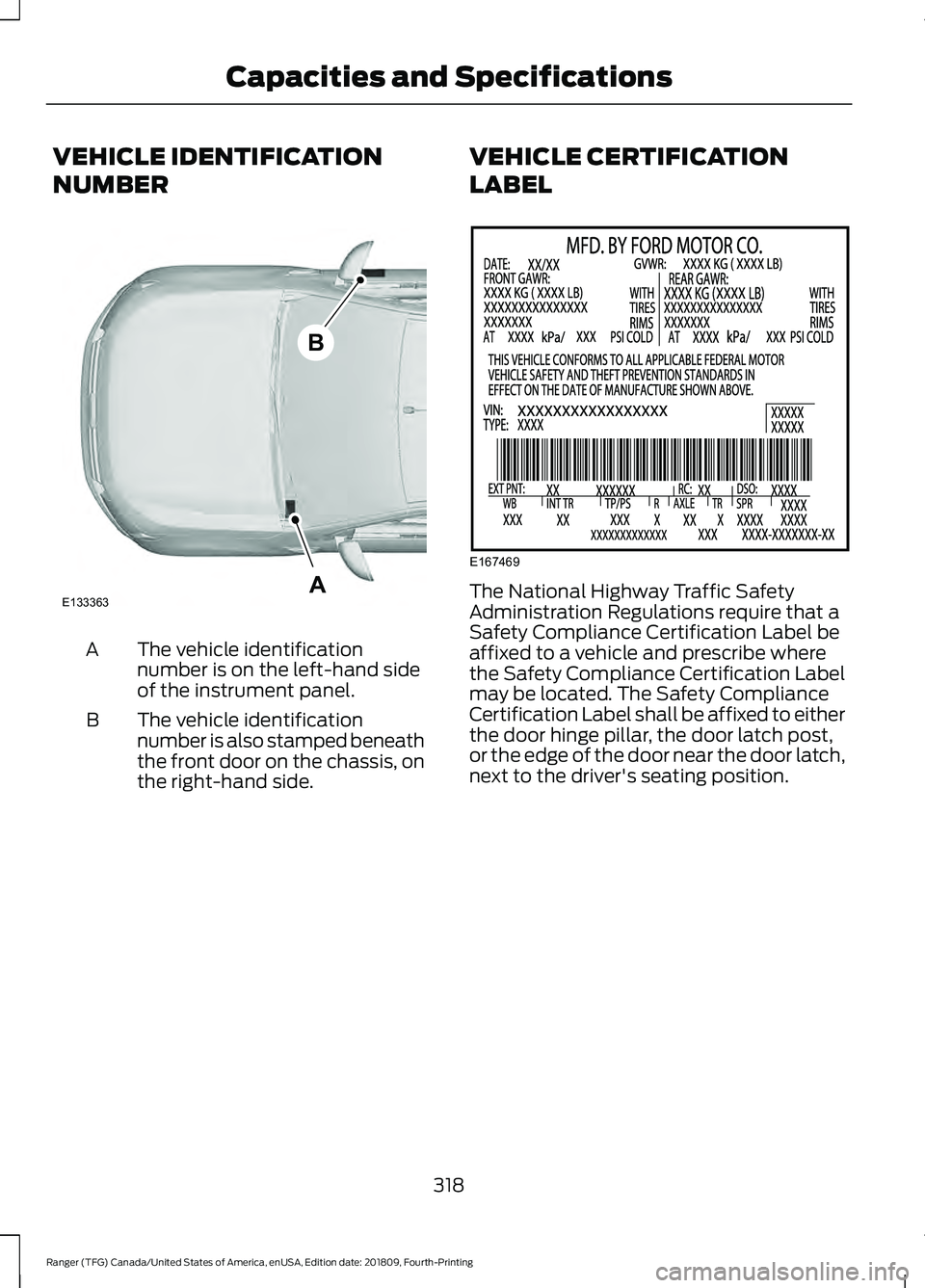
The vehicle identification
number is on the left-hand side
of the instrument panel.
A
The vehicle identification
number is also stamped beneath
the front door on the chassis, on
the right-hand side.
B VEHICLE CERTIFICATION
LABEL The National Highway Traffic Safety
Administration Regulations require that a
Safety Compliance Certification Label be
affixed to a vehicle and prescribe where
the Safety Compliance Certification Label
may be located. The Safety Compliance
Certification Label shall be affixed to either
the door hinge pillar, the door latch post,
or the edge of the door near the door latch,
next to the driver's seating position.
318
Ranger (TFG) Canada/United States of America, enUSA, Edition date: 201809, Fourth-Printing Capacities and SpecificationsA
B
E133363 E167469
Page 391 of 512

Description
Item
Callout
This button lights up when the passenger controls are
active. To switch the dual zone operation off and link
the passenger temperature to the driver temperature,
touch the DUAL button to switch it off.
DUAL
F
Touch up or down to adjust the temperature.
Right-hand front
seat temper-
ature
G
Touch up or down to increase or decrease the volume
of air circulated in your vehicle.
Fan speed
H
A popup appears on the screen to display the air
conditioning options.
A/C
I
Touch to cool your vehicle with recircu-
lated air. Touch again for normal A/C
operation. MAX A/C distributes air through
instrument panel vents and may help
reduce odors from entering your vehicle.
MAX A/C is more economical and efficient
than normal A/C mode.
MAX A/C
Touch to switch the air conditioning on or
off. Use A/C with recirculated air to
improve cooling performance and effi-
ciency. A/C engages automatically in MAX
A/C, defrost and footwell/defrost
A/C
Touch to switch the recirculated air on or
off which may reduce the amount of time
needed to cool down the interior and help
reduce odors from reaching the interior.
Recirculated air also engages automatic-
ally when you select MAX A/C. You can
engage this manually in any airflow mode
except defrost. It may also turn off in all
airflow modes except MAX A/C to reduce
fog potential.
Recircu-
lated air:
Select these controls individually, together, or with
Defrost to direct the air flow to the area you desire.
Manual airflow
distribution
controls
J
Distributes air through the instrument panel vents.
Panel
Distributes air through the demister vents, floor vents
and rear seat floor vents.
Floor
388
Ranger (TFG) Canada/United States of America, enUSA, Edition date: 201809, Fourth-Printing SYNC™ 3 (If Equipped)
Page 503 of 512

Cruise Control..................................................67
Principle of Operation....................................... 182
Cruise control See: Using Cruise Control................................ 182
Customer Assistance.................................234
D
Data Recording
..................................................9
911 Assist Privacy Notice..................................... 13
Comfort, Convenience and Entertainment Data........................................................................\
11
Event Data................................................................. 11
Service Data............................................................ 10
Services That Third Parties Provide...............12
Services That We Provide.................................. 12
Vehicles With a Modem...................................... 12
Vehicles With SYNC............................................. 12
Daytime Running Lamps
.............................73
Type One - Conventional
(Non-Configurable)........................................ 73
Type Two - Configurable.................................... 73
Declaration of Conformity.......................483 Radio Frequency Statement......................... 483
Digital Radio..................................................332 HD Radio Reception and Station
Troubleshooting............................................ 333
Direction Indicators........................................75 Direction Indicator................................................ 75
Switching the Direction Indicators On and Off........................................................................\
.. 75
Doors and Locks.............................................62
Driver Alert
......................................................190
PRINCIPLE OF OPERATION........................... 190
USING DRIVER ALERT..................................... 190
Driver and Passenger Airbags....................43 Children and Airbags.......................................... 44
Proper Driver and Front Passenger Seating Adjustment........................................................ 43
Driving Aids.....................................................190
Driving Hints
...................................................224
Driving Through Water...............................226
DRL See: Daytime Running Lamps......................... 73
E
Economical Driving.....................................224 Electromagnetic Compatibility..............455
Electronic Locking Differential................163
Operating Electronic Locking Differential
with Spare or Mismatched Tires..............163
Emission Law.................................................148 Noise Emissions Warranty, Prohibited
Tampering Acts and Maintenance..........149
Tampering With a Noise Control System............................................................... 148
End User License Agreement..................457 VEHICLE SOFTWARE END USER LICENSE
AGREEMENT (EULA) ................................. 457
Engine Block Heater.....................................137 Using the Engine Block Heater....................... 137
Engine Coolant Check...............................260 Adding Coolant.................................................... 261
Engine Emission Control...........................148
Engine Immobilizer See: Passive Anti-Theft System..................... 65
Engine Oil Check..........................................259 Adding Engine Oil.............................................. 259
Engine Oil Dipstick
......................................259
Engine Specifications.................................316 Drivebelt Routing................................................ 316
Entertainment...............................................376 AM/FM Radio....................................................... 377
Apps....................................................................... 385
Bluetooth Stereo or USB................................ 384
CD (If equipped)................................................ 383
HD Radio ™ Information (If
Available)........................................................ 380
SiriusXM® Satellite Radio (If Activated)........................................................ 378
Sources................................................................... 377
Supported Media Players, Formats and Metadata Information................................ 385
USB Ports............................................................. 385
Environment......................................................17
Essential Towing Checks...........................218 Before Towing a Trailer.................................... 220
Launching or Retrieving a Boat or Personal Watercraft (PWC)......................................... 221
Safety Chains....................................................... 219
Trailer Brakes....................................................... 220
Trailer Lamps....................................................... 220
Trailer Towing Connector................................. 219
When Towing a Trailer..................................... 220
500
Ranger (TFG) Canada/United States of America, enUSA, Edition date: 201809, Fourth-Printing Index
Page 505 of 512

Heated Seats..................................................124
Heated Windshield.......................................116
Windshield Wiper De-Icer................................ 116
Heating See: Climate Control........................................... 111
Hill Start Assist.............................................166 Switching the System On and Off................167
Using Hill Start Assist........................................ 167
Hints on Controlling the Interior Climate...........................................................113
Defogging the Side Windows in Cold Weather.............................................................. 116
General Hints......................................................... 113
Quickly Cooling the Interior.............................. 115
Quickly Heating the Interior............................. 114
Recommended Settings for Cooling............115
Recommended Settings for Heating...........115
Hints on Driving With Anti-Lock Brakes............................................................165
Home Screen
................................................368
Hood Lock See: Opening and Closing the Hood..........256
Horn....................................................................68
I
Ignition Switch
...............................................133
Starting the Engine............................................ 134
Switching the Ignition Off................................ 134
Switching the Ignition On................................ 134
Switching the Ignition to Accessory Mode
................................................................... 134
In California (U.S. Only).............................235
Information Display Control
......................68
Information Displays....................................90
General Information........................................... 90
Information Messages
.................................98
4WD........................................................................\
. 110
Adaptive Cruise Control.................................... 98
Airbag....................................................................... 99
Alarm and Security............................................. 99
Auto-Start-Stop................................................. 100
Battery and Charging System......................... 101
Blind Spot Information and Cross Traffic Alert System..................................................... 101
Doors and Locks................................................. 102
Driver Alert............................................................ 102
Drivetrain............................................................... 103Engine.....................................................................
103
Fuel........................................................................\
.. 103
Keys and Intelligent Access............................ 104
Lane Keeping System....................................... 105
Maintenance........................................................ 105
MyKey..................................................................... 106
Park Aid.................................................................. 107
Power Steering.................................................... 107
Pre-Collision Assist............................................ 107
Remote Start....................................................... 108
Starting System ................................................. 108
Tire Pressure Monitoring System.................108
Traction Control.................................................. 108
Trail Control.......................................................... 109
Trailer...................................................................... 109
Installing Child Restraints...........................22 Child Restraints..................................................... 22
Combining Seatbelt and LATCH Lower Anchors for Attaching Child
Restraints........................................................... 26
Front Seat Tether Strap Attachment (SuperCab)........................................................ 27
Rear Seat Tether Strap Attachment (SuperCab)....................................................... 28
Use of Inboard Lower Anchors from the Outermost Seating Positions (Center
Seating Use) .................................................... 26
Using Lap and Shoulder Belts ........................ 22
Using Lower Anchors and Tethers for CHildren (LATCH)........................................... 24
Using Tether Straps............................................. 26
Instrument Cluster
........................................83
Instrument Lighting Dimmer......................72 Vehicles With Front Fog Lamps...................... 73
Vehicles Without Front Fog Lamps...............73
Instrument Panel
............................................18
Interior Lamps..................................................75
Courtesy Lamp...................................................... 75
Reading Lamps..................................................... 76
Rear Courtesy Lamp............................................ 76
Interior Mirror....................................................81 Automatic Dimming Mirror................................ 81
Manual Dimming Mirror...................................... 81
Introduction.........................................................7
502
Ranger (TFG) Canada/United States of America, enUSA, Edition date: 201809, Fourth-Printing Index