2019 FORD RANGER ESP
[x] Cancel search: ESPPage 176 of 512
Note:
Operating your vehicle in any of the
off-road modes does not guarantee that it
cannot become stuck in sand, snow or mud
or other debris. It is your responsibility to
assess off-road situations and determine if
the terrain is passable.
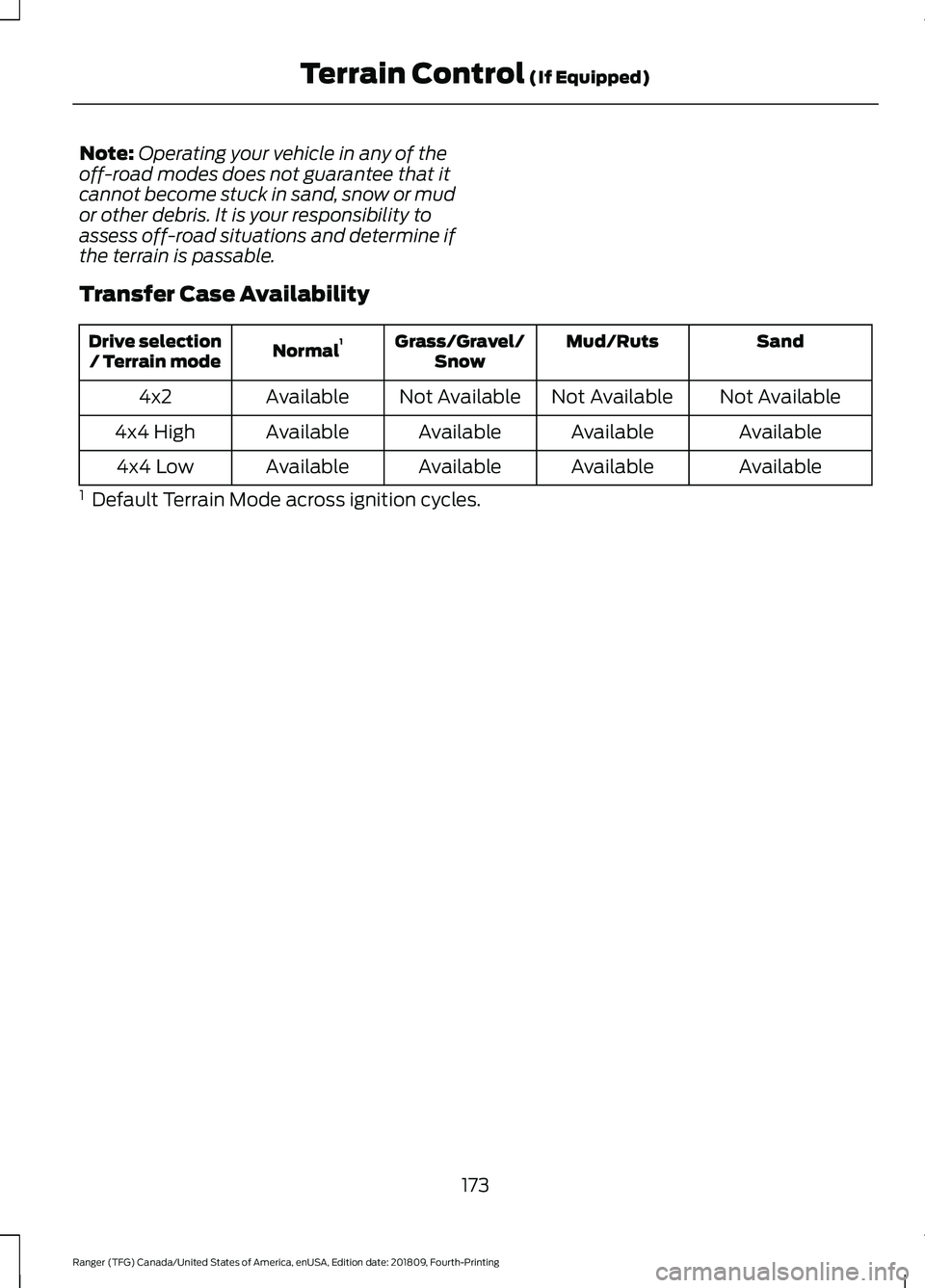
Transfer Case Availability Sand
Mud/Ruts
Grass/Gravel/
Snow
Normal 1
Drive selection
/ Terrain mode
Not Available
Not Available
Not Available
Available
4x2
Available
Available
Available
Available
4x4 High
Available
Available
Available
Available
4x4 Low
1 Default Terrain Mode across ignition cycles.
173
Ranger (TFG) Canada/United States of America, enUSA, Edition date: 201809, Fourth-Printing Terrain Control (If Equipped)
Page 177 of 512

ABOUT TRAIL CONTROL
WARNING: The system does not
control speed in low traction conditions
or extremely steep slopes. The system
is designed to be an aid and does not
relieve you of your responsibility to drive
with due care and attention. Failure to
follow this instruction could result in
personal injury. WARNING:
The system does not
replace the parking brake. When you
leave your vehicle, always apply the
parking brake and shift the transmission
into park (P) for automatic transmission
or first gear for manual transmission.
Trail control lets you focus on steering
during low-speed and off-road use by
controlling your vehicle's acceleration and
braking.
You can use trail control under the
following speeds:
• 20 mph (31 km/h)
in two-wheel or
four-wheel drive high range.
• 10 mph (15 km/h)
in four-wheel drive
low range.
• 5 mph (8 km/h)
in reverse (R).
You may hear a noise from the anti-lock
brake system pump motor when you use
the system. This is normal.
SWITCHING TRAIL CONTROL
ON AND OFF Press the button. The system switches off if you press the
button again or exceed 42 mph (68 km/h).
SETTING THE TRAIL CONTROL
SPEED
Note:
The buttons are located on the
steering wheel.
Drive to your preferred speed. Press button to increase the set
current speed.
Press button to decrease the set
current speed.
Note: The indicator changes color.
You can adjust the set speed in small or
large increments. Press the toggle button
upward or downward once to adjust the
set speed in small increments. Press and
hold the toggle button upward or
downward to adjust the set speed in large
increments.
You can also adjust the set speed by
braking.
Note: Pressing the brake pedal does not
switch off the system.
CANCELING THE SET SPEED Press the button.
TRAIL CONTROL INDICATORS 174
Ranger (TFG) Canada/United States of America, enUSA, Edition date: 201809, Fourth-Printing Trail ControlE272858 E265298 E272858
Page 185 of 512

PRINCIPLE OF OPERATION
Cruise control lets you maintain a set
speed without keeping your foot on the
accelerator pedal. You can use cruise
control when your vehicle speed is greater
than 20 mph (30 km/h).
USING CRUISE CONTROL WARNING:
Do not use cruise
control on winding roads, in heavy traffic
or when the road surface is slippery. This
could result in loss of vehicle control,
serious injury or death. WARNING:
When you are going
downhill, your vehicle speed could
increase above the set speed. The
system does not apply the brakes.
Note: The system cancels if your vehicle
speed drops below 10 mph (16 km/h) under
the set speed when driving uphill. The cruise controls are on the steering
wheel.
See Cruise Control (page 67).
Switching Cruise Control On
Press
ON. The indicator appears in the
information display.
Setting the Cruise Speed
Drive to the speed you prefer. Press to set the current speed.
Press to set the current speed.
Take your foot off the accelerator pedal.
Note: The indicator changes color.
Changing the Set Speed Press and release to increase the
set speed in small increments.
Press and release to decrease
the set speed in small
increments.
Press and hold either button to accelerate
or decelerate, respectively. Release the
button when you reach the speed you
prefer.
Press the accelerator or brake pedal until
you reach the speed you prefer. Press
either button.
Note: If you accelerate by pressing only the
accelerator pedal, the set speed does not
change. When you release the accelerator
pedal, your vehicle returns to the speed that
you previously set.
Canceling the Set Speed Press the button, or tap the
brake pedal to cancel the set
speed.
Note: The system remembers the set
speed.
182
Ranger (TFG) Canada/United States of America, enUSA, Edition date: 201809, Fourth-Printing Cruise Control
(If Equipped)E266656 E71340
Page 188 of 512

When a vehicle ahead of you enters the
same lane or a slower vehicle is ahead in
the same lane, the vehicle speed adjusts
to maintain a preset gap distance. A
vehicle graphic illuminates in the
instrument cluster.
Your vehicle maintains a consistent gap
from the vehicle ahead until:
•
The vehicle in front of you accelerates
to a speed above the set speed.
• The vehicle in front of you moves out
of the lane you are in.
• Your vehicle speed falls below 12 mph
(20 km/h).
• You set a new gap distance.
The system applies the brakes to slow your
vehicle to maintain a safe gap distance
from the vehicle in front. The system only
applies limited braking. You can override
the system by applying the brakes.
If the system determines that its maximum
braking level is not sufficient, an audible
warning sounds, a message appears in the
information display and an indicator
flashes when the system continues to
brake. Take immediate action.
Setting the Gap Distance
You can decrease or increase the distance
between your vehicle and the vehicle in
front by pressing the gap control. Press and release to decrease
the gap distance.
Press and release to increase the
gap distance. The selected gap appears in the
information display as shown by the bars
in the image.
Note:
The gap setting is time dependent
and therefore the distance adjusts with your
vehicle speed.
Note: It is your responsibility to select a gap
appropriate to the driving conditions.
Adaptive Cruise Control Gap Settings Dynamic
behavior
Distance Gap
Graphic
display,
bars indic- ated
between vehicles
Sport.
Closest.
1
Normal.
Close.
2
Normal.
Medium.
3
Comfort.
Far.
4
Each time you switch the system on, it
selects the last chosen gap setting.
Overriding the Set Speed WARNING:
If you override the
system by pressing the accelerator
pedal, it does not automatically apply
the brakes to maintain a gap from any
vehicle ahead.
185
Ranger (TFG) Canada/United States of America, enUSA, Edition date: 201809, Fourth-Printing Cruise Control
(If Equipped)E263697 E263696 E164805
Page 190 of 512
Switching Adaptive Cruise Control
Off
Press and release the button
when the system is in standby
mode, or switch the ignition off.
Note: You erase the set speed and gap
setting when you switch the system off.
Detection Issues WARNING: On rare occasions,
detection issues can occur due to the
road infrastructures, for example bridges,
tunnels and safety barriers. In these
cases, the system may brake late or
unexpectedly. At all times, you are
responsible for controlling your vehicle,
supervising the system and intervening,
if required. WARNING:
If the system
malfunctions, have your vehicle checked
as soon as possible.
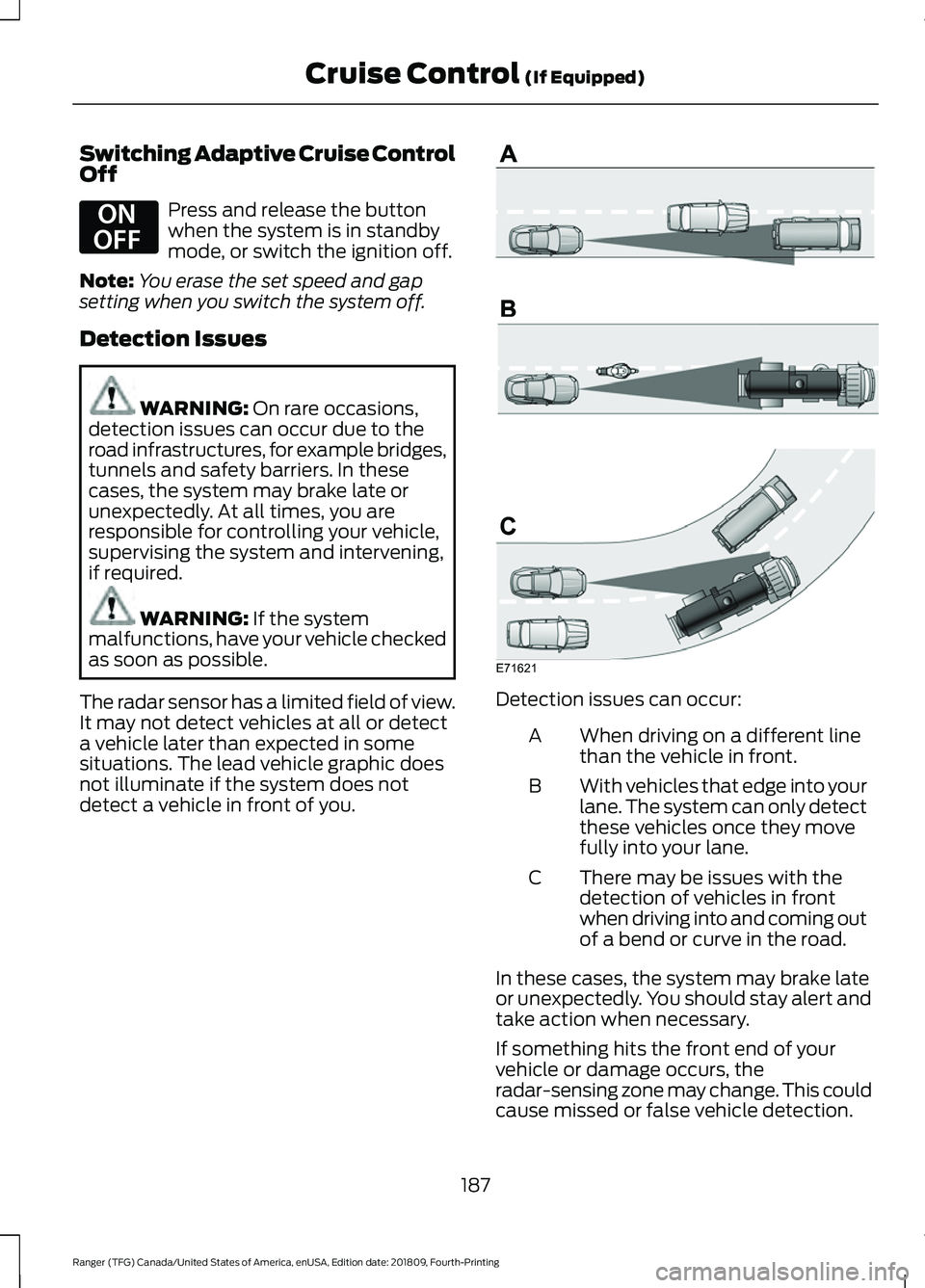
The radar sensor has a limited field of view.
It may not detect vehicles at all or detect
a vehicle later than expected in some
situations. The lead vehicle graphic does
not illuminate if the system does not
detect a vehicle in front of you. Detection issues can occur:
When driving on a different line
than the vehicle in front.
A
With vehicles that edge into your
lane. The system can only detect
these vehicles once they move
fully into your lane.
B
There may be issues with the
detection of vehicles in front
when driving into and coming out
of a bend or curve in the road.
C
In these cases, the system may brake late
or unexpectedly. You should stay alert and
take action when necessary.
If something hits the front end of your
vehicle or damage occurs, the
radar-sensing zone may change. This could
cause missed or false vehicle detection.
187
Ranger (TFG) Canada/United States of America, enUSA, Edition date: 201809, Fourth-Printing Cruise Control
(If Equipped)E294678 E71621
Page 192 of 512

Action
Cause
Do not use the system in these conditions
because it may not detect any vehicles
ahead.
Water, snow or ice on the surface of the
road may interfere with the radar signals.
Wait a short time or switch to normal cruise
control.
You are in a desert or remote area with no
other vehicles and no roadside objects.
Due to the nature of radar technology, it is possible to get a blockage warning with no
actual block. A false blocked condition either self clears, or clears after you restart your
vehicle.
Switching to Normal Cruise
Control WARNING: Normal cruise control
will not brake when your vehicle is
approaching slower vehicles. Always be
aware of which mode you have selected
and apply the brakes when necessary. The cruise control indicator light
replaces the adaptive cruise
control indicator light if you
select normal cruise control. The gap
setting does not display, and the system
does not respond to lead vehicles.
Automatic braking remains active to
maintain set speed.
You can change from adaptive cruise
control to normal cruise control through
the information display.
189
Ranger (TFG) Canada/United States of America, enUSA, Edition date: 201809, Fourth-Printing Cruise Control
(If Equipped)E71340
Page 193 of 512

DRIVER ALERT (IF EQUIPPED)
PRINCIPLE OF OPERATION WARNING:
You are responsible
for controlling your vehicle at all times.
The system is designed to be an aid and
does not relieve you of your responsibility
to drive with due care and attention.
Failure to follow this instruction could
result in the loss of control of your
vehicle, personal injury or death. WARNING:
The system may not
function if the sensor is blocked. WARNING:
Take regular rest
breaks if you feel tired. Do not wait for
the system to warn you. WARNING:
Certain driving styles
may result in the system warning you
even if you are not feeling tired. WARNING:
In cold and severe
weather conditions the system may not
function. Rain, snow and spray can all
limit sensor performance. WARNING:
The system will not
operate if the sensor cannot track the
road lane markings. WARNING:
If damage occurs in
the immediate area surrounding the
sensor, have your vehicle checked as
soon as possible. WARNING:
The system may not
correctly operate if your vehicle is fitted
with a suspension kit not approved by
us. Note:
The system may not operate correctly
if you modify the ride height.
Note: Keep the windshield free from
obstructions. For example, bird droppings,
insects, snow or ice.
Note: If the camera is blocked or if the
windshield is damaged, the system may not
function.
Note: If enabled in the menu, the system
activates at speeds above
40 mph
(64 km/h). When below the activation
speed, the information display informs the
driver that the system is unavailable. The system automatically monitors your
driving behavior using various inputs
including the front camera sensor.
If the system detects that your driving
alertness is reduced below a certain
threshold, the system alerts you using a
chime and a message in the information
display.
USING DRIVER ALERT
Switching the System On and Off
Switch the system on or off using the
information display.
See General
Information (page 90).
When active, the system monitors your
alertness level based upon your driving
behavior in relation to the lane markings
and other factors.
190
Ranger (TFG) Canada/United States of America, enUSA, Edition date: 201809, Fourth-Printing Driving AidsE249505
Page 194 of 512

System Warnings
Note:
The system does not issue warnings
below approximately 40 mph (64 km/h).
The warning system has two stages. First,
the system issues a temporary warning
that you need to take a rest. This message
only appears for a short time. If the system
detects further reduction in driving
alertness, it may issue another warning
that remains in the information display for
a longer time. You can press OK on the
steering wheel control to clear the warning.
System Display
When active, the system runs
automatically in the background and only
issues a warning if required. You can view
the status at any time using the
information display.
See General
Information (page 90).
The alertness level is shown by six steps
in a colored bar. The current assessment of your alertness
is within a typical range.
The current assessment of your alertness
indicates that you should rest as soon as
safely possible. The status bar travels from left to right as
the calculated alertness level decreases.
As the meter approaches the rest icon, the
color turns from green to yellow to red.
The yellow position indicates the first
warning is active and the red position
indicates the second warning is active.
Note:
If you have recently received a
warning, you should consider resting, even
if the current assessment is within the
typical range.
Note: If the camera sensor cannot track the
road lane markings, or if your vehicle speed
drops below approximately
40 mph
(64 km/h), the alertness level changes to
grey for a short time and the information
display informs you that the system is
unavailable.
Resetting the System
You can reset the system by either:
• Switching the ignition off and on.
• Stopping the vehicle and then opening
and closing the driver ’s door.
LANE KEEPING SYSTEM
(IF
EQUIPPED) WARNING:
You are responsible
for controlling your vehicle at all times.
The system is designed to be an aid and
does not relieve you of your responsibility
to drive with due care and attention.
Failure to follow this instruction could
result in the loss of control of your
vehicle, personal injury or death. WARNING:
Always drive with due
care and attention when using and
operating the controls and features on
your vehicle.
191
Ranger (TFG) Canada/United States of America, enUSA, Edition date: 201809, Fourth-Printing Driving AidsE131358 E131359