2019 FORD RANGER ECT
[x] Cancel search: ECTPage 206 of 512
lose the ability to steer the vehicle
manually nor will it cause permanent
damage. Typical steering and driving
maneuvers will allow the system to cool
down and steering assist will return to
normal.
Steering Tips
If the steering wanders or pulls, check for:
•
An improperly inflated tire.
• Uneven tire wear.
• Loose or worn suspension
components.
• Loose or worn steering components.
• Improper vehicle alignment.
A high crown in the road or high crosswinds
may also make the steering seem to
wander or pull.
PRE-COLLISION ASSIST (IF
EQUIPPED) WARNING:
You are responsible
for controlling your vehicle at all times.
The system is designed to be an aid and
does not relieve you of your responsibility
to drive with due care and attention.
Failure to follow this instruction could
result in the loss of control of your
vehicle, personal injury or death. WARNING:
The system does not
detect vehicles that are driving in a
different direction, cyclists or animals.
Failure to take care may result in the loss
of control of your vehicle, serious
personal injury or death. WARNING:
The system does not
operate during hard acceleration or
steering. Failure to take care may lead
to a crash or personal injury. WARNING:
The system may fail
or operate with reduced function during
cold and severe weather conditions.
Snow, ice, rain, spray and fog can
adversely affect the system. Keep the
front camera and radar free of snow and
ice. Failure to take care may result in the
loss of control of your vehicle, serious
personal injury or death. WARNING: In situations where the
vehicle camera has limited detection
capability, this may reduce system
performance. These situations include
but are not limited to direct or low
sunlight, vehicles at night without tail
lights, unconventional vehicle types,
pedestrians with complex backgrounds,
running pedestrians, partly obscured
pedestrians, or pedestrians that the
system cannot distinguish from a group.
Failure to take care may result in the loss
of control of your vehicle, serious
personal injury or death. WARNING:
The system cannot
help prevent all crashes. Do not rely on
this system to replace driver judgment
and the need to maintain a safe distance
and speed.
Note: To achieve full system performance,
you must break in the braking system.
See
General Information (page 165).
Note: The warning indicator may flash for
a short period of time when you start your
vehicle.
Using the Pre-Collision Assist
System
The Pre-Collision Assist system is active
at speeds above approximately
3 mph
(5 km/h) and pedestrian detection is active
at speeds up to
50 mph (80 km/h).
203
Ranger (TFG) Canada/United States of America, enUSA, Edition date: 201809, Fourth-Printing Driving Aids
Page 207 of 512

If your vehicle is rapidly approaching
another stationary vehicle, a vehicle
traveling in the same direction as yours, or
a pedestrian within your driving path the
system provides three levels of
functionality:
1. Alert
2. Brake Support
3. Active Braking
Alert: When active, the system provides a
flashing visual warning and an audible
warning sound.
Brake Support
: Assists the driver in
reducing collision speed by preparing the
brake system for rapid braking. Brake
support does not automatically activate
the brakes, but if the driver presses the
brake pedal even lightly, brake support
could add additional braking up to full
force. Active Braking
: Active braking may
activate if the system determines that a
collision is imminent. The system may help
the driver reduce impact damage or avoid
the crash completely.
Note: If you perceive Pre-Collision Assist
alerts as being too frequent or disturbing,
then you can reduce the alert sensitivity,
though the manufacturer recommends
using the highest sensitivity setting where
possible. Setting lower sensitivity would
lead to fewer and later system warnings.
Distance Indication and Alert
This function provides a graphical
indication of the time gap to other
preceding vehicles traveling in the same
direction. The distance indication and alert
screen in the information display shows a
graphic similar to the one that follows. If the time gap to a preceding vehicle is
small, a red visual indication displays to
the driver.
Note:
Distance indication and alert
deactivates and the graphics do not display
when adaptive cruise control is active.
204
Ranger (TFG) Canada/United States of America, enUSA, Edition date: 201809, Fourth-Printing Driving AidsE156130 E255268 E190004
Page 208 of 512

Time Gap
Distance Gap
Graphics
Sensitivity
Speed
>0.9sec
>82 ft (25 m)
Grey
Normal
62 mph
(100 km/h)
0.6sec - 0.9sec
56–82 ft
(17 –25 m)
Yellow
Normal
62 mph
(100 km/h)
<0.6sec
<
56 ft (17 m)
Red
Normal
62 mph
(100 km/h)
Adjusting Pre-Collision Assist Settings
You can adjust alert and distance alert
sensitivity to one of three possible settings
by using the information display control.
See
General Information (page 90).
You can switch the distance alert and
indication function off using the
information display controls. See General
Information
(page 90).
If required, you can switch active braking
off using the information display controls.
See
General Information (page 90).
Note: We recommend that you turn the
Pre-Collision Assist system off if you install
a snow plow or similar object in such a way
that it may block the radar sensor. Your
vehicle remembers the last selected setting
when you switch it off and then back on. Blocked Sensors
If a message regarding a blocked sensor
or camera appears in the information
display, the radar signals or camera images
are obstructed. The radar sensor is located
behind a fascia cover near the driver side
of the lower grille. With an obstructed
radar, the Pre-Collision Assist system does
not function and cannot detect a vehicle
ahead. With the front camera obstructed,
205
Ranger (TFG) Canada/United States of America, enUSA, Edition date: 201809, Fourth-Printing Driving AidsE271779
Page 209 of 512

the Pre-Collision Assist system does not
respond to pedestrians or stationary
vehicles and the system performance on
moving vehicles reduces. The following
table lists possible causes and actions for
when this message displays. Action
Cause
Clean the grille surface in front of the radaror remove the object causing the obstruc- tion
The surface of the radar in the grille is dirty
or obstructed in some way.
Wait a short time. It may take several
minutes for the radar to detect that there is no obstruction.
The surface of the radar in the grille is clean
but the message remains in the display.
The Pre-Collision Assist system is tempor-arily disabled. Pre-Collision Assist should
automatically reactivate a short time after the weather conditions improve.
Heavy rain, spray, snow, or fog is interfering
with the radar signals.
The Pre-Collision Assist system is tempor-arily disabled. Pre-Collision Assist should
automatically reactivate a short time after the weather conditions improve.
Swirling water, or snow or ice on the surface
of the road may interfere with the radar signals.
Contact an authorized dealer to have theradar checked for proper coverage and operation.
Radar is out of alignment due to a front end
impact.
Clean the outside of the windshield in frontof the camera.
The windshield in front of the camera is
dirty or obstructed in some way.
Wait a short time. It may take several
minutes for the camera to detect that there is no obstruction.
The windshield in front of the camera is
clean but the message remains in the display.
Note: Proper system operation requires a
clear view of the road by the camera. Have
any windshield damage in the area of the
camera's field of view repaired.
Note: If something hits the front end of your
vehicle or damage occurs, the radar sensing
zone may change. This could cause missed
or false vehicle detections. Contact an
authorized dealer to have the radar checked
for proper coverage and operation. Note:
If your vehicle detects excessive heat
at the camera or a potential misalignment
condition, a message may display in the
information display indicating temporary
sensor unavailability. When operational
conditions are correct, the message
deactivates. For example, when the ambient
temperature around the sensor decreases
or the sensor automatically recalibrates
successfully.
206
Ranger (TFG) Canada/United States of America, enUSA, Edition date: 201809, Fourth-Printing Driving Aids
Page 210 of 512
LOAD LIMIT
Vehicle Loading - with and
without a Trailer
This section guides you in the
proper loading of your vehicle,
trailer, or both. Keep your loaded
vehicle weight within its design
rating capability, with or without
a trailer. Properly loading your
vehicle provides maximum return
of vehicle design performance.
Before you load your vehicle,
become familiar with the
following terms for determining
your vehicle
’s weight rating, with
or without a trailer, from the
vehicle ’s Tire and Loading
Information label or Safety
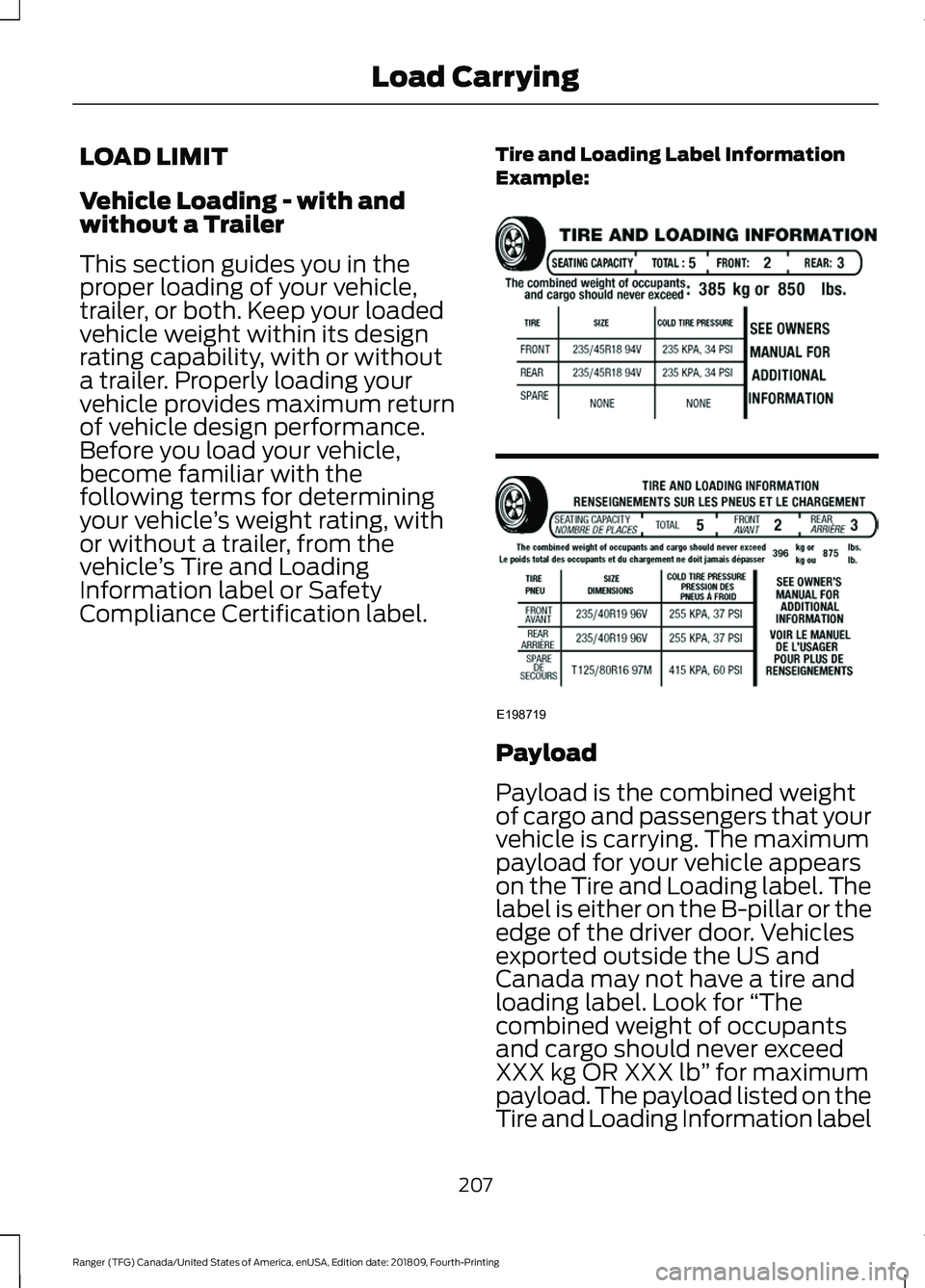
Compliance Certification label. Tire and Loading Label Information
Example: Payload
Payload is the combined weight
of cargo and passengers that your
vehicle is carrying. The maximum
payload for your vehicle appears
on the Tire and Loading label. The
label is either on the B-pillar or the
edge of the driver door. Vehicles
exported outside the US and
Canada may not have a tire and
loading label. Look for
“The
combined weight of occupants
and cargo should never exceed
XXX kg OR XXX lb ” for maximum
payload. The payload listed on the
Tire and Loading Information label
207
Ranger (TFG) Canada/United States of America, enUSA, Edition date: 201809, Fourth-Printing Load CarryingE198719
Page 212 of 512
WARNING: Exceeding the
Safety Compliance Certification
label vehicle weight limits can
adversely affect the
performance and handling of
your vehicle, cause vehicle
damage and can result in the
loss of control of your vehicle,
serious personal injury or death.
Maximum Loaded Trailer
Weight
Maximum loaded trailer weight is
the highest possible weight of a
fully loaded trailer the vehicle can
tow. Consult an authorized dealer
(or the RV and Trailer Towing
Guide available at an authorized
dealer) for more detailed
information.
GCWR (Gross Combined
Weight Rating)
GCWR is the maximum allowable
weight of the vehicle and the
loaded trailer, including all cargo
and passengers, that the vehicle
can handle without risking
damage. (Important: The towing
vehicle ’s braking system is rated
for operation at Gross Vehicle
Weight Rating, not at Gross
Combined Weight Rating.)
Separate functional brakes should
be used for safe control of towed
vehicles and for trailers where the
Gross Combined Weight of the
towing vehicle plus the trailer
exceed the Gross Vehicle Weight
Rating of the towing vehicle. The gross combined weight must
never exceed the Gross Combined
Weight Rating.
Note:
For trailer towing
information refer to the RV and
Trailer Towing Guide available at
an authorized dealer. WARNING:
Do not exceed
the GVWR or the GAWR
specified on the certification
label. WARNING:
Do not use
replacement tires with lower
load carrying capacities than the
original tires because they may
lower your vehicle's GVWR and
GAWR limitations. Replacement
tires with a higher limit than the
original tires do not increase the
GVWR and GAWR limitations. WARNING:
Exceeding any
vehicle weight rating can
adversely affect the
performance and handling of
your vehicle, cause vehicle
damage and can result in the
loss of control of your vehicle,
serious personal injury or death.
Steps for determining the
correct load limit:
1. Locate the statement "The combined weight of occupants
and cargo should never exceed
XXX kg or XXX lb." on your
vehicle ’s placard.
209
Ranger (TFG) Canada/United States of America, enUSA, Edition date: 201809, Fourth-Printing Load Carrying
Page 217 of 512
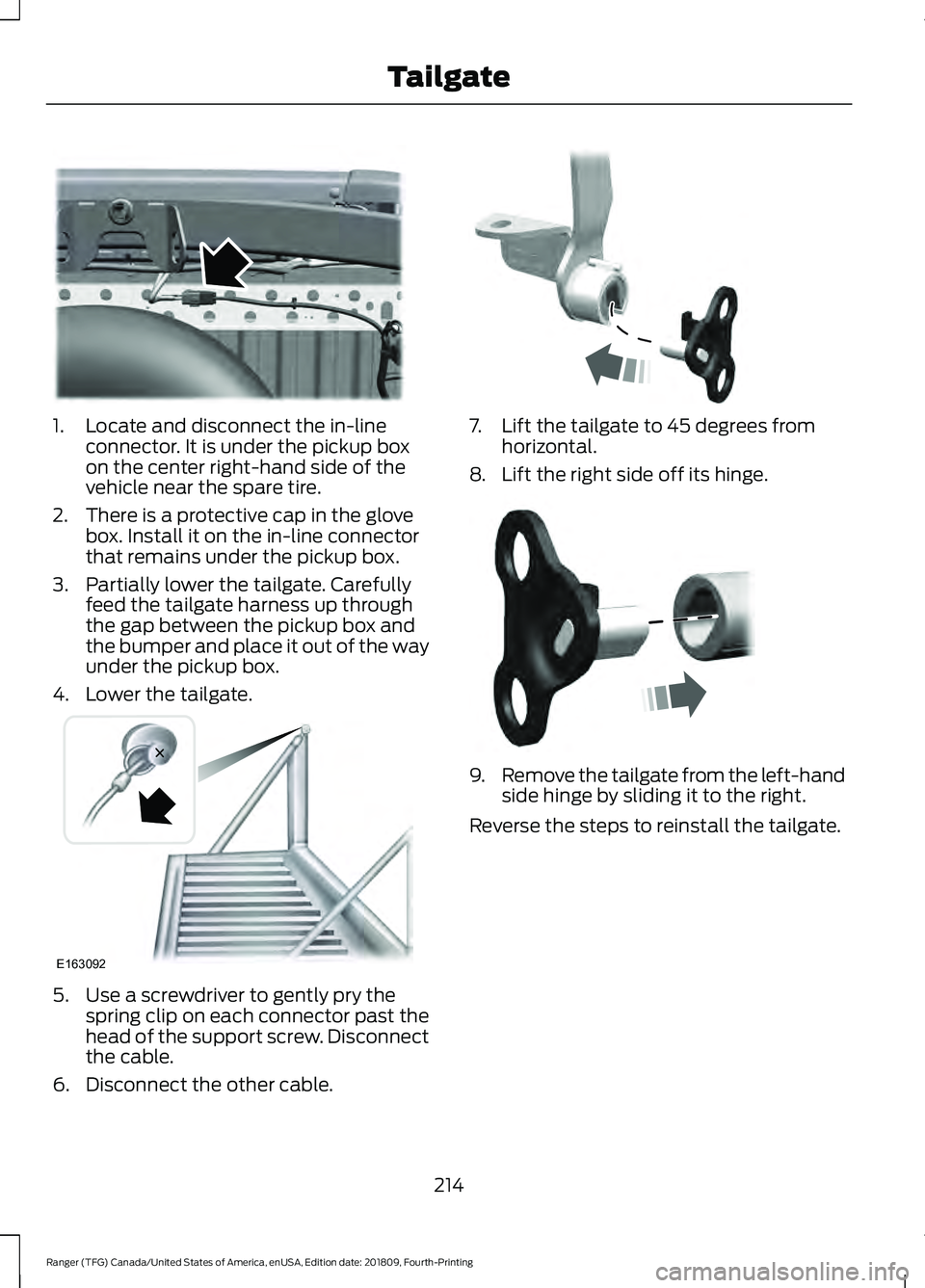
1. Locate and disconnect the in-line
connector. It is under the pickup box
on the center right-hand side of the
vehicle near the spare tire.
2. There is a protective cap in the glove box. Install it on the in-line connector
that remains under the pickup box.
3. Partially lower the tailgate. Carefully feed the tailgate harness up through
the gap between the pickup box and
the bumper and place it out of the way
under the pickup box.
4. Lower the tailgate. 5. Use a screwdriver to gently pry the
spring clip on each connector past the
head of the support screw. Disconnect
the cable.
6. Disconnect the other cable. 7. Lift the tailgate to 45 degrees from
horizontal.
8. Lift the right side off its hinge. 9.
Remove the tailgate from the left-hand
side hinge by sliding it to the right.
Reverse the steps to reinstall the tailgate.
214
Ranger (TFG) Canada/United States of America, enUSA, Edition date: 201809, Fourth-Printing TailgateE295026 E163092 E295025 E295024
Page 218 of 512

TOWING A TRAILER
WARNING: Do not exceed
the GVWR or the GAWR
specified on the certification
label. WARNING:
Towing trailers
beyond the maximum
recommended gross trailer
weight exceeds the limit of your
vehicle and could result in engine
damage, transmission damage,
structural damage, loss of
vehicle control, vehicle rollover
and personal injury. WARNING:
Do not exceed
the lowest rating capacity for
your vehicle or trailer hitch.
Overloading your vehicle or
trailer hitch can impair your
vehicle stability and handling.
Failure to follow this instruction
could result in the loss of control
of your vehicle, personal injury or
death. WARNING: Do not cut, drill,
weld or modify the trailer hitch.
Modifying the trailer hitch could
reduce the hitch rating. WARNING:
Do not exceed
the maximum vertical load on
the tow ball. Failure to follow
this instruction could result in
the loss of control of your
vehicle, personal injury or death. WARNING:
Do not tow a
trailer fitted with electric trailer
brakes unless your vehicle is
fitted with a compatible
aftermarket electronic trailer
brake controller. Failure to follow
this instruction could result in
the loss of control of your
vehicle, personal injury or death.
For additional information and
assistance, we recommend that
you contact an authorized
dealer.
Note: Your vehicle includes trailer
stability control if it has an
electronic stability program (ESP).
When towing a trailer:
• Obey country specific
regulations for towing a trailer.
• Do not exceed
62 mph
(100 km/h) even if a country
allows higher speeds under
certain conditions.
• Place loads as low as possible
and central to the axle of your
trailer. For best stability of the
trailer in an unladen vehicle,
place the load in the trailer
towards the nose within the
maximum nose load as this
gives the best stability. See
Recommended Towing
Weights
(page 216).
215
Ranger (TFG) Canada/United States of America, enUSA, Edition date: 201809, Fourth-Printing Towing