2019 FORD MUSTANG ECU
[x] Cancel search: ECUPage 31 of 495
the child restraint manufacturer's
instructions and warnings provided for
installation and use in conjunction with
the instructions and warnings provided
by your vehicle manufacturer. A safety
seat that is improperly installed or
utilized, is inappropriate for your child's
height, age, or weight or does not
properly fit the child may increase the
risk of serious injury or death.
WARNING: Do not allow a
passenger to hold a child on their lap
when your vehicle is moving. Failure to
follow this instruction could result in
personal injury or death in the event of a
sudden stop or crash. WARNING:
Do not use pillows,
books or towels to boost your child's
height. Failure to follow this instruction
could result in personal injury or death. WARNING:
Properly secure child
restraints or booster seats when they are
not in use. They could become projectiles
in a sudden stop or crash. Failure to
follow this instruction could result in
personal injury or death. WARNING:
Do not put the
shoulder section of the seatbelt or allow
the child to put the shoulder section of
the seatbelt under their arm or behind
their back. Failure to follow this
instruction could reduce the
effectiveness of the seatbelt and
increase the risk of injury or death in a
crash. WARNING:
Do not leave children
or pets unattended in your vehicle.
Failure to follow this instruction could
result in personal injury or death.
28
Mustang (CZG) Canada/United States of America, Vehicles Built From: 14-05-2018, enUSA, Edition date: 201804, Second-Printing Child Safety
Page 35 of 495
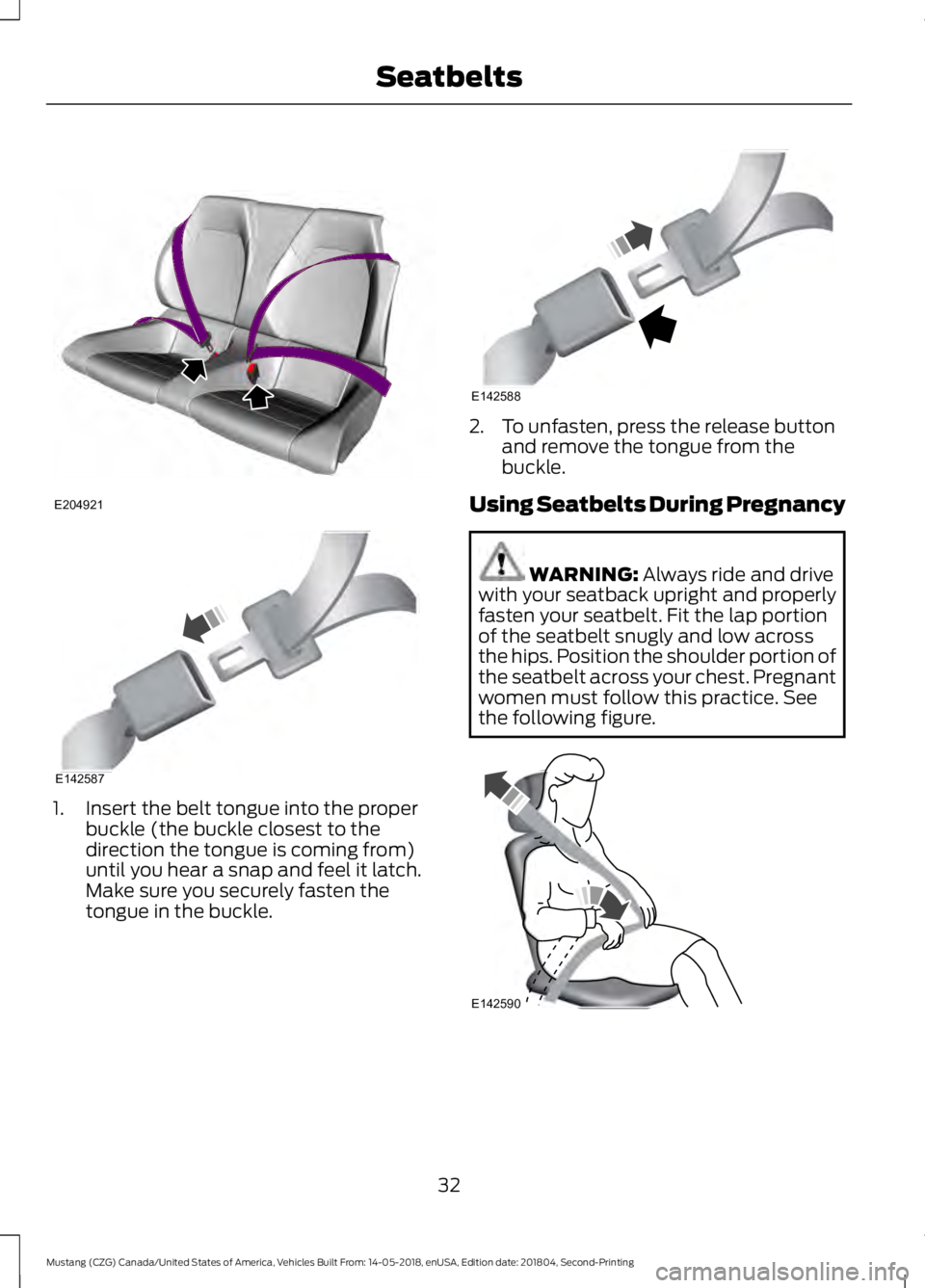
1. Insert the belt tongue into the proper
buckle (the buckle closest to the
direction the tongue is coming from)
until you hear a snap and feel it latch.
Make sure you securely fasten the
tongue in the buckle. 2. To unfasten, press the release button
and remove the tongue from the
buckle.
Using Seatbelts During Pregnancy WARNING: Always ride and drive
with your seatback upright and properly
fasten your seatbelt. Fit the lap portion
of the seatbelt snugly and low across
the hips. Position the shoulder portion of
the seatbelt across your chest. Pregnant
women must follow this practice. See
the following figure. 32
Mustang (CZG) Canada/United States of America, Vehicles Built From: 14-05-2018, enUSA, Edition date: 201804, Second-Printing SeatbeltsE204921 E142587 E142588 E142590
Page 54 of 495

Potential Causes
Condition
•Vehicles with keyless start: The keyless
start transmitter is not placed in the backup
position. See Passive Anti-Theft System
(page 64).
• SecuriLock passive anti-theft system is
disabled or in unlimited mode.
• The key or transmitter used to start your
vehicle does not have admin privileges.
• No MyKeys are created. See
Creating a
MyKey (page 49).
I cannot program the configurable
settings.
•The key or transmitter used to start your
vehicle does not have admin privileges.
• No MyKeys are created. See
Creating a
MyKey (page 49).
I cannot clear the MyKeys.
Purchase a new key from an authorized dealer.
I lost the only admin key.
Program a spare key. See Passive Anti-Theft
System
(page 64).
I lost a key.
MyKey distances do not accumulate.
•The MyKey user is not using the MyKey.
• An admin key holder cleared the MyKeys
and created new MyKeys.
• The key system has been reset.
• An admin transmitter is present at vehicle
start.
• No MyKeys are created. See
Creating a
MyKey (page 49).
No MyKey functions with the keyless
entry transmitter.
51
Mustang (CZG) Canada/United States of America, Vehicles Built From: 14-05-2018, enUSA, Edition date: 201804, Second-Printing MyKey
™
Page 56 of 495

The intelligent access keys operate the
power locks and the remote start system.
The key must be in your vehicle to use the
push button start.
Removable Key Blade
The intelligent access key also contains a
removable key blade that you can use to
unlock your vehicle. Push the release button and pull the key
blade out.
Note:
Your vehicle keys came with a
security label that provides important key
cut information. Keep the label in a safe
place for future reference.
Using the Key Blade
The key cylinder is under a cap on the driver
door handle.
To remove the cap:
53
Mustang (CZG) Canada/United States of America, Vehicles Built From: 14-05-2018, enUSA, Edition date: 201804, Second-Printing Keys and Remote ControlsE218399 E218400 E151795
Page 67 of 495

PASSIVE ANTI-THEFT
SYSTEM
Note:
The system is not compatible with
non-Ford aftermarket remote start systems.
Use of these systems may result in vehicle
starting problems and a loss of security
protection.
Note: Metallic objects, electronic devices
or a second coded key on the same key
chain may cause vehicle starting problems
if they are too close to the key when starting
your vehicle. Prevent these objects from
touching the coded key while starting your
vehicle. Switch the ignition off, move all
objects on the key chain away from the
coded key and restart your vehicle if a
problem occurs.
Note: Do not leave a duplicate coded key
in your vehicle. Always take your keys and
lock all doors when leaving your vehicle.
SecuriLock
The system helps prevent your vehicle
from starting unless you use a coded key
programmed to your vehicle. Using the
wrong key may prevent your vehicle from
starting. A message may appear in the
information display.
If you are unable to start your vehicle with
a correctly coded key, it is not operating
properly. A message may appear in the
information display.
Automatic Arming
Your vehicle arms immediately after
switching the ignition off.
Automatic Disarming
Switching the ignition on with a coded key
disarms your vehicle. Replacement Keys
Note:
Your vehicle comes equipped with
two intelligent access keys.
The intelligent access key functions as a
programmed key that operates the driver
door lock and activates the intelligent
access with push button start system, as
well as a remote control.
If your programmed transmitters are lost
or stolen and you do not have an extra
coded key, you need to have your vehicle
towed to an authorized dealer. You need
to erase the key codes from your vehicle
and program new coded keys.
Store an extra programmed key away from
your vehicle in a safe place to help prevent
any inconveniences. See your authorized
dealer to purchase additional spare or
replacement keys.
Programming a Spare Intelligent
Access Key
Note: You can program a maximum of four
intelligent access keys to your vehicle.
You must have two previously
programmed intelligent access keys inside
your vehicle and the new unprogrammed
intelligent access keys readily accessible.
See an authorized dealer to have the spare
key programmed if two previously
programmed keys are not available.
Make sure that your vehicle is off before
beginning this procedure. Make sure that
you close all the doors before beginning
and that they remain closed throughout
the procedure. Perform all steps within 30
seconds of starting the sequence. Stop
and wait for at least one minute before
starting again if you perform any steps out
of sequence.
Read and understand the entire procedure
before you begin.
64
Mustang (CZG) Canada/United States of America, Vehicles Built From: 14-05-2018, enUSA, Edition date: 201804, Second-Printing Security
Page 68 of 495

1. Remove the rubber covering (A) from
the cupholder. Place the first
programmed key in the backup slot (B)
at the bottom of the cupholder, then
press the push button ignition switch.
2. Wait five seconds and then press the push button ignition switch again.
3. Remove the intelligent access key.
4. Within 10 seconds, place a second programmed intelligent access key in
the backup slot. Press the push button
ignition switch.
5. Wait five seconds and then press the push button ignition switch again.
6. Remove the intelligent access key.
7. Place the unprogrammed intelligent access key in the backup slot and press
the push button ignition switch.
Programming is now complete. Verify the
remote control functions operate and your
vehicle starts with the new intelligent
access key.
If programming was not successful, wait
10 seconds and repeat Steps 1 through 7.
If you are still unsuccessful, take your
vehicle to your authorized dealer. ANTI-THEFT ALARM
The system will warn you of an
unauthorized entry to your vehicle. It will
be triggered if any door, the luggage
compartment or the hood is opened
without using the key, remote control or
keyless entry keypad.
The direction indicators will flash and the
horn will sound if unauthorized entry is
attempted while the alarm is armed.
Take all remote controls to an authorized
dealer if there is any potential alarm
problem with your vehicle.
Arming the Alarm
The alarm is ready to arm when there is
not a key in your vehicle. Electronically lock
your vehicle to arm the alarm.
Disarming the Alarm
Disarm the alarm by any of the following
actions:
•
Unlock the doors or luggage
compartment with the remote control
or keyless entry keypad.
• Switch your vehicle on or start your
vehicle.
• Use a key in the driver door to unlock
your vehicle, then switch your vehicle
on within 12 seconds.
Note: Pressing the panic button on the
remote control will stop the horn and signal
indicators, but will not disarm the system.
65
Mustang (CZG) Canada/United States of America, Vehicles Built From: 14-05-2018, enUSA, Edition date: 201804, Second-Printing SecurityE174956
Page 104 of 495

Collision Warning System
Action
Message
A fault with the system has occurred. Contact an authorizeddealer as soon as possible. See Driving Aids (page 173).
Collision Warning
Malfunction
You have a blocked sensor due to bad weather, ice, mud or
water in front of the radar sensor. You can typically clean the sensor to resolve. See
Driving Aids (page 173).
Collision Warning Not
Available Sensor
Blocked See Manual
A fault with the system has occurred. Contact an authorizeddealer as soon as possible. See
Driving Aids (page 173).
Collision Warning Not
Available
Doors and Locks Action
Message
The door(s) listed is not completely closed.
X Door Ajar
The trunk is not completely closed.
Trunk Ajar
The hood is not completely closed.
Hood Ajar
The system has disabled the door switches.
Switches Inhibited
Security Mode
Engine Action
Message
The engine is overheating and the power has been reduced
to assist in lowering the temperature. Stop in a safe place as soon as it is possible.
Power Reduced to
Lower Engine Temp
Exhaust Mode Action
Message
Indicates that the exhaust state selected, through the menuor drive mode selection, is for use on the track and may not
comply with local noise regulations. Only on vehicles equipped with active exhaust.
For Track Use See
Manual
101
Mustang (CZG) Canada/United States of America, Vehicles Built From: 14-05-2018, enUSA, Edition date: 201804, Second-Printing Information Displays
Page 125 of 495

REAR SEATS
WARNING: When folding the seat
backrest down, take care not to get your
fingers caught in the mechanism. WARNING:
Make sure that the
seats and the seat backrests are secure
and fully locked in their catches.
Accessing the Rear Seats Use the seatback release to fold the back
of the front seat forward for rear seat
access. The release handle is on the upper
back of the front seat. The seatback has
memory and locks automatically in the
original position. Second Row Split-Folding Rear
Seat
(If Equipped) To lower the seatback(s):
1. Pull the strap to release the seatback.
2. Fold the seatback down.
Returning the Seatbacks to the Upright
Position
When raising the seatback(s), push the
top of the seatback rearward and make
sure you hear the seat latch into place. Pull
down on the seatback to make sure that
it has locked into position.
CLIMATE CONTROLLED SEATS
(IF EQUIPPED)
Heated Seats
WARNING: People who are unable
to feel pain to their skin because of
advanced age, chronic illness, diabetes,
spinal cord injury, medication, alcohol
use, exhaustion or other physical
conditions, must use caution when using
the heated seat. The heated seat may
cause burns even at low temperatures,
especially if used for long periods of time.
Do not place anything on the seat that
122
Mustang (CZG) Canada/United States of America, Vehicles Built From: 14-05-2018, enUSA, Edition date: 201804, Second-Printing SeatsE207088 E175611