2019 FORD FUSION HYBRID reset
[x] Cancel search: resetPage 105 of 541

Fuel Economy (Energi only)
This display is only available in Hybrid
Mode. In Plug-in Power Mode the display
changes to Miles (or km)/Full Charge.
An Instant Fuel Economy gauge is provided
along with Avg Fuel Economy. While
viewing this screen you can reset your
average fuel economy by pressing and
holding the OK button on the left hand
steering wheel controls. For more
information see Common Displays in this
chapter.
Trip 1 & 2
Provides trip odometer, trip average fuel
economy and trip timer.
Distance traveled on battery power only
with the engine off is shown in blue next
to total trip distance.
For Energi vehicles total plug-in electricity
used in kilowatt hours (kWh) is shown in
blue next to trip average fuel economy.
Information In this mode, you can view
different vehicle system
information and perform a
system check. Information
Displays a number of different system tutorials. Use the
up or down arrows to scroll through the tutorials. Then
press OK to view.
Tutorial
Warnings
Displays the associated driver alert graphic.
Driver Alert
MyKeys (Number of MyKeys programmed)
MyKey
MyKey Miles (km) (Distance traveled using a
programmed MyKey)
Admin Keys (Number of admin keys)
Settings In this mode, you can configure
different driver setting choices.
Note:
Some items are optional and may
not appear.
Note: Some MyKey items will only appear
if a MyKey is set. Settings
Menu level 6
Menu level 5
Menu level 4
Menu level 3
Menu level 2
—
On or Off
Traction Ctrl
Driver Assist
—
On or Off
Blindspot
—
On or Off
Cross Traffic
102
Fusion Energi (CC7) Hybrid Electric Vehicle (HEV)/Plug-In Hybrid Electric Vehicle (PHEV), Canada/United States of America, enUSA, Edition date: 201805, First-Printing Information DisplaysE144642 E100023
Page 106 of 541
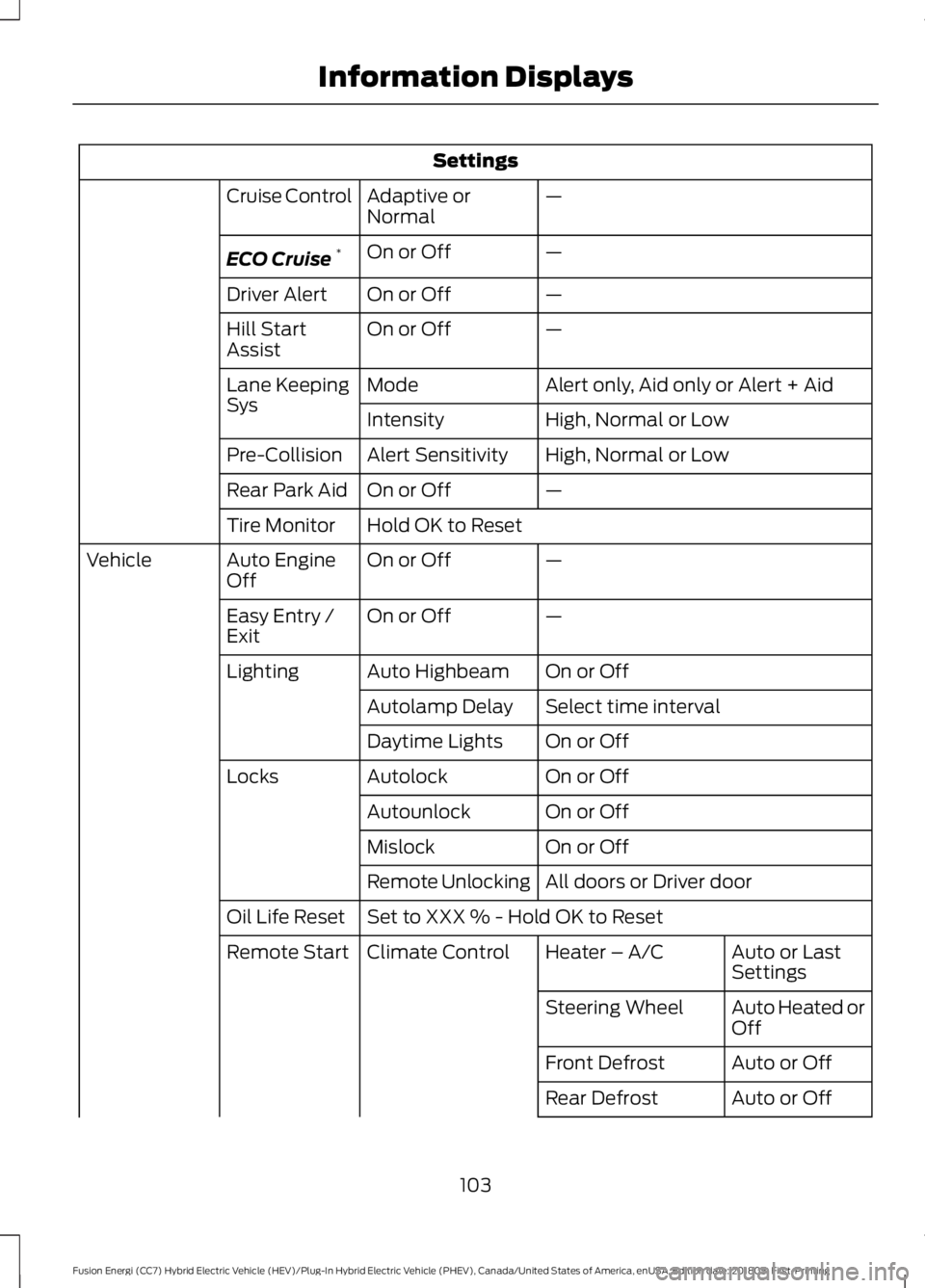
Settings
—
Adaptive or
Normal
Cruise Control
—
On or Off
ECO Cruise *
—
On or Off
Driver Alert
—
On or Off
Hill Start
Assist
Alert only, Aid only or Alert + Aid
Mode
Lane Keeping
Sys
High, Normal or Low
Intensity
High, Normal or Low
Alert Sensitivity
Pre-Collision
—
On or Off
Rear Park Aid
Hold OK to Reset
Tire Monitor
—
On or Off
Auto Engine
Off
Vehicle
—
On or Off
Easy Entry /
Exit
On or Off
Auto Highbeam
Lighting
Select time interval
Autolamp Delay
On or Off
Daytime Lights
On or Off
Autolock
Locks
On or Off
Autounlock
On or Off
Mislock
All doors or Driver door
Remote Unlocking
Set to XXX % - Hold OK to Reset
Oil Life Reset
Auto or Last
Settings
Heater – A/C
Climate Control
Remote Start
Auto Heated or
Off
Steering Wheel
Auto or Off
Front Defrost
Auto or Off
Rear Defrost
103
Fusion Energi (CC7) Hybrid Electric Vehicle (HEV)/Plug-In Hybrid Electric Vehicle (PHEV), Canada/United States of America, enUSA, Edition date: 201805, First-Printing Information Displays
Page 108 of 541

Settings
On or Off
Battery
Display
On or Off
Regen Display
Hold OK to Reset
Driving History
* Energi only.
Right Information Display Controls •
Press the up and down arrow buttons
to scroll through the list.
• Press the right arrow button to enter a
sub-menu.
• Press the left arrow button to exit a
menu.
• Press the OK button to choose and
confirm your selection. Main menu
From the main menu bar on the right side
of the information display, you can choose
from the following categories:
Entertainment
See
General Information (page 98).
Phone
See
General Information (page 98).
Navigation or Compass
See
General Information (page 98).
Fuel Economy
Use the up or down arrow buttons to
choose between the following display
options.
Note: The information display will remember the menu level 2 state when you change the
individual key state from the RUN to the OFF position.
105
Fusion Energi (CC7) Hybrid Electric Vehicle (HEV)/Plug-In Hybrid Electric Vehicle (PHEV), Canada/United States of America, enUSA, Edition date: 201805, First-Printing Information DisplaysE179396
Page 109 of 541

Fuel Economy
Menu level 5
Menu level 4
Menu level 3
Menu level 2
—
—
Help
Efficiency Leaves
—
5, 10 or 30 minutes
Duration
Fuel History
(Instantaneous Fuel Economy + Fuel
Economy History + Avg Fuel Economy) —
—
Help
—
—
Help
Coach
Efficiency Leaves
Efficiency leaves indicate short term driving
efficiency measured over the last few
minutes. The more leaves and vines that
appear on the display, the better your fuel
economy. Leaves and vines will
occasionally appear and disappear to
indicate a change in your driving efficiency.
Fuel History
From left to right this view includes an
instantaneous fuel economy gauge,
historical fuel economy data and average
fuel economy. The historical data
represents an average over time intervals
of either 1, 2 or 6 minutes, with the leftmost
interval being the most recent. Shown at
the bottom of the view is the total time
duration for the 5 intervals. You can select
total duration in the options menu.
Intervals shown in grey color are from the
previous drive. The blue horizontal line
represents the average fuel economy value
shown to the right.
Note: Hold OK to reset fuel history and
average fuel economy. Coach
This view provides a comparison of your
recent acceleration, braking and cruising
behavior, then recommends the most
efficient use of energy under present
conditions. The horizontal bars fill from left
to right with best behavior and appear blue
when at least half full. When the bars are
less than half full, the color is amber,
suggesting that you need a change in your
driving behavior to achieve better energy
efficiency.
Note:
Fuel Economy will be impacted by
your use of brakes, accelerator and
accessories, as well as environmental
conditions such as hills and weather.
Note: Fuel economy is not always a
measure of appropriate driving behavior. For
example, when driving uphill and
maintaining an appropriate speed, your
instant fuel economy may not be good
(losing leaves) but the Coach may show a
blue bar for Acceleration and Cruising.
106
Fusion Energi (CC7) Hybrid Electric Vehicle (HEV)/Plug-In Hybrid Electric Vehicle (PHEV), Canada/United States of America, enUSA, Edition date: 201805, First-Printing Information Displays
Page 110 of 541

Common Displays
Both Average fuel economy and an
instantaneous fuel economy gauge are
included in Engage, Empower, MyView (if
selected) and Fuel Economy (shown in
Hybrid Mode) on the left-hand information
display. They are also included in Fuel
History on the right-hand information
display.
Average Fuel Economy
Average Fuel Economy is continuously
averaged since the last reset. You can reset
your average fuel economy by pressing and
holding the OK button on the
corresponding steering wheel controls. For
Energi vehicles both Hybrid and Plug-in
Power mode operation will be included in
the calculation.
Note: Average fuel economy cannot be
reset in MyView.
Instantaneous Fuel Economy
If your instantaneous fuel economy is
greater than the maximum value
displayed, a + sign will be shown next to
the maximum scale number. When your
vehicle is operating on battery power only,
EV will display and the gauge fill will show
in blue. INFORMATION MESSAGES
Note:
Depending on your vehicle options
and instrument cluster type, not all of the
messages will display or be available.
Certain messages may be abbreviated or
shortened depending upon which cluster
type you have. Press the
OK button to acknowledge and
remove some messages from the
information display. Other messages will
be removed automatically after a short
time.
Certain messages need to be confirmed
before you can access the menus.
Active Park Action
Message
The system requires service due to a malfunction. Have thesystem checked by an authorized dealer.
Active Park Fault
107
Fusion Energi (CC7) Hybrid Electric Vehicle (HEV)/Plug-In Hybrid Electric Vehicle (PHEV), Canada/United States of America, enUSA, Edition date: 201805, First-Printing Information DisplaysE144636
Page 115 of 541

Action
Message
The system has disabled the door switches.
Switches Inhibited
Security Mode
There is a system malfunction with the child locks. Contact
an authorized dealer as soon as possible.
Child Lock Malfunction
Service Required
The factory keypad code displays in the information display
after system resets the keypad.
Factory Keypad Code {X
X X X X}
Driver Alert Action
Message
Stop and rest as soon as it is safe to do so.
Driver Alert Warning Rest
Now
Take a rest soon.
Driver Alert Warning Rest
Suggested
Fuel Action
Message
An early reminder of a low fuel condition.
Fuel Level Low
The fuel fill inlet may not be properly closed.
Check Fuel Fill Inlet
EV functionality is disabled and the engine is running tomaintain fuel freshness. See Fuel Quality (page 155).
Fuel Freshness Engine
may run to maintain fuel freshness
Wait for up to 15 seconds while the fuel system depressurizes.
Fuel Door Opening
The fuel system has finished depressurizing and you can begin
to refuel.
Fuel Door Open
A reminder to close the fuel door. Failure to follow this
instruction can cause the check engine light to illuminate.
Close Fuel Door to Avoid
""Check Engine"" Light
There is an error in attempting to refill your vehicle.
Refuel Error See Manual
112
Fusion Energi (CC7) Hybrid Electric Vehicle (HEV)/Plug-In Hybrid Electric Vehicle (PHEV), Canada/United States of America, enUSA, Edition date: 201805, First-Printing Information Displays
Page 134 of 541

•
Driver seat.
• Power mirrors.
• Power steering column.
The memory control is on the driver door. Saving a PreSet Position
1. Adjust the memory features to your
desired position.
2. Press the SET button until you hear a single tone.
3. Press the desired preset button until you hear a single tone.
You can save up to two preset memory
positions. You can save a memory preset
at any time.
Recalling a PreSet Position
Press and release the preset button
associated with your desired driving
position. The memory features move to
the position stored for that preset.
Note: You can only recall a preset memory
position when you switch the ignition off, or
when the transmission is in park (P) or
neutral (N) if the ignition is on and the
vehicle is not moving.
You can also recall a preset memory
position by:
• Pressing the unlock button on your
intelligent access key fob if it is linked
to a preset position.
• Unlocking the intelligent driver door
handle if a linked key fob is present. Note:
Using a linked key fob to recall your
memory position when the ignition is off
moves the seat to the Easy Entry position.
Note: Pressing any active memory feature
control - power seat, mirror, or steering
column (or any memory button) during a
memory recall cancels the operation.
Linking a PreSet Position to your
Remote Control or Intelligent
Access Key Fob
Your vehicle can save the preset memory
positions for up to two remote controls or
intelligent access (IA) keys.
After you have saved your desired memory
preset positions:
1. Press and hold the desired preset button for about three seconds until
you hear a single tone.
2. Within three seconds, press the lock button on the remote control you are
linking.
To unlink a remote control, follow the
same procedure – except in step 2, press
the unlock button on the remote control.
Note: If more than one linked remote
control or intelligent access key is in range,
the memory function moves to the settings
of the first key to initiate a memory recall.
Easy Entry and Exit Feature
If you enable the easy entry and exit
feature, it automatically moves the driver
seat position rearward up to 2 in (5 cm)
when you switch the ignition off.
The driver seat returns to the previous
position when you switch the ignition on.
You can enable or disable this feature in
the information display. See
General
Information (page 98).
131
Fusion Energi (CC7) Hybrid Electric Vehicle (HEV)/Plug-In Hybrid Electric Vehicle (PHEV), Canada/United States of America, enUSA, Edition date: 201805, First-Printing SeatsE223340
Page 144 of 541

When the indicator light on the power point
is:
•
On: The power point is working, the
ignition is on and a device is plugged
in.
• Off: The power point is off, the ignition
is off or no device is plugged in.
• Flashing: The power point is in fault
mode.
The power outlet temporarily turns off
power when in fault mode if the device
exceeds the 150 watt limit. Unplug your
device and switch the ignition off. Switch
the ignition back on, but do not plug your
device back in. Let the system cool off and
switch the ignition off to reset the fault
mode. Switch the ignition back on and
make sure the indicator light remains on.
Do not use the power point for certain
electric devices, including:
• Cathode-ray, tube-type televisions.
• Motor loads, such as vacuum cleaners,
electric saws and other electric power
tools or compressor-driven
refrigerators.
• Measuring devices, which process
precise data, such as medical
equipment or measuring equipment.
• Other appliances requiring an
extremely stable power supply such as
microcomputer-controlled electric
blankets or touch-sensor lamps.
141
Fusion Energi (CC7) Hybrid Electric Vehicle (HEV)/Plug-In Hybrid Electric Vehicle (PHEV), Canada/United States of America, enUSA, Edition date: 201805, First-Printing Auxiliary Power Points