2019 FORD FIESTA egr
[x] Cancel search: egrPage 220 of 443
Alloy wheels and wheel covers are coated
with a clear coat paint finish. To maintain
their condition we recommend that you:
•
Clean them weekly with the
recommended wheel and tire cleaner.
• Use a sponge to remove heavy
deposits of dirt and brake dust
accumulation.
• Rinse them thoroughly with a
pressurized stream of water when you
have completed the cleaning process.
We recommend that you use Ford service
wheel cleaner. Make sure that you read
and follow the manufacturer ’s instructions.
Using other non-recommended cleaning
products can result in severe and
permanent cosmetic damage.
VEHICLE STORAGE
If you plan on storing your vehicle for 30
days or more, read the following
maintenance recommendations to make
sure your vehicle stays in good operating
condition.
We engineer and test all motor vehicles
and their components for reliable, regular
driving. Under various conditions,
long-term storage may lead to degraded
engine performance or failure unless you
use specific precautions to preserve engine
components.
General
• Store all vehicles in a dry, ventilated
place.
• Protect from sunlight, if possible.
• If vehicles are stored outside, they
require regular maintenance to protect
against rust and damage. Body
•
Wash your vehicle thoroughly to
remove dirt, grease, oil, tar or mud from
exterior surfaces, rear-wheel housing
and the underside of front fenders.
• Periodically wash your vehicle if it is
stored in exposed locations.
• Touch-up exposed or primed metal to
prevent rust.
• Cover chrome and stainless steel parts
with a thick coat of auto wax to prevent
discoloration. Re-wax as necessary
when you wash your vehicle.
• Lubricate all hood, door and luggage
compartment hinges and latches with
a light grade oil.
• Cover interior trim to prevent fading.
• Keep all rubber parts free from oil and
solvents.
Engine
• Change the engine oil and filter prior to
storage because used engine oil
contains contaminates which may
cause engine damage.
• Start the engine every 15 days for a
minimum of 15 minutes. Run at fast idle
with the climate controls set to defrost
until the engine reaches normal
operating temperature.
• With your foot on the brake, shift
through all the gears while the engine
is running.
• We recommend that you change the
engine oil before you use your vehicle
again.
Fuel system
• Fill the fuel tank with high-quality fuel
until the first automatic shutoff of the
fuel pump nozzle.
217
2019 Fiesta (CCT) Canada/United States of America, KE8J 19A321 AA enUSA, Edition date: 201806, Second-Printing Vehicle Care
Page 233 of 443
or suspected have the tire
inspected by a tire professional.
Tires can be damaged during
off-road use, so inspection after
off-road use is also
recommended.
Age
WARNING: Tires degrade
over time depending on many
factors such as weather, storage
conditions, and conditions of use
(load, speed, inflation pressure)
the tires experience throughout
their lives. WARNING:
In general, tires
should be replaced after six
years regardless of tread wear.
However, heat caused by hot
climates or frequent high loading
conditions can accelerate the
aging process and may require
tires to be replaced more
frequently. WARNING:
You should
replace your spare tire when you
replace the road tires or after six
years due to aging even if it has
not been used. U.S. DOT Tire Identification
Number (TIN)
Both U.S. and Canada Federal
regulations require tire
manufacturers to place
standardized information on the
sidewall of all tires. This
information identifies and
describes the fundamental
characteristics of the tire and also
provides a U.S. DOT Tire
Identification Number for safety
standard certification and in case
of a recall.
This begins with the letters DOT
and indicates that the tire meets
all federal standards. The next
two numbers or letters are the
plant code designating where it
was manufactured, the next two
are the tire size code and the last
four numbers represent the week
and year the tire was built. For
example, the numbers 317 mean
the 31st week of 1997. After 2000
the numbers go to four digits. For
example, 2501 means the 25th
week of 2001. The numbers in
between are identification codes
used for traceability. This
information is used to contact
customers if a tire defect requires
a recall.
Tire Replacement
Requirements
Your vehicle is equipped with tires
designed to provide a safe ride
and handling capability.
230
2019 Fiesta (CCT) Canada/United States of America, KE8J 19A321 AA enUSA, Edition date: 201806, Second-Printing Wheels and Tires
Page 256 of 443
Materials
Specification
Name
-
Motorcraft® Penetrating and Lock Lubricant (U.S.)
Motorcraft® Penetrating Fluid / Liquide dégrippant
Motorcraft® (Canada)
XL-1 (U.S.)
CXC-51-A (Canada)
Grease
Materials Specification
Name
ESB-M1C93-B
Motorcraft® Multi-Purpose Grease Spray (U.S.)
Motorcraft® Multi-Purpose Grease Spray / Graisse
tout usage en aérosol Motorcraft® (Canada)
XL-5-A (U.S. & Canada)
253
2019 Fiesta (CCT) Canada/United States of America, KE8J 19A321 AA enUSA, Edition date: 201806, Second-Printing Capacities and Specifications
Page 262 of 443
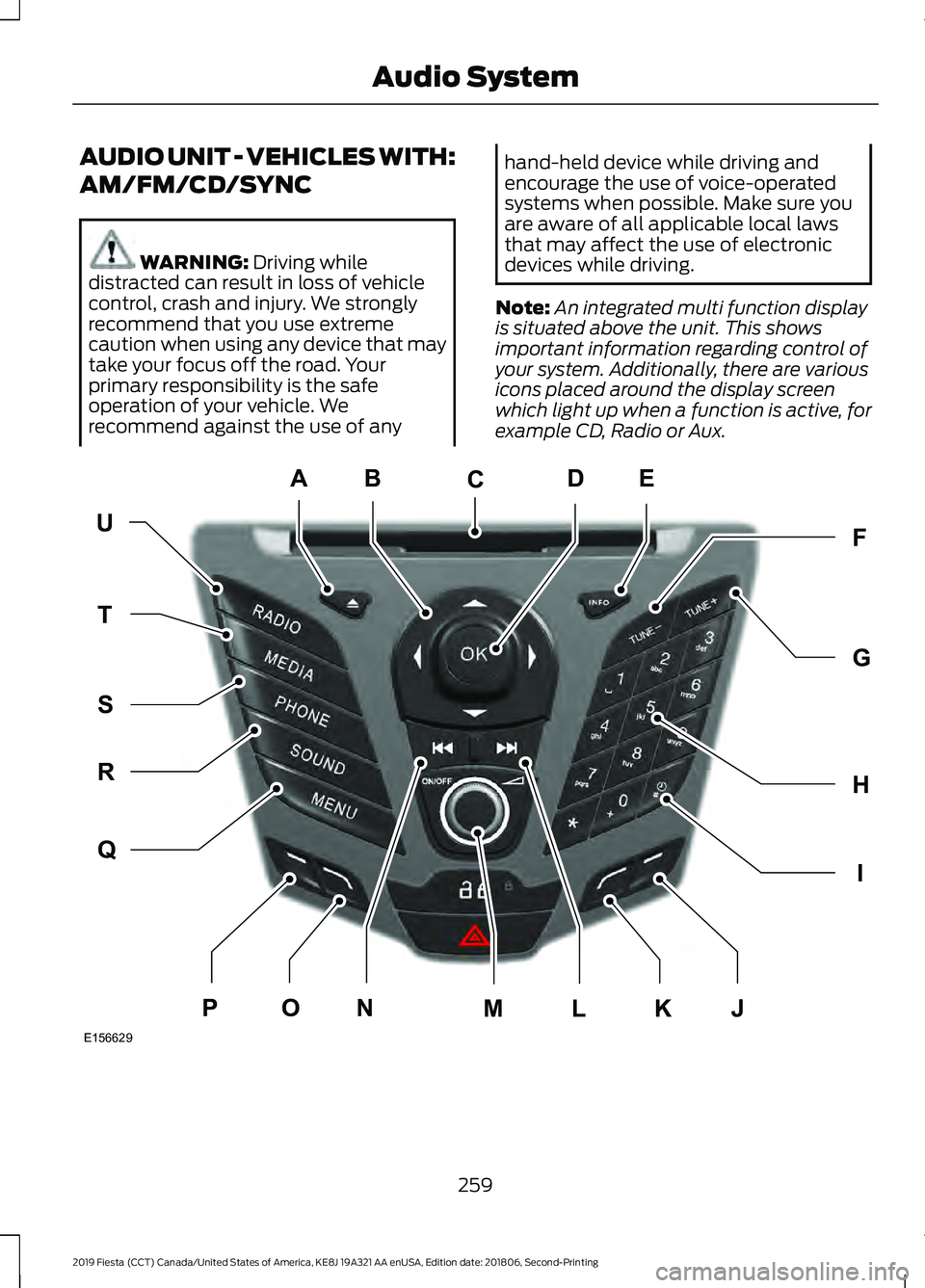
AUDIO UNIT - VEHICLES WITH:
AM/FM/CD/SYNC
WARNING: Driving while
distracted can result in loss of vehicle
control, crash and injury. We strongly
recommend that you use extreme
caution when using any device that may
take your focus off the road. Your
primary responsibility is the safe
operation of your vehicle. We
recommend against the use of any hand-held device while driving and
encourage the use of voice-operated
systems when possible. Make sure you
are aware of all applicable local laws
that may affect the use of electronic
devices while driving.
Note: An integrated multi function display
is situated above the unit. This shows
important information regarding control of
your system. Additionally, there are various
icons placed around the display screen
which light up when a function is active, for
example CD, Radio or Aux. 259
2019 Fiesta (CCT) Canada/United States of America, KE8J 19A321 AA enUSA, Edition date: 201806, Second-Printing Audio SystemE156629
KJ
ED
UF
H
I
G
Q
R
S
T
NOPLM
C
A
B
Page 314 of 443
GENERAL INFORMATION
WARNING: Driving while
distracted can result in loss of vehicle
control, crash and injury. We strongly
recommend that you use extreme
caution when using any device that may
take your focus off the road. Your
primary responsibility is the safe
operation of your vehicle. We
recommend against the use of any
hand-held device while driving and
encourage the use of voice-operated
systems when possible. Make sure you
are aware of all applicable local laws
that may affect the use of electronic
devices while driving.
Getting to Know Your System
The SYNC 3 system allows you to interact
with a variety of features using the
touchscreen and voice commands. By
integrating with your Bluetooth-enabled
phone, the touchscreen provides easy
interaction with audio, multimedia, climate
control, navigation, and your phone's SYNC
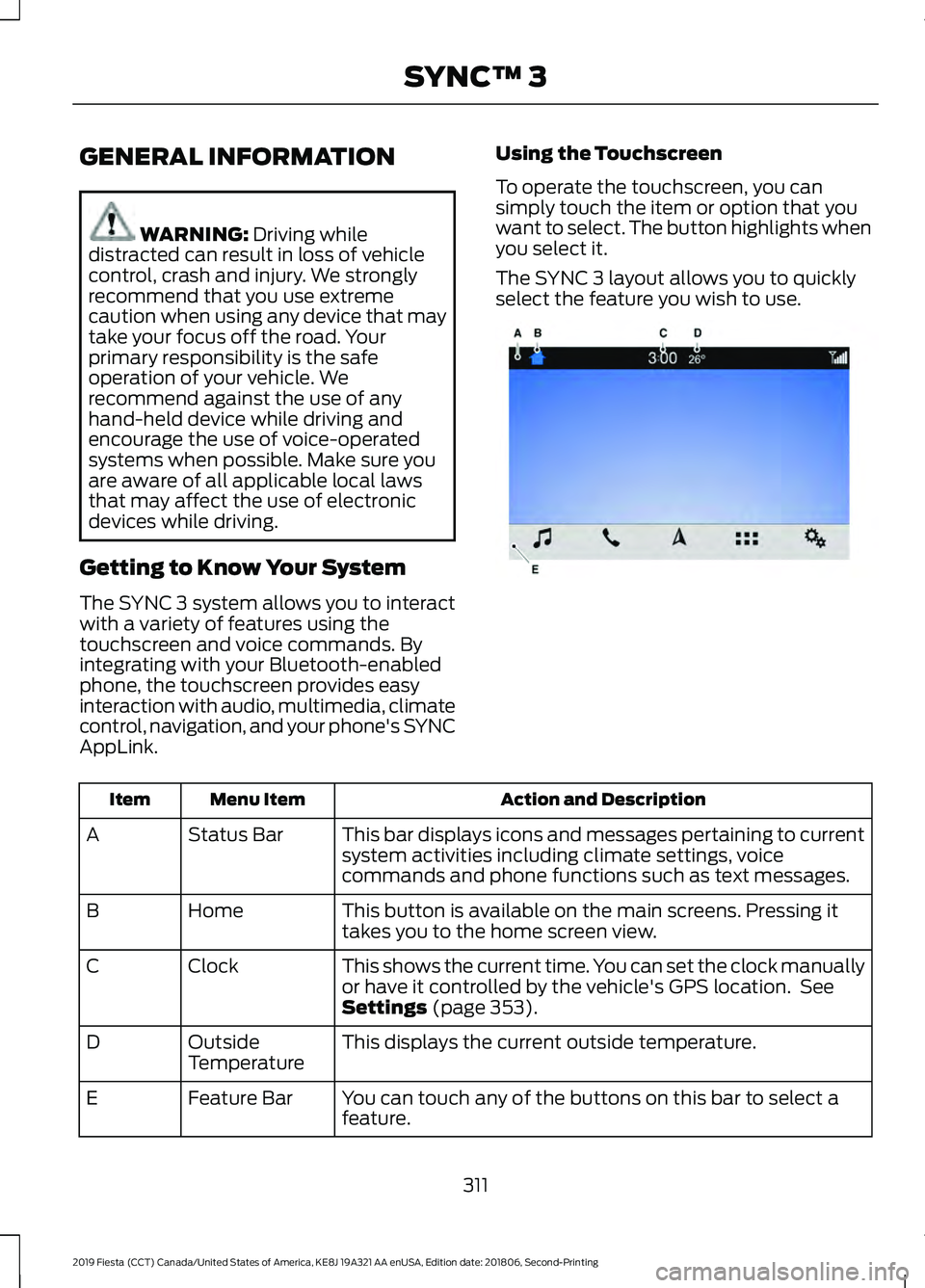
AppLink. Using the Touchscreen
To operate the touchscreen, you can
simply touch the item or option that you
want to select. The button highlights when
you select it.
The SYNC 3 layout allows you to quickly
select the feature you wish to use.
Action and Description
Menu Item
Item
This bar displays icons and messages pertaining to current
system activities including climate settings, voice
commands and phone functions such as text messages.
Status Bar
A
This button is available on the main screens. Pressing it
takes you to the home screen view.
Home
B
This shows the current time. You can set the clock manually
or have it controlled by the vehicle's GPS location. See
Settings
(page 353).
Clock
C
This displays the current outside temperature.
Outside
Temperature
D
You can touch any of the buttons on this bar to select a
feature.
Feature Bar
E
311
2019 Fiesta (CCT) Canada/United States of America, KE8J 19A321 AA enUSA, Edition date: 201806, Second-Printing SYNC™ 3E270673
Page 346 of 443
Map Mode
Map mode shows advanced viewing
comprised of 2D city maps, 3D landmarks
and 3D city models (when available). 2D
city maps show detailed outlines of
buildings, visible land use, landscape
features, and detailed railroad
infrastructure for the most essential cities
around the globe.
3D landmarks appear as clear, visible
objects that are typically recognizable and
have a certain tourism value.
3D city models are complete 3D models
of entire city areas including navigable
roads, parks, rivers and rendered buildings.
3D landmarks and city models appear in
3D map mode only. Coverage of these
varies and improves with updated map
releases.
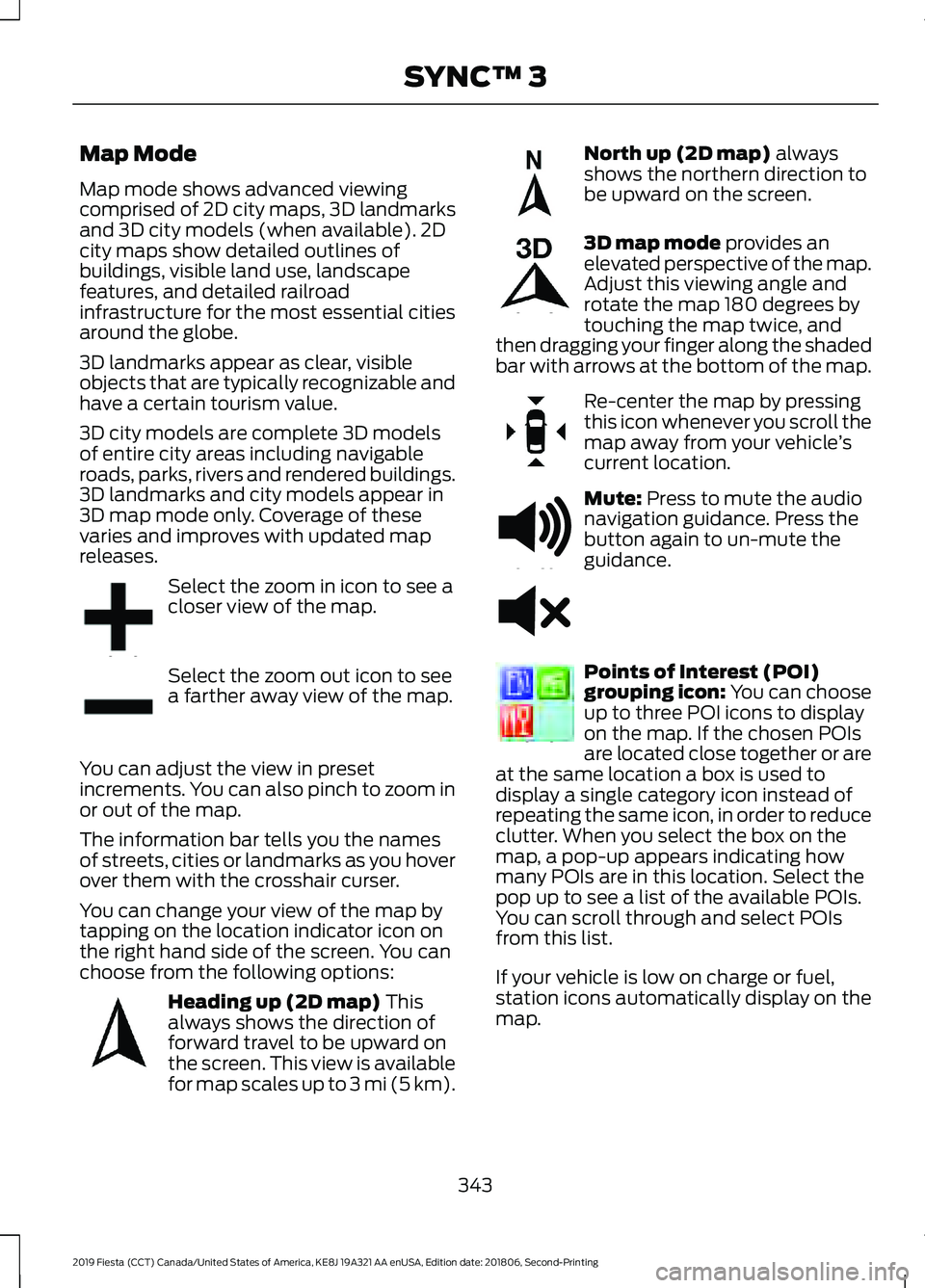
Select the zoom in icon to see a
closer view of the map.
Select the zoom out icon to see
a farther away view of the map.
You can adjust the view in preset
increments. You can also pinch to zoom in
or out of the map.
The information bar tells you the names
of streets, cities or landmarks as you hover
over them with the crosshair curser.
You can change your view of the map by
tapping on the location indicator icon on
the right hand side of the screen. You can
choose from the following options: Heading up (2D map) This
always shows the direction of
forward travel to be upward on
the screen. This view is available
for map scales up to
3 mi (5 km). North up (2D map)
always
shows the northern direction to
be upward on the screen. 3D map mode
provides an
elevated perspective of the map.
Adjust this viewing angle and
rotate the map 180 degrees by
touching the map twice, and
then dragging your finger along the shaded
bar with arrows at the bottom of the map. Re-center the map by pressing
this icon whenever you scroll the
map away from your vehicle
’s
current location. Mute:
Press to mute the audio
navigation guidance. Press the
button again to un-mute the
guidance. Points of Interest (POI)
grouping icon: You can choose
up to three POI icons to display
on the map. If the chosen POIs
are located close together or are
at the same location a box is used to
display a single category icon instead of
repeating the same icon, in order to reduce
clutter. When you select the box on the
map, a pop-up appears indicating how
many POIs are in this location. Select the
pop up to see a list of the available POIs.
You can scroll through and select POIs
from this list.
If your vehicle is low on charge or fuel,
station icons automatically display on the
map.
343
2019 Fiesta (CCT) Canada/United States of America, KE8J 19A321 AA enUSA, Edition date: 201806, Second-Printing SYNC™ 3E207752 E207753 E207750 E207749 E207748 E207751 E251780 E251779 E207754
Page 348 of 443
Description
Menu Item
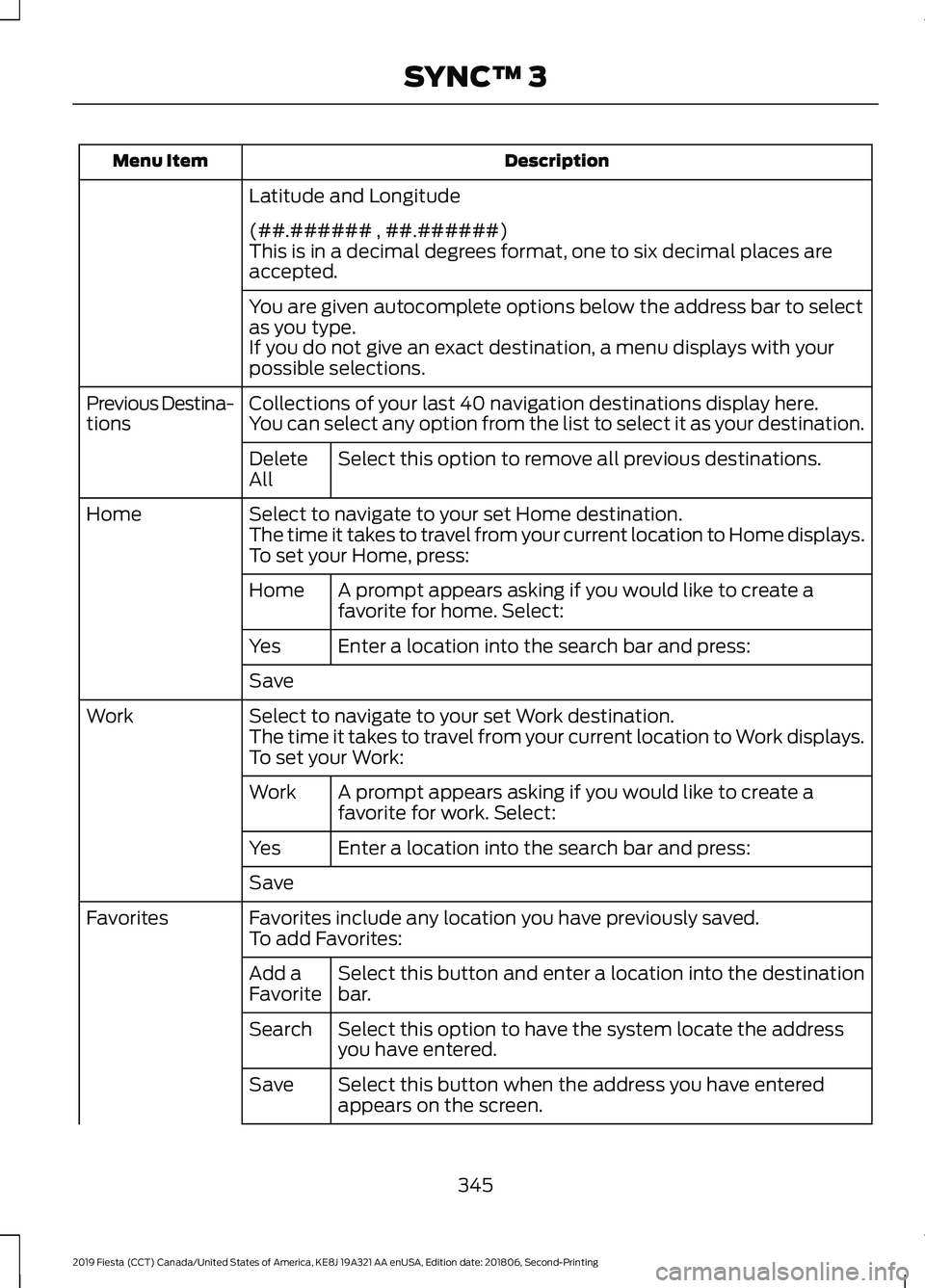
Latitude and Longitude
(##.###### , ##.######)
This is in a decimal degrees format, one to six decimal places are
accepted.
You are given autocomplete options below the address bar to select
as you type.
If you do not give an exact destination, a menu displays with your
possible selections.
Collections of your last 40 navigation destinations display here.
Previous Destina-
tions You can select any option from the list to select it as your destination.
Select this option to remove all previous destinations.
Delete
All
Select to navigate to your set Home destination.
Home
The time it takes to travel from your current location to Home displays.
To set your Home, press:
A prompt appears asking if you would like to create a
favorite for home. Select:
Home
Enter a location into the search bar and press:
Yes
Save
Select to navigate to your set Work destination.
Work
The time it takes to travel from your current location to Work displays.
To set your Work:
A prompt appears asking if you would like to create a
favorite for work. Select:
Work
Enter a location into the search bar and press:
Yes
Save
Favorites include any location you have previously saved.
Favorites
To add Favorites:
Select this button and enter a location into the destination
bar.
Add a
Favorite
Select this option to have the system locate the address
you have entered.
Search
Select this button when the address you have entered
appears on the screen.
Save
345
2019 Fiesta (CCT) Canada/United States of America, KE8J 19A321 AA enUSA, Edition date: 201806, Second-Printing SYNC™ 3
Page 437 of 443

SiriusXM® Satellite Radio (If
Activated)........................................................ 329
Sources.................................................................. 328
Supported Media Players, Formats and Metadata Information................................ 336
USB Ports............................................................. 336
Environment.....................................................16
Event Data Recording See: Data Recording.............................................. 9
Export Unique Options.................................15
Exterior Mirrors................................................78
Fold-Away Exterior Mirrors............................... 78
Integrated Blind Spot Mirrors........................... 78
Power Exterior Mirrors........................................ 78
F
Fan See: Engine Cooling Fan.................................. 186
Fastening the Seatbelts
................................31
Seatbelt Locking Modes.................................... 32
Using Seatbelts During Pregnancy.................31
Flat Tire See: Changing a Road Wheel....................... 238
Floor Mats.......................................................159
Fog Lamps - Front See: Front Fog Lamps......................................... 74
Ford Credit
.........................................................13
US Only..................................................................... 13
Ford Protect
...................................................382
Ford Protect Extended Service Plan
(CANADA ONLY).......................................... 383
Ford Protect Extended Service Plans (U.S. Only).................................................................. 382
Front Fog Lamps.............................................74
Front Parking Aid..........................................140 Sensing System Audible Warnings..............142
Switching the Parking Aid System
Off........................................................................\
142
Front Passenger Sensing System............40
Front Wiper Blades See: Changing the Front Wiper Blades.......194
Fuel and Refueling
.........................................117
Fuel Consumption........................................122
Calculating Fuel Economy............................... 123
Filling the Fuel Tank........................................... 123
Fuel Filler Funnel Location.........................118 Fuel Quality
......................................................117
Choosing the Right Fuel.................................... 117
Fuel Shutoff.....................................................161
Fuses..................................................................172
Fuse Specification Chart............................172 Engine Compartment Fuse Box..................... 172
Passenger Compartment Fuse Box.............176
G
Gauges................................................................81 Compass (If Equipped)...................................... 81
Engine Coolant Temperature Gauge.............81
Fuel Gauge.............................................................. 82
Low Fuel Reminder.............................................. 82
Gearbox See: Transmission.............................................. 128
General Information on Radio Frequencies...................................................47
Intelligent Access.................................................. 47
General Maintenance Information
.......384
Multi-Point Inspection..................................... 386
Owner Checks and Services.......................... 385
Protecting Your Investment.......................... 384
Why Maintain Your Vehicle?......................... 384
Why Maintain Your Vehicle at Your Dealership?..................................................... 384
Getting Assistance Outside the U.S. and Canada..........................................................168
Getting the Services You Need...............165 Away From Home............................................... 165
H
Handbrake See: Parking Brake............................................. 134
Hazard Flashers.............................................161
Headlamp Adjusting See: Adjusting the Headlamps...................... 195
Headlamp Exit Delay.....................................74
Headlamp Removal See: Removing a Headlamp.......................... 196
Headrest See: Head Restraints......................................... 103
Head Restraints............................................103 Adjusting the Head Restraint........................ 104
Heated Seats..................................................107
434
2019 Fiesta (CCT) Canada/United States of America, KE8J 19A321 AA enUSA, Edition date: 201806, Second-Printing Index