2019 FORD F-150 tow
[x] Cancel search: towPage 105 of 644

Telescoping Mirrors (If Equipped)
This feature lets you extend the mirror
about
3 in (75 mm). It is useful when
towing a trailer. You can manually pull out
or push in the mirrors to the desired
position.
Power-Folding Mirrors
(If Equipped) To fold both mirrors, switch your vehicle
on (with the ignition in accessory mode or
the engine running) and then:
1. Press the control.
2. Press control again to unfold the
mirrors.
Note: Do not stop the mirrors midway
through their movement. Wait until the
mirrors stop moving and press the control
again. The left-hand and right-hand mirrors move
at different rates. For example, one mirror
may stop while the other one continues to
move. This is normal.
Moving the mirrors 10 or more times within
one minute, or repeated folding and
unfolding of the mirrors while holding the
control down during full travel, may disable
the system to protect the motors from
overheating. Wait approximately three
minutes with the vehicle running, and up to
10 minutes with the vehicle off, for the
system to reset and for function to return to
normal.
Loose Mirror
If your power-folding mirrors are manually
folded, they may not work properly even
after you re-position them. You need to
reset them if:
•
The mirrors vibrate when you drive.
• The mirrors feel loose.
• The mirrors do not stay in the folded or
unfolded position.
• One of the mirrors is not in its normal
driving position.
To reset the power-fold feature, use the
power-folding mirror control to fold and
unfold the mirrors. You may hear a loud
noise as you reset the power-folding
mirrors. This sound is normal. Repeat this
process as needed each time the mirrors
are manually folded.
PowerScope ™ Power Telescoping
Mirrors
(If Equipped)
This feature lets you position both mirrors
at the same time.
102
F-150 (TFC) Canada/United States of America, enUSA, Edition date: 201808, Third-Printing- Windows and MirrorsE277400 E176218
Page 106 of 644

To adjust your mirrors, make sure you
switch your vehicle on (with the ignition in
accessory mode or the engine running) and
then:
1. Press and release the control. It lights.
2. Press the adjustment control to
position the mirrors.
•Press the left arrow to extend the
mirrors out. Press the right arrow to
retract the mirrors in.
• Press the up or down arrow to fold
the mirrors toward the window
glass. Press the up or down arrow
again to fold the mirrors out.
Note: Moving the mirrors 10 or more times
within one minute, or repeated folding and
unfolding of the mirrors while holding the
control down during full travel, may disable
the system to protect the motors from
overheating. Wait approximately three
minutes with the vehicle running, and up to
10 minutes with the vehicle off, for the
system to reset and for function to return to
normal.
Heated Exterior Mirrors (If Equipped)
See Heated Exterior Mirrors (page 153).
Memory Mirrors
(If Equipped)
You can save and recall the mirror
positions through the memory function.
See
Memory Function (page 161). Auto-dimming Feature
(If Equipped)
The driver exterior mirror automatically
dims when the interior auto-dimming
mirror turns on.
Direction Indicator Mirrors (If Equipped)
While the vehicle is running, the
forward-facing portion of the appropriate
mirror housing blinks when you switch on
the direction indicator.
Puddle Lamps
(If Equipped)
The lamps on the bottom part of the mirror
housing light when you use your
transmitter to unlock the doors or when
you open a door.
Clearance Lamps
(If Equipped)
The lower, outer part of the mirror housings
light when you switch the headlamps or
parking lamps on.
Spot Lamps
(If Equipped)
The area lights are on the forward-facing
portion of the mirror housing. You can
switch them on and off by using the
controls located on the instrument panel.
See
Lighting (page 93).
360-Degree Camera
(If Equipped)
Each mirror includes a camera.
Integrated Blind Spot Mirror
(If
Equipped) WARNING:
Objects in the mirror
are closer than they appear.
103
F-150 (TFC) Canada/United States of America, enUSA, Edition date: 201808, Third-Printing- Windows and MirrorsE176218
Page 107 of 644

Blind spot mirrors have an integrated
convex mirror built into the upper outboard
corner of the exterior mirrors. They can
assist you by increasing visibility along the
side of your vehicle. The blind spot mirror
is only on the driver exterior mirror.
Check the main mirror first before a lane
change, then check the blind spot mirror.
If no vehicles are present in the blind spot
mirror and the traffic in the adjacent lane
is at a safe distance, signal that you are
going to change lanes. Glance over your
shoulder to verify traffic is clear, and
carefully change lanes. The image of the approaching vehicle is
small and near the inboard edge of the
main mirror when it is at a distance. The
image becomes larger and begins to move
outboard across the main mirror as the
vehicle approaches (A). The image
transitions from the main mirror and begins
to appear in the blind spot mirror as the
vehicle approaches (B). The vehicle
transitions to your peripheral field of view
as it leaves the blind spot mirror (C).
Blind Spot Information System (If
Equipped)
See
Blind Spot Information System
(page 262).
INTERIOR MIRROR WARNING:
Do not adjust the
mirrors when your vehicle is moving. This
could result in the loss of control of your
vehicle, serious personal injury or death.
Note: Do not clean the mirror housing or
glass with harsh abrasives, fuel or other
petroleum-based cleaning products.
You can adjust the interior mirror to your
preference. Some mirrors also have a
second pivot point. This lets you move the
mirror head up or down and from side to
side.
Manual Dimming Mirror
Pull the tab below the mirror toward you
to reduce the effect of bright light from
behind.
104
F-150 (TFC) Canada/United States of America, enUSA, Edition date: 201808, Third-Printing- Windows and MirrorsA
B
C
E138665
Page 108 of 644

Automatic Dimming Mirror (If Equipped)
Note:
Do not block the sensors on the front
and back of the mirror. A rear center
passenger or raised rear center head
restraint may also block light from reaching
the sensor.
The mirror dims to reduce the effect of
bright light from behind. It returns to
normal when the bright light from behind
is no longer present or if you shift into
reverse (R).
SLIDING WINDOWS (IF EQUIPPED)
Power Sliding Back Window
(If
Equipped) WARNING:
When operating the
power sliding back window, you must
make sure all rear seat occupants and
cargo are not in the proximity of the back
window. WARNING:
Do not leave children
unattended in your vehicle and do not
let them play with the power sliding back
window. They may seriously injure
themselves. The control is on the overhead console. Press and hold the control to open the
window. Pull and hold the control to close
the window.
SUN VISORS
Rotate the sun visor toward the side
window and extend it rearward for extra
shade.
Illuminated Vanity Mirror
(If Equipped)
Lift the cover to switch the lamp on.
105
F-150 (TFC) Canada/United States of America, enUSA, Edition date: 201808, Third-Printing- Windows and MirrorsE176217 E138666 E162197
Page 112 of 644

Engine Oil Pressure Gauge
Indicates engine oil pressure. The needle
should stay in the normal operating range
(between L and H). If the needle falls
below the normal range, stop your vehicle,
turn off the engine and check the engine
oil level. Add oil if needed. If the oil level is
correct, have your vehicle checked by an
authorized dealer.
Engine Coolant Temperature
Gauge
WARNING: Do not remove the
coolant reservoir cap when the cooling
system is hot. Wait 10 minutes for the
cooling system to cool down. Cover the
coolant reservoir cap with a thick cloth
to prevent the possibility of scalding and
slowly remove the cap. Failure to follow
this instruction could result in personal
injury.
Indicates engine coolant temperature. At
normal operating temperature, the level
indicator will be in the normal range. If the
engine coolant temperature exceeds the
normal range, stop your vehicle as soon as
safely possible, switch off the engine and
let the engine cool.
Fuel Gauge
The fuel gauge indicates about how much
fuel is in the fuel tank.
The arrow adjacent to the fuel pump
symbol indicates on which side of your
vehicle the fuel filler door is located.
Note: The fuel gauge may vary slightly
when your vehicle is moving or on a slope. Low Fuel Reminder
A low fuel level reminder displays and
sounds when the distance to empty
reaches
75 mi (120 km) to empty for
MyKey, and at 50 mi (80 km), 25 mi
(40 km), 10 mi (20 km) and 0 mi (0 km)
for all vehicle keys.
Note: The low fuel reminder can appear at
different fuel gauge positions depending on
fuel economy conditions. This variation is
normal.
Transmission Fluid Temperature
Gauge
(If Equipped)
Indicates transmission fluid temperature.
At normal operating temperature, the level
indicator will be in the normal range. If the
transmission fluid temperature exceeds
the normal range, stop your vehicle as soon
as safely possible and verify the airflow is
not restricted (snow or debris blocking
airflow through the grille).
Also, higher than normal operating
temperature can be caused by special
operation conditions (snowplowing, towing
or off-road use). Refer to Special operating
conditions in the scheduled maintenance
information for instructions.
Operating the transmission for extended
periods with the gauge in the higher than
normal area may cause internal
transmission damage. You need to alter
the severity of your driving conditions to
lower the transmission temperature into
the normal range. If the gauge continues
to show high temperatures, see an
authorized dealer.
Turbo Boost Gauge
(If Equipped)
Indicates the amount of manifold air
pressure in the engine.
109
F-150 (TFC) Canada/United States of America, enUSA, Edition date: 201808, Third-Printing- Instrument Cluster
Page 117 of 644

Tow Haul Indicator (If Equipped)
It illuminates when you switch
the system on.
Wait To Start
(If Equipped) Illuminates when you switch the
ignition on as part of the
pre-start system. Wait until the
wait to start indicator turns off before
attempting to start vehicle. See
Starting
a Diesel Engine (page 179).
Water In Fuel
(If Equipped) WARNING:
Do not drain the
water-in-fuel separator while the engine
is running. Failure to follow this warning
may result in fire, serious injury, death or
property damage. During refueling, it is possible for
you to pump
water-contaminated diesel fuel
into your fuel tank. Your vehicle ’s fuel
system is equipped with a fuel filter and
water separator to remove water from the
fuel. The water in fuel indicator lights when
the fuel and water separator has a
significant quantity of water in it and
requires immediate draining.
If the water in fuel indicator illuminates
when the engine is running, stop your
vehicle as soon as safely possible, shut off
the engine, then drain the fuel and water
separator. See
Fuel Quality (page 188).
Allowing water to stay in the fuel system,
after the water in fuel indicator illuminates,
could result in extensive damage or failure
of the fuel injection system.
Note: Do not drain the fuel and water
separator while the engine is running. Air will
enter into the fuel system causing the engine
not to operate properly. AUDIBLE WARNINGS AND
INDICATORS
Airbag Secondary Warning
Sounds if there is a malfunction with the
safety belt warning lamp and there is a
fault in the supplemental restraints
system.
Beltminder Warning
Sounds when a seatbelt is unfastened in
an occupied seat and your vehicle is
moving.
Door Ajar Warning
Sounds when any door is not completely
closed and your vehicle speed exceeds
3 mph (5 km/h)
.
Headlamps On Warning
Sounds when you remove the key from the
ignition and open the driver's door and you
have left the headlamps or parking lamps
on.
Key in Ignition Warning
Sounds when you open the driver's door
and you have left the key in the ignition.
Keyless Warning Alert
(If Equipped)
Sounds the horn twice when you exit your
vehicle with the intelligent access key, after
the last door is closed and your keyless
vehicle is in RUN, indicating your vehicle is
still on.
Rear Park Aid Warning
(If Equipped)
A detection warning sounds when
obstacles are within a certain range of the
bumper area. The system turns on
automatically whenever you switch the
ignition on.
114
F-150 (TFC) Canada/United States of America, enUSA, Edition date: 201808, Third-Printing- Instrument ClusterE161509
Page 122 of 644
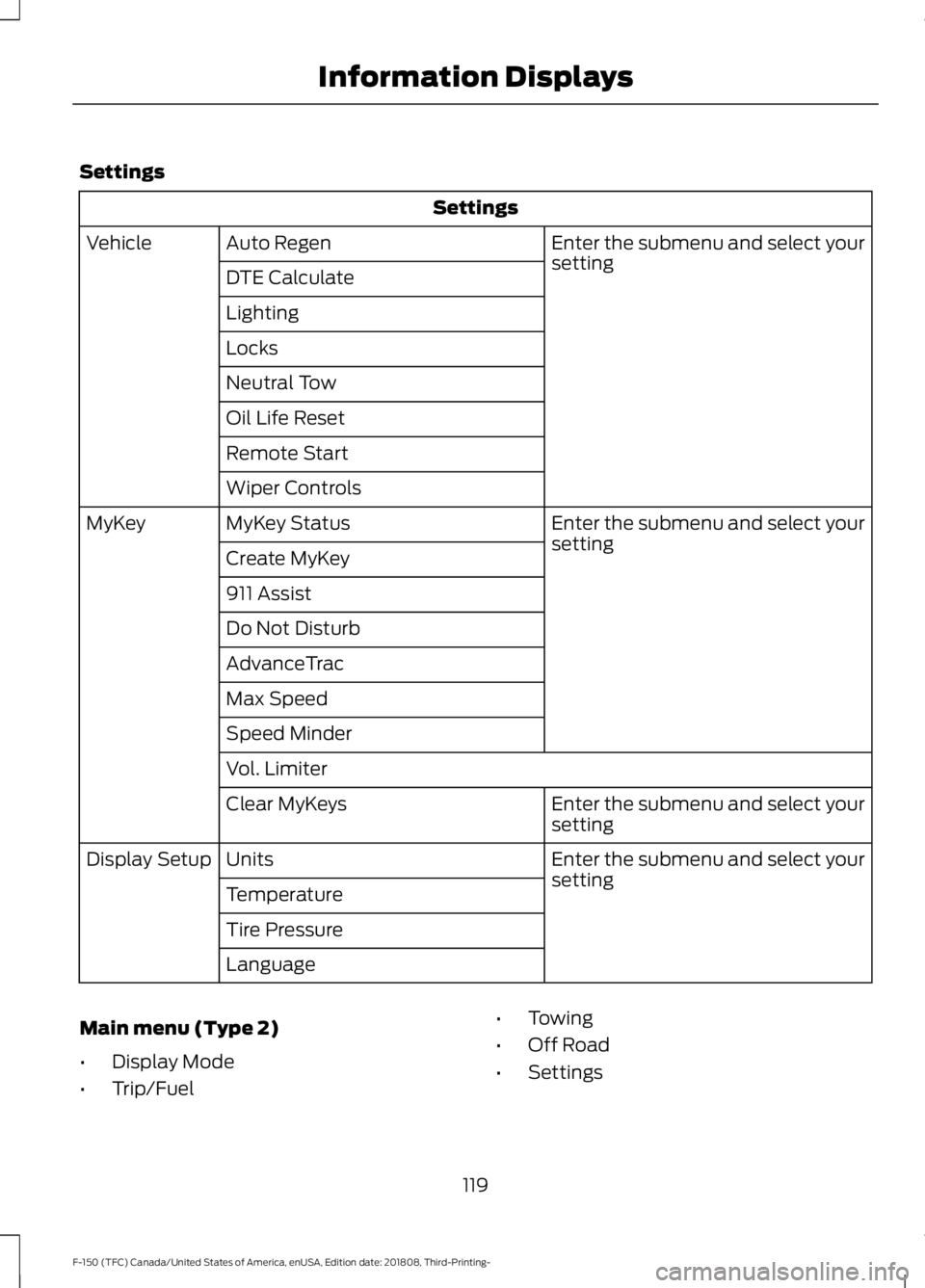
Settings
Settings
Enter the submenu and select your
setting
Auto Regen
Vehicle
DTE Calculate
Lighting
Locks
Neutral Tow
Oil Life Reset
Remote Start
Wiper Controls Enter the submenu and select your
setting
MyKey Status
MyKey
Create MyKey
911 Assist
Do Not Disturb
AdvanceTrac
Max Speed
Speed Minder
Vol. Limiter Enter the submenu and select your
setting
Clear MyKeys
Enter the submenu and select your
setting
Units
Display Setup
Temperature
Tire Pressure
Language
Main menu (Type 2)
• Display Mode
• Trip/Fuel •
Towing
• Off Road
• Settings
119
F-150 (TFC) Canada/United States of America, enUSA, Edition date: 201808, Third-Printing- Information Displays
Page 124 of 644

Trip/Fuel
Enter the submenu and select your setting
Average Speed
Auto StartStop
Trip 1 or 2
• Trip Timer - Registers the time of individual journeys.
• DTE - Shows the approximate distance your vehicle can travel before running out of
fuel.
• Odometer - Registers the distance of individual journeys.
• Avg - Shows the average fuel economy for a given trip.
Fuel Economy - Shows your instantaneous fuel usage as a bar graph and average fuel
economy.
Fuel History - Shows your fuel usage based on time. The graph is updated each minute
with the fuel economy that you achieved during 30 minutes of driving.
Average Speed - Shows the average speed your vehicle travels.
Auto StartStop - Shows the current status of the Auto StartStop system.
Note: Press and hold OK to reset the currently displayed information.
Towing
Note: Use the arrow buttons to configure different towing setting choices.
Note: Once you select a trailer, it remains active until you set it as no longer active. An active
trailer still accumulates miles even after you physically disconnect it from your vehicle. Towing
Trailer Connection Status
Trailer Status
BLIS with Trailer Ready/Not Available/Not Setup/Off
Pro Trailer Backup Assist: Ready or Not Setup or Not Calibrated
Active Trailer Name or Default Trailer
Accumulated Trailer Miles
Trailer Brake Gain
Output
Trailer Sway Control
Trailer
Options
Enter the submenu and select your
setting
Select Trailer
121
F-150 (TFC) Canada/United States of America, enUSA, Edition date: 201808, Third-Printing- Information Displays