2019 FORD F-150 cruise control
[x] Cancel search: cruise controlPage 258 of 644

Detection issues can occur:
When driving on a different line
than the vehicle in front.
A
With vehicles that edge into your
lane. The system can only detect
these vehicles once they move
fully into your lane.
B
There may be issues with the
detection of vehicles in front
when driving into and coming out
of a bend or curve in the road.
C
In these cases, the system may brake late
or unexpectedly. You should stay alert and
take action when necessary.
If something hits the front end of your
vehicle or damage occurs, the
radar-sensing zone may change. This could
cause missed or false vehicle detection. Optimal system performance requires a
clear view of the road by the
windshield-mounted camera.
Optimal performance may not occur if:
•
The camera is blocked.
• There is poor visibility or lighting
conditions.
• There are bad weather conditions.
System Not Available
Conditions that can cause the system to
deactivate or prevent the system from
activating when requested include:
• A blocked sensor.
• High brake temperature.
• A failure in the system or a related
system.
Blocked Sensor 255
F-150 (TFC) Canada/United States of America, enUSA, Edition date: 201808, Third-Printing- Cruise ControlE71621 E249424
Page 259 of 644

A message displays if something obstructs
the radar signals from the sensor. The
sensor is in the lower grille. The system
cannot detect a vehicle ahead and does
not function when something blocks the
sensor.
Note:
You cannot see the sensor. It is
behind a fascia panel.
Keep the front of your vehicle free of dirt,
metal badges or objects. Vehicle front
protectors and aftermarket lights may also
block the sensor.
Possible Causes and Actions for This Message Displaying: Action
Cause
Clean the grille surface in front of the radar
or remove the object causing the obstruc-
tion.
The surface of the radar is dirty or
obstructed.
Wait a short time. It may take several
minutes for the radar to detect that it is free
from obstruction.
The surface of the radar is clean but the
message remains in the display.
Do not use the system in these conditions
because it may not detect any vehicles
ahead.
Heavy rain or snow is interfering with the
radar signals.
Do not use the system in these conditions
because it may not detect any vehicles
ahead.
Water, snow or ice on the surface of the
road may interfere with the radar signals.
Wait a short time or switch to normal cruise
control.
You are in a desert or remote area with no
other vehicles and no roadside objects.
Due to the nature of radar technology, it is possible to get a blockage warning with no
actual block. A false blocked condition either self clears, or clears after you restart your
vehicle.
Switching to Normal Cruise
Control WARNING: Normal cruise control
will not brake when your vehicle is
approaching slower vehicles. Always be
aware of which mode you have selected
and apply the brakes when necessary. The cruise control indicator light
replaces the adaptive cruise
control indicator light if you
select normal cruise control. The gap
setting does not display, and the system
does not respond to lead vehicles.
Automatic braking remains active to
maintain set speed.
You can change from adaptive cruise
control to normal cruise control through
the information display.
256
F-150 (TFC) Canada/United States of America, enUSA, Edition date: 201808, Third-Printing- Cruise ControlE71340
Page 263 of 644

Alert and Aid Mode
Alert
A
AidB
Alert and Aid mode provides steering
assistance toward the lane center.
If your vehicle continues drifting out of the
lane, the system provides a steering wheel
vibration.
Note: The alert and aid diagrams illustrate
general zone coverage. They do not provide
exact zone parameters.
Intensity: This setting affects the intensity
of the steering wheel vibration used for the
alert and Alert and Aid modes. This
setting does not affect the aid mode.
• Low
• Medium
• High System Display
If you switch the system on in alert mode,
a graphic with lane markings appears in
the information display.
If you switch the system on in aid or alert
and aid mode, arrows appear with the lane
markings.
When you switch the system off, the lane
marking graphics do not display.
Note:
The overhead vehicle graphic may
still be displayed if adaptive cruise control
is enabled.
While the system is on, the color of the
lane markings change to indicate the
system status.
Gray: Indicates that the system is
temporarily unable to provide a warning
or intervention on the indicated side. This
may be because:
• Your vehicle is under the activation
speed.
• The direction indicator is active.
• Your vehicle is in a dynamic maneuver.
• Quick braking.
• Fast acceleration.
260
F-150 (TFC) Canada/United States of America, enUSA, Edition date: 201808, Third-Printing- Driving AidsE165517 E274073
Page 274 of 644

Alert: When active, a flashing visual
warning appears and an audible warning
tone sounds.
Brake Support
: The system is designed
to help reduce the impact speed by
preparing the brakes for rapid braking. The
system does not automatically apply the
brakes. If you press the brake pedal, the
system could apply additional braking up
to maximum braking force, even if you
lightly press the brake pedal.
Active Braking
: Active braking may
activate if the system determines that a
collision is imminent. The system may help
the driver reduce impact damage or avoid
the crash completely.
Note: Brake Support and Active Braking are
active at speeds up to
75 mph (120 km/h).
If the vehicle has a radar sensor or Adaptive
Cruise Control, then Brake Support and
Active Braking are active up to the maximum
speed of the vehicle. Note:
If you perceive Pre-Collision Assist
alerts as being too frequent or disturbing,
then you can reduce the alert sensitivity,
though the manufacturer recommends
using the highest sensitivity setting where
possible. Setting lower sensitivity would
lead to fewer and later system warnings.
Note: The Pre-Collision Assist system
automatically disables when you select 4X4
LOW
or when you manually disable
AdvanceTrac ™.
Distance Indication and Alert
(If
Equipped)
Distance Indication and Alert is a function
that provides the driver with a graphical
indication of the time gap to other
preceding vehicles traveling in the same
direction. The Distance Indication and Alert
screen in the display screen shows one of
the graphics that follow. If the time gap to a preceding vehicle is
small, a red visual indication displays.
271
F-150 (TFC) Canada/United States of America, enUSA, Edition date: 201808, Third-Printing- Driving AidsE255268 E156131 E254791
Page 275 of 644
Note:
Distance Indication and Alert
deactivates and the graphics do not display
when Adaptive Cruise Control is active. Time Gap
Distance Gap
Graphics
Sensitivity
Speed
>0.9sec
>82 ft (25 m)
Grey
Normal
62 mph
(100 km/h)
0.6sec —0.9sec
56–82 ft
(17 –25 m)
Yellow
Normal
62 mph
(100 km/h)
<0.6sec
<
56 ft (17 m)
Red
Normal
62 mph
(100 km/h)
Adjusting the Pre-Collision Assist
Settings
You can adjust the following settings by
using the information display controls.
See
General Information (page 116).
• You can change Alert and Distance
Alert sensitivity to one of three possible
settings.
• You can switch Distance Indication and
Alert on or off.
• If required, you can switch Active
Braking on or off.
• If required, you can switch the entire
Pre-Collision Assist feature on or off.
Note: Active braking automatically turns
on every time you switch the ignition on.
Note: If your vehicle has a radar sensor, we
recommend that you switch the system off
if you install a snow plow or similar object
in such a way that it may block the radar
sensor. Your vehicle remembers the selected
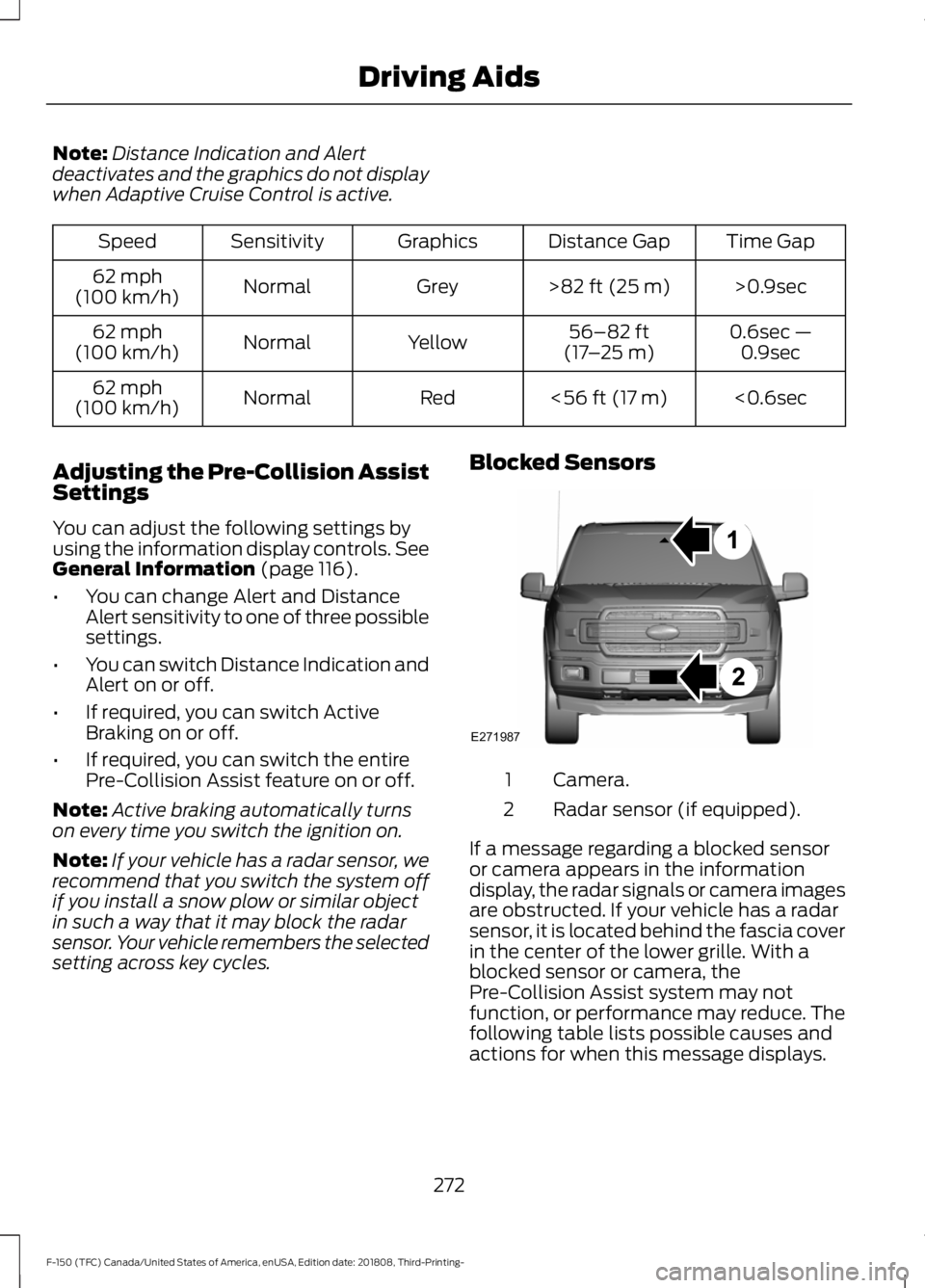
setting across key cycles. Blocked Sensors
Camera.
1
Radar sensor (if equipped).
2
If a message regarding a blocked sensor
or camera appears in the information
display, the radar signals or camera images
are obstructed. If your vehicle has a radar
sensor, it is located behind the fascia cover
in the center of the lower grille. With a
blocked sensor or camera, the
Pre-Collision Assist system may not
function, or performance may reduce. The
following table lists possible causes and
actions for when this message displays.
272
F-150 (TFC) Canada/United States of America, enUSA, Edition date: 201808, Third-Printing- Driving AidsE271987
Page 323 of 644

•
Transmissions give their best fuel
economy when operated in the top
cruise gear and with steady pressure
on the gas pedal.
• Four-wheel-drive operation (if
equipped) is less fuel efficient than
two-wheel-drive operation.
• Close the windows for high-speed
driving.
OFF-ROAD DRIVING
In addition to providing an excellent
on-road driving experience, your vehicle
excels at all types of off-road driving. The
truck has been designed and equipped to
allow you to explore those places where
the road doesn ’t take you whether it’ s a
forest trail or the open desert. Before going
off-roading, consult with your local
governmental agencies to determine
designated off-road trails and recreation
areas. Also, be sure to understand any
off-road vehicle registration requirements
for the area in which you plan on driving.
Tread Lightly is an educational program
designed to increase public awareness of
land-use regulations and responsibilities
in our nation ’s wilderness areas. Ford joins
the U.S. Forest Service and Bureau of Land
Management in encouraging you to help
preserve our national forest and other
public and private lands by treading lightly.
Before taking your vehicle off-roading, a
basic vehicle inspection should be done to
make sure that the vehicle is in top working
condition. It is always recommended that at least
two vehicles are used while off-roading.
The buddy system helps make sure that
help is close at hand should a vehicle
become stuck or damaged. It is also wise
to take supplies such as a first aid kit,
supply of water, tow strap, cell or satellite
phone with you any time an off-road
excursion is planned.
Basic Off-road Driving Techniques
•
Grip the steering wheel with thumbs
on the outside of the rim. This will
reduce the risk of injury due to abrupt
steering wheel motions that occur
when negotiating rough terrain. Do not
grip the steering wheel with thumbs
inside the rim.
• Throttle, brake and steering inputs
should be made in a smooth and
controlled manner. Sudden inputs to
the controls can cause loss of traction
or upset the vehicle, especially while
on sloped terrain or while crossing
obstacles such as rocks or logs.
• Look ahead on your route noting
upcoming obstacles, surface texture
or color changes or any other factors
which may indicate a change in
available traction, and adjust the
vehicle speed and route accordingly.
During pre-run, mark obstacles with
GPS markers to make sure appropriate
speeds are used to avoid potential
vehicle damage.
• When driving off-road, if the front or
rear suspension is bottoming out
and/or excessive contact with the
skid-plates is encountered, reduce
vehicle speed to avoid potential
damage to the vehicle.
• When running with other vehicles, it is
recommended that communication is
used, and the lead vehicle notify other
vehicles of obstacles that could cause
potential vehicle damage.
320
F-150 (TFC) Canada/United States of America, enUSA, Edition date: 201808, Third-Printing- Driving Hints
Page 343 of 644

Protected Component
Fuse Rating
Fuse Number
Horn.
25A 1
1
Electric fan 1.
50A 2
2
Windshield wiper motor.
30A 2
3
Body control module.
60A 2
4
Starter relay.
30A 2
5
Power point 1.
20A 2
6
Power point 2.
20A 2
8
Rain sensor.
5A 1
10
Upfitter 1 relay (Raptor).
15A 2
12
4x4 run/start.
10A 1
13
Adaptive cruise control run/start module.
Not used (base).
—
14
Not used (spare) (Raptor).
15A 1
Front view camera.
7.5A 1
15
Voltage quality module.
Voltage quality module (Raptor).
15A 1
Powertrain control module.
10A 1
16
Transmission control module run/start.
Anti-lock brakes run/start.
10A 1
17
Electric power steering run/start.
10A 1
18
Upfitter 5 relay (Raptor).
5A 1
19
Blower motor.
40A 2
20
Passenger seat motors.
30A 2
21
340
F-150 (TFC) Canada/United States of America, enUSA, Edition date: 201808, Third-Printing- Fuses
Page 627 of 644

South Korea
Radio Frequency Certifications for
SYNC 3
Brazil China
Radio Frequency Certifications for
Cruise Control Module
Canada
IC: 3432A-0065TR
United States of America
FCC ID: L2C0065TR
Radio Frequency Certifications for
Body Control Module
Canada
IC: 7812A-A2C738448
Model # : M : A2C750526
Model # : M : A2C750561
United States of America
FCC ID: M3NA2C738448
Model # : M : A2C750526
Model # : M : A2C750561
Radio Frequency Certification for
Keys and Remote Controls
Canada
IC : 7812A-A2C931423
IC: 7812A-A2C931426
624
F-150 (TFC) Canada/United States of America, enUSA, Edition date: 201808, Third-Printing- AppendicesE273475 E252722 E282218 E291427