Page 52 of 583
While the system is designed to help
reduce serious injuries, contact with a
deploying airbag may also cause abrasions
or swelling. Temporary hearing loss is also
a possibility as a result of the noise
associated with a deploying airbag.
Because airbags must inflate rapidly and
with considerable force, there is the risk of
death or serious injuries such as fractures,
facial and eye injuries or internal injuries,
particularly to occupants who are not
properly restrained or are otherwise out of
position at the time of airbag deployment.
Thus, it is extremely important that
occupants be properly restrained as far
away from the airbag module as possible
while maintaining vehicle control.
Routine maintenance of the airbags is not
required.
DRIVER AND PASSENGER
AIRBAGS
WARNING: Do not place your arms
on the airbag cover or through the
steering wheel. Failure to follow this
instruction could result in personal injury. WARNING: Keep the areas in front
of the airbags free from obstruction. Do
not affix anything to or over the airbag
covers. Objects could become projectiles
during airbag deployment or in a sudden
stop. Failure to follow this instruction
could result in personal injury or death. WARNING:
Airbags can kill or
injure a child in a child restraint. Never
place a rear-facing child restraint in front
of an active airbag. If you must use a
forward-facing child restraint in the front
seat, move the seat upon which the child
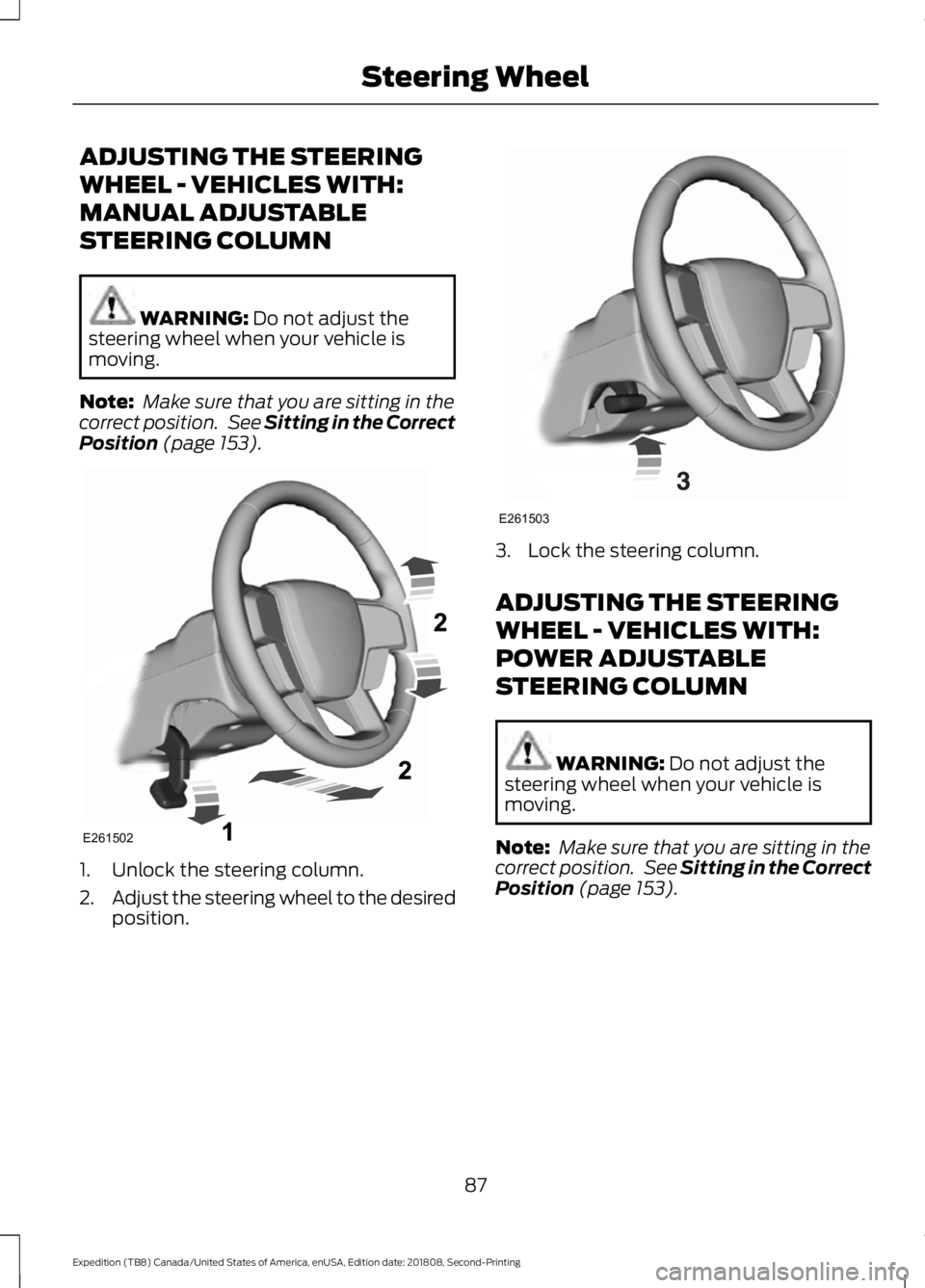
restraint is installed all the way back. The driver and passenger front airbags will
deploy during significant frontal and near
frontal crashes.
The driver and passenger front airbag
system consists of:
•
Driver and passenger airbag modules.
• Front passenger sensing system. · Crash sensors and monitoring
system with readiness indicator.
See Crash Sensors and Airbag
Indicator
(page 54).
Proper Driver and Front Passenger
Seating Adjustment WARNING:
National Highway
Traffic Safety Administration (NHTSA)
recommends a minimum distance of at
least
10 in (25 cm) between an
occupant's chest and the driver airbag
module.
To properly position yourself away from
the airbag:
• Move your seat to the rear as far as you
can while still reaching the pedals
comfortably.
• Recline the seat slightly (one or two
degrees) from the upright position.
49
Expedition (TB8) Canada/United States of America, enUSA, Edition date: 201808, Second-Printing Supplementary Restraints SystemE151127 E67017
Page 90 of 583
ADJUSTING THE STEERING
WHEEL - VEHICLES WITH:
MANUAL ADJUSTABLE
STEERING COLUMN
WARNING: Do not adjust the
steering wheel when your vehicle is
moving.
Note: Make sure that you are sitting in the
correct position. See
Sitting in the Correct
Position (page 153). 1. Unlock the steering column.
2.
Adjust the steering wheel to the desired
position. 3. Lock the steering column.
ADJUSTING THE STEERING
WHEEL - VEHICLES WITH:
POWER ADJUSTABLE
STEERING COLUMN
WARNING:
Do not adjust the
steering wheel when your vehicle is
moving.
Note: Make sure that you are sitting in the
correct position. See
Sitting in the Correct
Position (page 153).
87
Expedition (TB8) Canada/United States of America, enUSA, Edition date: 201808, Second-Printing Steering WheelE261502 E261503
Page 91 of 583
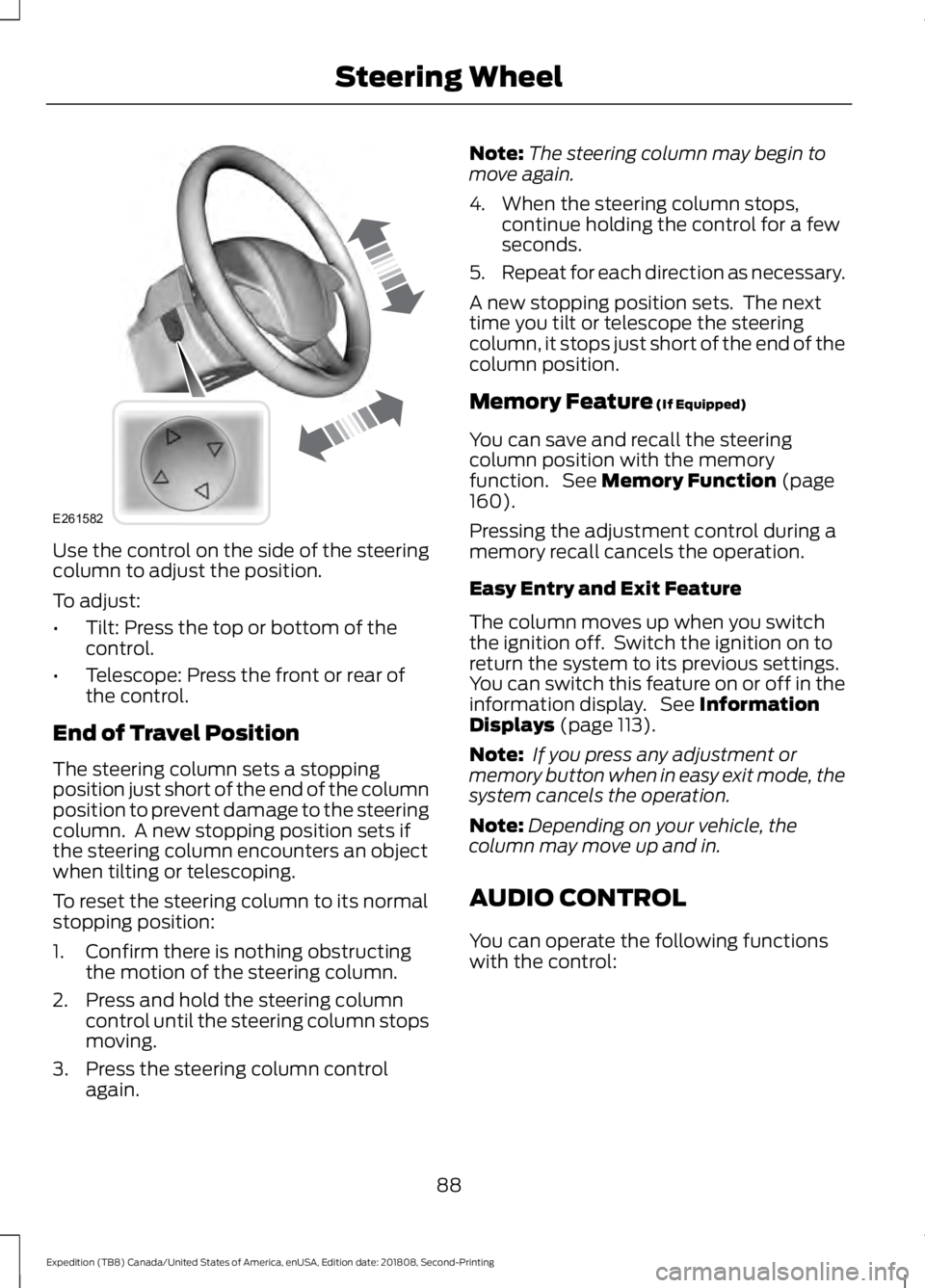
Use the control on the side of the steering
column to adjust the position.
To adjust:
•
Tilt: Press the top or bottom of the
control.
• Telescope: Press the front or rear of
the control.
End of Travel Position
The steering column sets a stopping
position just short of the end of the column
position to prevent damage to the steering
column. A new stopping position sets if
the steering column encounters an object
when tilting or telescoping.
To reset the steering column to its normal
stopping position:
1. Confirm there is nothing obstructing the motion of the steering column.
2. Press and hold the steering column control until the steering column stops
moving.
3. Press the steering column control again. Note:
The steering column may begin to
move again.
4. When the steering column stops, continue holding the control for a few
seconds.
5. Repeat for each direction as necessary.
A new stopping position sets. The next
time you tilt or telescope the steering
column, it stops just short of the end of the
column position.
Memory Feature (If Equipped)
You can save and recall the steering
column position with the memory
function. See
Memory Function (page
160).
Pressing the adjustment control during a
memory recall cancels the operation.
Easy Entry and Exit Feature
The column moves up when you switch
the ignition off. Switch the ignition on to
return the system to its previous settings.
You can switch this feature on or off in the
information display. See
Information
Displays (page 113).
Note: If you press any adjustment or
memory button when in easy exit mode, the
system cancels the operation.
Note: Depending on your vehicle, the
column may move up and in.
AUDIO CONTROL
You can operate the following functions
with the control:
88
Expedition (TB8) Canada/United States of America, enUSA, Edition date: 201808, Second-Printing Steering WheelE261582
Page 92 of 583
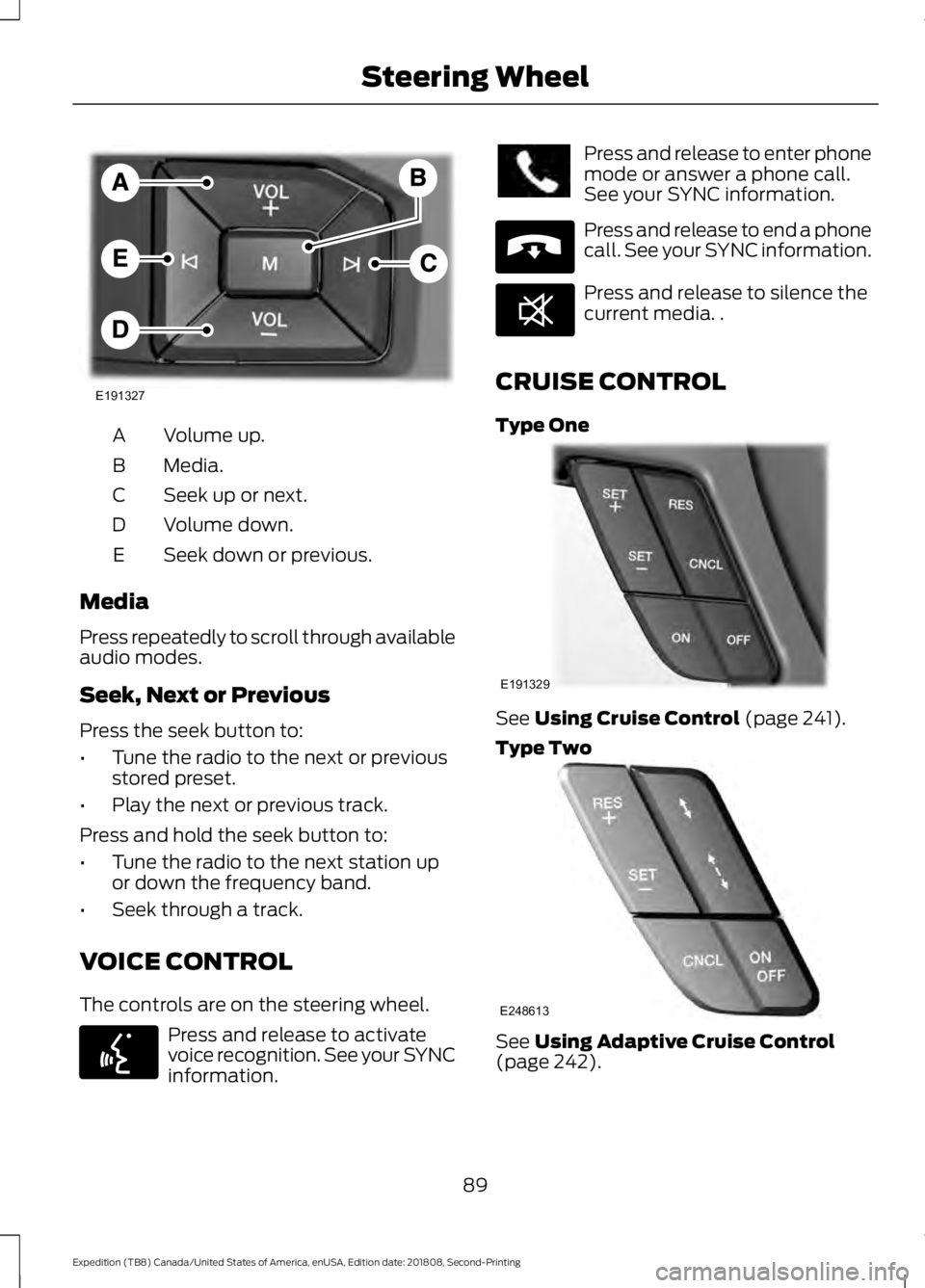
Volume up.
A
Media.
B
Seek up or next.
C
Volume down.
D
Seek down or previous.
E
Media
Press repeatedly to scroll through available
audio modes.
Seek, Next or Previous
Press the seek button to:
• Tune the radio to the next or previous
stored preset.
• Play the next or previous track.
Press and hold the seek button to:
• Tune the radio to the next station up
or down the frequency band.
• Seek through a track.
VOICE CONTROL
The controls are on the steering wheel. Press and release to activate
voice recognition. See your SYNC
information. Press and release to enter phone
mode or answer a phone call.
See your SYNC information.
Press and release to end a phone
call. See your SYNC information.
Press and release to silence the
current media. .
CRUISE CONTROL
Type One See Using Cruise Control (page 241).
Type Two See
Using Adaptive Cruise Control
(page 242).
89
Expedition (TB8) Canada/United States of America, enUSA, Edition date: 201808, Second-Printing Steering WheelE191327 E142599 E265040 E268549 E191329 E248613
Page 93 of 583
INFORMATION DISPLAY
CONTROL
See Information Displays (page 113).
HEATED STEERING WHEEL
(IF
EQUIPPED)
The heated steering wheel button is on the
climate controls. Press the button to switch the
heated steering wheel on and
off.
Note: You can use the heated steering
wheel only when the engine is running.
Note: The system uses a sensor and is
designed to control the temperature of the
steering wheel and to prevent it from
overheating.
Note: In warm temperatures, the steering
wheel quickly reaches its maximum
temperature and the system reduces the
current to the heating element. This could
cause you to think that the system has
stopped working but it has not. This is
normal.
90
Expedition (TB8) Canada/United States of America, enUSA, Edition date: 201808, Second-Printing Steering WheelE191336
Page 94 of 583
ADJUSTING THE PEDALS
WARNING: Never use the pedal
adjustment controls when your feet are
on the accelerator or brake pedal when
the vehicle is moving.
You can find the control on the left side of
the steering column. Press and hold the
appropriate side of the control to move the
pedals. Farther.
A
Closer.
B
You can save and recall the pedal positions
with the memory feature. See
Memory
Function (page 160).
Note: Adjust the pedals only when your
vehicle is in park (P).
91
Expedition (TB8) Canada/United States of America, enUSA, Edition date: 201808, Second-Printing Adjustable Pedals
(If Equipped)E176213
Page 116 of 583
GENERAL INFORMATION
WARNING: Driving while
distracted can result in loss of vehicle
control, crash and injury. We strongly
recommend that you use extreme
caution when using any device that may
take your focus off the road. Your
primary responsibility is the safe
operation of your vehicle. We
recommend against the use of any
hand-held device while driving and
encourage the use of voice-operated
systems when possible. Make sure you
are aware of all applicable local laws
that may affect the use of electronic
devices while driving.
Various systems on your vehicle can be
controlled using the information display
controls on the steering wheel.
Corresponding information is displayed in
the information display.
Note: Some options may appear slightly
different or not at all if the items are
optional. Note:
Trailer options are not available if
your vehicle speed is greater than
3 mph
(5 km/h).
Note: Some MyKey menu options only
appear if MyKey is enabled and at least one
MyKey is programmed. This icon gives you the ability to
switch a feature on or off. A
check in the box indicates the
feature is on, and unchecked indicates the
feature is off.
Information Display Controls
(Type 1 and 2)
• Press the up and down arrow buttons
to scroll through and highlight the
options within a menu.
• Press the right arrow button to enter a
sub-menu.
• Press the left arrow button to exit a
menu.
• Press the
OK button to choose and
confirm a setting or messages.
Type 1 Main Menu
Trip 1
Trip 2
Fuel Economy Driver Assist Settings
113
Expedition (TB8) Canada/United States of America, enUSA, Edition date: 201808, Second-Printing Information DisplaysE204495
Page 121 of 583
Towing
Trailer Status
Trailer Status
Trailer Light Check
Trailer Sway Control
Trailer
Options
Enter the submenu and select your
setting
Select Trailer
Change Trailer Settings
Add Trailer
Connection Checklist Off Road
Off Road Status
Power Distribution
Off Road Status - Displays pitch, steering angle and roll.
Power Distribution
- Displays a graphic of the power distribution between the front and
rear wheels. Settings
Blind Spot
Cross Traffic Alert Enter the submenu and select your setting
DTE Calcula-
tion
Rear Park Aid
Trailer Blind Spot
Auto Engine Off
Vehicle
Advanced
Settings
Easy Entry/Exit
Lighting
Locks
Mirrors
Neutral Tow
118
Expedition (TB8) Canada/United States of America, enUSA, Edition date: 201808, Second-Printing Information Displays