2019 FORD EXPEDITION brake
[x] Cancel search: brakePage 399 of 583
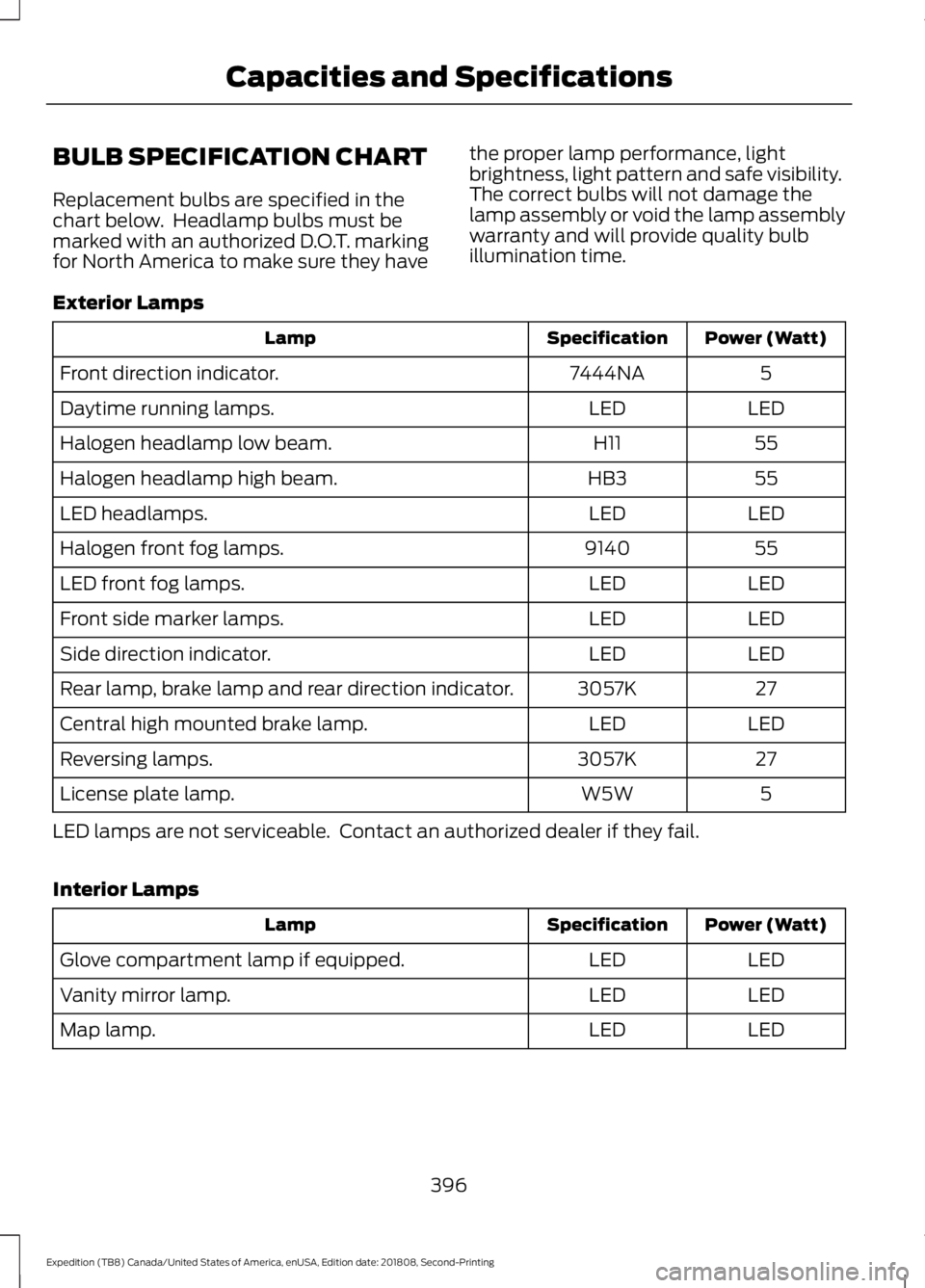
BULB SPECIFICATION CHART
Replacement bulbs are specified in the
chart below. Headlamp bulbs must be
marked with an authorized D.O.T. marking
for North America to make sure they have
the proper lamp performance, light
brightness, light pattern and safe visibility.
The correct bulbs will not damage the
lamp assembly or void the lamp assembly
warranty and will provide quality bulb
illumination time.
Exterior Lamps Power (Watt)
Specification
Lamp
5
7444NA
Front direction indicator.
LED
LED
Daytime running lamps.
55
H11
Halogen headlamp low beam.
55
HB3
Halogen headlamp high beam.
LED
LED
LED headlamps.
55
9140
Halogen front fog lamps.
LED
LED
LED front fog lamps.
LED
LED
Front side marker lamps.
LED
LED
Side direction indicator.
27
3057K
Rear lamp, brake lamp and rear direction indicator.
LED
LED
Central high mounted brake lamp.
27
3057K
Reversing lamps.
5
W5W
License plate lamp.
LED lamps are not serviceable. Contact an authorized dealer if they fail.
Interior Lamps Power (Watt)
Specification
Lamp
LED
LED
Glove compartment lamp if equipped.
LED
LED
Vanity mirror lamp.
LED
LED
Map lamp.
396
Expedition (TB8) Canada/United States of America, enUSA, Edition date: 201808, Second-Printing Capacities and Specifications
Page 509 of 583

Less Cost to Properly Maintain Your
Vehicle
Ford Protect extended service plan also
offers a Premium Maintenance Plan that
covers all scheduled maintenance, and
selected wear items. The coverage is
prepaid, so you never have to worry about
the cost of your vehicle
’s maintenance.
Covered maintenance includes:
• Windshield wiper blades.
• Spark plugs.
• The clutch disc (if equipped).
• Brake pads and linings.
• Shock absorbers.
• Struts.
• Engine Belts.
• Engine coolant hoses, clamps and
o-rings.
• Diesel exhaust fluid replenishment (if
equipped).
• Cabin air filter replacement every
20,000 mi (32,000 km) (electric
vehicles only).
Interest Free Finance Options
Just a 10% down payment will provide you
with an affordable, no interest, no fee
payment program allowing you all the
security and benefits Ford Protect
extended service plan has to offer while
paying over time. You are pre-approved
with no credit check or hassles. To learn
more, call our Ford Protect extended
service plan specialists at 800-367-3377.
Ford Protect Extended Service Plan
P.O. Box 321067
Detroit, MI 48232 Ford Protect Extended Service
Plan (CANADA ONLY)
You can get more protection for your
vehicle by purchasing a Ford Protect
extended service plan. Ford Protect
extended service plan is the only service
contract backed by Ford Motor Company
of Canada, Limited. Depending on the plan
you purchase, Ford Protect extended
service plan provides benefits such as:
•
Rental reimbursement.
• Coverage for certain maintenance and
wear items.
• Protection against repair costs after
your New Vehicle Limited Warranty
Coverage expires.
• Roadside Assistance benefits.
There are several Ford Protect extended
service plans available in various time,
distance and deductible combinations.
Each plan is tailored to fit your own driving
needs, including reimbursement for towing
and rental. When you purchase Ford
Protect extended service plan, you receive
added peace-of-mind protection
throughout Canada, the United States and
Mexico, provided by a network of
participating authorized Ford Motor
Company dealers.
Note: Repairs performed outside of
Canada, the United States and Mexico are
not eligible for Ford Protect extended
service plan coverage.
This information is subject to change. For
more information; visit your local Ford of
Canada dealer or www.ford.ca to find the
Ford Protect extended service plan that is
right for you.
506
Expedition (TB8) Canada/United States of America, enUSA, Edition date: 201808, Second-Printing Ford Protect
Page 512 of 583
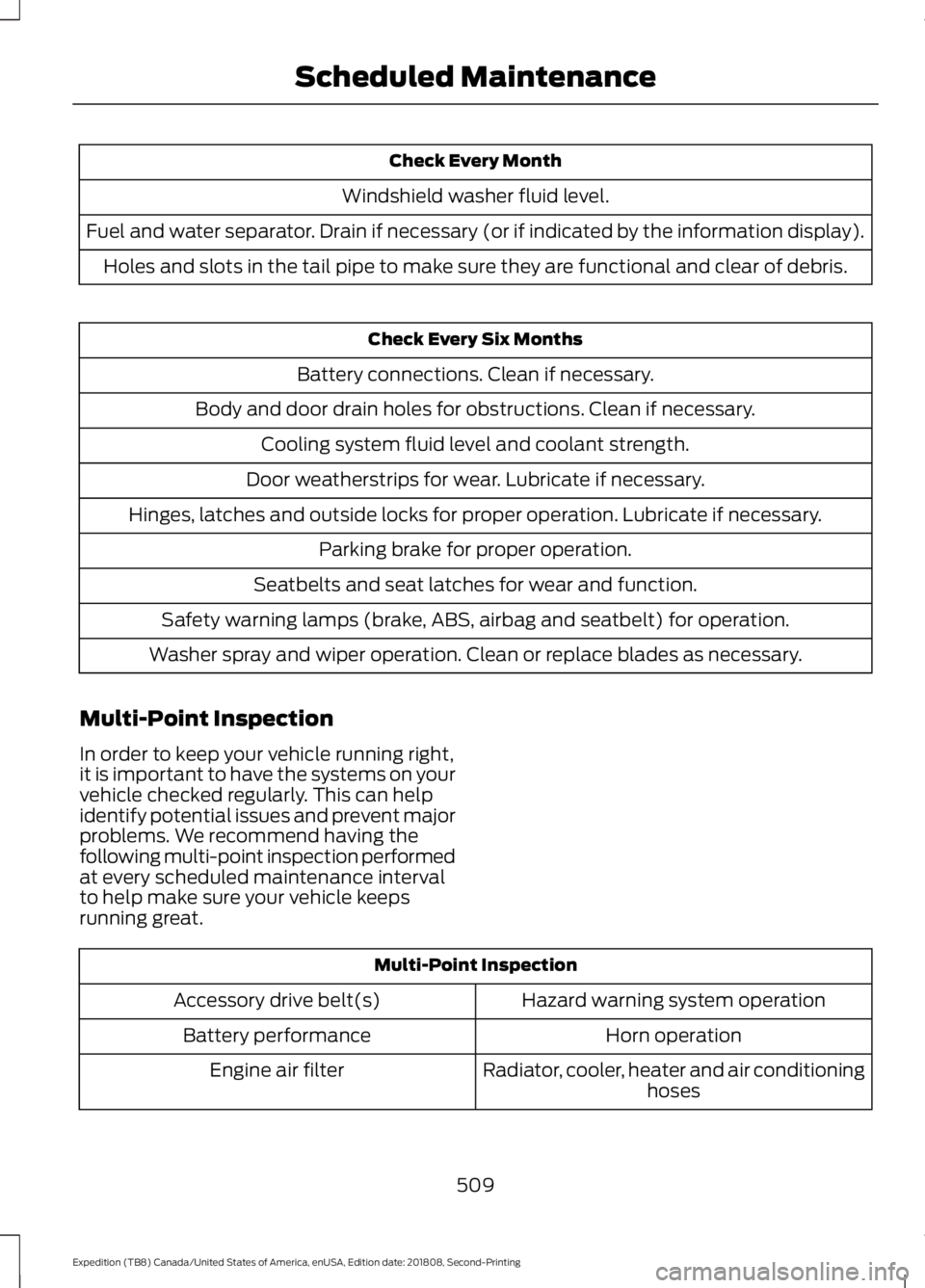
Check Every Month
Windshield washer fluid level.
Fuel and water separator. Drain if necessary (or if indicated by the information display). Holes and slots in the tail pipe to make sure they are functional and clear of debris. Check Every Six Months
Battery connections. Clean if necessary.
Body and door drain holes for obstructions. Clean if necessary. Cooling system fluid level and coolant strength.
Door weatherstrips for wear. Lubricate if necessary.
Hinges, latches and outside locks for proper operation. Lubricate if necessary. Parking brake for proper operation.
Seatbelts and seat latches for wear and function.
Safety warning lamps (brake, ABS, airbag and seatbelt) for operation.
Washer spray and wiper operation. Clean or replace blades as necessary.
Multi-Point Inspection
In order to keep your vehicle running right,
it is important to have the systems on your
vehicle checked regularly. This can help
identify potential issues and prevent major
problems. We recommend having the
following multi-point inspection performed
at every scheduled maintenance interval
to help make sure your vehicle keeps
running great. Multi-Point Inspection
Hazard warning system operation
Accessory drive belt(s)
Horn operation
Battery performance
Radiator, cooler, heater and air conditioninghoses
Engine air filter
509
Expedition (TB8) Canada/United States of America, enUSA, Edition date: 201808, Second-Printing Scheduled Maintenance
Page 513 of 583
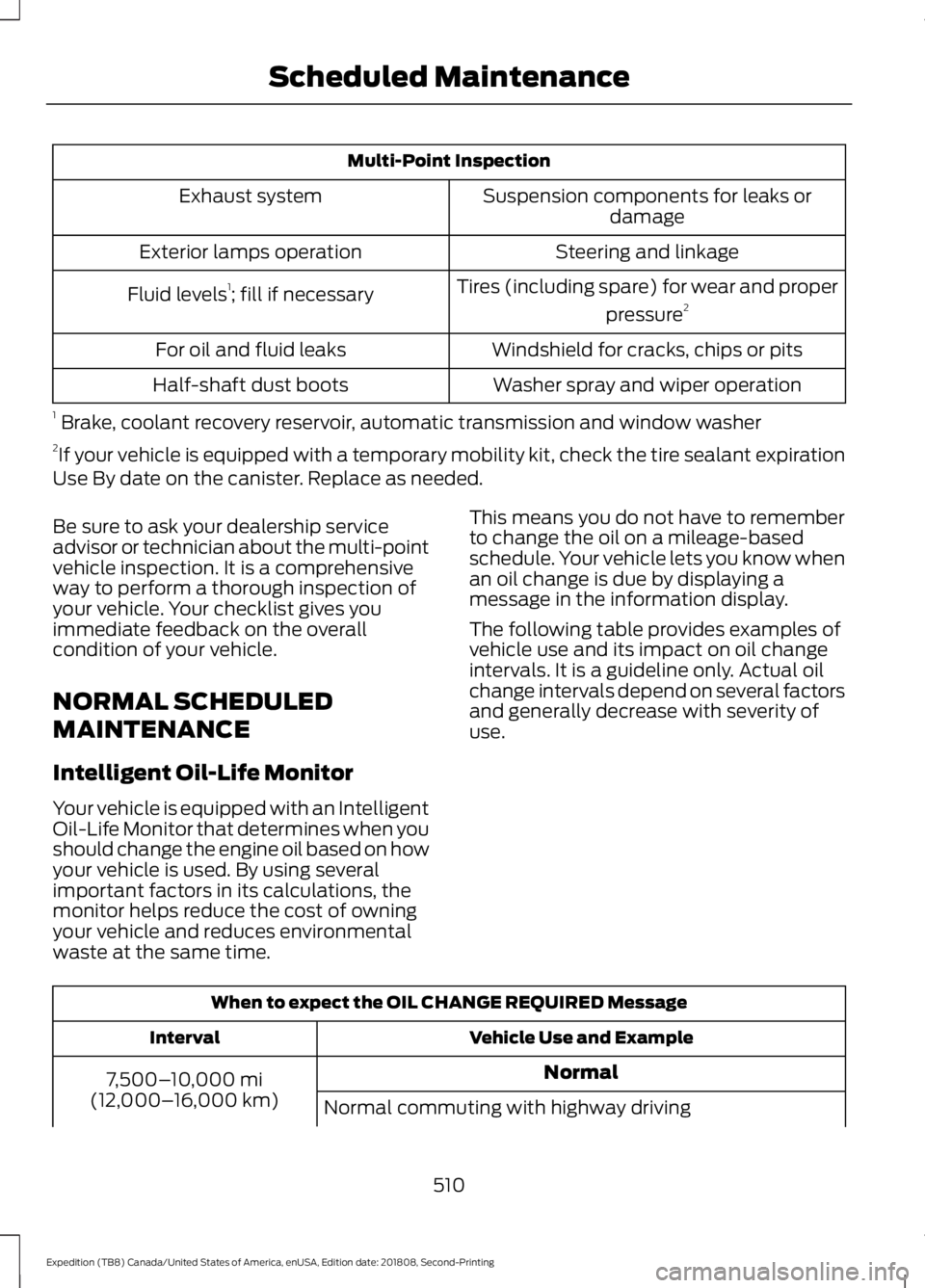
Multi-Point Inspection
Suspension components for leaks ordamage
Exhaust system
Steering and linkage
Exterior lamps operation
Tires (including spare) for wear and properpressure2
Fluid levels 1
; fill if necessary
Windshield for cracks, chips or pits
For oil and fluid leaks
Washer spray and wiper operation
Half-shaft dust boots
1 Brake, coolant recovery reservoir, automatic transmission and window washer
2 If your vehicle is equipped with a temporary mobility kit, check the tire sealant expiration
Use By date on the canister. Replace as needed.
Be sure to ask your dealership service
advisor or technician about the multi-point
vehicle inspection. It is a comprehensive
way to perform a thorough inspection of
your vehicle. Your checklist gives you
immediate feedback on the overall
condition of your vehicle.
NORMAL SCHEDULED
MAINTENANCE
Intelligent Oil-Life Monitor
Your vehicle is equipped with an Intelligent
Oil-Life Monitor that determines when you
should change the engine oil based on how
your vehicle is used. By using several
important factors in its calculations, the
monitor helps reduce the cost of owning
your vehicle and reduces environmental
waste at the same time. This means you do not have to remember
to change the oil on a mileage-based
schedule. Your vehicle lets you know when
an oil change is due by displaying a
message in the information display.
The following table provides examples of
vehicle use and its impact on oil change
intervals. It is a guideline only. Actual oil
change intervals depend on several factors
and generally decrease with severity of
use.
When to expect the OIL CHANGE REQUIRED Message
Vehicle Use and Example
Interval
Normal
7,500– 10,000 mi
(12,000– 16,000 km)
Normal commuting with highway driving
510
Expedition (TB8) Canada/United States of America, enUSA, Edition date: 201808, Second-Printing Scheduled Maintenance
Page 514 of 583
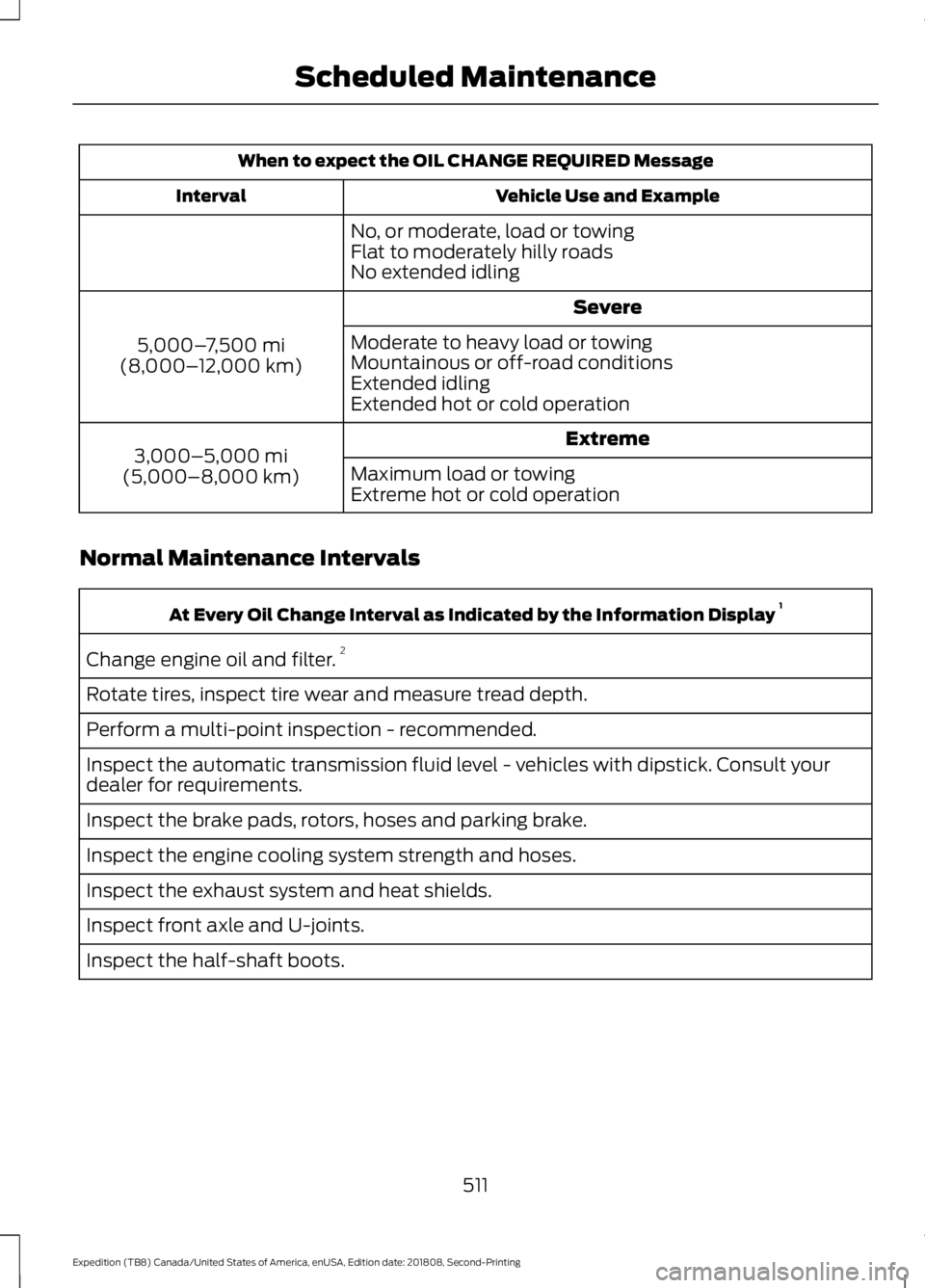
When to expect the OIL CHANGE REQUIRED Message
Vehicle Use and Example
Interval
No, or moderate, load or towing
Flat to moderately hilly roads
No extended idling Severe
5,000– 7,500 mi
(8,000– 12,000 km) Moderate to heavy load or towing
Mountainous or off-road conditions
Extended idling
Extended hot or cold operation
Extreme
3,000–5,000 mi
(5,000–8,000 km) Maximum load or towing
Extreme hot or cold operation
Normal Maintenance Intervals At Every Oil Change Interval as Indicated by the Information Display
1
Change engine oil and filter. 2
Rotate tires, inspect tire wear and measure tread depth.
Perform a multi-point inspection - recommended.
Inspect the automatic transmission fluid level - vehicles with dipstick. Consult your
dealer for requirements.
Inspect the brake pads, rotors, hoses and parking brake.
Inspect the engine cooling system strength and hoses.
Inspect the exhaust system and heat shields.
Inspect front axle and U-joints.
Inspect the half-shaft boots.
511
Expedition (TB8) Canada/United States of America, enUSA, Edition date: 201808, Second-Printing Scheduled Maintenance
Page 529 of 583
ELECTROMAGNETIC
COMPATIBILITY
WARNING: Do not place objects
or mount equipment on or near the
airbag cover, on the side of the seatbacks
(of the front seats), or in front seat areas
that may come into contact with a
deploying airbag. Failure to follow these
instructions may increase the risk of
personal injury in the event of a crash. WARNING:
Do not fasten antenna
cables to original vehicle wiring, fuel
pipes and brake pipes. WARNING:
Keep antenna and
power cables at least 4 in (10 cm) from
any electronic modules and airbags.
Note: We test and certify your vehicle to
meet electromagnetic compatibility
legislation (UNECE Regulation 10 or other
applicable local requirements). It is your
responsibility to make sure that any
equipment an authorized dealer installs on
your vehicle complies with applicable local
legislation and other requirements.
Note: Any radio frequency transmitter
equipment in your vehicle (such as cellular
telephones and amateur radio transmitters)
must keep to the parameters in the
following table. We do not provide special
provisions or conditions for installations or
use.
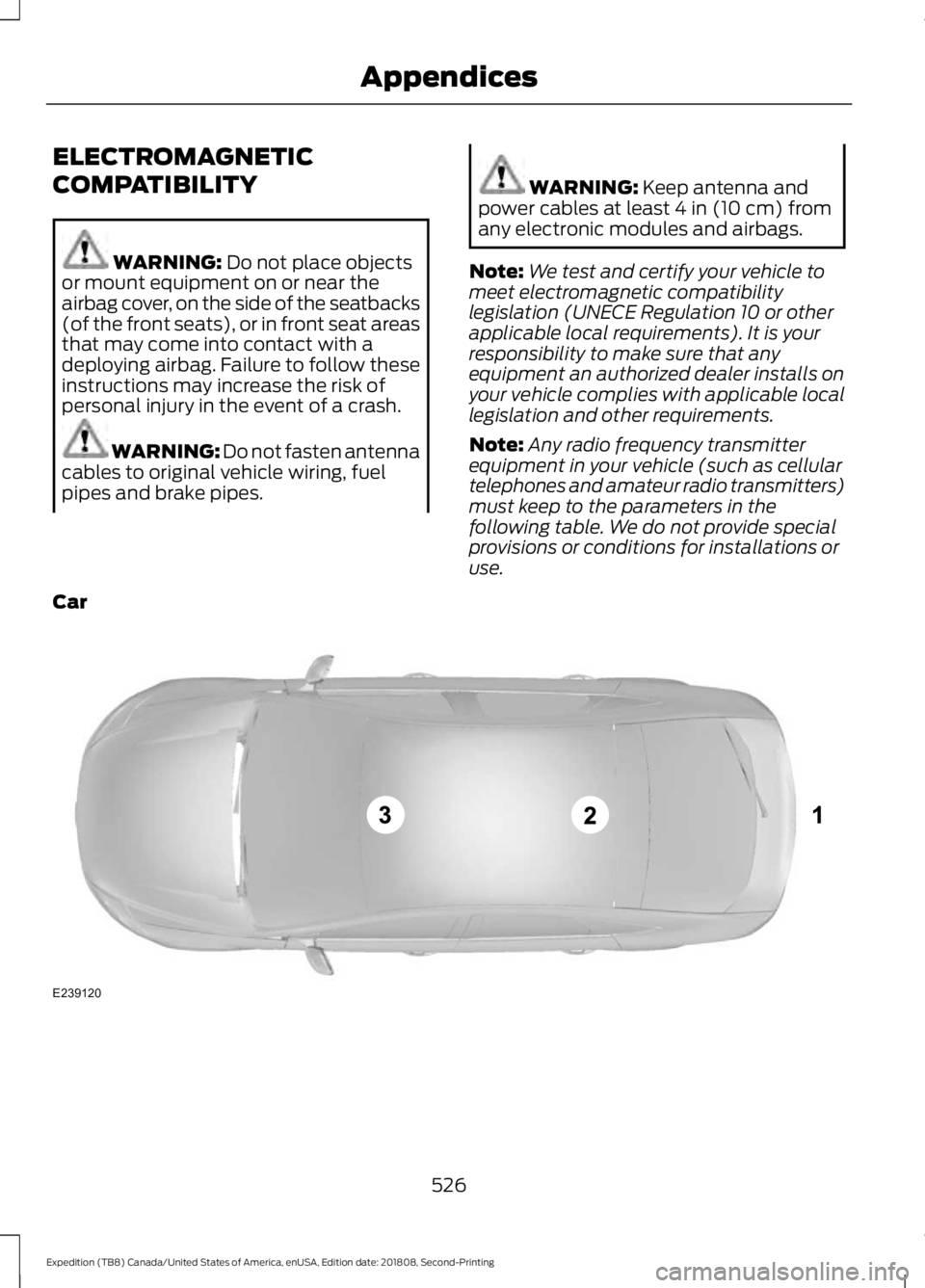
Car 526
Expedition (TB8) Canada/United States of America, enUSA, Edition date: 201808, Second-Printing AppendicesE239120
Page 570 of 583
3
360 Degree Camera...................................238
Advanced Camera Views............................... 239
Camera Views..................................................... 239
Front Camera...................................................... 239
Keep Out Zone.................................................... 239
Side Camera........................................................ 240
4
4WD See: Four-Wheel Drive.................................... 206
A
A/C See: Climate Control......................................... 142
About This Manual...........................................7
ABS See: Brakes............................................................ 215
ABS driving hints See: Hints on Driving With Anti-Lock
Brakes................................................................. 215
Accessories....................................................503 Exterior Style....................................................... 503
Interior Style........................................................ 503
Lifestyle................................................................. 503
Peace of Mind..................................................... 503
Accessories See: Replacement Parts
Recommendation............................................ 14
ACC See: Using Adaptive Cruise Control............242
Active Park Assist........................................229 Using Active Park Assist.................................. 230
Adjustable Pedals...........................................91
Adjusting the Headlamps........................344 Horizontal Aim Adjustment........................... 345
Vertical Aim Adjustment................................ 344
Adjusting the Pedals......................................91
Adjusting the Steering Wheel - Vehicles With: Manual Adjustable Steering
Column............................................................87
Adjusting the Steering Wheel - Vehicles With: Power Adjustable Steering
Column............................................................87
End of Travel Position........................................ 88Memory Feature...................................................
88
Airbag Disposal...............................................55
Air Conditioning See: Climate Control......................................... 142
Air Filter See: Changing the Engine Air Filter.............347
Alarm See: Anti-Theft Alarm........................................ 83
Ambient Lighting
...........................................99
Adjusting the Brightness................................... 99
Changing the Color............................................. 99
Switching Ambient Lighting Off..................... 99
Switching Ambient Lighting On..................... 99
Anti-Theft Alarm............................................83 Arming the Alarm................................................ 84
Disarming the Alarm........................................... 84
Using the System................................................. 83
Appendices....................................................526
Apps..................................................................472 ........................................................................\
........... 472
SiriusXM Traffic and Travel Link................... 474
At a Glance........................................................18
Audible Warnings and Indicators.............112 Direction Indicator Chime................................. 112
Headlamps On Warning Chime...................... 112
Key in Ignition Warning Chime........................ 112
Parking Brake On Warning Chime.................112
Audio Control
..................................................88
Media........................................................................\
89
Seek, Next or Previous....................................... 89
Audio System
...............................................398
General Information......................................... 398
Audio Unit - Vehicles With: Touchscreen Display..........................................................402
Accessing the Sound Settings..................... 402
Adjusting the Volume...................................... 402
Changing Radio Stations............................... 402
Ejecting the CD................................................... 403
Inserting a CD..................................................... 403
Muting the Audio............................................... 403
Playing or Pausing Media............................... 403
Setting the Memory Presets......................... 403
Switching the Display On and Off..............403
Using Seek, Fast Forward and Reverse............................................................. 403
Audio Unit - Vehicles Without: Touchscreen Display
...............................399
Accessing the Apps Menu.............................. 399
567
Expedition (TB8) Canada/United States of America, enUSA, Edition date: 201808, Second-Printing Index
Page 571 of 583
Accessing the Clock Settings.......................
400
Accessing the Media Source Menu............400
Accessing the Phone Features.................... 400
Accessing the Settings Menu....................... 400
Accessing the Sound Settings..................... 400
Adjusting the Volume...................................... 400
Changing Radio Stations............................... 400
Listening to the Radio...................................... 401
Playing or Pausing Media................................ 401
Switching Radio Text On and Off................401
Switching Repeat Mode On and Off...........401
Switching Shuffle Mode On and Off..........401
Switching the Audio Unit On and Off.........401
Switching the Display On and Off...............401
Using Seek, Fast Forward and Reverse.............................................................. 401
Using the Display Control............................... 401
Using the Number Block................................. 401
Autolamps........................................................95 Windshield Wiper Activated
Headlamps........................................................ 95
Automatic Climate Control......................144 Accessing Rear Climate Controls.................144
Directing Air to the Footwell Air
Vents.................................................................. 144
Directing Air to the Instrument Panel Air Vents.................................................................. 144
Setting the Blower Motor Speed.................. 144
Setting the Temperature................................. 144
Switching Auto Mode On and Off................144
Switching Defrost On and Off....................... 145
Switching Dual Zone Mode On and Off........................................................................\
145
Switching Maximum Air Conditioning On and Off............................................................... 145
Switching Maximum Defrost On and Off........................................................................\
145
Switching Recirculated Air On and Off....................................................................... 146
Switching the Air Conditioning On and Off........................................................................\
145
Switching the Climate Control On and Off........................................................................\
145
Switching the Heated Seats On and Off........................................................................\
145
Switching the Ventilated Seats On and Off....................................................................... 146Automatic High Beam Control.................96
Automatic High Beam Indicator..................... 97
Switching the System On and Off.................97
Automatic Transmission...........................199 Automatic Transmission Adaptive
Learning........................................................... 205
Brake-Shift Interlock........................................ 204
If Your Vehicle Gets Stuck In Mud or Snow................................................................. 205
SelectShift™ Automatic Transmission.................................................. 203
Understanding the Shift Positions of your Automatic Transmission............................ 199
Automatic Transmission Fluid Check............................................................339
Auto-Start-Stop...........................................185 Disabling Auto-Start-Stop............................. 186
Enabling Auto-Start-Stop.............................. 185
Autowipers........................................................92
Autowipers Settings............................................ 93
Auxiliary Power Points................................174 110 Volt AC Power Point.................................... 174
12 Volt DC Power Point...................................... 174
USB Port and Power Point Locations..........174
B
Battery See: Changing the 12V Battery...................... 341
Blind Spot Information System
.............254
........................................................................\
.......... 254
Blind Spot Information System with Trailer Tow..................................................................... 256
Switching the System On and Off..............258
System Errors...................................................... 258
Using the Blind Spot Information System.............................................................. 255
BLIS See: Blind Spot Information System..........254
Bonnet Lock See: Opening and Closing the Hood...........331
Booster Seats
...................................................31
Types of Booster Seats...................................... 32
Brake Fluid Check
.......................................340
Brakes................................................................215 General Information.......................................... 215
Breaking-In....................................................303
Bulb Specification Chart..........................396
568
Expedition (TB8) Canada/United States of America, enUSA, Edition date: 201808, Second-Printing Index