2019 FORD EDGE wheel nut
[x] Cancel search: wheel nutPage 345 of 547
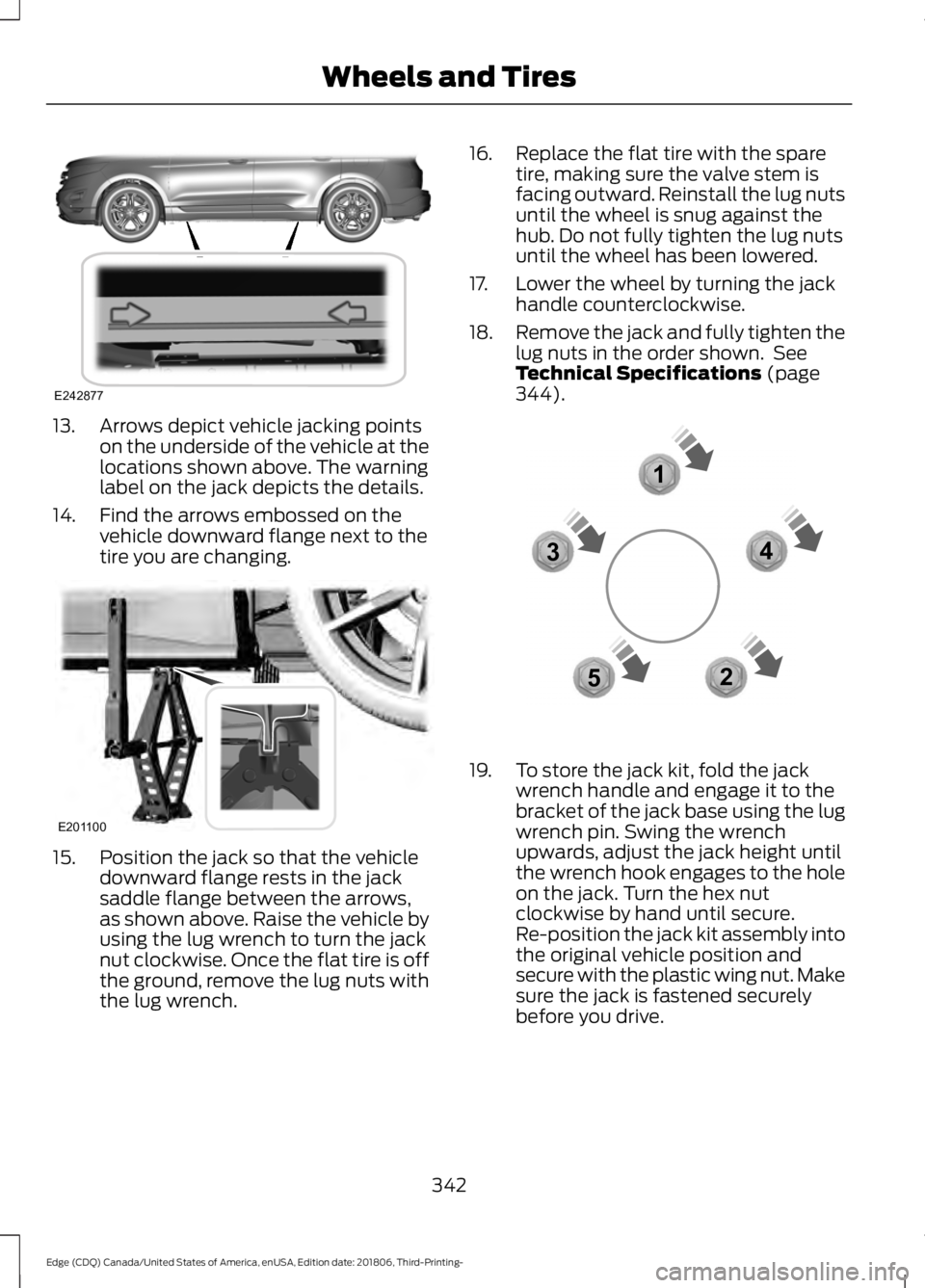
13. Arrows depict vehicle jacking points
on the underside of the vehicle at the
locations shown above. The warning
label on the jack depicts the details.
14. Find the arrows embossed on the vehicle downward flange next to the
tire you are changing.15. Position the jack so that the vehicle
downward flange rests in the jack
saddle flange between the arrows,
as shown above. Raise the vehicle by
using the lug wrench to turn the jack
nut clockwise. Once the flat tire is off
the ground, remove the lug nuts with
the lug wrench. 16. Replace the flat tire with the spare
tire, making sure the valve stem is
facing outward. Reinstall the lug nuts
until the wheel is snug against the
hub. Do not fully tighten the lug nuts
until the wheel has been lowered.
17. Lower the wheel by turning the jack handle counterclockwise.
18. Remove the jack and fully tighten the
lug nuts in the order shown. See
Technical Specifications (page
344). 19. To store the jack kit, fold the jack
wrench handle and engage it to the
bracket of the jack base using the lug
wrench pin. Swing the wrench
upwards, adjust the jack height until
the wrench hook engages to the hole
on the jack. Turn the hex nut
clockwise by hand until secure.
Re-position the jack kit assembly into
the original vehicle position and
secure with the plastic wing nut. Make
sure the jack is fastened securely
before you drive.
342
Edge (CDQ) Canada/United States of America, enUSA, Edition date: 201806, Third-Printing- Wheels and TiresE242877 E201100 12
3
4
5E306781
Page 347 of 547

TECHNICAL SPECIFICATIONS
Wheel Lug Nut Torque Specifications
WARNING: When a wheel is installed, always remove any corrosion, dirt or foreign
materials present on the mounting surfaces of the wheel or the surface of the wheel
hub, brake drum or brake disc that contacts the wheel. Make sure that any fasteners
that attach the rotor to the hub are secured so they do not interfere with the mounting
surfaces of the wheel. Installing wheels without correct metal-to-metal contact at the
wheel mounting surfaces can cause the wheel nuts to loosen and the wheel to come
off while your vehicle is in motion, resulting in loss of control. lb.ft (Nm)*
Bolt size
162 lb.ft (220 Nm)
M14 x 1.5
*Torque specifications are for nut and bolt threads free of dirt and rust. Use only Ford
recommended replacement fasteners.
Retighten the lug nuts to the specified torque within 100 miles (160 kilometers) after any
wheel disturbance (such as tire rotation, changing a flat tire, wheel removal). Wheel pilot bore
A
Inspect the wheel pilot hole and
mounting surface prior to installation.
Remove any visible corrosion or loose
particles.
344
Edge (CDQ) Canada/United States of America, enUSA, Edition date: 201806, Third-Printing- Wheels and TiresE145950
Page 378 of 547

things, this profile may contain data about
your cellular phone book, text messages
(read and unread), and call history,
including history of calls when your cellular
phone was not connected to the system.
In addition, if you connect a media device,
the system creates and retains an index of
supported media content. The system also
records a short development log of
approximately 10 minutes of all recent
system activity. The log profile and other
system data may be used to improve the
system and help diagnose any problems
that may occur.
The cellular profile, media device index,
and development log will remain in the
vehicle unless you delete them and are
generally accessible only in the vehicle
when you connect the cellular phone or
media player. If you no longer plan to use
the system or the vehicle, we recommend
you perform a Master Reset to erase all
stored information.
No one can access system data without
special equipment and access to the
vehicle's SYNC module. Ford Motor
Company and Ford of Canada will not
access the system data for any purpose
other than as described absent consent, a
court order, or where required by law
enforcement, other government
authorities, or other third parties acting
with lawful authority. Other parties may
seek to access the information
independently of Ford Motor Company and
Ford of Canada. For further privacy
information, see the section on 911 Assist.
See SYNC™ Troubleshooting (page 382).
USING VOICE RECOGNITION
This system helps you control many
features using voice commands. This
allows you to keep your hands on the
wheel and focus on what is around you.
Initiating a Voice Session Press the voice button. A list of
available voice commands
appears in the display.
Global Voice Commands
These voice commands are always
available. You can say them at any time. Global voice commands
Gives you available commands you can use
on the current screen.
Help
Gives you a list of possible voice
commands.
List of Commands
This command ends the voice session. You
can also cancel a session by pressing seek
up, seek down, or holding the voice button
for two or more seconds.
Cancel
375
Edge (CDQ) Canada/United States of America, enUSA, Edition date: 201806, Third-Printing- SYNC™ (If Equipped)E142599
Page 384 of 547

To Access Using Voice Commands
Press the voice button, then when prompted say:
Action and Description
Voice Command
Say the name of the application after the tone.
The app should start. When an app is running through SYNC, you can press the voice button and speak commands specific to the app, for example "Play Playlist Road Trip".
Mobile Applications
SYNC lists all of the currently available mobile apps.
List Applications
Searches your connected mobile device for SYNC-compatible mobile apps.
Find Applications
Use this command to discover the available voice commands.
Help
App Permissions
App permissions are organized by groups.
You can grant these group permissions
individually. You can change a permission
group status any time when not driving, by
using the settings menu.
When you launch an app using SYNC, the
system may ask you to grant certain
permissions, for example:
• To allow your vehicle to provide vehicle
information to the app such as, but not
limited to: Fuel level, fuel economy, fuel
consumption, engine speed, rain
sensor, odometer, VIN, external
temperature, gear position, tire
pressure, and head lamp status.
• To allow your vehicle to provide driving
characteristic information such as, but
not limited to: MyKey, seat belt status,
engine revolutions per minute, gear
position, braking events, steering wheel
angle, and accelerator pedal position. •
To allow your vehicle to provide
location information, including: GPS
and speed.
• To allow the app to send push
notifications using the vehicle display
and voice capabilities while running in
a background state. Push notifications
may be particularly useful for news or
location based apps.
Note: You only need to grant permissions
the first time you use an app with SYNC.
Note: Ford is not responsible or liable for
any damages or loss of privacy relating to
usage of an app, or dissemination of any
vehicle data that you approve Ford to
provide to an app.
Enabling SYNC Mobile Apps
In order to enable mobile apps, SYNC
requires user consent to send and receive
app authorization information and updates
using the data plan associated with the
connected device.
Data is sent to Ford in the United States
through the connected device. The
information is encrypted and includes your
VIN, SYNC module number, anonymous
usage statistics and debugging
information. Updates may take place.
381
Edge (CDQ) Canada/United States of America, enUSA, Edition date: 201806, Third-Printing- SYNC™ (If Equipped)
Page 440 of 547

For restaurants, cityseeker can provide
information such as star rating, average
cost, review, handicap access, hours of
operation, and website address.
For hotels, cityseeker can provide
information such as star rating, price
category, review, check-in and checkout
times, hotel service icons and website
address. Hotel service icons include:
•
Restaurant
• Business center
• Handicap facilities
• Laundry
• Refrigerator
• 24 hour room service
• Fitness center
• Internet access
• Pool
• Wi-Fi
Attractions include nearby landmarks,
amusement parks, historic buildings and
more. cityseeker can provide information
such as star rating, reviews, hour of
operation and admission price.
SiriusXM Traffic and Travel Link (If
Equipped)
SiriusXM Traffic and Travel Link is available
on vehicles equipped with navigation and
only in select markets. You must activate
and subscribe to receive SiriusXM Traffic
and Travel Link information. It helps you
locate the best gas prices, find movie
listings, get current traffic alerts, view the
weather map, get accurate ski conditions
and see current sports scores. See Apps
(page 437). The system calculates a reasonable
efficient route based on available speed
limits, traffic, and road conditions. You may
know a local short cut that is more efficient
at a given time than the route provided by
SYNC 3, but you should expect a slight
difference in minutes or miles with the
SYNC 3 route.
Navigation Map Updates
Annual navigation map updates are
available for purchase through your
dealership, by calling 1-866-462-8837 in
the United States and Canada or
01-800-557-5539 in Mexico. You can also
visit:
Website
www.navigation.com/sync
You need to specify the make and model
of your vehicle to determine if there is an
update available.
HERE is the digital map provider for the
navigation application. If you find map data
errors, you may report them directly to
HERE by going to
www.here.com/mapcreator. HERE
evaluates all reported map errors and
responds with the result of their
investigation by e-mail.
Map coverage includes the USA (including
Puerto Rico and the US Virgin Islands),
Canada and Mexico.
APPS
The system enables voice, steering wheel,
and touch screen control of SYNC 3
AppLink enabled smartphone apps.
When an app is running through AppLink,
you can control main features of the app
through voice commands and steering
wheel controls.
437
Edge (CDQ) Canada/United States of America, enUSA, Edition date: 201806, Third-Printing- SYNC™ 3
(If Equipped)
Page 541 of 547

Instrument Lighting Dimmer.....................80
Vehicles With Front Fog Lamps...................... 81
Vehicles Without Front Fog Lamps................81
Instrument Panel.............................................17
Interior Lamps.................................................84
Front Interior Lamp............................................. 84
Rear Interior Lamps............................................. 85
Interior Mirror...................................................89 Auto-Dimming Mirror......................................... 89
Introduction.........................................................7
J
Jump Starting the Vehicle........................258 Preparing Your Vehicle.................................... 258
To Connect the Booster Cables................... 258
To Start the Engine........................................... 259
K
Keyless Entry
....................................................63
SECURICODE™ KEYLESS ENTRY
KEYPAD.............................................................. 63
Keyless Starting
............................................155
Ignition Modes..................................................... 155
Keys and Remote Controls.........................49
L
Lane Keeping System................................226 Switching the System On and Off...............227
Liftgate...............................................................66
Lighting Control
..............................................79
Flashing the Headlamp High Beam.............80
Headlamp High Beam........................................ 79
Lighting
...............................................................79
General Information............................................ 79
Load Carriers See: Roof Racks and Load Carriers..............241
Load Carrying.................................................241
Load Limit
.......................................................242
Special Loading Instructions for Owners of
Pick-up Trucks and Utility-type
Vehicles............................................................ 246
Vehicle Loading - with and without a Trailer................................................................. 242
Locking and Unlocking.................................59 Activating Intelligent Access............................. 61Autolock...................................................................
62
Auto Relock............................................................ 62
Battery Saver......................................................... 63
Illuminated Entry.................................................. 62
Illuminated Exit..................................................... 63
Locking and Unlocking the Doors with the Key Blade........................................................... 60
Power Door Locks................................................ 59
Remote Control.................................................... 59
Smart Unlocks for Intelligent Access Keys....................................................................... 61
Lug Nuts See: Changing a Road Wheel....................... 338
M
Maintenance.................................................280 General Information......................................... 280
Manual Climate Control.............................124 Directing Air to the Footwell Air
Vents................................................................... 124
Directing Air to the Instrument Panel Air Vents................................................................... 124
Setting the Blower Motor Speed.................. 124
Setting the Temperature.................................. 124
Switching Defrost On and Off........................ 124
Switching Maximum Air Conditioning On and Off............................................................... 125
Switching Maximum Defrost On and Off........................................................................\
125
Switching Recirculated Air On and Off........................................................................\
125
Switching the Air Conditioning On and Off........................................................................\
125
Switching the Climate Control On and Off........................................................................\
125
Manual Liftgate
..............................................66
Closing the Liftgate............................................. 66
Opening the Liftgate........................................... 66
Manual Seats..................................................137 Adjusting the Seat Backrest............................ 137
Media Hub
.......................................................373
Memory Function.........................................140
Easy Entry and Exit Feature............................ 142
Linking a PreSet Position to your Remote Control or Intelligent Access Key
Fob....................................................................... 141
Saving a PreSet Position................................... 141
538
Edge (CDQ) Canada/United States of America, enUSA, Edition date: 201806, Third-Printing- Index
Page 547 of 547

W
Warning Lamps and Indicators................94
Adaptive Cruise Control.................................... 94
Anti-Lock Braking System................................ 94
Automatic Headlamp High Beam Indicator .............................................................. 94
Auto Start-stop.................................................... 94
Battery ...................................................................... 94
Blind Spot Monitor.............................................. 94
Brake System......................................................... 94
Cruise Control........................................................ 95
Direction Indicator............................................... 95
Door Ajar.................................................................. 95
Electric Park Brake............................................... 95
Engine Coolant Temperature.......................... 95
Engine Oil................................................................ 95
Fasten Seatbelt.................................................... 95
Front Airbag........................................................... 95
Front Fog Lamps Indicator............................... 95
High Beam.............................................................. 96
Hill Start Assist Indicator.................................. 96
Hood Ajar................................................................ 96
Lane Keeping Aid................................................. 96
Liftgate Ajar............................................................ 96
Low Fuel Level...................................................... 96
Low Tire Pressure Warning.............................. 96
Low Washer Fluid................................................ 96
Parking Lamps...................................................... 96
Powertrain Fault................................................... 96
Service Engine Soon........................................... 96
Stability Control.................................................... 97
Stability Control Off............................................ 97
Washer Fluid Check.....................................291
Washers See: Cleaning the Exterior.............................. 299
See: Wipers and Washers.................................. 77
Waxing..............................................................301
Wheel Nuts See: Changing a Road Wheel....................... 338
Wheels and Tires.........................................307 General Information......................................... 307
Technical Specifications................................. 344
Wi-Fi Hotspot...............................................360
Windows and Mirrors
...................................86
Windshield Washers......................................77
Front Camera Washer........................................ 78Wiper Blades
See: Checking the Wiper Blades.................. 293
Wipers and Washers......................................77
Wireless Accessory Charging
...................152
544
Edge (CDQ) Canada/United States of America, enUSA, Edition date: 201806, Third-Printing- Index