Page 89 of 547

POWER WINDOWS
WARNING: Do not leave children
unattended in your vehicle and do not
let them play with the power windows.
They may seriously injure themselves. WARNING:
When closing the
power windows, you should verify they
are free of obstructions and make sure
that children and pets are not in the
proximity of the window openings. Note:
You may hear a pulsing noise when
just one of the windows is open. Lower the
opposite window slightly to reduce this
noise.
Press the control to open the window.
Lift the control to close the window.
One-Touch Down
Press the control fully and release it. Press
again or lift it to stop the window.
One-Touch Up
Lift the control fully and release it. Press
again or lift it to stop the window. Resetting One-Touch Up
1. Lift and hold the control until the
window is fully closed.
2. Release the control.
3. Open the window and then try to close
it automatically.
4. Repeat the procedure if the window does not close automatically.
Note: The one-touch down and one-touch
up feature only applies to the front
windows.
Bounce-Back
The window will automatically stop and
reverse some distance if it detects an
obstacle while closing.
Overriding the Bounce-Back Feature WARNING: When you override the
bounce-back feature the window will
not reverse if it detects an obstacle. Take
care when closing the windows to avoid
personal injury or damage to your
vehicle.
Pull up the window switch and hold within
two seconds of the window reaching the
bounce-back position. The window travels
up with no bounce-back protection. The
window stops if you release the switch
before the window is fully closed.
86
Edge (CDQ) Canada/United States of America, enUSA, Edition date: 201806, Third-Printing- Windows and MirrorsE146043
Page 102 of 547
Trip 1 and 2
Digital Speedo
Distance to E
Trip Odometer
Trip Timer
Average Fuel
Outside Temp.
All Values
• Digital Speedo - Shows a digital display of your vehicle speed.
• Distance to E - Shows the approximate distance your vehicle can travel before running
out of fuel.
• Trip Odometer — Registers the distance of individual journeys.
• Trip Timer — The timer stops when you turn your vehicle off and restarts when you
restart your vehicle.
• Average Fuel — Shows the average fuel economy for a given trip.
• Outside Temperature — Shows the outside air temperature.
• All Values — Shows the Distance to E, Trip Odometer, Trip Timer and Average Fuel.
Note: Press and hold OK on the current screen to reset the respective trip, distance, time
and fuel information. Fuel Economy
Distance to E
Inst Fuel Econ
Avg MPG
Long Term Fuel Economy
Fuel History
Average Speed
99
Edge (CDQ) Canada/United States of America, enUSA, Edition date: 201806, Third-Printing- Information Displays
Page 103 of 547
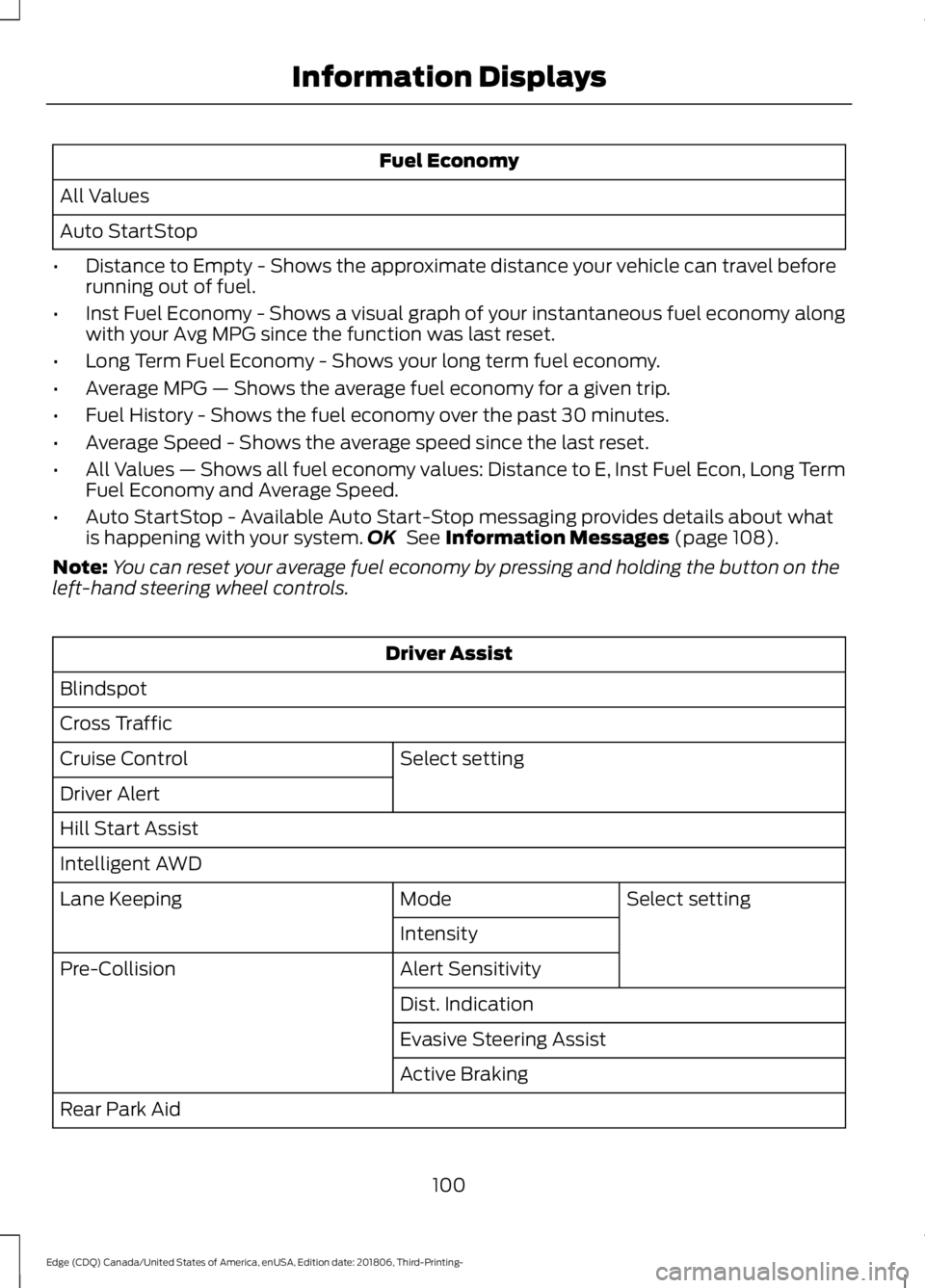
Fuel Economy
All Values
Auto StartStop
• Distance to Empty - Shows the approximate distance your vehicle can travel before
running out of fuel.
• Inst Fuel Economy - Shows a visual graph of your instantaneous fuel economy along
with your Avg MPG since the function was last reset.
• Long Term Fuel Economy - Shows your long term fuel economy.
• Average MPG — Shows the average fuel economy for a given trip.
• Fuel History - Shows the fuel economy over the past 30 minutes.
• Average Speed - Shows the average speed since the last reset.
• All Values — Shows all fuel economy values: Distance to E, Inst Fuel Econ, Long Term
Fuel Economy and Average Speed.
• Auto StartStop - Available Auto Start-Stop messaging provides details about what
is happening with your system. OK See Information Messages (page 108).
Note: You can reset your average fuel economy by pressing and holding the button on the
left-hand steering wheel controls. Driver Assist
Blindspot
Cross Traffic Select setting
Cruise Control
Driver Alert
Hill Start Assist
Intelligent AWD
Select setting
Mode
Lane Keeping
Intensity
Alert Sensitivity
Pre-Collision
Dist. Indication
Evasive Steering Assist
Active Braking
Rear Park Aid
100
Edge (CDQ) Canada/United States of America, enUSA, Edition date: 201806, Third-Printing- Information Displays
Page 104 of 547
Driver Assist
Tire Pressure
Tire Monitor
Hold OK to Reset
Trailer Sway Settings
Select setting
Alarm
Vehicle
Ask on exit
Auto Engine Off Information
Chimes
Select setting
DTE calcula-
tion
Easy Entry/Exit
Auto Highbeam
Lighting
Select setting
Autolamp delay
Daytime Lights
Autounlock
Locks
Mislock Select setting
Remote Unlock
Switches inhibit
Hold OK to Reset
Oil Life
Reset
Select setting
Power Lift-
gate
Select setting
Climate Control
Remote
Start
Seats or Seats and
Wheel
Duration
System
101
Edge (CDQ) Canada/United States of America, enUSA, Edition date: 201806, Third-Printing- Information Displays
Page 107 of 547

Option 4
Option 3
Option 2
Option 1
Display Mode
Intelligent AWD
Turbo Boost Gauge 1
1 ST only.
• XXX mi (km) to empty: Shows the approximate distance the vehicle will travel.
• Round tachometer: Indicates the engine speed in revolutions per minute. Driving with
your tachometer pointer continuously at the top of the scale may damage the engine.
During SelectShift Automatic ™ transmission (SST) use, the currently selected gear
will appear in the display.
Trip 1 & 2
You can access the menu using the
information display control. Note:
Some options may appear slightly
different or not at all if the items are
optional. Trip 1 & 2
All Values
All Values — shows all trip values (Trip Timer, Odometer and Average Fuel).
• Trip Odometer — Shows your accumulated trip distance.
• Average Fuel — Shows your average fuel economy for a given trip.
• Trip Timer — The timer stops when you turn your vehicle off and restarts when you
restart your vehicle.
Note: You can reset your trip information by pressing and holding the OK button on the left
hand steering wheel controls.
Fuel Economy
Use the left and right arrow buttons to
choose the desired fuel economy display.
104
Edge (CDQ) Canada/United States of America, enUSA, Edition date: 201806, Third-Printing- Information Displays
Page 108 of 547

Fuel Economy
Instant Fuel Economy - Hold OK to Reset
Auto StartStop
Fuel History
Average Speed
• Inst Fuel Economy - shows a visual graph of your instantaneous fuel economy, average
fuel economy and distance to empty.
• Auto StartStop - available Auto Start-Stop messaging will provide details about what
is happening with your system. See
Information Messages (page 108).
• Fuel History - Shows the fuel economy over the past 30 minutes.
• Average Speed - Shows the average speed since the last reset.
Note: You can reset your average fuel economy by pressing and holding the
OK button on
the left hand steering wheel controls.
Driver Assist
In this mode, you can configure different
driver setting choices. Note:
Some items are optional and may
not appear. Driver Assist
Traction Control
Blindspot
Cross Traffic Alert Select setting
Cruise Control
Driver Alert
Driver Sel. Susp.
Hill Start Assist
Select setting
Mode
Lane Keeping Sys
Intensity
Alert Sensitivity
Pre-Collision
Active Braking
105
Edge (CDQ) Canada/United States of America, enUSA, Edition date: 201806, Third-Printing- Information Displays
Page 109 of 547
Driver Assist
Rear Park Aid Hold OK to Reset
Tire Monitor
Trailer Sway
Settings
In this mode, you can configure different
driver setting choices. Note:
Some items are optional and may
not appear. Settings
Select setting
Alarm
Vehicle
Ask on Exit
Auto Engine Off Select setting
DTE Calcu-
lation
Easy Entry/Exit
Adaptive Headlamps
Adaptive Headlamps
Lighting
Select setting
Traffic Set Up
Auto Highbeam Select setting
Autolamp Delay
Daytime Lights
Autolock
Locks
Autounlock
Mislock Select setting
Remote Unlock
Switch Inhibit
Autofold
Mirrors
XXX% - Hold OK to Reset
Oil Life
Reset
106
Edge (CDQ) Canada/United States of America, enUSA, Edition date: 201806, Third-Printing- Information Displays
Page 116 of 547

Blind Spot Information and Cross Traffic Alert System
Action
Message
A fault with the system has occurred. Contact an authorizeddealer as soon as possible. See Blind Spot Information
System (page 231).
Blindspot System Fault
The system sensors are blocked. See
Blind Spot Informa-
tion System (page 231).
Blindspot Not Available
Sensor Blocked See Manual
The system detects a vehicle.
Cross Traffic Vehicle
Coming From X
The system sensors are blocked. See
Cross Traffic Alert
(page 233).
Cross Traffic Not Avail-
able Sensor Blocked See Manual
A fault with the system has occurred. Contact an authorizeddealer. See
Cross Traffic Alert (page 233).
Cross Traffic System
Fault
Doors and Locks Action
Message
The door listed is not completely closed.
Driver Door Ajar
The door listed is not completely closed.
Passenger Door Ajar
The door listed is not completely closed.
Rear Left Door Ajar
The door listed is not completely closed.
Rear Right Door Ajar
The door listed is not completely closed.
Liftgate Ajar
The hood is not completely closed.
Hood Ajar
The system has disabled the door switches.
Switches Inhibited
Security Mode
The factory keypad code displays in the information displayafter system resets the keypad. See
Keyless Entry (page
63).
Factory Keypad Code {X
X X X X}
113
Edge (CDQ) Canada/United States of America, enUSA, Edition date: 201806, Third-Printing- Information Displays


