2019 FORD EDGE door locks
[x] Cancel search: door locksPage 66 of 547

Illuminated Exit
The interior lamps and some exterior
lamps illuminate when all doors are closed,
you switch the ignition off and you remove
the key from the ignition.
The lamps turn off if all the doors remain
closed and:
•
25 seconds have elapsed.
• You press the START/STOP button.
Battery Saver
If you leave the courtesy lamps, dome
lamps or headlamps on, the battery saver
shuts them off 10 minutes after you switch
the ignition off.
Accessory Mode Battery Saver for
Intelligent Access Keys
If you leave the ignition switched on, it
shuts off once it detects a certain amount
of battery drain, or after 45 minutes.
KEYLESS ENTRY
SECURICODE™ KEYLESS ENTRY
KEYPAD
The keypad is near the driver window. It
illuminates when touched.
Note: If you enter your entry code too fast
on the keypad, the unlock function may not
work. Enter your entry code again more
slowly. You can use the keypad to do the
following:
•
Lock or unlock the doors.
• Recall memory seat and mirror
positions.
• Program and erase user codes.
• Arm and disarm the anti-theft alarm.
You can operate the keypad with the
factory-set five-digit entry code. The code
is on the owner ’s wallet card in the glove
box and is available from an authorized
dealer. You can also program up to five of
your own five-digit personal entry codes.
Programming a Personal Entry Code
1. Enter the factory-set five-digit code.
2. Press
1·2 on the keypad within five
seconds.
3. Enter your personal five-digit code. You must do this within five seconds
of completing step 2.
4. Press
1·2 on the keypad to save
personal code 1.
The doors lock then unlock to confirm that
programming was successful.
63
Edge (CDQ) Canada/United States of America, enUSA, Edition date: 201806, Third-Printing- Doors and LocksE138637
Page 67 of 547

To program additional personal entry
codes, repeat steps 1 through 3, then for
step 4:
•
Press 3·4 to save personal code 2.
• Press
5·6 to save personal code 3.
• Press
7·8 to save personal code 4.
• Press
9·0 to save personal code 5.
If your vehicle is fitted with MyFord Touch,
you can also program the system with a
personal entry code. See
Settings (page
440).
Hints:
• Do not set a code that uses five of the
same number.
• Do not use five numbers in sequential
order.
• The factory-set code works even if you
have set your own personal code.
Erasing a Personal Code
1. Enter the factory-set five-digit code.
2. Press and release
1·2 on the keypad
within five seconds.
3. Press and hold
1·2 for two seconds.
You must do this within five seconds
of completing Step 2.
All personal codes erase and only the
factory-set five-digit code works.
Anti-Scan Feature
The keypad goes into an anti-scan mode
if you enter the wrong code seven times.
This mode turns off the keypad for one
minute and the keypad lamp flashes.
The anti-scan feature turns off after:
• One minute of keypad inactivity.
• You press the unlock button on the
remote control.
• You switch the ignition on.
• You unlock your vehicle using
intelligent access. Locking and Unlocking the Doors
Locking All Doors
Press and hold 7·8 and 9·0 simultaneously
with the driver door cl
osed. You do not
need to enter the keypad code first.
Unlocking the Driver Door
Enter the factory-set or your personal
five-digit code. You must press each
number within five seconds of each other.
The interior lamps illuminate.
Note: All doors unlock if you enable the
all-door unlocking mode. See
Locking and
Unlocking (page 59).
Unlocking All Doors
Enter the factory-set or your personal
five-digit code, then press
3·4 within five
seconds.
Displaying the Factory-Set Code
Note: You need to have two programmed
intelligent access keys for this procedure. 1. Open the floor console storage
compartment lid.
64
Edge (CDQ) Canada/United States of America, enUSA, Edition date: 201806, Third-Printing- Doors and LocksE284085
1
Page 68 of 547

2.
With the buttons facing the rear of your
vehicle and the key ring up, place the
first intelligent access key into the
backup slot inside the center console.
3. Press the START/STOP button once
and wait a few seconds.
4. Press the
START/STOP button again
and remove the key.
5. Insert the second programmed key into
the backup slot, then press the
START/STOP
button.
The factory-set code appears in the
information display for a few seconds.
Note: The code may not display until after
any other warning messages first display.
65
Edge (CDQ) Canada/United States of America, enUSA, Edition date: 201806, Third-Printing- Doors and LocksE195808
2
Page 71 of 547

From the Instrument Panel
With the transmission in park
(P), press the button on the
instrument panel.
Remote Control Press the button twice within
three seconds.
Outside Control Button
Opening the Liftgate
1. Unlock the liftgate with the remote control or power door unlock control.
If an intelligent access key is within 3 ft
(1 m) of the liftgate, the liftgate unlocks
when you press the liftgate release
button. 2.
Press the control button located in the
top of the liftgate pull-cup handle.
Note: Allow the system to open the
liftgate. Manually pushing or pulling the
liftgate may turn on obstacle detection and
stop the power operation or reverse its
direction. Manually interfering with the
liftgate motion may also replicate a strut
failure. Stopping the Liftgate Movement
Note:
Do not apply sudden excessive force
to the liftgate while it is in motion. This
could damage the power liftgate and its
components.
You can stop the liftgate movement by
doing any of the following:
• Pressing the liftgate control button.
• Pressing the liftgate button on the
remote control twice.
• Pressing the liftgate button on the
instrument panel.
Note: Moving your foot under and away
from the center rear bumper in a single-kick
motion only works for vehicles with the
hands-free liftgate feature.
Setting the Liftgate Open Height
1. Open the liftgate.
2. Stop the liftgate movement by pressing
the control button on the liftgate when
it reaches your preferred height.
Note: Once the liftgate has stopped
moving, you can also manually move it to
your preferred height.
3. Press and hold the liftgate control button on the liftgate until you hear a
tone, indicating programming is
complete.
Note: You can only use the liftgate control
button to program the height.
Note: You cannot program the height if the
liftgate position is too low.
When you open the power liftgate, it
recalls the new open liftgate height. To
change the programmed height, repeat the
above procedure. Once you open the
power liftgate, you can manually move it
to a different height.
Note: The system recalls the new
programmed height until you reprogram it,
even if you disconnect the battery.
68
Edge (CDQ) Canada/United States of America, enUSA, Edition date: 201806, Third-Printing- LiftgateE138633 E138630 E138632
Page 116 of 547

Blind Spot Information and Cross Traffic Alert System
Action
Message
A fault with the system has occurred. Contact an authorizeddealer as soon as possible. See Blind Spot Information
System (page 231).
Blindspot System Fault
The system sensors are blocked. See
Blind Spot Informa-
tion System (page 231).
Blindspot Not Available
Sensor Blocked See Manual
The system detects a vehicle.
Cross Traffic Vehicle
Coming From X
The system sensors are blocked. See
Cross Traffic Alert
(page 233).
Cross Traffic Not Avail-
able Sensor Blocked See Manual
A fault with the system has occurred. Contact an authorizeddealer. See
Cross Traffic Alert (page 233).
Cross Traffic System
Fault
Doors and Locks Action
Message
The door listed is not completely closed.
Driver Door Ajar
The door listed is not completely closed.
Passenger Door Ajar
The door listed is not completely closed.
Rear Left Door Ajar
The door listed is not completely closed.
Rear Right Door Ajar
The door listed is not completely closed.
Liftgate Ajar
The hood is not completely closed.
Hood Ajar
The system has disabled the door switches.
Switches Inhibited
Security Mode
The factory keypad code displays in the information displayafter system resets the keypad. See
Keyless Entry (page
63).
Factory Keypad Code {X
X X X X}
113
Edge (CDQ) Canada/United States of America, enUSA, Edition date: 201806, Third-Printing- Information Displays
Page 149 of 547

UNIVERSAL GARAGE DOOR
OPENER
HomeLink Wireless Control
System
WARNING: Do not use the system
with any garage door opener that does
not have the safety stop and reverse
feature as required by U.S. Federal
Safety Standards (this includes any
garage door opener manufactured
before April 1, 1982). A garage door
opener which cannot detect an object,
signaling the door to stop and reverse,
does not meet current federal safety
standards. Using a garage door opener
without these features increases the risk
of serious injury or death.
Note: Make sure that the garage door and
security device are free from obstruction
when you are programming. Do not program
the system with the vehicle in the garage.
Note: Make sure you keep the original
remote control transmitter for use in other
vehicles as well as for future system
programming.
Note: We recommend that upon the sale
or lease termination of your vehicle, you
erase the programmed function buttons for
security reasons. See Erasing the Function
Button Codes
.
Note: You can program a maximum of
three devices. To change or replace any of
the three devices after it has been initially
programmed, you must first erase the
current settings. See Erasing the Function
Button Codes
. The universal garage door opener replaces
the common hand-held garage door
opener with a three-button transmitter
that is integrated into the driver
’s sun visor.
The system includes two primary features,
a garage door opener and a platform for
remote activation of devices within the
home. As well as being programmed for
garage doors, the system transmitter can
be programmed to operate entry gate
operators, security systems, entry door
locks and home or office lighting.
Additional system information can be
found online at www.homelink.com,
www.youtube.com/HomeLinkGentex or
by calling the toll-free help line on
1-800-355-3515.
In-Vehicle Programming
This process is to program your hand-held
transmitter and your in-vehicle HomeLink
button.
Note: The programming steps below
assume you will be programming HomeLink
that was not previously programmed.
Note: Put a new battery in the hand-held
transmitter. This will ensure quicker training
and accurate transmission of the
radio-frequency signal.
146
Edge (CDQ) Canada/United States of America, enUSA, Edition date: 201806, Third-Printing- Garage Door Opener
(If Equipped)E142657
Page 477 of 547
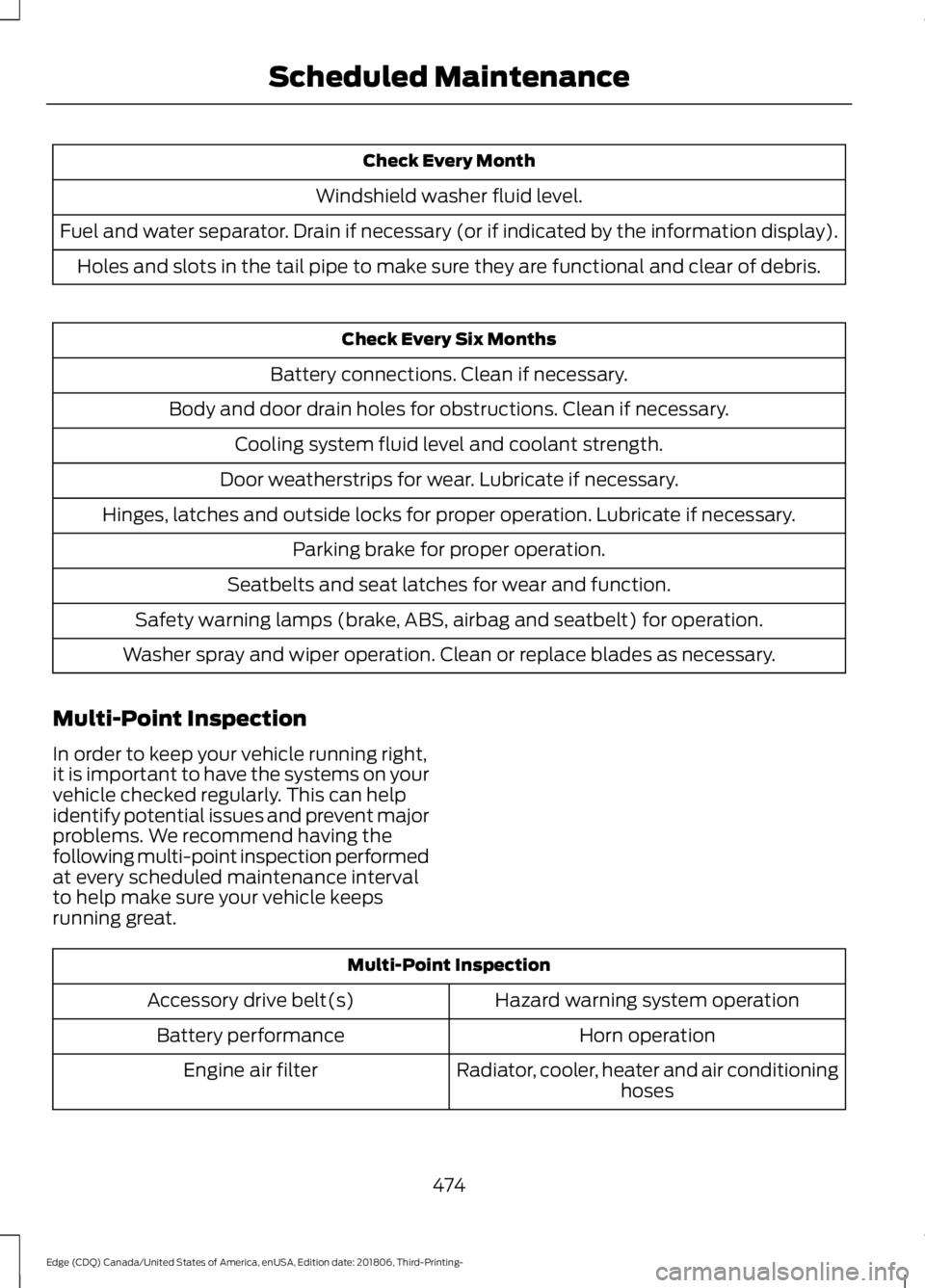
Check Every Month
Windshield washer fluid level.
Fuel and water separator. Drain if necessary (or if indicated by the information display). Holes and slots in the tail pipe to make sure they are functional and clear of debris. Check Every Six Months
Battery connections. Clean if necessary.
Body and door drain holes for obstructions. Clean if necessary. Cooling system fluid level and coolant strength.
Door weatherstrips for wear. Lubricate if necessary.
Hinges, latches and outside locks for proper operation. Lubricate if necessary. Parking brake for proper operation.
Seatbelts and seat latches for wear and function.
Safety warning lamps (brake, ABS, airbag and seatbelt) for operation.
Washer spray and wiper operation. Clean or replace blades as necessary.
Multi-Point Inspection
In order to keep your vehicle running right,
it is important to have the systems on your
vehicle checked regularly. This can help
identify potential issues and prevent major
problems. We recommend having the
following multi-point inspection performed
at every scheduled maintenance interval
to help make sure your vehicle keeps
running great. Multi-Point Inspection
Hazard warning system operation
Accessory drive belt(s)
Horn operation
Battery performance
Radiator, cooler, heater and air conditioninghoses
Engine air filter
474
Edge (CDQ) Canada/United States of America, enUSA, Edition date: 201806, Third-Printing- Scheduled Maintenance
Page 538 of 547

D
Data Recording..................................................9
911 Assist Privacy Notice..................................... 13
Comfort, Convenience and Entertainment Data........................................................................\
11
Event Data................................................................. 11
Service Data............................................................ 10
Services That Third Parties Provide...............12
Services That We Provide.................................. 12
Vehicles With a Modem...................................... 12
Vehicles With SYNC............................................. 12
Daytime Running Lamps..............................81 Type One - Conventional
(Non-Configurable)........................................ 81
Type Two - Configurable.................................... 81
Declaration of Conformity
........................518
Radio Frequency Statement.......................... 518
Digital Radio...................................................367 HD Radio Reception and Station
Troubleshooting............................................ 368
Direction Indicators.......................................84
Doors and Locks
.............................................59
Driver Alert......................................................225
Resetting the System....................................... 226
Switching the System On and Off...............225
System Display................................................... 226
System Warnings............................................... 226
Driver and Passenger Airbags....................41 Children and Airbags........................................... 42
Proper Driver and Front Passenger Seating Adjustment......................................................... 41
Driver and Passenger Knee Airbags........46
Driving Aids
.....................................................225
Driving Hints..................................................254
Driving Through Water...............................254
DRL See: Daytime Running Lamps.......................... 81
E
Economical Driving
.....................................254
Electric Parking Brake.................................185 Applying the Electric Parking Brake............185
Automatically Releasing the Electric
Parking Brake.................................................. 186
Manually Releasing the Electric Parking Brake.................................................................. 185Releasing the Electric Parking Brake if the
Vehicle Battery is Running Out of
Charge............................................................... 186
Electromagnetic Compatibility
.............490
Emission Law.................................................169
Noise Emissions Warranty, Prohibited
Tampering Acts and Maintenance..........170
Tampering With a Noise Control System............................................................... 169
End User License Agreement.................492 VEHICLE SOFTWARE END USER LICENSE
AGREEMENT (EULA) ................................. 492
Engine Block Heater....................................158 Using the Engine Block Heater...................... 159
Engine Coolant Check
...............................286
Adding Coolant.................................................. 286
Coolant Change................................................. 288
Engine Coolant Temperature Management.................................................. 289
Fail-Safe Cooling............................................... 288
Recycled Coolant.............................................. 288
Severe Climates................................................. 288
Engine Emission Control...........................169
Engine Immobilizer See: Passive Anti-Theft System..................... 70
Engine Oil Check..........................................284 Adding Engine Oil.............................................. 285
Engine Oil Dipstick - 2.0L EcoBoost™.................................................284
Engine Oil Dipstick - 2.7L EcoBoost™.................................................284
Engine Specifications - 2.0L EcoBoost™.................................................345
Drivebelt Routing............................................... 345
Engine Specifications - 2.7L EcoBoost™.................................................345
Drivebelt Routing............................................... 346
Entertainment................................................411 AM/FM Radio....................................................... 412
Apps....................................................................... 420
Bluetooth Stereo or USB................................. 419
CD (If equipped)................................................. 418
HD Radio ™ Information (If
Available)......................................................... 415
SiriusXM® Satellite Radio (If Activated)......................................................... 413
Sources................................................................... 412
535
Edge (CDQ) Canada/United States of America, enUSA, Edition date: 201806, Third-Printing- Index