Page 220 of 284

COLD TYRE INFLATION PRESSURE (bar)
When the tyres are warm, the inflation pressure should be +0.3 bar compared with the prescribed value. However, recheck that
the value is correct with the tyre cold.
With snow tyres, add +0.2 bar to the pressure value prescribed for standard tyres.
If it is necessary to raise the vehicle, refer to the "Raising the vehicle" paragraph in the "In an emergency" chapter.
WARNING
190)If winter tyres with a lower speed rating than that indicated in the Registration Document are used, do not exceed the maximum speed
corresponding to the speed rating of the tyres used.
191)DO NOT fit wheel hub caps when using integral hub caps fixed (with springs) to the steel rim and after sale tyres provided with Rim
Protector. Use of unsuitable tyres and wheel caps may cause sudden decrease of tyre pressure.
218
TECHNICAL SPECIFICATIONS
TyresUnladen/medium load Full load
Space saver
spare wheel
Front Rear Front Rear
215 / 60 R16 95H 2.4 2.4 2.6 2.6
4.2 215 / 55 R17 94V 2.4 2.4 2.6 2.6
225 / 45 R18 91V 2.4 2.4 2.6 2.6
225 / 45 R18 91Y 2.4 2.4 2.6 2.6
215 / 55 R17 98V (M+S) 2.4 2.4 2.6 2.6
225 / 45 R18 45V (M+S) 2.4 2.4 2.6 2.6
Page 233 of 284

Use Features SpecificationOriginal fluids and
lubricantsApplications
Lubricants and
greases for drive
transmissionSynthetic lubricant.9.55550-AV5TUTELA TRANSMISSION
AS8
Contractual Technical
Reference N° F139.I11Lubricant for versions with
AT9 automatic gearbox
Fully synthetic oil with
dedicated additive.9.55550-SA1TUTELA CS SPEED
Contractual Technical
Reference N° F005.F98Lubricant for
electro-hydraulic actuator
(dual clutch automatic
transmission versions)
SAE 75W API GL4 grade
synthetic lubricant.9.55550-MZ6TUTELA
TRANSMISSION
GEARFORCE
Contractual Technical
Reference N° F002.F10Manual gearbox and
differential
Molybdenum disulphide
grease, for use at high
temperatures. N.L.G.I.
consistency 1-2.9.55580-GRAS IITUTELA ALL STAR
Contractual Technical
Reference N° F702.G07Wheel side constant
velocity joints
Grease for constant
velocity joints with low
friction coefficient.
N.L.G.I. consistency 0-1.9.55580-GRAS IITUTELA STAR 700
Contractual Technical
Reference N° F701.C07Differential side constant
velocity joints
Diesel fuel additiveAntifreeze additive for
diesel, with protective
action for diesel engines.PETRONAS DURANCE
DIESEL ART
Contractual Technical
Reference N° F601.L06To be mixed with diesel
(25 cc per 10 litres)
231
Page 245 of 284
CONTROLS ON THE STEERING WHEEL
The controls for the main system functions are present on the steering wheel to make control easier.
The activation of the function selected is controlled, in some cases, by how long the button is pressed (short or long press) as
described in the table below.
186F1B0731
243
Page 246 of 284
CONTROLS ON STEERING WHEEL SUMMARY TABLE
Button Interaction
Acceptance of incoming call
Acceptance of the second incoming call and putting the active call on hold
Rejection of incoming call
Ending of call in progress
244
MULTIMEDIA
Page 247 of 284
CONTROLS BEHIND THE STEERING WHEEL
Buttons Interaction
Button A (left side, behind the steering wheel)
Upper button
Brief button press: search for next radio station or selection of USB next track
Long button press: scan of higher frequencies until released/fast forward of USB
track
Central buttonWith each press it scrolls through sources AM, FM and USB. Only the available
sources will be selected.
Lower button
Brief button press: search for next radio station or select USB previous track
Long button press: scan of lower frequencies until released/fast forward of USB
track.
Button B (right side, behind the steering wheel)
Upper buttonIncreasing volume
Brief button press: single volume increase
Long button press: fast volume increase
Central button Activation/deactivation of Mute function
Lower buttonDecreasing volume
Brief button press: single volume decrease
Long button press: fast volume decrease
245
Page 248 of 284

SWITCHING THE SYSTEM
ON/OFF
The system is switched on/off by
pressing the
button/knob.
Turn the button/knob clockwise to
increase the radio volume or
anticlockwise to decrease it.
RADIO (TUNER) MODE
The system features the following
tuners: AM, FM.
RADIO MODE SELECTION
Press the RADIO button on the front
panel to activate radio mode.
FREQUENCY BAND
SELECTION
The different tuning modes can be
selected by pressing the RADIO button
on the front panel.
DISPLAYED
INFORMATION
After the desired radio station is
selected on the display, the following
information is shown (INFO mode
activated):
In the upper part: the preset station, the
time and the other active radio settings
are highlighted.
In the central part: the name of the
current station, the frequency and the
radio text information (if any) are
highlighted.
FM station list
Press the BROWSE ENTER
button/knob to display the complete list
of the FM stations that can be received.
SETTING THE PRESETS
The preset stations are available in all
system modes and are selected by
touching one of the presetting buttons
1-2-3-4-5-6on the front panel.
If you are tuned to a radio station that
you wish to store, hold down the button
on the display which corresponds to
the desired preset until an acoustic
confirmation signal is emitted.
RADIO STATION
SELECTION
To search for the desired radio station
press the
orbutton or use
the wheel of the steering wheel controls
, or turn the "BROWSE ENTER"
knob.
PREVIOUS/NEXT RADIO
STATION SEARCH
Press briefly theorbutton
or use the wheel of the steering wheel
controls
: when the button is
released the previous or next radio
station is displayed.
PREVIOUS/NEXT RADIO
STATION FAST SEARCH
Hold down theorbutton to
start the fast search: when the button is
released, the first tunable radio is
played.
MEDIA MODE
To select the USB source, press the
MEDIAbutton.
To select and playback music tracks on
the mobile phone CD card (where the
phone allows) press the BROWSE
ENTER button/knob, select Folders
then Card.
IMPORTANT Some multimedia player
devices may not be compatible with the
Uconnect™system.
TRACK CHANGE
(previous/next)
Briefly press thebutton or turn
the BROWSE ENTER button/knob
clockwise to play the next track.
Briefly press the
button or turn
the BROWSE ENTER button/knob
anticlockwise to return to the beginning
of the selected track or to the beginning
of the previous track (if this has been
played for less than 3 seconds).
246
MULTIMEDIA
Page 250 of 284

TheUconnect™system may not
support some USB keys: in this case, it
may not automatically switch from
“Radio” mode to “Media” mode.
If the device used does not play, verify
its compatibility by selecting Media
mode: a dedicated message will appear
on theUconnect™system display.
PHONE MODE
Phone mode activation
Press thePHONEbutton on the front
panel to activate the Phone mode.
If no mobile phone is connected, the
respective display warning screen
appears:
Pairing of a
Bluetooth®
mobile
phone
The system connects automatically to
the paired mobile phone with the
highest priority.
To choose a specific
Bluetooth®
mobile phone, proceed as follows:
press theMENUbutton on the front
panel;
select "Phone menu/Bluetooth" on
the display;
select the "Bluetooth/Phones" list
using the corresponding button;
select the specific device
(
Bluetooth®
mobile phone);
select "Connect";
the device connected is highlighted
in the list.
Unpairing of a
Bluetooth®
mobile
phone
To disconnect a specific
Bluetooth®
mobile phone, proceed as follows:
press theMENUbutton on the front
panel;
select "Phone menu/Bluetooth" on
the display;
select the "Bluetooth/Phones" list
using the corresponding button;
select the specific device (mobile
phone or
Bluetooth®
device);
select "Disconnect".
Making a phone call
A call can be made by:
selecting "Contacts" (Phonebook
......);
select the “Recent calls list”: the
received, made and missed calls are
viewed;
pressPHONEon the front panel,
then select “Keypad” to enter the
numbers using the “BROWSE/ENTER”
right knob and finally press the
icon
to make the call. Alternatively, you can
use the keypad of your phone (not while
driving).Ending a call
Press the "End" button or the
button on the steering wheel
controls (where present) to end a call in
progress.
SETTINGS
Press the MENU button on the front
panel to display the "Settings" menu.
NOTE The menu items displayed can
vary according to the versions.
The menu includes the following items:
System Settings: Language, Reset
Default Value, System Power Off,
Power on Volume Limit, Auto-On Radio.
Radio Settings: Browse FM Station
List, Traffic Announcements, Regional,
Alternative Frequency.
Radio off delay: allows the system
to be kept on for a preset time after the
ignition device has been turned to
STOP.
Audio settings: access the audio
settings menu.
Telephone: access to the telphone
settings menu.
248
MULTIMEDIA
Page 255 of 284
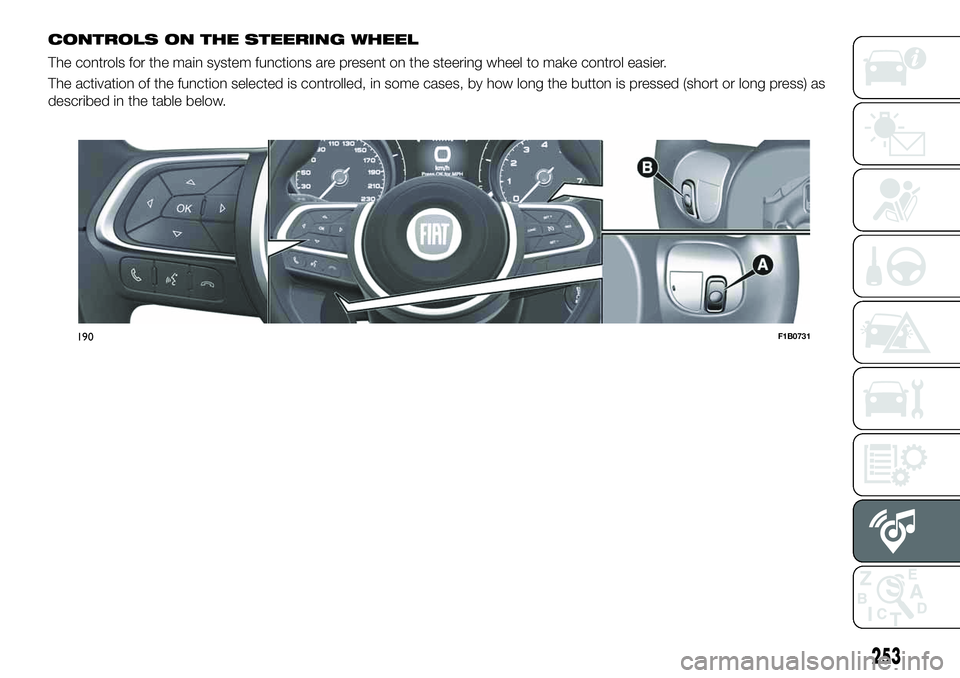
CONTROLS ON THE STEERING WHEEL
The controls for the main system functions are present on the steering wheel to make control easier.
The activation of the function selected is controlled, in some cases, by how long the button is pressed (short or long press) as
described in the table below.
190F1B0731
253