Page 3 of 490

TABLE OF CONTENTSSECTIONPAGE
1INTRODUCTION
...................................................................3
2GRAPHICAL TABLE OF CONTENTS
......................................................7
3GETTING TO KNOW YOUR VEHICLE
...................................................13
4GETTING TO KNOW YOUR INSTRUMENT PANEL
.........................................129
5SAFETY
........................................................................\
157
6STARTING AND OPERATING
.........................................................239
7IN CASE OF EMERGENCY
...........................................................285
8SERVICING AND MAINTENANCE
.....................................................333
9TECHNICAL SPECIFICATIONS
........................................................387
10MULTIMEDIA
....................................................................401
11CUSTOMER ASSISTANCE
............................................................465
12INDEX
........................................................................\
..471
1
2
3
4
5
6
7
8
9
10 11
12
Page 7 of 490

HOW TO USE THIS MANUAL
Essential Information
Consult the Table of Contents to determine which section
contains the information you desire.
Since the specification of your vehicle depends on the items
of equipment ordered, certain descriptions and illustra-
tions may differ from your vehicle’s equipment.
The detailed index at the back of this Owner’s Manual
contains a complete listing of all subjects.
Symbols
Some vehicle components have colored labels whose sym-
bols indicate precautions to be observed when using this
component. Refer to “Warning Lights and Messages” in
“Getting To Know Your Instrument Panel” for further
information on the symbols used in your vehicle.
WARNINGS AND CAUTIONS
This Owner ’s Manual containsWARNINGSagainst oper-
ating procedures that could result in a collision, bodily
injury and/or death. It also contains CAUTIONSagainst
procedures that could result in damage to your vehicle. If
you do not read this entire Owner ’s Manual, you may miss
important information. Observe all Warnings and Cau-
tions.
VEHICLE MODIFICATIONS/ALTERATIONS
WARNING!
Any modifications or alterations to this vehicle could
seriously affect its roadworthiness and safety and may
lead to a collision resulting in serious injury or death.
1
INTRODUCTION 5
Page 9 of 490
GRAPHICAL TABLE OF CONTENTS
CONTENTS
�FRONT VIEW ............................8
� REAR VIEW .............................9 �
INSTRUMENT PANEL .....................10
� INTERIOR ..............................11
2
Page 12 of 490
INSTRUMENT PANEL
Instrument Panel
1 — Headlight Switch7 — Gear Selector
2 — Instrument Cluster Display Controls 8 — Uconnect System
3 — Multifunction Lever (Behind Steering Wheel) 9 — Climate Controls
4 — Instrument Cluster 10 — Switch Panel
5 — Speed Controls 11 — Upper Glove Compartment
6 — Ignition 12 — Lower Glove Compartment
10 GRAPHICAL TABLE OF CONTENTS
Page 29 of 490
DOORS
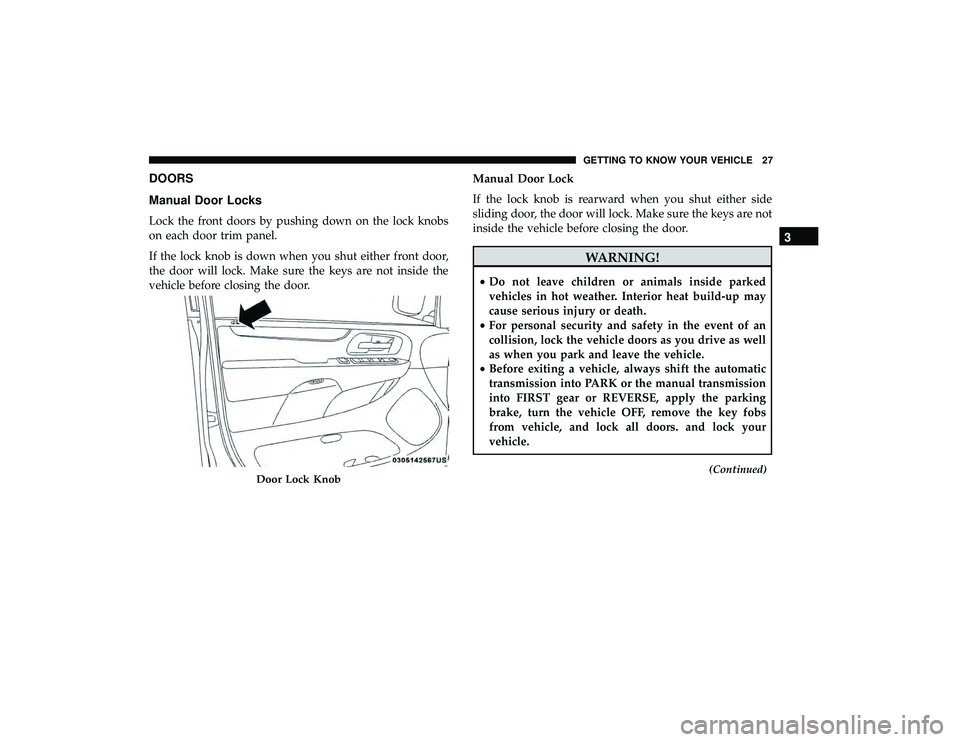
Manual Door Locks
Lock the front doors by pushing down on the lock knobs
on each door trim panel.
If the lock knob is down when you shut either front door,
the door will lock. Make sure the keys are not inside the
vehicle before closing the door.Manual Door Lock
If the lock knob is rearward when you shut either side
sliding door, the door will lock. Make sure the keys are not
inside the vehicle before closing the door.
WARNING!
•
Do not leave children or animals inside parked
vehicles in hot weather. Interior heat build-up may
cause serious injury or death.
• For personal security and safety in the event of an
collision, lock the vehicle doors as you drive as well
as when you park and leave the vehicle.
• Before exiting a vehicle, always shift the automatic
transmission into PARK or the manual transmission
into FIRST gear or REVERSE, apply the parking
brake, turn the vehicle OFF, remove the key fobs
from vehicle, and lock all doors. and lock your
vehicle.
(Continued)Door Lock Knob
3
GETTING TO KNOW YOUR VEHICLE 27
Page 30 of 490
WARNING!(Continued)
•Never leave children alone in a vehicle, or with
access to an unlocked vehicle. Leaving children in a
vehicle unattended is dangerous for a number of
reasons. A child or others could be seriously or
fatally injured. Children should be warned not to
touch the parking brake, brake pedal or the gear
selector.
• Allowing children to be in a vehicle unattended is
dangerous for a number of reasons. A child or others
could be seriously or fatally injured. Children
should be warned not to touch the parking brake,
brake pedal or the gear selector.
• Do not leave the key fob in or near the vehicle, or in
a location accessible to children. A child could oper-
ate power windows, other controls, or move the
vehicle.
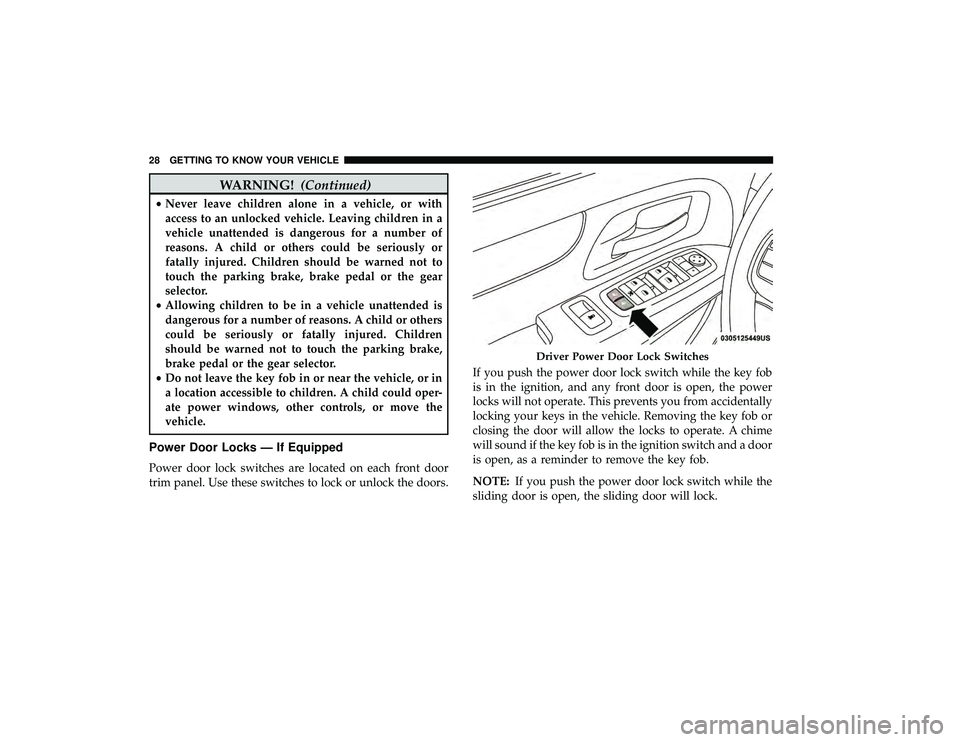
Power Door Locks — If Equipped
Power door lock switches are located on each front door
trim panel. Use these switches to lock or unlock the doors. If you push the power door lock switch while the key fob
is in the ignition, and any front door is open, the power
locks will not operate. This prevents you from accidentally
locking your keys in the vehicle. Removing the key fob or
closing the door will allow the locks to operate. A chime
will sound if the key fob is in the ignition switch and a door
is open, as a reminder to remove the key fob.
NOTE:
If you push the power door lock switch while the
sliding door is open, the sliding door will lock.
Driver Power Door Lock Switches
28 GETTING TO KNOW YOUR VEHICLE
Page 31 of 490

Automatic Door Locks — If Equipped
The auto door lock feature default condition is enabled.
When enabled, the door locks will lock automatically when
the vehicle’s speed exceeds 15 mph (24 km/h). The auto
door lock feature can be enabled or disabled by your
authorized dealer per written request of the customer.
Please see your authorized dealer for service.
Unlock Doors Automatically On Exit — If Equipped
The Unlock Doors Automatically On Exit feature unlocks
all of the vehicle doors when any door is opened. This will
occur only after the gear selector has been placed into the
PARK position, after the vehicle has been driven (the gear
selector has been placed out of the PARK position and all
doors closed).
The Unlock Doors Automatically On Exit feature will not
operate if there is any manual operation of the power door
locks (lock or unlock).
On vehicles equipped with the optional instrument cluster
display, refer to “Instrument Cluster Display” in “Getting
To Know Your Instrument Panel” for further information.
NOTE:Use the Automatic Door Locks at 15 mph
(24 km/h) and Unlock Doors Automatically On Exit fea-
tures in accordance with local laws.
Power Sliding Side Door — If Equipped
Push the button on the key fob twice within five
seconds to open, close, or reverse a power sliding
door.
The power sliding door may be power opened or closed in
several ways:
• Key fob
• Inside or outside handles
• Buttons located:
– In the overhead console
– Just inside the sliding door
– On the outside handle
Push the button on the key fob twice within five seconds to
open a power sliding door. When the door is fully open,
pushing the button twice within five seconds a second time
will close the door.
There are power sliding side door switches located on the
B-pillar trim panel, just in front of the power sliding door
for the rear seat passengers and in the overhead console for
the driver and passengers. Pushing the switch once will
3
GETTING TO KNOW YOUR VEHICLE 29
Page 34 of 490
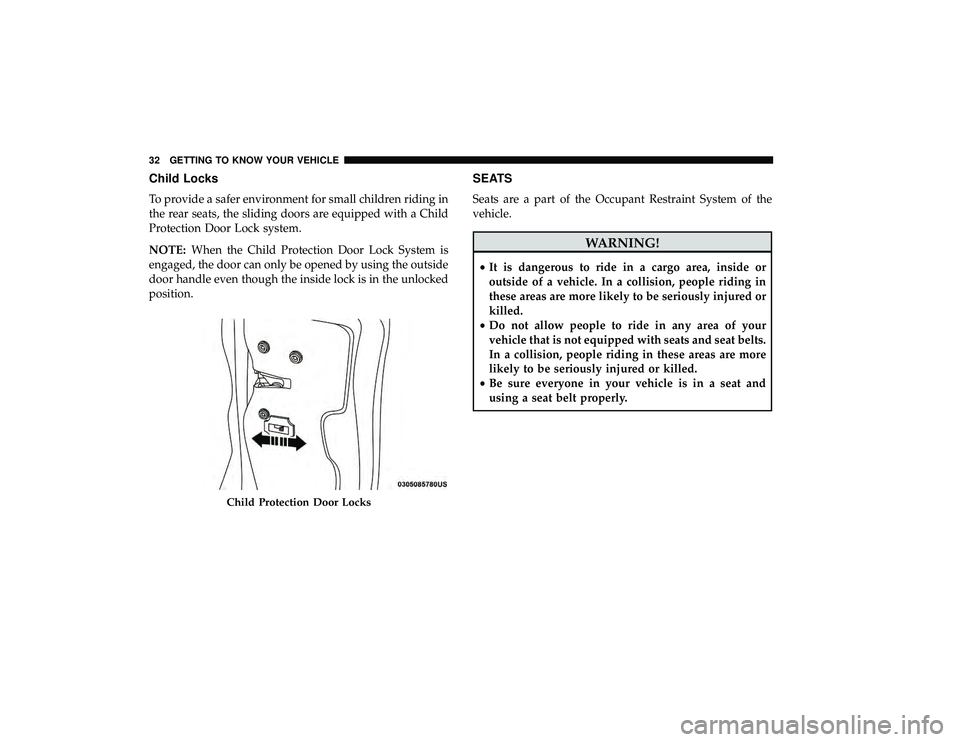
Child Locks
To provide a safer environment for small children riding in
the rear seats, the sliding doors are equipped with a Child
Protection Door Lock system.
NOTE:When the Child Protection Door Lock System is
engaged, the door can only be opened by using the outside
door handle even though the inside lock is in the unlocked
position.
SEATS
Seats are a part of the Occupant Restraint System of the
vehicle.
WARNING!
• It is dangerous to ride in a cargo area, inside or
outside of a vehicle. In a collision, people riding in
these areas are more likely to be seriously injured or
killed.
• Do not allow people to ride in any area of your
vehicle that is not equipped with seats and seat belts.
In a collision, people riding in these areas are more
likely to be seriously injured or killed.
• Be sure everyone in your vehicle is in a seat and
using a seat belt properly.
Child Protection Door Locks
32 GETTING TO KNOW YOUR VEHICLE