Page 466 of 572

▫Radio Operation ....................... .512
▫ Media Mode ......................... .513
� IPOD/USB/MP3 CONTROL — IF EQUIPPED . . .513
▫ Connecting The iPod Or External USB Device . . .513
▫ Using This Feature ..................... .514
▫ Second Row USB Charging Port ............514
� UCONNECT REAR SEAT ENTERTAINMENT
(RSE) SYSTEM — IF EQUIPPED .............515
▫ Getting Started ....................... .515
▫ Dual Video Screen ..................... .517
▫ Blu-ray Disc Player ..................... .517
▫ Play Video Games ..................... .519
▫ Play A DVD/Blu-ray Disc Using The
Touchscreen Radio ..................... .520
▫ Important Notes For Dual Video Screen
System ............................. .521
▫ Blu-ray Disc Player Remote Control —
If Equipped .......................... .522▫
Headphones Operation ...................523
▫ Controls ............................ .524
▫ Replacing The Headphone Batteries ..........524
▫ Accessibility — If Equipped ...............525
▫ Stereo Headphone Lifetime Limited Warranty . . .525
� RADIO OPERATION AND MOBILE PHONES . . .530
▫ Regulatory And Safety Information ..........530
� UCONNECT VOICE RECOGNITION QUICK
TIPS ................................ .531
▫ Introducing Uconnect ....................531
▫ Get Started .......................... .532
▫ Basic Voice Commands ...................532
▫ Radio .............................. .533
▫ Media .............................. .534
▫ Phone .............................. .535
▫ V
oice Text Reply — If Equipped ............535
▫ Climate ............................. .537
464 MULTIMEDIA
Page 515 of 572

Media Mode
Pushing the top of the switch once goes to the next track on
the selected media (AUX/USB/Bluetooth). Pushing the
bottom of the switch once goes to the beginning of the
current track, or to the beginning of the previous track if it
is within eight seconds after the current track begins to
play.
IPOD/USB/MP3 CONTROL — IF EQUIPPED
This feature allows an iPod or external USB device to be
plugged into the USB port, located inside the storage area
on the center stack of the instrument panel.
iPod control supports Mini, 4G, Photo, Nano, 5G iPod and
iPhone devices. Some iPod software versions may not fully
support the iPod control features. Please visit Apple’s
website for software updates.
For further information, refer to the Uconnect Owner ’s
Manual Supplement.
Connecting The iPod Or External USB Device
Use the connection cable to connect an iPod or external
USB device to the vehicles USB/AUX connector port which
is located in the center console.The USB ports on the Media Hub are equipped with a
Smart Electronic Voltage Regulator (Smart Charge) feature.
This feature allows a device to charge for up to one hour
after the vehicle is powered off.
Once the audio device is connected and synchronized to
the vehicles iPod/USB/MP3 control system (iPod or exter-
nal USB device may take a few minutes to connect), the
audio device starts charging and is ready for use.
NOTE:If the audio device battery is completely discharged,
it may not communicate with the iPod/USB/MP3 control
system until a minimum charge is attained. Leaving the
Integrated Center Console USB/AUX Media HUB10
MULTIMEDIA 513
Page 516 of 572
audio device connected to the iPod/USB/MP3 control sys-
tem may charge it to the required level.
Using This Feature
By using an iPod cable, or an external USB device to
connect to the USB port:
•The audio device can be played on the vehicle’s sound
system, providing metadata (artist, track title, album,
etc.) information on the radio display.
• The audio device can be controlled using the radio
buttons to Play, Browse, and List the iPod contents.
• The audio device battery charges when plugged into the
USB/AUX connector (if supported by the specific audio
device).
NOTE: For further information, refer to the Uconnect
Owner ’s Manual Supplement.
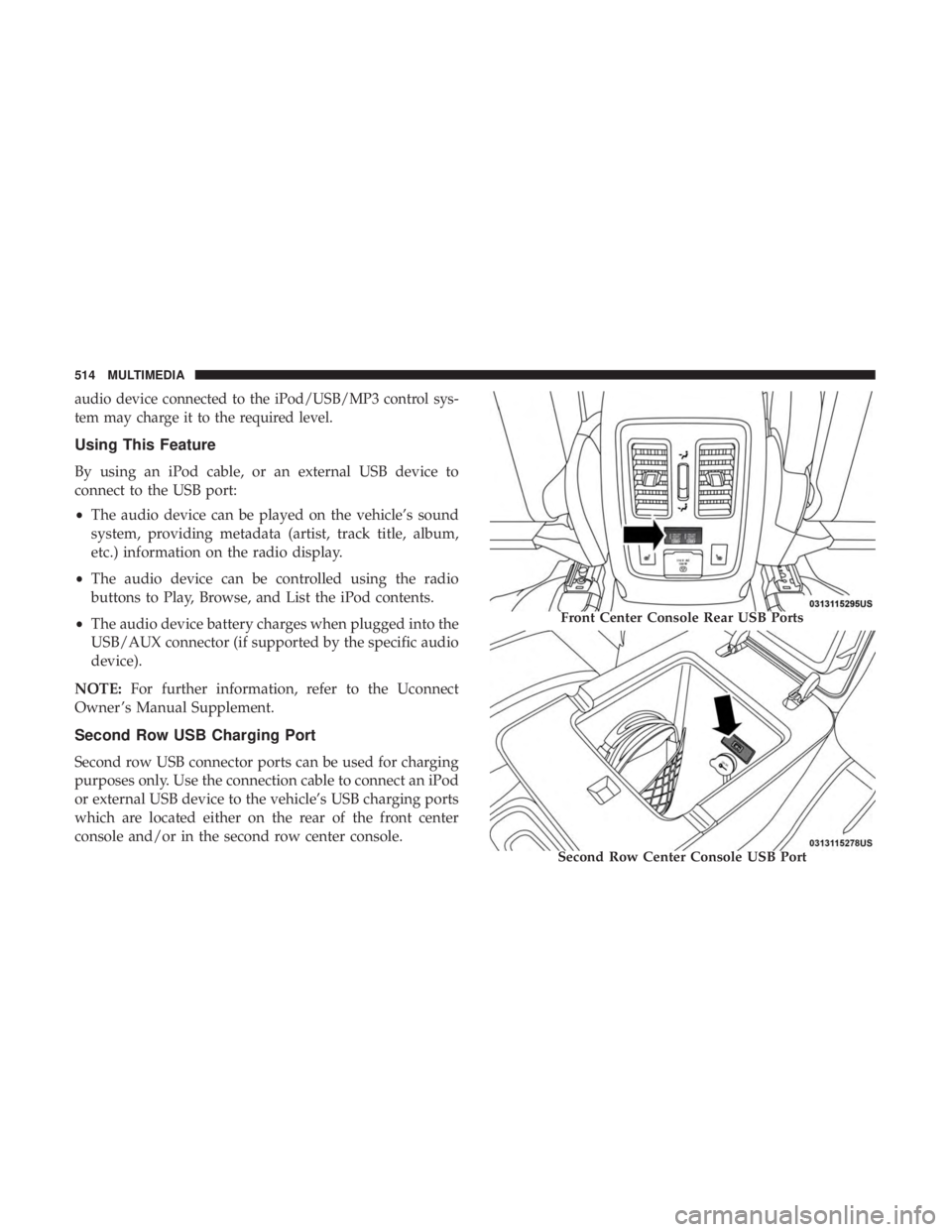
Second Row USB Charging Port
Second row USB connector ports can be used for charging
purposes only. Use the connection cable to connect an iPod
or external USB device to the vehicle’s USB charging ports
which are located either on the rear of the front center
console and/or in the second row center console.
Front Center Console Rear USB Ports
Second Row Center Console USB Port
514 MULTIMEDIA
Page 557 of 572

Anti-Lock Warning Light.....................161
Apple CarPlay ........................... .543
Arming System Security Alarm ...........................32
Assist, Hill Start .......................... .172
Audio Systems (Radio) ...................... .466
Auto Down Power Windows ...................98
Automatic Headlights ........................72
Automatic High Beams .......................71
Automatic Temperature Control (ATC) ............94
Automatic Transmission ..................258, 269
Adding Fluid ....................... .422, 462
Autostick ............................. .275
Fluid And Filter Change ...................422
Fluid Change .......................... .422
Fluid Level Check .....................421, 422
Fluid Type ......................... .421, 462
Gear Ranges ........................... .270
Special Additives ........................ .421
Automatic Transmission Limp Home Mode ........274
Autostick ............................... .275
Auxiliary Driving Systems ....................180
Auxiliary Electrical Outlet (Power Outlet) .........122
Auxiliary Power Outlet ..................... .122Axle Lubrication
.......................... .462
Battery .............................. .155, 399
Charging System Light ....................155
Keyless Key Fob Replacement ................21
Battery Saver Feature .........................74
Belts, Seat ............................... .251
Blind Spot Monitoring ...................... .180
Body Mechanism Lubrication ..................408
B-Pillar Location .......................... .429
Brake Assist System ........................ .172
Brake Control System, Electronic ................171
Brake Fluid .......................... .420, 462
Brake System ......................... .420, 455
Anti-Lock
(ABS) ........................ .455
Fluid Check ........................ .420, 462
Master Cylinder ........................ .420
Parking .............................. .265
Warning Light .......................... .154
Brake/Transmission Interlock ..................268
Bulb Replacement ...................... .360, 361
Bulbs, Light ............................. .254
Camera, Rear ............................ .329
Capacities, Fluid .......................... .460
12
INDEX 555