Page 444 of 560
▫Register (4C/4C NAV) ...................524
▫ Vehicle Health Report/Alert (4C/4C NAV) .....524
▫ Mobile App (4C/4C NAV) ................525
▫ SiriusXM Travel Link (4C NAV) .............526
▫ Siri Eyes Free — If Equipped ..............527▫
Do Not Disturb ....................... .528
▫ Android Auto — If Equipped ..............529
▫ Apple CarPlay — If Equipped ..............530
▫ General Information .....................532
▫ Additional Information ...................532
442 MULTIMEDIA
Page 445 of 560
UCONNECT SYSTEMS
For detailed information about your Uconnect system,
refer to your Uconnect Owner ’s Manual Supplement.
NOTE:Uconnect screen images are for illustration pur-
poses only and may not reflect exact software for your
vehicle.
DRAG & DROP MENU BAR
The Uconnect features and services in the main menu bar
are easily changed for your convenience. Simply follow
these steps:
1. Press the “Apps
” button to open the App screen.
2. Press and hold, then drag the selected App to replace anexisting shortcut in the main menu bar.
The new app shortcut, that was dragged down onto the
main menu bar, will now be an active App/shortcut.
NOTE: This feature is only available if the vehicle is in
park.
Uconnect 4 Main Menu
Uconnect 4C/4C NAV Main Menu10
MULTIMEDIA 443
Page 446 of 560
CYBERSECURITY
Your vehicle may be a connected vehicle and may be
equipped with both wired and wireless networks. These
networks allow your vehicle to send and receive informa-
tion. This information allows systems and features in your
vehicle to function properly.
Your vehicle may be equipped with certain security fea-
tures to reduce the risk of unauthorized and unlawful
access to vehicle systems and wireless communications.
Vehicle software technology continues to evolve over time
and FCA US LLC, working with its suppliers, evaluates
and takes appropriate steps as needed. Similar to a com-
puter or other devices, your vehicle may require software
updates to improve the usability and performance of your
systems or to reduce the potential risk of unauthorized and
unlawful access to your vehicle systems.
The risk of unauthorized and unlawful access to your
vehicle systems may still exist, even if the most recent
version of vehicle software (such as Uconnect software) is
installed.
WARNING!
•It is not possible to know or to predict all of the
possible outcomes if your vehicle’s systems are
breached. It may be possible that vehicle systems,
including safety related systems, could be impaired or
a loss of vehicle control could occur that may result in
an accident involving serious injury or death.
•ONLY insert media (e.g., USB, SD card, or CD) into
your vehicle if it came from a trusted source. Media of
unknown origin could possibly contain malicious soft-
ware, and if installed in your vehicle, it may increase
the possibility for vehicle systems to be breached.
• As always, if you experience unusual vehicle behav-
ior, take your vehicle to your nearest authorized
dealer immediately.
NOTE:
• FCA US LLC or your dealer may contact you directly
regarding software updates.
• To help further improve vehicle security and minimize
the potential risk of a security breach, vehicle owners
should:
444 MULTIMEDIA
Page 447 of 560
•Routinely check www.driveuconnect.com (U.S. Resi-
dents) or www.driveuconnect.ca (Canadian Residents)
to learn about available Uconnect software updates.
• Only connect and use trusted media devices (e.g.
personal mobile phones, USBs, CDs).
Privacy of any wireless and wired communications cannot
be assured. Third parties may unlawfully intercept infor-
mation and private communications without your consent.
For further information, refer to “Data Collection & Pri-
vacy” in your Uconnect Owner ’s Manual Supplement or
“Onboard Diagnostic System (OBD II) Cybersecurity” in
“Getting To Know Your Instrument Panel”.
UCONNECT SETTINGS
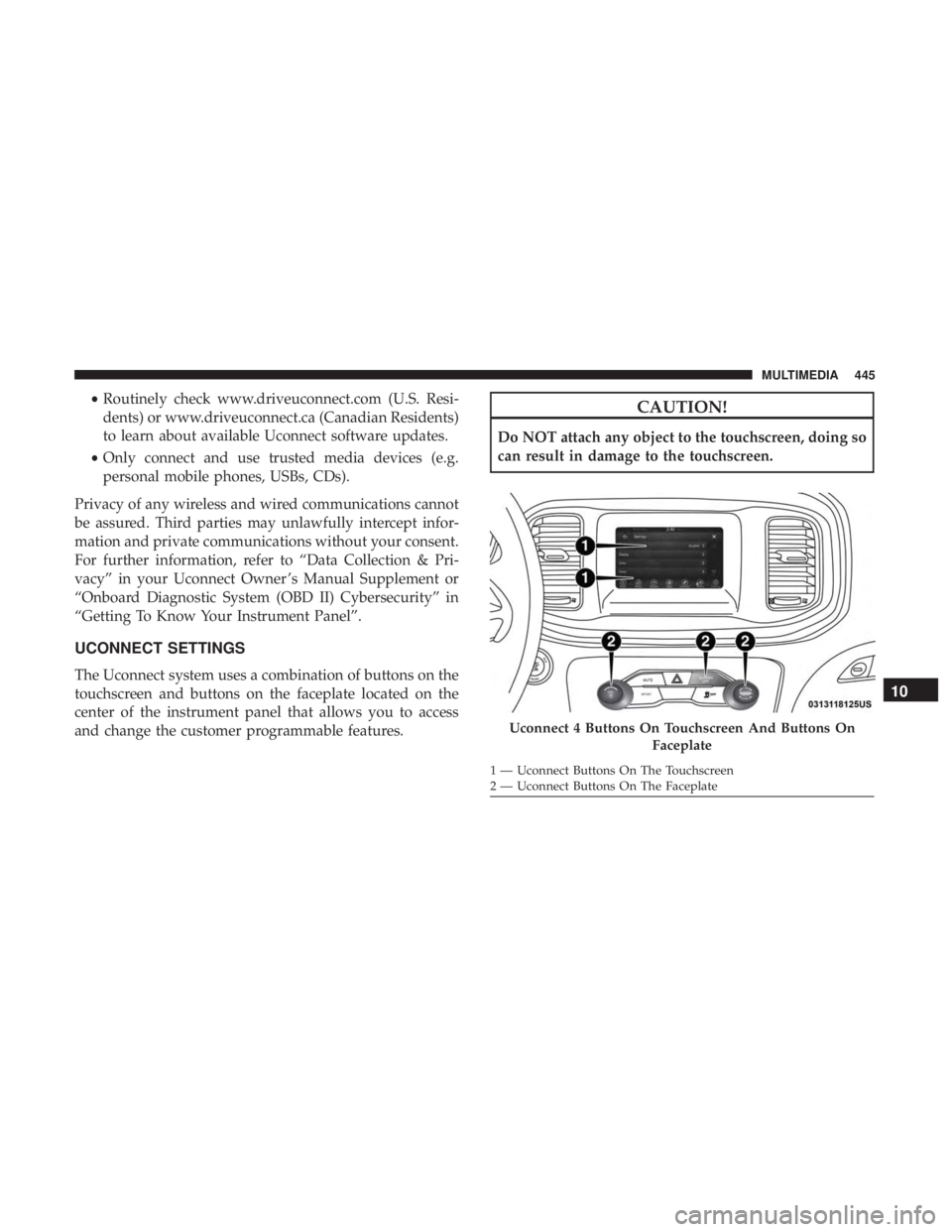
The Uconnect system uses a combination of buttons on the
touchscreen and buttons on the faceplate located on the
center of the instrument panel that allows you to access
and change the customer programmable features.
CAUTION!
Do NOT attach any object to the touchscreen, doing so
can result in damage to the touchscreen.
Uconnect 4 Buttons On Touchscreen And Buttons On Faceplate
1 — Uconnect Buttons On The Touchscreen
2 — Uconnect Buttons On The Faceplate
10
MULTIMEDIA 445
Page 448 of 560
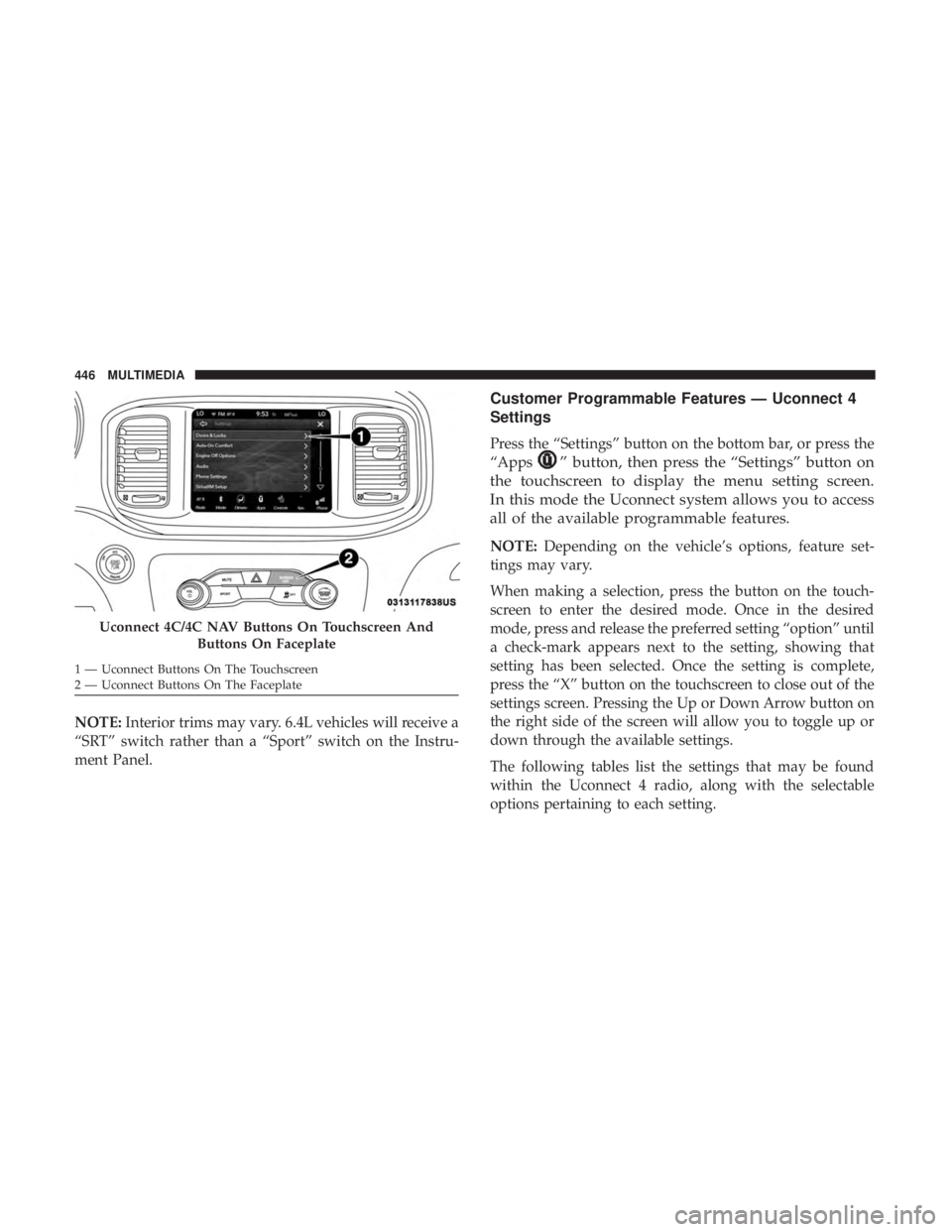
NOTE:Interior trims may vary. 6.4L vehicles will receive a
“SRT” switch rather than a “Sport” switch on the Instru-
ment Panel.
Customer Programmable Features — Uconnect 4
Settings
Press the “Settings” button on the bottom bar, or press the
“Apps
” button, then press the “Settings” button on
the touchscreen to display the menu setting screen.
In this mode the Uconnect system allows you to access
all of the available programmable features.
NOTE: Depending on the vehicle’s options, feature set-
tings may vary.
When making a selection, press the button on the touch-
screen to enter the desired mode. Once in the desired
mode, press and release the preferred setting “option” until
a check-mark appears next to the setting, showing that
setting has been selected. Once the setting is complete,
press the “X” button on the touchscreen to close out of the
settings screen. Pressing the Up or Down Arrow button on
the right side of the screen will allow you to toggle up or
down through the available settings.
The following tables list the settings that may be found
within the Uconnect 4 radio, along with the selectable
options pertaining to each setting.
Uconnect 4C/4C NAV Buttons On Touchscreen And
Buttons On Faceplate
1 — Uconnect Buttons On The Touchscreen
2 — Uconnect Buttons On The Faceplate 446 MULTIMEDIA
Page 449 of 560
Display
After pressing the “Display” button on the touchscreen,
you may select from the available settings displayed in the
instrument cluster display, and navigation system (if
equipped). The following selectable units of measure are
listed below:
Setting NameSelectable Options
Display Mode AutoManual
Display Brightness With Headlight ON +–
Display Brightness With Headlights OFF +–
Set Language EnglishFrançais Español
NOTE:
When the “Set Language” feature is selected, you may select one of multiple languages (English/Français/Español)
for all display nomenclature, including the trip functions and the navigation system (if equipped). Press the “Set
Language” button on the touchscreen, then press the desired language button on the touchscreen until a check-mark
appears next to the language, showing that setting has been selected. Touchscreen Beep OnOff
10
MULTIMEDIA 447
Page 450 of 560
Units
After pressing the “Units” button on the touchscreen you
may select each unit of measure independently displayed
in the instrument cluster display, and navigation system
(if equipped). The following selectable units of measure are
listed below:
Setting NameSelectable Options
Units US Metric Custom
Speed MPH km/h
Distance mi km
Fuel Consumption MPG (US)MPG (UK) L/100 km km/L
Pressure psikPa bar
Temperature °F °C
Voice
After pressing the “Voice” button on the touchscreen, the
following settings will be available:
Setting Name Selectable Options
Voice Response Length BriefDetailed
Show Command List AlwaysWith Help Never
448 MULTIMEDIA
Page 451 of 560
Clock & Date
After pressing the “Clock & Date” button on the touch-
screen, the following settings will be available:
Setting NameSelectable Options
Sync Time With GPS — If Equipped On
Off
NOTE:
The “Sync Time With GPS” feature will allow you to automatically have the radio set the time. Set Time +–
Set Format 12 hour24 hour
AM PM
Set Date Up ArrowDown Arrow
NOTE:
When in this display, you may set the date manually. Press the “Set Date” button on the touchscreen then press the
corresponding arrows above and below the current date to adjust.
10
MULTIMEDIA 449