Page 408 of 500
Customer Programmable Features — Uconnect
4C/4C NAV Settings
Press the “Apps” button (if equipped), and then
press the “Settings” button on the touchscreen to dis-
play the menu setting screen. In this mode, the
Uconnect system allows you to access programmable
features that may be equipped such as Language, Dis-
play, Units, Voice, Clock & Date, Safety & Driving
Assistance, Mirrors & Wipers, Lights, Doors & Locks,
Auto-On Comfort, Key Off Options, Audio, Phone/
Bluetooth, SiriusXM Setup, Reset, and System Informa-
tion.
NOTE: Depending on the vehicle’s options, feature set-
tings may vary.
When making a selection, press the button on the touch-
screen to enter the desired mode. Once in the desired
mode, press and release the preferred setting “option” until
a check-mark appears next to the setting, showing that
setting has been selected. Once the setting is complete,
press the “X” button on the touchscreen to close out of the
settings screen. Pressing the up or down arrow button on
the right side of the screen will allow you to toggle up or
down through the available settings.
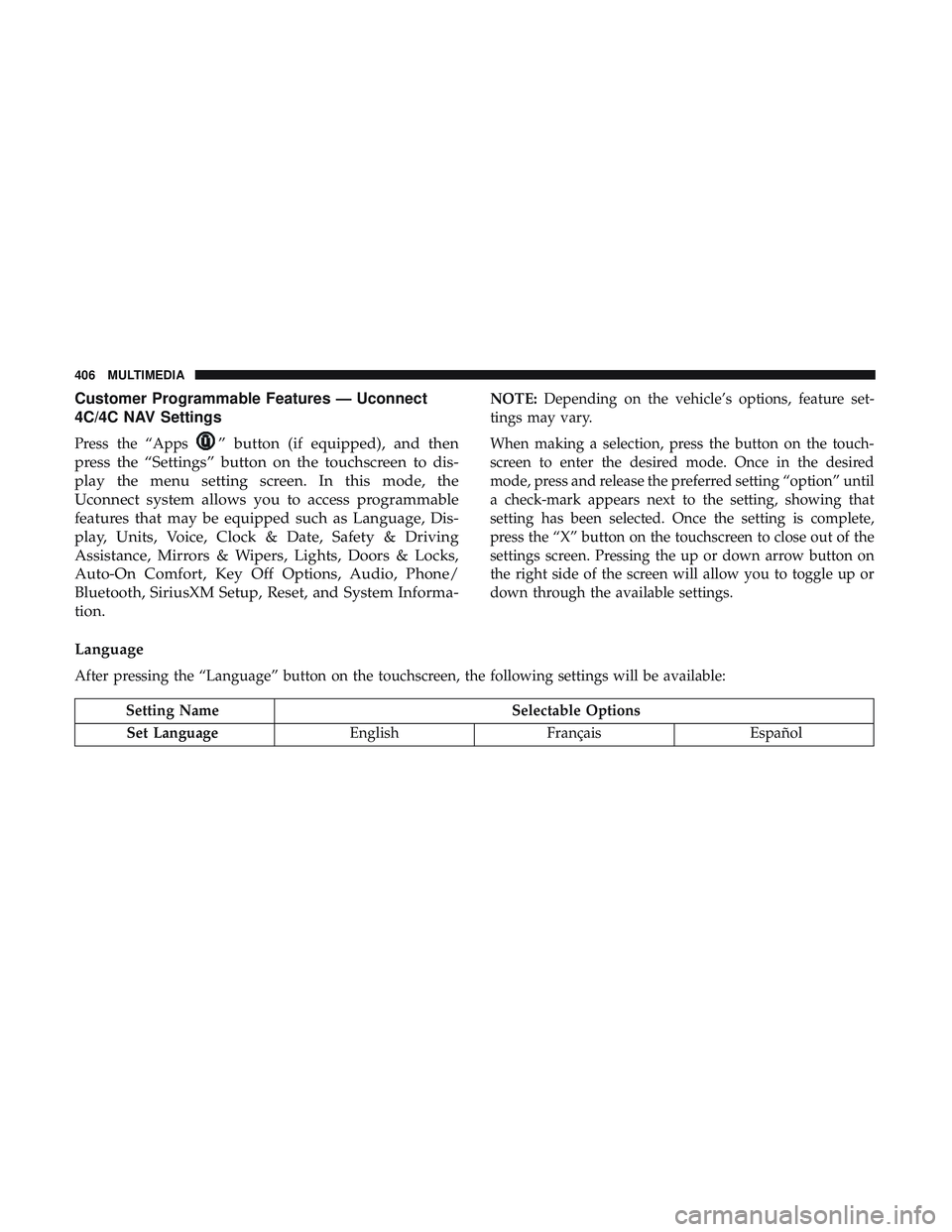
Language
After pressing the “Language” button on the touchscreen, the following settings will be available:
Setting Name Selectable Options
Set Language EnglishFrançais Español
406 MULTIMEDIA
Page 426 of 500
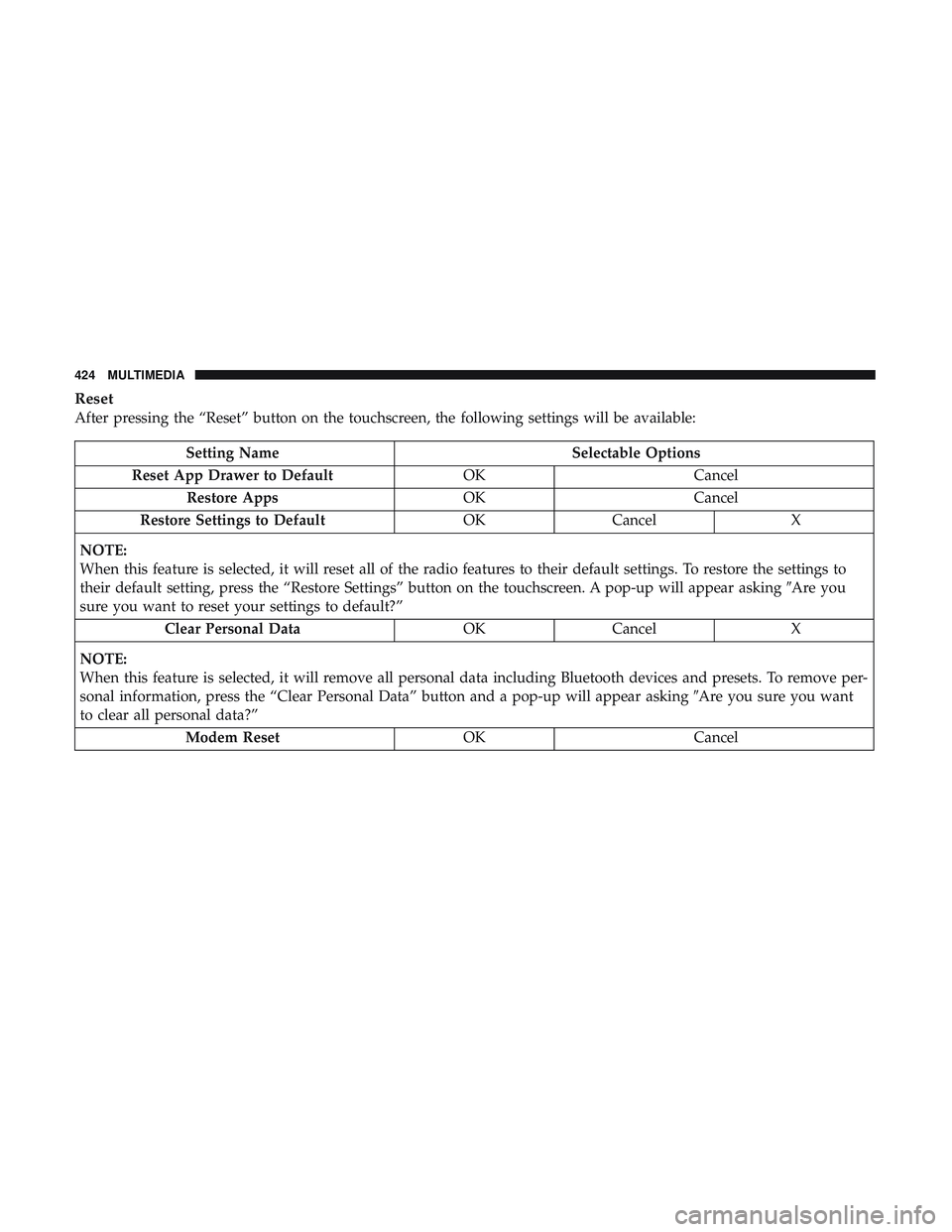
Reset
After pressing the “Reset” button on the touchscreen, the following settings will be available:
Setting NameSelectable Options
Reset App Drawer to Default OKCancel
Restore Apps OKCancel
Restore Settings to Default OKCancel X
NOTE:
When this feature is selected, it will reset all of the radio features to their default settings. To restore the settings to
their default setting, press the “Restore Settings” button on the touchscreen. A pop-up will appear asking �Are you
sure you want to reset your settings to default?”
Clear Personal Data OKCancel X
NOTE:
When this feature is selected, it will remove all personal data including Bluetooth devices and presets. To remove per-
sonal information, press the “Clear Personal Data” button and a pop-up will appear asking �Are you sure you want
to clear all personal data?”
Modem Reset OKCancel
424 MULTIMEDIA
Page 434 of 500
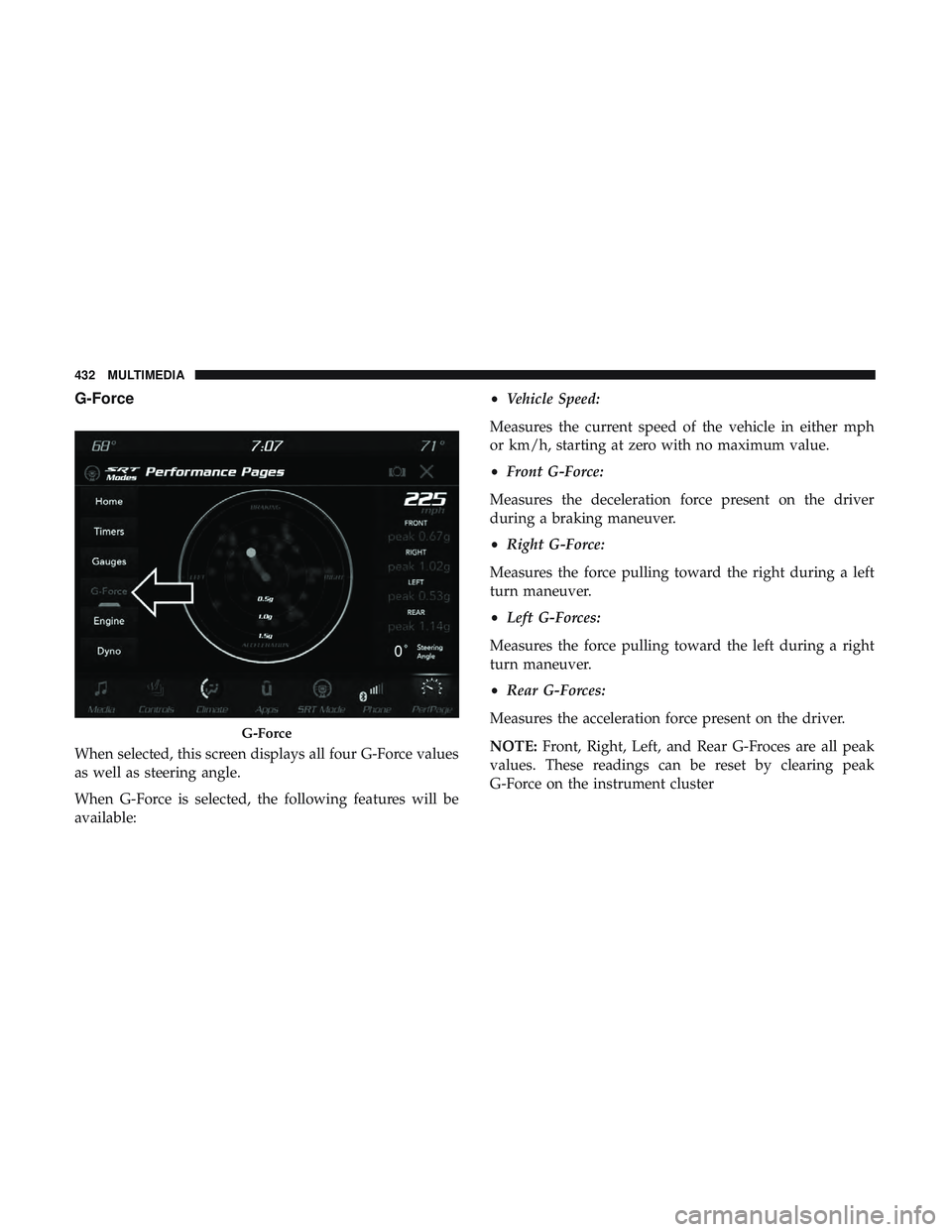
G-Force
When selected, this screen displays all four G-Force values
as well as steering angle.
When G-Force is selected, the following features will be
available:•
Vehicle Speed:
Measures the current speed of the vehicle in either mph
or km/h, starting at zero with no maximum value.
• Front G-Force:
Measures the deceleration force present on the driver
during a braking maneuver.
• Right G-Force:
Measures the force pulling toward the right during a left
turn maneuver.
• Left G-Forces:
Measures the force pulling toward the left during a right
turn maneuver.
• Rear G-Forces:
Measures the acceleration force present on the driver.
NOTE: Front, Right, Left, and Rear G-Froces are all peak
values. These readings can be reset by clearing peak
G-Force on the instrument cluster
G-Force
432 MULTIMEDIA
Page 453 of 500
NOTE:The only time the shift light comes on, is when the
shifter is placed into Sport Mode. It will not work with
paddle shifters.
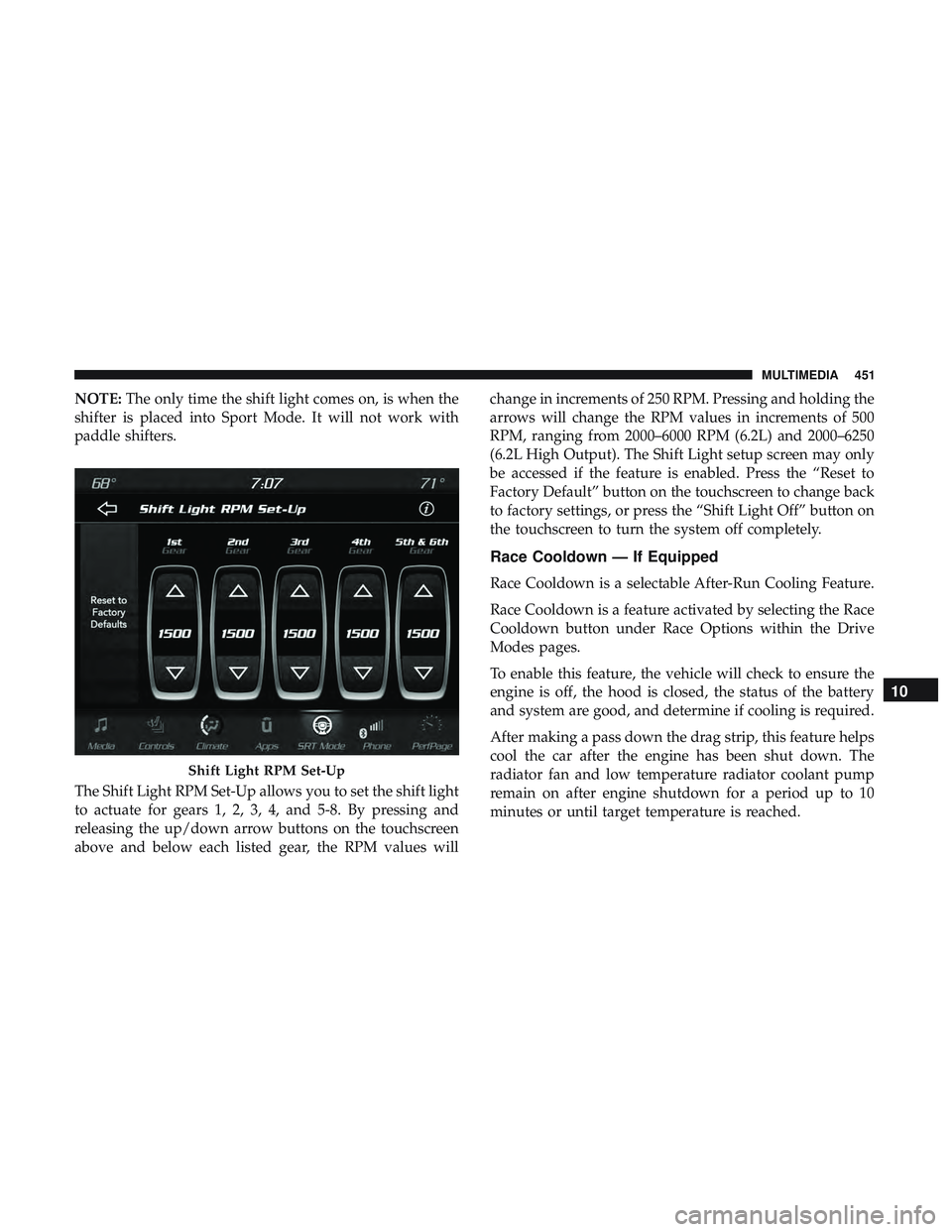
The Shift Light RPM Set-Up allows you to set the shift light
to actuate for gears 1, 2, 3, 4, and 5-8. By pressing and
releasing the up/down arrow buttons on the touchscreen
above and below each listed gear, the RPM values will change in increments of 250 RPM. Pressing and holding the
arrows will change the RPM values in increments of 500
RPM, ranging from 2000–6000 RPM (6.2L) and 2000–6250
(6.2L High Output). The Shift Light setup screen may only
be accessed if the feature is enabled. Press the “Reset to
Factory Default” button on the touchscreen to change back
to factory settings, or press the “Shift Light Off” button on
the touchscreen to turn the system off completely.
Race Cooldown — If Equipped
Race Cooldown is a selectable After-Run Cooling Feature.
Race Cooldown is a feature activated by selecting the Race
Cooldown button under Race Options within the Drive
Modes pages.
To enable this feature, the vehicle will check to ensure the
engine is off, the hood is closed, the status of the battery
and system are good, and determine if cooling is required.
After making a pass down the drag strip, this feature helps
cool the car after the engine has been shut down. The
radiator fan and low temperature radiator coolant pump
remain on after engine shutdown for a period up to 10
minutes or until target temperature is reached.
Shift Light RPM Set-Up
10
MULTIMEDIA 451
Page 458 of 500
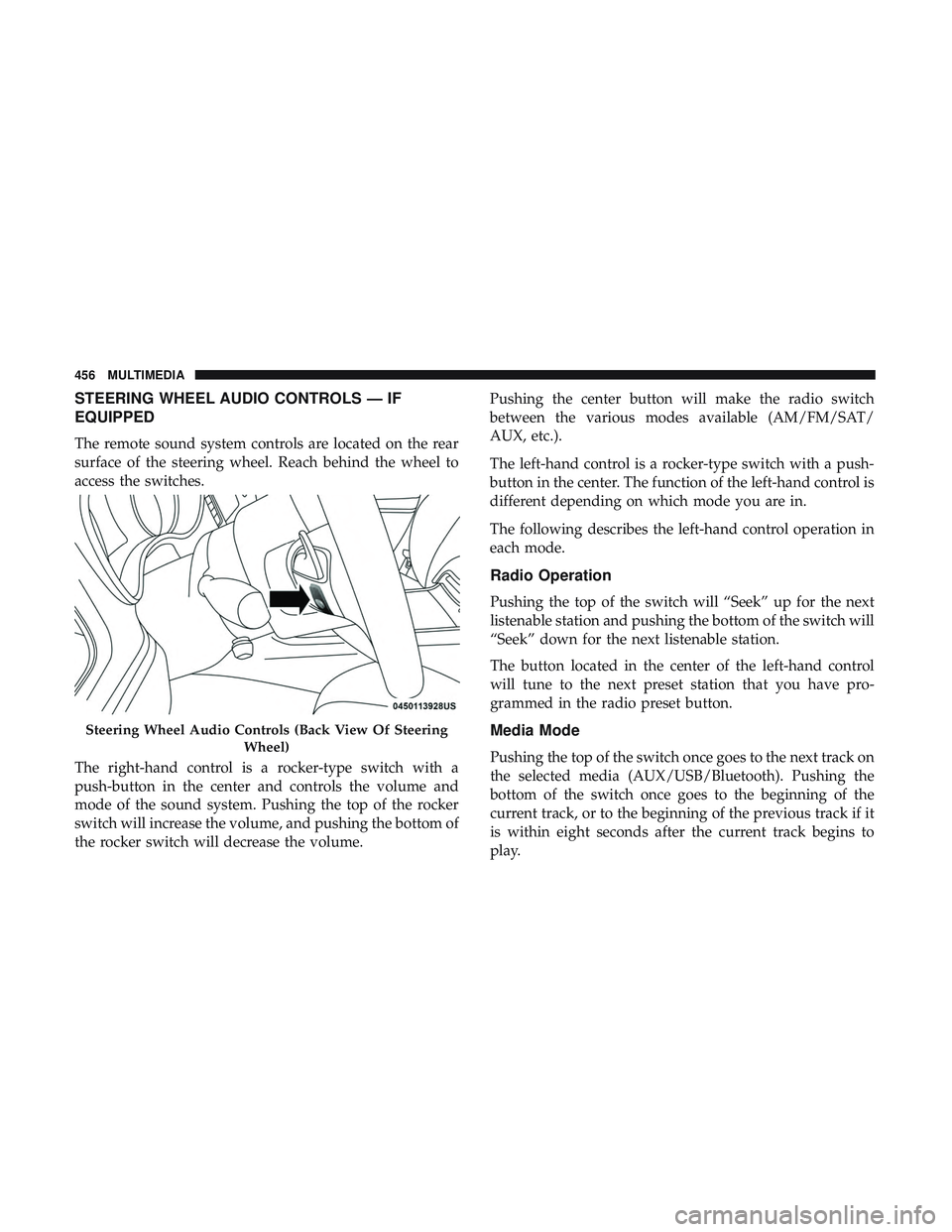
STEERING WHEEL AUDIO CONTROLS — IF
EQUIPPED
The remote sound system controls are located on the rear
surface of the steering wheel. Reach behind the wheel to
access the switches.
The right-hand control is a rocker-type switch with a
push-button in the center and controls the volume and
mode of the sound system. Pushing the top of the rocker
switch will increase the volume, and pushing the bottom of
the rocker switch will decrease the volume.Pushing the center button will make the radio switch
between the various modes available (AM/FM/SAT/
AUX, etc.).
The left-hand control is a rocker-type switch with a push-
button in the center. The function of the left-hand control is
different depending on which mode you are in.
The following describes the left-hand control operation in
each mode.
Radio Operation
Pushing the top of the switch will “Seek” up for the next
listenable station and pushing the bottom of the switch will
“Seek” down for the next listenable station.
The button located in the center of the left-hand control
will tune to the next preset station that you have pro-
grammed in the radio preset button.
Media Mode
Pushing the top of the switch once goes to the next track on
the selected media (AUX/USB/Bluetooth). Pushing the
bottom of the switch once goes to the beginning of the
current track, or to the beginning of the previous track if it
is within eight seconds after the current track begins to
play.
Steering Wheel Audio Controls (Back View Of Steering
Wheel)
456 MULTIMEDIA
Page 492 of 500
Service............................... .479
Tilt ...................................45
Manual Transmission .................223, 357, 359
Fluid Level Check .....................357, 359
Map/Reading Lights .........................65
Methanol ............................... .393
Mirrors ..................................57
Electric Powered ..........................59
Electric Remote ...........................59
Heated .................................59
Outside ................................58
Rearview ............................57, 283
Vanity .................................60
Modifications/Alterations Vehicle .................................5
Monitor, Tire Pressure System ..................153
Mopar Parts ............................. .479
Multi-Function Control Lever ...................61
Occupant Restraints ........................ .159
Octane Rating, Gasoline (Fuel) ..............392, 398
Oil Change Indicator ........................107
Reset .................................107
Oil, Engine ............................340, 398
Capacity ...............................397 Change Interval
........................ .340
Checking ............................. .338
Dipstick ...............................338
Disposal ...............................342
Filter ............................. .342, 398
Filter Disposal .......................... .342
Materials Added To .......................341
Pressure Warning Light ....................120
Recommendation ........................ .397
Synthetic ............................. .341
Viscosity .......................... .341, 397
Oil Filter, Change ..........................342
Oil Filter, Selection ..........................342
Oil Pressure Light ..........................120
Onboard Diagnostic System ...................128
Operating Pr
ecautions.......................128
Operator Manual Owner’s Manual .......................5,479
Outside Rearview Mirrors .....................58
Overheating, Engine ........................322
Owner ’s Manual (Operator Manual) ...............5
Paddle Shifters ............................235
Paddle Shift Mode ..........................235
Paint Care ............................... .385
490 INDEX
Page:
< prev 1-8 9-16 17-24