Page 398 of 532
DEPARTMENT OF TRANSPORTATION UNIFORM
TIRE QUALITY GRADES
The following tire grading categories were established
by the National Highway Traffic Safety Administration.
The specific grade rating assigned by the tire’s manu-
facturer in each category is shown on the sidewall of the
tires on your vehicle.
All passenger vehicle tires must conform to Federal
safety requirements in addition to these grades.
Treadwear
The Treadwear grade is a comparative rating, based on
the wear rate of the tire when tested under controlled
conditions on a specified government test course. For
example, a tire graded 150 would wear one and one-half
times as well on the government course as a tire graded
100. The relative performance of tires depends upon the
actual conditions of their use, however, and may depart
significantly from the norm due to variations in driving
habits, service practices, and differences in road charac-
teristics and climate.
Traction Grades
The Traction grades, from highest to lowest, are AA, A,
B, and C. These grades represent the tire’s ability to stopon wet pavement, as measured under controlled condi-
tions on specified government test surfaces of asphalt
and concrete. A tire marked C may have poor traction
performance.
WARNING!
The traction grade assigned to this tire is based on
straight-ahead braking traction tests, and does not
include acceleration, cornering, hydroplaning, or
peak traction characteristics.
Temperature Grades
The Temperature grades are A (the highest), B, and C,
representing the tire’s resistance to the generation of
heat and its ability to dissipate heat, when tested under
controlled conditions on a specified indoor laboratory
test wheel.
Sustained high temperature can cause the material of
the tire to degenerate and reduce tire life, and excessive
temperature can lead to sudden tire failure. The grade C
corresponds to a level of performance, which all pas-
senger vehicle tires must meet under the Federal Motor
Vehicle Safety Standard No. 109. Grades B and A
396 SERVICING AND MAINTENANCE
Page 419 of 532

MULTIMEDIA
CONTENTS
�UCONNECT SYSTEMS ...................419
� DRAG & DROP MENU BAR ................419
� CYBERSECURITY ...................... .420
� UCONNECT SETTINGS ...................421
▫ Customer Programmable Features —
Uconnect 4 Settings .....................422
▫ Customer Programmable Features —
Uconnect 4C/4C NAV Settings .............443
▫ Performance Pages — If Equipped ...........463
▫ Performance Control — If Equipped .........473
� STEERING WHEEL AUDIO CONTROLS —
IF EQUIPPED ......................... .482
▫ Radio Operation ....................... .482
▫ Media Mode ......................... .482
� IPOD/USB/MP3 CONTROL — IF EQUIPPED . . .483 �
RADIO OPERATION AND MOBILE PHONES . . .483
▫ Regulatory And Safety Information ..........483
� UCONNECT VOICE RECOGNITION QUICK
TIPS ................................ .485
▫ Introducing Uconnect ....................485
▫ Get Started .......................... .486
▫ Basic Voice Commands ...................487
▫ Radio .............................. .487
▫ Media .............................. .488
▫ Phone .............................. .490
▫ Voice Text Reply — If Equipped ............491
▫ Climate ............................. .492
▫ Navigation (4C NAV) ....................494
▫ SiriusXM Guardian (4C/4C NAV) —
If Equipped .......................... .495
10
Page 494 of 532
TIP:Your mobile phone must have the full implementation
of the Message Access Profile (MAP) to take advantage of
this feature. For details about MAP, visit
UconnectPhone.com.
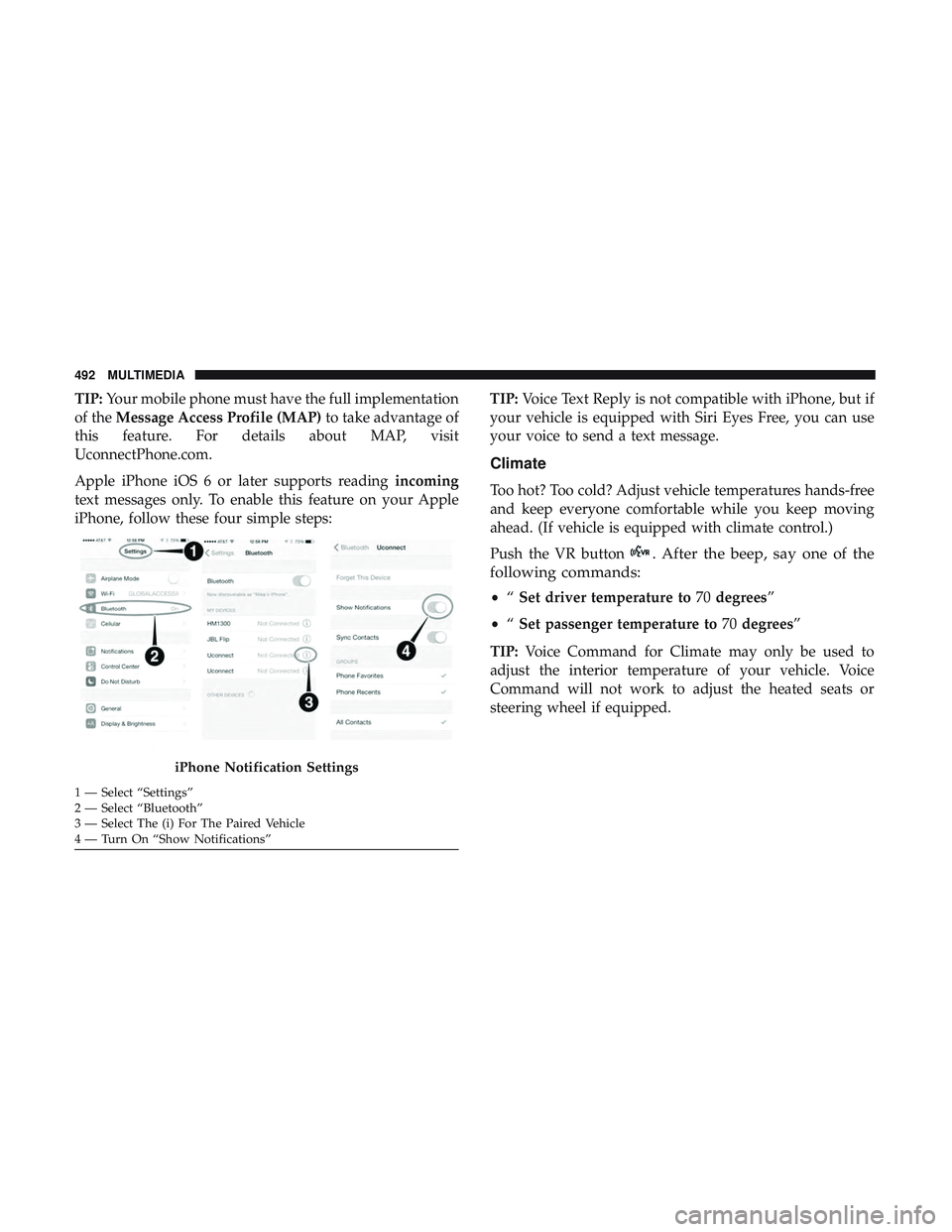
Apple iPhone iOS 6 or later supports reading incoming
text messages only. To enable this feature on your Apple
iPhone, follow these four simple steps: TIP:
Voice Text Reply is not compatible with iPhone, but if
your vehicle is equipped with Siri Eyes Free, you can use
your voice to send a text message.
Climate
Too hot? Too cold? Adjust vehicle temperatures hands-free
and keep everyone comfortable while you keep moving
ahead. (If vehicle is equipped with climate control.)
Push the VR button
. After the beep, say one of the
following commands:
• “Set driver temperature to 70degrees”
• “Set passenger temperature to 70degrees”
TIP: Voice Command for Climate may only be used to
adjust the interior temperature of your vehicle. Voice
Command will not work to adjust the heated seats or
steering wheel if equipped.
iPhone Notification Settings
1 — Select “Settings”
2 — Select “Bluetooth”
3 — Select The (i) For The Paired Vehicle
4 — Turn On “Show Notifications” 492 MULTIMEDIA
Page 516 of 532
Camera, Rear............................ .261
Capacities, Fluid ...........................411
Caps, Filler Fuel ................................. .263
Oil (Engine) ........................ .345, 353
Radiator (Coolant Pressure) .................367
Carbon Monoxide Warning ................201, 411
Cargo Vehicle Loading ......................... .265
Car Washes .............................. .398
Cellular Phone ........................... .483
Certification Label ......................... .265
Chains, Tire ............................. .394
Changing A Flat Tire ....................... .373
Charging Wireless ................................98
Chart, Tire Sizing .......................... .375
Check Engine Light (Malfunction Indicator Light). . . .126
Checking Your Vehicle For Safety ...............201
Checks, Safety ............................ .201
Child Restraint ........................... .180
Child Restraints Booster Seats ........................... .184
Child Seat Installation .....................197
How To Stow An unused ALR Seat Belt ........193Infant And Child Restraints
.................183
Lower Anchors And Tethers For Children .......187
Older Children And Child Restraints ...........183
Seating Positions ........................ .186
Clean Air Gasoline ........................ .408
Cleaning Wheels ............................... .393
Climate Control ............................68
Cold Weather Operation ..................... .212
Compact Spare Tire ........................ .391
Contract, Service .......................... .508
Cooling Pressure Cap (Radiator Cap) ............367
Cooling System ........................... .365
Adding Coolant (Antifreeze) .................366
Coolant
Level ....................... .365, 368
Cooling Capacity .........................411
Disposal Of Used Coolant ..................368
Drain, Flush, And Refill ....................365
Inspection ............................. .368
Points To Remember ..................... .368
Pressure Cap ........................... .367
Radiator Cap .......................... .367
Selection Of Coolant (Antifreeze) .......365, 411, 413
Corrosion Protection ....................... .397
Cruise Control (Speed Control) ..............233, 236
514 INDEX
Page:
< prev 1-8 9-16 17-24