2019 DODGE CHALLENGER audio
[x] Cancel search: audioPage 445 of 532

System Information
After pressing the “System Information” button on the
touchscreen, the following settings will be available:
Setting NameSelectable Options
Software License System Software Information Screen
NOTE:
When the “Software License” feature is selected, a “System Software Information” screen will appear, displaying the
system software version. You can also update your maps with a USB device. Please see your authorized dealer for
further information.
Customer Programmable Features — Uconnect
4C/4C NAV Settings
Press the “Apps” button (if equipped), and then
press the “Settings” button on the touchscreen to dis-
play the menu setting screen. In this mode, the
Uconnect system allows you to access programmable
features that may be equipped such as Language, Dis-
play, Units, Voice, Clock & Date, Safety & Driving
Assistance, Mirrors & Wipers, Lights, Doors & Locks,
Auto-On Comfort, Key Off Options, Audio, Phone/
Bluetooth, SiriusXM Setup, Reset, and System Informa-
tion.
NOTE: Depending on the vehicle’s options, feature set-
tings may vary.
When making a selection, press the button on the touch-
screen to enter the desired mode. Once in the desired
mode, press and release the preferred setting “option” until
a check-mark appears next to the setting, showing that
setting has been selected. Once the setting is complete,
press the “X” button on the touchscreen to close out of the
settings screen. Pressing the up or down arrow button on
the right side of the screen will allow you to toggle up or
down through the available settings.
10
MULTIMEDIA 443
Page 460 of 532
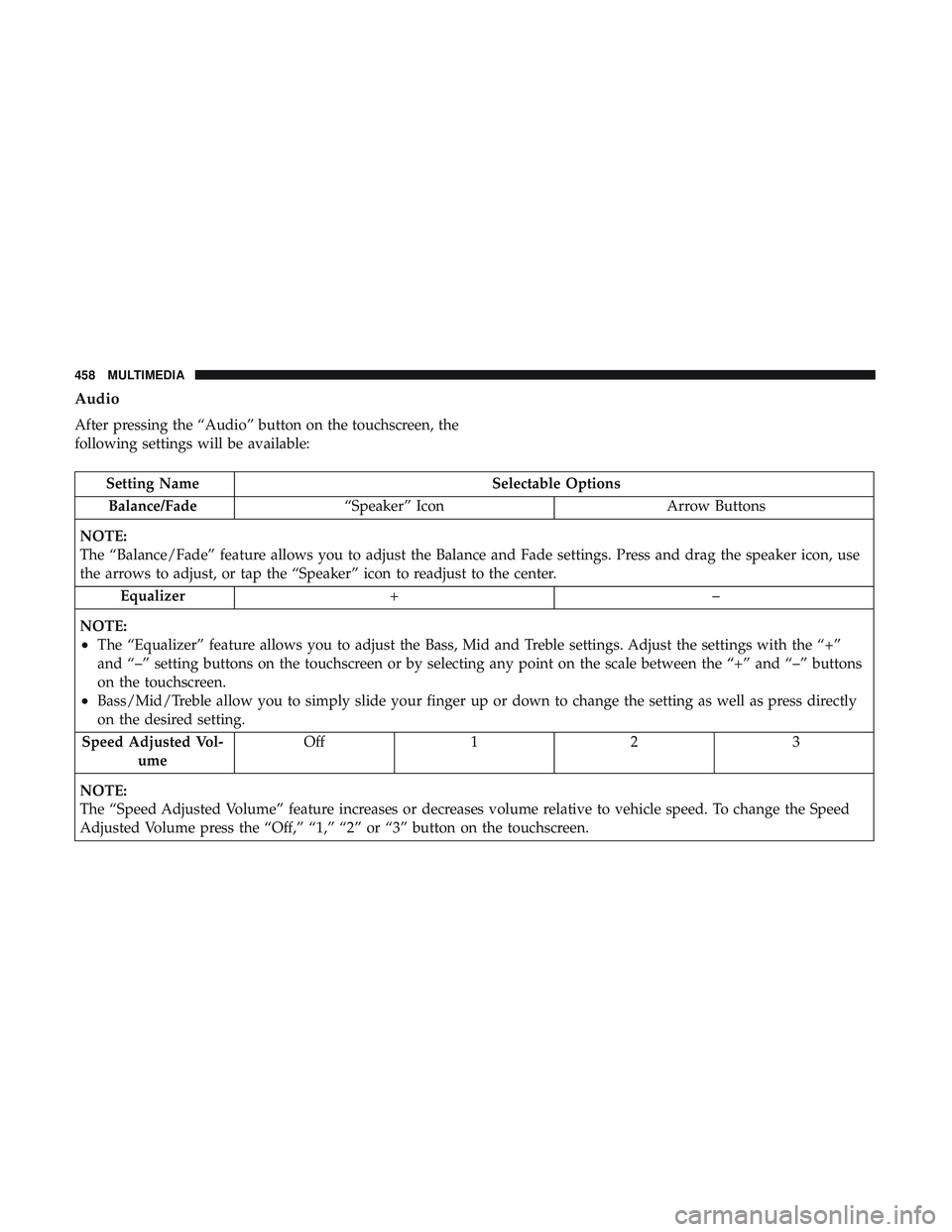
Audio
After pressing the “Audio” button on the touchscreen, the
following settings will be available:
Setting NameSelectable Options
Balance/Fade “Speaker” Icon Arrow Buttons
NOTE:
The “Balance/Fade” feature allows you to adjust the Balance and Fade settings. Press and drag the speaker icon, use
the arrows to adjust, or tap the “Speaker” icon to readjust to the center. Equalizer +–
NOTE:
•The “Equalizer” feature allows you to adjust the Bass, Mid and Treble settings. Adjust the settings with the “+”
and “–” setting buttons on the touchscreen or by selecting any point on the scale between the “+” and “–” buttons
on the touchscreen.
•Bass/Mid/Treble allow you to simply slide your finger up or down to change the setting as well as press directly
on the desired setting.
Speed Adjusted Vol- ume Off 1 2 3
NOTE:
The “Speed Adjusted Volume” feature increases or decreases volume relative to vehicle speed. To change the Speed
Adjusted Volume press the “Off,” “1,” “2” or “3” button on the touchscreen.
458 MULTIMEDIA
Page 461 of 532
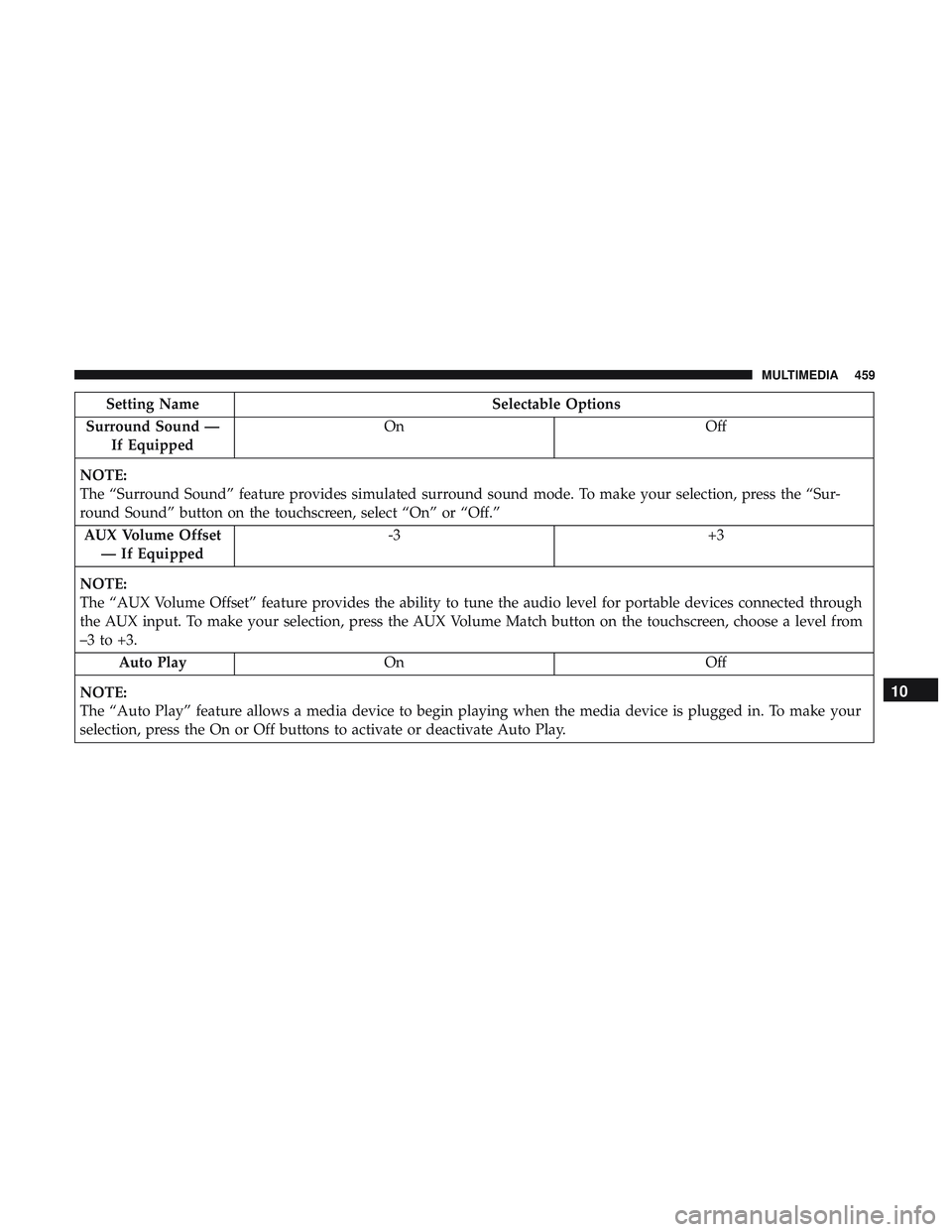
Setting NameSelectable Options
Surround Sound — If Equipped On
Off
NOTE:
The “Surround Sound” feature provides simulated surround sound mode. To make your selection, press the “Sur-
round Sound” button on the touchscreen, select “On” or “Off.” AUX Volume Offset — If Equipped -3
+3
NOTE:
The “AUX Volume Offset” feature provides the ability to tune the audio level for portable devices connected through
the AUX input. To make your selection, press the AUX Volume Match button on the touchscreen, choose a level from
–3 to +3. Auto Play On Off
NOTE:
The “Auto Play” feature allows a media device to begin playing when the media device is plugged in. To make your
selection, press the On or Off buttons to activate or deactivate Auto Play.
10
MULTIMEDIA 459
Page 462 of 532

Phone/Bluetooth Settings
After pressing the “Phone/Bluetooth Settings” button on
the touchscreen, the following settings will be available:
Setting NameSelectable Options
Do Not Disturb List of Settings
NOTE:
Press “Do Not Disturb” to access the available settings. The following settings are: Auto Reply (both, text, call), Auto
Reply Message (custom, default), and Custom Auto Reply Message (create message). Paired Phones and Audio Sources List Of Paired Phones and Audio Sources
NOTE:
The “Paired Phones and Audio Sources” feature shows which phones and audio sources are paired to the Phone and
Audio Sources Settings system. For further information, refer to the Uconnect Owner ’s Manual Supplement. Smartphone Projection Manager OnOff
NOTE: Pressing “Smartphone Projection Manager” feature allows you to see a list of all connected phones and gives
you the option to determine which phone will be used for projection (Apple CarPlay or Android Auto).
460 MULTIMEDIA
Page 484 of 532
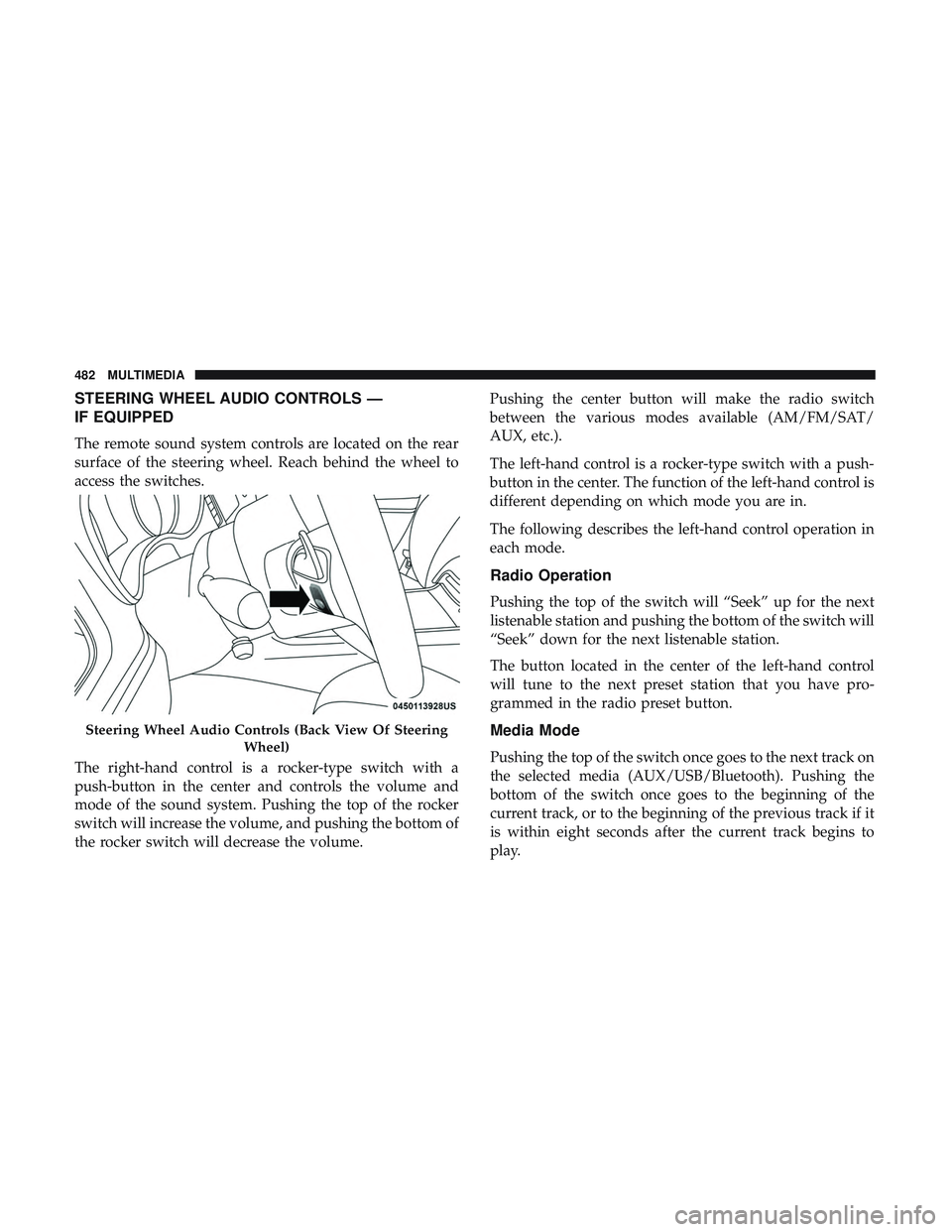
STEERING WHEEL AUDIO CONTROLS —
IF EQUIPPED
The remote sound system controls are located on the rear
surface of the steering wheel. Reach behind the wheel to
access the switches.
The right-hand control is a rocker-type switch with a
push-button in the center and controls the volume and
mode of the sound system. Pushing the top of the rocker
switch will increase the volume, and pushing the bottom of
the rocker switch will decrease the volume.Pushing the center button will make the radio switch
between the various modes available (AM/FM/SAT/
AUX, etc.).
The left-hand control is a rocker-type switch with a push-
button in the center. The function of the left-hand control is
different depending on which mode you are in.
The following describes the left-hand control operation in
each mode.
Radio Operation
Pushing the top of the switch will “Seek” up for the next
listenable station and pushing the bottom of the switch will
“Seek” down for the next listenable station.
The button located in the center of the left-hand control
will tune to the next preset station that you have pro-
grammed in the radio preset button.
Media Mode
Pushing the top of the switch once goes to the next track on
the selected media (AUX/USB/Bluetooth). Pushing the
bottom of the switch once goes to the beginning of the
current track, or to the beginning of the previous track if it
is within eight seconds after the current track begins to
play.
Steering Wheel Audio Controls (Back View Of Steering
Wheel)
482 MULTIMEDIA
Page 485 of 532
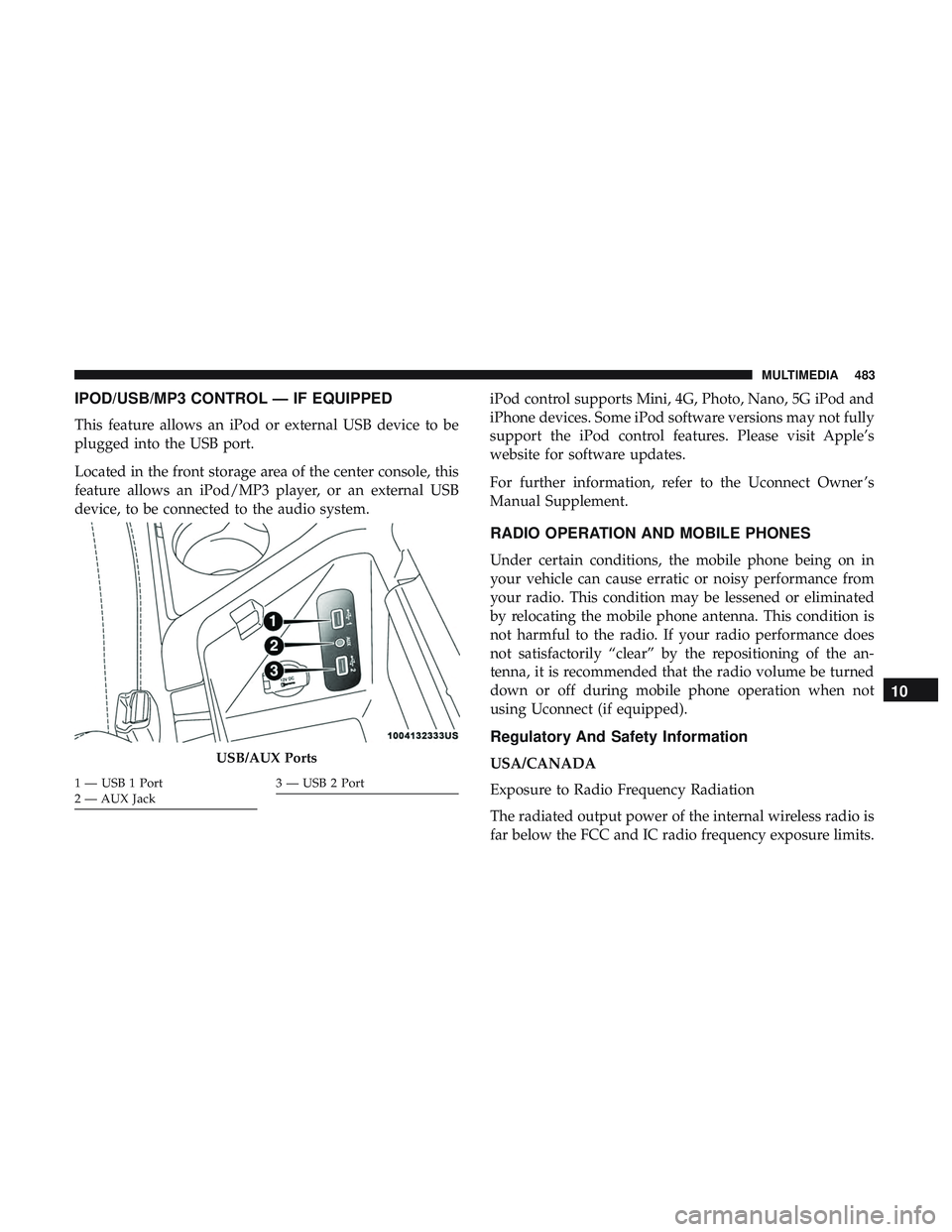
IPOD/USB/MP3 CONTROL — IF EQUIPPED
This feature allows an iPod or external USB device to be
plugged into the USB port.
Located in the front storage area of the center console, this
feature allows an iPod/MP3 player, or an external USB
device, to be connected to the audio system.iPod control supports Mini, 4G, Photo, Nano, 5G iPod and
iPhone devices. Some iPod software versions may not fully
support the iPod control features. Please visit Apple’s
website for software updates.
For further information, refer to the Uconnect Owner ’s
Manual Supplement.
RADIO OPERATION AND MOBILE PHONES
Under certain conditions, the mobile phone being on in
your vehicle can cause erratic or noisy performance from
your radio. This condition may be lessened or eliminated
by relocating the mobile phone antenna. This condition is
not harmful to the radio. If your radio performance does
not satisfactorily “clear” by the repositioning of the an-
tenna, it is recommended that the radio volume be turned
down or off during mobile phone operation when not
using Uconnect (if equipped).
Regulatory And Safety Information
USA/CANADA
Exposure to Radio Frequency Radiation
The radiated output power of the internal wireless radio is
far below the FCC and IC radio frequency exposure limits.USB/AUX Ports
1 — USB 1 Port
2 — AUX Jack3 — USB 2 Port
10
MULTIMEDIA 483
Page 515 of 532
Anti-Lock Warning Light.....................122
Apple CarPlay ........................... .501
Arming System Security Alarm ...........................33
Assist, Hill Start .......................... .136
Audio Systems (Radio) ...................... .419
Auto Down Power Windows ...................80
Automatic Door Locks ........................41
Automatic Headlights ........................61
Automatic High Beams .......................61
Automatic Temperature Control (ATC) ............76
Automatic Transmission ..................... .224
Adding Fluid .....................372, 413, 415
Fluid And Filter Change ...................372
Fluid Change .......................... .372
Fluid Level Check .....................371, 372
Fluid Type ...................... .371, 413, 415
Special Additives ........................ .372
Automatic Transmission Limp Home Mode .....41, 228
AutoPark ................................211
Autostick Operation ............................. .229
AW D Towing ............................... .333
Axle Fluid ........................... .413, 415Axle Lubrication
....................... .413, 415
Back-Up ................................ .261
Battery ...............................117,349
Charging System Light .....................117
Keyless Key Fob Replacement ................22
Location .............................. .349
Belts, Seat ............................... .202
Blind Spot Monitoring ...................... .139
Body Mechanism Lubrication ..................360
B-Pillar Location .......................... .379
Brake Assist System ........................ .131
Brake Control System ....................... .131
Brake Fluid ....................... .369, 413, 415
Brake System ......................... .369, 404
Fluid Check ..................... .369,
413, 415
Master Cylinder ........................ .369
Parking .............................. .215
Warning Light .......................115,404
Brake/Transmission Interlock ..................223
Break-In Recommendations, New Vehicle ..........214
Brightness, Interior Lights .....................65
Bulb Replacement ......................... .286
Bulbs, Light .......................... .204, 286
12
INDEX 513
Page 520 of 532
HomeLink (Garage Door Opener)................87
Hood Prop ................................83
Hood Release ..............................83
Ignition ..................................26
Switch .................................26
Information Center, Vehicle ...................105
Inside Rearview Mirror ....................57, 281
Instrument Cluster Descriptions ........................ .102, 123
Display ........................... .105, 108
Instrument Panel Lens Cleaning ................400
Interior Appearance Care .....................399
Interior Lights ..............................64
Intermittent Wipers (Delay Wipers) ...............67
Introduction ................................4
In Vehicle Help Vehicle User Guide ........................17
iPod/USB/MP3 Control ..................... .483
Bluetooth Streaming Audio .................483
Jacking Instructions ........................ .303
Jack Location ............................ .301
Jack Operation ........................ .303, 373Jump Starting
..................... .324, 325, 326
Key Fob Arm The System ..........................34
Panic Alarm .............................21
Programming Additional Key Fobs ..........25, 33
Unlatch The Trunk ........................21
Key Fob Battery Service (Remote Keyless Entry) .....22
Key Fob Programming (Remote Keyless Entry) ......25
Key-In Reminder ............................28
Keyless Enter-N-Go ..........................37
Enter The Trunk ..........................21
Keys ....................................18
Replacement ......................... .25, 33
Lane Change And Turn Signals .................63
Lane Change Assist ..........................63
Lap/Shoulder Belts ........................ .159
Latches ................................. .204
Hood ..................................83
Lead Free Gasoline ........................ .406
Leaks, Fluid ............................. .204
Life Of Tires ............................. .387
Light
Bulbs .......................... .204, 286
Lights .................................. .204
518 INDEX