Page 363 of 532
The external lock cylinders should be lubricated twice a
year, preferably in the Fall and Spring. Apply a small
amount of a high quality lubricant, such as Mopar Lock
Cylinder Lubricant directly into the lock cylinder.
Windshield Wiper Blades
Clean the rubber edges of the wiper blades and the
windshield periodically with a sponge or soft cloth and a
mild nonabrasive cleaner. This will remove accumulations
of salt or road film.
Operation of the wipers on dry glass for long periods may
cause deterioration of the wiper blades. Always use washer
fluid when using the wipers to remove salt or dirt from a
dry windshield.
Avoid using the wiper blades to remove frost or ice from
the windshield. Keep the blade rubber out of contact with
petroleum products such as engine oil, gasoline, etc.
NOTE:Life expectancy of wiper blades varies depending
on geographical area and frequency of use. Poor perfor-
mance of blades may be present with chattering, marks,
water lines or wet spots. If any of these conditions are
present, clean the wiper blades or replace as necessary.
Wiper Blade Removal/Installation
CAUTION!
Do not allow the wiper arm to spring back against the
glass without the wiper blade in place or the glass may
be damaged.
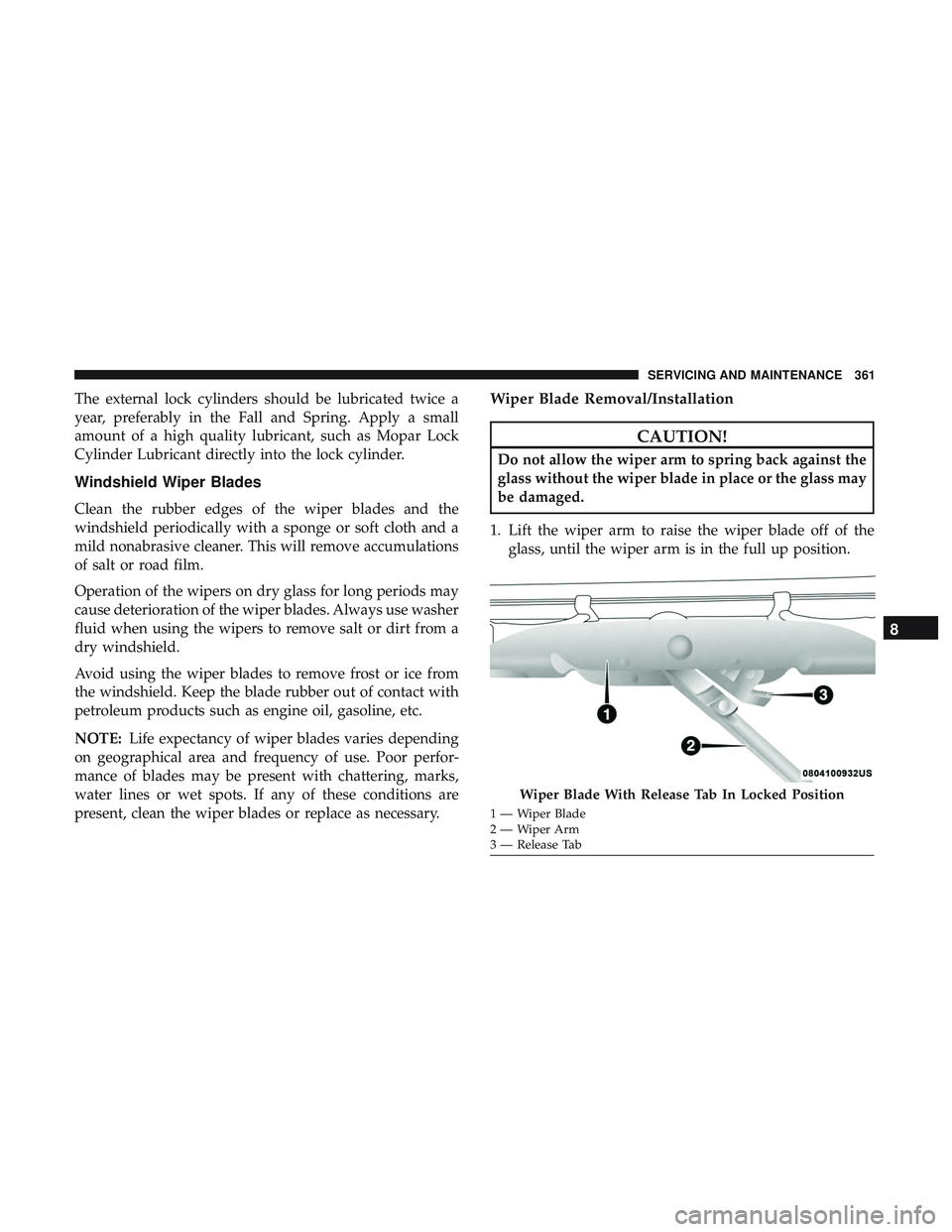
1. Lift the wiper arm to raise the wiper blade off of the glass, until the wiper arm is in the full up position.
Wiper Blade With Release Tab In Locked Position
1 — Wiper Blade
2—WiperArm
3 — Release Tab
8
SERVICING AND MAINTENANCE 361
Page 364 of 532
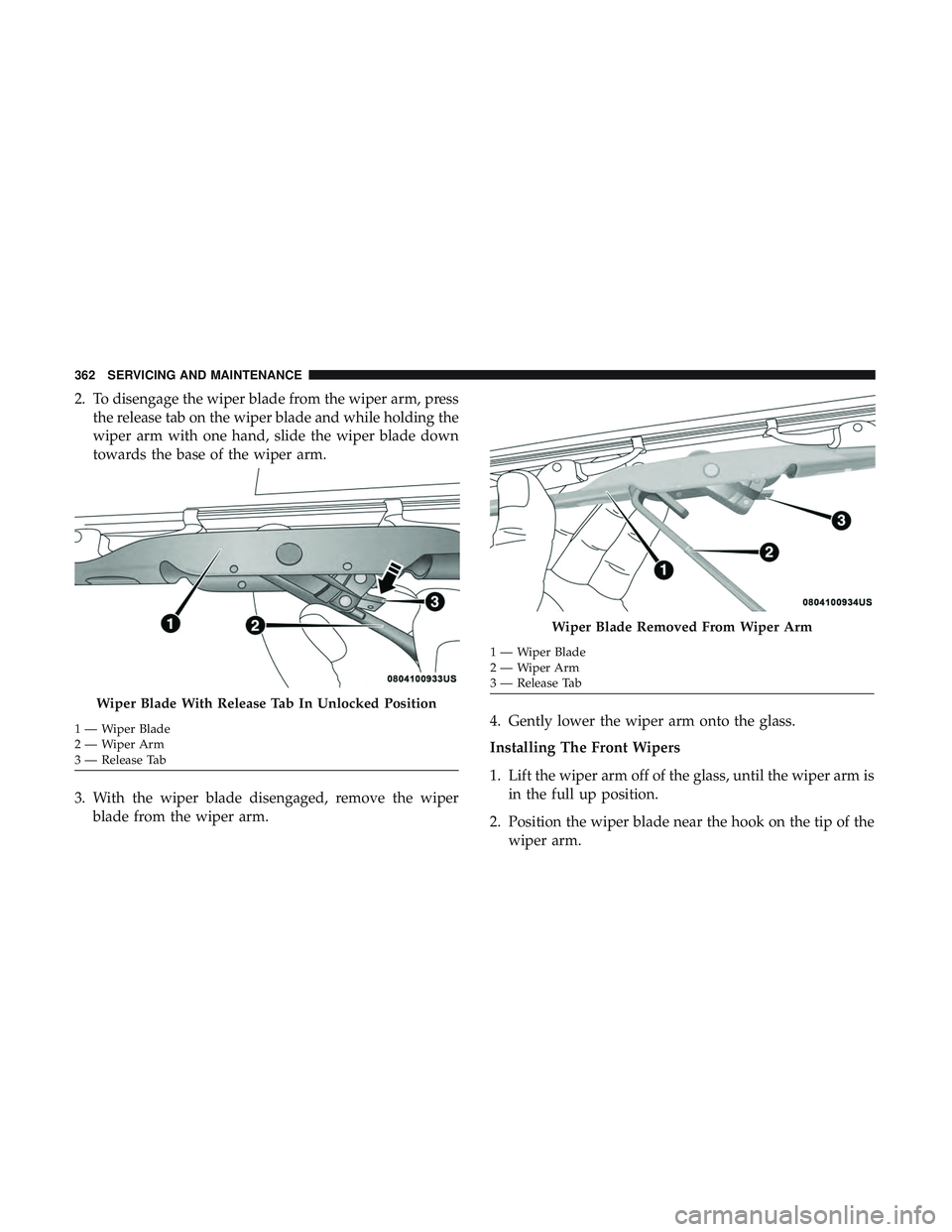
2. To disengage the wiper blade from the wiper arm, pressthe release tab on the wiper blade and while holding the
wiper arm with one hand, slide the wiper blade down
towards the base of the wiper arm.
3. With the wiper blade disengaged, remove the wiper blade from the wiper arm. 4. Gently lower the wiper arm onto the glass.
Installing The Front Wipers
1. Lift the wiper arm off of the glass, until the wiper arm is
in the full up position.
2. Position the wiper blade near the hook on the tip of the wiper arm.
Wiper Blade With Release Tab In Unlocked Position
1—WiperBlade
2—WiperArm
3 — Release Tab
Wiper Blade Removed From Wiper Arm
1 — Wiper Blade
2—WiperArm
3 — Release Tab
362 SERVICING AND MAINTENANCE
Page 433 of 532

Setting NameSelectable Options
ParkView Backup Camera Delay On
Off
NOTE:
When the vehicle is shifted out of REVERSE (with camera delay turned OFF), the rear camera mode is exited and the
navigation or audio screen appears again. When the vehicle is shifted out of REVERSE (with camera delay turned
ON), the rear view image with dynamic grid lines will be displayed for up to ten seconds after shifting out of “RE-
VERSE” unless the forward vehicle speed exceeds 8 mph (12 km/h), the transmission is shifted into “PARK” or the
ignition is switched to the OFF position. To set the ParkView Backup Camera Delay, press the “Controls” button on
the touchscreen, the “settings” button on the touchscreen, then the “Safety & Driving Assistance” button on the
touchscreen. Rain Sensing Auto Wipers On Off
NOTE:
When this feature is selected and the wipers are on, the system will automatically activate the windshield wipers if it
senses moisture on the windshield. Hill Start Assist — If Equipped On
Off
NOTE:
When this feature is selected, the Hill Start Assist (HSA) system is active.
10
MULTIMEDIA 431
Page 434 of 532
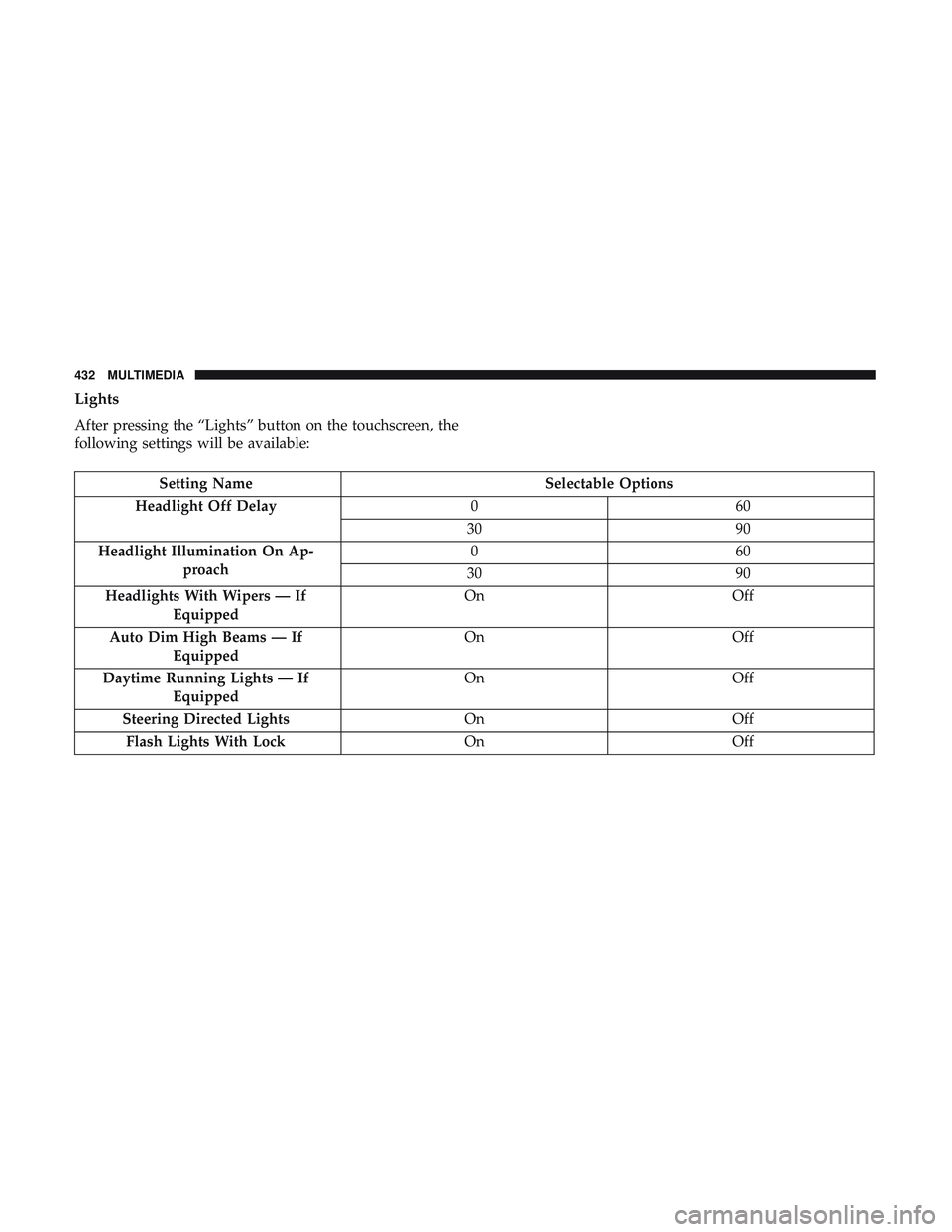
Lights
After pressing the “Lights” button on the touchscreen, the
following settings will be available:
Setting NameSelectable Options
Headlight Off Delay 060
30 90
Headlight Illumination On Ap- proach 06
0
30 90
Headlights With Wipers — If Equipped On
Off
Auto Dim High Beams — If Equipped On
Off
Daytime Running Lights — If Equipped On
Off
Steering Directed Lights OnOff
Flash Lights With Lock OnOff
432 MULTIMEDIA
Page 445 of 532

System Information
After pressing the “System Information” button on the
touchscreen, the following settings will be available:
Setting NameSelectable Options
Software License System Software Information Screen
NOTE:
When the “Software License” feature is selected, a “System Software Information” screen will appear, displaying the
system software version. You can also update your maps with a USB device. Please see your authorized dealer for
further information.
Customer Programmable Features — Uconnect
4C/4C NAV Settings
Press the “Apps” button (if equipped), and then
press the “Settings” button on the touchscreen to dis-
play the menu setting screen. In this mode, the
Uconnect system allows you to access programmable
features that may be equipped such as Language, Dis-
play, Units, Voice, Clock & Date, Safety & Driving
Assistance, Mirrors & Wipers, Lights, Doors & Locks,
Auto-On Comfort, Key Off Options, Audio, Phone/
Bluetooth, SiriusXM Setup, Reset, and System Informa-
tion.
NOTE: Depending on the vehicle’s options, feature set-
tings may vary.
When making a selection, press the button on the touch-
screen to enter the desired mode. Once in the desired
mode, press and release the preferred setting “option” until
a check-mark appears next to the setting, showing that
setting has been selected. Once the setting is complete,
press the “X” button on the touchscreen to close out of the
settings screen. Pressing the up or down arrow button on
the right side of the screen will allow you to toggle up or
down through the available settings.
10
MULTIMEDIA 443
Page 454 of 532
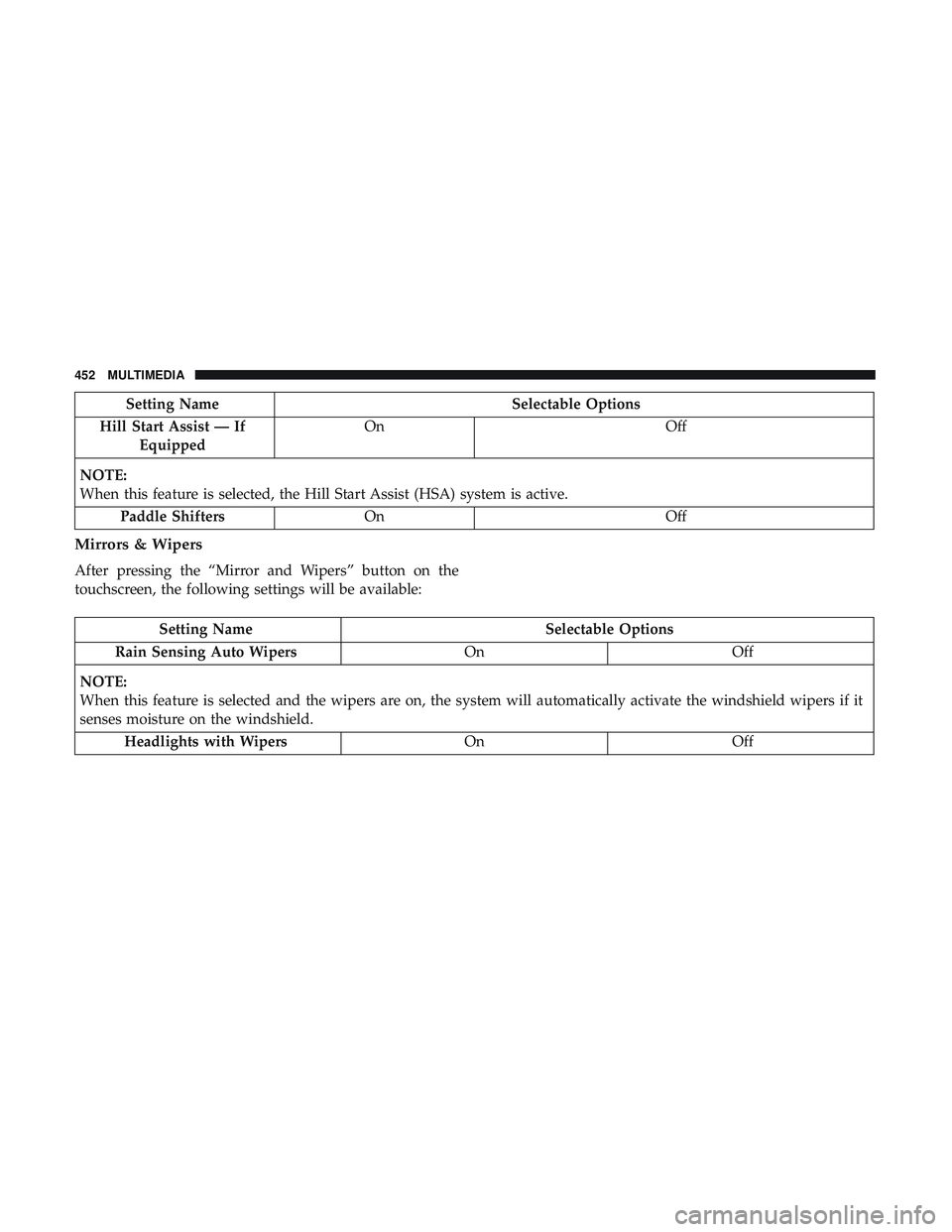
Setting NameSelectable Options
Hill Start Assist — If Equipped On
Off
NOTE:
When this feature is selected, the Hill Start Assist (HSA) system is active. Paddle Shifters On Off
Mirrors & Wipers
After pressing the “Mirror and Wipers” button on the
touchscreen, the following settings will be available:
Setting Name Selectable Options
Rain Sensing Auto Wipers OnOff
NOTE:
When this feature is selected and the wipers are on, the system will automatically activate the windshield wipers if it
senses moisture on the windshield. Headlights with Wipers OnOff
452 MULTIMEDIA
Page 455 of 532
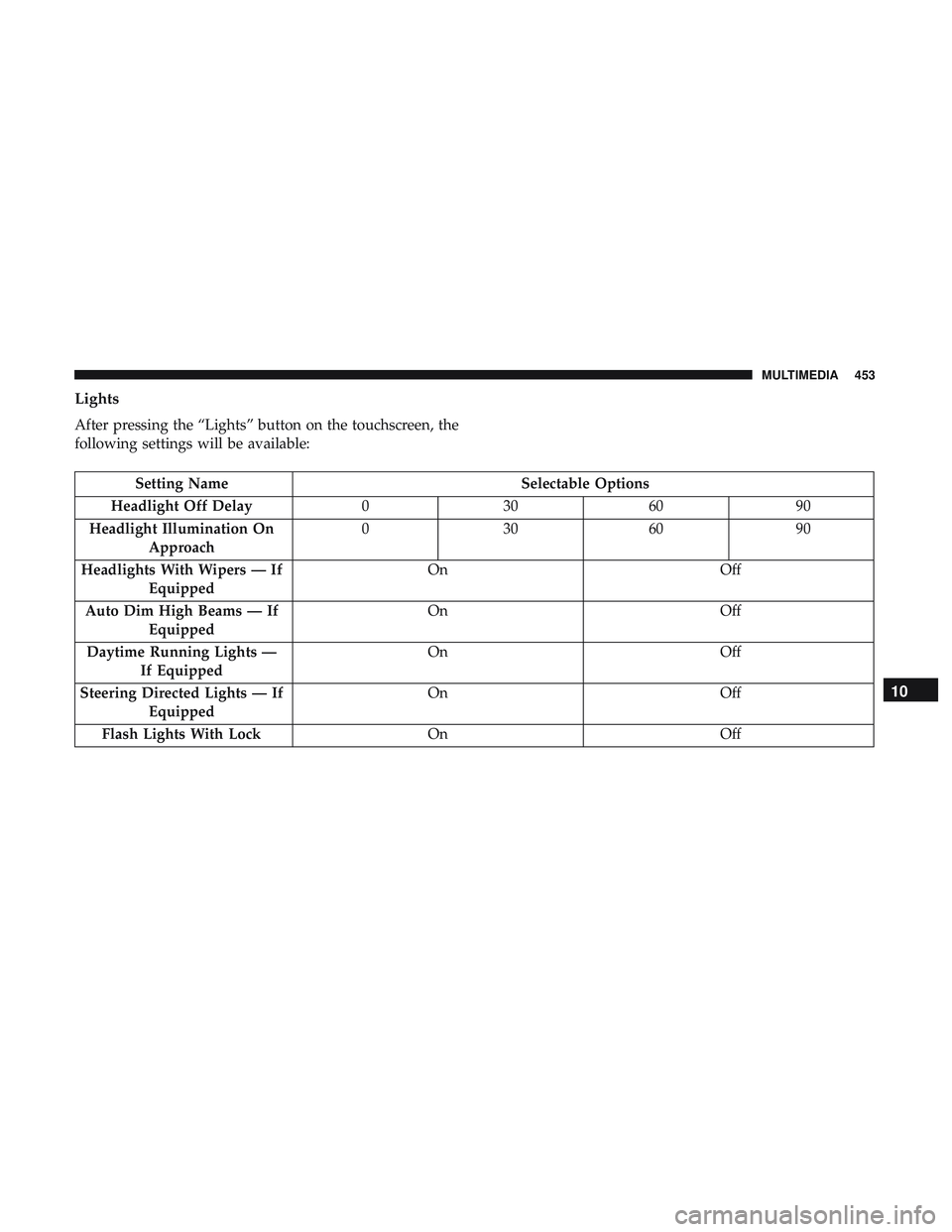
Lights
After pressing the “Lights” button on the touchscreen, the
following settings will be available:
Setting NameSelectable Options
Headlight Off Delay 030609 0
Headlight Illumination On Approach 03
0609 0
Headlights With Wipers — If Equipped On
Off
Auto Dim High Beams — If Equipped On
Off
Daytime Running Lights — If Equipped On
Off
Steering Directed Lights — If Equipped On
Off
Flash Lights With Lock OnOff
10
MULTIMEDIA 453
Page 517 of 532
Cruise Light.......................... .124, 125
Customer Assistance ....................... .506
Customer Programmable Features ...............421
Cybersecurity ............................ .420
Daytime Running Lights ......................60
Dealer Service ............................ .350
Deck Lid Power Release ...........................84
Defroster, Windshield ....................... .202
Delay (Intermittent) Wipers ....................67
Diagnostic System, Onboard ...................125
Dimmer Switch Headlight ...............................61
Dipsticks Oil (Engine) ........................... .348
Disabled Vehicle Towing .....................332
Disposal Antifreeze (Engine Coolant) .................368
Do Not Disturb ........................... .499
Door Ajar ................................119
Door Ajar Light ............................119
Door Locks Automatic ..............................41
Door Opener, Garage .........................87 Doors
....................................35
Drag And Drop Menu ...................... .419
Drive Modes ............................. .473
Driver ’s Seat Back Tilt ........................42
Driving Through Flowing, Rising, Or Shallow Standing
Water ................................ .277
Electrical Power Outlets .......................95
Electric Brake Control System ..................131
Anti-Lock Brake System ....................130
Electronic Roll Mitigation ...............132, 139
Electric Remote Mirrors .......................58
Electronic Power Distribution Center (Fuses) .......291
Electronic Speed Control (Cruise Control) .........234
Electronic Stability Control (ESC) ...............133
Electronic Throttle Control Warning Light .........117
Emergency, In Case Of Freeing Vehicle When Stuck .................330
Jacking ........................... .301, 373
Jump Starting ................... .324, 325, 326
T
owing ............................... .332
Emission Control System Maintenance ............126
Engine .......................... .345, 346, 347
Air Cleaner ............................ .355
12
INDEX 515