Page 47 of 244

Downloaded from www.Manualslib.com manuals search engine JauneNoir Noir texte
1.41
ENG_UD32123_1
Poste de conduite direction à gauche (H79 - Dacia)
ENG_NU_1079-3_H79Ph2_Dacia_1
DRIVING POSITION, LEFT-HAND DRIVE (2/2)
The fittings described DEPEND ON THE VEHICLE VERSION AND COUNTRY.
1 Side air vent.
2 Side demister outlet.
3 Stalk for:
– direction indicator lights,
– exterior lights,
– front fog lights,
– rear fog light,
– horn.
4 Instrument panel.
5 Location for driver’s airbag.
6 – Steering column stalk for wind-
screen and rear screen wash/
wiper.
– On-board computer information
readout control.
7 Ignition switch.
8 Hazard warning lights switch.
9 Centre air vents.
10 Electric central locking switch.
11 Central demister outlet. 12
Location for radio, navigation system
or storage compartments.
13 Location for passenger airbag.
14 Side demister outlet.
15 Side air vent.
16 Passenger airbag activation, deacti-
vation switch.
17 Glovebox.
18 Activation/deactivation control for
the parking distance control.
19 Rear screen and door mirror de-ic-
ing control
20 ECO mode switch.
21 ESC control (version 4x4 (4WD)).
22 Not used.
23 Mode selector 4x2 (2WD), 4x4
(4WD) or storage compartment.
24 Cigarette lighter or accessories
socket.
25 Handbrake.
26 Door mirror adjustment control. 27 Gear lever.
28 LPG control
29
Accessories socket.
30 Bottle holders.
31 Heating and ventilation controls.
32 Cruise control/speed limiter main
control.
33 Radio remote control.
34 Cruise control/speed limiter controls.
35 Beam height adjustment control.
36 Bonnet release control.
37 Fuse box.
Page 49 of 244

Downloaded from www.Manualslib.com manuals search engine JauneNoir Noir texte
1.43
ENG_UD32124_1
Poste de conduite direction à droite (H79 - Dacia)
ENG_NU_1079-3_H79Ph2_Dacia_1
DRIVING POSITION, RIGHT-HAND DRIVE (2/2)
The presence of the equipment DEPENDS ON THE VEHICLE VERSION AND COUNTRY.
1 Side air vent.
2 Side demister outlet.
3 Location for passenger airbag or
storage compartment.
4 Rear screen and door mirror de-icing control
5 Hazard warning lights switch.
6 Electric central locking switch.
7 Central demister outlet.
8 Centre air vents.
9 Location for radio, navigation system or storage compartments.
10 Stalk for: – direction indicator lights,
– exterior lights,
– front fog lights,
– rear fog light,
– horn. 11
Instrument panel.
12 Cruise control/speed limiter controls.
13 – Steering column stalk for wind-
screen and rear screen wash/
wiper.
– On-board computer information
readout control.
14 Side demister outlet.
15 Side air vent.
16 Ignition switch.
17 Bonnet release control.
18 Beam height adjustment control.
19 Radio remote control.
20 Cruise control/speed limiter main
control.
21 Heating and ventilation controls.
22 Gear lever.
23 Handbrake.
24 Door mirror adjustment control.
25 ECO mode switch.
26 ESC control (version 4x4 (4WD)).
27 Cigarette lighter or accessories
socket.
28 Mode selector 4x2 (2WD), 4x4
(4WD) or storage compartment.
29 Glovebox.
30 Fuse box.
31 Passenger airbag activation, deacti-
vation switch.
Page 68 of 244
Downloaded from www.Manualslib.com manuals search engine JauneNoir Noir texte
1.62
ENG_UD32130_1
Avertisseurs sonore et lumineux (H79 Ph2 - Dacia)
ENG_NU_1079-3_H79Ph2_Dacia_1
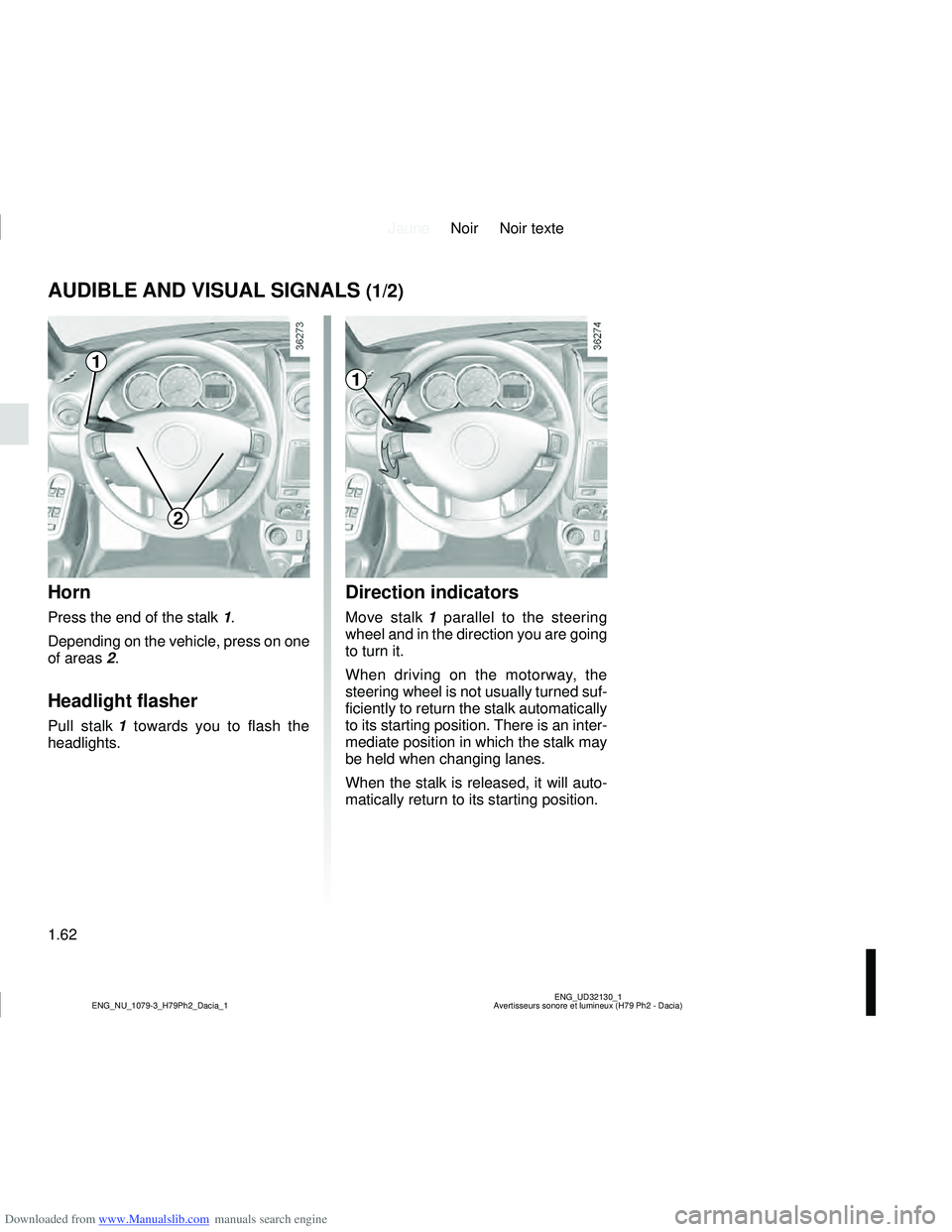
AUDIBLE AND VISUAL SIGNALS (1/2)
Horn
Press the end of the stalk 1.
Depending on the vehicle, press on one
of areas 2.
Headlight flasher
Pull stalk 1 towards you to flash the
headlights.
Direction indicators
Move stalk 1 parallel to the steering
wheel and in the direction you are going
to turn it.
When driving on the motorway, the
steering wheel is not usually turned suf-
ficiently to return the stalk automatically
to its starting position. There is an inter-
mediate position in which the stalk may
be held when changing lanes.
When the stalk is released, it will auto-
matically return to its starting position.
1
2
1
Page 70 of 244

Downloaded from www.Manualslib.com manuals search engine JauneNoir Noir texte
1.64
ENG_UD33916_2
Éclairages et signalisations extérieures (H79 Ph2 - Dacia)
ENG_NU_1079-3_H79Ph2_Dacia_1
EXTERIOR LIGHTING AND SIGNALS (1/2)
uSide lights
or
šSide lights
Turn the end of stalk 1 until the
symbol is opposite mark 2.
kDipped beam
headlights
Turn the end of stalk 1 until the symbol
is opposite mark 2.
An indicator light on the instrument
panel will come on.
áMain beam headlights
With the dipped beam head-
lights lit, push stalk 1 . This indicator
light on the instrument panel comes on.
To return to the dipped headlight posi-
tion, pull the stalk 1 towards you again.
eSwitching off the lights
Return the end of stalk 1 to its
initial position.
Before driving at night, check that the electrical equipment is operatin\
g
correctly and adjust the headlight beams (if your vehicle is not carryi\
ng
its normal load).
Check that the lights are not obscured (by dirt, mud, snow or objects
which could cover them).
11212
Page 71 of 244

Downloaded from www.Manualslib.com manuals search engine JauneNoir Noir texte
1.65
ENG_UD33916_2
Éclairages et signalisations extérieures (H79 Ph2 - Dacia)
ENG_NU_1079-3_H79Ph2_Dacia_1
EXTERIOR LIGHTING AND SIGNALS (2/2)
gFront fog lights
Turn the centre ring 3 or 4 of
the stalk until the symbol is opposite
mark 2 or 5.
The fog lights only light up if the exterior
lights have been switched on. An indi-
cator light on the instrument panel then
lights up.
Do not forget to switch off the fog lights
when they are no longer needed, to
avoid inconveniencing other road
users.
hRear fog lights
Turn the centre ring 3 on
the stalk until the symbol faces mark 2.
The fog lights only light up if the exterior
lights have been switched on. An indi-
cator light on the instrument panel then
lights up.
Remember to switch off the these
lights when they are no longer required
to avoid inconveniencing other road
users.
eTurning off the fog
lights
Turn the centre ring 3 or 4 of the stalk
until the symbol is opposite mark 2
or 5.
The corresponding indicator light goes
out on the instrument panel.
The front and rear fog lights switch off
when the exterior lights are switched
off.
2345
Daytime running lights
function
(front lights only)
These lights are automatically lit during
daylight hours. They are deactivated
when the main and dipped beams are
lit.
Lights-on warning buzzer
If the lights are on after the engine is
switched off, a warning beep sounds
when the driver’s door is opened to
warn you that the lights are still on.