2019 CITROEN JUMPY Auto mirror
[x] Cancel search: Auto mirrorPage 4 of 324
2
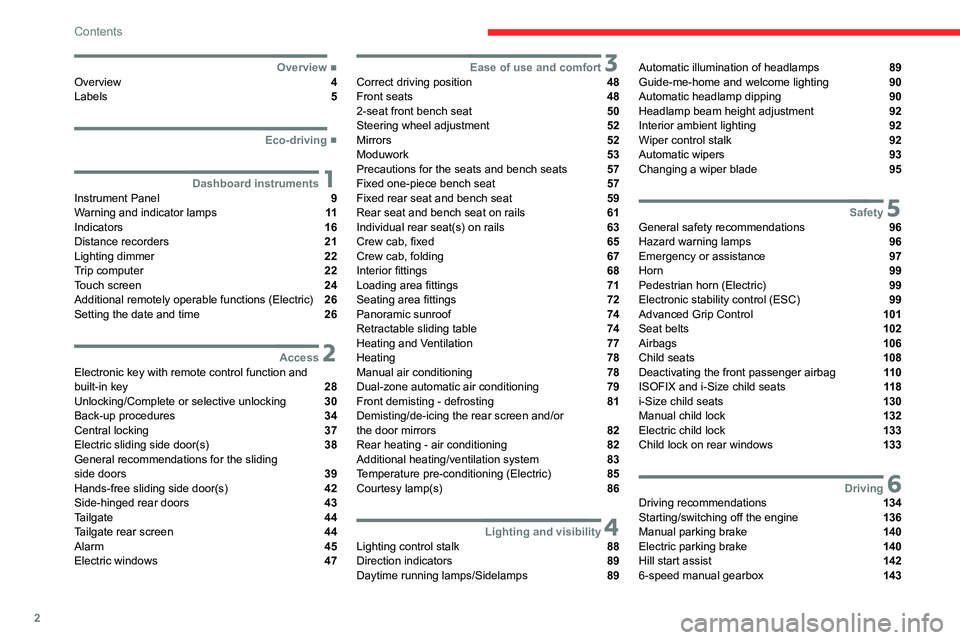
Contents
■
OverviewOverview 4
Labels 5
■
Eco-driving
1Dashboard instrumentsInstrument Panel 9
Warning and indicator lamps 11
Indicators 16
Distance recorders 21
Lighting dimmer 22
Trip computer 22
Touch screen 24
Additional remotely operable functions (Electric) 26
Setting the date and time 26
2AccessElectronic key with remote control function and
built-in key 28
Unlocking/Complete or selective unlocking 30
Back-up procedures 34
Central locking 37
Electric sliding side door(s) 38
General recommendations for the sliding
side doors
39
Hands-free sliding side door(s) 42
Side-hinged rear doors 43
Tailgate 44
Tailgate rear screen 44
Alarm 45
Electric windows 47
3Ease of use and comfortCorrect driving position 48
Front seats 48
2-seat front bench seat 50
Steering wheel adjustment 52
Mirrors 52
Moduwork 53
Precautions for the seats and bench seats 57
Fixed one-piece bench seat 57
Fixed rear seat and bench seat 59
Rear seat and bench seat on rails 61
Individual rear seat(s) on rails 63
Crew cab, fixed 65
Crew cab, folding 67
Interior fittings 68
Loading area fittings 71
Seating area fittings 72
Panoramic sunroof 74
Retractable sliding table 74
Heating and Ventilation 77
Heating 78
Manual air conditioning 78
Dual-zone automatic air conditioning 79
Front demisting - defrosting 81
Demisting/de-icing the rear screen and/or
the door mirrors
82
Rear heating - air conditioning 82
Additional heating/ventilation system 83
Temperature pre-conditioning (Electric) 85
Courtesy lamp(s) 86
4Lighting and visibilityLighting control stalk 88
Direction indicators 89
Daytime running lamps/Sidelamps 89
Automatic illumination of headlamps 89
Guide-me-home and welcome lighting 90
Automatic headlamp dipping 90
Headlamp beam height adjustment 92
Interior ambient lighting 92
Wiper control stalk 92
Automatic wipers 93
Changing a wiper blade 95
5SafetyGeneral safety recommendations 96
Hazard warning lamps 96
Emergency or assistance 97
Horn 99
Pedestrian horn (Electric) 99
Electronic stability control (ESC) 99
Advanced Grip Control 101
Seat belts 102
Airbags 106
Child seats 108
Deactivating the front passenger airbag 11 0
ISOFIX and i-Size child seats 11 8
i-Size child seats 130
Manual child lock 132
Electric child lock 133
Child lock on rear windows 133
6DrivingDriving recommendations 134
Starting/switching off the engine 136
Manual parking brake 140
Electric parking brake 140
Hill start assist 142
6-speed manual gearbox 143
Page 30 of 324

28
Access
Electronic key with
remote control function
and built-in key
Advice
If one of the doors or the boot is still open
or if the electronic key for the Keyless
Entry and Start
system has been left inside
the vehicle, central locking will not take place.
However
, if the vehicle is fitted with an alarm,
it will be activated after 45
seconds.
If the vehicle is unlocked but the doors or
boot are not subsequently opened, the
vehicle will automatically lock itself again after
about 30
seconds. If the vehicle is fitted with
an alarm, it will be reactivated automatically.
Automatic door mirror folding and unfolding can be deactivated by a
CITROËN dealer or a qualified workshop.
As a safety measure, never leave the vehicle, even for a short time, without
taking the Keyless Entry and Start system’s
electronic key with you.
Be aware of the risk of theft of the vehicle if
the key is present in one of the defined areas
while the vehicle is unlocked.
If a door is not properly closed (except the
right-hand door with side-hinged rear
doors):
–
when the vehicle is stationary and engine
running, this warning lamp comes on,
accompanied by a warning message for a few
seconds,
–
when the vehicle is moving (at speeds above
6 mph (10 km/h)), this warning lamp comes on,
accompanied by an audible signal and a warning
message for a few seconds.
Remote control key
This allows the central locking or unlocking of the
vehicle using the door lock or from a distance.
It also allows the vehicle to be located, the fuel
filler cap and charging flap to be opened and
closed and the engine to be started or switched
off, as well as providing protection against theft.
The remote control buttons are not active with the ignition switched on.
Unfolding / Folding the key
► Press this button to unfold or fold the key .
The remote control may be damaged if
you do not press the button.
Keyless Entry and Start
This allows the central locking or unlocking of the
vehicle from a distance.
It is also used to locate and start the vehicle, as
well as providing protection against theft.
Integral key
This is used to lock and unlock the vehicle when
the remote control cannot operate:
–
cell battery flat, vehicle battery discharged or
disconnected, etc.
–
vehicle located in an area with strong
electromagnetic signals.
Page 39 of 324

37
Access
2Central locking
Manual
► Press this button to lock/unlock the vehicle
(doors, tailgate or side-hinged doors) from inside
the passenger compartment.
The indicator lamp comes on to confirm the
central locking of the vehicle.
Central locking does not take place if any
of the doors are open.
When locking/deadlocking from the
outside
When the vehicle is locked or deadlocked
from the outside, the indicator lamp flashes
and the button is deactivated.
►
After normal locking, pull one of the
interior door controls to unlock the vehicle.
►
After deadlocking, you must use the
remote control, the "Keyless Entry and
Start" system or the built-in key to unlock the
vehicle.
Driving with the doors locked makes
access for the emergency services more
difficult
in an emergency.
When transporting an oversized load
(tailgate or side-hinged doors open),
press the button to lock only the cab doors.
When transporting an oversized load
(tailgate or side-hinged doors open),
press the button to lock only the front and rear
doors (sliding side door).
When locking from inside, the door
mirrors do not fold.
Central locking from the inside does not
operate if one of the doors is open (indicated
by a mechanical noise coming from the
locks).
When the tailgate or side-hinged doors are
open, only the other doors are locked (the
button does not light up).
Automatic (anti-intrusion security)
The doors and the tailgate or the side-hinged
doors can lock automatically while driving (speed
above 6 mph (10
km/h)).
To deactivate/reactivate this function (activated
by default):
►
Press the button until an audible signal is
heard and/or a message appears on the screen.
Locking/unlocking the
loading area
This button is unavailable if the vehicle has been locked or deadlocked from
outside (using the key, remote control or
Keyless Entry and Start, depending on
equipment) or if any of the doors are still
open.
Page 44 of 324

42
Access
Hands-free sliding side
door(s)
Opening/Closing
With a movement of your foot while keeping the
remote control on your person in the recognition
zone A, the system unlocks and opens the
sliding side door or closes and locks it.
The remote control must be located at the rear
of the vehicle, at least about 30
cm but no more
than about 2
m from the vehicle.
The automatic locking after closing the door can be programmed in the vehicle
configuration menu.
Before making the movement with your
foot, ensure that you are steady and well
positioned, so that you do not lose your
balance (rain, snow, ice, mud, etc.).
Take care not to touch the exhaust tailpipe
when making the movement with your foot -
risk of burns.
► Put your foot beneath the corner of the rear
bumper , then move the foot at normal speed with
a sweeping side movement.
The sensor detects the foot approaching and
leaving and triggers the opening or closing of the
side door.
Make the movement without interruption
and do not repeat it immediately
afterwards or several times.
If the door does not open, wait about
2
seconds before trying again.
Do not keep the foot in the air.
Confirmation that the door is going to
open or close is signalled by the direction
indicators flashing for a few seconds,
accompanied by an audible signal.
The movement of the door is reversed if the
movement of the foot takes place during the
manoeuvre.
If the vehicle is so equipped, the electric door
mirrors fold/unfold on locking/unlocking the
vehicle.
Automatic locking
The vehicle locks itself following the hands-free
closing of the sliding door.
If your vehicle is not fitted with an alarm,
locking is signalled by the fixed
illumination of the direction indicators for
about two seconds.
Depending on your version, the door mirrors
fold at the same time.
Activation/Deactivation
With audio system or touch screen
By default, hands-free access is activated.The "Hands-Free Tailgate Access" function or automatic vehicle
locking when the sliding door is closed is
activated and deactivated via the vehicle
configuration menu.
Page 84 of 324

82
Ease of use and comfort
Demisting/de-icing the
rear screen and/or the
door mirrors
► Press one of these buttons to switch on/off
rear screen and door mirror demisting/de-icing
(depending on version).
The indicator lamp in the button comes on
when
the function is activated.
Demisting/de-icing switches off automatically to
prevent excessive power consumption.
Switch off demisting/de-icing as soon
as you no longer consider it necessary,
as decreased power consumption in turn
reduces energy consumption.
Demisting/de-icing only operates with the
engine running.
Rear heating - air
conditioning
If your vehicle is fitted with a rear air conditioning
unit located in the roof, this system distributes
conditioned and heated air via a distribution rail
and individual outlets.
Air flow
► Turn the dial to increase or decrease
the air flow.
Comfort temperature
– Turn the thumbwheel from blue (cold)
to red (hot) to modulate the temperature
to your liking.
This control simultaneously adjusts the
temperature and the location of the air delivery:
–
blue: the air is delivered mainly at roof level,
–
red: the air is delivered mainly by the vent
located in row 3 on the right.
Activation/Deactivation
Depending on version, this button is accessible
at the front, from the dual-zone automatic air
conditioning control panel.
► Press this button to activate/deactivate
the operation of the rear controls.
Page 92 of 324

90
Lighting and visibility
on if rain is detected, at the same time as the
automatic rain sensitive wipers.
As soon as the brightness returns to a sufficient
level or after the windscreen wipers are switched
off, the lamps are switched off automatically.
Malfunction
In the event of a malfunction of the rain/sunshine
sensor, the vehicle’s lamps come on and this
warning lamp is displayed on the instrument
panel, accompanied by an audible signal and/or
the display of a message.
Have it checked by a CITROËN dealer or a
qualified workshop.
Do not cover the rain/sunshine sensor
located at the top centre of the
windscreen behind the interior rear view
mirror; the associated functions would no
longer be controlled.
In fog or snow, the rain/sunshine sensor
may detect sufficient light. For this
reason, the lighting will not come on
automatically.
The inner surface of the windscreen may become misted up and affect the proper
operation of the rain/sunshine sensor.
In humid and cold weather, demist the
windscreen regularly.
Guide-me-home and
welcome lighting
Guide-me-home lighting
Manual
► With the ignition off, pull the lighting control
stalk toward you ("headlamp flash") to activate/
deactivate the function.
Manual guide-me-home lighting goes off
automatically after a period of time.
Automatic
With the "Automatic illumination of lamps"
function activated (lighting control stalk in the
"AUTO" position) and when the light is poor, the
dipped beam headlamps come on automatically
when the ignition is switched off.
With the ring in the "AUTO" position and when
the light is poor, the dipped beam headlamps
come on automatically when the ignition is
switched off.
With audio system or touch screen
The activation, deactivation and duration of guide-me-home lighting
are set in the vehicle configuration menu.
Exterior welcome lighting
The remote operation of the lighting makes your
approach to the vehicle easier in poor light. It
is activated when the lighting control is in the
"AUTO" position and the level of light detected
by the sunshine sensor is low.
Switching on
Press this button on the remote control or
on one of the front door handles with the
"Keyless Entry and Start" system.
The dipped beam headlamps and sidelamps
come on; your vehicle is also unlocked.
Switching off
The exterior welcome lighting switches off
automatically after a set time, when the ignition
is switched on or on locking the vehicle.
Programming
With audio system or touch screen
The activation, deactivation and duration of the welcome lighting
can be set via the vehicle configuration menu.
Page 95 of 324

93
Lighting and visibility
4Without AUTO wiping
With AUTO wiping
Windscreen wipers
► To select the wiping speed: raise or lower the
stalk to the desired position.
Fast wiping (heavy rain)
Normal wiping (moderate rain)
Intermittent wiping (proportional to the
vehicle’s speed)
Switching off
Single wipe (press down and release).
or
Automatic wiping
Refer to the corresponding section.
After the ignition has been switched off, the wipers may move slightly at the foot
of the windscreen.
If the ignition has been switched off with
the windscreen wipers active, you must
operate the control stalk again to reactivate
wiping when the ignition is switched on again
(unless the ignition was off for less than
a
minute).
Windscreen wash
► Pull the wiper control stalk towards you and
hold.
The screenwash then the windscreen wipers
operate for a pre-determined time.
With automatic air conditioning, any
action on the screenwash control results
in temporary closure of the air intake to
protect the passenger compartment from any
odour.
To avoid damaging the wiper blades, do not operate the screenwash if the
screenwash reservoir is empty.
Only operate the screenwash if there is no
risk of the fluid freezing on the windscreen
and hindering visibility. During the winter
period, use "very cold climate" rated products.
Never top up with water.
Low screenwash fluid level
When the low level of the reservoir is
reached, this warning lamp lights up on
the instrument panel, accompanied by an
audible signal and a message.
It comes on when the ignition is switched on,
or every time the stalk is operated, until the
reservoir is refilled.
Refill the screenwash reservoir (or have it
refilled) the next time you stop.
Automatic windscreen wipers
In AUTO mode, the windscreen wipers operate
automatically and adapt to the intensity of the
rainfall.
Detection is via a rain/brightness sensor, located
at the top centre of the windscreen behind the
rear view mirror.
Switching on
Page 176 of 324

174
Driving
You can choose the display mode at any time by
pressing this area.
When the sub-menu is displayed, select one of
the four views:
"Standard view".
"180° view".
"Zoom view".
"AUTO mode".
The function will be deactivated:– If a trailer is attached or a bicycle
carrier is fitted on a towing device (vehicle
fitted with a towing device installed in line with
the manufacturer's recommendations).
–
Above about 6
mph (10 km/h).
–
When the boot is opened.
–
Upon changing out of reverse gear (the
image remains displayed for 7
seconds).
–
By pressing the white arrow in the upper-
left corner of the touch screen.
AUTO mode
This mode is activated by default.
Using sensors in the rear bumper, the automatic
view changes from the rear view (standard) to
the view from above (zoom) as an obstacle is
approached at the level of the red line (less than
30
cm) during a manoeuvre.
Standard view
The area behind the vehicle is displayed on the
screen. The blue lines
1 represent the width of your
vehicle, with the mirrors unfolded; their direction
changes according to the position of the steering
wheel.
The red line 2 represents a distance of 30 cm
from the rear bumper; the two blue lines 3 and 4
represent 1 m and 2 m, respectively.
This view is available with AUTO mode or in the
view selection menu.
Zoom view
The camera records the vehicle's surroundings
during the manoeuvre in order to create a
view from above the rear of the vehicle in its
near surroundings, allowing the vehicle to be
manoeuvred around nearby obstacles.
This view is available with AUTO mode or in the
view selection menu.