2019 CITROEN DS7 CROSSBACK distance control
[x] Cancel search: distance controlPage 29 of 244

27Access02
If selective unlocking of the tailgate is
deactivated, pressing the button unlocks the
whole vehicle.
If motorised operation of the tailgate is
deactivated, pressing the button partially
opens the tailgate.
To lock the vehicle, it is necessary to close the
tailgate again.
Locking the vehicle
Normal locking
► Press the locking button.
The locking, and the activation of the alarm
depending on version, is confirmed by the lighting
of the direction indicators.
Depending on version, the door mirrors fold.
An access (door or boot) that is not
properly closed prevents locking of the
vehicle. However, if the vehicle is fitted with an
alarm, it will be activated after 45 seconds.
If the vehicle is unlocked but the doors or boot
are not subsequently opened, the vehicle will
automatically lock itself again after about
30 seconds. If the vehicle is fitted with an
alarm, it will be reactivated automatically.
Deadlocking
Deadlocking renders the interior door
controls inoperative. It also disables the
central locking button.
The horn remains operational.
Never leave anyone inside the vehicle when it
is deadlocked.
► Press the locking button again within 5
seconds to deadlock the vehicle (confirmed by the
temporary lighting of the direction indicators).
Closing the windows and sunroof
An audible signal sounds before the start of
movement.
Maintaining pressure on the locking
button for more than 3 seconds allows the
windows and, depending on version, the sunroof
to be closed to the desired position.
This operation also closes the sunroof blind.
Ensure that no person or object could
prevent the correct closing of the
windows and sunroof.
If, on versions with alarm, you want to leave
the windows and/or sunroof partially open, you
must first deactivate the interior volumetric
alarm protection.
For more information on the Alarm, refer to the
corresponding section.
"DS LIGHT VEIL"
The additional daytime running lamps
and sidelamps illuminate in a scrolling pattern
upon locking and unlocking the vehicle.
Locating the vehicle
This function helps you to spot your vehicle from a
distance, with the vehicle locked:
–
The direction indic
ators flash for approximately
10 seconds.
–
The door mirror spo
tlamps come on.
–
The c
ourtesy lamps come on.
► Press this button.
Advice
Remote control
The remote control is a sensitive, high-
frequency device; avoid handling it in your
pocket, due to the risk of unintentionally
unlocking the vehicle.
Avoid pressing the remote control buttons
while out of range of the vehicle, due to
the risk of rendering the remote control
inoperative. It would then be necessary to
reset it.
Anti-theft protection
Do not modify the electronic vehicle
immobiliser, as this might result in
malfunctions.
Page 44 of 244
42
Ease of use and comfort03
Driving position
Correct seating position
Adopting a good driving position contributes to
improving driver comfort and protection.
It also optimises interior and exterior visibility as
well as access to controls.
Certain seat adjustments described in this
section depend on the trim level and the country
in which the vehicle is sold.
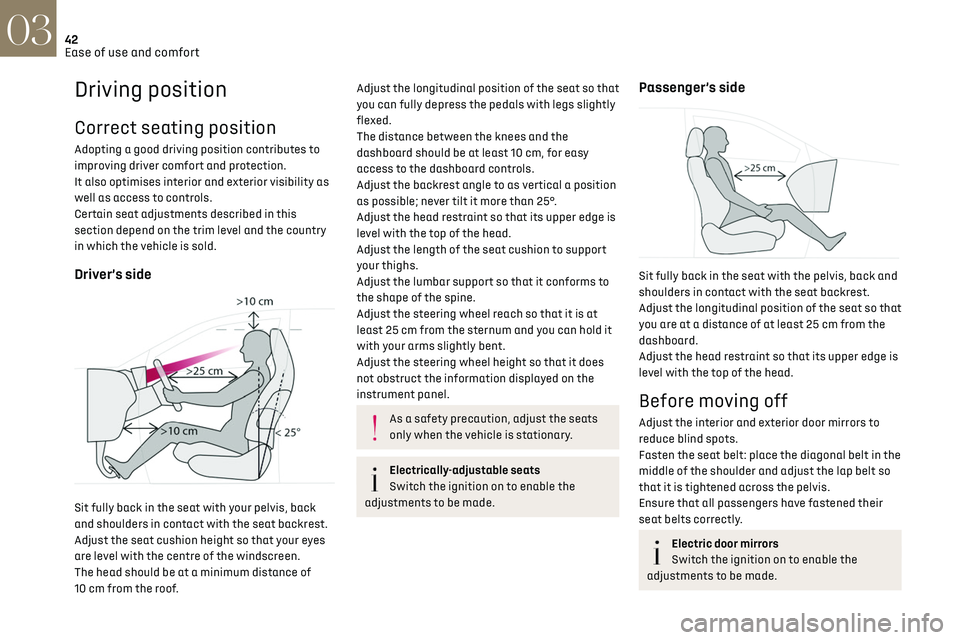
Driver’s side
Sit fully back in the seat with your pelvis, back
and shoulders in contact with the seat backrest.
Adjust the seat cushion height so that your eyes
are level with the centre of the windscreen.
The head should be at a minimum distance of
10 cm from the roof.
Adjust the longitudinal position of the seat so that
you can fully depress the pedals with legs slightly
flexed.
The distance between the knees and the
dashboard should be at least 10 cm, for easy
access to the dashboard controls.
Adjust the backrest angle to as vertical a position
as possible; never tilt it more than 25°.
Adjust the head restraint so that its upper edge is
level with the top of the head.
Adjust the length of the seat cushion to support
your thighs.
Adjust the lumbar support so that it conforms to
the shape of the spine.
Adjust the steering wheel reach so that it is at
least 25 cm from the sternum and you can hold it
with your arms slightly bent.
Adjust the steering wheel height so that it does
not obstruct the information displayed on the
instrument panel.
As a safety precaution, adjust the seats
only when the vehicle is stationary.
Electrically-adjustable seats
Switch the ignition on to enable the
adjustments to be made.
Passenger’s side
Sit fully back in the seat with the pelvis, back and
shoulders in contact with the seat backrest.
Adjust the longitudinal position of the seat so that
you are at a distance of at least 25 cm from the
dashboard.
Adjust the head restraint so that its upper edge is
level with the top of the head.
Before moving off
Adjust the interior and exterior door mirrors to
reduce blind spots.
Fasten the seat belt: place the diagonal belt in the
middle of the shoulder and adjust the lap belt so
that it is tightened across the pelvis.
Ensure that all passengers have fastened their
seat belts correctly.
Electric door mirrors
Switch the ignition on to enable the
adjustments to be made.
Page 49 of 244

47
Ease of use and comfort03
Mirrors
Door mirrors
Adjustment
► Turn control A to the right or to the left to
select the corresponding mirror.
► Move the control in any of the four directions
to adjust.
► Return the control to the central position.
For optimum safety, adjust the mirrors to
reduce the "blind spot".
The objects observed are, in reality, closer than
they appear. Take this into account in order
to correctly judge the distance of vehicles
approaching from behind.
Folding
Automatic: lock the vehicle using the electronic
key.
Manual: with the ignition on, move control
A downwards.
If the mirrors are folded using control A,
they will not unfold when the vehicle is
unlocked.
Unfolding
Automatic: unlock the vehicle using the electronic
key.
Manual: with the ignition on, move control A
upwards.
The mirrors can be folded manually if necessary.
Automatic folding/unfolding of the door
mirrors is configured in the Settings >
Vehicle touch screen application.
Before using an automatic car wash, fold the
mirrors.
Automatic tilting in reverse gear
Depending on version, this function allows you to
automatically tilt the mirrors downwards to assist
with parking manoeuvres in reverse gear.
With the engine running, on engaging reverse
gear, the mirror glasses tilt downwards.
They each return to their original positions:
–
A fe
w seconds after coming out of reverse gear.
–
O
nce the vehicle speed exceeds 6 mph
(10 km/h).
–
When the engine is s
witched off.
It can be activated/deactivated in the
Settings > Vehicle touch screen
application.
Demisting/Defrosting
The demisting/defrosting of the door
mirrors works with the demisting/
defrosting of the rear screen.
For more information on Rear screen demisting/
defrosting, refer to the corresponding section.
Electrochrome interior rear
view mirror
The electrochrome system uses a sensor that
detects the level of exterior brightness and that
coming from the rear of the vehicle, in order to
automatically and gradually switch between day
and night usage.
To ensure optimum visibility while
manoeuvring, the mirror automatically
brightens when reverse gear is engaged.
The system is deactivated if the load in the
boot exceeds the height of the load space
cover or if the load space cover has items
placed on it.
Page 82 of 244

80
Safety05
accompanied by a message and an audible signal,
indicates an EBFD malfunction.
You must stop the vehicle.
Stop as soon as it is safe to do so and switch off
the ignition.
Contact a dealer or a qualified workshop.
When changing wheels (tyres and rims),
ensure that these are approved for your
vehicle.
After an impact
Have it checked by a dealer or a qualified
workshop.
Emergency braking assistance
(EBA)
This system reduces the emergency stopping
distance, by optimising the braking pressure.
It is triggered in relation to the speed at which
the brake pedal is depressed. The effect of this is
a reduction in the resistance of the pedal and an
increase in braking efficiency.
Anti-slip regulation (ASR) /
Dynamic stability control (DSC)
Anti-slip regulation (or traction control) optimises
traction by using engine braking and by applying
the brakes on the driving wheels to avoid one
or more wheels spinning. It also enhances the
vehicle's directional stability.
If there is a difference between the vehicle’s
trajectory and the path desired by the driver, the
dynamic stability control system automatically
uses engine braking and the brakes on one or
more wheels to return the vehicle to the desired
path, within the limits of the laws of physics.
These systems are activated automatically every
time the vehicle is started.
These systems are activated in the event
of a problem with grip or trajectory
(confirmed by this warning lamp flashing on the
instrument panel).
E-TENSE 4X4 360
The dynamic stability control is optimised
to be able to react later on this vehicle.
Deactivation/Reactivation
In exceptional conditions (e.g. moving a vehicle
that is bogged down in mud, stuck in snow, on
loose soil), it may prove useful to deactivate the
DSC/ASR systems, so that the wheels can move
freely and regain grip.
Reactivate the system as soon as the level of grip
permits.
The ASR system is deactivated/
reactivated in the ADAS touch screen
application.
Deactivation/reactivation of the ASR
system is indicated by this indicator lamp
on the instrument panel coming on/going out and
the display of a message.
The ASR system is automatically reactivated
every time the ignition is switched off or at
speeds over 31 mph (50 km/h)
Reactivation is manual below 31 mph (50 km/h).
Malfunction
In the event of a malfunction, this warning
lamp lights up on the instrument panel,
accompanied by the display of a message and an
audible signal.
Have it checked by a dealer or a qualified
workshop.
ASR/DSC
These systems enhance safety during
normal driving, but should not encourage the
driver to take extra risks or drive at high speed.
It is in conditions of reduced grip (rain, snow,
ice) that the risk of loss of grip increases. It
is therefore important for your safety to keep
these systems activated in all conditions, and
particularly in difficult conditions.
Correct operation of these systems depends
on compliance with the manufacturer's
recommendations relating to the wheels (tyres
and rims), braking and electronic components,
as well as the assembly and repair procedures
provided by dealers.
In order to ensure that these systems remain
effective in wintry conditions, the use of snow
or all-season tyres is recommended. All four
wheels must be fitted with tyres approved for
your vehicle.
Page 114 of 244

112
Driving06
Malfunction
In the event of a malfunction, these
warning lamps light up on the
instrument panel.
A message appears, accompanied by an audible
signal.
In this case, the tyre under-inflation monitoring
function is no longer performed.
Have it checked by a dealer or a qualified
workshop.
Non-standard or 'space-saver' spare
wheel
The use of this type of spare wheel may
suspend tyre pressure monitoring.
In this case, the malfunction warning lamp
comes on and disappears once the wheel has
been replaced by one of uniform size (the same
as the others), the pressure readjusted and
the reinitialisation carried out.
Driving and manoeuvring
aids - General
recommendations
Driving and manoeuvring aids cannot, in
any circumstances, replace the need for
vigilance on the part of the driver.
The driver must comply with the Highway
Code, must remain in control of the vehicle in
all circumstances and must be able to retake
control of it at all times. The driver must adapt
the speed to climatic conditions, traffic and
the state of the road.
It is the driver's responsibility to constantly
monitor traffic conditions, assess the distance
and relative speed of other vehicles, and
anticipate their manoeuvres before using the
direction indicator and changing lanes.
These systems do not make it possible to
exceed the laws of physics.
Driving aids
You should hold the steering wheel with
both hands, always use the door and interior
mirrors, always leave your feet close to the
pedals and take a break every 2 hours.
Manoeuvring aids
The driver must always check the
surroundings of the vehicle before and during
the whole manoeuvre, in particular using the
mirrors.
Radar(s)
The operation of the radar(s), along with
any associated functions, may be affected by
the accumulation of dirt (e.g. mud, ice), in poor
weather conditions (e.g. heavy rain, snow), or
if the bumpers are damaged.
If the front bumper is to be repainted, contact
a dealer or a qualified workshop; certain types
of paint could interfere with the operation of
the radar(s).
Driving aids camera
This camera and its associated functions
may be impaired or not work if the windscreen
area in front of the camera is dirty, misty,
frosty, covered with snow, damaged or masked
by a sticker.
In humid and cold weather, demist the
windscreen regularly.
Poor visibility (inadequate street lighting,
heavy rain, thick fog, snowfall), dazzle
(headlamps of an oncoming vehicle, low sun,
reflections on a damp road, leaving a tunnel,
alternating shade and light) can also impair
detection performance.
In the event of a windscreen replacement,
contact a dealer or a qualified workshop
to recalibrate the camera; otherwise, the
operation of the associated driving aids may
be disrupted.
Other cameras
The images from the camera(s) displayed
on the touch screen or on the instrument panel
may be distorted by the terrain.
Page 115 of 244

113
Driving06
In the presence of areas in shade, or in
conditions of bright sunlight or inadequate
lighting, the image may be darkened and with
lower contrast.
Obstacles may appear further away than they
actually are.
Sensors
The operation of the sensors, as well as
any associated functions, may be disrupted by
noise pollution such as that emitted by noisy
vehicles and machinery (e.g. lorries, pneumatic
drills), by the accumulation of snow or dead
leaves on the road or in the event of damaged
bumpers and mirrors.
When reverse gear is engaged, an audible
signal (long beep) indicates that the sensors
may be dirty.
A front or rear impact to the vehicle can
upset the sensors’ settings, which is not
always detected by the system: distance
measurements may be distorted.
The sensors do not systematically detect
obstacles that are too low (pavements, studs)
or too thin (trees, posts, wire fences).
Certain obstacles located in the sensors’ blind
spots may not be detected or may no longer be
detected during the manoeuvre.
Certain materials (fabrics) absorb sound
waves: pedestrians may not be detected.
Maintenance
Clean the bumpers and door mirrors and
the field of vision of the cameras regularly.
When washing your vehicle at high pressure,
direct the spray from at least 30 cm away from
the radar, sensors and cameras.
Mats/Pedal trims
The use of mats or pedal trims not
approved by the Manufacturer may interfere
with the operation of the speed limiter or
cruise control.
To avoid any risk of jamming the pedals:
–
Ensure tha
t the mat is secured correctly.
–
Ne
ver fit one mat on top of another.
Units of speed
Ensure that the units of speed displayed
on the instrument panel (mph or km/h) are
those for the country you are driving in.
If this is not the case, when the vehicle is
stationary, set the display to the required
units of speed so that it complies with what is
authorised locally.
In case of doubt, contact a dealer or a qualified
workshop.
Shortcuts for driving aids
The full list of available driving aids can be found
in the Functions tab. Driving aids can be accessed directly to quickly
activate/deactivate them.
By default, driving aids are already stored in the
Shortcuts tab (e.g. Stop & Start, Lane keeping
assist).
Other driving aids can be added or deleted from
this tab.
It is configured in the ADAS>Functions
touch screen application.
►
Press the button corresponding to the
driving assistance concerned:
•
Full s
ymbol: the function is added to the
Shortcuts tab.
•
Empty s
ymbol: the function is deleted from
the Shortcuts tab.
► Check the modification in the Shortcuts tab.
► Press this button to access directly to the
Shortcuts tab.
Multiple deactivation
It is possible to deactivate several driver
assistance functions simultaneously.
This is done in two steps:
Page 116 of 244

114
Driving06
– First of all, the selection of all the functions
that you want to deactivate.
–
Sec
ondly, the simultaneous deactivation of all
these functions.
Selection of functions
► Press this button on the dashboard to
display the ADAS tabs.
► Select the Functions tab.
► Press this button to display the list of
available functions.
► Select the functions to deactivate (e.g. Stop
& Start, Lane Keeping Assist, Automatic Braking
System (Active Safety Brake)).
► Press this button to return to the
previous page.
The functions to deactivate are saved in the
system.
Deactivation of these functions
► Press and hold this button on
the dashboard.
All previously selected functions are deactivated
until the vehicle is next restarted (confirmed by an
audible signal).
Road signs recognition
For more information, refer to the General
recommendations on the use of driving
and manoeuvring aids.
This system displays the maximum speed
authorised locally on the instrument panel, using:
–
Speed limit signs det
ected by the camera.
–
Speed limit in
formation from the navigation
system’s mapping.
–
Signs indic
ating a shared traffic zone detected
by the camera.
Sign detected Suggested speed (calculated)
Entry into a shared traffic zoneExample:
Without DS IRIS SYSTEM
10 mph or 20 km/h (depending on
the units on the
instrument panel)
With DS IRIS SYSTEM Display of the speed
in force in the country you are driving in.
–
Some supplemen
tary traffic signs detected by
the camera.
Supplementary
traffic sign detected Display of the speed
associated with
the supplementary traffic sign
Speed limit when raining
Examples:
If the wiper control stalk is in the
"intermittent wipe"
or "automatic wipe" position (in order
to activate the rain sensor):
68 mph (110 km/h) (for example)
Speed limit when towing
If an approved towing device is fixed to the vehicle:
56 mph (90 km/h) (for example)
Speed limit
applicable over a certain distance Example:
43 mph (70 km/h) (for example)
Page 120 of 244

118
Driving06
To modify the speed limit setting based on the
speed suggested by the Road signs recognition
function displayed on the instrument panel:
► Press 5-MEM once; a message is displayed,
confirming the memorisation request.
► Press 5-MEM again to save the suggested
speed.
The new speed setting value is displayed on the
instrument panel.
Temporarily exceeding the
speed setting
► Fully depress the accelerator pedal.
The speed limiter is temporarily deactivated and
the displayed speed setting flashes.
► Release the accelerator pedal to return to
below the speed setting.
When exceeding the speed is not due to the
driver's action (e.g. in case of a steep slope), an
audible signal is triggered immediately.
On a steep descent or in the event of
sharp acceleration, the speed limiter will
not be able to prevent the vehicle from
exceeding the speed setting.
If necessary, apply the brakes to control your
vehicle’s speed.
When the vehicle speed returns to the speed
setting level, the speed limiter operates again: the
speed setting display becomes fixed again.
Switching off
► Turn the thumbwheel 1 to the "OFF" position:
speed limiter information is no longer displayed.
Malfunction
In the event of a malfunction, dashes are
displayed flashing and then fixed instead of the
speed setting.
Have it checked by a dealer or a qualified
workshop.
Cruise control - Specific
recommendations
The cruise control function does not
guarantee compliance with the maximum
authorised speed and the safety distance
between vehicles, the driver remains
responsible for their driving.
In the interest of public safety, only use cruise
control if the traffic conditions enable vehicles
to drive at a steady speed and maintain an
adequate safety distance.
Remain vigilant while cruise control is
activated. If you press and hold one of the
speed setting modification buttons, your
vehicle may change speed very abruptly.
When descending a steep hill, the cruise
control system cannot prevent the vehicle from
exceeding the set speed. Brake if necessary to
control the vehicle speed.
On steep climbs or when towing, the set speed
may not be reached or maintained.
Exceeding the programmed speed setting
You can temporarily exceed the speed
setting by pressing the accelerator pedal (the
programmed speed flashes).
To return to the speed setting, release the
accelerator pedal (when the set speed is
reached again, the displayed speed stops
flashing).
Operating limits
Never use the system in the following
situations:
–
In an urban area with the risk o
f pedestrians
crossing the road.
–
In hea
vy traffic (except versions with the
Stop & Go function).
–
O
n winding or steep roads.
–
O
n slippery or flooded roads.
–
In poor w
eather conditions.
–
In the e
vent of restricted visibility for the
driver.
–
D
riving on a speed circuit.
–
D
riving on a rolling road.
–
When using a ‘
space-saver’ type spare
wheel.
–
When using sno
w chains, non-slip covers or
studded tyres.