2019 CITROEN C5 AIRCROSS reset info
[x] Cancel search: reset infoPage 10 of 292

8
Instrument panel with dials
Dials
1.Speedometer (mph or km/h).
2. Fuel level indicator.
3. Engine coolant fluid temperature gauge.
4. Rev counter (x 1,000
rpm).
5. Display screen.
Control buttons Colour display
1.
Cruise control or speed limiter settings.
Speed suggested by the speed limit
recognition system.
2. Gear efficiency and/or selector position
indicator, gear and Sport and Snow
modes with an automatic gearbox.
3. Display area: alert message or state
of functions, trip computer, digital
speedometer (mph or km/h), range
associated with the AdBlue
® and the SCR
system (miles or km), etc.
4 Ser vice indicator, then total distance
recorder (miles or km).
These functions are displayed
successively on switching on the ignition.
5 Trip distance recorder (miles or km).
A.
Resetting the service indicator.
Alert log display.
Reminder of servicing information or the
remaining range associated with AdBlue
®
and the SCR system (miles or km).
Tyre pressure status information display.
B. General lighting dimmer.
C. Resetting the trip distance recorder.
Digital instrument panel
This instrument panel can be customised.
The content and availability of information
depends on the display mode selected and the
vehicle's equipment.
Description
Example with the "PERSONAL" display mode.
1.Fuel level indicator.
2. Rev counter (x 1,000
rpm).
3. Gear efficiency indicator.
Status of the automatic gearbox.
Driving mode.
4. Digital speedometer (mph or km/h).
5. Cruise control or speed limiter settings.
6. Display of speed limit signs.
Instruments
Page 11 of 292

9
7.Analogue speedometer (mph or km/h).
8. Engine oil temperature gauge.
9. Engine coolant temperature indicator
(°Celsius).
10. Total distance recorder (miles or km).
11. Trip distance recorder (miles or km).
Control button
A.Short press: display the alerts log,
reminder of servicing information or the
remaining range associated with the
AdBlue
® and the SCR system (miles or
km) and tyre pressure status information
display.
Long press: reset the ser vice indicator or
trip distance recorder (depending on the
contex t).
Displays
Some lamps have a fixed location, the others
c an alter location.
For certain functions that have indicator lamps
for both operation and for deactivation, there is
only one dedicated location.
Permanent information
Whatever the display mode selected, the
instrument panel displays:
-
i
n fixed locations:
•
t
he analogue speedometer,
•
t
he fuel level indicator,
•
t
he engine coolant temperature indicator,
•
t
he distance recorders,
-
i
n variable locations:
•
g
earbox and gear efficiency indicator
information,
•
t
he digital speedometer,
•
s
tatus or alert messages displayed
temporarily.
Optional information
Depending on the display mode selected and
active features, additional information can be
displayed:
-
t
he rev counter,
-
t
he trip computer,
-
d
riving aids,
-
t
he speed limiter or cruise control,
-
t
he media currently playing,
-
n
avigation instructions,
-
t
he analogue speedometer,
-
e
ngine oil level and temperature
Customisation of the
instrument panel
You can modify the appearance of the
instrument panel by choosing:
-
a d
isplay colour,
-
a d
isplay mode.
Display language and units
They depend on the configuration of the
touch screen.
When travelling abroad, the speed must
be shown in the official units of the
country you are driving in (mph, miles or
km/h, km).
As a
safety measure, these adjustments
must be carried out with the vehicle
stationary.
Choosing a display colour
F Press S ettings in the upper bar of
the touch screen.
F
Sel
ect " Colour schemes ".
F
Sel
ect a
display colour.
1
Instruments
Page 33 of 292

31
Trip computer
Information displayed about the current journey
(range, fuel consumption, average speed, etc.).Display of the different trip computer tabs
With instrument panels with dials
The display of trip computer data is selected by
pressing on the end of the wiper control stalk or
by rotating the thumb wheel situated to the left
of the steering wheel. F
P ress this button, located on the end of the
wiper control stalk , to display the different
tabs in turn.
Display of data in the
instrument panel- The current information with: • t he range,
•
t
he current fuel consumption,
•
t
he Stop & Start time counter.
-
T
rip "1" with:
•
t
he average speed,
•
t
he average fuel consumption,
•
t
he distance travelled,
for the first trip.
-
T
rip "2" with:
•
t
he average speed,
•
t
he average fuel consumption,
•
t
he distance travelled,
for the second trip.
Trip reset
F When the desired trip is displayed, press the button on the end of the wiper control
stalk for more than 2
seconds.
Tr i p s " 1" and " 2" are independent and are used
identically.
With CITROËN Connect Nav
F Press this button to select the Settings menu.
F
Sel
ect " OPTIONS ".
F
Sel
ect "Screen configuration ".
F
Sel
ect the " Brightness " tab.
F
A
djust the brightness by pressing
the arrows or moving the slider.
F
P
ress this button to save and exit.
You can also switch off the screen: F
P
ress this button to select the
Settings menu.
F
Sel
ect "Switch off screen ".
The screen goes off completely.
F
P
ress the screen again (anywhere on its
sur face) to activate it. With digital instrument panel
Trip computer data is displayed permanently
when you select the display mode "DRIVING"
or "PERSONAL", depending on version.
In all other display modes, pressing the end of
the wiper control stalk will cause this data to
appear temporarily in a
specific window.
1
Instruments
Page 34 of 292

32
Average fuel consumption
(mpg or l/100 km or km/l)
C alculated since the last trip
computer reset.
Average speed
(mph or km/h)
Calculated since the last trip
computer reset.
Distance travelled
(miles or km)
Calculated since the last trip
computer reset.
Stop & Start time counter
(minutes/seconds or hours/minutes)
If your vehicle is fitted with Stop & Start, a time
counter calculates the time spent in STOP
mode during a
journey.
It resets to zero every time the ignition is
switched on.
Current fuel consumption
(mpg or l/100 km or km/l)
C alculated during the last few
seconds.
This value may vary following a
change in
the style of driving or the terrain, resulting
in a
significant change in the current fuel
consumption.
When the range falls below 19
miles (30
km),
dashes are displayed.
After filling with at least 5
litres of fuel, the
range is recalculated and is displayed if it
exceeds 62
miles (100
km).
If dashes instead of figures continue
to be displayed when driving, contact
a CITROËN dealer or a qualified workshop.
Touch screen
This system gives access to:
- t he permanent display of the time and
the exterior temperature (a blue symbol
appears when there is a
risk of ice).
-
t
he heating/air conditioning controls.
-
t
he menus for adjusting settings for vehicle
functions and systems.
-
t
he audio system and telephone controls
and the display of associated information.
-
t
he display of visual manoeuvring aid
functions (visual parking sensor information,
Park Assist, etc.).
-
I
nternet ser vices and the display of
associated information.
and, depending on equipment, it gives access
to:
-
t
he mode and intensity adjustment for the
massage function of the front seats.
-
t
he navigation system controls and the
display of associated information.
This function is only displayed from 19
mph
(30
km/h).
A few definitions…
Range
(miles or km)
The distance which can
still be travelled with the
fuel remaining in the tank
(depending on the average
fuel consumption over the
last few miles (kilometres)
travelled).
Instruments
Page 133 of 292
131
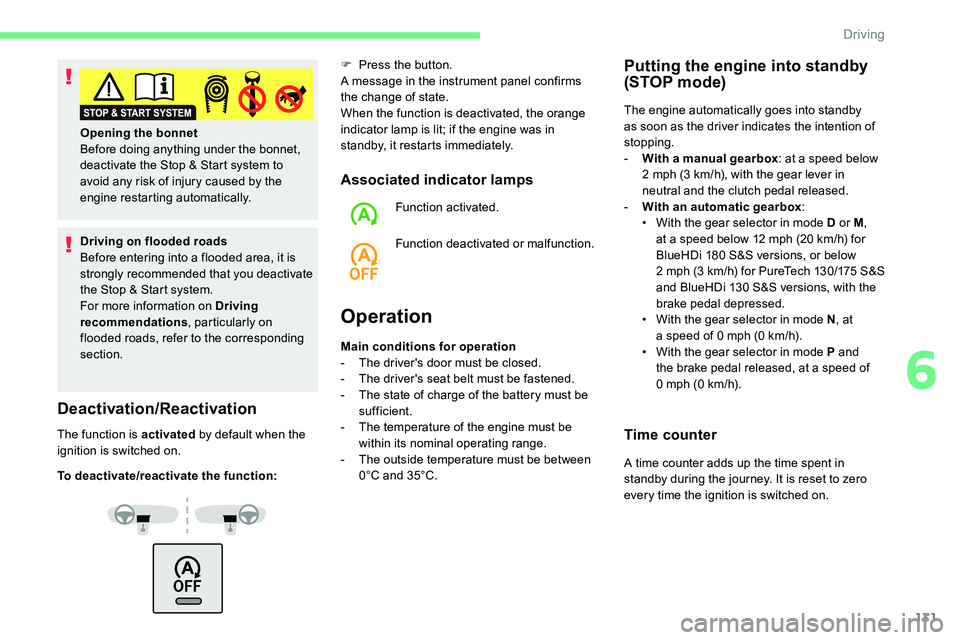
Driving on flooded roads
Before entering into a flooded area, it is
strongly recommended that you deactivate
the Stop & Start system.
For more information on Driving
recommendations , particularly on
flooded roads, refer to the corresponding
section.
Deactivation/Reactivation
The function is activated by default when the
ignition is switched on.
To deactivate/reactivate the function: F
P
ress the button.
A message in the instrument panel confirms
the change of state.
When the function is deactivated, the orange
indicator lamp is lit; if the engine was in
standby, it restarts immediately.
Associated indicator lamps
Function activated.
Function deactivated or malfunction.
Operation
Opening the bonnet
Before doing anything under the bonnet,
deactivate the Stop & Start system to
avoid any risk of injury caused by the
engine restarting automatically.
Main conditions for operation
-
T
he driver's door must be closed.
-
T
he driver's seat belt must be fastened.
-
T
he state of charge of the battery must be
sufficient.
-
T
he temperature of the engine must be
within its nominal operating range.
-
T
he outside temperature must be between
0°C and 35°C.
Putting the engine into standby
(STOP mode)
The engine automatically goes into standby
as soon as the driver indicates the intention of
stopping.
-
W
ith a manual gearbox : at a
speed below
2
mph (3 km/h), with the gear lever in
neutral and the clutch pedal released.
-
W
ith an automatic gearbox :
•
W
ith the gear selector in mode D or M ,
at a
speed below 12 mph (20 km/h) for
BlueHDi 180
S&S versions, or below
2
mph (3 km/h) for PureTech 130/175 S&S
and BlueHDi 130
S&S versions, with the
brake pedal depressed.
•
W
ith the gear selector in mode N , at
a
speed of 0 mph (0 km/h).
•
W
ith the gear selector in mode P and
the brake pedal released, at a
speed of
0
mph (0 km/h).
Time counter
A time counter adds up the time spent in
standby during the journey. It is reset to zero
every time the ignition is switched on.
6
Driving
Page 228 of 292

2
The touch screen is of the "capacitive"
type.
To clean the screen, use a soft, non-
abrasive cloth (e.g. spectacles cloth) with
no additional product.
Do not use sharp objects on the screen.
Do not touch the screen with wet hands.
Certain information is displayed permanently in
the upper bar of the touch screen:
-
R
eminder of the air conditioning information
(depending on version), and direct access to
the corresponding menu.
-
R
eminder of the Radio Media and
Telephone menu information.
-
R
eminder of the privacy information.
-
A
ccess to the Settings of the touch screen
and digital instrument panel.
Selection of the audio source (depending on
equipment):
-
F
M/DAB/AM radio stations (depending on
equipment).
-
T
elephone connected via Bluetooth and
Bluetooth multimedia broadcast (streaming).
-
U
SB memory stick.
-
M
edia player connected via the auxiliary
socket (depending on equipment).
-
C
D player (depending on equipment). In the "Settings" menu it is possible to
create a
profile for just one person or
a
group of people with shared interests,
with the possibility of entering multiple
settings (radio presets, audio settings,
ambiences, etc.); these settings are taken
into account automatically.
In very hot conditions, the volume may
be limited to protect the system. It may go
into standby (screen and sound off) for at
least 5
minutes.
The return to normal takes place when
the temperature in the passenger
compartment has dropped.
Press the back arrow to go back a
level or
confirm.
Steering mounted controls
Steering mounted controls –
Ty p e 1
Radio:
Select the previous/next preset radio
station.
Select the previous/next item in
a
menu or a list.
Media:
Select the previous/next track.
Select the previous/next item in
a
menu or a list.
Radio:
Short press: display the list of radio
stations.
Long press: update the list.
Media:
Short press: display the list of
folders.
Long press: display the available
sorting options.
Change audio source (radio; USB;
AUX if equipment connected; CD;
streaming).
Confirm a
selection.
CITROËN Connect Radio
Page 232 of 292

6
Press "OK" to confirm.
Radio reception may be affected by the
use of electrical equipment not approved
by the Brand, such as a
USB charger
connected to the 12
V socket.
The exterior environment (hills, buildings,
tunnels, basement car parks, etc.)
may block reception, including in RDS
mode. This behaviour is normal in the
propagation of radio waves and does not
indicate any failure of the audio system.
Changing waveband
Press Radio Media to display the
primary page.
Press the " OPTIONS" button to go to the
secondary page.
Press "Band" to change waveband.
Press in the grey area to confirm.
Presetting a station
Select a radio station or frequency.
Make a short press on the star
outline. If the star is solid, the radio
station is already preset.
Or
Select a
radio station or frequency.
Press " Preset".
Make a
long press on one of the
buttons to preset the station.
Activating/Deactivating RDS
Press Radio Media to display the
primary page.
Press the " OPTIONS" button to go to the
secondary page.
Activate/deactivate " RDS".
Press in the grey zone to confirm.
RDS, if activated, allows you to continue
listening to the same station by automatically
retuning to alternative frequencies. However,
in certain conditions, coverage of an RDS
station may not be assured throughout the
entire country as radio stations do not cover
100% of the territory. This explains the loss
of reception of the station during a
journey.
Displaying text information
The "Radio Text" function allows
information transmitted by the radio
station and related to the station or the
song playing to be displayed.Press Radio Media to display the
primary page.
Press the " OPTIONS" button to go to the
secondary page.
Activate/deactivate " INFO".
Press in the grey zone to confirm.
CITROËN Connect Radio
Page 248 of 292

2
The touch screen is of the "capacitive"
type.
To clean the screen, use a soft, non-
abrasive cloth (e.g. spectacles cloth) with
no additional product.
Do not use sharp objects on the screen.
Do not touch the screen with wet hands.
Certain information is displayed permanently
in the side bars or in the upper bar of the touch
screen (depending on equipment):
-
R
eminder of the air conditioning information
(depending on version), and direct access to
the corresponding menu.
-
G
o directly to the selection of the audio
source, to the list of radio stations (or list of
titles depending on the source).
-
G
o to the "Notifications" of messages,
emails, map updates and, depending on the
services, the navigation notifications.
-
G
o to the settings for the touch screen and
the digital instrument panel. Selection of the audio source (depending on
equipment):
-
F
M/DAB/AM radio stations (depending on
equipment).
-
T
elephone connected via Bluetooth and
Bluetooth multimedia broadcast (streaming).
-
U
SB memory stick.
-
M
edia player connected via the auxiliary
socket (depending on equipment).
-
C
D player (depending on equipment).
-
V
ideo (depending on equipment).Using the "Settings" menu, create a
profile
for just one person or a group of people
with common interests, with the possibility
of entering a
multitude of settings (radio
presets, audio settings, navigation history,
contact favourites, etc.); these settings are
taken into account automatically.
In very hot conditions, the volume may
be limited to protect the system. It may go
into standby (screen and sound off) for at
least 5
minutes.
The return to normal takes place when
the temperature in the passenger
compartment has dropped.
Steering mounted controls
Voice commands :
This control is located on the
steering wheel or at the end of the
lighting control stalk (depending on
equipment).
Short press, system voice
commands.
Long press, smartphone voice
commands via the system.
Increase volume.
CITROËN Connect Nav