2019 CITROEN C4 instrument panel
[x] Cancel search: instrument panelPage 137 of 317

135
C4-cactus_en_Chap06_conduite_ed01-2016
Steering mounted controls
6. Speed limiter on / pause indication.
7. P rogrammed speed setting.
8.
S
peed limiter mode selection indication.
Speed limiter
System which prevents the vehicle from exceeding the speed programmed by the driver.
The speed limiter cannot, in any circumstances, replace the need to observe speed limits, nor can it r
eplace the need for vigilance on the part of the driver.
1. Select speed limiter mode.
2. D ecrease value.
3.
In
crease
v
alue.
4.
S
peed limiter on / pause.
5.
L
ist of memorised speeds display button.
Display in the instrument panelThe programmed speed remains in the system memory when the ignition is switched off.
6
Driving
Page 140 of 317

138
C4-cactus_en_Chap06_conduite_ed01-2016
Steering mounted controls
6. Cruise control pause / resume indication.
7. P rogrammed speed setting.
8.
C
ruise control mode selection indication.
Cruise control
System which automatically maintains the speed of the vehicle at the value programmed by the driver, without any action on the accelerator pedal.
The cruise control system cannot, in any circumstances, replace the need to o
bserve speed limits, nor can it replace the
n
eed for vigilance on the part of the driver.
You
are advised to keep your feet near the
p
edals at all times.
1. Select cruise control mode.
2. P rogramme a speed / Decrease the value.
3.
P
rogramme a speed / Increase the value.
4.
P
ause / resume cruise control.
5.
D
isplay the list of memorised speeds.
Display in the instrument panelSwitching off the ignition cancels any programmed speed value.
Driving
Page 150 of 317

148
C4-cactus_en_Chap06_conduite_ed01-2016
Exit from a parallel parking space
With the vehicle stationary, to activate the Park Assist system:
F
W
hen you want to exit from a parallel
p
arking space, start the engine.
The assisted exit from parking manoeuvre is in
p
rogress.
Without exceeding 5 mph (8 km/h), continue the
m
anoeuvres following the information given by
t
he "parking assistance" system, until the end of m
anoeuvre message is displayed.
The
manoeuvre is complete once the front wheels
o
f the vehicle are out of the parking space.
The
indicator lamp in the control goes off,
a
ccompanied by a audible signal.
The
driver takes back control of the vehicle's
s
teering.
OR
A
message is displayed in the screen.F
S
elect the exit parking space manoeuvre.
T
he indicator lamp in the control comes on.
F
O
perate the direction indicator on the exit
f
rom parking side.
T
he direction indicator warning lamp
f
lashes in the instrument panel throughout
t
he manoeuvre, whatever the position of
t
he stalk.
F
S
elect a for ward or reverse gear then
r
elease the steering wheel.
F
Sel
ect "Park Assist " in the
" Driving assistance "
menu in
t
he touch screen tablet.
F
P
ress this control.
The
indicator lamp in the control remains off.
Driving
Page 173 of 317

171
C4-cactus_en_Chap07_info-pratiques_ed01-2016
After topping-up the oil, the check when switching on the ignition with the oil
l
evel indicator in the instrument panel
i
s not valid during the 30 minutes after
t
opping up.
Topping-up the engine oil level
The location of the oil filler cap is shown in the
corresponding underbonnet layout view.
F
U
nscrew the oil filler cap to reveal the filler
aperture.
F
A
dd oil in small quantities, avoiding any
s
pills on engine components (risk of fire).
F
W
ait a few minutes before checking the
l
evel again using the dipstick.
F
A
dd more oil if necessary.
F
A
fter checking the level, carefully refit the
o
il filler cap and the dipstick in its tube.
Engine oil change
Refer to the manufacturer's service schedule for details of the interval for this operation.
In
order to maintain the reliability of the engine
a
nd emission control system, never use
a
dditives in the engine oil. The
brake fluid level should be close t
o the "MA X" mark. If it is not, check t
he brake pad wear.
Brake fluid level
Changing the fluid
Refer to the manufacturer's service schedule f
or details of the interval for this operation.
Fluid specification
The brake fluid must conform to the manufacturer's r ecommendations.
7
Practical information
Page 178 of 317

176
C4-cactus_en_Chap07_info-pratiques_ed01-2016
Range indicators
Once the AdBlue® tank is on reserve or after d
etection
of
a
fault with the SCR emissions
c
ontrol
system,
when the ignition is switched
o
n,
an
indicator
displays an estimate of the
d
istance
that
can
be covered, the range, before
e
ngine
starting
is
prevented.
In
the
event
of
simultaneous system fault and
l
ow AdBlue
® level, the shortest range figure is t
he
one
displayed. Range greater than 1 500 miles (2 400 km)
When
the ignition is switched on, no
i
nformation on range is displayed automatically
i
n the instrument panel.
The
engine start prevention system
r
equired by regulations is activated
a
utomatically once the AdBlue
® tank is e
m pt y.
In the event of the risk of non-starting related to a lack of AdBlue®
Remaining range between 350 and 1500 miles (600 and 2 400 km)
When switching on the ignition, the U REA warning lamp comes on, accompanied
b
y an audible signal and the display of a
m
essage (e.g.: "Top up emissions additive:
S
tarting prevented in 900 miles") indicating
t
he remaining range expressed in miles or
k
ilometres.
When
driving, the message is displayed every
2
00 miles (300 km) until the additive tank has
be
en
t
opped-up.
Go
to a CITROËN dealer or a qualified
w
orkshop to have the AdBlue
® tank topped-up.
Y
ou
can
also
top-up
the
tank
yourself.
For
more
information
on
topping-up the
Ad
Blue
® additive, refer to the corresponding s
ection.
Practical information
Page 195 of 317

193
C4-cactus_en_Chap08_En-cas-de-panne_ed01-2016
Removing a wheel
Parking the vehicle
Immobilise the vehicle where it does not block traffic: the ground must be level,
s
table and not slippery.
Apply
the parking brake, switch off the
i
gnition and engage first gear to block
t
he wheels.
Check
that the parking brake warning
l
amps in the instrument panel come on.
The
occupants must get out of the
v
ehicle and wait where they are safe.
Ensure
that the jack is correctly
p
ositioned at one of the vehicle's
j
acking points.
Incorrect
use of the jack could cause
t
he vehicle to drop.
Never
go underneath a vehicle raised
u
sing a jack; use an axle stand.
List of operations
F Remove the wheel bolt cover(s) using the t
ool 3 (depending on version).
F
S
lacken the bolts using the
w
heelbrace
1 o n l y.
Do
not use:
-
t
he jack for any other purpose than
l
ifting the vehicle,
-
a
jack other than the one supplied
b
y the manufacturer. The
jack must only be used to change a
w
heel with a damaged tyre.
The jack does not require any m
aintenance.
The
jack conforms to European
l
egislation, such as defined in the
M
achinery Directive 2006/42/CE.
8
In the event of a breakdown
Page 210 of 317
208
C4-cactus_en_Chap08_En-cas-de-panne_ed01-2016
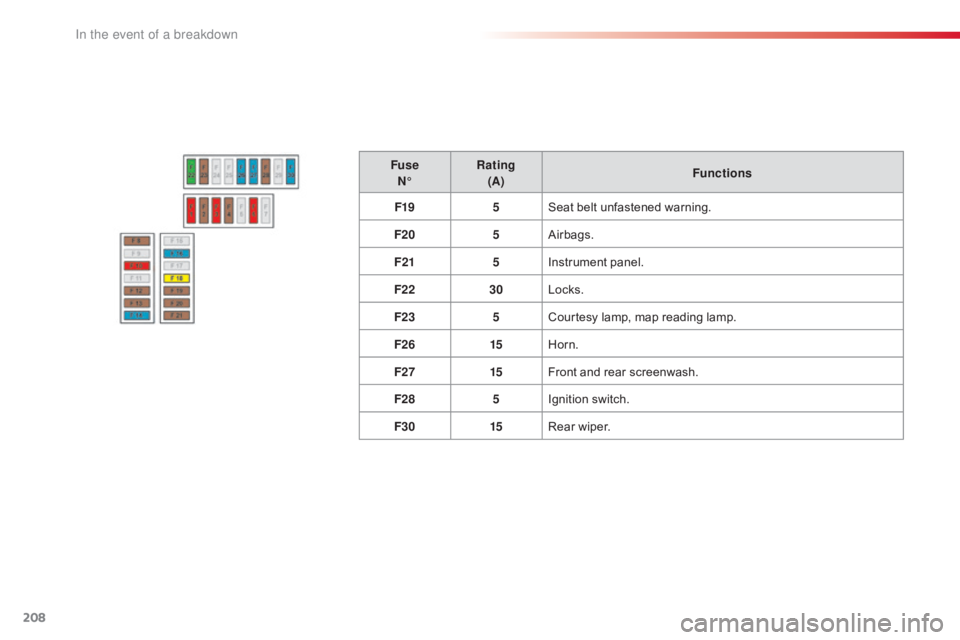
FuseN° Rating
(A) Functions
F19 5Seat
belt unfastened warning.
F20 5Airbags.
F21 5Instrument
panel.
F22 30Locks.
F23 5Courtesy
lamp, map reading lamp.
F26 15Horn.
F27 15Front
and rear screenwash.
F28 5Ignition
s
witch.
F30 15Rear
wiper.
In the event of a breakdown
Page 294 of 317

292
C4-cactus_en_Chap11_index-alpha_ed01-2016
Maintenance (advice) ............................18 2, 18 3
Maintenance, routine ...................................... 10
M
ap reading lamps
......................................... 67
M
arkings,
id
entification
................................. 2
24
Mat
.......
............................................... 69, 70, 74
Memorising
a
speed
...............
........................................ 141
Mirror, rear view
.............................................. 54
M
irrors, door .................................................... 53Navigation
...............................
......................
256
Number plate lamps
......................................
20
3
M
N
Labels, identification .....................................
2 24
Lamp, boot ............................... ..............68, 204
Lamps .............................................................. 79
Leather (care)
...............................
.................183
LEDs
- Light-emitting
diodes
..............................
.................... 83, 204
Levels
and checks
..............................
...16 8 -172
Lighting,
c
ornering
...............................
...........85
Lighting
dimmer
..............................
................39
Lighting,
guide-me home
................................84
L
ighting,
i
nterior
.............................................. 67
Lo
ading
..............................
.............................10
Load
reduction mode
.................................... 16
0
Localised
Assistance /
Emergency
C
all
.......................................... 2
26
Locating
your vehicle
...................................... 41
L
ocking from the inside
...................................44
L
ocking the doors
..............................
.......44, 46
Low fuel level
..............................
..................153Misfuel prevention ...............................
..........155
Mountings, I
sofix ............................... ............113
L
Key with remote
c ontrol ............................................... 4 0, 41, 43
Kit, hands-free
......................................2
78, 279
Kit,
temporary puncture
repair
...............................
...................... 76, 185
K
Immobiliser, electronic .............................. 4 1, 43
Indicator, engine oil level ................................2
7
Indicator
lamps, operation
..............................13
I
ndicators, direction
................................ 81
,
19
9
Inflating
tyres
..............................
...................... 9
Inflating
tyres and accessories
(using
the kit)
..............................
................185
Instrument
panel
...............................
..............11
Interactive help
........................................3
3, 270
ISOFIX
...............
.................................... 113 -115
Jack
........
....................................... 191, 193, 194
Jump
starting
..............................
..................213
J
Oil change ............................... ..............170, 171
Oil consumption ............................................ 17
0
Opening
the bonnet
...................................... 16
7
Opening
the boot
..............................
..............47
Opening
the doors
...............................
...........45
O
Alphabetical index