2019 CITROEN BERLINGO VAN cruise control
[x] Cancel search: cruise controlPage 127 of 320

125
Forced switch-off with
Keyless Entry and Starting
In the event of an emergency only and with the
vehicle stationary, you can switch off the engine.
With Keyless Entry and Starting
F With the remote control in the recognition zone, press the " START/STOP" button.
With a manual gearbox, the engine switches off
and the steering column locks.
With the EAT8 automatic gearbox, the engine
switches off. If the vehicle is not immobilised, the
engine will not switch off.
To avoid any risk of jamming the pedals:
-
o
nly use mats which are suited to the
fixings already present in the vehicle;
these fixings must be used,
-
n
ever place one mat on top of another.
The use of mats not approved by
CITROËN may inter fere with access to
the pedals and hinder the operation of the
cruise control/speed limiter.
The mats approved by CITROËN have two
fixings located below the seat.
Switching the ignition on
with
K
eyless Entry and
Starting
F Press the " START/STOP" button, the
instrument panel comes on but the engine
does not start.
F
P
ress this button again to switch off the
ignition and allow the vehicle to be locked.
With the ignition on, the system will
automatically go into energy economy
mode to maintain an adequate state of
charge in the battery.
Back-up starting with
K
eyless Entry and Starting
Should your vehicle not detect the electronic
key in the recognition zone, because the
remote control battery is flat, a back-up reader
is provided to the left, behind the steering
wheel, to allow starting. F
W
ith a manual gearbox, shift the gear lever
into neutral, fully depress the clutch pedal
and keep the pedal down until the engine
runs.
F
W
ith an automatic gearbox, place the
selector in position P , then fully depress the
brake pedal.
F
P
lace and hold the remote control against
the reader, then:
F
T
hen, press the "
START/STOP" button.
The engine starts.
With the
K
eyless Entry and Starting
electronic key inside the vehicle,
pressing the " START/STOP " button,
without pressing any of the
pedals , allows the ignition to be
switched on.
F
T
o do this, press the "
S TA R T/
STOP " button and keep it
pressed for about 3 seconds.
In this case the steering column locks as soon
as the vehicle stops.
6
Driving
Page 140 of 320

138
Have it checked by a CITROËN dealer or a
qualified workshop.
If a fault occurs in STOP mode, the vehicle may
stall.
All of the instrument panel warning lamps come
on.
Depending on version, a warning message may
also be displayed, asking you to place the gear
selector in position N and to press the brake
pedal.
With the vehicle stationary, you must switch off
the ignition and then start the engine again.
Head-up display
System which projects various information onto
a smoked blade in the driver's field of vision so
that they do not have to take their eyes off the
road.
Displays during operation
A.The speed of your vehicle.
B. Cruise control/speed limiter information.
C. If your vehicle is so equipped, inter-
vehicle distance information, automatic
emergency braking alerts and navigation
instructions.
D. If your vehicle is so equipped, speed limit
information.
For more information on Navigation , refer
to the Audio equipment and telematics
section.
Buttons
Once the system has been activated, the
following information is grouped together in the
head-up display:
Activation/Deactivation
F With the engine running, press button 1 to activate the system and deploy the blade.
1. On.
2. Off (long press). 3.
Brightness adjustment.
4. Display height adjustment.
Height adjustment
F With the engine running, adjust the display
to the desired height using buttons 4 :
-
u
p to move the display up,
-
d
own to move the display down.
F
P
ress and hold button 2 to deactivate the
system and retract the blade.
The activated/deactivated state is saved and
restored on restarting the engine.
Driving
Page 144 of 320

142
- obsolete or incorrect mapping,
- h idden road signs (other vehicles,
vegetation, snow),
-
s
peed limit signs that do not conform to the
standard, are damaged or distorted.
Recommendation
For more information on the Speed
limiter , Cruise control or Adaptive
cruise control , refer to the corresponding
sections.
Steering mounted controls
1. Select speed limiter/cruise control mode.
2. Memorise a speed setting.
Display in the instrument panel
3.Speed limit indication.
4. Offer to memorise the speed.
5. Current speed setting.
Memorising the speedIn addition to Speed Limit recognition and
recommendation , the driver can keep the
speed displayed as a speed setting for the
speed limiter or cruise control using the speed
limiter or cruise control memorisation button.
F
S
witch on the speed limiter/cruise control.
Speed limiter/cruise control information is
displayed.
On detection of a sign offering a new speed
limit, the system displays the value and MEM
If an app on your smart phone is used
via Mirror Screen, the sign displayed by
the system may be temporarily hidden. It
will be redisplayed as soon as you pass
another sign.
flashes for a few seconds to offer to make it a
new speed setting.
If there is a difference of less than 6 mph
(10 km/h) between the speed setting and
the speed displayed by the Speed Limit
recognition and recommendation, the
MEM symbol is not displayed.
Depending on the road conditions, several
speeds may be displayed.
F
M
ake an initial
press on button 2 to request
saving of the speed suggested.
A message is displayed to confirm the request.
F
P
ress button 2 again
to confirm and save
the new speed setting.
After a predetermined period, the screen
returns to the current display.
Extended Traffic Sign
Recognition
Using the camera installed at the top of the
windscreen, this additional system recognises
these road signs and displays them in the
instrument panel.
Driving
Page 147 of 320
145
Switching off
F Turn thumbwheel 1 to position "0". The
display of information related to the speed
limiter disappears.
Malfunction
The use of mats not approved by
CITROËN may inter fere with the operation
of the speed limiter.
To avoid any risk of jamming the pedals:
-
e
nsure that the mat is positioned
c o r r e c t l y,
-
n
ever fit one mat on top of another.
Flashing dashes indicate a fault with the speed
limiter.
Have it checked by a CITROËN dealer or a
qualified workshop.
Programmable cruise
control
System which automatically
maintains the cruising speed of the
vehicle at a setting programmed by
the driver, without any action on the
accelerator pedal. The cruise control remains active after
changing gear, regardless of the gearbox
type, on vehicles fitted with Stop & Start.
The operation of the cruise control can be
temporarily interrupted (pause):
-
b
y pressing control 4 or by pressing the
brake pedal,
-
a
utomatically, if operation of the dynamic
stability control system is triggered.
Switching off the ignition cancels any
programmed speed setting.
The cruise control system is a driving aid
that cannot, in any circumstances, replace
the need to obser ve speed limits, nor the
need for vigilance on the part of the driver.
As a safety measure, you are advised to
keep your feet near the pedals at all times.
The cruise control is switched on
manually.
It requires a minimum vehicle speed of 25
mph
(40
km/h).
With a manual gearbox, it requires the
engagement of third gear or higher.
With an automatic gearbox, it requires the
engagement of the selector in mode D or of
second gear or higher in mode M .
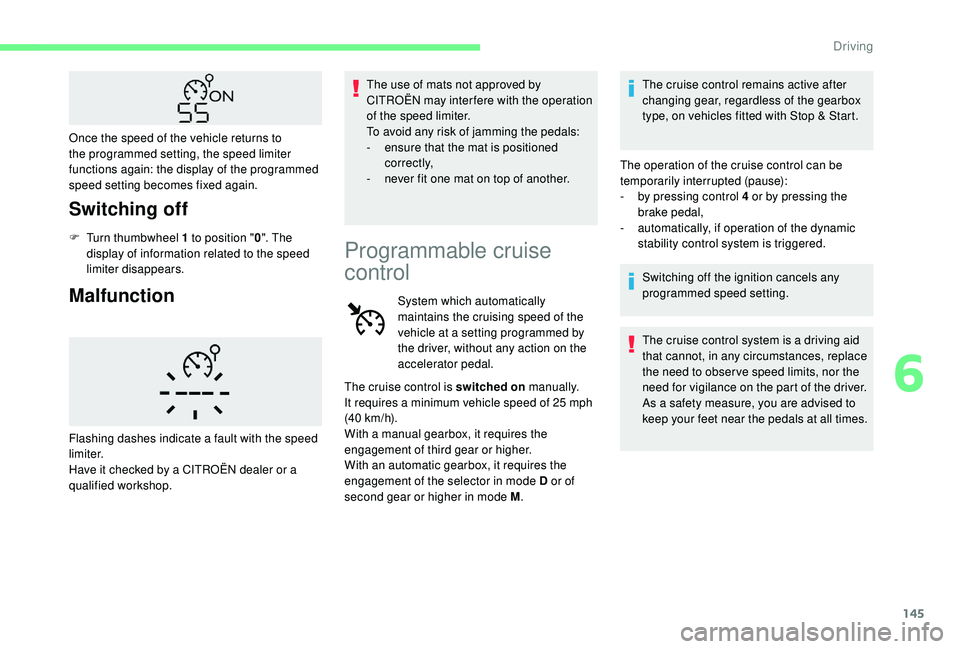
Once the speed of the vehicle returns to
the programmed setting, the speed limiter
functions again: the display of the programmed
speed setting becomes fixed again.
6
Driving
Page 148 of 320
146
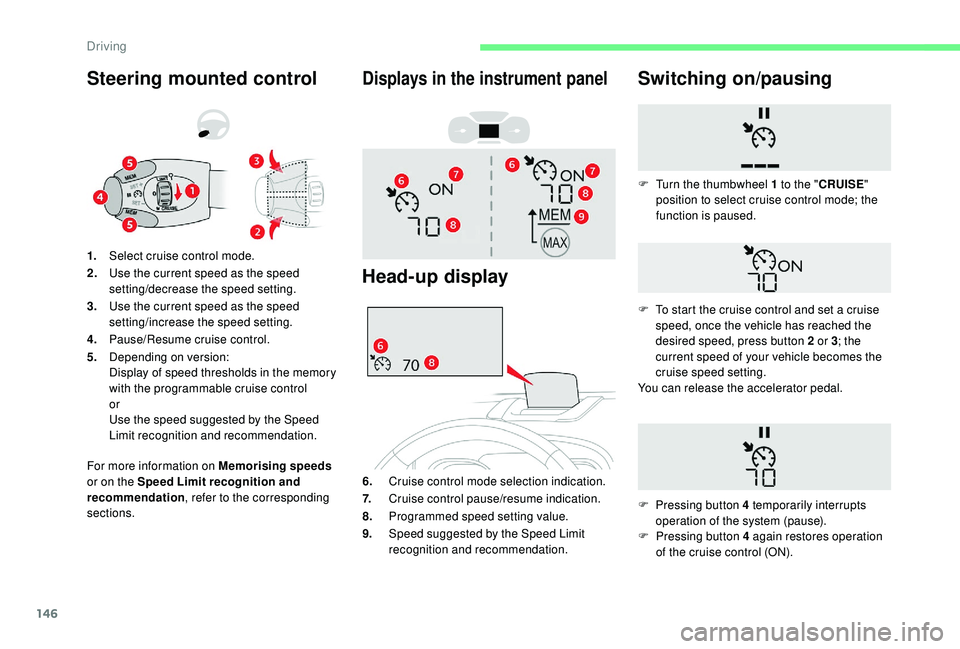
Steering mounted control
For more information on Memorising speeds
or on the Speed Limit recognition and
recommendation , refer to the corresponding
sections. 1. Select cruise control mode.
2. Use the current speed as the speed
setting/decrease the speed setting.
3. Use the current speed as the speed
setting/increase the speed setting.
4. Pause/Resume cruise control.
5. Depending on version:
Display of speed thresholds in the memory
with the programmable cruise control
or
Use the speed suggested by the Speed
Limit recognition and recommendation.
Displays in the instrument panel
Head-up display
6. Cruise control mode selection indication.
7. Cruise control pause/resume indication.
8. Programmed speed setting value.
9. Speed suggested by the Speed Limit
recognition and recommendation.
Switching on/pausing
F Pressing button 4 again restores operation
of the cruise control (ON).
F
T
urn the thumbwheel 1 to the "
CRUISE"
position to select cruise control mode; the
function is paused.
F
T
o start the cruise control and set a cruise
speed, once the vehicle has reached the
desired speed, press button 2 or 3 ; the
current speed of your vehicle becomes the
cruise speed setting.
You can release the accelerator pedal.
F
P
ressing button 4 temporarily interrupts
operation of the system (pause).
Driving
Page 149 of 320

147
Modifying the cruise speed
setting
The cruise control must be active.
To modify the cruise speed setting from the
current speed of the vehicle:
F
i
n steps of +/- 1 mph (km/h), make
successive short presses on button 2 or 3 ,
F
c
ontinuously, in steps of +/- 5 mph (km/h),
press and hold button 2 or 3 .
Take care: pressing and holding button 2
or 3
results in a rapid change in the speed
of your vehicle.
As a precaution, it is recommended
that the cruise speed chosen be close
to the current speed of your vehicle, so
as to avoid any sudden acceleration or
deceleration of the vehicle.
To modify the cruise speed setting using
memorised speed settings and from the touch
screen:
F
p
ress button 5 to display the memorised
speed settings,
F
p
ress the button for the desired speed
setting.
The selection screen closes after a few
moments.
This setting becomes the new cruise speed. To modify the cruise speed setting using
the speed suggested by the Speed Limit
recognition and recommendation system:
F
t he speed suggested is displayed in the
instrument panel,
F
m
ake a first press on button 5; a message
is displayed to confirm the memorisation
request,
F
p
ress button 5 again to save the suggested
speed.
The speed displays immediately in the
instrument panel as the new speed setting.
Temporarily exceeding the
programmed speed
If needed (for overtaking, etc.) it is possible to
exceed the programmed speed by pressing the
accelerator pedal. When descending a steep hill, the cruise
control system cannot prevent the vehicle
from exceeding the programmed speed.
You may have to brake to control the
speed of your vehicle. In this case, the
cruise control is automatically paused.
To activate the system again, with the
speed of the vehicle above 25
mph
(40 km/h), press button 4.
Switching off
F Turn thumbwheel 1 to position " 0". The
display of information related to the cruise
control disappears.
The cruise control is temporarily overridden
and the programmed speed setting flashes.
To return to the programmed speed, simply
release the accelerator pedal. Once the vehicle has returned to the
programmed speed, the cruise control takes
over again: the display of the programmed
speed setting becomes steady again.
6
Driving
Page 150 of 320

148
Malfunction
Use the cruise control only where the
driving conditions allow running at a
constant speed and at an adequate safe
distance for a period of time.
Do not activate the cruise control in urban
areas, in heavy traffic, on winding or steep
roads, on slippery or flooded roads, or in
conditions of poor visibility (heavy rain,
fog, falling snow, etc.).
In some circumstances, it may not be
possible to maintain or even reach the
cruise speed set: towing, vehicle heavily
loaded, steep climb.The use of mats not approved by
CITROËN may inter fere with the operation
of the cruise control.
To avoid any risk of jamming the pedals:
-
e
nsure that the mat is positioned
c o r r e c t l y,
-
n
ever fit one mat on top of another.
Flashing dashes indicate a fault with the cruise
control system.
Have it checked by a CITROËN dealer or a
qualified workshop. This system provides the following
functions:
- A utomatically maintains the vehicle
at the speed set by the driver.
-
A
utomatic adjustment of the
distance between your vehicle and
the one in front.
The cruise control remains active after
changing gear regardless of the gearbox
type.
It manages the acceleration and deceleration
of the vehicle by automatically acting on the
engine and the braking system.
Adaptive cruise control
With an automatic gearbox, automatic
adjustment of the distance can cause your
vehicle to come to a complete stop. For this purpose there is a camera located at
the top of the windscreen.
Principle of operation
The system automatically adapts the speed of
your vehicle to that of the vehicle in front, to
maintain a constant distance.
If the vehicle in front is driving more slowly, the
system slows, or even stops your vehicle, using
engine braking and the braking system (for
versions fitted with an automatic gearbox).
If the vehicle in front accelerates or changes
lane, the cruise control progressively
accelerates your vehicle to return to the
programmed speed.
If the driver operates a direction indicator to
overtake a slower vehicle, the cruise control
allows your vehicle to temporarily approach
the vehicle in front to assist the overtaking
manoeuvre, though never exceeding the
programmed speed.Primarily designed for driving on main
roads and motor ways, this system only
works on moving vehicles
, driving in the
same direction as your vehicle.
Driving
Page 151 of 320

149
The brake lamps illuminate as soon as
the braking system is activated with
deceleration of the vehicle.This system is a driving aid that cannot,
in any circumstances, replace the need to
obser ve speed limits and safety distances,
nor the need for vigilance on the part of
the driver.
Some vehicles present on the road may
not be properly seen or may be poorly
interpreted by the camera (e.g. a lorry),
which may lead to a poor assessment
of the distances and lead to the vehicle
inappropriately accelerating or braking.
The driver must be ready at all times to
retake control of their vehicle by keeping
both hands on the steering wheel and
keeping the feet near the brake and
accelerator pedals.
Steering mounted control
1. Select cruise control mode.
2. Use the current speed as the speed
setting/decrease the speed setting.
3. Use the current speed as the speed
setting/increase the speed setting.
4. Pause/Resume cruise control.
5. Use the speed suggested by the Speed
Limit recognition and recommendation.
6. Display and adjustment of the programmed
inter-vehicle distance.
For more information on the Speed Limit
recognition and recommendation , refer to
the corresponding section.
Displays in the instrument panel
7. Indication of the presence/absence of a
target vehicle.
8. Indication of cruise control activation/
deactivation. 9.
Value of the speed setting.
10. Indication that vehicle is held stationary
(versions fitted with the automatic
gearbox).
11. Speed suggested by the Speed Limit
recognition and recommendation.
If a vehicle is detected, the symbol 7 is filled
with the colour associated with the cruise
control mode. By default, the symbol 7 is
e m pt y.
When the cruise control is in operation, the
symbols 7 and 8 are displayed in green. By
default, they are displayed in grey.
12 . Inter-vehicle distance setting.
13. Position of vehicle detected by the camera.
Switching on
F With the engine running, turn the
thumbwheel 1 to the "CRUISE" position.
The system is paused (grey display).
With a manual gearbox
With the speed of the vehicle between 19 and
99
mph (30 and 160 km/h):
F
W
ith the vehicle moving, press one of the
buttons 2 or 3 : the current speed of your
vehicle becomes the cruise speed setting.
The cruise control starts operating (displayed
in green).
6
Driving