Page 50 of 718

location below the door handle(s). Do not move your foot
sideways or in a sweeping motion or the sensors may not
detect the motion.
When a valid kicking motion is completed, the sliding door
will chime, the hazard lights will flash and the sliding door
will open almost instantaneously. This assumes all options
are enabled in the radio settings.
NOTE:
•To open the Hands-Free Sliding Doors requires a valid
Passive Entry key fob within 5 ft (1.5 m) of the door
handle. If a valid Passive Entry key fob is not within 5 ft
(1.5 m), the door will not respond to any kicks.
• The Hands-Free Sliding Door will only operate when the
transmission is in PARK.
• With every movement of the Hands-Free sliding doors,
an audible tone will sound and the turn signals will
flash. Refer to “Uconnect Settings” in “Multimedia” in
the Owner ’s Manual for further information on turning
these alerts on or off.
• If anything obstructs the power sliding side door while
it is closing or opening, the door will automatically
reverse to the closed or open position and an audible tone will sound, provided it meets sufficient resistance.
The turn signals will flash with sliding door movements.
• If the power sliding doors encounters multiple obstruc-
tions within the same cycle, the system will automati-
cally stop.
The Hands-Free Sliding Doors feature may be turned off
through Uconnect Settings. Refer to “Uconnect Settings” in
“Multimedia” for further information. The Hands-Free
Sliding Doors feature should be turned off during Jacking,
Tire Changing, and Vehicle Service.
Child Locks
To provide a safer environment for small children riding in
the rear seats, the sliding doors are equipped with a Child
Protection Door Lock system.
To Engage The Child Protection Door Lock
1. Open the sliding side door.
2. On the rear of the sliding door, slide the Child Protection Door Lock control inward (toward the vehicle) to en-
gage the Child Protection Door Lock.
48 GETTING TO KNOW YOUR VEHICLE
Page 51 of 718

3. Repeat Steps 1 and 2 on the opposite sliding door.
NOTE:
•After engaging (or disengaging) the Child Protection
Door Lock, always test the inside door handle with the
sliding door closed to make certain the Child Protection
Door Lock is in the desired position. The inside door
handle will not open the sliding door when the Child
Protection Door Lock is engaged. •
The power sliding door will operate from the switch
located just inside the sliding door, regardless of the
Child Protection Door Lock lever position.
• To avoid unintentional operation of the power sliding
door from the rear seats, push the Sliding Door Power
Off button, located in the overhead console. When the
overhead console power OFF LED is lit, the sliding door
may not be power opened or closed by pushing the
buttons just inside the sliding doors or pulling on the
handles.
WARNING!
Avoid trapping anyone in the vehicle in a collision.
Remember that the sliding doors cannot be opened
from the inside door handle when the Child Protection
Door Locks are engaged.
To Disengage The Child Protection Door Lock
1. Open the sliding side door.
2. Slide the Child Protection Door Lock control outward (away from the vehicle) to disengage the Child Protec-
tion Door Lock.
Child Protection Door Locks
3
GETTING TO KNOW YOUR VEHICLE 49
Page 52 of 718

3. Repeat Steps 1 and 2 on the opposite sliding door.
NOTE:
•After disengaging (or engaging) the Child Protection
Door Lock, always test the inside door handle with the
sliding door closed to make certain the Child Protection
Door Lock is in the desired position. The inside door
handle will open the sliding door when the Child
Protection Door Lock is disengaged.
SEATS
Seats are a part of the Occupant Restraint System of the
vehicle.
WARNING!
• It is dangerous to ride in a cargo area, inside or
outside of a vehicle. In a collision, people riding in
these areas are more likely to be seriously injured or
killed.
• Do not allow people to ride in any area of your
vehicle that is not equipped with seats and seat belts.
In a collision, people riding in these areas are more
likely to be seriously injured or killed.
(Continued)
WARNING! (Continued)
•Be sure everyone in your vehicle is in a seat and
using a seat belt properly.
Manual Adjustment (Front Seats) — If Equipped
WARNING!
• Adjusting a seat while the vehicle is moving is
dangerous. The sudden movement of the seat could
cause you to lose control. The seat belt might not be
adjusted properly and you could be injured. Adjust
the seat only while the vehicle is parked.
• Do not ride with the seatback reclined so that the
shoulder belt is no longer resting against your chest.
In a collision you could slide under the seat belt and
be seriously or even fatally injured. Use the recliner
only when the vehicle is parked.
Manual Front Adjuster
Both front seats are adjustable forward or rearward. The
manual seat adjustment handle is located under the seat
cushion at the front edge of each seat.
50 GETTING TO KNOW YOUR VEHICLE
Page 57 of 718
4. Once the latches are released, tilt the entire seat towardthe front of the vehicle. The seat can now be removed
through either sliding side door, or through the lift gate.
NOTE:
• Due to the weight of the bench seat, it is recommended
that two people are utilized for its removal.
• When storing the removed bench seat, it is important to
keep the seatback in the folded position. Reinstalling The Bench Seat
1. To reinstall the bench seat, align the seats front attach-
ments into the detent positions on the floor.
2. Tilt seat rearward to lock the seat back into its original position.
NOTE: Push downward to ensure the rear latches are in
the locked position.
3. Lift the recline handle and return the seat back to the seating position.
WARNING!
If not properly latched, the seat could become loose.
Personal injuries could result.
Tilt Bench Seat Forward
3
GETTING TO KNOW YOUR VEHICLE 55
Page 81 of 718

Driver Memory Seat — If Equipped
The Memory Buttons (1) and (2) on the driver’s door panel
can be programmed to recall the driver’s seat, outside
mirrors, and radio station preset settings. Your key fobs can
also be programmed to recall the same positions when the
unlock button is pushed.
Your vehicle may have been delivered with two key fobs,
one key fob can be linked to each of the memory positions.
Programming The Memory Feature
To create a new memory profile, perform the following:
1. Cycle the vehicle’s ignition to the ON/RUN position (donot start the engine).
2. Adjust all memory profile settings to desired prefer- ences (i.e., driver ’s seat, outside mirrors and radio
station presets).
3. Push and release the set (S) button on the memory switch.
4. Within five seconds, push and release either of the memory buttons (1) or (2). The instrument cluster dis-
play will show which memory position has been set.
NOTE:
• Memory profiles can be set without the vehicle in PARK,
but the vehicle must be in PARK to recall a memory
profile.
• To set a memory profile to your key fob, refer to
“Linking And Unlinking The Remote Keyless Entry Key
Fob To Memory” in this section.
Driver Memory Switch
1 — Memory Button 1
2 — Set Button
3 — Memory Button 2
3
GETTING TO KNOW YOUR VEHICLE 79
Page 82 of 718

Linking And Unlinking The Remote Keyless Entry
Key Fob To Memory
Your key fob can be programmed to recall one of two
pre-programmed memory profiles by pushing the unlock
button on the key fob.
NOTE:Before programming your key fob you must select
the “Personal Settings Linked to Key Fob” feature through
the Uconnect Settings. Refer to “Uconnect Settings” in
“Multimedia” for further information.
To program your key fob, perform the following:
1. Cycle the vehicle’s ignition to the OFF position.
2. Select a desired memory profile 1 or 2.
NOTE: If a memory profile has not already been set, refer
to �Programming The Memory Feature� in this section for
instructions on how to set a memory profile.
3. Once the profile has been recalled, push and release the set (S) button on the memory switch.
4. Push and release button (1) or (2) accordingly. “Memory Profile Set” (1 or 2) will display in the instrument
cluster. 5. Push and release the lock button on the key fob within
10 seconds.
NOTE:Your key fob can be unlinked to your memory
settings by pushing the set (S) button, and within 10 seconds,
followed by pushing the unlock button on the key fob.
Memory Position Recall
NOTE: The vehicle speed must be less than or equal to
5 mph (8 km/h) to recall memory positions. If a recall is
attempted when the vehicle speed is greater than 5 mph
(8 km/h), a message will be displayed in the instrument
cluster display.
To recall the memory settings for driver one, push memory
button (1) on the driver’s door or the unlock button on the
key fob linked to memory position 1.
To recall the memory setting for driver two, push memory
button (2) on the driver’s door or the unlock button on the
key fob linked to memory position 2.
A recall can be cancelled by pushing any of the memory
buttons on the driver’s door during a recall (S, 1, or 2).
When a recall is cancelled, the driver’s seat stops moving.
A delay of one second will occur before another recall can
be selected.
80 GETTING TO KNOW YOUR VEHICLE
Page 104 of 718
To operate the courtesy lights, push either the driver or
passenger light switch.
NOTE:
•Before exiting the vehicle, make sure that the interior
lights are turned off. This will prevent the battery from
discharging once the doors are closed.
• If a light is left on, it will automatically be turned off
approximately 10 minutes after the ignition is in the
STOP/OFF position.
Rear Courtesy/Reading Lights — If Equipped
Located above the rear passengers are courtesy/reading
lights. The lights turn on when a front door, a sliding door
or the liftgate is opened. If your vehicle is equipped with
remote keyless entry the lights will also turn on when the
unlock button on the key fob is pushed. The courtesy lights also function as reading lights. Push the
lens to turn these lights on while inside the vehicle. Push
the lens a second time to turn each light off.
Reading Lights
102 GETTING TO KNOW YOUR VEHICLE
Page 140 of 718
WINDOWS
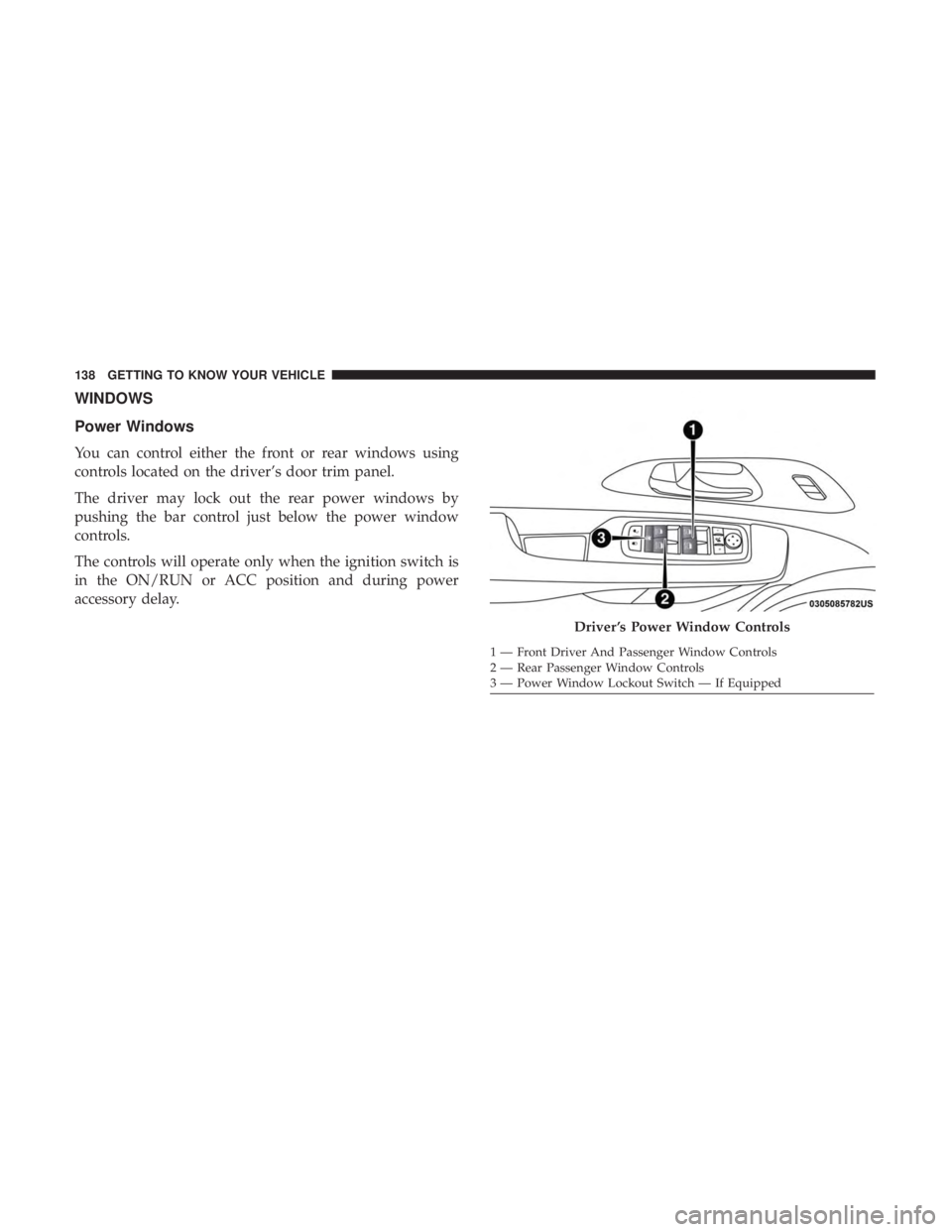
Power Windows
You can control either the front or rear windows using
controls located on the driver’s door trim panel.
The driver may lock out the rear power windows by
pushing the bar control just below the power window
controls.
The controls will operate only when the ignition switch is
in the ON/RUN or ACC position and during power
accessory delay.
Driver ’s Power Window Controls
1 — Front Driver And Passenger Window Controls
2 — Rear Passenger Window Controls
3 — Power Window Lockout Switch — If Equipped
138 GETTING TO KNOW YOUR VEHICLE