Page 641 of 718

STEERING WHEEL AUDIO CONTROLS
The remote sound system controls are located on the rear
surface of the steering wheel at the three and nine o’clock
positions. Both controls are rocker-type switches with a
push-button in the center.
The right-hand control is a rocker-type switch with a
push-button in the center and controls the volume and
mode of the sound system. Pushing the top of the rocker
switch will increase the volume, and pushing the bottom of
the rocker switch will decrease the volume.Pushing the center button will make the radio switch
between the various modes available (AM/FM/SXM or
Media etc.)
The left-hand control is a rocker-type switch with a push-
button in the center. The function of the left-hand control is
different depending on which mode you are in.
The following describes the left-hand control operation in
each mode.
Radio Operation
Pushing the top of the switch will “Seek” up for the next
listenable station and pushing the bottom of the switch will
“Seek” down for the next listenable station.
The button located in the center of the left-hand control
will tune to the next preset station that you have pro-
grammed in the radio preset button.
Media Mode
Pushing the top of the switch once goes to the next track on
the selected media (AUX/USB/Bluetooth). Pushing the
bottom of the switch once goes to the beginning of the
current track, or to the beginning of the previous track if it
is within eight seconds after the current track begins to
play.
Steering Wheel Audio Controls (Back View Of Steering
Wheel)
10
MULTIMEDIA 639
Page 644 of 718
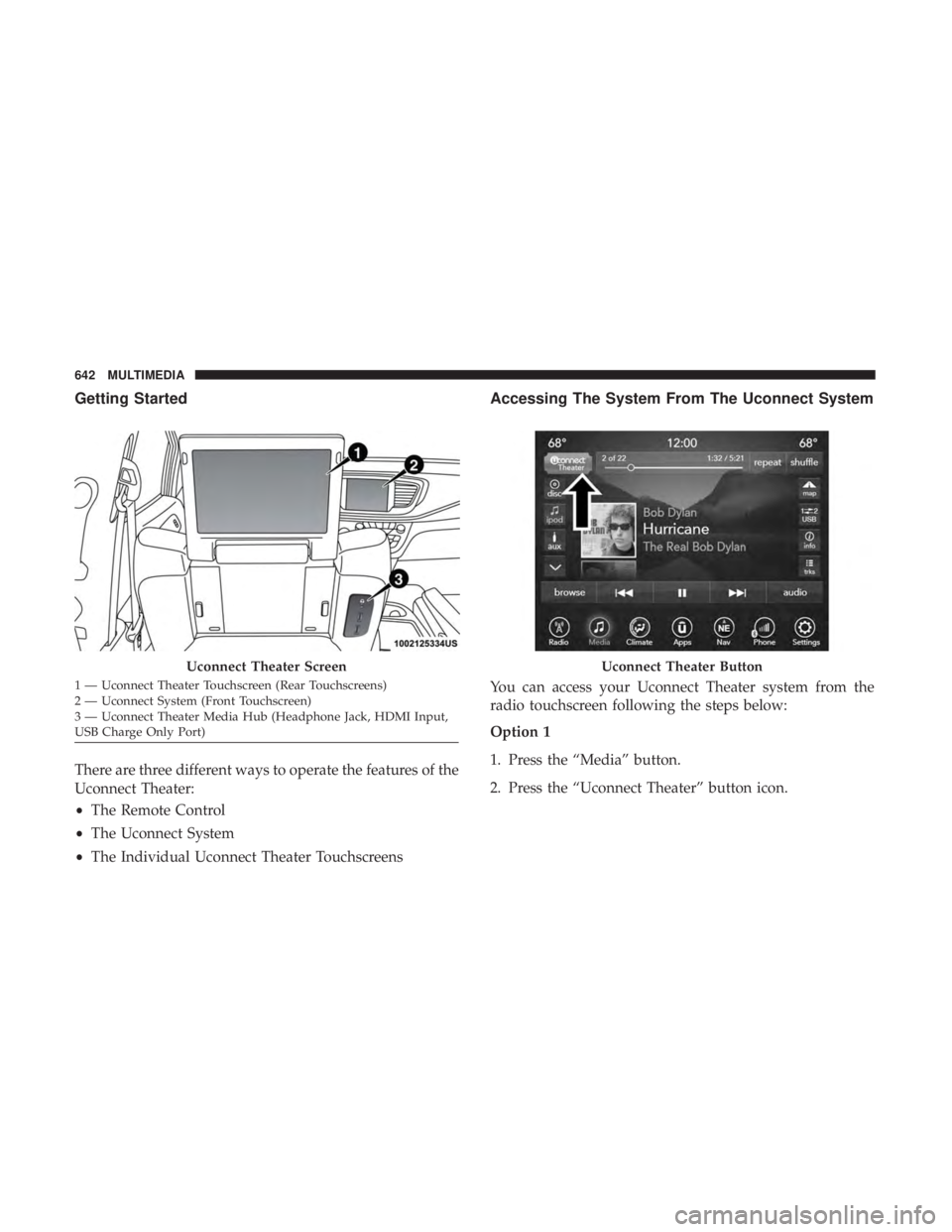
Getting Started
There are three different ways to operate the features of the
Uconnect Theater:
•The Remote Control
• The Uconnect System
• The Individual Uconnect Theater Touchscreens
Accessing The System From The Uconnect System
You can access your Uconnect Theater system from the
radio touchscreen following the steps below:
Option 1
1. Press the “Media” button.
2. Press the “Uconnect Theater” button icon.
Uconnect Theater Screen
1 — Uconnect Theater Touchscreen (Rear Touchscreens)
2 — Uconnect System (Front Touchscreen)
3 — Uconnect Theater Media Hub (Headphone Jack, HDMI Input,
USB Charge Only Port)
Uconnect Theater Button
642 MULTIMEDIA
Page 646 of 718
Parents can control certain features of the system with the
“Uconnect Theater Controls” screens, right from the
Uconnect touchscreen radio. Options include:
•Change media sources or select APPS by using the drop
down list
• Lock one or both screens
• Mute an individual screen or both screens
• Turn on/off one or both screens
• View media showing on a specific screen while gear
selector is in PARK
• Listen in to a particular Uconnect Theater screen
through the vehicle’s sound system by selecting the
“Listen In” feature after selecting the “Press to Enter”
option.
Accessing The System From The Uconnect
Theater Rear Screens
You can also access your Uconnect Theater system from the
rear screens from the steps below:
1. Lift screen upward, the system will automatically power on.
NOTE: A message asking if you would like to pair a
remote will pop up if one has not already been paired to
the system.
Individual Main Screen Listen In Feature
644 MULTIMEDIA
Page 647 of 718

2. If “YES” is selected to Pair a Remote, push any buttonon the remote and pairing will immediately start.
3. If “NO” is selected, the Uconnect Theater home screen will pop up.
NOTE:
• There will be a touchscreen notification message when
pairing is successful.
• Test to make sure the remote is successfully paired by
dragging your finger across the gesture pad. If you do
not see the on screen arrow, try using the “Screen”
button on the remote to switch between rear screen one
and rear screen two to make sure the remote is control-
ling the intended screen. It may take several seconds for
the remote to react when initially paired.
• If remote does not pair, refer to “Pairing The Remote”
section for an alternative pairing process.Pairing The Remote
If the remote needs to be paired to your Uconnect Theater
system, follow the procedure below:
1. Install batteries into both remotes.
2. Press the Settings icon found in the lower right portion of the Uconnect Theater touchscreen.
Remote Pairing
10
MULTIMEDIA 645
Page 648 of 718

3. Press the “Remote” button towards the bottom of theUconnect Theater touchscreen, within the settings
menu.
4. Press the “Pair Remote” option. Press the “OK” button. A touchscreen notification will appear indicating that
your remote has been paired successfully or unsuccess-
fully.
5. Test to make sure the remote is successfully paired by dragging your finger across the gesture pad. If you do
not see the on screen arrow, try using the “Screen”
button on the remote to switch between rear screen one
and rear screen two to make sure the remote is control-
ling the intended screen. It may take several seconds for
the remote to react when initially paired.
NOTE:
• If pairing fails, try resetting the remote by pushing and
holding the Play/Pause, Down arrow, and the Screen
button simultaneously for about five seconds until the
back light flashes.
• If the remote is ever non-operational, try re-pairing the
remote.
• The system can accommodate up to ten paired remote
controls.Unpairing The Remote
In events such as updating the Uconnect Theater software,
or taking a remote to another vehicle, the remote will need
to be unpaired from your Uconnect Theater system. To
unpair the remote:
1. Press the Settings icon found in the lower right portion of the Uconnect Theater touchscreen.
2. Press the “Remote” button towards the bottom of the Uconnect Theater touchscreen, within the settings
menu.
3. Select “Manage Remote Controls” from the Remote section of �Settings” and follow the on screen instruc-
tions to complete the unpairing process.
4. Once complete, the remote will be ready to pair again.
NOTE: There will be a touchscreen notification message
when unpairing is successful. Repeat the above steps to
unpair a second remote.
646 MULTIMEDIA
Page 650 of 718

Uconnect Theater Remote Control
1.Gesture Pad — Control pointer position by running
your finger over this area and tapping to select items on
the touchscreen, functions similar to a computer/laptop
mouse.
2. Mute Button — Mutes headphone audio.
3. Home Button — Push to access available “Sources”.
4. Arrow Buttons — Push the arrow
buttons
to highlight an item or scroll through menus.
5. Fast Forward Button— Push and hold to fast
forward through the current audio track or video
chapter. Push once to skip to the next track.
6. Play/Pause Button�— Begin/resume or pause
disc play.
7. Fast Rewind Button— Push and hold to fast
rewind through the current audio track or video
chapter. Push once to revert back to the previous
track.
8. OK Button — Push to select the highlighted option in a
menu.
9. Screen Selector Button — Push the screen selector to
toggle between screen 1 (Driver Side), or screen 2
(Passenger Side).
10. Back Button — Push to exit out of menus or return to
previous screen.
11 . Power Button — Turns the screen for the selected
channel on or off.
12. Screen Indicator — Indicates which screen (1 or 2) is
being controlled by the remote control.
Remote Control
648 MULTIMEDIA
Page 651 of 718
Replacing The Remote Control Batteries
Each remote control requires two AAA batteries for opera-
tion.
To replace the batteries:
1. Locate the battery compartment on the back of theremote, then slide the battery cover downward.
2. Remove the old batteries and follow battery recycling procedures for your area.
3. Install new batteries, making sure to orient them accord- ing to the polarity diagram shown inside the battery
compartment.
4. Replace the battery compartment cover.
Uconnect Theater Home Screen And Controls
Uconnect Theater Home Screen (Rear Touchscreens)
1 — Search Button (Front USB
Media Search)
2 — Power Button
3 — Settings Button
4 — Toggle Button List And
Icon View5 — Source Card Page Indicator
6 — Wired Headphone Volume
7—
Rear Climate Control Button8 — Home Button
9 — Source Cards
10
MULTIMEDIA 649
Page 652 of 718

You can choose sources such as HDMI, USB, Apps, or
Blu-ray. You may also view content of the opposite screen
in one step by choosing the “View Screen” source card.
NOTE:
•Source card order can be changed by pressing the
Settings button on the touchscreen and scrolling down
to �Source Card Order�.
• Use the “View Screen” function to pull content from one
screen to the other in a single press of a button. Doing
this however will disable and gray out certain player
controls on the screen viewing the other screen’s content. General Settings
To change source card order, select “Source Card Reorder”,
then press and hold source card on the touchscreen, and
drag and drop in desired order.
You can also adjust settings such as:
•
Brightness
• Media port lighting on and off
• Clock on and off
NOTE: System information can also be displayed under
General Settings.
Remote Settings
Under this setting, you can access the following:
• Manage Remotes (this allows you to unpair remotes)
• Pair Remote
• Remote sensitivity (this adjusts the speed and sensitiv-
ity of cursor on screen when using gesture pad)
Source Card Selection
650 MULTIMEDIA