Page 504 of 620
IDENTIFICATION DATA
Vehicle Identification Number
The Vehicle Identification Number (VIN) is on the left front
corner of the instrument panel and is visible from outside
of the vehicle through the windshield. This number also
appears stamped under the right rear sliding door trim
panel and printed on the Automobile Information Disclo-
sure Label affixed to a window on your vehicle, the vehicle
registration and title.NOTE:It is illegal to remove or alter the VIN.
BRAKE SYSTEM
Your vehicle is equipped with dual hydraulic brake sys-
tems. If either of the two hydraulic systems loses normal
capability, the remaining system will still function. How-
ever, there will be some loss of overall braking effective-
ness. You may notice increased pedal travel during appli-
cation, greater pedal force required to slow or stop, and
potential activation of the Brake Warning Light.
Vehicle Identification Number
Vehicle Identification Number
502 TECHNICAL SPECIFICATIONS
Page 506 of 620

After 25 miles (40 km) check the lug nut/bolt torque to be
sure that all the lug nuts/bolts are properly seated against
the wheel.
WARNING!
To avoid the risk of forcing the vehicle off the jack, do
not tighten the lug nuts/bolts fully until the vehicle has
been lowered. Failure to follow this warning may
result in personal injury.
FUEL REQUIREMENTS
3.6L Engine
Do not use E-85 flex fuel or ethanol blends greater than
15% in this engine.These engines are designed to meet all
emissions regulations and provide opti-
mum fuel economy and performance
when using high quality unleaded
“Regular” gasoline having a posted oc-
tane number of 87 as specified by the
(R+M)/2 method. The use of higher
octane “Premium” gasoline is not required, as it will not
provide any benefit over “Regular” gasoline in these
engines.
While operating on gasoline with an octane number of 87,
hearing a light knocking sound from the engine is not a
cause for concern. However, if the engine is heard making
a heavy knocking sound, see an dealer immediately. Use of
gasoline with an octane number lower than 87 can cause
engine failure and may void or not be covered by the New
Vehicle Limited Warranty.
Torque Patterns
504 TECHNICAL SPECIFICATIONS
Page 509 of 620

Fuel System Cautions
CAUTION!
Follow these guidelines to maintain your vehicle’s
performance:
•The use of leaded gasoline is prohibited by Federal
law. Using leaded gasoline can impair engine perfor-
mance and damage the emissions control system.
• An out-of-tune engine or certain fuel or ignition
malfunctions can cause the catalytic converter to
overheat. If you notice a pungent burning odor or
some light smoke, your engine may be out of tune or
malfunctioning and may require immediate service.
Contact an authorized dealer for service assistance.
• The use of fuel additives, which are now being sold
as octane enhancers, is not recommended. Most of
these products contain high concentrations of metha-
nol. Fuel system damage or vehicle performance
problems resulting from the use of such fuels or
additives is not the responsibility of the manufac-
turer and may void or not be covered under the New
Vehicle Limited Warranty. NOTE:
Intentional tampering with the emissions control
system can result in civil penalties being assessed against
you.Carbon Monoxide Warnings
WARNING!
Carbon monoxide (CO) in exhaust gases is deadly.
Follow the precautions below to prevent carbon mon-
oxide poisoning:
• Do not inhale exhaust gases. They contain carbon
monoxide, a colorless and odorless gas, which can
kill. Never run the engine in a closed area, such as a
garage, and never sit in a parked vehicle with the
engine running for an extended period. If the vehicle
is stopped in an open area with the engine running
for more than a short period, adjust the ventilation
system to force fresh, outside air into the vehicle.
• Guard against carbon monoxide with proper main-
tenance. Have the exhaust system inspected every
time the vehicle is raised. Have any abnormal condi-
tions repaired promptly. Until repaired, drive with
all side windows fully open.
9
TECHNICAL SPECIFICATIONS 507
Page 518 of 620

CYBERSECURITY
Your vehicle may be a connected vehicle and may be
equipped with both wired and wireless networks. These
networks allow your vehicle to send and receive informa-
tion. This information allows systems and features in your
vehicle to function properly.
Your vehicle may be equipped with certain security fea-
tures to reduce the risk of unauthorized and unlawful
access to vehicle systems and wireless communications.
Vehicle software technology continues to evolve over time
and FCA US LLC, working with its suppliers, evaluates
and takes appropriate steps as needed. Similar to a com-
puter or other devices, your vehicle may require software
updates to improve the usability and performance of your
systems or to reduce the potential risk of unauthorized and
unlawful access to your vehicle systems.
The risk of unauthorized and unlawful access to your
vehicle systems may still exist, even if the most recent
version of vehicle software (such as Uconnect software) is
installed.
WARNING!
•It is not possible to know or to predict all of the
possible outcomes if your vehicle’s systems are
breached. It may be possible that vehicle systems,
including safety related systems, could be impaired
or a loss of vehicle control could occur that may
result in an accident involving serious injury or
death.
• ONLY insert media (e.g., USB, SD card, or CD) into
your vehicle if it came from a trusted source. Media
of unknown origin could possibly contain malicious
software, and if installed in your vehicle, it may
increase the possibility for vehicle systems to be
breached.
• As always, if you experience unusual vehicle behav-
ior, take your vehicle to your nearest authorized
dealer immediately.
516 MULTIMEDIA
Page 521 of 620

KeySense
The vehicle’s KeySense settings are protected by a unique
four digit PIN, which the vehicle owner creates when
accessing the specific settings for the first time. This four
digit PIN can only be reset by an authorized dealer.After pressing the “KeySense” button on the touchscreen,
and entering the KeySense PIN, the following settings will
be available:
Setting Name
Selectable Options
Automatic Emergency
Braking — If Equipped List Of Settings
When “Automatic Emergency Braking” is selected, the following options will appear:
• Forward Collision Warning — If Equipped: Select “Only Warning” or “Warning + Active Braking”
NOTE:
Changing the FCW status to “Off” prevents the system from warning you of a possible collision with the vehicle
in front of you.
The FCW system state is kept in memory from one ignition cycle to the next. If the system is turned OFF, it will
remain off when the vehicle is restarted.
Forward Collision Warning includes Advanced Brake Assist (ABA). The ABA applies additional brake pressure
when the driver requests insufficient brake pressure to avoid a potential frontal collision. When the “Sound Only”
option is selected a chime will sound alerting you of a possible collision with the vehicle in front of you and more
brake pressure is needed. When the “Sound and Brake” option is selected, it will apply the brakes to slow your
vehicle in case of potential forward collision and sound an audible chime to alert you.
10
MULTIMEDIA 519
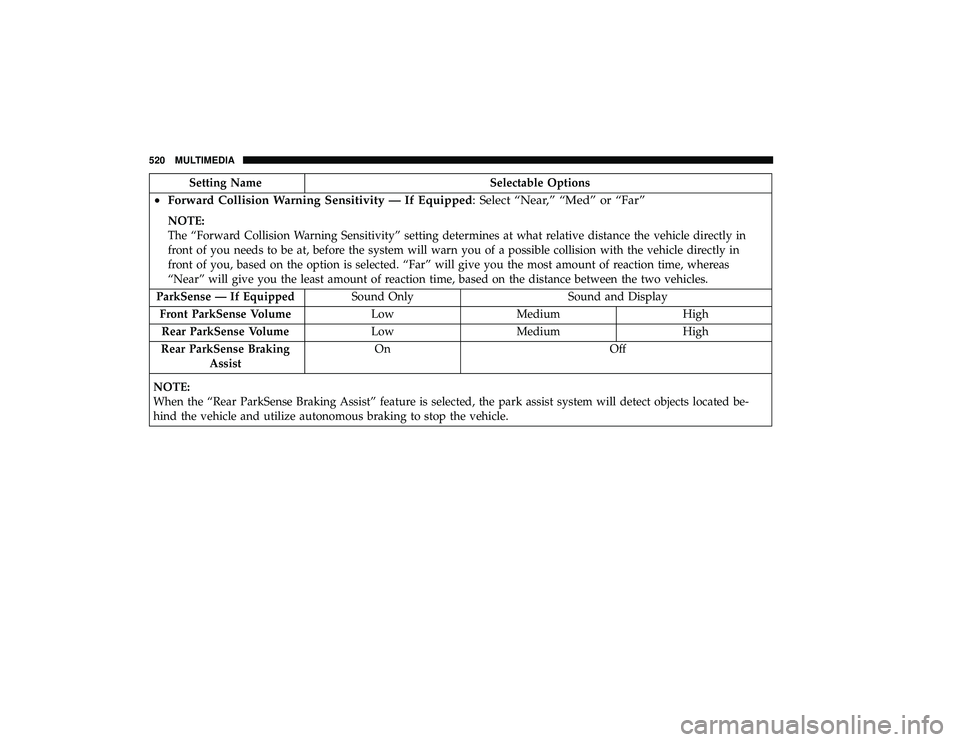
Page 522 of 620
Setting NameSelectable Options
•Forward Collision Warning Sensitivity — If Equipped: Select “Near,” “Med” or “Far”
NOTE:
The “Forward Collision Warning Sensitivity” setting determines at what relative distance the vehicle directly in
front of you needs to be at, before the system will warn you of a possible collision with the vehicle directly in
front of you, based on the option is selected. “Far” will give you the most amount of reaction time, whereas
“Near” will give you the least amount of reaction time, based on the distance between the two vehicles.
ParkSense — If Equipped Sound Only Sound and Display
Front ParkSense Volume Low Medium High
Rear ParkSense Volume Low Medium High
Rear ParkSense Braking Assist On Off
NOTE:
When the “Rear ParkSense Braking Assist” feature is selected, the park assist system will detect objects located be-
hind the vehicle and utilize autonomous braking to stop the vehicle.
520 MULTIMEDIA
Page 531 of 620

Setting NameSelectable Options
ParkView Backup Camera Active Guide Lines On
Off
NOTE:
The “ParkView Backup Camera Active Guide Lines” feature overlays the Rear Backup Camera image with active, or
dynamic, grid lines to help illustrate the width of the vehicle and its project back up path, based on the steering
wheel position when the option is checked. A dashed center line overlay indicates the center of the vehicle to assist
with parking or aligning to a hitch/receiver. Automatic Emergency
Braking — If Equipped List of Settings
When “Automatic Emergency Braking” is selected, the following options will appear:
• Forward Collision Warning — If Equipped: Select “Only Warning” or “Warning + Active Braking”
NOTE:
Changing the FCW status to “Off” prevents the system from warning you of a possible collision with the vehicle
in front of you.
The FCW system state is kept in memory from one ignition cycle to the next. If the system is turned OFF, it will
remain off when the vehicle is restarted.
Forward Collision Warning includes Advanced Brake Assist (ABA). The ABA applies additional brake pressure
when the driver requests insufficient brake pressure to avoid a potential frontal collision. When the “Sound Only”
option is selected a chime will sound alerting you of a possible collision with the vehicle in front of you and more
brake pressure is needed. When the “Sound and Brake” option is selected, it will apply the brakes to slow your
vehicle in case of potential forward collision and sound an audible chime to alert you.
10
MULTIMEDIA 529
Page 532 of 620

Setting NameSelectable Options
•Forward Collision Warning Sensitivity — If Equipped: Select “Near,” “Med” or “Far”
NOTE:
The “Forward Collision Warning Sensitivity” setting determines at what relative distance the vehicle directly in
front of you needs to be at, before the system will warn you of a possible collision with the vehicle directly in
front of you, based on the option is selected. “Far” will give you the most amount of reaction time, whereas
“Near” will give you the least amount of reaction time, based on the distance between the two vehicles.
LaneSense Warning — If Equipped Early Medium Late
NOTE:
The “LaneSense Warning” setting determines at what distance the LaneSense system will warn you, through steering
wheel feedback, of a possible lane departure. LaneSense Strength — If Equipped Low Medium High
ParkSense — If Equipped Sound Sound and Display
NOTE:
The “ParkSense” system setting will scan for objects behind the vehicle when the transmission gear selector is in RE-
VERSE and the vehicle speed is less than 7 mph (11 km/h), when enabled. It will provide an alert (audible and/or
visual) to indicate the proximity to other objects. The system can be enabled with “Sound Only,” or “Sound and Dis-
play.” Front ParkSense Volume Low Medium High
Rear ParkSense Volume Low Medium High
530 MULTIMEDIA