Page 422 of 492
▫Siri Eyes Free — If Equipped ..............460
▫ Do Not Disturb ....................... .460
▫ Android Auto — If Equipped ..............461▫
Apple CarPlay — If Equipped ..............462
▫ General Information .....................463
▫ Additional Information ...................464
420 MULTIMEDIA
Page 463 of 492
Do Not Disturb can automatically reply with a text mes-
sage, a call or both, when declining an incoming call and
send it to voicemail.
Automatic reply messages can be:
•“I am driving right now, I will get back to you shortly.”
• Create a custom auto reply message up to 160 characters.
NOTE: Only the first 25 characters can be seen on the
touchscreen while typing a custom message.
While in Do Not Disturb, Conference Call can be selected
so you can still place a second call without being inter-
rupted by incoming calls.
NOTE:
• Reply with text message is not compatible with iPhones.
• Auto reply with text message is only available on
phones that support Bluetooth MAP.
Android Auto — If Equipped
NOTE: Feature availability depends on your carrier and
mobile phone manufacturer. Some Android Auto features
may or may not be available in every region and/or
language. Android Auto allows you to use your voice to interact with
Android’s best-in-class speech technology through your
vehicle’s voice recognition system, and use your smart-
phone’s data plan to project your Android powered smart-
phone and a number of its apps onto your Uconnect
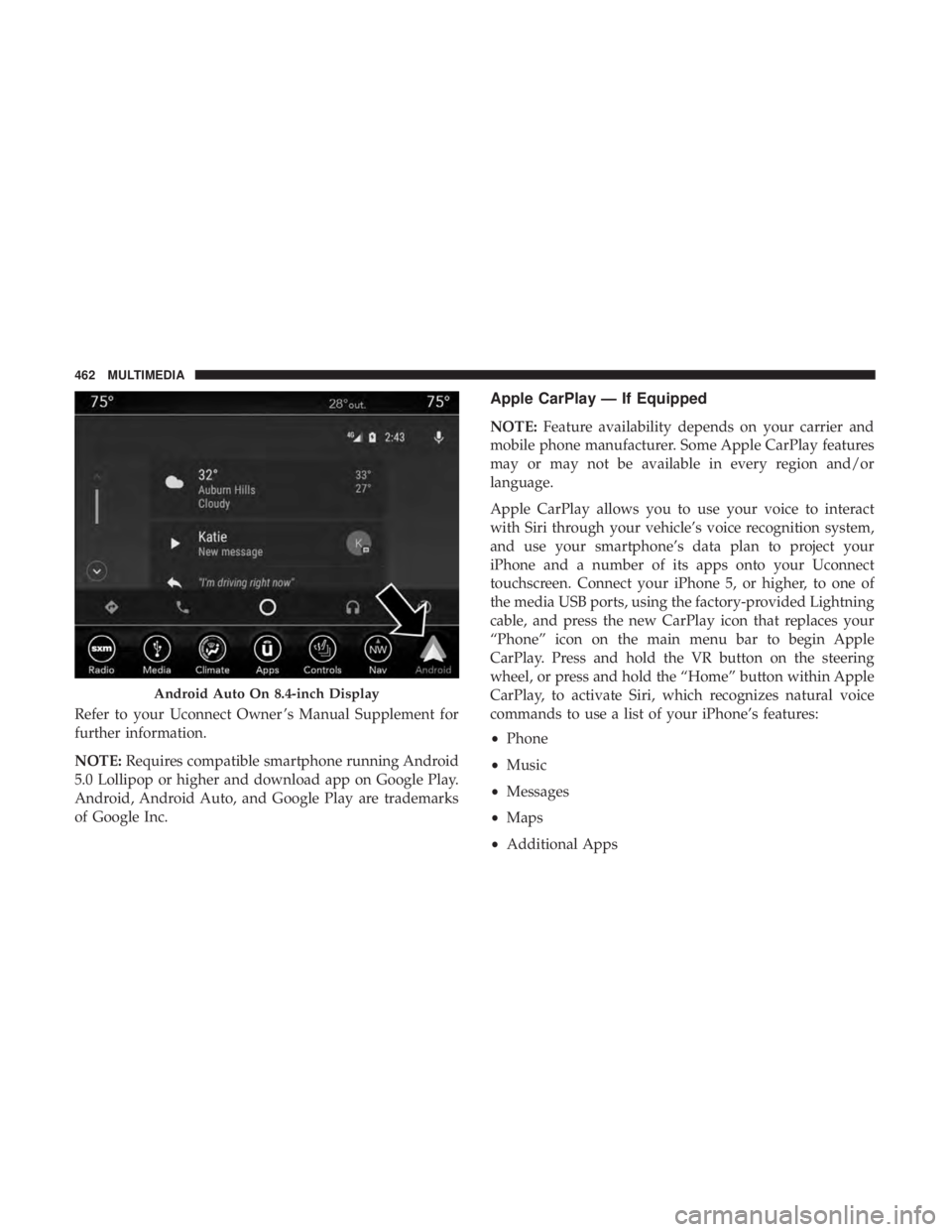
touchscreen. Connect your Android 5.0 (Lollipop), or
higher, to one of the media USB ports, using the factory-
provided USB cable, and press the new Android Auto icon
that replaces your “Phone” icon on the main menu bar to
begin Android Auto. Push and hold the VR button on the
steering wheel, or press and hold the “Microphone” icon
within Android Auto, to activate Android’s VR, which
recognizes natural voice commands, to use a list of your
smartphone’s features:
•
Maps
• Music
• Phone
• Text Messages
• Additional Apps
10
MULTIMEDIA 461
Page 464 of 492
Refer to your Uconnect Owner ’s Manual Supplement for
further information.
NOTE:Requires compatible smartphone running Android
5.0 Lollipop or higher and download app on Google Play.
Android, Android Auto, and Google Play are trademarks
of Google Inc.
Apple CarPlay — If Equipped
NOTE: Feature availability depends on your carrier and
mobile phone manufacturer. Some Apple CarPlay features
may or may not be available in every region and/or
language.
Apple CarPlay allows you to use your voice to interact
with Siri through your vehicle’s voice recognition system,
and use your smartphone’s data plan to project your
iPhone and a number of its apps onto your Uconnect
touchscreen. Connect your iPhone 5, or higher, to one of
the media USB ports, using the factory-provided Lightning
cable, and press the new CarPlay icon that replaces your
“Phone” icon on the main menu bar to begin Apple
CarPlay. Press and hold the VR button on the steering
wheel, or press and hold the “Home” button within Apple
CarPlay, to activate Siri, which recognizes natural voice
commands to use a list of your iPhone’s features:
• Phone
• Music
• Messages
• Maps
• Additional Apps
Android Auto On 8.4-inch Display
462 MULTIMEDIA
Page 474 of 492
About Your Brakes........................ .405
Adaptive Cruise Control (ACC) (Cruise Control) . . . .244
Adding Engine Coolant (Antifreeze) .............366
Adding Fuel ............................. .281
Adding Washing Fluid ...................... .350
Additives, Fuel ........................... .408
Adjust Forward ................................47
Rearward ...............................47
AirBag ................................ .186
Advance Front Air Bag ....................186
Air Bag Operation ....................... .188
Air Bag Warning Light .....................184
Driver Knee Air Bag ..................... .189
Enhanced Accident Response .............194, 339
Event Data Recorder (EDR) .................339
FrontAirBag .......................... .186
If Deployment Occurs .....................193
Knee Impact Bolsters ..................... .188
Maintaining Your Air Bag System .............196
Maintenance ........................... .196
Redundant Air Bag Warning Light ............185
Side Air Bags .......................... .189
Transporting Pets ....................... .212
Air Bag Light ...................... .131, 184, 213Air Cleaner, Engine (Engine Air Cleaner Filter)
......355
Air Conditioner Maintenance ..................356
Air Conditioner Refrigerant ...................356
Air Conditioner System ....................79, 356
Air Conditioning ............................84
Air Conditioning Filter ....................86, 357
Air Conditioning, Operating Tips ................85
Air Filter ............................... .355
Air Pressure Tires................................. .384
Alarm Arm The System ...................... .35, 37
Panic ..................................22
Rearm The System ........................37
Security Alarm....................... .35,
135
Alarm System Security Alarm ...........................35
All Wheel Drive Towing ............................... .338
All Wheel Drive (AWD) ..................... .372
Alterations/Modifications Vehicle .................................5
Android Auto ............................ .461
Antifreeze (Engine Coolant) ................365, 414
Disposal .............................. .367
472 INDEX