Page 65 of 492
Power mirror preselected positions can be controlled by
the optional Memory Seat Feature. Refer to “Driver
Memory Seat” in “Getting To Know Your Vehicle” for
further information.
Power Folding Outside Mirrors — If Equipped
If equipped with power folding mirrors, they can be
electrically folded rearward and unfolded into the drive
position.
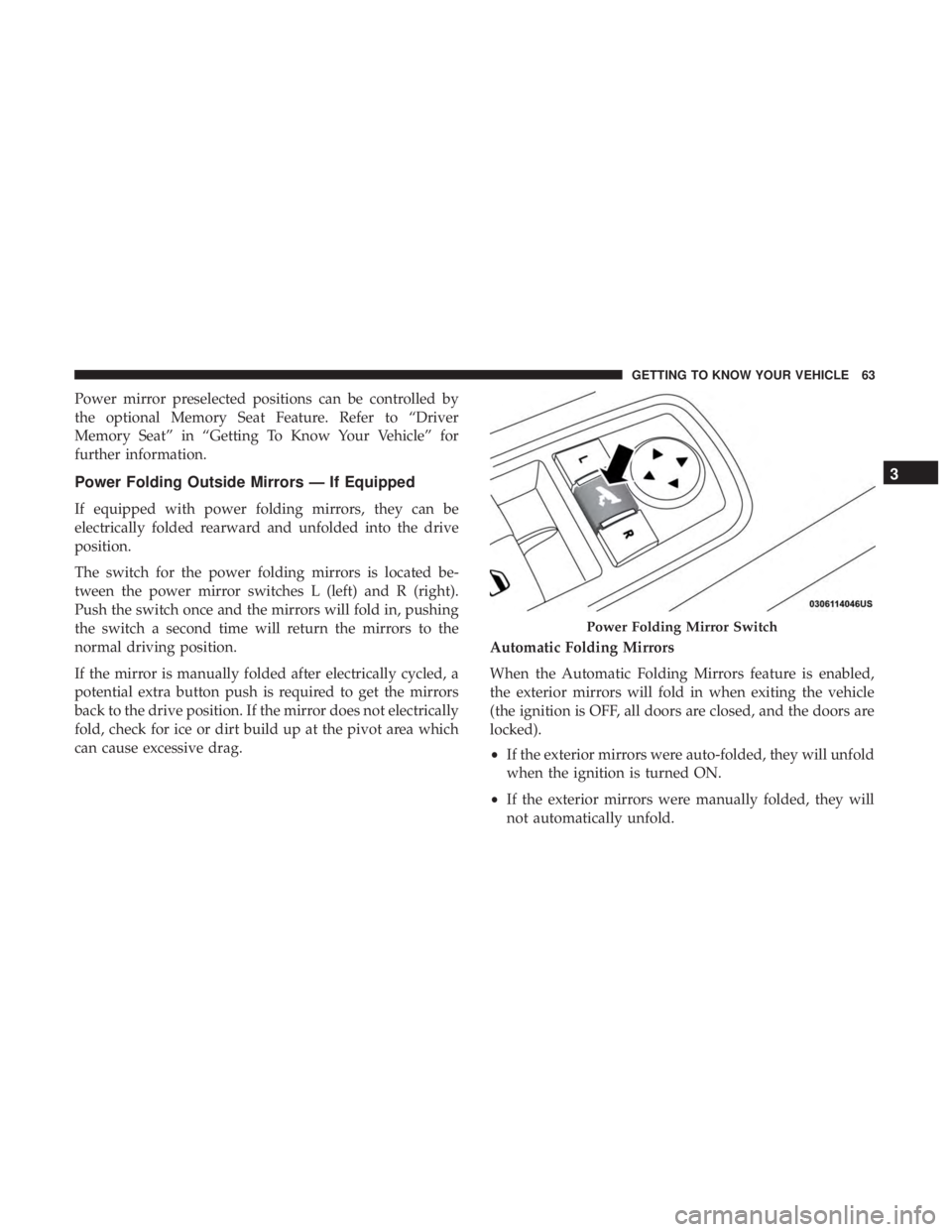
The switch for the power folding mirrors is located be-
tween the power mirror switches L (left) and R (right).
Push the switch once and the mirrors will fold in, pushing
the switch a second time will return the mirrors to the
normal driving position.
If the mirror is manually folded after electrically cycled, a
potential extra button push is required to get the mirrors
back to the drive position. If the mirror does not electrically
fold, check for ice or dirt build up at the pivot area which
can cause excessive drag.Automatic Folding Mirrors
When the Automatic Folding Mirrors feature is enabled,
the exterior mirrors will fold in when exiting the vehicle
(the ignition is OFF, all doors are closed, and the doors are
locked).
•
If the exterior mirrors were auto-folded, they will unfold
when the ignition is turned ON.
• If the exterior mirrors were manually folded, they will
not automatically unfold.
Power Folding Mirror Switch
3
GETTING TO KNOW YOUR VEHICLE 63
Page 70 of 492
To Deactivate
1. Pull the multifunction lever toward you (or rearward invehicle) to manually deactivate the system (normal
operation of low beams).
2. Push back on the multifunction lever to reactivate the system.
The Automatic High Beams can also be deactivated
through the Uconnect system. Refer to “Uconnect Settings”
in “Multimedia” for further information.
Flash-To-Pass
You can signal another vehicle with your headlights by
lightly pulling the multifunction lever toward you. This
will cause the high beam headlights to turn on, and remain
on, until the lever is released.
Automatic Headlights
This system automatically turns the headlights on or off
according to ambient light levels. To turn the system on,
rotate the headlight switch counterclockwise to the AUTO
position. When the system is on, the headlight time delay
feature is also on. This means the headlights will stay on for up to 90 seconds after you place the ignition into the
OFF position. The headlight time delay can be pro-
grammed 0/30/60/90 seconds.
Refer to “Uconnect Settings” in “Multimedia” for further
information.
To turn the automatic system off, move the headlight
switch out of the AUTO position.
NOTE:
The engine must be running before the headlights
will come on in the automatic mode.
Parking Lights
Turn the headlight switch knob to the first detent to turn
the parking lights on. This also turns on all instrument
panel lighting.
Headlights On With Wipers
When this feature is active, the headlights will turn on after
the wipers are turned on if the headlight switch is placed in
the AUTO position and programmable feature is set to on.
In addition, the headlights will turn off when the wipers
are turned off if they were turned on by this feature.
68 GETTING TO KNOW YOUR VEHICLE
Page 71 of 492
NOTE:The “Headlights On With Wipers” feature can be
turned on or off using the Uconnect System. Refer to
“Uconnect Settings” in “Multimedia” for further informa-
tion.
Adaptive Bi-Xenon High Intensity Discharge
Headlights — If Equipped
This system automatically swivels the headlight beam
pattern horizontally to provide increased illumination in
the direction the vehicle is steering.
NOTE:
• Each time the Adaptive Headlight System is turned on,
the headlights will initialize by performing a brief
sequence of rotations.
• The Adaptive Headlight System is active only when the
vehicle is moving forward.
The Adaptive Headlight System can be turned on or off
using the Uconnect System, refer to “Uconnect Settings” in
“Multimedia” for further information.
Headlight Time Delay
This feature provides the safety of headlight illumination
for up to 90 seconds (programmable) when leaving your
vehicle in an unlit area. To activate the delay feature, place the ignition in the OFF
position while the headlights are still on. Then, turn off the
headlights within 45 seconds. The delay interval begins
when the headlight switch is turned off.
If you turn the headlights or parking lights on, or place the
ignition in ACC or RUN, the system will cancel the delay.
If you turn the headlights off before the ignition, they will
turn off in the normal manner.
NOTE:
•
The lights must be turned off within 45 seconds of
placing the ignition in the OFF position to activate this
feature.
• The headlight delay time is programmable using the
Uconnect System, refer to “Uconnect Settings” in “Mul-
timedia” for further information.
Lights-On Reminder
If the headlights or parking lights are on after the ignition
is placed in the OFF position, a chime will sound to alert
the driver when the driver’s door is opened.
3
GETTING TO KNOW YOUR VEHICLE 69
Page 73 of 492
INTERIOR LIGHTS
The interior lights come on when a door is opened.
To protect the battery, the interior lights will turn off
automatically ten minutes after the ignition is moved to the
OFF position. This will occur if the interior lights were
switched on manually or are on because a door is open.
The Battery Protection also includes the glove compart-
ment light and the trunk light. To restore interior light
operation after automatic battery protection is enabled
(lights off), either place the ignition in the ON/RUN
position or cycle the light switch.
Courtesy Lights
The courtesy lights can be turned on by pushing the top
corner of the lens. To turn the lights off, push the lens a
second time.
Courtesy Lights
3
GETTING TO KNOW YOUR VEHICLE 71
Page 77 of 492
Ambient Light Control
Rotate the right dimmer control upward or downward to
increase or decrease the brightness of the door handle
lights and ambient light located in the overhead console.
WINDSHIELD WIPERS AND WASHERS
The multifunction lever operates the windshield wipers
and washer when the ignition is placed in the ON/RUN or
ACC position. The multifunction lever is located on the left
side of the steering column.
Door Handle/Ambient Light Dimmer
Windshield Wiper/Washer Control
3
GETTING TO KNOW YOUR VEHICLE 75
Page 80 of 492
NOTE:
•The Rain Sensing feature will not operate when the
wiper speed is in the low or high position.
• The Rain Sensing feature may not function properly
when ice or dried salt water is present on the wind-
shield.
• Use of Rain-X or products containing wax or silicone
may reduce rain sensor performance.
The Rain Sensing system has protective features for the
wiper blades and arms. It will not operate under the
following conditions:
• Low Temperature Wipe Inhibit — The Rain Sensing
feature will not operate when the ignition is placed in
the RUN position, the vehicle is stationary and the
outside temperature is below 32°F (0°C), unless the
wiper control on the multifunction lever is moved, the
vehicle speed becomes greater than 0 mph (0 km/h) or
the outside temperature rises above freezing. •
Neutral Wipe Inhibit — The Rain Sensing feature will
not operate when the ignition is placed in the RUN
position, the automatic transmission gear selector is in
the NEUTRAL position and the vehicle speed is less
than 3 mph (5 km/h), unless the wiper control on the
multifunction lever is moved or the gear selector is
moved out of the NEUTRAL position.
• Remote Start Mode Inhibit — On vehicles equipped
with Remote Starting system, Rain Sensing wipers are
not operational when the vehicle is in the remote start
mode. Once the operator is in the vehicle and has placed
the ignition switch in the ON/RUN position, rain sens-
ing wiper operation can resume, if it has been selected,
and no other inhibit conditions (mentioned previously)
exist.
CLIMATE CONTROLS
The Climate Control System allows you to regulate the
temperature, air flow, and direction of air circulating
throughout the vehicle. The controls are located on the
touchscreen (if equipped) and on the instrument panel
below the radio.
78 GETTING TO KNOW YOUR VEHICLE
Page 89 of 492
Operating Tips ChartWINDOWS
Power Window Controls
The window controls on the driver’s door control all the
door windows.
There are single window controls on each passenger door
trim panel, which operate the passenger door windows.
The window controls will operate only when the ignition is
in the ACC or ON/RUN position.
Power Window Switches
3
GETTING TO KNOW YOUR VEHICLE 87
Page 90 of 492
NOTE:For vehicles equipped with the Uconnect system,
the power window switches will remain active for up to
ten minutes after the ignition is placed in the OFF position.
Opening either front door will cancel this feature. The time
is programmable. Refer to “Uconnect Settings” in “Multi-
media” for further information.
WARNING!
Never leave children unattended in a vehicle, and do not
let children play with power windows. Do not leave the
key fob in or near the vehicle, or in a location accessible to
children, and do not leave the ignition of a vehicle
equipped with Keyless Enter-N-Go in the ACC or ON/
RUN mode. Occupants, particularly unattended children,
can become entrapped by the windows while operating
the power window switches. Such entrapment may result
in serious injury or death.
Auto-Down Feature
The driver and, in some models, passenger power window
switches have an Auto-Down feature. Push the window
switch to the second detent, release, and the window will
go down automatically. To open the window part way, push the window switch to
the first detent and release it when you want the window
to stop.
To stop the window from going all the way down during
the Auto-Down operation, pull up on the switch briefly.
Auto-Up Feature With Anti-Pinch Protection — If
Equipped
Pull window up switch to second detent for at least a half
of a second and the window will go up automatically.
To stop the window during an Auto-Up operation, push or
pull the window switch again.
To close the window part way, pull and hold the window
switch briefly and release it when you want the window to
stop.
NOTE:
•
If the window runs into any obstacle during Auto-
Closure, it will reverse direction and then go back down.
Remove the obstacle and use the window switch again
to close the window.
88 GETTING TO KNOW YOUR VEHICLE