Page 362 of 492

The external lock cylinders should be lubricated twice a
year, preferably in the Fall and Spring. Apply a small
amount of a high quality lubricant, such as Mopar Lock
Cylinder Lubricant directly into the lock cylinder.
Windshield Wiper Blades
Clean the rubber edges of the wiper blades and the
windshield periodically with a sponge or soft cloth and a
mild nonabrasive cleaner. This will remove accumulations
of salt or road film.
Operation of the wipers on dry glass for long periods may
cause deterioration of the wiper blades. Always use washer
fluid when using the wipers to remove salt or dirt from a
dry windshield.
Avoid using the wiper blades to remove frost or ice from
the windshield. Keep the blade rubber out of contact with
petroleum products such as engine oil, gasoline, etc.NOTE:
Life expectancy of wiper blades varies depending
on geographical area and frequency of use. Poor perfor-
mance of blades may be present with chattering, marks,
water lines or wet spots. If any of these conditions are
present, clean the wiper blades or replace as necessary.Wiper Blade Removal/Installation
CAUTION!
Do not allow the wiper arm to spring back against the
glass without the wiper blade in place or the glass may
be damaged.
1. Lift the wiper arm to raise the wiper blade off of the glass, until the wiper arm is in the full up position.
360 SERVICING AND MAINTENANCE
Page 363 of 492
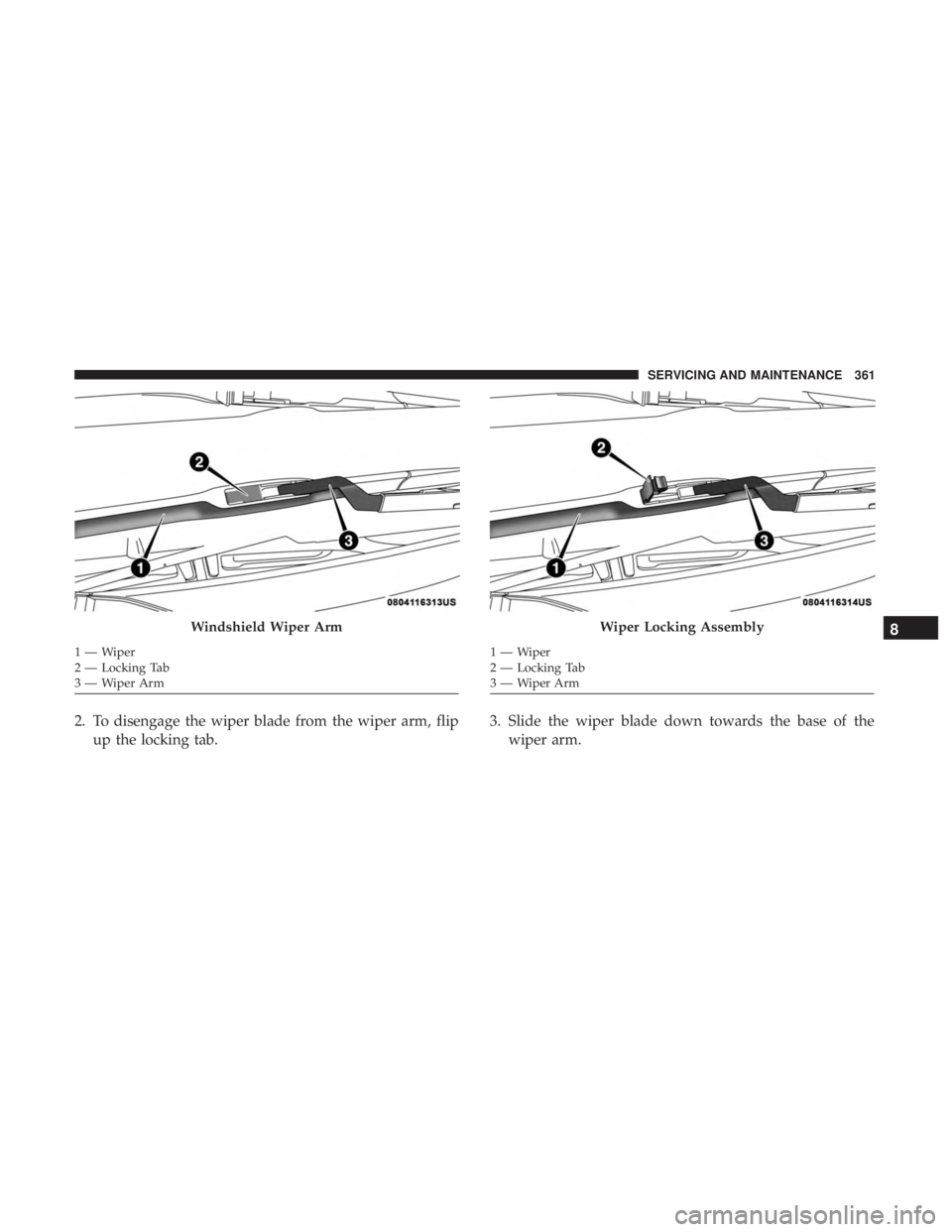
2. To disengage the wiper blade from the wiper arm, flipup the locking tab. 3. Slide the wiper blade down towards the base of the
wiper arm.
Windshield Wiper Arm
1—Wiper
2 — Locking Tab
3—WiperArm
Wiper Locking Assembly
1—Wiper
2 — Locking Tab
3—WiperArm
8
SERVICING AND MAINTENANCE 361
Page 364 of 492
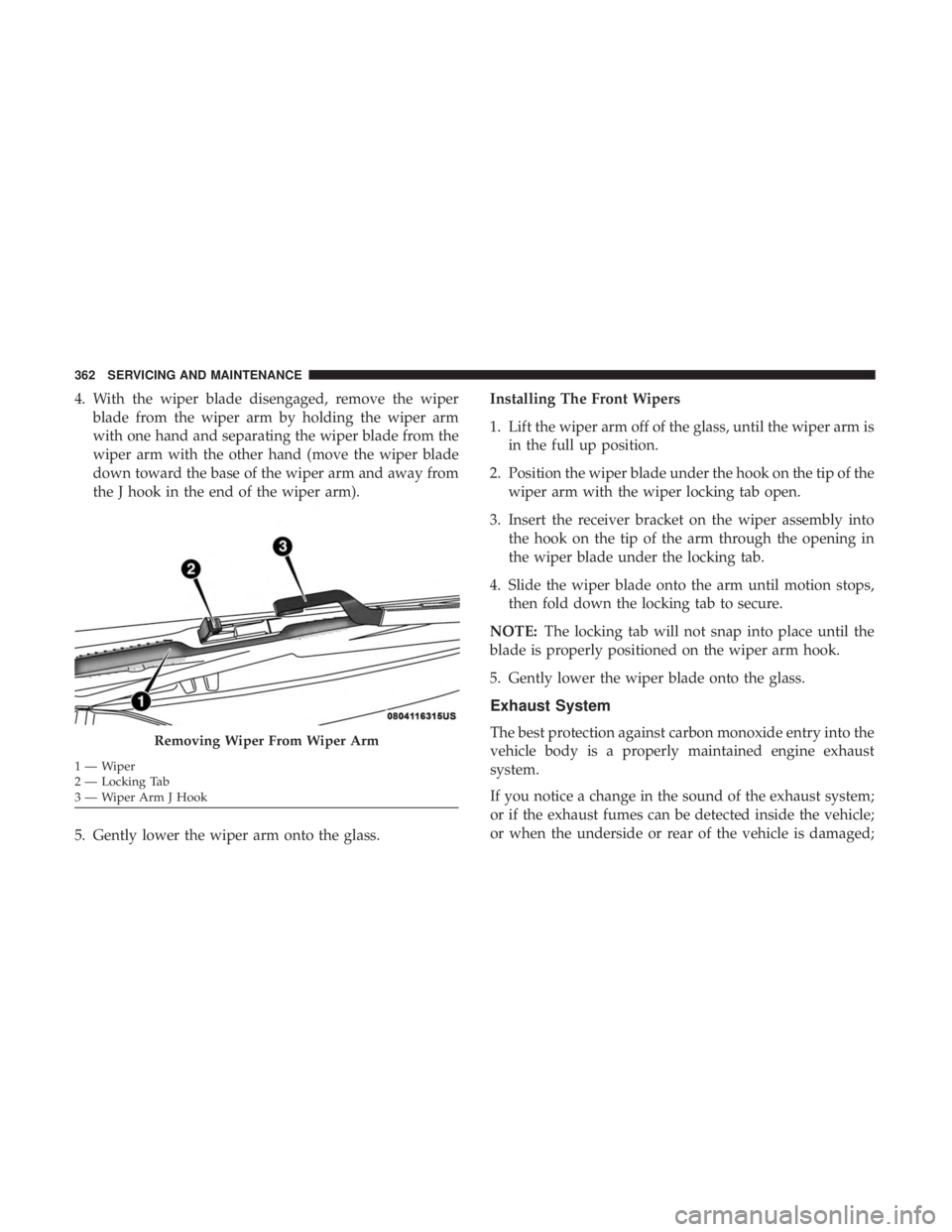
4. With the wiper blade disengaged, remove the wiperblade from the wiper arm by holding the wiper arm
with one hand and separating the wiper blade from the
wiper arm with the other hand (move the wiper blade
down toward the base of the wiper arm and away from
the J hook in the end of the wiper arm).
5. Gently lower the wiper arm onto the glass. Installing The Front Wipers
1. Lift the wiper arm off of the glass, until the wiper arm is
in the full up position.
2. Position the wiper blade under the hook on the tip of the wiper arm with the wiper locking tab open.
3. Insert the receiver bracket on the wiper assembly into the hook on the tip of the arm through the opening in
the wiper blade under the locking tab.
4. Slide the wiper blade onto the arm until motion stops, then fold down the locking tab to secure.
NOTE: The locking tab will not snap into place until the
blade is properly positioned on the wiper arm hook.
5. Gently lower the wiper blade onto the glass.
Exhaust System
The best protection against carbon monoxide entry into the
vehicle body is a properly maintained engine exhaust
system.
If you notice a change in the sound of the exhaust system;
or if the exhaust fumes can be detected inside the vehicle;
or when the underside or rear of the vehicle is damaged;Removing Wiper From Wiper Arm
1—Wiper
2 — Locking Tab
3 — Wiper Arm J Hook 362 SERVICING AND MAINTENANCE
Page 415 of 492
Starting
The characteristics of E-85 fuel make it unsuitable for use
when ambient temperatures fall below 0°F (-18°C). In the
range of 0°F (-18°C) to 32°F (0°C), an increase in the time it
takes for your engine to start may be experienced, and a
deterioration in driveability (sags and/or hesitations) until
the engine is fully warmed up. These issues may be
improved with the use of seasonally adjusted E-85 fuel.
NOTE:Use of the engine block heater (if equipped) may
improve engine start time when using E-85 fuel when the
ambient temperature is less than 32°F (0°C).
Cruising Range
Because E-85 fuel contains less energy per gallon/liter than
gasoline, an increase in fuel consumption will be experi-
enced. The miles per gallon (mpg)/kilometers per liter and
the driving range will decrease by approximately 30%,
compared to gasoline operation.
Replacement Parts
All fuel and engine components in your Flexible Fuel
Vehicle (FFV) are designed to be compatible with ethanol.
Ethanol compatible service components are required.
CAUTION!
Replacing fuel system components with non-ethanol
compatible components can damage your vehicle.
Maintenance
CAUTION!
Do not use ethanol mixture greater than 85% in your
vehicle. It will cause difficulty in cold starting and may
affect drivability.9
TECHNICAL SPECIFICATIONS 413
Page 426 of 492
Customer Programmable Features — Uconnect
4C/4C NAV Settings
Press the “Apps” button (if equipped), and then
press the “Settings” button on the touchscreen to dis-
play the menu setting screen. In this mode, the
Uconnect system allows you to access programmable
features that may be equipped such as Language, Dis-
play, Units, Voice, Clock & Date, Safety & Driving
Assistance, Mirrors & Wipers, Lights, Doors & Locks,
Auto-On Comfort, Key Off Options, Audio, Phone/
Bluetooth, SiriusXM Setup, Reset, and System Informa-
tion.
NOTE: Depending on the vehicle’s options, feature set-
tings may vary.
When making a selection, press the button on the touch-
screen to enter the desired mode. Once in the desired
mode, press and release the preferred setting “option” until
a check-mark appears next to the setting, showing that
setting has been selected. Once the setting is complete,
press the “X” button on the touchscreen to close out of the
settings screen. Pressing the up or down arrow button on
the right side of the screen will allow you to toggle up or
down through the available settings.
Language
After pressing the “Language” button on the touchscreen, the following settings will be available:
Setting Name Selectable Options
Set Language EnglishFrançais Español
424 MULTIMEDIA
Page 430 of 492
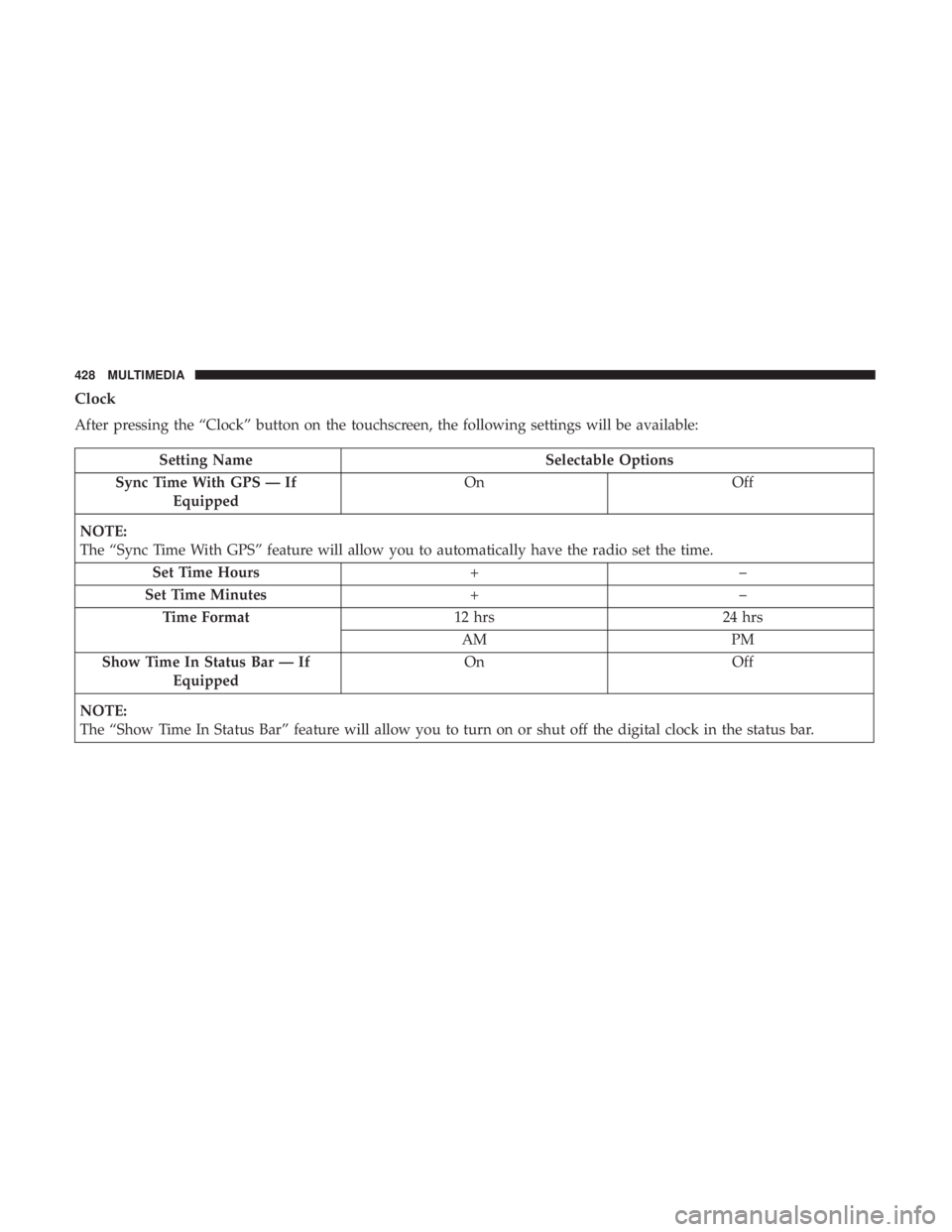
Clock
After pressing the “Clock” button on the touchscreen, the following settings will be available:
Setting NameSelectable Options
Sync Time With GPS — If Equipped On
Off
NOTE:
The “Sync Time With GPS” feature will allow you to automatically have the radio set the time. Set Time Hours +–
Set Time Minutes +–
Time Format 12 hrs24 hrs
AM PM
Show Time In Status Bar — If Equipped On
Off
NOTE:
The “Show Time In Status Bar” feature will allow you to turn on or shut off the digital clock in the status bar.
428 MULTIMEDIA
Page 437 of 492
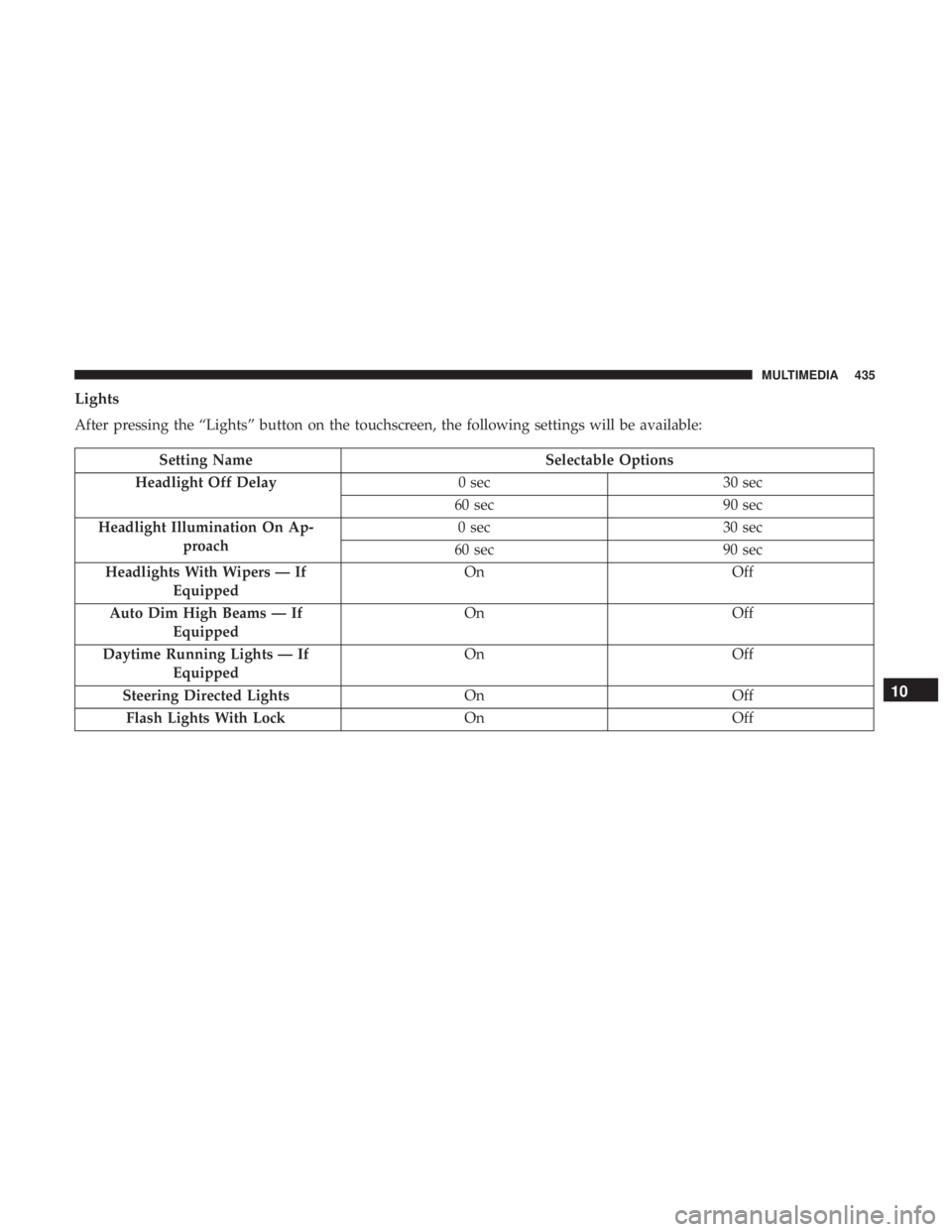
Lights
After pressing the “Lights” button on the touchscreen, the following settings will be available:
Setting NameSelectable Options
Headlight Off Delay 0 sec30 sec
60 sec 90 sec
Headlight Illumination On Ap- proach 0 sec
30 sec
60 sec 90 sec
Headlights With Wipers — If Equipped On
Off
Auto Dim High Beams — If Equipped On
Off
Daytime Running Lights — If Equipped On
Off
Steering Directed Lights OnOff
Flash Lights With Lock OnOff
10
MULTIMEDIA 435
Page 438 of 492
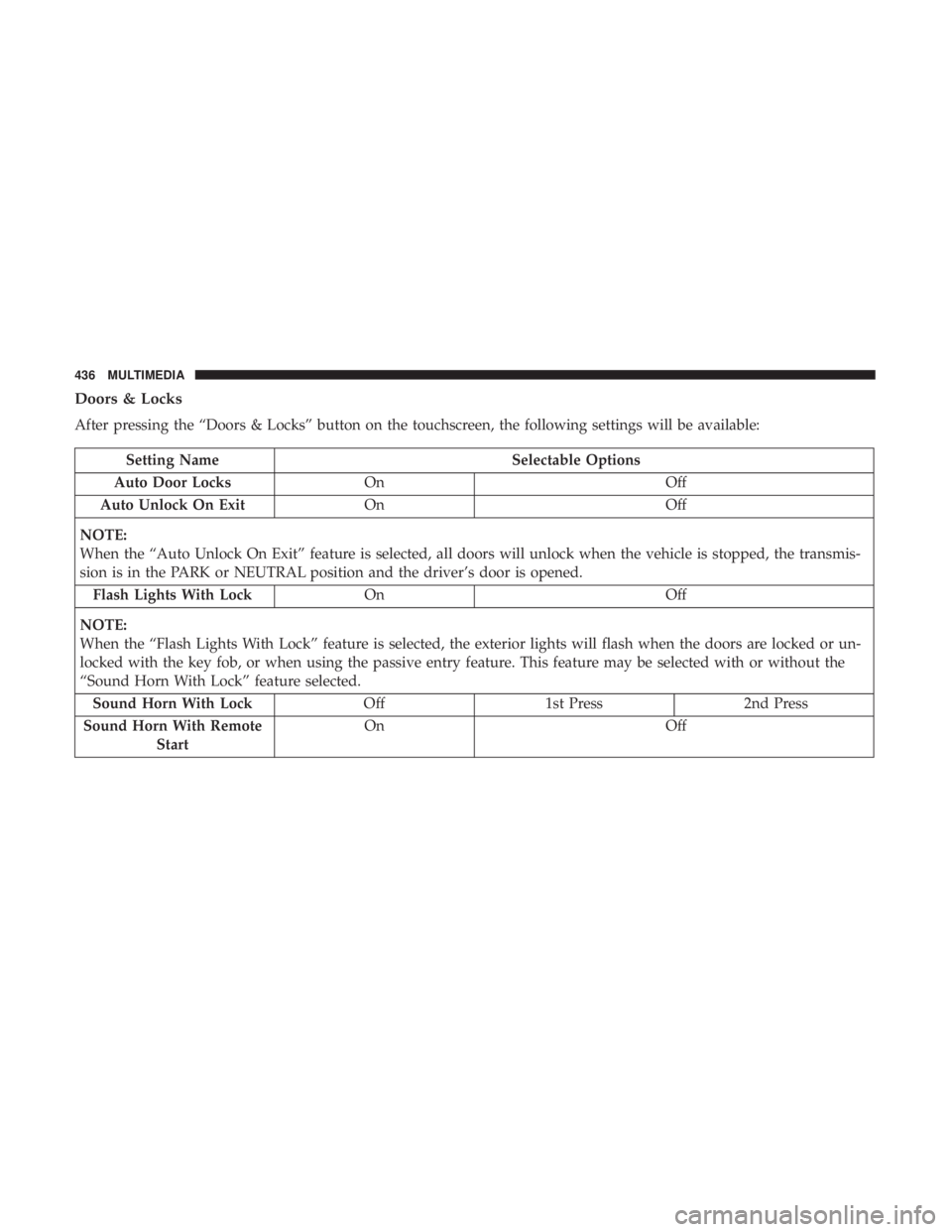
Doors & Locks
After pressing the “Doors & Locks” button on the touchscreen, the following settings will be available:
Setting NameSelectable Options
Auto Door Locks On Off
Auto Unlock On Exit On Off
NOTE:
When the “Auto Unlock On Exit” feature is selected, all doors will unlock when the vehicle is stopped, the transmis-
sion is in the PARK or NEUTRAL position and the driver’s door is opened. Flash Lights With Lock On Off
NOTE:
When the “Flash Lights With Lock” feature is selected, the exterior lights will flash when the doors are locked or un-
locked with the key fob, or when using the passive entry feature. This feature may be selected with or without the
“Sound Horn With Lock” feature selected. Sound Horn With Lock Off1st Press 2nd Press
Sound Horn With Remote Start On
Off
436 MULTIMEDIA