2019 CHEVROLET SONIC ABS
[x] Cancel search: ABSPage 4 of 351

Chevrolet Sonic Owner Manual (GMNA-Localizing-U.S./Canada-12461769) -
2019 - crc - 5/21/18
Introduction 3
Danger, Warning, and
Caution
Warning messages found on vehicle
labels and in this manual describe
hazards and what to do to avoid or
reduce them.
{Danger
Danger indicates a hazard with a
high level of risk which will result
in serious injury or death.
{Warning
Warning indicates a hazard that
could result in injury or death.
Caution
Caution indicates a hazard that
could result in property or vehicle
damage.
A circle with a slash through it is a
safety symbol which means“Do
Not,” “Do not do this,” or“Do not let
this happen.”
Symbols
The vehicle has components and
labels that use symbols instead of
text. Symbols are shown along with
the text describing the operation or
information relating to a specific
component, control, message,
gauge, or indicator.
M: Shown when the owner ’s
manual has additional instructions
or information.
*: Shown when the service
manual has additional instructions
or information.
0: Shown when there is more
information on another page —
“see page.” Vehicle Symbol Chart
Here are some additional symbols
that may be found on the vehicle
and what they mean. See the
features in this manual for
information.
u:
Air Conditioning System
G:Air Conditioning Refrigerant Oil
9:Airbag Readiness Light
!:Antilock Brake System (ABS)
$:Brake System Warning Light
9:Dispose of Used Components
Properly
P: Do Not Apply High Pressure
Water
B: Engine Coolant Temperature
_: Flame/Fire Prohibited
H:Flammable
[:Forward Collision Alert
R: Fuse Block Cover Lock
Location
+: Fuses
j:ISOFIX/LATCH System Child
Restraints
Page 106 of 351

Chevrolet Sonic Owner Manual (GMNA-Localizing-U.S./Canada-12461769) -
2019 - crc - 5/21/18
Instruments and Controls 105
Instruments and
Controls
Controls
Steering Wheel Adjustment . . . 106
Steering Wheel Controls . . . . . . 106
Heated Steering Wheel . . . . . . . 107
Horn . . . . . . . . . . . . . . . . . . . . . . . . . . 107
Windshield Wiper/Washer . . . . 107
Rear Window Wiper/Washer . . . . . . . . . . . . . . . . . . . . . 108
Compass . . . . . . . . . . . . . . . . . . . . . 109
Clock . . . . . . . . . . . . . . . . . . . . . . . . . 109
Power Outlets . . . . . . . . . . . . . . . . 109
Warning Lights, Gauges, and
Indicators
Warning Lights, Gauges, and Indicators . . . . . . . . . . . . . . . . . . . 110
Instrument Cluster . . . . . . . . . . . . 111
Speedometer . . . . . . . . . . . . . . . . . 113
Odometer . . . . . . . . . . . . . . . . . . . . . 113
Trip Odometer . . . . . . . . . . . . . . . . 113
Tachometer . . . . . . . . . . . . . . . . . . . 113
Fuel Gauge . . . . . . . . . . . . . . . . . . . 113
Seat Belt Reminders . . . . . . . . . . 114
Airbag Readiness Light . . . . . . . 114 Passenger Airbag Status
Indicator . . . . . . . . . . . . . . . . . . . . . 115
Charging System Light . . . . . . . 116
Malfunction Indicator Lamp (Check Engine Light) . . . . . . . . 116
Service Vehicle Soon Light . . . 118
Owner Manual Indicator . . . . . . 118
Brake System Warning Light . . . . . . . . . . . . . . . . . . . . . . . . 118
Antilock Brake System (ABS) Warning Light . . . . . . . . . . . . . . . 119
Operate Pedal Light . . . . . . . . . . 119
Up-Shift Light . . . . . . . . . . . . . . . . . 120
Power Steering Warning Light . . . . . . . . . . . . . . . . . . . . . . . . 120
Lane Departure Warning (LDW) Light . . . . . . . . . . . . . . . . . 120
Forward Collision Alert (FCA) Warning Light . . . . . . . . . . . . . . . 120
Vehicle Ahead Indicator . . . . . . 121
Ultrasonic Parking Sensor Light . . . . . . . . . . . . . . . . . . . . . . . . 121
Traction Off Light . . . . . . . . . . . . . 121
StabiliTrak OFF Light . . . . . . . . . 121
Traction Control System (TCS)/ StabiliTrak Light . . . . . . . . . . . . . 122
Engine Coolant Temperature Warning Light . . . . . . . . . . . . . . . 122
Tire Pressure Light . . . . . . . . . . . 122
Engine Oil Pressure Light . . . . 123 Low Fuel Warning Light . . . . . . 123
Immobilizer Light . . . . . . . . . . . . . 124
Reduced Engine Power
Light . . . . . . . . . . . . . . . . . . . . . . . . 124
High-Beam On Light . . . . . . . . . . 124
Front Fog Lamp Light . . . . . . . . . 124
Lamps On Reminder . . . . . . . . . 125
Cruise Control Light . . . . . . . . . . 125
Hood Ajar Light . . . . . . . . . . . . . . . 125
Door Ajar Light . . . . . . . . . . . . . . . 125
Information Displays
Driver Information
Center (DIC) . . . . . . . . . . . . . . . . 126
Vehicle Messages
Vehicle Messages . . . . . . . . . . . . 130
Engine Power Messages . . . . . 131
Vehicle Speed Messages . . . . . 132
Vehicle Personalization
Vehicle Personalization . . . . . . . 132
Page 120 of 351
Chevrolet Sonic Owner Manual (GMNA-Localizing-U.S./Canada-12461769) -
2019 - crc - 5/21/18
Instruments and Controls 119
Warning (Continued)
the road and carefully stopped,
have the vehicle towed for
service.
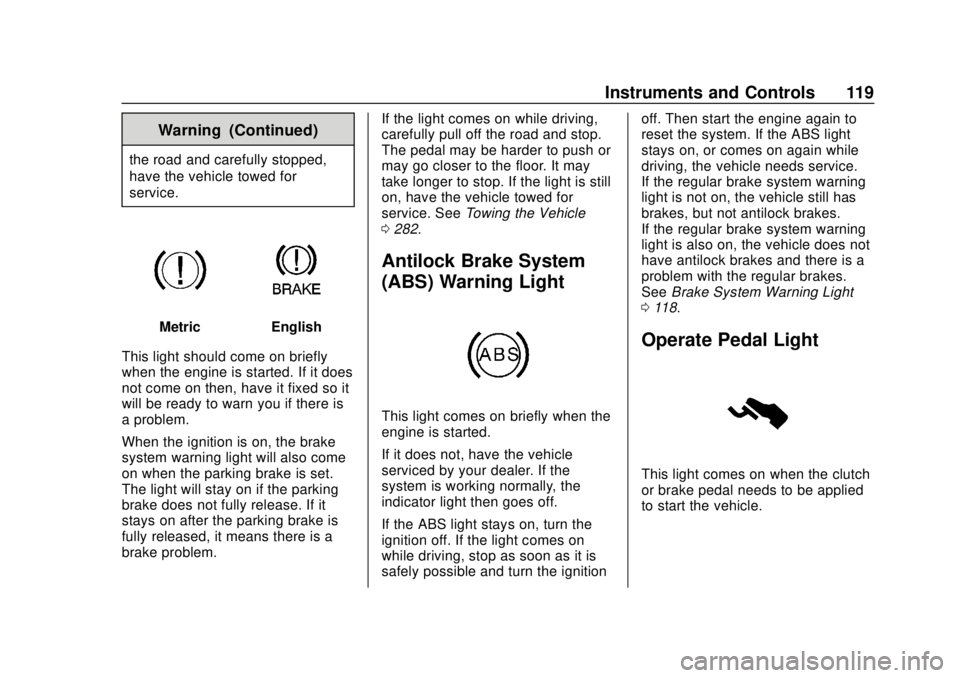
MetricEnglish
This light should come on briefly
when the engine is started. If it does
not come on then, have it fixed so it
will be ready to warn you if there is
a problem.
When the ignition is on, the brake
system warning light will also come
on when the parking brake is set.
The light will stay on if the parking
brake does not fully release. If it
stays on after the parking brake is
fully released, it means there is a
brake problem. If the light comes on while driving,
carefully pull off the road and stop.
The pedal may be harder to push or
may go closer to the floor. It may
take longer to stop. If the light is still
on, have the vehicle towed for
service. See
Towing the Vehicle
0 282.
Antilock Brake System
(ABS) Warning Light
This light comes on briefly when the
engine is started.
If it does not, have the vehicle
serviced by your dealer. If the
system is working normally, the
indicator light then goes off.
If the ABS light stays on, turn the
ignition off. If the light comes on
while driving, stop as soon as it is
safely possible and turn the ignition off. Then start the engine again to
reset the system. If the ABS light
stays on, or comes on again while
driving, the vehicle needs service.
If the regular brake system warning
light is not on, the vehicle still has
brakes, but not antilock brakes.
If the regular brake system warning
light is also on, the vehicle does not
have antilock brakes and there is a
problem with the regular brakes.
See
Brake System Warning Light
0 118.
Operate Pedal Light
This light comes on when the clutch
or brake pedal needs to be applied
to start the vehicle.
Page 156 of 351

Chevrolet Sonic Owner Manual (GMNA-Localizing-U.S./Canada-12461769) -
2019 - crc - 5/21/18
Infotainment System 155
OnStar System
4G LTE
If equipped with 4G LTE, up to
seven devices, such as
smartphones, tablets, and laptops,
can be connected to high-speed
Internet through the vehicle’s built-in
Wi-Fi hotspot.
Call 1-888-4ONSTAR
(1-888-466-7827) to connect to an
OnStar Advisor for assistance. See
www.onstar.com for vehicle
availability, details, and system
limitations. Service and connectivity
may vary by make, model, year,
carrier, availability, and conditions.
4G LTE service is available in select
markets. 4G LTE performance is
based on industry averages and
vehicle systems design. Some
services require a data plan.
The OnStar App
If equipped, the infotainment system
has OnStar controls in the
embedded OnStar app on the Home
Page. All OnStar functions that can
be performed with the buttons canbe done using the app. To open the
app, select the OnStar icon on the
Home Page. Features vary by
region and model. Features are
subject to change. For more
information on this feature, see
my.chevrolet.com/learn.
Services
The Services tab displays the
default view for the app. Use this
page to launch the available OnStar
services. Select a service to open
its display. Touch Hands-Free
Calling (HFC) to launch the phone
app. Touch Wi-Fi to launch the
connections manager.
Account
The Account tab displays a
snapshot of the account linked with
the vehicle. If there is no such
account, this tab will show all values
as
——. The
#will be active even if
there is no active account. Advisor Call
Selecting Advisor Call is the same
as pressing
Qor calling 1-888-
4ONSTAR (1-888-466-7827). The X
option in the upper right corner of
the screen does not end the call, but
returns to the previous display.
Turn-by-Turn Directions
With a connected plan, an OnStar
Advisor can download a destination
to the vehicle or its embedded
navigation system, if equipped.
Touch Turn-by-Turn Directions from
the main page of the OnStar app
and follow the display prompts.
A destination transfer from OnStar
will show the detail view of the
destination when it is transferred
from OnStar to the Navigation
application. Touch OK to go back to
the previous menu. An ABS and
Guidance or Navigation Add-On
Plan is required. See
www.onstar.com for a coverage
map. Services vary by model. Map
coverage is available in the United
States, Puerto Rico, and Canada.
Page 175 of 351
Chevrolet Sonic Owner Manual (GMNA-Localizing-U.S./Canada-12461769) -
2019 - crc - 5/21/18
174 Driving and Operating
Driving and
Operating
Driving Information
Distracted Driving . . . . . . . . . . . . 175
Defensive Driving . . . . . . . . . . . . . 176
Drunk Driving . . . . . . . . . . . . . . . . . 176
Control of a Vehicle . . . . . . . . . . . 176
Braking . . . . . . . . . . . . . . . . . . . . . . . 176
Steering . . . . . . . . . . . . . . . . . . . . . . 177
Off-Road Recovery . . . . . . . . . . . 177
Loss of Control . . . . . . . . . . . . . . . 178
Driving on Wet Roads . . . . . . . . 178
Hill and Mountain Roads . . . . . 179
Winter Driving . . . . . . . . . . . . . . . . 180
If the Vehicle Is Stuck . . . . . . . . 181
Vehicle Load Limits . . . . . . . . . . . 181
Starting and Operating
New Vehicle Break-In . . . . . . . . . 185
Ignition Positions (KeyAccess) . . . . . . . . . . . . . . . . . . . . . 185
Ignition Positions (Keyless Access) . . . . . . . . . . . . . . . . . . . . . 188
Starting the Engine . . . . . . . . . . . 189
Engine Heater . . . . . . . . . . . . . . . . 191
Retained Accessory Power (RAP) . . . . . . . . . . . . . . . . 192 Shifting Into Park (Automatic
Transmission) . . . . . . . . . . . . . . . 193
Shifting out of Park (Automatic Transmission) . . . . . . . . . . . . . . . 194
Parking (Manual
Transmission) . . . . . . . . . . . . . . . 194
Parking over Things That Burn . . . . . . . . . . . . . . . . . . . 195
Extended Parking (Keyless Access) . . . . . . . . . . . . . . . . . . . . . 195
Engine Exhaust
Engine Exhaust . . . . . . . . . . . . . . 195
Running the Vehicle WhileParked . . . . . . . . . . . . . . . . . . . . . . 196
Automatic Transmission
Automatic Transmission . . . . . . 196
Manual Mode . . . . . . . . . . . . . . . . . 198
Manual Transmission
Manual Transmission . . . . . . . . . 199
Brakes
Antilock BrakeSystem (ABS) . . . . . . . . . . . . . . . 201
Parking Brake . . . . . . . . . . . . . . . . 202
Brake Assist . . . . . . . . . . . . . . . . . . 202
Hill Start Assist (HSA) . . . . . . . . 203
Ride Control Systems
Traction Control/Electronic Stability Control . . . . . . . . . . . . . 203
Cruise Control
Cruise Control . . . . . . . . . . . . . . . . 205
Driver Assistance Systems
Driver Assistance Systems . . . 208
Rear Vision Camera (RVC) . . . 209
Park Assist . . . . . . . . . . . . . . . . . . . 211
Forward Collision Alert (FCA)System . . . . . . . . . . . . . . . . . . . . . . 212
Lane Departure Warning (LDW) . . . . . . . . . . . . . 214
Fuel
Top Tier Fuel . . . . . . . . . . . . . . . . . 216
Recommended Fuel . . . . . . . . . . 216
Prohibited Fuels . . . . . . . . . . . . . . 216
Fuels in Foreign Countries . . . 217
Fuel Additives . . . . . . . . . . . . . . . . 217
Filling the Tank . . . . . . . . . . . . . . . 217
Filling a Portable FuelContainer . . . . . . . . . . . . . . . . . . . 218
Trailer Towing
General TowingInformation . . . . . . . . . . . . . . . . . . 219
Page 178 of 351
Chevrolet Sonic Owner Manual (GMNA-Localizing-U.S./Canada-12461769) -
2019 - crc - 5/21/18
Driving and Operating 177
Once the power assist is used up, it
can take longer to stop and the
brake pedal will be harder to push.
Steering
Electric Power Steering
The vehicle has electric power
steering. It does not have power
steering fluid. Regular maintenance
is not required.
If power steering assist is lost due
to a system malfunction, the vehicle
can be steered, but may require
increased effort. See your dealer if
there is a problem.
If the steering wheel is turned until it
reaches the end of its travel and is
held against that position for an
extended period of time, power
steering assist may be reduced.
If the steering assist is used for an
extended period of time while the
vehicle is not moving, power assist
may be reduced.
Normal use of the power steering
assist should return when the
system cools down.See your dealer if there is a
problem.
Curve Tips
.
Take curves at a reasonable
speed.
. Reduce speed before entering a
curve.
. Maintain a reasonable steady
speed through the curve.
. Wait until the vehicle is out of
the curve before accelerating
gently into the straightaway.
Steering in Emergencies
.There are some situations when
steering around a problem may
be more effective than braking.
. Holding both sides of the
steering wheel allows you to turn
180 degrees without removing
a hand.
. The Antilock Brake System
(ABS) allows steering while
braking.
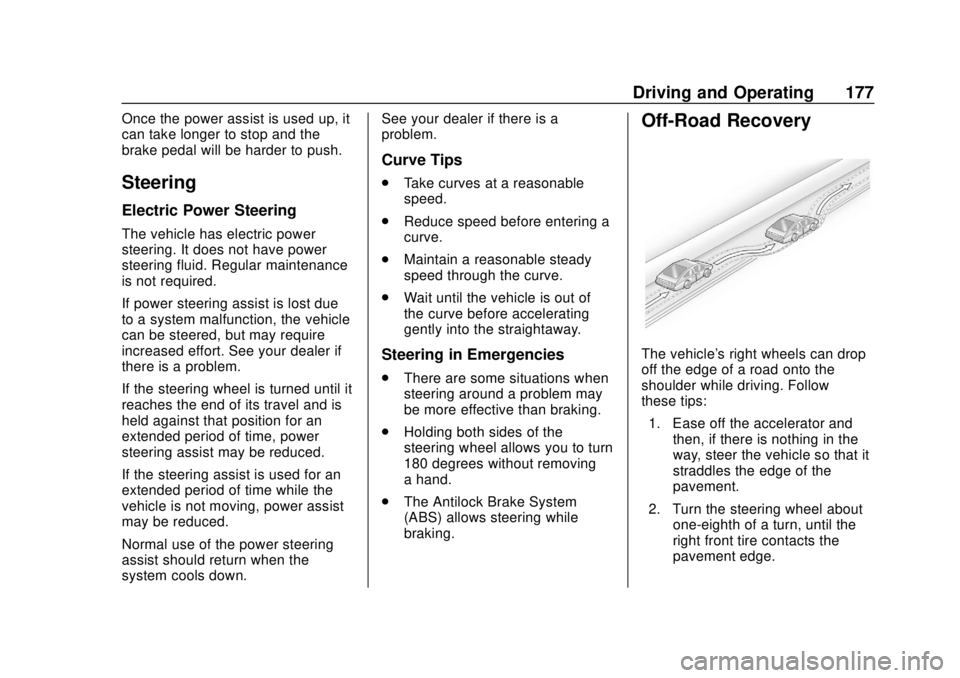
Off-Road Recovery
The vehicle's right wheels can drop
off the edge of a road onto the
shoulder while driving. Follow
these tips:
1. Ease off the accelerator and then, if there is nothing in the
way, steer the vehicle so that it
straddles the edge of the
pavement.
2. Turn the steering wheel about one-eighth of a turn, until the
right front tire contacts the
pavement edge.
Page 181 of 351
Chevrolet Sonic Owner Manual (GMNA-Localizing-U.S./Canada-12461769) -
2019 - crc - 5/21/18
180 Driving and Operating
.Pay attention to special road
signs (e.g., falling rocks area,
winding roads, long grades,
passing or no-passing zones)
and take appropriate action.
Winter Driving
Driving on Snow or Ice
Snow or ice between the tires and
the road creates less traction or
grip, so drive carefully. Wet ice can
occur at about 0 °C (32 °F) when
freezing rain begins to fall. Avoid
driving on wet ice or in freezing rain
until roads can be treated.
For Slippery Road Driving:
.Accelerate gently. Accelerating
too quickly causes the wheels to
spin and makes the surface
under the tires slick.
. Turn on Traction Control. See
Traction Control/Electronic
Stability Control 0203.
. The Antilock Brake System
(ABS) improves vehicle stability
during hard stops, but the
brakes should be applied sooner than when on dry pavement.
See
Antilock Brake System
(ABS) 0201.
. Allow greater following distance
and watch for slippery spots. Icy
patches can occur on otherwise
clear roads in shaded areas.
The surface of a curve or an
overpass can remain icy when
the surrounding roads are clear.
Avoid sudden steering
maneuvers and braking while
on ice.
. Turn off cruise control.
Blizzard Conditions
Stop the vehicle in a safe place and
signal for help. Stay with the vehicle
unless there is help nearby.
If possible, use Roadside
Assistance. See Roadside
Assistance Program 0317. To get
help and keep everyone in the
vehicle safe:
. Turn on the hazard warning
flashers.
. Tie a red cloth to an outside
mirror.
{Warning
Snow can trap engine exhaust
under the vehicle. This may
cause exhaust gases to get
inside. Engine exhaust contains
carbon monoxide (CO), which
cannot be seen or smelled. It can
cause unconsciousness and even
death.
If the vehicle is stuck in snow:
. Clear snow from the base of
the vehicle, especially any
blocking the exhaust pipe.
. Open a window about 5 cm
(2 in) on the vehicle side
that is away from the wind,
to bring in fresh air.
. Fully open the air outlets on
or under the instrument
panel.
. Adjust the climate control
system to circulate the air
inside the vehicle and set
(Continued)
Page 202 of 351
Chevrolet Sonic Owner Manual (GMNA-Localizing-U.S./Canada-12461769) -
2019 - crc - 5/21/18
Driving and Operating 201
For the best fuel economy,
accelerate slowly and shift when the
light comes on, and if the weather,
road, and traffic conditions allow.
It is normal for the light to go on and
off if the accelerator position
changes quickly. Ignore the light
during downshifts.Brakes
Antilock Brake
System (ABS)
This vehicle has an Antilock Brake
System (ABS), an advanced
electronic braking system that helps
prevent a braking skid.
When the vehicle begins to drive
away, ABS checks itself.
A momentary motor or clicking noise
may be heard while this test is going
on, and it may even be noticed that
the brake pedal moves a little. This
is normal.
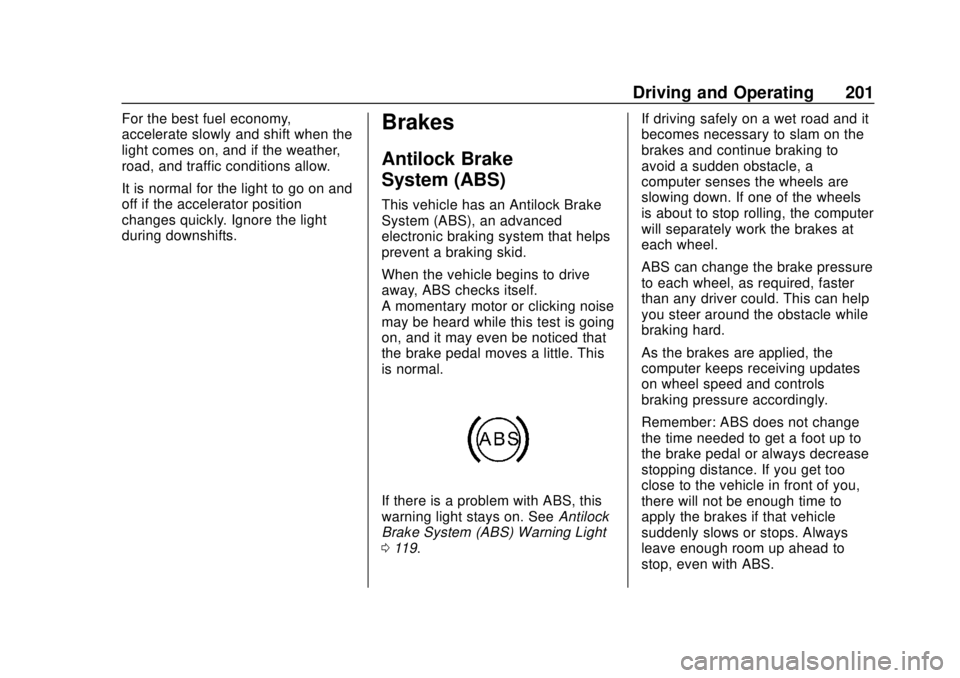
If there is a problem with ABS, this
warning light stays on. SeeAntilock
Brake System (ABS) Warning Light
0 119. If driving safely on a wet road and it
becomes necessary to slam on the
brakes and continue braking to
avoid a sudden obstacle, a
computer senses the wheels are
slowing down. If one of the wheels
is about to stop rolling, the computer
will separately work the brakes at
each wheel.
ABS can change the brake pressure
to each wheel, as required, faster
than any driver could. This can help
you steer around the obstacle while
braking hard.
As the brakes are applied, the
computer keeps receiving updates
on wheel speed and controls
braking pressure accordingly.
Remember: ABS does not change
the time needed to get a foot up to
the brake pedal or always decrease
stopping distance. If you get too
close to the vehicle in front of you,
there will not be enough time to
apply the brakes if that vehicle
suddenly slows or stops. Always
leave enough room up ahead to
stop, even with ABS.