2019 CHEVROLET SONIC automatic transmission
[x] Cancel search: automatic transmissionPage 198 of 351

Chevrolet Sonic Owner Manual (GMNA-Localizing-U.S./Canada-12461769) -
2019 - crc - 5/21/18
Driving and Operating 197
Warning (Continued)
Do not leave the vehicle when the
engine is running. If you have left
the engine running, the vehicle
can move suddenly. You or others
could be injured. To be sure the
vehicle will not move, even when
you are on fairly level ground,
always set the parking brake and
move the shift lever to P (Park).
SeeShifting Into Park (Automatic
Transmission) 0193.
Make sure the shift lever is fully in
P (Park) before starting the engine.
The vehicle has a shift lock control.
You must fully apply the brake pedal
then press the shift lever button
before you can shift from P (Park)
while the ignition is on. If you cannot
shift out of P (Park), ease pressure
on the shift lever and push the shift
lever all the way into P (Park) as
you maintain brake application.
Then move the shift lever into another gear. See
Shifting out of
Park (Automatic Transmission)
0 194.
R : Use this gear to back up.
Caution
Shifting to R (Reverse) while the
vehicle is moving forward could
damage the transmission. The
repairs would not be covered by
the vehicle warranty. Shift to
R (Reverse) only after the vehicle
is stopped.
To rock the vehicle back and forth to
get out of snow, ice, or sand without
damaging the transmission, see If
the Vehicle Is Stuck 0181.
N : In this position, the engine does
not connect with the wheels. To
restart the engine when the vehicle
is already moving, use
N (Neutral) only.
{Warning
Shifting into a drive gear while the
engine is running at high speed is
dangerous. Unless your foot is
firmly on the brake pedal, the
vehicle could move very rapidly.
You could lose control and hit
people or objects. Do not shift
into a drive gear while the engine
is running at high speed.
Caution
Shifting out of P (Park) or
N (Neutral) with the engine
running at high speed may
damage the transmission. The
repairs would not be covered by
the vehicle warranty. Be sure the
engine is not running at high
speed when shifting the vehicle.
Page 199 of 351
Chevrolet Sonic Owner Manual (GMNA-Localizing-U.S./Canada-12461769) -
2019 - crc - 5/21/18
198 Driving and Operating
Caution
A transmission hot message may
display if the automatic
transmission fluid is too hot.
Driving under this condition can
damage the vehicle. Stop and idle
the engine to cool the automatic
transmission fluid. This message
clears when the transmission fluid
has cooled sufficiently.
D : This position is for normal
driving. If more power is needed for
passing, press the accelerator
pedal down.
M : This position allows you to
change gears similar to a manual
transmission. If equipped, see
“Manual Mode” following. Operating Modes
The transmission may operate in a
lower gear than normal to improve
vehicle performance. The engine
speed may be higher and there may
be an increase in noise during the
following conditions:
.
When climbing a grade
. When driving downhill
. When driving in hot
temperatures or at high altitude
Manual Mode
To use this feature, if equipped:
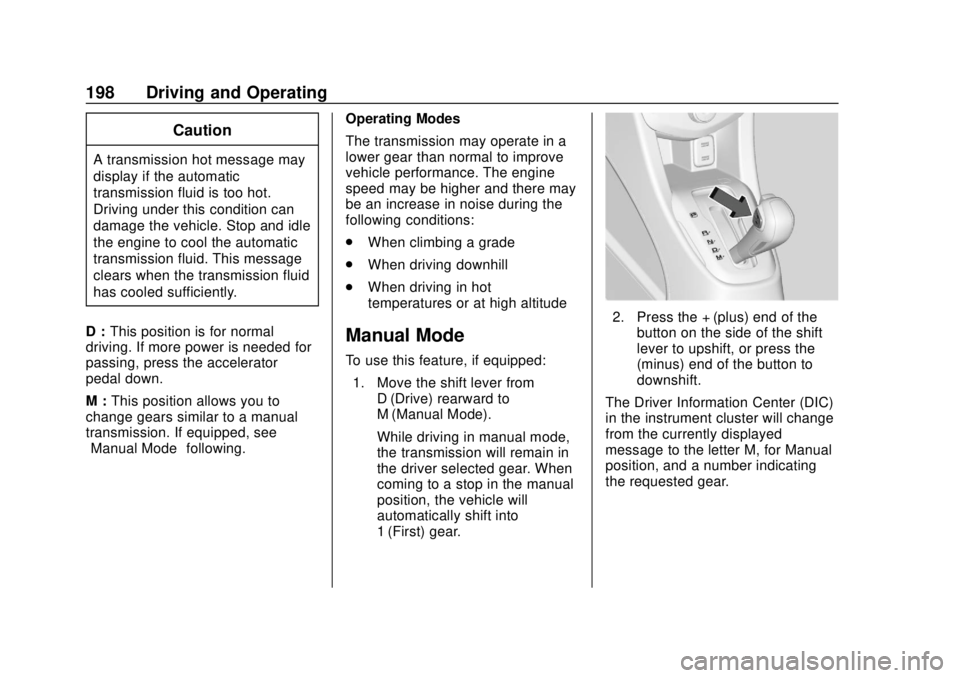
1. Move the shift lever from D (Drive) rearward to
M (Manual Mode).
While driving in manual mode,
the transmission will remain in
the driver selected gear. When
coming to a stop in the manual
position, the vehicle will
automatically shift into
1 (First) gear.
2. Press the + (plus) end of thebutton on the side of the shift
lever to upshift, or press the −
(minus) end of the button to
downshift.
The Driver Information Center (DIC)
in the instrument cluster will change
from the currently displayed
message to the letter M, for Manual
position, and a number indicating
the requested gear.
Page 200 of 351
Chevrolet Sonic Owner Manual (GMNA-Localizing-U.S./Canada-12461769) -
2019 - crc - 5/21/18
Driving and Operating 199
While using manual mode, the
transmission will have firmer shifting
and sportier performance. You can
use this for sport driving or when
climbing hills to stay in gear longer
or to downshift for more power or
engine braking.
The transmission will only allow you
to shift into gears appropriate for the
vehicle speed and engine
revolutions per minute (rpm):
.The transmission will not
automatically shift to the next
higher gear if the vehicle speed
or engine rpm is too low.
. The transmission will not allow
shifting to the next lower gear if
the vehicle speed or engine rpm
is too high.Manual Transmission
Caution
Shifting the vehicle initially into
any gear other than 1 (First) or
R (Reverse) can damage the
clutch. Shift the manual
transmission in the proper
sequence, and time the gear
shifting with the accelerator to
avoid revving the engine and
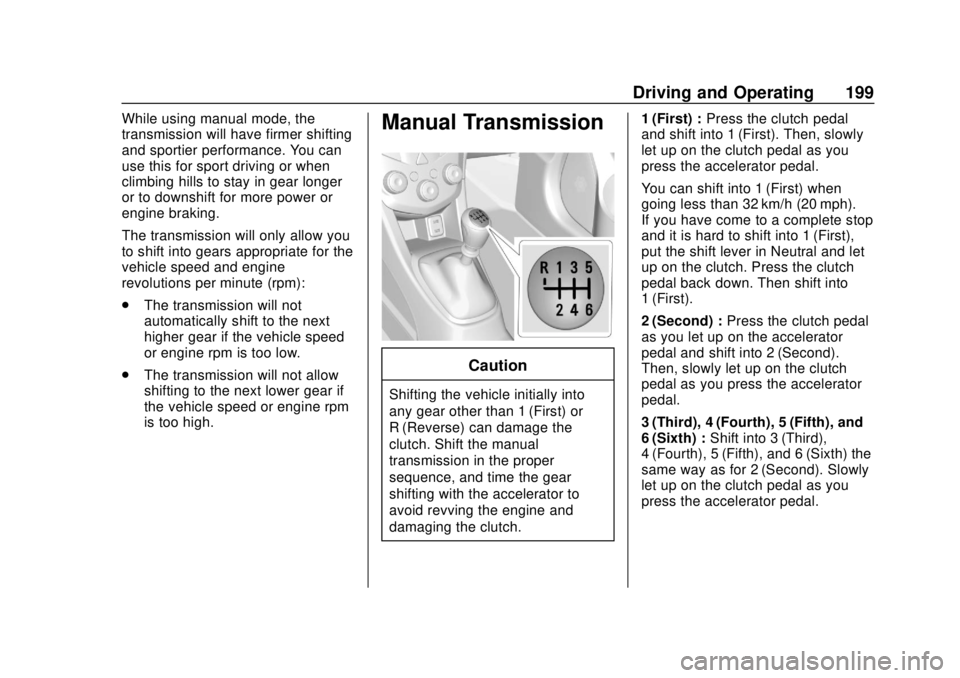
damaging the clutch. 1 (First) :
Press the clutch pedal
and shift into 1 (First). Then, slowly
let up on the clutch pedal as you
press the accelerator pedal.
You can shift into 1 (First) when
going less than 32 km/h (20 mph).
If you have come to a complete stop
and it is hard to shift into 1 (First),
put the shift lever in Neutral and let
up on the clutch. Press the clutch
pedal back down. Then shift into
1 (First).
2 (Second) : Press the clutch pedal
as you let up on the accelerator
pedal and shift into 2 (Second).
Then, slowly let up on the clutch
pedal as you press the accelerator
pedal.
3 (Third), 4 (Fourth), 5 (Fifth), and
6 (Sixth) : Shift into 3 (Third),
4 (Fourth), 5 (Fifth), and 6 (Sixth) the
same way as for 2 (Second). Slowly
let up on the clutch pedal as you
press the accelerator pedal.
Page 203 of 351
Chevrolet Sonic Owner Manual (GMNA-Localizing-U.S./Canada-12461769) -
2019 - crc - 5/21/18
202 Driving and Operating
Using ABS
Do not pump the brakes. Just hold
the brake pedal down firmly and let
ABS work. You may hear the ABS
pump or motor operating and feel
the brake pedal pulsate. This is
normal.
Braking in Emergencies
ABS allows you to steer and brake
at the same time. In many
emergencies, steering can help
more than even the very best
braking.
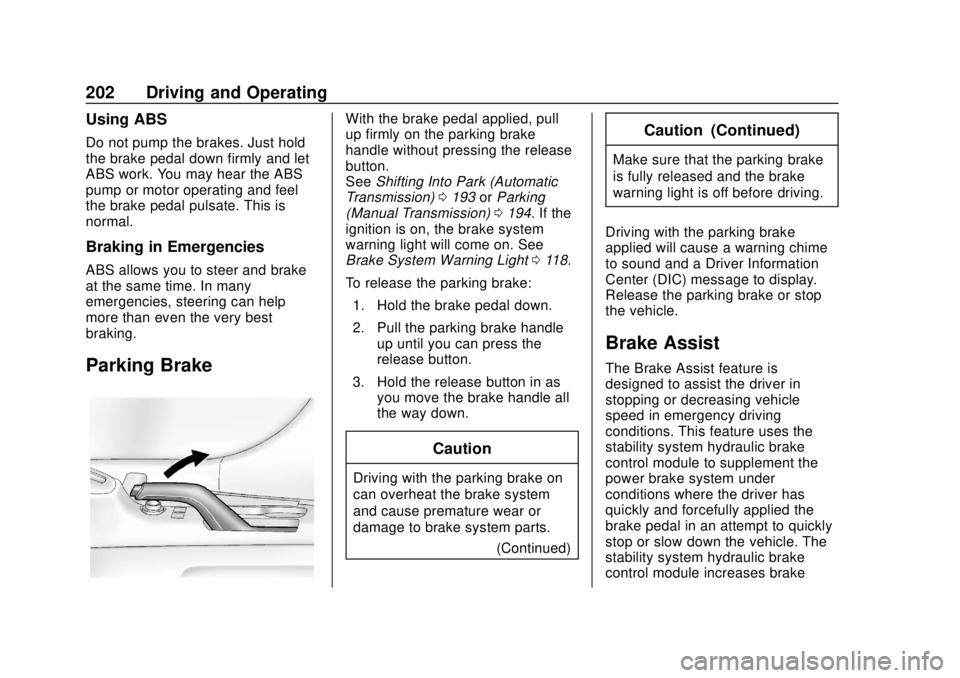
Parking Brake
With the brake pedal applied, pull
up firmly on the parking brake
handle without pressing the release
button.
SeeShifting Into Park (Automatic
Transmission) 0193 orParking
(Manual Transmission) 0194. If the
ignition is on, the brake system
warning light will come on. See
Brake System Warning Light 0118.
To release the parking brake: 1. Hold the brake pedal down.
2. Pull the parking brake handle up until you can press the
release button.
3. Hold the release button in as you move the brake handle all
the way down.
Caution
Driving with the parking brake on
can overheat the brake system
and cause premature wear or
damage to brake system parts.
(Continued)
Caution (Continued)
Make sure that the parking brake
is fully released and the brake
warning light is off before driving.
Driving with the parking brake
applied will cause a warning chime
to sound and a Driver Information
Center (DIC) message to display.
Release the parking brake or stop
the vehicle.
Brake Assist
The Brake Assist feature is
designed to assist the driver in
stopping or decreasing vehicle
speed in emergency driving
conditions. This feature uses the
stability system hydraulic brake
control module to supplement the
power brake system under
conditions where the driver has
quickly and forcefully applied the
brake pedal in an attempt to quickly
stop or slow down the vehicle. The
stability system hydraulic brake
control module increases brake
Page 207 of 351
Chevrolet Sonic Owner Manual (GMNA-Localizing-U.S./Canada-12461769) -
2019 - crc - 5/21/18
206 Driving and Operating
control will automatically disengage.
SeeTraction Control/Electronic
Stability Control 0203. If a collision
alert occurs when cruise control is
activated, cruise control is
disengaged. See Forward Collision
Alert (FCA) System 0212. When
road conditions allow you to safely
use it again, the cruise control can
be turned back on.
If the brakes are applied, cruise
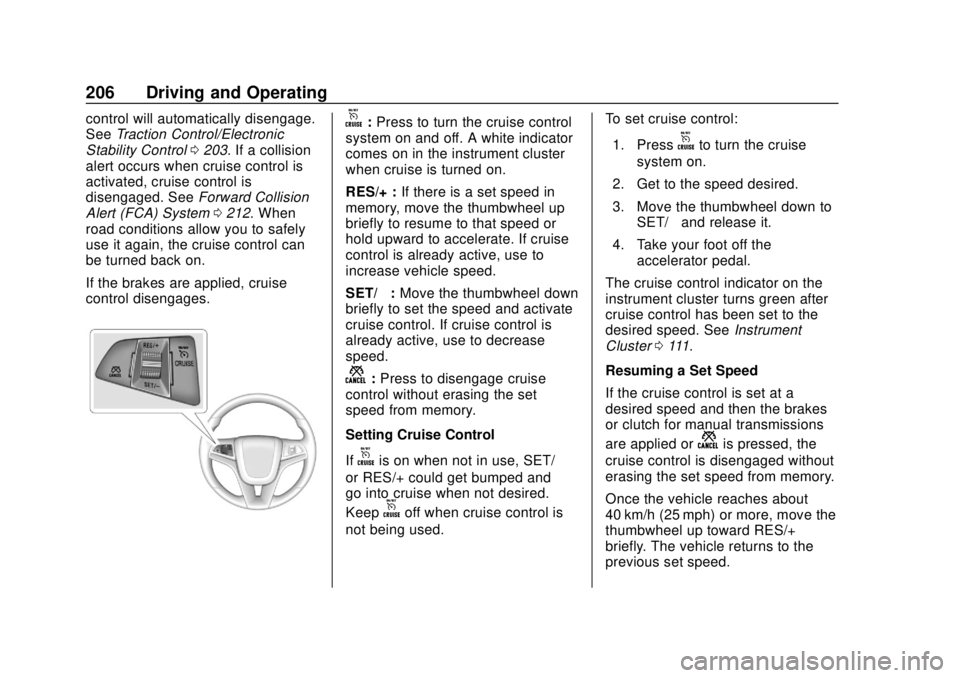
control disengages.o: Press to turn the cruise control
system on and off. A white indicator
comes on in the instrument cluster
when cruise is turned on.
RES/+ : If there is a set speed in
memory, move the thumbwheel up
briefly to resume to that speed or
hold upward to accelerate. If cruise
control is already active, use to
increase vehicle speed.
SET/− :Move the thumbwheel down
briefly to set the speed and activate
cruise control. If cruise control is
already active, use to decrease
speed.
n: Press to disengage cruise
control without erasing the set
speed from memory.
Setting Cruise Control
If
ois on when not in use, SET/−
or RES/+ could get bumped and
go into cruise when not desired.
Keep
ooff when cruise control is
not being used. To set cruise control:
1. Press
oto turn the cruise
system on.
2. Get to the speed desired.
3. Move the thumbwheel down to SET/− and release it.
4. Take your foot off the accelerator pedal.
The cruise control indicator on the
instrument cluster turns green after
cruise control has been set to the
desired speed. See Instrument
Cluster 0111.
Resuming a Set Speed
If the cruise control is set at a
desired speed and then the brakes
or clutch for manual transmissions
are applied or
nis pressed, the
cruise control is disengaged without
erasing the set speed from memory.
Once the vehicle reaches about
40 km/h (25 mph) or more, move the
thumbwheel up toward RES/+
briefly. The vehicle returns to the
previous set speed.
Page 209 of 351
Chevrolet Sonic Owner Manual (GMNA-Localizing-U.S./Canada-12461769) -
2019 - crc - 5/21/18
208 Driving and Operating
.Pressn.
. Shift the transmission to
N (Neutral) (automatic
transmissions).
. To turn off cruise control,
press
o.
Erasing Speed Memory
The cruise control set speed is
erased from memory if
ois
pressed or if the ignition is
turned off.
Driver Assistance
Systems
This vehicle may have features that
work together to help avoid crashes
or reduce crash damage while
driving, backing, and parking. Read
this entire section before using
these systems.
{Warning
Do not rely on the Driver
Assistance Systems. These
systems do not replace the need
for paying attention and driving
safely. You may not hear or see
alerts or warnings provided by
these systems. Failure to use
proper care when driving may
result in injury, death, or vehicle
damage. See Defensive Driving
0 176.
Under many conditions, these
systems will not: (Continued)
Warning (Continued)
.Detect children,
pedestrians, bicyclists,
or animals.
. Detect vehicles or objects
outside the area monitored
by the system.
. Work at all driving speeds.
. Warn you or provide you
with enough time to avoid a
crash.
. Work under poor visibility or
bad weather conditions.
. Work if the detection sensor
is not cleaned or is covered
by ice, snow, mud, or dirt.
. Work if the detection sensor
is covered up, such as with
a sticker, magnet, or metal
plate.
. Work if the area surrounding
the detection sensor is
damaged or not properly
repaired.
(Continued)
Page 222 of 351

Chevrolet Sonic Owner Manual (GMNA-Localizing-U.S./Canada-12461769) -
2019 - crc - 5/21/18
Vehicle Care 221
Vehicle Care
General Information
General Information . . . . . . . . . . 222
California Proposition65 Warning . . . . . . . . . . . . . . . . . 222
California Perchlorate Materials Requirements . . . . . 223
Accessories and Modifications . . . . . . . . . . . . . . . . 223
Vehicle Checks
Doing Your OwnService Work . . . . . . . . . . . . . . . 223
Hood . . . . . . . . . . . . . . . . . . . . . . . . . 224
Engine Compartment Overview . . . . . . . . . . . . . . . . . . . . 226
Engine Oil . . . . . . . . . . . . . . . . . . . . 227
Engine Oil Life System . . . . . . . 229
Automatic Transmission Fluid . . . . . . . . . . . . . . . . . . . . . . . . 230
Manual Transmission Fluid . . . 231
Hydraulic Clutch . . . . . . . . . . . . . . 231
Engine Air Cleaner/Filter . . . . . . 231
Cooling System . . . . . . . . . . . . . . 232
Engine Overheating . . . . . . . . . . 236
Washer Fluid . . . . . . . . . . . . . . . . . 237
Brakes . . . . . . . . . . . . . . . . . . . . . . . 237
Brake Fluid . . . . . . . . . . . . . . . . . . . 238 Battery - North America . . . . . . 239
Starter Switch Check . . . . . . . . . 240
Automatic Transmission Shift
Lock Control Function
Check . . . . . . . . . . . . . . . . . . . . . . . 241
Ignition Transmission Lock Check . . . . . . . . . . . . . . . . . . . . . . . 241
Park Brake and P (Park) Mechanism Check . . . . . . . . . . 241
Wiper Blade Replacement . . . . 242
Windshield Replacement . . . . . 243
Gas Strut(s) . . . . . . . . . . . . . . . . . . 243Headlamp Aiming
Headlamp Aiming . . . . . . . . . . . . 244
Bulb Replacement
Bulb Replacement . . . . . . . . . . . . 245
Halogen Bulbs . . . . . . . . . . . . . . . . 245
Headlamps and Front Turn Signal . . . . . . . . . . . . . . . . . . . . . . . 245
Taillamps, Turn Signal, Stoplamps, and Back-Up
Lamps . . . . . . . . . . . . . . . . . . . . . . 246
License Plate Lamp . . . . . . . . . . 247
Electrical System
Electrical System Overload . . . 248
Fuses and Circuit Breakers . . . 248
Engine Compartment Fuse Block . . . . . . . . . . . . . . . . . . . . . . . . 249 Instrument Panel Fuse
Block . . . . . . . . . . . . . . . . . . . . . . . . 251
Wheels and Tires
Tires . . . . . . . . . . . . . . . . . . . . . . . . . . 253
All-Season Tires . . . . . . . . . . . . . . 253
Winter Tires . . . . . . . . . . . . . . . . . . 254
Summer Tires . . . . . . . . . . . . . . . . 254
Tire Sidewall Labeling . . . . . . . . 255
Tire Designations . . . . . . . . . . . . . 257
Tire Terminology andDefinitions . . . . . . . . . . . . . . . . . . 257
Tire Pressure . . . . . . . . . . . . . . . . . 260
Tire Pressure Monitor System . . . . . . . . . . . . . . . . . . . . . . 261
Tire Pressure Monitor Operation . . . . . . . . . . . . . . . . . . . 262
Tire Inspection . . . . . . . . . . . . . . . . 265
Tire Rotation . . . . . . . . . . . . . . . . . 265
When It Is Time for New Tires . . . . . . . . . . . . . . . . . . . . . . . . 266
Buying New Tires . . . . . . . . . . . . . 267
Different Size Tires and Wheels . . . . . . . . . . . . . . . . . . . . . . 269
Uniform Tire Quality Grading . . . . . . . . . . . . . . . . . . . . . 269
Wheel Alignment and Tire Balance . . . . . . . . . . . . . . . . . . . . . 270
Wheel Replacement . . . . . . . . . . 271
Tire Chains . . . . . . . . . . . . . . . . . . . 271
If a Tire Goes Flat . . . . . . . . . . . . 272
Page 231 of 351
Chevrolet Sonic Owner Manual (GMNA-Localizing-U.S./Canada-12461769) -
2019 - crc - 5/21/18
230 Vehicle Care
indicated can vary considerably. For
the oil life system to work properly,
the system must be reset every time
the oil is changed.
When the system has calculated
that oil life has been diminished, it
indicates that an oil change is
necessary. A
:% CHANGE
message in the DIC comes on.
Change the oil as soon as possible
within the next 1 000 km (600 mi).
It is possible that, if driving under
the best conditions, the oil life
system might indicate that an oil
change is not necessary for up to a
year. The engine oil and filter must
be changed at least once a year
and, at this time, the system must
be reset. Your dealer has trained
service people who will perform this
work and reset the system. It is also
important to check the oil regularly
over the course of an oil drain
interval and keep it at the proper
level.
If the system is ever reset
accidentally, the oil must be
changed at 5 000 km (3,000 mi) since the last oil change.
Remember to reset the oil life
system whenever the oil is changed.
How to Reset the Engine Oil
Life System
Reset the system whenever the
engine oil is changed so that the
system can calculate the next
engine oil change. To reset the
system:
1. Press MENU to show Remaining Oil Life on the
display. This display shows an
estimate of the oil’s remaining
useful life. If 99% is displayed,
that means that 99% of the
current oil life remains.
2. To reset the engine oil life system, press SET/CLR while
the oil life display is active.
Select YES and press and hold
SET/CLR. After a few seconds,
there will be a single chime and
the oil life will be reset
to 100%. Be careful not to reset the oil life
display accidentally at any time
other than after the oil is changed.
It cannot be reset accurately.
If the
:% CHANGE message in
the DIC comes back on when the
vehicle is started, the engine oil life
system has not reset. Repeat the
procedure.
Automatic Transmission
Fluid
How to Check Automatic
Transmission Fluid
It is not necessary to check the
transmission fluid level.
A transmission fluid leak is the only
reason for fluid loss. If a leak
occurs, take the vehicle to your
dealer and have it repaired as soon
as possible.
There is a special procedure for
checking and changing the
transmission fluid. Because this
procedure is difficult, you should
have this done at your dealer.