2019 CHEVROLET SONIC maintenance
[x] Cancel search: maintenancePage 127 of 351

Chevrolet Sonic Owner Manual (GMNA-Localizing-U.S./Canada-12461769) -
2019 - crc - 5/21/18
126 Instruments and Controls
Information Displays
Driver Information
Center (DIC)
The DIC displays information about
the vehicle. It also displays warning
messages if a system problem is
detected. SeeVehicle Messages
0 130. All messages appear in the
DIC display in the instrument panel
cluster.
DIC Operation and Displays
On some models, the trip odometer
reset stem is used to operate the
DIC. On other models, the controls
for the DIC are on the turn signal
lever.
DIC Buttons
1. SET/CLR: Press to set or clear
the menu item displayed.
2.
w/x: Turn the band to
scroll through the menus.
3. MENU: Press to display the
Trip/Fuel menu and the Vehicle
Information menu. This button
is also used to return to or exit
the last screen displayed on
the DIC.
Vehicle Information Menu
Items (Base Level DIC)
Press MENU to view the DIC menu.
Some items display in the upper
display area, some in the lower
display area, and others use both
the upper and lower display areas.
Use
w/xto scroll through the
menu items. Not all items are
available on every vehicle. The
following is a list of possible menu
items:
. Remaining Oil Life
. Units
. Tire Learn Remaining Oil Life
This menu is not available while the
vehicle is moving. This display
shows an estimate of the oil's
remaining useful life. If 99
:% is
displayed, that means 99% of the
current oil life remains.
When the remaining oil life is low,
the
:% CHANGE message will
appear on the display. The oil
should changed as soon as
possible. See Engine Oil0227. In
addition to the engine oil life system
monitoring the oil life, additional
maintenance is recommended in the
Maintenance Schedule. See
Maintenance Schedule 0297.
Remember, the Oil Life display must
be reset after each oil change. It will
not reset itself. Also, be careful not
to reset the Oil Life display
accidentally at any time other than
when the oil has just been changed.
It cannot be reset accurately until
the next oil change. To reset the
engine oil life system, press SET/
Page 130 of 351

Chevrolet Sonic Owner Manual (GMNA-Localizing-U.S./Canada-12461769) -
2019 - crc - 5/21/18
Instruments and Controls 129
last time this menu item was reset.
This number reflects only the
approximate average fuel economy
that the vehicle has right now, and
will change as driving conditions
change. The fuel economy can be
reset by pressing SET/CLR while
the Average Fuel Economy display
is showing.
Average Vehicle Speed
This display shows the average
speed of the vehicle in kilometers
per hour (km/h) or miles per
hour (mph). This average is
calculated based on the various
vehicle speeds recorded since the
last reset of this value. The average
speed can be reset by pressing
SET/CLR while the Average Vehicle
Speed display is showing.
Vehicle Information Menu
Items (Uplevel DIC)
Press MENU on the turn signal
lever until Vehicle Information menu
is displayed. Use
w/xto scroll
through the following possible menu
items: .
Display Units
. Tire Pressure
. Remaining Oil Life
Display Units
Move
w/xto switch between
metric or US when the Unit display
is active. Press SET/CLR to confirm
the setting. This will change the
displays on the cluster and DIC to
either metric or English (US)
measurements.
Tire Pressure
The display will show a vehicle with
the approximate pressures of all
four tires. Tire pressure is displayed
in either kilopascal (kPa) or pounds
per square inch (psi).
See Tire Pressure Monitor System
0 261 andTire Pressure Monitor
Operation 0262.
Remaining Oil Life
This menu is not available while the
vehicle is moving. This display
shows an estimate of the oil's
remaining useful life. If REMAINING OIL LIFE 99 % is displayed, that
means 99% of the current oil life
remains.
When the remaining oil life is low,
the CHANGE ENGINE OIL SOON
message will appear on the display.
The oil should changed as soon as
possible. See
Engine Oil0227. In
addition to the engine oil life system
monitoring the oil life, additional
maintenance is recommended in the
Maintenance Schedule. See
Maintenance Schedule 0297.
Remember, the Oil Life display must
be reset after each oil change. It will
not reset itself. Also, be careful not
to reset the Oil Life display
accidentally at any time other than
when the oil has just been changed.
It cannot be reset accurately until
the next oil change. To reset the
engine oil life system, press SET/
CLR while the Oil Life display is
active. See Engine Oil Life System
0 229.
Page 132 of 351

Chevrolet Sonic Owner Manual (GMNA-Localizing-U.S./Canada-12461769) -
2019 - crc - 5/21/18
Instruments and Controls 131
70 :Service Leveling System
75 : Service AC System
77 : Service Front Camera System
78 : Service Pedestrian Protection
79 : Engine Oil Low –Add Oil
81 : Service Transmission
82 : Change Engine Oil Soon
84 : Engine Power Is Reduced
88 : Use Transmitter Pocket to Start
89 : Service Vehicle Soon
91 : No Remote Detected
92 : No Remote Detected, Press
Brake To Restart
93 : Press Button Again To Turn
Engine Off
94 : Shift to Park
95 : Service Airbag
99 : Pedestrian Protection System
Disabled
120 : Reduce Speed For Hill
Descent Control 136 :
Service Park Assist
145 : Washer Fluid Low —Add
Fluid
151 : Press Clutch to Start
174 : Low Battery
258 : Park Assist Off
:% CHANGE
This message displays when the
engine oil needs to be changed.
When changing the engine oil, be
sure to reset the Oil Life System.
See Engine Oil Life System 0229,
Engine Oil 0227, and Maintenance
Schedule 0297.
LF XX, RF XX, LR XX,
or RR XX
A message displays when the tire
pressure is low. It shows the
location of the low tire and the
approximate pressure of the low tire.
If a tire pressure message appears,
stop as soon as you can. Inflate the
tires by adding air until the tire
pressure is equal to the values shown on the Tire and Loading
Information label. See
Tires0253,
Vehicle Load Limits 0181, and Tire
Pressure 0260.
Uplevel Cluster
Messages that do not require
immediate action can be
acknowledged and cleared by
pressing SET/CLR.
Messages that require immediate
action cannot be cleared until that
action is performed. Clearing
messages does not correct the
problem.
Engine Power Messages
ENGINE POWER IS REDUCED
This message displays when the
vehicle's propulsion power is
reduced. Reduced propulsion power
can affect the vehicle's ability to
accelerate. If this message is on,
but there is no observed reduction
in performance, proceed to your
destination. The performance may
be reduced the next time the vehicle
is driven. The vehicle may be driven
Page 170 of 351
Chevrolet Sonic Owner Manual (GMNA-Localizing-U.S./Canada-12461769) -
2019 - crc - 5/21/18
Climate Controls 169
Climate Controls
Climate Control Systems
Climate Control Systems . . . . . 169
Air Vents
Air Vents . . . . . . . . . . . . . . . . . . . . . 171
Maintenance
Air Intake . . . . . . . . . . . . . . . . . . . . . 172
Passenger Compartment AirFilter . . . . . . . . . . . . . . . . . . . . . . . . 172
Service . . . . . . . . . . . . . . . . . . . . . . . 172
Climate Control
Systems
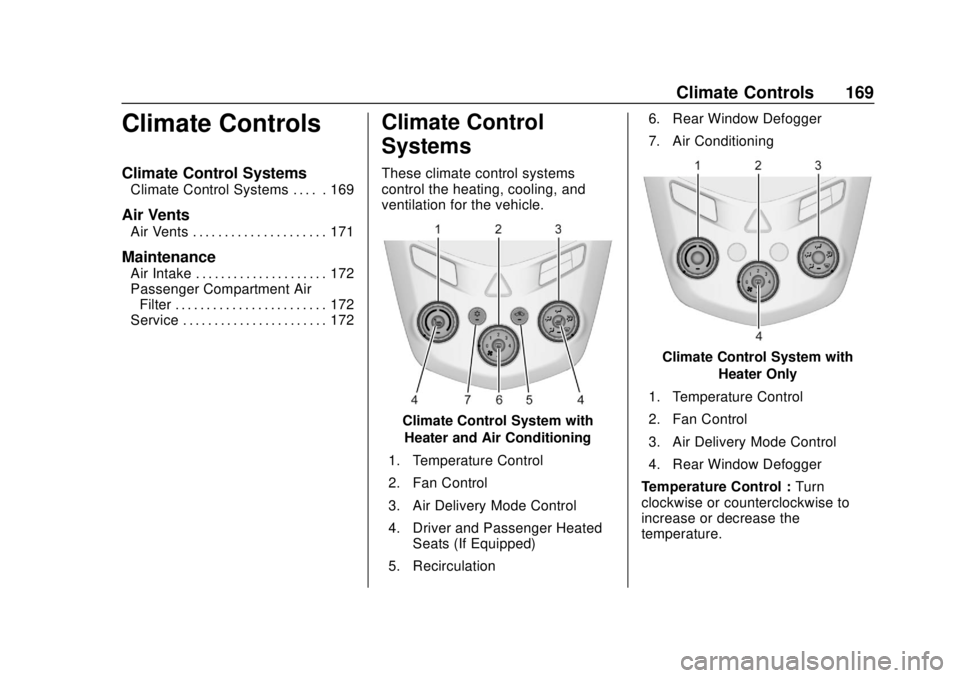
These climate control systems
control the heating, cooling, and
ventilation for the vehicle.
Climate Control System with
Heater and Air Conditioning
1. Temperature Control
2. Fan Control
3. Air Delivery Mode Control
4. Driver and Passenger Heated Seats (If Equipped)
5. Recirculation 6. Rear Window Defogger
7. Air Conditioning
Climate Control System with
Heater Only
1. Temperature Control
2. Fan Control
3. Air Delivery Mode Control
4. Rear Window Defogger
Temperature Control : Turn
clockwise or counterclockwise to
increase or decrease the
temperature.
Page 173 of 351

Chevrolet Sonic Owner Manual (GMNA-Localizing-U.S./Canada-12461769) -
2019 - crc - 5/21/18
172 Climate Controls
Maintenance
Air Intake
Clear away any ice, snow, or leaves
from the air intake at the base of the
windshield that can block the flow of
air into the vehicle.
Passenger Compartment
Air Filter
The filter removes dust, pollen, and
other airborne irritants from outside
air that is pulled into the vehicle.
The filter should be replaced as part
of routine scheduled maintenance.
SeeMaintenance Schedule 0297.
To find out what type of filter to use,
see Maintenance Replacement
Parts 0307.1. Open the glove box completely
and disconnect the damper on
the outboard side.
2. Push in both sides of the glove box and pull to remove.3. Install the new air filter.
4. Reinstall the air filter cover andglove box in reverse order.
See your dealer if additional
assistance is needed.
Service
All vehicles have a label underhood
that identifies the refrigerant used in
the vehicle. The refrigerant system
should only be serviced by trained
and certified technicians. The air
conditioning evaporator should
never be repaired or replaced by
one from a salvage vehicle.
Page 174 of 351
Chevrolet Sonic Owner Manual (GMNA-Localizing-U.S./Canada-12461769) -
2019 - crc - 5/21/18
Climate Controls 173
It should only be replaced by a new
evaporator to ensure proper and
safe operation.
During service, all refrigerants
should be reclaimed with proper
equipment. Venting refrigerants
directly to the atmosphere is harmful
to the environment and may also
create unsafe conditions based on
inhalation, combustion, frostbite,
or other health-based concerns.
The air conditioning system requires
periodic maintenance. See
Maintenance Schedule0297.
Page 178 of 351
Chevrolet Sonic Owner Manual (GMNA-Localizing-U.S./Canada-12461769) -
2019 - crc - 5/21/18
Driving and Operating 177
Once the power assist is used up, it
can take longer to stop and the
brake pedal will be harder to push.
Steering
Electric Power Steering
The vehicle has electric power
steering. It does not have power
steering fluid. Regular maintenance
is not required.
If power steering assist is lost due
to a system malfunction, the vehicle
can be steered, but may require
increased effort. See your dealer if
there is a problem.
If the steering wheel is turned until it
reaches the end of its travel and is
held against that position for an
extended period of time, power
steering assist may be reduced.
If the steering assist is used for an
extended period of time while the
vehicle is not moving, power assist
may be reduced.
Normal use of the power steering
assist should return when the
system cools down.See your dealer if there is a
problem.
Curve Tips
.
Take curves at a reasonable
speed.
. Reduce speed before entering a
curve.
. Maintain a reasonable steady
speed through the curve.
. Wait until the vehicle is out of
the curve before accelerating
gently into the straightaway.
Steering in Emergencies
.There are some situations when
steering around a problem may
be more effective than braking.
. Holding both sides of the
steering wheel allows you to turn
180 degrees without removing
a hand.
. The Antilock Brake System
(ABS) allows steering while
braking.
Off-Road Recovery
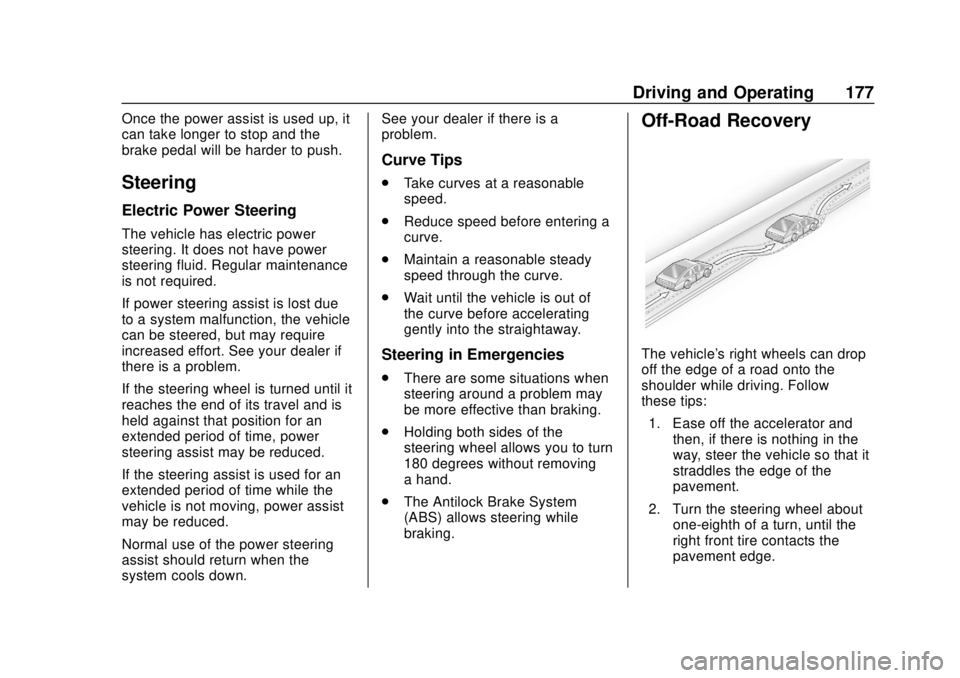
The vehicle's right wheels can drop
off the edge of a road onto the
shoulder while driving. Follow
these tips:
1. Ease off the accelerator and then, if there is nothing in the
way, steer the vehicle so that it
straddles the edge of the
pavement.
2. Turn the steering wheel about one-eighth of a turn, until the
right front tire contacts the
pavement edge.
Page 220 of 351
Chevrolet Sonic Owner Manual (GMNA-Localizing-U.S./Canada-12461769) -
2019 - crc - 5/21/18
Driving and Operating 219
Warning (Continued)
Contact should be
maintained until the filling is
complete.
. Do not smoke while
pumping fuel.
. Avoid using electronic
devices.
Trailer Towing
General Towing
Information
{Warning
Never tow a trailer with your
vehicle. It was not designed or
intended to tow a trailer.
Conversions and
Add-Ons
Add-On Electrical
Equipment
{Warning
The Data Link Connector (DLC) is
used for vehicle service and
Emission Inspection/Maintenance
testing. See Malfunction Indicator
Lamp (Check Engine Light) 0116.
A device connected to the DLC —
such as an aftermarket fleet or
driver-behavior tracking device —
may interfere with vehicle
systems. This could affect vehicle
operation and cause a crash.
Such devices may also access
information stored in the vehicle’s
systems.