2019 CHEVROLET SONIC engine oil
[x] Cancel search: engine oilPage 130 of 351

Chevrolet Sonic Owner Manual (GMNA-Localizing-U.S./Canada-12461769) -
2019 - crc - 5/21/18
Instruments and Controls 129
last time this menu item was reset.
This number reflects only the
approximate average fuel economy
that the vehicle has right now, and
will change as driving conditions
change. The fuel economy can be
reset by pressing SET/CLR while
the Average Fuel Economy display
is showing.
Average Vehicle Speed
This display shows the average
speed of the vehicle in kilometers
per hour (km/h) or miles per
hour (mph). This average is
calculated based on the various
vehicle speeds recorded since the
last reset of this value. The average
speed can be reset by pressing
SET/CLR while the Average Vehicle
Speed display is showing.
Vehicle Information Menu
Items (Uplevel DIC)
Press MENU on the turn signal
lever until Vehicle Information menu
is displayed. Use
w/xto scroll
through the following possible menu
items: .
Display Units
. Tire Pressure
. Remaining Oil Life
Display Units
Move
w/xto switch between
metric or US when the Unit display
is active. Press SET/CLR to confirm
the setting. This will change the
displays on the cluster and DIC to
either metric or English (US)
measurements.
Tire Pressure
The display will show a vehicle with
the approximate pressures of all
four tires. Tire pressure is displayed
in either kilopascal (kPa) or pounds
per square inch (psi).
See Tire Pressure Monitor System
0 261 andTire Pressure Monitor
Operation 0262.
Remaining Oil Life
This menu is not available while the
vehicle is moving. This display
shows an estimate of the oil's
remaining useful life. If REMAINING OIL LIFE 99 % is displayed, that
means 99% of the current oil life
remains.
When the remaining oil life is low,
the CHANGE ENGINE OIL SOON
message will appear on the display.
The oil should changed as soon as
possible. See
Engine Oil0227. In
addition to the engine oil life system
monitoring the oil life, additional
maintenance is recommended in the
Maintenance Schedule. See
Maintenance Schedule 0297.
Remember, the Oil Life display must
be reset after each oil change. It will
not reset itself. Also, be careful not
to reset the Oil Life display
accidentally at any time other than
when the oil has just been changed.
It cannot be reset accurately until
the next oil change. To reset the
engine oil life system, press SET/
CLR while the Oil Life display is
active. See Engine Oil Life System
0 229.
Page 132 of 351

Chevrolet Sonic Owner Manual (GMNA-Localizing-U.S./Canada-12461769) -
2019 - crc - 5/21/18
Instruments and Controls 131
70 :Service Leveling System
75 : Service AC System
77 : Service Front Camera System
78 : Service Pedestrian Protection
79 : Engine Oil Low –Add Oil
81 : Service Transmission
82 : Change Engine Oil Soon
84 : Engine Power Is Reduced
88 : Use Transmitter Pocket to Start
89 : Service Vehicle Soon
91 : No Remote Detected
92 : No Remote Detected, Press
Brake To Restart
93 : Press Button Again To Turn
Engine Off
94 : Shift to Park
95 : Service Airbag
99 : Pedestrian Protection System
Disabled
120 : Reduce Speed For Hill
Descent Control 136 :
Service Park Assist
145 : Washer Fluid Low —Add
Fluid
151 : Press Clutch to Start
174 : Low Battery
258 : Park Assist Off
:% CHANGE
This message displays when the
engine oil needs to be changed.
When changing the engine oil, be
sure to reset the Oil Life System.
See Engine Oil Life System 0229,
Engine Oil 0227, and Maintenance
Schedule 0297.
LF XX, RF XX, LR XX,
or RR XX
A message displays when the tire
pressure is low. It shows the
location of the low tire and the
approximate pressure of the low tire.
If a tire pressure message appears,
stop as soon as you can. Inflate the
tires by adding air until the tire
pressure is equal to the values shown on the Tire and Loading
Information label. See
Tires0253,
Vehicle Load Limits 0181, and Tire
Pressure 0260.
Uplevel Cluster
Messages that do not require
immediate action can be
acknowledged and cleared by
pressing SET/CLR.
Messages that require immediate
action cannot be cleared until that
action is performed. Clearing
messages does not correct the
problem.
Engine Power Messages
ENGINE POWER IS REDUCED
This message displays when the
vehicle's propulsion power is
reduced. Reduced propulsion power
can affect the vehicle's ability to
accelerate. If this message is on,
but there is no observed reduction
in performance, proceed to your
destination. The performance may
be reduced the next time the vehicle
is driven. The vehicle may be driven
Page 192 of 351

Chevrolet Sonic Owner Manual (GMNA-Localizing-U.S./Canada-12461769) -
2019 - crc - 5/21/18
Driving and Operating 191
If the RKE transmitter is not in
the vehicle, if there is
interference, or if the RKE
battery is low, a Driver
Information Center (DIC)
message will display.
SeeDriver Information Center
(DIC) 0126 andRemote
Keyless Entry (RKE) System
Operation (Keyless Access)
0 29 orRemote Keyless Entry
(RKE) System Operation (Key
Access) 035.
Caution
Cranking the engine for long
periods of time, by returning the
ignition to the START position
immediately after cranking has
ended, can overheat and damage
the cranking motor, and drain the
battery. Wait at least 15 seconds
between each try, to let the
cranking motor cool down.
2. If the engine does not start after five to 10 seconds,
especially in very cold weather (below
−18 °C or 0 °F), it could
be flooded with too much
gasoline. Try pushing the
accelerator pedal all the way to
the floor and holding it there as
you press ENGINE START/
STOP, for up to a maximum of
15 seconds. Wait at least
15 seconds between each try,
to allow the cranking motor to
cool down. When the engine
starts, let go of the button and
the accelerator. If the vehicle
starts briefly but then stops
again, do the same thing. This
clears the extra gasoline from
the engine. Do not race the
engine immediately after
starting it. Operate the engine
and transmission gently until
the oil warms up and lubricates
all moving parts.
Engine Heater
The engine heater can provide
easier starting and better fuel
economy during engine warm-up in
cold weather conditions at or below −18 °C (0 °F). Vehicles with an
engine heater should be plugged in
at least four hours before starting.
1. Turn off the engine.
2. Open the hood and unwrap the electrical cord. The cord is
located in the driver side of the
engine compartment, near the
battery. It is shipped from the
factory with a tie holding it in
place. Use care in removing
the tie so that the cord is not
damaged.
Page 218 of 351
Chevrolet Sonic Owner Manual (GMNA-Localizing-U.S./Canada-12461769) -
2019 - crc - 5/21/18
Driving and Operating 217
Fuels in Foreign
Countries
The U.S., Canada, and Mexico post
fuel octane ratings in anti-knock
index (AKI). For fuel not to use in a
foreign country, seeProhibited
Fuels 0216.
Fuel Additives
TOP TIER Detergent Gasoline is
highly recommended for use with
your vehicle. If your country does
not have TOP TIER Detergent
Gasoline, add ACDelco Fuel
System Treatment Plus−Gasoline to
the vehicle’ s gasoline fuel tank at
every oil change or 15,000 km
(9,000 mi), whichever occurs first.
TOP TIER Detergent Gasoline and
ACDelco Fuel System Treatment
Plus−Gasoline will help keep your
vehicle’s engine fuel deposit free
and performing optimally.
Filling the Tank
{Warning
Fuel vapors and fuel fires burn
violently and can cause injury or
death.
. To help avoid injuries to you
and others, read and follow
all the instructions on the
fuel pump island.
. Turn off the engine when
refueling.
. Keep sparks, flames, and
smoking materials away
from fuel.
. Do not leave the fuel pump
unattended.
. Avoid using electronic
devices while refueling.
. Do not re-enter the vehicle
while pumping fuel.
. Keep children away from
the fuel pump and never let
children pump fuel.
(Continued)
Warning (Continued)
.Fuel can spray out if the fuel
cap is opened too quickly.
This spray can happen if the
tank is nearly full, and is
more likely in hot weather.
Open the fuel cap slowly
and wait for any hiss noise
to stop, then unscrew the
cap all the way.
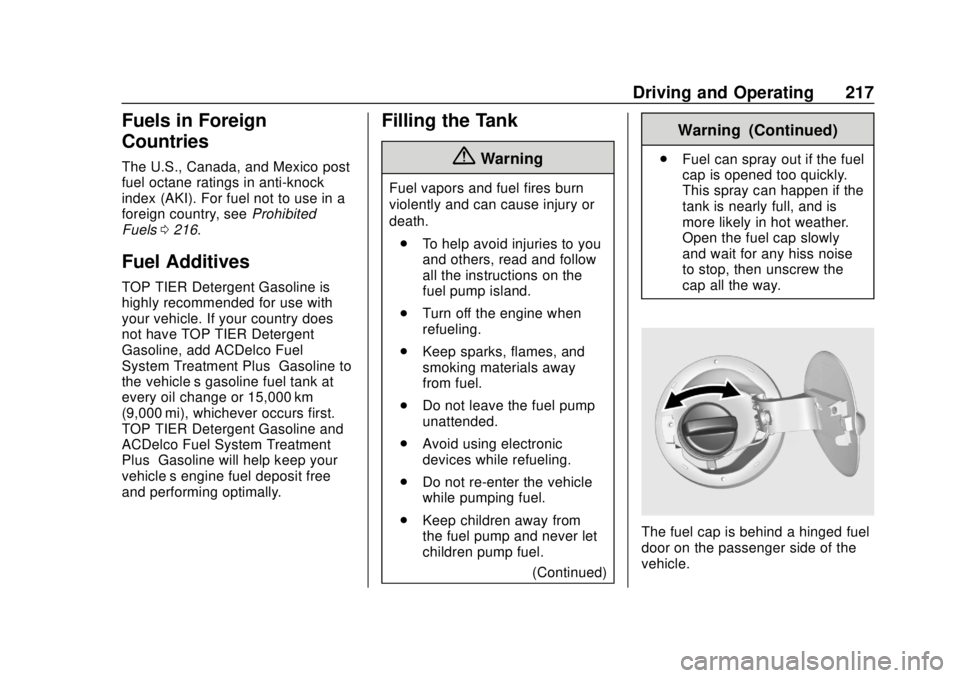
The fuel cap is behind a hinged fuel
door on the passenger side of the
vehicle.
Page 222 of 351

Chevrolet Sonic Owner Manual (GMNA-Localizing-U.S./Canada-12461769) -
2019 - crc - 5/21/18
Vehicle Care 221
Vehicle Care
General Information
General Information . . . . . . . . . . 222
California Proposition65 Warning . . . . . . . . . . . . . . . . . 222
California Perchlorate Materials Requirements . . . . . 223
Accessories and Modifications . . . . . . . . . . . . . . . . 223
Vehicle Checks
Doing Your OwnService Work . . . . . . . . . . . . . . . 223
Hood . . . . . . . . . . . . . . . . . . . . . . . . . 224
Engine Compartment Overview . . . . . . . . . . . . . . . . . . . . 226
Engine Oil . . . . . . . . . . . . . . . . . . . . 227
Engine Oil Life System . . . . . . . 229
Automatic Transmission Fluid . . . . . . . . . . . . . . . . . . . . . . . . 230
Manual Transmission Fluid . . . 231
Hydraulic Clutch . . . . . . . . . . . . . . 231
Engine Air Cleaner/Filter . . . . . . 231
Cooling System . . . . . . . . . . . . . . 232
Engine Overheating . . . . . . . . . . 236
Washer Fluid . . . . . . . . . . . . . . . . . 237
Brakes . . . . . . . . . . . . . . . . . . . . . . . 237
Brake Fluid . . . . . . . . . . . . . . . . . . . 238 Battery - North America . . . . . . 239
Starter Switch Check . . . . . . . . . 240
Automatic Transmission Shift
Lock Control Function
Check . . . . . . . . . . . . . . . . . . . . . . . 241
Ignition Transmission Lock Check . . . . . . . . . . . . . . . . . . . . . . . 241
Park Brake and P (Park) Mechanism Check . . . . . . . . . . 241
Wiper Blade Replacement . . . . 242
Windshield Replacement . . . . . 243
Gas Strut(s) . . . . . . . . . . . . . . . . . . 243Headlamp Aiming
Headlamp Aiming . . . . . . . . . . . . 244
Bulb Replacement
Bulb Replacement . . . . . . . . . . . . 245
Halogen Bulbs . . . . . . . . . . . . . . . . 245
Headlamps and Front Turn Signal . . . . . . . . . . . . . . . . . . . . . . . 245
Taillamps, Turn Signal, Stoplamps, and Back-Up
Lamps . . . . . . . . . . . . . . . . . . . . . . 246
License Plate Lamp . . . . . . . . . . 247
Electrical System
Electrical System Overload . . . 248
Fuses and Circuit Breakers . . . 248
Engine Compartment Fuse Block . . . . . . . . . . . . . . . . . . . . . . . . 249 Instrument Panel Fuse
Block . . . . . . . . . . . . . . . . . . . . . . . . 251
Wheels and Tires
Tires . . . . . . . . . . . . . . . . . . . . . . . . . . 253
All-Season Tires . . . . . . . . . . . . . . 253
Winter Tires . . . . . . . . . . . . . . . . . . 254
Summer Tires . . . . . . . . . . . . . . . . 254
Tire Sidewall Labeling . . . . . . . . 255
Tire Designations . . . . . . . . . . . . . 257
Tire Terminology andDefinitions . . . . . . . . . . . . . . . . . . 257
Tire Pressure . . . . . . . . . . . . . . . . . 260
Tire Pressure Monitor System . . . . . . . . . . . . . . . . . . . . . . 261
Tire Pressure Monitor Operation . . . . . . . . . . . . . . . . . . . 262
Tire Inspection . . . . . . . . . . . . . . . . 265
Tire Rotation . . . . . . . . . . . . . . . . . 265
When It Is Time for New Tires . . . . . . . . . . . . . . . . . . . . . . . . 266
Buying New Tires . . . . . . . . . . . . . 267
Different Size Tires and Wheels . . . . . . . . . . . . . . . . . . . . . . 269
Uniform Tire Quality Grading . . . . . . . . . . . . . . . . . . . . . 269
Wheel Alignment and Tire Balance . . . . . . . . . . . . . . . . . . . . . 270
Wheel Replacement . . . . . . . . . . 271
Tire Chains . . . . . . . . . . . . . . . . . . . 271
If a Tire Goes Flat . . . . . . . . . . . . 272
Page 228 of 351

Chevrolet Sonic Owner Manual (GMNA-Localizing-U.S./Canada-12461769) -
2019 - crc - 5/21/18
Vehicle Care 227
1.Engine Air Cleaner/Filter 0231.
2. Engine Oil Dipstick. See Engine Oil 0227.
3. Engine Cooling Fan (Out of View). See Cooling System
0 232.
4. Engine Oil Fill Cap. See Engine Oil 0227.
5. Engine Coolant Surge Tank and Pressure Cap. See
Cooling System 0232.
6. Brake/Clutch Fluid Reservoir. See Brake Fluid 0238 and
Hydraulic Clutch 0231.
7. Battery - North America 0239.
8. Windshield Washer Fluid Reservoir. See Washer Fluid
0 237.
9. Engine Compartment Fuse
Block 0249.Engine Oil
To ensure proper engine
performance and long life, careful
attention must be paid to engine oil.
Following these simple, but
important steps will help protect
your investment:
.
Use engine oil approved to the
proper specification and of the
proper viscosity grade. See
“Selecting the Right Engine Oil”
in this section.
. Check the engine oil level
regularly and maintain the
proper oil level. See “Checking
Engine Oil” and“When to Add
Engine Oil” in this section.
. Change the engine oil at the
appropriate time. See Engine Oil
Life System 0229.
. Always dispose of engine oil
properly. See “What to Do with
Used Oil” in this section.
If the engine oil pressure light
comes on, check the engine oil level
right away. The oil pressure light is
on the instrument cluster. See
Engine Oil Pressure Light 0123.
Check the engine oil level regularly;
this is an added reminder.
Checking Engine Oil
Check the engine oil level regularly,
every 650 km (400 mi), especially
prior to a long trip. The engine oil
dipstick handle is a loop. See
Engine Compartment Overview
0 226 for the location.
{Warning
The engine oil dipstick handle
may be hot; it could burn you.
Use a towel or glove to touch the
dipstick handle.
Page 229 of 351
Chevrolet Sonic Owner Manual (GMNA-Localizing-U.S./Canada-12461769) -
2019 - crc - 5/21/18
228 Vehicle Care
If a low oil Driver Information Center
(DIC) message displays, check the
oil level.
Follow these guidelines:
.To get an accurate reading, park
the vehicle on level ground.
Check the engine oil level after
the engine has been off for at
least two hours. Checking the
engine oil level on steep grades
or too soon after engine shutoff
can result in incorrect readings.
Accuracy improves when
checking a cold engine prior to
starting. Remove the dipstick
and check the level.
. If unable to wait two hours, the
engine must be off for at least
15 minutes if the engine is
warm, or at least 30 minutes if
the engine is not warm. Pull out
the dipstick, wipe it with a clean
paper towel or cloth, then push it
back in all the way. Remove it
again, keeping the tip down, and
check the level.When to Add Engine Oil
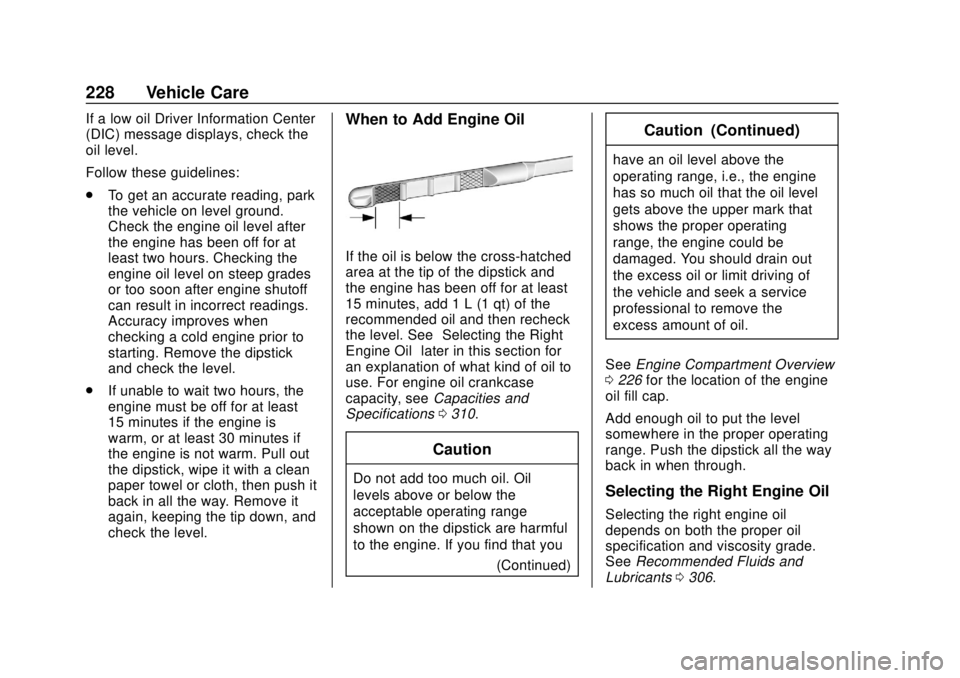
If the oil is below the cross-hatched
area at the tip of the dipstick and
the engine has been off for at least
15 minutes, add 1 L (1 qt) of the
recommended oil and then recheck
the level. See “Selecting the Right
Engine Oil” later in this section for
an explanation of what kind of oil to
use. For engine oil crankcase
capacity, see Capacities and
Specifications 0310.
Caution
Do not add too much oil. Oil
levels above or below the
acceptable operating range
shown on the dipstick are harmful
to the engine. If you find that you
(Continued)
Caution (Continued)
have an oil level above the
operating range, i.e., the engine
has so much oil that the oil level
gets above the upper mark that
shows the proper operating
range, the engine could be
damaged. You should drain out
the excess oil or limit driving of
the vehicle and seek a service
professional to remove the
excess amount of oil.
See Engine Compartment Overview
0 226 for the location of the engine
oil fill cap.
Add enough oil to put the level
somewhere in the proper operating
range. Push the dipstick all the way
back in when through.
Selecting the Right Engine Oil
Selecting the right engine oil
depends on both the proper oil
specification and viscosity grade.
See Recommended Fluids and
Lubricants 0306.
Page 230 of 351
Chevrolet Sonic Owner Manual (GMNA-Localizing-U.S./Canada-12461769) -
2019 - crc - 5/21/18
Vehicle Care 229
Specification
Use full synthetic engine oils that
meet the dexos1 specification.
Engine oils that have been
approved by GM as meeting the
dexos1 specification are marked
with the dexos1 approved logo. See
www.gmdexos.com.
Caution
Failure to use the recommended
engine oil or equivalent can result
in engine damage not covered by
the vehicle warranty.
Viscosity Grade
Use SAE 5W-30 viscosity grade
engine oil. Cold Temperature Operation: In an
area of extreme cold, where the
temperature falls below
−29 °C
(−20 °F), an SAE 0W-30 oil may be
used. An oil of this viscosity grade
will provide easier cold starting for
the engine at extremely low
temperatures. When selecting an oil
of the appropriate viscosity grade, it
is recommended to select an oil of
the correct specification. See
“Specification” earlier in this section.
Engine Oil Additives/Engine
Oil Flushes
Do not add anything to the oil. The
recommended oils meeting the
dexos1 specification are all that is
needed for good performance and
engine protection.
Engine oil system flushes are not
recommended and could cause
engine damage not covered by the
vehicle warranty.
What to Do with Used Oil
Used engine oil contains certain
elements that can be unhealthy for
your skin and could even cause cancer. Do not let used oil stay on
your skin for very long. Clean your
skin and nails with soap and water,
or a good hand cleaner. Wash or
properly dispose of clothing or rags
containing used engine oil. See the
manufacturer's warnings about the
use and disposal of oil products.
Used oil can be a threat to the
environment. If you change your
own oil, be sure to drain all the oil
from the filter before disposal. Never
dispose of oil by putting it in the
trash or pouring it on the ground,
into sewers, or into streams or
bodies of water. Recycle it by taking
it to a place that collects used oil.
Engine Oil Life System
When to Change Engine Oil
This vehicle has a computer system
that indicates when to change the
engine oil and filter. This is based
on a combination of factors which
include engine revolutions, engine
temperature, and miles driven.
Based on driving conditions, the
mileage at which an oil change is