2019 CHEVROLET SILVERADO park assist
[x] Cancel search: park assistPage 58 of 474

Chevrolet Silverado Owner Manual (GMNA-Localizing-U.S./Canada/Mexico-
1500-11698642) - 2019 - CRC - 2/20/19
Keys, Doors, and Windows 57
Power Folding
If equipped with power folding
mirrors:1. Press
gto fold the mirrors in
to the folded position.
2. Press
gagain to fold the
mirrors out to the driving
position.
Resetting the Power Folding
Mirrors
Reset the power folding mirrors if:
. The mirrors are accidentally
obstructed while folding. .
The mirrors are accidentally
manually folded/unfolded.
. The mirrors will not stay in the
unfolded position.
. The mirrors vibrate at normal
driving speeds.
Manually fold both mirrors if they
are out of sync. Fold and unfold the
mirrors three times using the mirror
controls to reset them to their
normal position. A popping noise
may be heard. This sound is normal
after a manual folding operation.
Remote Folding Mirrors
If equipped, press and holdQon
the RKE transmitter for
approximately one second to
remotely fold the exterior mirrors.
Press and hold
Kon the RKE
transmitter for approximately
one second to unfold. See Remote
Keyless Entry (RKE) System
Operation (Keyless Access) 034 or
Remote Keyless Entry (RKE)
System Operation (Key Access)
0 42. This feature can be turned on or off.
See
Vehicle Personalization 0168.
Task Lighting
If equipped, task lighting projects
light from the outside mirrors to the
sides of the vehicle. See Task
Lighting 0183.
Advanced Trailering Vision
System Side Cameras
If equipped, the Advanced Trailering
Vision System side cameras are on
the bottom of the outside mirrors. To
locate for cleaning, see “Surround
Vision (360 Degrees)” under
Assistance Systems for Parking or
Backing 0255.
Lane Change Alert (LCA)
The vehicle may have LCA. See
Lane Change Alert (LCA) 0268.
Side Blind Zone Alert
The vehicle may have Side Blind
Zone Alert. See Side Blind Zone
Alert (SBZA) 0267.
Page 131 of 474

Chevrolet Silverado Owner Manual (GMNA-Localizing-U.S./Canada/Mexico-
1500-11698642) - 2019 - CRC - 2/20/19
130 Instruments and Controls
Instruments and
Controls
Controls
Steering Wheel Adjustment . . . 131
Steering Wheel Controls . . . . . . 132
Heated Steering Wheel . . . . . . . 132
Horn . . . . . . . . . . . . . . . . . . . . . . . . . . 132
Windshield Wiper/Washer . . . . 132
Compass . . . . . . . . . . . . . . . . . . . . . 133
Clock . . . . . . . . . . . . . . . . . . . . . . . . . 133
Power Outlets . . . . . . . . . . . . . . . . 133
Wireless Charging . . . . . . . . . . . . 136
Warning Lights, Gauges, and
Indicators
Warning Lights, Gauges, andIndicators . . . . . . . . . . . . . . . . . . . 138
Instrument Cluster . . . . . . . . . . . . 139
Speedometer . . . . . . . . . . . . . . . . . 143
Odometer . . . . . . . . . . . . . . . . . . . . . 144
Trip Odometer . . . . . . . . . . . . . . . . 144
Tachometer . . . . . . . . . . . . . . . . . . . 144
Fuel Gauge . . . . . . . . . . . . . . . . . . . 144
Engine Oil Pressure Gauge . . . . . . . . . . . . . . . . . . . . . . 145
Engine Coolant Temperature Gauge . . . . . . . . . . . . . . . . . . . . . . 146 Voltmeter Gauge . . . . . . . . . . . . . 147
Seat Belt Reminders . . . . . . . . . 147
Airbag Readiness Light . . . . . . . 148
Passenger Airbag Status
Indicator . . . . . . . . . . . . . . . . . . . . 148
Charging System Light . . . . . . . 149
Malfunction Indicator Lamp (Check Engine Light) . . . . . . . . 150
Brake System Warning Light . . . . . . . . . . . . . . . . . . . . . . . . 152
Electric Parking Brake Light . . . . . . . . . . . . . . . . . . . . . . . . 153
Service Electric Parking Brake Light . . . . . . . . . . . . . . . . . . . . . . . . 153
Antilock Brake System (ABS) Warning Light . . . . . . . . . . . . . . . 153
Four-Wheel-Drive Light . . . . . . . 154
Tow/Haul Mode Light . . . . . . . . . 154
Hill Descent Control Light . . . . 154
Lane Keep Assist (LKA) Light . . . . . . . . . . . . . . . . . . . . . . . . 154
Vehicle Ahead Indicator . . . . . . 155
Pedestrian Ahead Indicator . . . 155
Traction Off Light . . . . . . . . . . . . . 155
Traction Control System (TCS)/ Electronic Stability Control
Light . . . . . . . . . . . . . . . . . . . . . . . . 155
Electronic Stability Control (ESC) Off Light . . . . . . . . . . . . . . 156 Engine Coolant Temperature
Warning Light . . . . . . . . . . . . . . . 156
Driver Mode Control Light . . . . 157
Tire Pressure Light . . . . . . . . . . . 157
Engine Oil Pressure Light (Uplevel Cluster) . . . . . . . . . . . . 158
Low Fuel Warning Light . . . . . . 158
Security Light . . . . . . . . . . . . . . . . . 158
High-Beam On Light . . . . . . . . . . 158
Front Fog Lamp Light . . . . . . . . . 159
Lamps On Reminder . . . . . . . . . 159
Cruise Control Light . . . . . . . . . . 159
Door Ajar Light . . . . . . . . . . . . . . . 159
Information Displays
Driver Information Center (DIC) (Base Level) . . . . . . . . . . . . . . . . 160
Driver Information Center (DIC) (Midlevel and Uplevel) . . . . . . 161
Head-Up Display (HUD) . . . . . . 164
Vehicle Messages
Vehicle Messages . . . . . . . . . . . . 167
Engine Power Messages . . . . . 168
Vehicle Speed Messages . . . . . 168
Vehicle Personalization
Vehicle Personalization . . . . . . . 168
Universal Remote System
Universal Remote System . . . . 173
Page 152 of 474
Chevrolet Silverado Owner Manual (GMNA-Localizing-U.S./Canada/Mexico-
1500-11698642) - 2019 - CRC - 2/20/19
Instruments and Controls 151
If towing a trailer, reduce the
amount of cargo being hauled as
soon as possible.
If the light continues to flash, find a
safe place to park. Turn the vehicle
off and wait at least 10 seconds
before restarting the engine. If the
light is still flashing, follow the
previous guidelines and see your
dealer for service as soon as
possible.
If the light is on steady :A
malfunction has been detected.
Diagnosis and service may be
required.
Check the following:
. If fuel has been added to the
vehicle using the capless funnel
adapter, make sure that it has
been removed. See “Filling the
Tank with a Portable Gas Can”
under Filling the Tank 0274.
The diagnostic system can
detect if the adapter has been
left installed in the vehicle,
allowing fuel to evaporate into the atmosphere. A few driving
trips with the adapter removed
may turn off the light.
. Poor fuel quality can cause
inefficient engine operation and
poor driveability, which may go
away once the engine is warmed
up. If this occurs, change the
fuel brand. It may require at
least one full tank of the proper
fuel to turn the light off. See
Recommended Fuel (Except
6.2L V8 Engine) 0272 or
Recommended Fuel (6.2L
V8 Engine) 0272.
If the light remains on, see your
dealer.
Emissions Inspection and
Maintenance Programs
If the vehicle requires an Emissions
Inspection/Maintenance test, the
test equipment will likely connect to
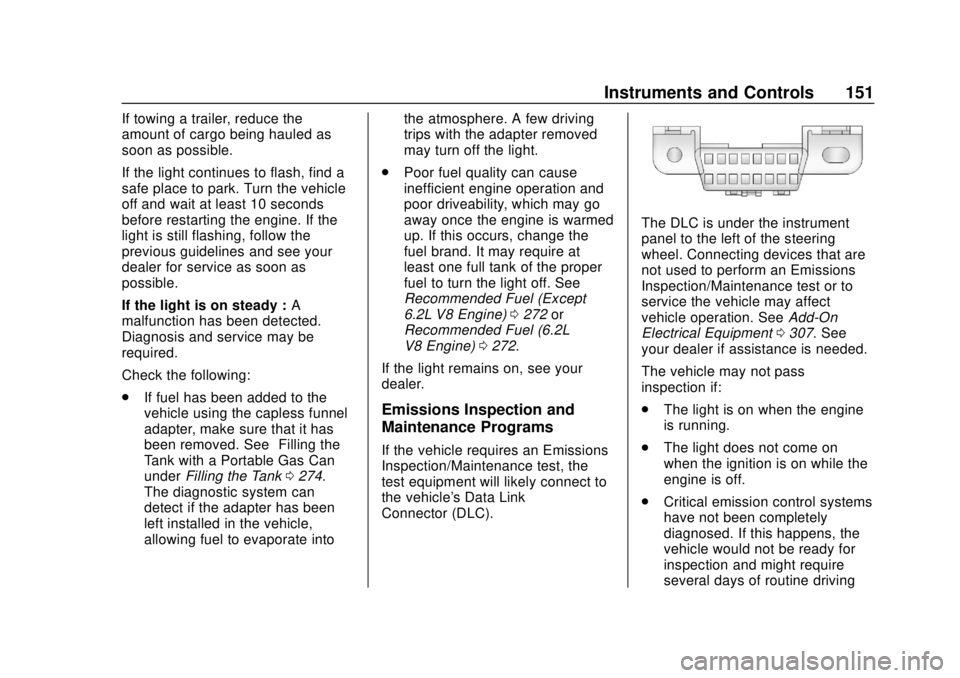
the vehicle's Data Link
Connector (DLC).
The DLC is under the instrument
panel to the left of the steering
wheel. Connecting devices that are
not used to perform an Emissions
Inspection/Maintenance test or to
service the vehicle may affect
vehicle operation. See Add-On
Electrical Equipment 0307. See
your dealer if assistance is needed.
The vehicle may not pass
inspection if:
. The light is on when the engine
is running.
. The light does not come on
when the ignition is on while the
engine is off.
. Critical emission control systems
have not been completely
diagnosed. If this happens, the
vehicle would not be ready for
inspection and might require
several days of routine driving
Page 165 of 474
Chevrolet Silverado Owner Manual (GMNA-Localizing-U.S./Canada/Mexico-
1500-11698642) - 2019 - CRC - 2/20/19
164 Instruments and Controls
is displayed as a bar graph. Dotted
lines may appear in the OUTPUT
display if a trailer is not connected.
Off Road :Displays vehicle pitch
and roll information, road wheel
angle, and four-wheel drive (4WD)
status.
Follow Distance : If equipped, the
current follow time to the vehicle
ahead is displayed as a time value
on this page.
Driver Assistance : If equipped,
shows information for Lane Keep
Assist (LKA) and Forward Collision
Alert (FCA).
Info Page Options : Scroll to
choose which info pages appear on
the DIC. Press the thumbwheel to
select or deselect.
Blank Page : Shows no
information.Head-Up Display (HUD)
{Warning
If the HUD image is too bright or
too high in your field of view, it
may take you more time to see
things you need to see when it is
dark outside. Be sure to keep the
HUD image dim and placed low in
your field of view.
If equipped with HUD, some
information about the operation of
the vehicle is projected onto the
windshield. The image is projected
through the HUD lens on top of the
instrument panel. The information
appears as an image focused out
toward the front of the vehicle.
Caution
If you try to use the HUD image
as a parking aid, you may
misjudge the distance and
damage your vehicle. Do not use
the HUD image as a parking aid.
The HUD information can be
displayed in various languages. The
speedometer reading and other
numerical values can be displayed
in either English or metric units.
The language selection is changed
through the radio, and the units of
measurement is changed through
the instrument cluster. See
“Settings” in the infotainment
manual and “Options”under
Instrument Cluster 0139.
Page 167 of 474
Chevrolet Silverado Owner Manual (GMNA-Localizing-U.S./Canada/Mexico-
1500-11698642) - 2019 - CRC - 2/20/19
166 Instruments and Controls
HUD Rotation: Press the
thumbwheel while Adjust Rotation is
highlighted to enter Adjust Mode.
Scroll to adjust the angle of the
HUD display. Press the thumbwheel
to confirm and save the setting. This
feature may only be available in
P (Park).
Speed Limit Style Adjustment
If equipped, the speed limit style
can be changed to a speed limit bar
or speed limit sign from the Options
menu in the instrument cluster.
Press the thumbwheel while Speed
Limit Style is highlighted to change
the speed sign style or to turn it off.
HUD Views
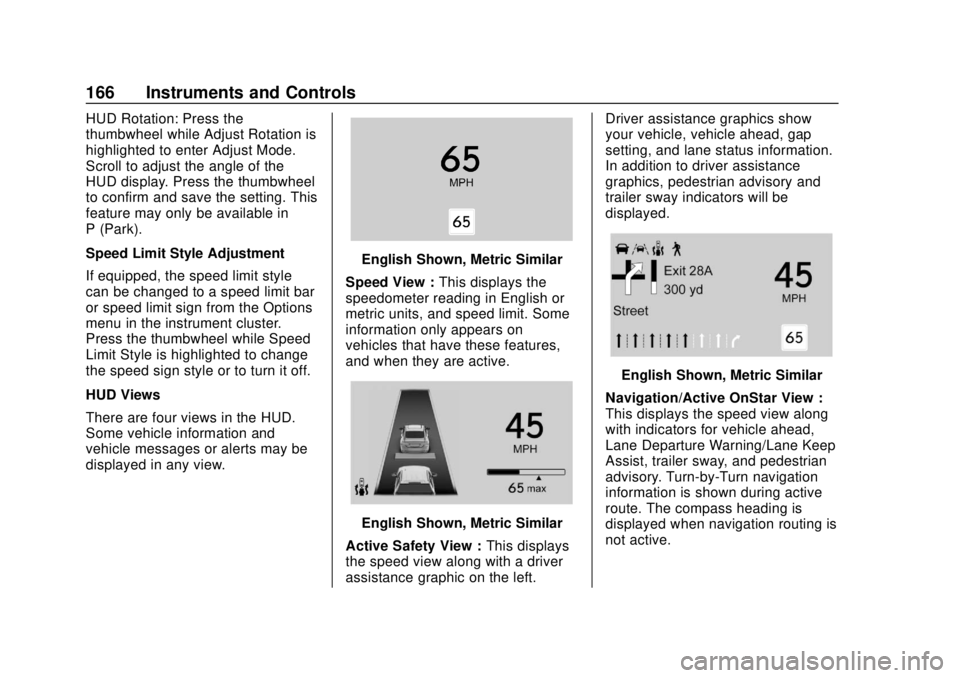
There are four views in the HUD.
Some vehicle information and
vehicle messages or alerts may be
displayed in any view.
English Shown, Metric Similar
Speed View : This displays the
speedometer reading in English or
metric units, and speed limit. Some
information only appears on
vehicles that have these features,
and when they are active.
English Shown, Metric Similar
Active Safety View : This displays
the speed view along with a driver
assistance graphic on the left. Driver assistance graphics show
your vehicle, vehicle ahead, gap
setting, and lane status information.
In addition to driver assistance
graphics, pedestrian advisory and
trailer sway indicators will be
displayed.
English Shown, Metric Similar
Navigation/Active OnStar View :
This displays the speed view along
with indicators for vehicle ahead,
Lane Departure Warning/Lane Keep
Assist, trailer sway, and pedestrian
advisory. Turn-by-Turn navigation
information is shown during active
route. The compass heading is
displayed when navigation routing is
not active.
Page 170 of 474
Chevrolet Silverado Owner Manual (GMNA-Localizing-U.S./Canada/Mexico-
1500-11698642) - 2019 - CRC - 2/20/19
Instruments and Controls 169
The menu may contain the
following:
Rear Seat Reminder
This allows for a chime and a
message when the rear door has
been opened before or during
operation of the vehicle.
Touch Off or On.
Climate and Air Quality
Touch and the following may
display:
.Auto Fan Speed
. Auto Defog
. Auto Rear Defog
Auto Fan Speed
This setting specifies the amount of
airflow when the climate control fan
setting is Auto Fan.
Touch Low, Medium, or High.
Auto Defog
This setting automatically directs air
to the windshield to assist in
defogging, based on temperature
and humidity conditions. Touch Off or On.
Auto Rear Defog
This setting automatically turns the
rear defogger on based on
temperature and humidity
conditions.
Touch Off or On.
Collision/Detection Systems
Touch and the following may
display:
.
Alert Type
. Forward Collision System
. Front Pedestrian Detection
. Lane Change Alert
. Park Assist
. Rear Camera Park Assist
Symbols
. Rear Cross Traffic Alert
Alert Type
This feature sets the type of alert
from the driver assistance systems
to help avoid crashes.
Touch Beeps or Safety Alert Seat. Forward Collision System
This feature will turn on or off
Forward Collision Alert (FCA) and
Forward Automatic Braking (FAB).
The Off setting disables all FCA and
FAB functions. With the Alert and
Brake setting, both FCA and FAB
are available. The Alert setting
disables FAB. See
Forward
Automatic Braking (FAB) 0264.
Touch Off, Alert, or Alert and Brake.
Front Pedestrian Detection
This feature may help avoid or
reduce the harm caused by
front-end crashes with nearby
pedestrians. See Front Pedestrian
Braking (FPB) System 0265.
Touch Off, Alert, or Alert and Brake.
Lane Change Alert
This allows the feature to be turned
on or off. See Lane Change Alert
(LCA) 0268.
When Lane Change Alert is
disabled, Side Blind Zone Alert is
also disabled.
Touch Off or On.
Page 171 of 474
Chevrolet Silverado Owner Manual (GMNA-Localizing-U.S./Canada/Mexico-
1500-11698642) - 2019 - CRC - 2/20/19
170 Instruments and Controls
Park Assist
This allows the feature to be turned
on or off. SeeAssistance Systems
for Parking or Backing 0255.
Select Off, On, or On with Towbar.
Rear Camera Park Assist Symbols
This setting enables the Rear
Camera Park Assist Symbols. See
Assistance Systems for Parking or
Backing 0255.
Touch Off or On.
Rear Cross Traffic Alert
This allows the Rear Cross Traffic
Alert feature to be turned on or off.
See Assistance Systems for Parking
or Backing 0255.
Touch Off or On.
Comfort and Convenience
Touch and the following may
display:
. Chime Volume
. Reverse Tilt Mirror
. Remote Mirror Folding Chime Volume
This determines the chime volume
level.
Touch the controls on the
infotainment display to adjust the
volume.
Reverse Tilt Mirror
This allows the feature to be turned
on or off. See
Reverse Tilt Mirrors
0 59.
Touch Off, On - Driver and
Passenger, On - Driver, or On -
Passenger.
Remote Mirror Folding
When on, the outside mirrors will
remotely fold or unfold when the
Remote Keyless Entry (RKE)
transmitter
QorKbutton is
pressed and held. See Folding
Mirrors 056.
Touch Off or On.
Lighting
Touch and the following may
display: .
Vehicle Locator Lights
. Exit Lighting
Vehicle Locator Lights
This setting flashes the vehicle’ s
headlamps when
Kis pressed on
the Remote Keyless Entry (RKE)
transmitter.
Touch Off or On.
Exit Lighting
This setting specifies how long the
headlamps stay on after the vehicle
is turned off and exited.
Touch Off, 30 Seconds, 60 Seconds,
or 120 Seconds.
Power Door Locks
Touch and the following may
display:
. Open Door Anti Lock Out
. Auto Door Unlock
. Delayed Door Lock
Page 174 of 474

Chevrolet Silverado Owner Manual (GMNA-Localizing-U.S./Canada/Mexico-
1500-11698642) - 2019 - CRC - 2/20/19
Instruments and Controls 173
Touch Lock or Unlock to lock or
unlock the system. Touch Back to
go back to the previous menu.Universal Remote
System
SeeRadio Frequency Statement
0 445.
Universal Remote System
Programming
If equipped, these buttons are in the
overhead console.
This system can replace up to three
remote control transmitters used to
activate devices such as garage
door openers, security systems, and
home automation devices. These instructions refer to a garage door
opener, but can be used for other
devices.
Do not use the Universal Remote
system with any garage door opener
that does not have the stop and
reverse feature. This includes any
garage door opener model
manufactured before April 1, 1982.
Read the instructions completely
before programming the Universal
Remote system. It may help to have
another person assist with the
programming process.
Keep the original hand-held
transmitter for use in other vehicles
as well as for future programming.
Erase the programming when
vehicle ownership is terminated.
See
“Erasing Universal Remote
System Buttons” later in this
section.
To program a garage door opener,
park outside directly in line with and
facing the garage door opener
receiver. Clear all people and
objects near the garage door.