Page 2 of 353
Chevrolet Impala Owner Manual (GMNA-Localizing-U.S./Canada-12146115) -
2019 - crc - 8/27/18
ContentsIntroduction . . . . . . . . . . . . . . . . . . . . . . 2
In Brief . . . . . . . . . . . . . . . . . . . . . . . . . . . 5
Keys, Doors, and Windows . . . . . 27
Seats and Restraints . . . . . . . . . . . 50
Storage . . . . . . . . . . . . . . . . . . . . . . . 102
Instruments and Controls . . . . . . 106
Lighting . . . . . . . . . . . . . . . . . . . . . . . 144
Infotainment System . . . . . . . . . . 151
Climate Controls . . . . . . . . . . . . . . 152
Driving and Operating . . . . . . . . . 161
Vehicle Care . . . . . . . . . . . . . . . . . . 221
Service and Maintenance . . . . . 299
Technical Data . . . . . . . . . . . . . . . . 312
Customer Information . . . . . . . . . 315
Reporting Safety Defects . . . . . . 325
OnStar . . . . . . . . . . . . . . . . . . . . . . . . 329
Connected Services . . . . . . . . . . . 337
Index . . . . . . . . . . . . . . . . . . . . 341
Page 5 of 353
Chevrolet Impala Owner Manual (GMNA-Localizing-U.S./Canada-12146115) -
2019 - crc - 8/27/18
4 Introduction
Q:Keep Fuse Block Covers
Properly Installed
|: Lane Change Alert
@:Lane Departure Warning
A:Lane Keep Assist
*:Malfunction Indicator Lamp
::Oil Pressure
X:Park Assist
~:Pedestrian Ahead Indicator
O:Power
7: Rear Cross Traffic Alert
I:Registered Technician
/:Remote Vehicle Start
>:Seat Belt Reminders
I: Side Blind Zone Alert
h:Stop/Start
7: Tire Pressure Monitor
d:Traction Control/StabiliTrak/
Electronic Stability Control (ESC)
a: Under Pressure
V:Vehicle Ahead Indicator
Page 6 of 353

Chevrolet Impala Owner Manual (GMNA-Localizing-U.S./Canada-12146115) -
2019 - crc - 8/27/18
In Brief 5
In Brief
Instrument Panel
Instrument Panel . . . . . . . . . . . . . . . . 6
Initial Drive Information
Initial Drive Information . . . . . . . . . . 8
Stop/Start System . . . . . . . . . . . . . . . 8
Remote Keyless Entry (RKE)System . . . . . . . . . . . . . . . . . . . . . . . . 8
Remote Vehicle Start . . . . . . . . . . . 8
Door Locks . . . . . . . . . . . . . . . . . . . . . 9
Trunk . . . . . . . . . . . . . . . . . . . . . . . . . . 10
Windows . . . . . . . . . . . . . . . . . . . . . . . 10
Seat Adjustment . . . . . . . . . . . . . . . 10
Memory Features . . . . . . . . . . . . . . 12
Second Row Seats . . . . . . . . . . . . 13
Heated and Ventilated Seats . . . 13
Head Restraint Adjustment . . . . 13
Seat Belts . . . . . . . . . . . . . . . . . . . . . 13
Passenger Sensing System . . . 14
Mirror Adjustment . . . . . . . . . . . . . . 14 Steering Wheel Adjustment . . . . 15
Interior Lighting . . . . . . . . . . . . . . . . 15
Exterior Lighting . . . . . . . . . . . . . . . 16
Windshield Wiper/Washer . . . . . . 17
Climate Controls . . . . . . . . . . . . . . . 18
Transmission . . . . . . . . . . . . . . . . . . 19Vehicle Features
Infotainment System . . . . . . . . . . . 20
Steering Wheel Controls . . . . . . . 20
Cruise Control . . . . . . . . . . . . . . . . . 20
Driver Information
Center (DIC) . . . . . . . . . . . . . . . . . 20
Forward Collision Alert (FCA) System . . . . . . . . . . . . . . . . . . . . . . . 21
Forward Automatic Braking (FAB) . . . . . . . . . . . . . . . . 21
Lane Departure Warning (LDW) . . . . . . . . . . . . . . . 21
Lane Change Alert (LCA) . . . . . . 22
Rear Vision Camera (RVC) . . . . 22
Rear Cross Traffic Alert (RCTA) System . . . . . . . . . . . . . . . . . . . . . . . 22 Park Assist . . . . . . . . . . . . . . . . . . . . 22
Power Outlets . . . . . . . . . . . . . . . . . 22
Universal Remote System . . . . . 23
Sunroof . . . . . . . . . . . . . . . . . . . . . . . . 23
Performance and Maintenance
Traction Control/Electronic
Stability Control . . . . . . . . . . . . . . 24
Tire Pressure Monitor . . . . . . . . . . 24
Fuel . . . . . . . . . . . . . . . . . . . . . . . . . . . 25
E85 or FlexFuel . . . . . . . . . . . . . . . . 25
Engine Oil Life System . . . . . . . . 25
Driving for Better Fuel Economy . . . . . . . . . . . . . . . . . . . . . 26
Roadside Assistance Program . . . . . . . . . . . . . . . . . . . . . . 26
Page 9 of 353

Chevrolet Impala Owner Manual (GMNA-Localizing-U.S./Canada-12146115) -
2019 - crc - 8/27/18
8 In Brief
Initial Drive
Information
This section provides a brief
overview about some of the
important features that may or may
not be on your specific vehicle.
For more detailed information, refer
to each of the features which can be
found later in this owner’s manual.
Stop/Start System
If equipped, the Stop/Start system
will shut off the engine to help
conserve fuel. It has components
designed for the increased number
of starts.
When the brakes are applied and
the vehicle is at a complete stop,
the engine may turn off. When
stopped, the tachometer displays
AUTO STOP. SeeTachometer
0 117. When the brake pedal is
released or the accelerator pedal is
pressed, the engine will restart. See
Stop/Start System 0175 in Driving
and Operating.
Remote Keyless Entry
(RKE) System
The Remote Keyless Entry (RKE)
transmitter may work up to 60 m
(197 ft) away from the vehicle.
RKE with Remote Start Shown,
without Similar
Press the button to extend the key.
The key can be used for all locks.
K: Press to unlock the driver door
or all doors.
Q: Press to lock all doors. Lock and unlock feedback can be
personalized. See
Vehicle
Personalization 0132.
Y:Press and hold to release the
trunk.
7: Press and release one time to
initiate vehicle locator. Press and
hold for at least three seconds to
sound the panic alarm. Press again
to cancel the panic alarm.
See Keys 027 and Remote Keyless
Entry (RKE) System Operation 028.
Remote Vehicle Start
If equipped, the engine can be
started from outside of the vehicle.
Starting the Vehicle
1. Press and releaseQon the
RKE transmitter.
2. Immediately press and hold
/
for at least four seconds or until
the turn signal lamps flash.
Start the vehicle normally after
entering.
Page 10 of 353

Chevrolet Impala Owner Manual (GMNA-Localizing-U.S./Canada-12146115) -
2019 - crc - 8/27/18
In Brief 9
When the vehicle starts, the parking
lamps will turn on.
Remote start can be extended.
Canceling a Remote Start
To cancel a remote start, do one of
the following:
.Press and hold
/until the
parking lamps turn off.
. Turn on the hazard warning
flashers.
. Turn the vehicle on and then off.
See Remote Vehicle Start 034.
Door Locks
Keyless Access
Use the Keyless Access system to
lock and unlock the door. When the
doors are locked and the Remote
Keyless Entry (RKE) transmitter is
within 1 m (3 ft) of the driver door
handle, press the lock/unlock
button. When unlocking from the
driver door, the first press unlocks
that door; press again within
five seconds to unlock all passenger
doors. See Remote Keyless Entry
(RKE) System Operation 028. Key Cylinder Access
Use the key in the driver door. The
key cylinder is covered by a cap.
See
Door Locks 035.
Inside the Vehicle
Push down on the door lock knob to
lock that door. Pull once on the door
handle to unlock the door and again
to open the door. Press the power
door lock switch to lock or unlock all
doors.
See Door Locks 035 and Power
Door Locks 038.
Power Door Locks
K: Press to unlock.
Page 15 of 353

Chevrolet Impala Owner Manual (GMNA-Localizing-U.S./Canada-12146115) -
2019 - crc - 8/27/18
14 In Brief
Passenger Sensing
System
United States
Canada
The passenger sensing system will
turn off the front outboard
passenger frontal airbag and knee
airbag under certain conditions. No
other airbag is affected by the
passenger sensing system. See
Passenger Sensing System 077. The passenger airbag status
indicator lights on the overhead
console when the vehicle is started.
See
Passenger Airbag Status
Indicator 0120.
Mirror Adjustment
Exterior Mirrors
1. Move the selector switch to L
(Left) or R (Right) to choose
the driver or passenger mirror.
2. Press one of the four arrows to move the mirror.
3. Move the selector switch to
)
to deselect the mirror. The vehicle has manual folding
mirrors. See
Folding Mirrors 044.
Interior Mirrors
Adjustment
Adjust the rearview mirror for a clear
view of the area behind the vehicle.
Manual Rearview Mirror
If equipped, push the tab forward for
daytime use and pull it for nighttime
use to avoid glare from the
headlamps from behind. See
Manual Rearview Mirror 045.
Automatic Dimming Rearview
Mirror
If equipped, the mirror will
automatically reduce the glare from
the headlamps from behind. The
dimming feature comes on when the
vehicle is started. See Automatic
Dimming Rearview Mirror 045.
Page 19 of 353
Chevrolet Impala Owner Manual (GMNA-Localizing-U.S./Canada-12146115) -
2019 - crc - 8/27/18
18 In Brief
Climate Controls
The heating, cooling, and ventilation for the vehicle can be controlled with
these systems.
Climate Control System
1. Fan Control
2. Air Conditioning or Comfort/ Eco Air Conditioning (Stop/
Start Only)
3. Air Delivery Modes 4. Defrost
5. TEMP (Temperature Control)
6. Rear Window Defogger
7. Recirculation
Page 20 of 353
Chevrolet Impala Owner Manual (GMNA-Localizing-U.S./Canada-12146115) -
2019 - crc - 8/27/18
In Brief 19
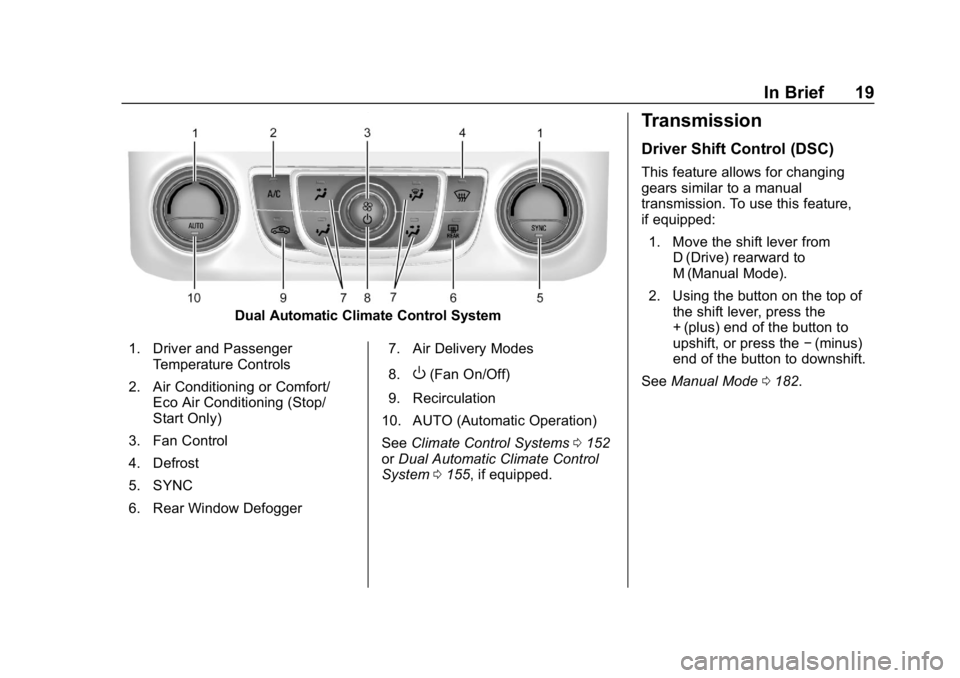
Dual Automatic Climate Control System
1. Driver and Passenger Temperature Controls
2. Air Conditioning or Comfort/ Eco Air Conditioning (Stop/
Start Only)
3. Fan Control
4. Defrost
5. SYNC
6. Rear Window Defogger 7. Air Delivery Modes
8.
O(Fan On/Off)
9. Recirculation
10. AUTO (Automatic Operation)
See Climate Control Systems 0152
or Dual Automatic Climate Control
System 0155, if equipped.
Transmission
Driver Shift Control (DSC)
This feature allows for changing
gears similar to a manual
transmission. To use this feature,
if equipped:
1. Move the shift lever from D (Drive) rearward to
M (Manual Mode).
2. Using the button on the top of the shift lever, press the
+ (plus) end of the button to
upshift, or press the −(minus)
end of the button to downshift.
See Manual Mode 0182.