2019 CHEVROLET IMPALA cooling
[x] Cancel search: coolingPage 229 of 353

Chevrolet Impala Owner Manual (GMNA-Localizing-U.S./Canada-12146115) -
2019 - crc - 8/27/18
228 Vehicle Care
1.Engine Air Cleaner/Filter 0232.
2. Engine Oil Fill Cap. See Engine Oil 0228.
3. Engine Oil Dipstick. See Engine Oil 0228.
4. Engine Cooling Fans (Out of View). See Cooling System
0 233.
5. Engine Cover.
6. Transmission Fluid Cap and Dipstick (Out of View). See
Automatic Transmission Fluid
0231.
7. Brake Fluid Reservoir. See Brake Fluid 0240.
8. Coolant Surge Tank and Pressure Cap. See Cooling
System 0233.
9. Battery (Under Cover). See Battery - North America 0241.
10. Windshield Washer Fluid Reservoir. See Washer Fluid
0 238.
11. Engine Compartment Fuse
Block 0251.Engine Oil
To ensure proper engine
performance and long life, careful
attention must be paid to engine oil.
Following these simple, but
important steps will help protect
your investment:
.
Use engine oil approved to the
proper specification and of the
proper viscosity grade. See
“Selecting the Right Engine Oil”
in this section.
. Check the engine oil level
regularly and maintain the
proper oil level. See “Checking
Engine Oil” and“When to Add
Engine Oil” in this section.
. Change the engine oil at the
appropriate time. See Engine Oil
Life System 0230.
. Always dispose of engine oil
properly. See “What to Do with
Used Oil” in this section.
Checking Engine Oil
Check the engine oil level regularly,
every 650 km (400 mi), especially
prior to a long trip. The engine oil
dipstick handle is a loop. See
Engine Compartment Overview
0225 for the location.
{Warning
The engine oil dipstick handle
may be hot; it could burn you.
Use a towel or glove to touch the
dipstick handle.
If a low oil Driver Information Center
(DIC) message displays, check the
oil level.
Follow these guidelines:
. To get an accurate reading, park
the vehicle on level ground.
Check the engine oil level after
the engine has been off for at
least two hours. Checking the
engine oil level on steep grades
or too soon after engine shutoff
can result in incorrect readings.
Accuracy improves when
Page 234 of 353
Chevrolet Impala Owner Manual (GMNA-Localizing-U.S./Canada-12146115) -
2019 - crc - 8/27/18
Vehicle Care 233
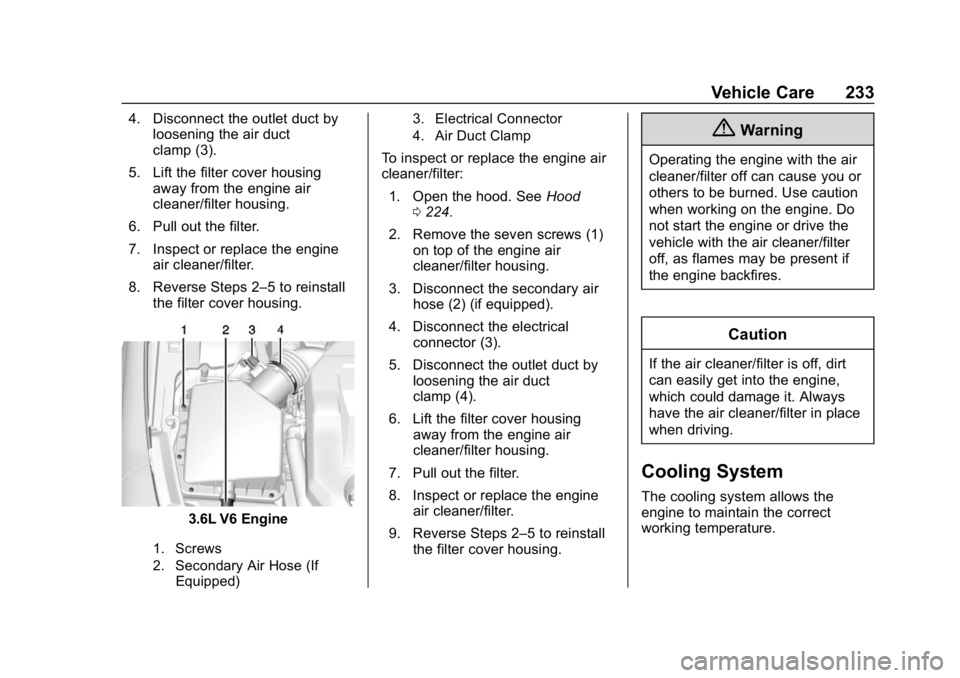
4. Disconnect the outlet duct byloosening the air duct
clamp (3).
5. Lift the filter cover housing away from the engine air
cleaner/filter housing.
6. Pull out the filter.
7. Inspect or replace the engine air cleaner/filter.
8. Reverse Steps 2–5 to reinstall the filter cover housing.
3.6L V6 Engine
1. Screws
2. Secondary Air Hose (If
Equipped) 3. Electrical Connector
4. Air Duct Clamp
To inspect or replace the engine air
cleaner/filter:
1. Open the hood. See Hood
0 224.
2. Remove the seven screws (1) on top of the engine air
cleaner/filter housing.
3. Disconnect the secondary air hose (2) (if equipped).
4. Disconnect the electrical connector (3).
5. Disconnect the outlet duct by loosening the air duct
clamp (4).
6. Lift the filter cover housing away from the engine air
cleaner/filter housing.
7. Pull out the filter.
8. Inspect or replace the engine air cleaner/filter.
9. Reverse Steps 2–5 to reinstall the filter cover housing.
{Warning
Operating the engine with the air
cleaner/filter off can cause you or
others to be burned. Use caution
when working on the engine. Do
not start the engine or drive the
vehicle with the air cleaner/filter
off, as flames may be present if
the engine backfires.
Caution
If the air cleaner/filter is off, dirt
can easily get into the engine,
which could damage it. Always
have the air cleaner/filter in place
when driving.
Cooling System
The cooling system allows the
engine to maintain the correct
working temperature.
Page 235 of 353

Chevrolet Impala Owner Manual (GMNA-Localizing-U.S./Canada-12146115) -
2019 - crc - 8/27/18
234 Vehicle Care
2.5L L4 Engine
1. Engine Cooling Fans (Outof View)
2. Coolant Surge Tank and Pressure Cap
3.6L V6 Engine
1. Engine Cooling Fans (Outof View)
2. Coolant Surge Tank and Pressure Cap
{Warning
An underhood electric fan can
start up even when the engine is
not running and can cause injury.
Keep hands, clothing, and tools
away from any underhood
electric fan.
{Warning
Do not touch heater or radiator
hoses, or other engine parts.
They can be very hot and can
burn you. Do not run the engine if
there is a leak; all coolant could
leak out. That could cause an
engine fire and can burn you. Fix
any leak before driving the
vehicle.
Engine Coolant
The cooling system in the vehicle is
filled with DEX-COOL engine
coolant. This coolant is designed to
remain in the vehicle for 5 years or
240 000 km (150,000 mi), whichever
occurs first.
The following explains the cooling
system and how to check and add
coolant when it is low. If there is a
problem with engine overheating,
see Engine Overheating 0237.
Page 236 of 353

Chevrolet Impala Owner Manual (GMNA-Localizing-U.S./Canada-12146115) -
2019 - crc - 8/27/18
Vehicle Care 235
What to Use
{Warning
Plain water, or other liquids such
as alcohol, can boil before the
proper coolant mixture will. With
plain water or the wrong mixture,
the engine could get too hot but
there would not be an overheat
warning. The engine could catch
fire and you or others could be
burned.
Use a 50/50 mixture of clean,
drinkable water and DEX-COOL
coolant. If using this mixture,
nothing else needs to be added.
This mixture:
. Gives freezing protection down
to−37 °C (−34 °F), outside
temperature.
. Gives boiling protection up to
129 °C (265 °F), engine
temperature.
. Protects against rust and
corrosion. .
Will not damage aluminum parts.
. Help keep the proper engine
temperature.Caution
Do not use anything other than a
mix of DEX-COOL coolant that
meets GM Standard
GMW3420 and clean, drinkable
water. Anything else can cause
damage to the engine cooling
system and the vehicle, which
would not be covered by the
vehicle warranty.
Never dispose of engine coolant by
putting it in the trash, pouring it on
the ground, or into sewers, streams,
or bodies of water. Have the coolant
changed by an authorized service
center, familiar with legal
requirements regarding used
coolant disposal. This will help
protect the environment and your
health.
Checking Coolant
The vehicle must be on a level
surface when checking the coolant
level.
Check to see if coolant is visible in
the coolant surge tank. If the coolant
inside the coolant surge tank is
boiling, do not do anything else until
it cools down.
If coolant is visible but the coolant
level is not at or above the mark
pointed to, add a 50/50 mixture of
clean drinkable water and
DEX-COOL coolant.
Page 237 of 353

Chevrolet Impala Owner Manual (GMNA-Localizing-U.S./Canada-12146115) -
2019 - crc - 8/27/18
236 Vehicle Care
Be sure the cooling system is cool
before this is done.
If no coolant is visible in the coolant
surge tank, add coolant as follows:
How to Add Coolant to the
Coolant Surge Tank
If no problem is found, check to see
if coolant is visible in the coolant
surge tank. If coolant is visible but
the coolant level is not at the
indicated level mark, add a 50/
50 mixture of clean, drinkable water
and DEX-COOL coolant at the
coolant surge tank, but be sure the
cooling system, including the
coolant surge tank pressure cap, is
cool before you do it.
{Warning
Spilling coolant on hot engine
parts can burn you. Coolant
contains ethylene glycol and it will
burn if the engine parts are hot
enough.
{Warning
Steam and scalding liquids from a
hot cooling system are under
pressure. Turning the pressure
cap, even a little, can cause them
to come out at high speed and
you could be burned. Never turn
the cap when the cooling system,
including the pressure cap, is hot.
Wait for the cooling system and
pressure cap to cool.
Caution
Failure to follow the specific
coolant fill procedure could cause
the engine to overheat and could
cause system damage. If coolant
is not visible in the surge tank,
contact your dealer.
1. Remove the coolant surge tankpressure cap when the cooling
system, including the coolant
surge tank pressure cap and
upper radiator hose, is no
longer hot.
Turn the pressure cap slowly
counterclockwise about
one-quarter of a turn. If you
hear a hiss, wait for that to
stop. This will allow any
pressure still left to be vented
out the discharge hose.
2. Keep turning the pressure cap slowly and remove it.
3. Fill the coolant surge tank with the proper mixture to the
indicated level mark.
4. With the coolant surge tank pressure cap off, start the
engine and let it run until you
Page 238 of 353

Chevrolet Impala Owner Manual (GMNA-Localizing-U.S./Canada-12146115) -
2019 - crc - 8/27/18
Vehicle Care 237
can feel the upper radiator
hose getting hot. Watch out for
the engine cooling fans.
By this time, the coolant level
inside the coolant surge tank
may be lower. If the level is
lower, add more of the proper
mixture to the coolant surge
tank until the level reaches the
indicated level mark.
5. Replace the pressure cap tightly.
6. Verify coolant level after the engine is shut off and the
coolant is cold. If necessary,
repeat coolant fill procedure
Steps 1–6.
If the coolant still is not at the
proper level when the system
cools down again, see your
dealer.Caution
If the pressure cap is not tightly
installed, coolant loss and engine
damage may occur. Be sure the
cap is properly and tightly
secured.
Engine Overheating
There is a coolant temperature
gauge on the instrument cluster that
indicates an overheated engine
condition. See Engine Coolant
Temperature Gauge 0119.
If the decision is made not to lift the
hood when this warning appears,
get service help right away. See
Roadside Assistance Program
0 319.
If the decision is made to lift the
hood, make sure the vehicle is
parked on a level surface.
Then check to see if the engine
cooling fans are running. If the
engine is overheating, the fans should be running. If not, do not
continue to run the engine and have
the vehicle serviced.
Caution
Do not run the engine if there is a
leak in the engine cooling system.
This can cause a loss of all
coolant and can damage the
system and vehicle. Have any
leaks fixed right away.
If Steam Is Coming from the
Engine Compartment
{Warning
Steam and scalding liquids from a
hot cooling system are under
pressure. Turning the pressure
cap, even a little, can cause them
to come out at high speed and
you could be burned. Never turn
the cap when the cooling system,
including the pressure cap, is hot.
Wait for the cooling system and
pressure cap to cool.
Page 239 of 353

Chevrolet Impala Owner Manual (GMNA-Localizing-U.S./Canada-12146115) -
2019 - crc - 8/27/18
238 Vehicle Care
SeeOverheated Engine Protection
Operating Mode 0238 for
information on driving to a safe
place in an emergency.
If No Steam Is Coming from
the Engine Compartment
If an engine overheat warning is
displayed but no steam can be seen
or heard, the problem might not be
too serious. Sometimes the engine
can get a little too hot when the
vehicle:
. Climbs a long hill on a hot day.
. Stops after high-speed driving.
. Idles for long periods in traffic.
. Tows a trailer.
If the overheat warning displays with
no sign of steam:
1. Turn the air conditioning off.
2. Turn the heater on to the highest temperature and to the
highest fan speed. Open the
windows as necessary. 3. When it is safe to do so, pull off
the road, shift to P (Park) or
N (Neutral), and let the
engine idle.
If the coolant temperature gauge is
no longer in the overheat zone, the
vehicle can be driven. Continue to
drive the vehicle slowly for about
10 minutes. Keep a safe vehicle
distance from the vehicle in front.
If the warning does not come back
on, continue to drive normally and
have the cooling system checked
for proper fill and function.
If the warning continues, pull over,
stop, and park the vehicle
right away.
If there is no sign of steam, idle the
engine for three minutes while
parked. If the warning is still
displayed, turn off the engine until it
cools down. Also, see Overheated
Engine Protection Operating Mode
0 238.
Overheated Engine
Protection
Operating Mode
This emergency operating mode
allows the vehicle to be driven to a
safe place in an emergency
situation. If an overheated engine
condition exists, an overheat
protection mode which alternates
firing groups of cylinders helps
prevent engine damage. In this
mode, there is significant loss in
power and engine performance.
The engine coolant temperature
gauge indicates if an overheat
condition exists. Driving extended
distances and/or towing a trailer in
the overheat protection mode
should be avoided.
Washer Fluid
What to Use
When windshield washer fluid is
needed, be sure to read the
manufacturer's instructions before
use. If operating the vehicle in an
area where the temperature may fall
Page 255 of 353

Chevrolet Impala Owner Manual (GMNA-Localizing-U.S./Canada-12146115) -
2019 - crc - 8/27/18
254 Vehicle Care
FusesUsage
42 Cooling fan high speed
44 Starter control
45 Cooling fan low speed
46 Cooling fan control
47 Pre catalytic converter O2 sensors/Canister
purge solenoid
49 Right HID headlamp
50 Left HID headlamp
51 Horn
52 Display/Ignition
53 Inside rearview mirror/ Rear vision camera
54 Instrument panel/ Ignition
55 Exterior rearview mirror
56 Front washer
60 Heated mirror
62 Obstacle detection Fuses
Usage
64 Rain sensor/Rear seat audio
66 Trunk release
67 Chassis control module
69 Battery voltage sensor
71 Memory seat
Relays Usage
1 A/C clutch
2 Starter pinion
4 Front wiper speed
5 Front wiper control
6 Cabin Coolant pump/ Air solenoid
7 Powertrain
8 Transmission auxiliary pump
9 Cooling fan high speed
10 Cooling fan low speed
11 Starter Relays
Usage
13 Cooling fan control
14 Low-beam HID headlamp
15 Run/Crank
17 Rear window defogger
Instrument Panel Fuse
Block
The instrument panel fuse block is
in the instrument panel, on the
driver side of the vehicle.