2019 CHEVROLET EQUINOX engine
[x] Cancel search: enginePage 151 of 426
Chevrolet Equinox Owner Manual (GMNA-Localizing-U.S./Canada/Mexico-
12145779) - 2019 - CRC - 7/30/18
150 Instruments and Controls
Oil Pressure :Oil pressure is
displayed in either kilopascal (kPa)
or in pounds per square inch (psi).
Oil pressure can vary with engine
speed, outside temperature, and oil
viscosity. On some models, the oil
pump will vary engine oil pressure
according to engine needs. Oil
pressure may change quickly as the
engine speed or load varies. This is
normal. If the oil pressure warning
light or DIC message indicates oil
pressure outside the normal
operating range, check the vehicle's
oil as soon as possible.
Coolant Temperature : Displays
the coolant temperature in degrees
Celsius (°C) or degrees Fahrenheit
(°F).
Diesel Exhaust Fluid (DEF) Level
Percent (Diesel Engine Only) :
If equipped, the DEF level will be
displayed as either OK, XX%,
or LOW. When LOW appears on the
display, add DEF as soon as
possible. See Diesel Exhaust Fluid
0 205. Diesel Exhaust Fluid (DEF) Level
Gauge (Diesel Engine Only) :
If equipped, the DEF level displays
as a horizontal bar gauge with E or
0 and F or 1 at both ends. If more of
the bar is filled green, the vehicle
has a higher level of DEF. When the
estimated level is low, the gauge will
turn red and LOW will display above
the bar. When there is an error, the
bar will be empty and
UNAVAILABLE will appear. When
LOW appears on the display, add
DEF as soon as possible. See
Diesel Exhaust Fluid
0205.
Diesel Exhaust Fluid (DEF) Range
(Diesel Engine Only) : If equipped,
this page displays how far the
vehicle can go before DEF needs to
be replaced. Range is displayed in
mi or km. When the estimated range
is low, LOW will display. If an error
occurs, “−−”will display. When DEF
range is high, a greater than sign is
shown before the range value.
When LOW appears on the display,
add DEF as soon as possible. See
Diesel Exhaust Fluid 0205.Vehicle Messages
Messages displayed on the DIC
indicate the status of the vehicle or
some action that may be needed to
correct a condition. Multiple
messages may appear one after
another.
The messages that do not require
immediate action can be
acknowledged and cleared by
pressing
V. The messages that
require immediate action cannot be
cleared until that action is
performed.
All messages should be taken
seriously; clearing the message
does not correct the problem.
If a SERVICE message appears,
see your dealer.
Follow the instructions given in the
messages. The system displays
messages regarding the following
topics:
. Service Messages
. Fluid Levels
. Vehicle Security
Page 152 of 426
Chevrolet Equinox Owner Manual (GMNA-Localizing-U.S./Canada/Mexico-
12145779) - 2019 - CRC - 7/30/18
Instruments and Controls 151
.Brakes
. Steering
. Ride Control Systems
. Driver Assistance Systems
. Cruise Control
. Lighting and Bulb Replacement
. Wiper/Washer Systems
. Doors and Windows
. Seat Belts
. Airbag Systems
. Engine and Transmission
. Tire Pressure
. Battery
Engine Power Messages
ENGINE POWER IS REDUCED
This message displays when the
vehicle's propulsion power is
reduced. A reduction in propulsion
power can affect the vehicle's ability
to accelerate. If this message is on,
but there is no observed reduction
in performance, proceed to your
destination. The performance may be reduced the next time the vehicle
is driven. The vehicle may be driven
while this message is on, but
maximum acceleration and speed
may be reduced. Anytime this
message stays on, or displays
repeatedly, the vehicle should be
taken to your dealer for service as
soon as possible.
Vehicle Speed Messages
SPEED LIMITED TO
XXX KM/H (MPH)
This message shows that the
vehicle speed has been limited to
the speed displayed. The limited
speed is a protection for various
propulsion and vehicle systems,
such as lubrication, thermal,
suspension, Teen Driver if
equipped, or tires.
If equipped with a diesel engine,
see
Diesel Exhaust Fluid 0205.
Vehicle
Personalization
The following are all possible
vehicle personalization features.
Depending on the vehicle, some
may not be available.
For System, Apps, and Personal
features and functions, see
“Settings” in the infotainment
manual.
To access the vehicle
personalization menu:
1. Touch the Settings icon on the Home Page of the infotainment
display.
2. Touch Vehicle to display a list of available options.
3. Touch to select the desired feature setting.
4. Touch
9orRto turn a feature
off or on.
5. Touch
zto go to the top level
of the Settings menu.
Page 153 of 426
Chevrolet Equinox Owner Manual (GMNA-Localizing-U.S./Canada/Mexico-
12145779) - 2019 - CRC - 7/30/18
152 Instruments and Controls
The menu may contain the
following:
Rear Seat Reminder
This allows for a chime and a
message when the rear door has
been opened before or during
operation of the vehicle.
Touch Off or On.
Climate and Air Quality
Touch and the following may
display:
.Auto Fan Speed
. Air Quality Sensor
. Auto Cooled Seats
. Auto Heated Seats
. Auto Defog
. Auto Rear Defog
Auto Fan Speed
This setting specifies the amount of
airflow when the climate control fan
setting is Auto Fan.
Touch Low, Medium, or High. Air Quality Sensor
This setting switches the system
into Recirculation Mode based on
the quality of the outside air.
Touch Off, Low Sensitivity, or High
Sensitivity.
Auto Cooled Seats
When enabled, this feature will
automatically activate ventilated
seats at the level required by the
interior temperature. See
Heated
and Ventilated Front Seats 064.
Touch Off or On.
Auto Heated Seats
When enabled, this feature will
automatically activate the heated
seats at the level required by the
interior temperature. The auto
heated seats can be turned off by
using the heated seat buttons on
the center console. See Heated and
Ventilated Front Seats 064.
Touch Off or On. Auto Defog
This setting automatically turns the
front defogger on when the engine
is started.
Touch Off or On.
Auto Rear Defog
This setting automatically turns the
rear defogger on when the engine is
started.
Touch Off or On.
Collision/Detection Systems
Touch and the following may
display:
.
Alert Type
. Forward Collision System
. Lane Change Alert
. Park Assist
. Rear Camera Park Assist
Symbols
. Rear Cross Traffic Alert
Page 155 of 426
Chevrolet Equinox Owner Manual (GMNA-Localizing-U.S./Canada/Mexico-
12145779) - 2019 - CRC - 7/30/18
154 Instruments and Controls
shifted out of R (Reverse) or the
engine is turned off. SeeReverse
Tilt Mirrors 051.
Touch Off, On - Driver and
Passenger, On - Driver, or On -
Passenger.
Auto Wipe in Reverse Gear
When on and the front wiper is on,
the rear wiper will automatically
activate when the vehicle is shifted
to R (Reverse).
Touch Off or On.
Extended Hill Start Assist
This allows the duration of the Hill
Start Assist to be changed.
Touch Extended Hold or
Standard Hold.
Lighting
Touch and the following may
display:
. Vehicle Locator Lights
. Exit Lighting Vehicle Locator Lights
This feature will flash the exterior
lamps and allows some of the
exterior lamps and most of the
interior lamps to turn on briefly
when
Kon the Remote Keyless
Entry (RKE) transmitter is pressed
to locate the vehicle.
Touch Off or On.
Exit Lighting
This allows the selection of how
long the exterior lamps stay on
when leaving the vehicle when it is
dark outside.
Touch Off, 30 Seconds, 60 Seconds,
or 120 Seconds.
Power Door Locks
Touch and the following may
display:
. Open Door Anti Lockout
. Auto Door Unlock
. Delayed Door Lock Open Door Anti Lock Out
When on, this feature will keep the
driver door from locking when the
door is open. If Off is selected, the
Delayed Door Lock menu will be
available.
Touch Off or On.
Auto Door Unlock
This allows selection of which of the
doors will automatically unlock when
the vehicle is shifted into P (Park).
Touch Off, All Doors, or Driver Door.
Delayed Door Lock
When on, this feature will delay the
locking of the doors. To override the
delay, press the power door lock
switch on the door.
Touch Off or On.
Remote Lock, Unlock, Start
Touch and the following may
display:
.
Remote Unlock Light Feedback
. Remote Lock Feedback
. Remote Door Unlock
Page 164 of 426
Chevrolet Equinox Owner Manual (GMNA-Localizing-U.S./Canada/Mexico-
12145779) - 2019 - CRC - 7/30/18
Lighting 163
When the DRL are on, the taillamps,
sidemarker lamps, instrument panel
lights, and other lamps will not be
on. The instrument cluster will be lit.
The DRL turn off when the
headlamps are turned to
Oor the
ignition is off. For vehicles first sold
in Canada, the DRL can only be
turned off when the vehicle is
parked.
The regular headlamp system
should be turned on when needed.
Automatic Headlamp
System
When the exterior lamp control is
set to AUTO and it is dark enough
outside, the headlamps come on
automatically.
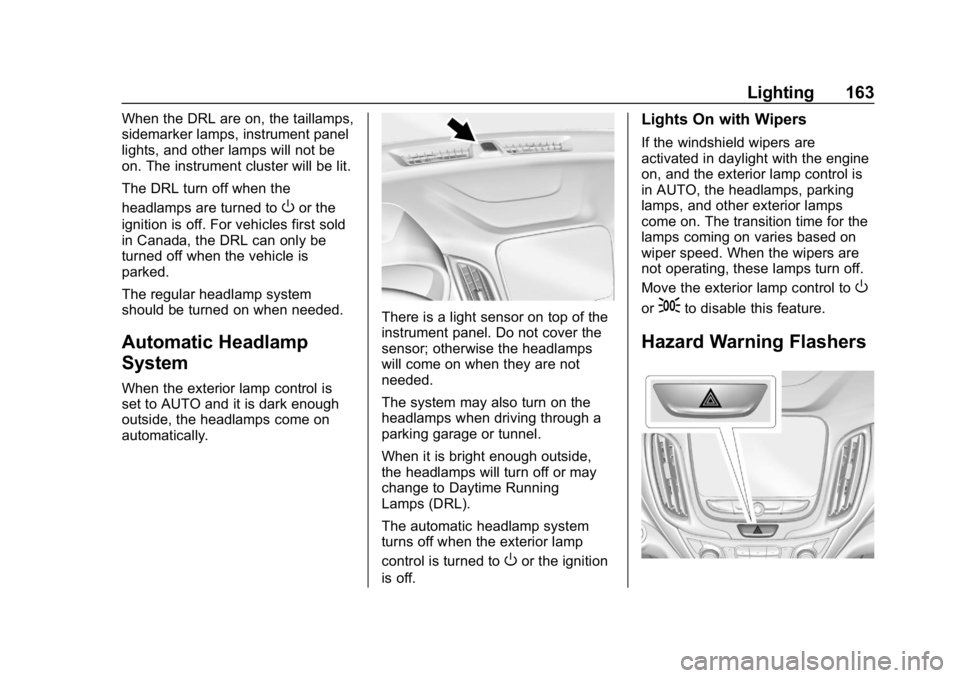
There is a light sensor on top of the
instrument panel. Do not cover the
sensor; otherwise the headlamps
will come on when they are not
needed.
The system may also turn on the
headlamps when driving through a
parking garage or tunnel.
When it is bright enough outside,
the headlamps will turn off or may
change to Daytime Running
Lamps (DRL).
The automatic headlamp system
turns off when the exterior lamp
control is turned to
Oor the ignition
is off.
Lights On with Wipers
If the windshield wipers are
activated in daylight with the engine
on, and the exterior lamp control is
in AUTO, the headlamps, parking
lamps, and other exterior lamps
come on. The transition time for the
lamps coming on varies based on
wiper speed. When the wipers are
not operating, these lamps turn off.
Move the exterior lamp control to
O
or;to disable this feature.
Hazard Warning Flashers
Page 168 of 426
Chevrolet Equinox Owner Manual (GMNA-Localizing-U.S./Canada/Mexico-
12145779) - 2019 - CRC - 7/30/18
Lighting 167
The exterior lamps turn off
immediately by turning the exterior
lamp control off.
This feature can be changed. See
Vehicle Personalization0151.
Battery Load
Management
The vehicle has Electric Power
Management (EPM) that estimates
the battery's temperature and state
of charge. It then adjusts the voltage
for best performance and extended
life of the battery.
When the battery's state of charge
is low, the voltage is raised slightly
to quickly bring the charge back up.
When the state of charge is high,
the voltage is lowered slightly to
prevent overcharging. If the vehicle
has a voltmeter gauge or a voltage
display on the Driver Information
Center (DIC), you may see the
voltage move up or down. This is
normal. If there is a problem, an
alert will be displayed. The battery can be discharged at
idle if the electrical loads are very
high. This is true for all vehicles.
This is because the generator
(alternator) may not be spinning fast
enough at idle to produce all of the
power needed for very high
electrical loads.
A high electrical load occurs when
several of the following are on, such
as: headlamps, high beams, rear
window defogger, climate control fan
at high speed, heated seats, engine
cooling fans, trailer loads, and loads
plugged into accessory power
outlets.
EPM works to prevent excessive
discharge of the battery. It does this
by balancing the generator's output
and the vehicle's electrical needs.
It can increase engine idle speed to
generate more power whenever
needed. It can temporarily reduce
the power demands of some
accessories.
Normally, these actions occur in
steps or levels, without being
noticeable. In rare cases at the
highest levels of corrective action,this action may be noticeable to the
driver. If so, a DIC message might
be displayed and it is recommended
that the driver reduce the electrical
loads as much as possible.
Battery Power Protection
This feature shuts off the interior
lamps if they are left on for more
than 10 minutes when the ignition is
off. This helps to prevent the battery
from running down.
Exterior Lighting Battery
Saver
The exterior lamps turn off about
10 minutes after the ignition is
turned off, if the parking lamps or
headlamps have been manually left
on. This protects against draining
the battery. To restart the 10-minute
timer, turn the exterior lamp control
to the off position and then back to
the parking lamp or headlamp
position.
To keep the lamps on for more than
10 minutes, the ignition must be on
or in ACC/ACCESSORY.
Page 169 of 426
Chevrolet Equinox Owner Manual (GMNA-Localizing-U.S./Canada/Mexico-
12145779) - 2019 - CRC - 7/30/18
168 Infotainment System
Infotainment
System
Introduction
Infotainment . . . . . . . . . . . . . . . . . . 168
Introduction
Infotainment
See the infotainment manual for
information on the radio, audio
players, phone, navigation system,
and voice or speech recognition.
It also includes information on
settings.
Active Noise Cancellation (ANC)
If equipped, ANC reduces engine
noise in the vehicle’s interior. ANC
requires the factory-installed audio
system, radio, speakers, amplifier (if
equipped), induction system, and
exhaust system to work properly.
Deactivation is required by your
dealer if related aftermarket
equipment is installed.
Page 178 of 426
Chevrolet Equinox Owner Manual (GMNA-Localizing-U.S./Canada/Mexico-
12145779) - 2019 - CRC - 7/30/18
Driving and Operating 177
Driving and
Operating
Driving Information
Driver Behavior . . . . . . . . . . . . . . . 178
Driving Environment . . . . . . . . . . 179
Vehicle Design . . . . . . . . . . . . . . . 179
Distracted Driving . . . . . . . . . . . . 179
Defensive Driving . . . . . . . . . . . . . 180
Drunk Driving . . . . . . . . . . . . . . . . . 180
Control of a Vehicle . . . . . . . . . . . 180
Braking . . . . . . . . . . . . . . . . . . . . . . . 180
Steering . . . . . . . . . . . . . . . . . . . . . . 181
Off-Road Recovery . . . . . . . . . . . 181
Loss of Control . . . . . . . . . . . . . . . 182
Off-Road Driving . . . . . . . . . . . . . 182
Driving on Wet Roads . . . . . . . . 186
Hill and Mountain Roads . . . . . 187
Winter Driving . . . . . . . . . . . . . . . . 188
If the Vehicle Is Stuck . . . . . . . . 189
Vehicle Load Limits . . . . . . . . . . . 190
Starting and Operating
New Vehicle Break-In . . . . . . . . . 194
Ignition Positions . . . . . . . . . . . . . 194
Starting the Engine . . . . . . . . . . . 196
Stop/Start System . . . . . . . . . . . . 198
Engine Heater . . . . . . . . . . . . . . . . 199Retained Accessory
Power (RAP) . . . . . . . . . . . . . . . . 201
Shifting Into Park . . . . . . . . . . . . . 201
Shifting out of Park . . . . . . . . . . . 202
Parking over Things That Burn . . . . . . . . . . . . . . . . . . . 202
Extended Parking . . . . . . . . . . . . 202
Engine Exhaust
Engine Exhaust . . . . . . . . . . . . . . 203
Running the Vehicle While Parked . . . . . . . . . . . . . . . . . . . . . . 204
Diesel Particulate Filter
Diesel Particulate Filter . . . . . . . 204
Diesel Exhaust Fluid
Diesel Exhaust Fluid . . . . . . . . . . 205
Automatic Transmission
Automatic Transmission . . . . . . 210
Manual Mode . . . . . . . . . . . . . . . . . 212
Tow/Haul Mode . . . . . . . . . . . . . . . 213
Drive Systems
All-Wheel Drive . . . . . . . . . . . . . . . 214
Brakes
Antilock BrakeSystem (ABS) . . . . . . . . . . . . . . . 215
Electric Parking Brake . . . . . . . . 216 Brake Assist . . . . . . . . . . . . . . . . . . 217
Hill Start Assist (HSA) . . . . . . . . 218
Ride Control Systems
Traction Control/Electronic
Stability Control . . . . . . . . . . . . . 218
Cruise Control
Cruise Control . . . . . . . . . . . . . . . . 222
Adaptive Cruise Control . . . . . . 224
Driver Assistance Systems
Driver Assistance Systems . . . 234
Assistance Systems forParking or Backing . . . . . . . . . . 236
Assistance Systems for Driving . . . . . . . . . . . . . . . . . . . . . . 240
Forward Collision Alert (FCA) System . . . . . . . . . . . . . . . . . . . . . . 240
Forward Automatic Braking (FAB) . . . . . . . . . . . . . . . 242
Front Pedestrian Braking (FPB) System . . . . . . . . . . . . . . . 244
Side Blind Zone Alert (SBZA) . . . . . . . . . . . . . . . . 246
Lane Change Alert (LCA) . . . . . 246
Lane Departure Warning (LDW) . . . . . . . . . . . . . 248
Lane Keep Assist (LKA) . . . . . . 248