2019 CHEVROLET EQUINOX Driver information center
[x] Cancel search: Driver information centerPage 205 of 426
Chevrolet Equinox Owner Manual (GMNA-Localizing-U.S./Canada/Mexico-
12145779) - 2019 - CRC - 7/30/18
204 Driving and Operating
Running the Vehicle
While Parked
It is better not to park with the
engine running.
If the vehicle is left with the engine
running, follow the proper steps to
be sure the vehicle will not move.
SeeShifting Into Park 0201 and
Engine Exhaust 0203.
If parking on a hill and pulling a
trailer, see Driving Characteristics
and Towing Tips 0264.
Diesel Particulate
Filter
The Diesel Particulate Filter (DPF)
system filters soot particles out of
the exhaust gases. The DPF is
under the vehicle in the exhaust
system.
Depending on a number of factors
monitored by the engine computer,
the DPF will need to be cleaned of
accumulated solids. When a
cleaning is needed, the engine
computer will initiate a self-cleaning
function that runs automatically
during driving without any
notification. The filter is cleaned by
periodically burning off the soot
particles at high temperature. This
process takes place automatically
under set driving conditions and
may take up to 25 minutes. Fuel
consumption may be higher during
this period.
While the DPF cleaning is
automatically controlled by the
engine computer, the vehicle will
need to operate continuously for
approximately 25 minutes and at speeds greater than 50 km/h
(30 mph) to clean the DPF
effectively.
If the vehicle is used for numerous
short trips or extended slow-speed
operation, the engine computer may
not be able to adequately heat up
the exhaust system to clean the
DPF effectively. The engine
computer has been designed to
continuously monitor the condition
of the DPF. When the engine
computer detects that the DPF is
nearly full of particulates and that
the vehicle is not being operated in
a manner that would allow effective
automatic DPF cleaning, a Driver
Information Center (DIC) message
will display. Start the cleaning
process as soon as possible.
Cleaning Process
To activate the cleaning process,
continue driving safely, and keep
vehicle speed above 50 km/h (30
mph) until the warning message in
the DIC turns off.
Page 207 of 426
Chevrolet Equinox Owner Manual (GMNA-Localizing-U.S./Canada/Mexico-
12145779) - 2019 - CRC - 7/30/18
206 Driving and Operating
Caution (Continued)
damage the system, requiring
costly repairs that will not be
covered by the vehicle warranty.
Caution
Do not mix fuel with DEF, and do
not put DEF in the fuel tank. This
could lead to costly repairs that
might not be covered by the
vehicle warranty.
It is recommended to fill the DEF
tank on level ground and when the
vehicle is not running. When adding
fluid, it is recommended to fill the
DEF tank.
Caution
Do not overfill the DEF tank and
do not allow DEF to contact the
finished surfaces of the vehicle,
as it could damage the vehicle
finish. If DEF is spilled during
filling, wipe any affected surface
with a damp cloth.
Do not top off the DEF tank. If using
a bottle or jug to refill DEF, follow
the instructions on the container
label and use a dedicated fill aid.
In certain cold conditions, it is
possible to find some frozen DEF in
the DEF fill pipe opening. If this
condition prevents the filling of a
DEF tank, place the vehicle in a
warm garage overnight.
For information on how to fill the
DEF tank, see Filling the Tank
(Gasoline) 0259 orFilling the Tank
(Diesel) 0261. Exhaust Fluid Low
A full DEF tank will last for several
thousand kilometers (miles),
depending on vehicle usage. As the
exhaust fluid level drops, warnings
will automatically be displayed in the
DIC. Exhaust fluid level status is
available in the DIC. See
“Diesel
Exhaust Fluid (DEF) Level (Diesel
Engine Only)” inDriver Information
Center (DIC) (Base Level and
Midlevel) 0141 orDriver Information
Center (DIC) (Uplevel) 0146.
To avoid vehicle speed limitations,
the DEF tank should be refilled at
the first opportunity after a low
warning indication. If DEF is added
before the EXHAUST FLUID
EMPTY REFILL NOW message
appears, it may take several km/mi
for the DIC message to update.
If the vehicle speed has been
limited and DEF has been added, it
may take up to 30 seconds after
engine start with the vehicle
stopped for the EXHAUST FLUID
EMPTY REFILL NOW message to
clear. If the vehicle is driven prior to
the DIC message clearing, the
Page 213 of 426
Chevrolet Equinox Owner Manual (GMNA-Localizing-U.S./Canada/Mexico-
12145779) - 2019 - CRC - 7/30/18
212 Driving and Operating
Caution
A transmission hot message may
display if the automatic
transmission fluid is too hot.
Driving under this condition can
damage the vehicle. Stop and idle
the engine to cool the automatic
transmission fluid. This message
clears when the transmission fluid
has cooled sufficiently.
D : This position is for normal
driving. If more power is needed for
passing, press the accelerator
pedal down.
Caution
If the vehicle does not shift gears,
the transmission could be
damaged. Have the vehicle
serviced right away.
Caution
Spinning the tires or holding the
vehicle in one place on a hill
using only the accelerator pedal
may damage the transmission.
The repair will not be covered by
the vehicle warranty. If the vehicle
is stuck, do not spin the tires.
When stopping on a hill, use the
brakes to hold the vehicle in
place.
L : Allows the driver to select the
range of gear positions. See Manual
Mode 0212.
Operating Modes
The transmission may operate in a
lower gear than normal to improve
vehicle performance. The engine
speed may be higher and there may
be an increase in noise during the
following conditions:
. When climbing a grade.
. When driving downhill. .
When driving in hot
temperatures or at high altitude.Manual Mode
Electronic Range Select
(ERS) Mode
ERS or manual mode allows for the
selection of the range of gear
positions. Use this mode when
driving downhill or towing a trailer to
limit the top gear and vehicle speed.
The shift position indicator within the
Driver Information Center (DIC) will
display a number next to the L
indicating the highest available gear
under manual mode and the driving
conditions when manual mode was
selected.
To use this feature:
1. Move the shift lever to L (Manual Mode).
Page 214 of 426
Chevrolet Equinox Owner Manual (GMNA-Localizing-U.S./Canada/Mexico-
12145779) - 2019 - CRC - 7/30/18
Driving and Operating 213
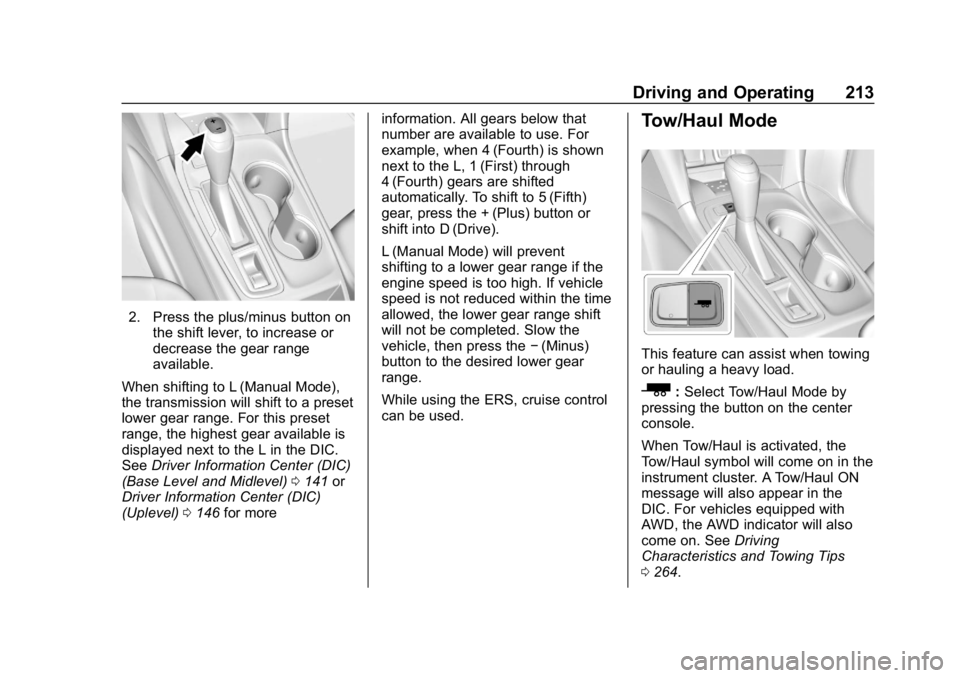
2. Press the plus/minus button onthe shift lever, to increase or
decrease the gear range
available.
When shifting to L (Manual Mode),
the transmission will shift to a preset
lower gear range. For this preset
range, the highest gear available is
displayed next to the L in the DIC.
See Driver Information Center (DIC)
(Base Level and Midlevel) 0141 or
Driver Information Center (DIC)
(Uplevel) 0146 for more information. All gears below that
number are available to use. For
example, when 4 (Fourth) is shown
next to the L, 1 (First) through
4 (Fourth) gears are shifted
automatically. To shift to 5 (Fifth)
gear, press the + (Plus) button or
shift into D (Drive).
L (Manual Mode) will prevent
shifting to a lower gear range if the
engine speed is too high. If vehicle
speed is not reduced within the time
allowed, the lower gear range shift
will not be completed. Slow the
vehicle, then press the
−(Minus)
button to the desired lower gear
range.
While using the ERS, cruise control
can be used.
Tow/Haul Mode
This feature can assist when towing
or hauling a heavy load.
_: Select Tow/Haul Mode by
pressing the button on the center
console.
When Tow/Haul is activated, the
Tow/Haul symbol will come on in the
instrument cluster. A Tow/Haul ON
message will also appear in the
DIC. For vehicles equipped with
AWD, the AWD indicator will also
come on. See Driving
Characteristics and Towing Tips
0 264.
Page 217 of 426
Chevrolet Equinox Owner Manual (GMNA-Localizing-U.S./Canada/Mexico-
12145779) - 2019 - CRC - 7/30/18
216 Driving and Operating
Electric Parking Brake
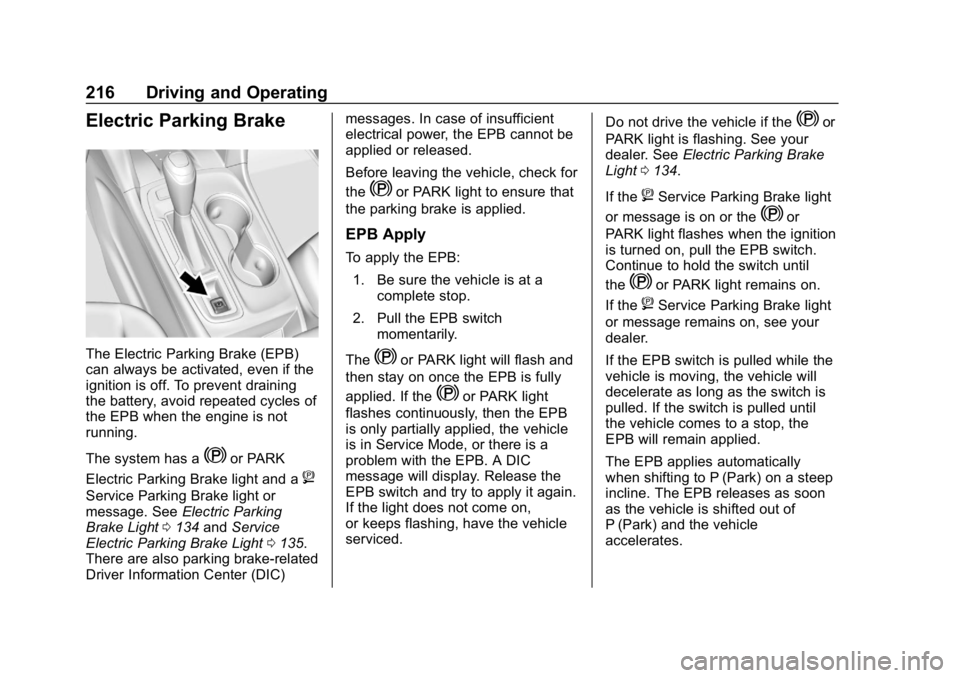
The Electric Parking Brake (EPB)
can always be activated, even if the
ignition is off. To prevent draining
the battery, avoid repeated cycles of
the EPB when the engine is not
running.
The system has a
Yor PARK
Electric Parking Brake light and a
8
Service Parking Brake light or
message. See Electric Parking
Brake Light 0134 andService
Electric Parking Brake Light 0135.
There are also parking brake-related
Driver Information Center (DIC) messages. In case of insufficient
electrical power, the EPB cannot be
applied or released.
Before leaving the vehicle, check for
the
Yor PARK light to ensure that
the parking brake is applied.
EPB Apply
To apply the EPB:
1. Be sure the vehicle is at a complete stop.
2. Pull the EPB switch momentarily.
The
Yor PARK light will flash and
then stay on once the EPB is fully
applied. If the
Yor PARK light
flashes continuously, then the EPB
is only partially applied, the vehicle
is in Service Mode, or there is a
problem with the EPB. A DIC
message will display. Release the
EPB switch and try to apply it again.
If the light does not come on,
or keeps flashing, have the vehicle
serviced. Do not drive the vehicle if the
Yor
PARK light is flashing. See your
dealer. See Electric Parking Brake
Light 0134.
If the
8Service Parking Brake light
or message is on or the
Yor
PARK light flashes when the ignition
is turned on, pull the EPB switch.
Continue to hold the switch until
the
Yor PARK light remains on.
If the
8Service Parking Brake light
or message remains on, see your
dealer.
If the EPB switch is pulled while the
vehicle is moving, the vehicle will
decelerate as long as the switch is
pulled. If the switch is pulled until
the vehicle comes to a stop, the
EPB will remain applied.
The EPB applies automatically
when shifting to P (Park) on a steep
incline. The EPB releases as soon
as the vehicle is shifted out of
P (Park) and the vehicle
accelerates.
Page 220 of 426
Chevrolet Equinox Owner Manual (GMNA-Localizing-U.S./Canada/Mexico-
12145779) - 2019 - CRC - 7/30/18
Driving and Operating 219
The indicator light for both systems
is in the instrument cluster. This
light will:
.Flash when TCS is limiting
wheel spin
. Flash when StabiliTrak/ESC is
activated
. Turn on and stay on when either
system is not working
If either system fails to turn on or to
activate, a message displays in the
Driver Information Center (DIC), and
dcomes on and stays on to
indicate that the system is inactive
and is not assisting the driver in
maintaining control. The vehicle is
safe to drive, but driving should be
adjusted accordingly.
If
dcomes on and stays on:
1. Stop the vehicle. 2. Turn the engine off and wait
15 seconds.
3. Start the engine.
Drive the vehicle. If
dcomes on
and stays on, the vehicle may need
more time to diagnose the problem.
If the condition persists, see your
dealer.
Turning the Systems Off and
On (Uplevel Cluster)
Caution
Do not repeatedly brake or
accelerate heavily when TCS is
off. The vehicle driveline could be
damaged.
At speeds of 56 km/h (35 mph) or
above, this ability to turn off or on is
disabled.
TCS and StabiliTrak/ESC can be
turned off or on using the DIC
controls as follows:
Pressoorpto scroll to the
Options application.
Press
worxto scroll through the
items in the Options menu.
Press
Vto select the Traction and
Stability page, then press
Vto
select the menu. Use
worxto
select Traction (TCS) or
Stability (ESC).
To turn TCS off, select Traction,
then press
V. The TCS icon on the
DIC will change from On to Off and
iilluminates in the instrument
cluster.
Page 236 of 426
Chevrolet Equinox Owner Manual (GMNA-Localizing-U.S./Canada/Mexico-
12145779) - 2019 - CRC - 7/30/18
Driving and Operating 235
Warning (Continued)
Under many conditions, these
systems will not:. Detect children,
pedestrians, bicyclists,
or animals.
. Detect vehicles or objects
outside the area monitored
by the system.
. Work at all driving speeds.
. Warn you or provide you
with enough time to avoid a
crash.
. Work under poor visibility or
bad weather conditions.
. Work if the detection sensor
is not cleaned or is covered
by ice, snow, mud, or dirt.
. Work if the detection sensor
is covered up, such as with
a sticker, magnet, or metal
plate.
(Continued)
Warning (Continued)
.Work if the area surrounding
the detection sensor is
damaged or not properly
repaired.
Complete attention is always
required while driving, and you
should be ready to take action
and apply the brakes and/or steer
the vehicle to avoid crashes.
Audible or Safety Alert Seat
Some driver assistance features
alert the driver of obstacles by
beeping. To change the volume of
the warning chime, see “Comfort
and Convenience” underVehicle
Personalization 0151.
If equipped with the Safety Alert
Seat, the driver seat cushion may
provide a vibrating pulse alert
instead of beeping. To change this,
see “Collision/Detection Systems”
under Vehicle Personalization
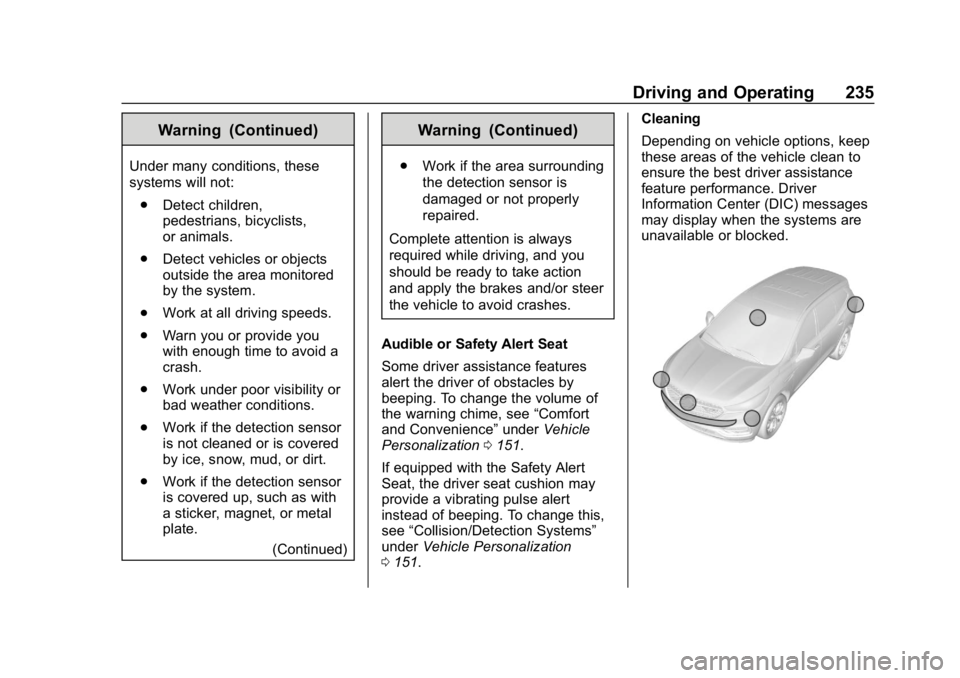
0 151. Cleaning
Depending on vehicle options, keep
these areas of the vehicle clean to
ensure the best driver assistance
feature performance. Driver
Information Center (DIC) messages
may display when the systems are
unavailable or blocked.
Page 243 of 426
Chevrolet Equinox Owner Manual (GMNA-Localizing-U.S./Canada/Mexico-
12145779) - 2019 - CRC - 7/30/18
242 Driving and Operating
chosen setting will remain until it is
changed and will affect the timing of
both the Collision Alert and the
Tailgating Alert features. The timing
of both alerts will vary based on
vehicle speed. The faster the
vehicle speed, the farther away the
alert will occur. Consider traffic and
weather conditions when selecting
the alert timing. The range of
selectable alert timings may not be
appropriate for all drivers and
driving conditions.
Following Distance Indicator
The following distance to a moving
vehicle ahead in your path is
indicated in following time in
seconds on the Driver Information
Center (DIC). SeeDriver
Information Center (DIC) (Base
Level and Midlevel) 0141 orDriver
Information Center (DIC) (Uplevel)
0 146. The minimum following time
is 0.5 seconds away. If there is no
vehicle detected ahead, or the
vehicle ahead is out of sensor
range, dashes will be displayed.
Unnecessary Alerts
FCA may provide unnecessary
alerts for turning vehicles, vehicles
in other lanes, objects that are not
vehicles, or shadows. These alerts
are normal operation and the
vehicle does not need service.
Cleaning the System
If the FCA system does not seem to
operate properly, this may correct
the issue:
. Clean the outside of the
windshield in front of the
rearview mirror.
. Clean the entire front of the
vehicle.
. Clean the headlamps.
Forward Automatic
Braking (FAB)
If the vehicle has Forward Collision
Alert (FCA), it also has FAB, which
includes Intelligent Brake
Assist (IBA). When the system
detects a vehicle ahead in your path
that is traveling in the same direction that you may be about to
crash into, it can provide a boost to
braking or automatically brake the
vehicle. This can help avoid or
lessen the severity of crashes when
driving in a forward gear. Depending
on the situation, the vehicle may
automatically brake moderately or
hard. This forward automatic
braking can only occur if a vehicle is
detected. This is shown by the FCA
vehicle ahead indicator being lit.
See
Forward Collision Alert (FCA)
System 0240.
The system works when driving in a
forward gear between 8 km/h
(5 mph) and 80 km/h (50 mph).
It can detect vehicles up to
approximately 60 m (197 ft).
{Warning
FAB is an emergency crash
preparation feature and is not
designed to avoid crashes. Do
not rely on FAB to brake the
vehicle. FAB will not brake (Continued)