2019 CHEVROLET EQUINOX service
[x] Cancel search: servicePage 137 of 426
Chevrolet Equinox Owner Manual (GMNA-Localizing-U.S./Canada/Mexico-
12145779) - 2019 - CRC - 7/30/18
136 Instruments and Controls
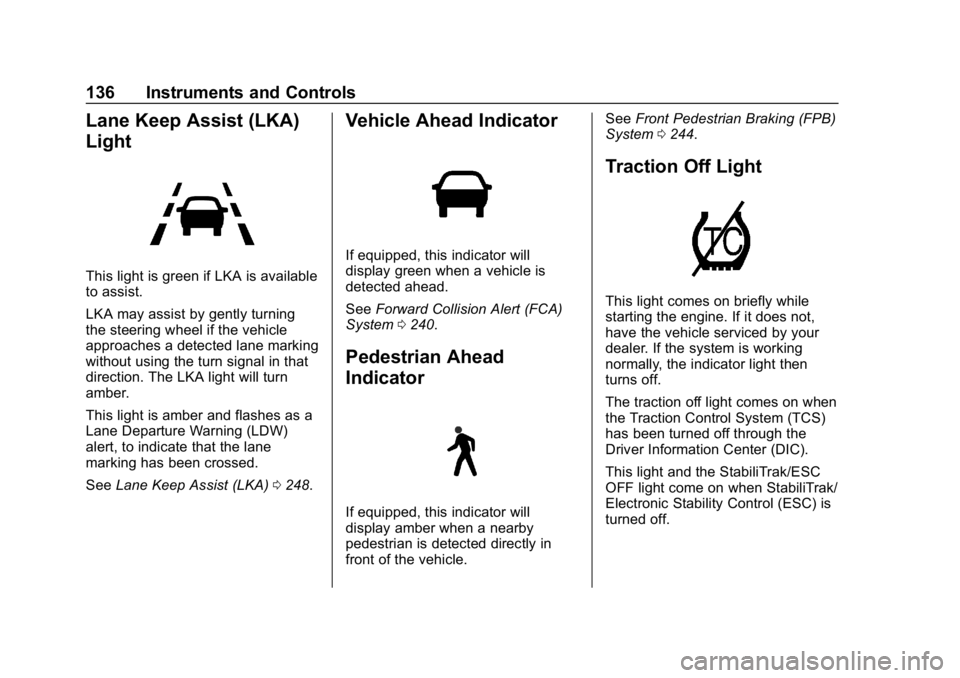
Lane Keep Assist (LKA)
Light
This light is green if LKA is available
to assist.
LKA may assist by gently turning
the steering wheel if the vehicle
approaches a detected lane marking
without using the turn signal in that
direction. The LKA light will turn
amber.
This light is amber and flashes as a
Lane Departure Warning (LDW)
alert, to indicate that the lane
marking has been crossed.
SeeLane Keep Assist (LKA) 0248.
Vehicle Ahead Indicator
If equipped, this indicator will
display green when a vehicle is
detected ahead.
See Forward Collision Alert (FCA)
System 0240.
Pedestrian Ahead
Indicator
If equipped, this indicator will
display amber when a nearby
pedestrian is detected directly in
front of the vehicle. See
Front Pedestrian Braking (FPB)
System 0244.
Traction Off Light
This light comes on briefly while
starting the engine. If it does not,
have the vehicle serviced by your
dealer. If the system is working
normally, the indicator light then
turns off.
The traction off light comes on when
the Traction Control System (TCS)
has been turned off through the
Driver Information Center (DIC).
This light and the StabiliTrak/ESC
OFF light come on when StabiliTrak/
Electronic Stability Control (ESC) is
turned off.
Page 138 of 426

Chevrolet Equinox Owner Manual (GMNA-Localizing-U.S./Canada/Mexico-
12145779) - 2019 - CRC - 7/30/18
Instruments and Controls 137
If the TCS is off, wheel speed will
be limited when necessary to
protect the driveline from damage.
Adjust driving accordingly.
SeeTraction Control/Electronic
Stability Control 0218.
StabiliTrak OFF Light
This light comes on briefly while
starting the vehicle. If it does not,
have the vehicle serviced by your
dealer.
This light comes on when the
StabiliTrak/Electronic Stability
Control (ESC) system is turned off.
If StabiliTrak/ESC is off, the Traction
Control System (TCS) is also off.
If the StabiliTrak/ESC and TCS are
off, the system does not assist in
controlling the vehicle. Turn on the TCS and the StabiliTrak/ESC
systems and the warning light
turns off.
See
Traction Control/Electronic
Stability Control 0218.
Traction Control System
(TCS)/StabiliTrak Light
This light comes on briefly when the
engine is started.
If the light does not come on, have
the vehicle serviced by your dealer.
If the system is working normally,
the indicator light turns off.
If the light is on and not flashing, the
TCS and potentially the StabiliTrak/
ESC system have been disabled.
A Driver Information Center (DIC)
message may display. Check the
DIC messages to determine which feature(s) is no longer functioning
and whether the vehicle requires
service.
If the light is on and flashing, the
TCS and/or the StabiliTrak/ESC
system is actively working.
See
Traction Control/Electronic
Stability Control 0218.
Wait-to-Start Light
For diesel engines, the wait-to-start
light shows that the engine is
functioning properly and indicates
when the engine can be started.
The fast warm-up glow plug system
makes the wait-to-start light stay on
for a shorter amount of time than
most diesel engines.
For more information, see Starting
the Engine 0196.
Page 139 of 426
Chevrolet Equinox Owner Manual (GMNA-Localizing-U.S./Canada/Mexico-
12145779) - 2019 - CRC - 7/30/18
138 Instruments and Controls
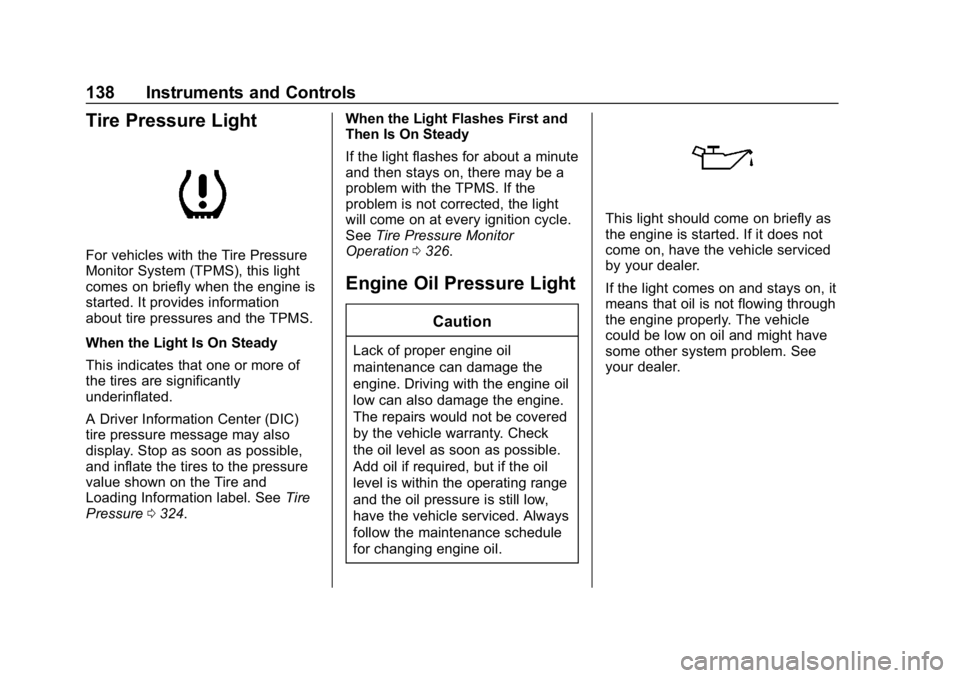
Tire Pressure Light
For vehicles with the Tire Pressure
Monitor System (TPMS), this light
comes on briefly when the engine is
started. It provides information
about tire pressures and the TPMS.
When the Light Is On Steady
This indicates that one or more of
the tires are significantly
underinflated.
A Driver Information Center (DIC)
tire pressure message may also
display. Stop as soon as possible,
and inflate the tires to the pressure
value shown on the Tire and
Loading Information label. SeeTire
Pressure 0324. When the Light Flashes First and
Then Is On Steady
If the light flashes for about a minute
and then stays on, there may be a
problem with the TPMS. If the
problem is not corrected, the light
will come on at every ignition cycle.
See
Tire Pressure Monitor
Operation 0326.
Engine Oil Pressure Light
Caution
Lack of proper engine oil
maintenance can damage the
engine. Driving with the engine oil
low can also damage the engine.
The repairs would not be covered
by the vehicle warranty. Check
the oil level as soon as possible.
Add oil if required, but if the oil
level is within the operating range
and the oil pressure is still low,
have the vehicle serviced. Always
follow the maintenance schedule
for changing engine oil.
This light should come on briefly as
the engine is started. If it does not
come on, have the vehicle serviced
by your dealer.
If the light comes on and stays on, it
means that oil is not flowing through
the engine properly. The vehicle
could be low on oil and might have
some other system problem. See
your dealer.
Page 140 of 426
Chevrolet Equinox Owner Manual (GMNA-Localizing-U.S./Canada/Mexico-
12145779) - 2019 - CRC - 7/30/18
Instruments and Controls 139
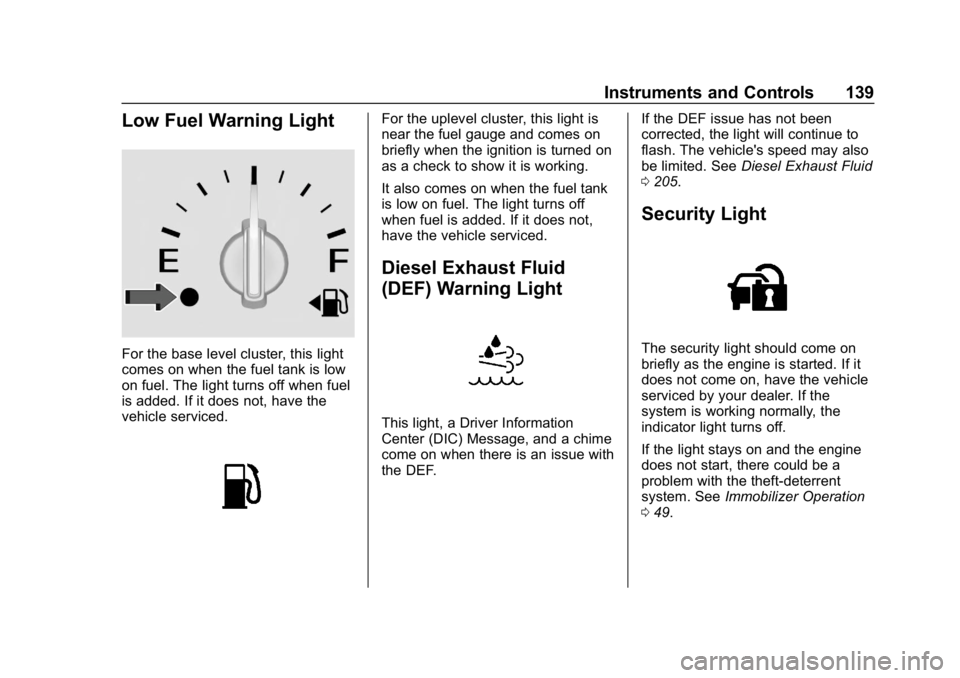
Low Fuel Warning Light
For the base level cluster, this light
comes on when the fuel tank is low
on fuel. The light turns off when fuel
is added. If it does not, have the
vehicle serviced.
For the uplevel cluster, this light is
near the fuel gauge and comes on
briefly when the ignition is turned on
as a check to show it is working.
It also comes on when the fuel tank
is low on fuel. The light turns off
when fuel is added. If it does not,
have the vehicle serviced.
Diesel Exhaust Fluid
(DEF) Warning Light
This light, a Driver Information
Center (DIC) Message, and a chime
come on when there is an issue with
the DEF.If the DEF issue has not been
corrected, the light will continue to
flash. The vehicle's speed may also
be limited. See
Diesel Exhaust Fluid
0 205.
Security Light
The security light should come on
briefly as the engine is started. If it
does not come on, have the vehicle
serviced by your dealer. If the
system is working normally, the
indicator light turns off.
If the light stays on and the engine
does not start, there could be a
problem with the theft-deterrent
system. See Immobilizer Operation
0 49.
Page 151 of 426
Chevrolet Equinox Owner Manual (GMNA-Localizing-U.S./Canada/Mexico-
12145779) - 2019 - CRC - 7/30/18
150 Instruments and Controls
Oil Pressure :Oil pressure is
displayed in either kilopascal (kPa)
or in pounds per square inch (psi).
Oil pressure can vary with engine
speed, outside temperature, and oil
viscosity. On some models, the oil
pump will vary engine oil pressure
according to engine needs. Oil
pressure may change quickly as the
engine speed or load varies. This is
normal. If the oil pressure warning
light or DIC message indicates oil
pressure outside the normal
operating range, check the vehicle's
oil as soon as possible.
Coolant Temperature : Displays
the coolant temperature in degrees
Celsius (°C) or degrees Fahrenheit
(°F).
Diesel Exhaust Fluid (DEF) Level
Percent (Diesel Engine Only) :
If equipped, the DEF level will be
displayed as either OK, XX%,
or LOW. When LOW appears on the
display, add DEF as soon as
possible. See Diesel Exhaust Fluid
0 205. Diesel Exhaust Fluid (DEF) Level
Gauge (Diesel Engine Only) :
If equipped, the DEF level displays
as a horizontal bar gauge with E or
0 and F or 1 at both ends. If more of
the bar is filled green, the vehicle
has a higher level of DEF. When the
estimated level is low, the gauge will
turn red and LOW will display above
the bar. When there is an error, the
bar will be empty and
UNAVAILABLE will appear. When
LOW appears on the display, add
DEF as soon as possible. See
Diesel Exhaust Fluid
0205.
Diesel Exhaust Fluid (DEF) Range
(Diesel Engine Only) : If equipped,
this page displays how far the
vehicle can go before DEF needs to
be replaced. Range is displayed in
mi or km. When the estimated range
is low, LOW will display. If an error
occurs, “−−”will display. When DEF
range is high, a greater than sign is
shown before the range value.
When LOW appears on the display,
add DEF as soon as possible. See
Diesel Exhaust Fluid 0205.Vehicle Messages
Messages displayed on the DIC
indicate the status of the vehicle or
some action that may be needed to
correct a condition. Multiple
messages may appear one after
another.
The messages that do not require
immediate action can be
acknowledged and cleared by
pressing
V. The messages that
require immediate action cannot be
cleared until that action is
performed.
All messages should be taken
seriously; clearing the message
does not correct the problem.
If a SERVICE message appears,
see your dealer.
Follow the instructions given in the
messages. The system displays
messages regarding the following
topics:
. Service Messages
. Fluid Levels
. Vehicle Security
Page 152 of 426
Chevrolet Equinox Owner Manual (GMNA-Localizing-U.S./Canada/Mexico-
12145779) - 2019 - CRC - 7/30/18
Instruments and Controls 151
.Brakes
. Steering
. Ride Control Systems
. Driver Assistance Systems
. Cruise Control
. Lighting and Bulb Replacement
. Wiper/Washer Systems
. Doors and Windows
. Seat Belts
. Airbag Systems
. Engine and Transmission
. Tire Pressure
. Battery
Engine Power Messages
ENGINE POWER IS REDUCED
This message displays when the
vehicle's propulsion power is
reduced. A reduction in propulsion
power can affect the vehicle's ability
to accelerate. If this message is on,
but there is no observed reduction
in performance, proceed to your
destination. The performance may be reduced the next time the vehicle
is driven. The vehicle may be driven
while this message is on, but
maximum acceleration and speed
may be reduced. Anytime this
message stays on, or displays
repeatedly, the vehicle should be
taken to your dealer for service as
soon as possible.
Vehicle Speed Messages
SPEED LIMITED TO
XXX KM/H (MPH)
This message shows that the
vehicle speed has been limited to
the speed displayed. The limited
speed is a protection for various
propulsion and vehicle systems,
such as lubrication, thermal,
suspension, Teen Driver if
equipped, or tires.
If equipped with a diesel engine,
see
Diesel Exhaust Fluid 0205.
Vehicle
Personalization
The following are all possible
vehicle personalization features.
Depending on the vehicle, some
may not be available.
For System, Apps, and Personal
features and functions, see
“Settings” in the infotainment
manual.
To access the vehicle
personalization menu:
1. Touch the Settings icon on the Home Page of the infotainment
display.
2. Touch Vehicle to display a list of available options.
3. Touch to select the desired feature setting.
4. Touch
9orRto turn a feature
off or on.
5. Touch
zto go to the top level
of the Settings menu.
Page 170 of 426
Chevrolet Equinox Owner Manual (GMNA-Localizing-U.S./Canada/Mexico-
12145779) - 2019 - CRC - 7/30/18
Climate Controls 169
Climate Controls
Climate Control Systems
Climate Control Systems . . . . . 169
Dual Automatic ClimateControl System . . . . . . . . . . . . . 171
Air Vents
Air Vents . . . . . . . . . . . . . . . . . . . . . 174
Maintenance
Passenger Compartment AirFilter . . . . . . . . . . . . . . . . . . . . . . . . 175
Service . . . . . . . . . . . . . . . . . . . . . . . 176
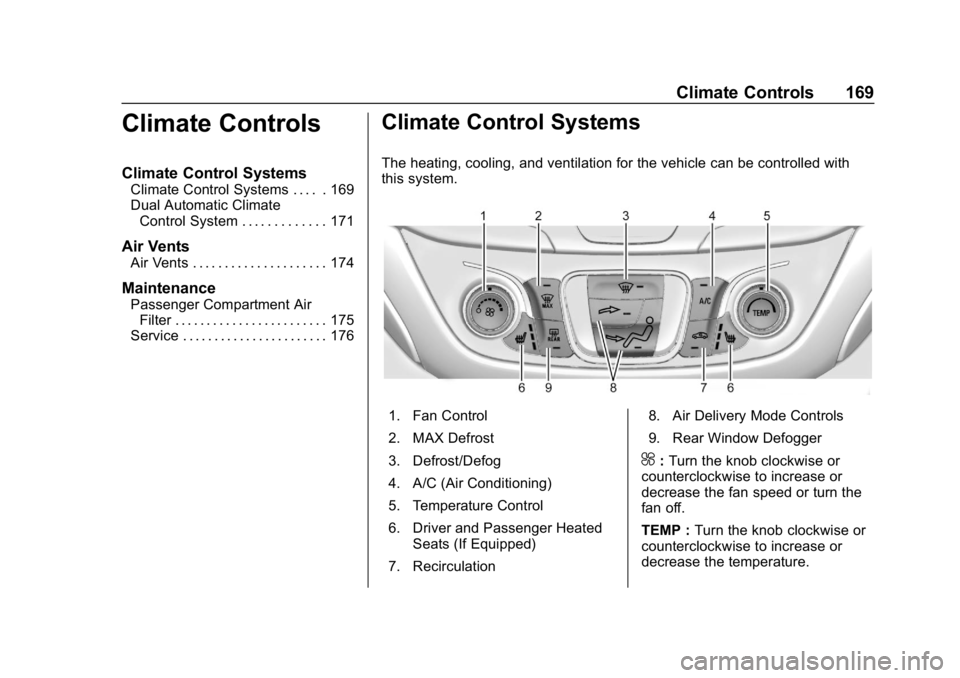
Climate Control Systems
The heating, cooling, and ventilation for the vehicle can be controlled with
this system.
1. Fan Control
2. MAX Defrost
3. Defrost/Defog
4. A/C (Air Conditioning)
5. Temperature Control
6. Driver and Passenger Heated
Seats (If Equipped)
7. Recirculation 8. Air Delivery Mode Controls
9. Rear Window Defogger
^:
Turn the knob clockwise or
counterclockwise to increase or
decrease the fan speed or turn the
fan off.
TEMP : Turn the knob clockwise or
counterclockwise to increase or
decrease the temperature.
Page 177 of 426
Chevrolet Equinox Owner Manual (GMNA-Localizing-U.S./Canada/Mexico-
12145779) - 2019 - CRC - 7/30/18
176 Climate Controls
4. Remove the two screwssecuring the door.
5. Press the latches on either side of the service door inward to
release. Open the service door
and remove the old filter.
6. Install the new air filter.
7. Close the service door completely.
8. Reverse the steps to reinstall the glove box.
See your dealer if additional
assistance is needed.
Service
All vehicles have a label underhood
that identifies the refrigerant used in
the vehicle. The refrigerant system
should only be serviced by trained
and certified technicians. The air
conditioning evaporator should
never be repaired or replaced by
one from a salvage vehicle.
It should only be replaced by a new
evaporator to ensure proper and
safe operation. During service, all refrigerants
should be reclaimed with proper
equipment. Venting refrigerants
directly to the atmosphere is harmful
to the environment and may also
create unsafe conditions based on
inhalation, combustion, frostbite,
or other health-based concerns.
The air conditioning system requires
periodic maintenance. See
Maintenance Schedule
0370.