2019 CHEVROLET EQUINOX Service mode
[x] Cancel search: Service modePage 151 of 426
Chevrolet Equinox Owner Manual (GMNA-Localizing-U.S./Canada/Mexico-
12145779) - 2019 - CRC - 7/30/18
150 Instruments and Controls
Oil Pressure :Oil pressure is
displayed in either kilopascal (kPa)
or in pounds per square inch (psi).
Oil pressure can vary with engine
speed, outside temperature, and oil
viscosity. On some models, the oil
pump will vary engine oil pressure
according to engine needs. Oil
pressure may change quickly as the
engine speed or load varies. This is
normal. If the oil pressure warning
light or DIC message indicates oil
pressure outside the normal
operating range, check the vehicle's
oil as soon as possible.
Coolant Temperature : Displays
the coolant temperature in degrees
Celsius (°C) or degrees Fahrenheit
(°F).
Diesel Exhaust Fluid (DEF) Level
Percent (Diesel Engine Only) :
If equipped, the DEF level will be
displayed as either OK, XX%,
or LOW. When LOW appears on the
display, add DEF as soon as
possible. See Diesel Exhaust Fluid
0 205. Diesel Exhaust Fluid (DEF) Level
Gauge (Diesel Engine Only) :
If equipped, the DEF level displays
as a horizontal bar gauge with E or
0 and F or 1 at both ends. If more of
the bar is filled green, the vehicle
has a higher level of DEF. When the
estimated level is low, the gauge will
turn red and LOW will display above
the bar. When there is an error, the
bar will be empty and
UNAVAILABLE will appear. When
LOW appears on the display, add
DEF as soon as possible. See
Diesel Exhaust Fluid
0205.
Diesel Exhaust Fluid (DEF) Range
(Diesel Engine Only) : If equipped,
this page displays how far the
vehicle can go before DEF needs to
be replaced. Range is displayed in
mi or km. When the estimated range
is low, LOW will display. If an error
occurs, “−−”will display. When DEF
range is high, a greater than sign is
shown before the range value.
When LOW appears on the display,
add DEF as soon as possible. See
Diesel Exhaust Fluid 0205.Vehicle Messages
Messages displayed on the DIC
indicate the status of the vehicle or
some action that may be needed to
correct a condition. Multiple
messages may appear one after
another.
The messages that do not require
immediate action can be
acknowledged and cleared by
pressing
V. The messages that
require immediate action cannot be
cleared until that action is
performed.
All messages should be taken
seriously; clearing the message
does not correct the problem.
If a SERVICE message appears,
see your dealer.
Follow the instructions given in the
messages. The system displays
messages regarding the following
topics:
. Service Messages
. Fluid Levels
. Vehicle Security
Page 170 of 426
Chevrolet Equinox Owner Manual (GMNA-Localizing-U.S./Canada/Mexico-
12145779) - 2019 - CRC - 7/30/18
Climate Controls 169
Climate Controls
Climate Control Systems
Climate Control Systems . . . . . 169
Dual Automatic ClimateControl System . . . . . . . . . . . . . 171
Air Vents
Air Vents . . . . . . . . . . . . . . . . . . . . . 174
Maintenance
Passenger Compartment AirFilter . . . . . . . . . . . . . . . . . . . . . . . . 175
Service . . . . . . . . . . . . . . . . . . . . . . . 176
Climate Control Systems
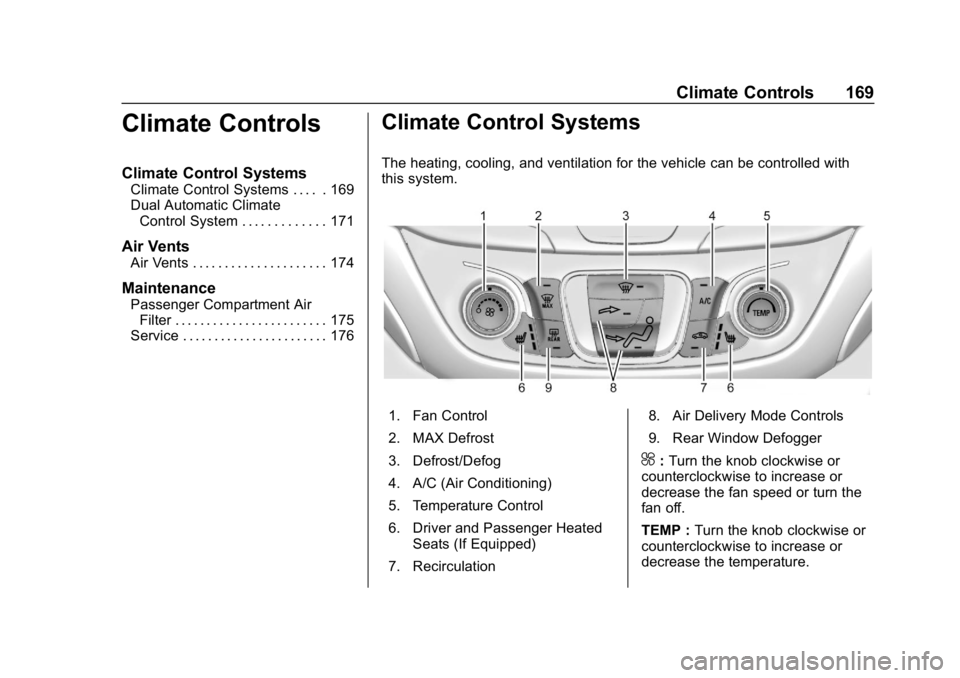
The heating, cooling, and ventilation for the vehicle can be controlled with
this system.
1. Fan Control
2. MAX Defrost
3. Defrost/Defog
4. A/C (Air Conditioning)
5. Temperature Control
6. Driver and Passenger Heated
Seats (If Equipped)
7. Recirculation 8. Air Delivery Mode Controls
9. Rear Window Defogger
^:
Turn the knob clockwise or
counterclockwise to increase or
decrease the fan speed or turn the
fan off.
TEMP : Turn the knob clockwise or
counterclockwise to increase or
decrease the temperature.
Page 197 of 426
Chevrolet Equinox Owner Manual (GMNA-Localizing-U.S./Canada/Mexico-
12145779) - 2019 - CRC - 7/30/18
196 Driving and Operating
ACC/ACCESSORY (Amber
Indicator Light)
This mode allows you to use some
electrical accessories when the
engine is off.
With the ignition off, pressing the
button one time without the brake
pedal applied will place the ignition
system in ACC/ACCESSORY.
The ignition will switch from ACC/
ACCESSORY to OFF after
five minutes to prevent battery
rundown.
ON/RUN/START (Green
Indicator Light)
This mode is for driving and starting.
With the ignition off and the brake
pedal applied, pressing the button
once will place the ignition system
in ON/RUN/START. Once engine
cranking begins, release the button.
Engine cranking will continue until
the engine starts. SeeStarting the
Engine 0196. The ignition will then
remain in ON/RUN.
Service Mode
This power mode is available for
service and diagnostics, and to
verify the proper operation of the
malfunction indicator lamp as may
be required for emission inspection
purposes. With the vehicle off and
the brake pedal not applied,
pressing and holding the button for
more than five seconds will place
the vehicle in Service Mode. The
instruments and audio systems will
operate as they do in ON/RUN, but
the vehicle will not be able to be
driven. The engine will not start in
Service Mode. Press the button
again to turn the vehicle off.
Starting the Engine
Move the shift lever to P (Park) or
N (Neutral). To restart the engine
when the vehicle is already moving,
use N (Neutral) only.
Caution
Do not try to shift to P (Park) if the
vehicle is moving. If you do, you
could damage the transmission.
Shift to P (Park) only when the
vehicle is stopped.
Caution
If you add electrical parts or
accessories, you could change
the way the engine operates. Any
resulting damage would not be
covered by the vehicle warranty.
See Add-On Electrical Equipment
0 273.
Gasoline Engine Starting
Procedure 1. With the Keyless Access system, the Remote Keyless
Entry (RKE) transmitter must
be in the vehicle. Press
ENGINE START/STOP with the
Page 213 of 426
Chevrolet Equinox Owner Manual (GMNA-Localizing-U.S./Canada/Mexico-
12145779) - 2019 - CRC - 7/30/18
212 Driving and Operating
Caution
A transmission hot message may
display if the automatic
transmission fluid is too hot.
Driving under this condition can
damage the vehicle. Stop and idle
the engine to cool the automatic
transmission fluid. This message
clears when the transmission fluid
has cooled sufficiently.
D : This position is for normal
driving. If more power is needed for
passing, press the accelerator
pedal down.
Caution
If the vehicle does not shift gears,
the transmission could be
damaged. Have the vehicle
serviced right away.
Caution
Spinning the tires or holding the
vehicle in one place on a hill
using only the accelerator pedal
may damage the transmission.
The repair will not be covered by
the vehicle warranty. If the vehicle
is stuck, do not spin the tires.
When stopping on a hill, use the
brakes to hold the vehicle in
place.
L : Allows the driver to select the
range of gear positions. See Manual
Mode 0212.
Operating Modes
The transmission may operate in a
lower gear than normal to improve
vehicle performance. The engine
speed may be higher and there may
be an increase in noise during the
following conditions:
. When climbing a grade.
. When driving downhill. .
When driving in hot
temperatures or at high altitude.Manual Mode
Electronic Range Select
(ERS) Mode
ERS or manual mode allows for the
selection of the range of gear
positions. Use this mode when
driving downhill or towing a trailer to
limit the top gear and vehicle speed.
The shift position indicator within the
Driver Information Center (DIC) will
display a number next to the L
indicating the highest available gear
under manual mode and the driving
conditions when manual mode was
selected.
To use this feature:
1. Move the shift lever to L (Manual Mode).
Page 217 of 426
Chevrolet Equinox Owner Manual (GMNA-Localizing-U.S./Canada/Mexico-
12145779) - 2019 - CRC - 7/30/18
216 Driving and Operating
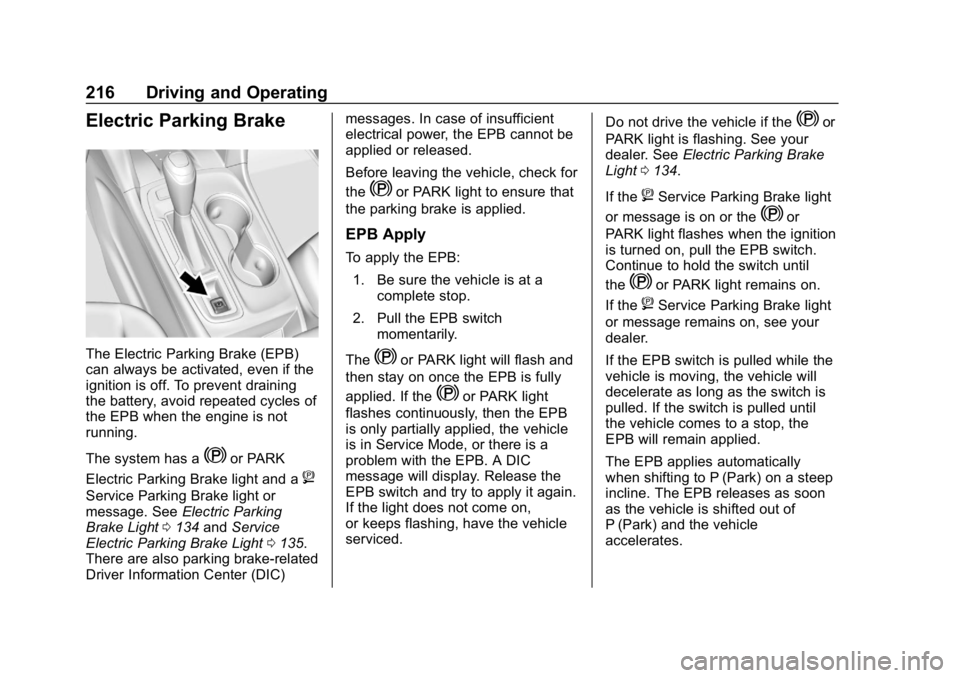
Electric Parking Brake
The Electric Parking Brake (EPB)
can always be activated, even if the
ignition is off. To prevent draining
the battery, avoid repeated cycles of
the EPB when the engine is not
running.
The system has a
Yor PARK
Electric Parking Brake light and a
8
Service Parking Brake light or
message. See Electric Parking
Brake Light 0134 andService
Electric Parking Brake Light 0135.
There are also parking brake-related
Driver Information Center (DIC) messages. In case of insufficient
electrical power, the EPB cannot be
applied or released.
Before leaving the vehicle, check for
the
Yor PARK light to ensure that
the parking brake is applied.
EPB Apply
To apply the EPB:
1. Be sure the vehicle is at a complete stop.
2. Pull the EPB switch momentarily.
The
Yor PARK light will flash and
then stay on once the EPB is fully
applied. If the
Yor PARK light
flashes continuously, then the EPB
is only partially applied, the vehicle
is in Service Mode, or there is a
problem with the EPB. A DIC
message will display. Release the
EPB switch and try to apply it again.
If the light does not come on,
or keeps flashing, have the vehicle
serviced. Do not drive the vehicle if the
Yor
PARK light is flashing. See your
dealer. See Electric Parking Brake
Light 0134.
If the
8Service Parking Brake light
or message is on or the
Yor
PARK light flashes when the ignition
is turned on, pull the EPB switch.
Continue to hold the switch until
the
Yor PARK light remains on.
If the
8Service Parking Brake light
or message remains on, see your
dealer.
If the EPB switch is pulled while the
vehicle is moving, the vehicle will
decelerate as long as the switch is
pulled. If the switch is pulled until
the vehicle comes to a stop, the
EPB will remain applied.
The EPB applies automatically
when shifting to P (Park) on a steep
incline. The EPB releases as soon
as the vehicle is shifted out of
P (Park) and the vehicle
accelerates.
Page 243 of 426
Chevrolet Equinox Owner Manual (GMNA-Localizing-U.S./Canada/Mexico-
12145779) - 2019 - CRC - 7/30/18
242 Driving and Operating
chosen setting will remain until it is
changed and will affect the timing of
both the Collision Alert and the
Tailgating Alert features. The timing
of both alerts will vary based on
vehicle speed. The faster the
vehicle speed, the farther away the
alert will occur. Consider traffic and
weather conditions when selecting
the alert timing. The range of
selectable alert timings may not be
appropriate for all drivers and
driving conditions.
Following Distance Indicator
The following distance to a moving
vehicle ahead in your path is
indicated in following time in
seconds on the Driver Information
Center (DIC). SeeDriver
Information Center (DIC) (Base
Level and Midlevel) 0141 orDriver
Information Center (DIC) (Uplevel)
0 146. The minimum following time
is 0.5 seconds away. If there is no
vehicle detected ahead, or the
vehicle ahead is out of sensor
range, dashes will be displayed.
Unnecessary Alerts
FCA may provide unnecessary
alerts for turning vehicles, vehicles
in other lanes, objects that are not
vehicles, or shadows. These alerts
are normal operation and the
vehicle does not need service.
Cleaning the System
If the FCA system does not seem to
operate properly, this may correct
the issue:
. Clean the outside of the
windshield in front of the
rearview mirror.
. Clean the entire front of the
vehicle.
. Clean the headlamps.
Forward Automatic
Braking (FAB)
If the vehicle has Forward Collision
Alert (FCA), it also has FAB, which
includes Intelligent Brake
Assist (IBA). When the system
detects a vehicle ahead in your path
that is traveling in the same direction that you may be about to
crash into, it can provide a boost to
braking or automatically brake the
vehicle. This can help avoid or
lessen the severity of crashes when
driving in a forward gear. Depending
on the situation, the vehicle may
automatically brake moderately or
hard. This forward automatic
braking can only occur if a vehicle is
detected. This is shown by the FCA
vehicle ahead indicator being lit.
See
Forward Collision Alert (FCA)
System 0240.
The system works when driving in a
forward gear between 8 km/h
(5 mph) and 80 km/h (50 mph).
It can detect vehicles up to
approximately 60 m (197 ft).
{Warning
FAB is an emergency crash
preparation feature and is not
designed to avoid crashes. Do
not rely on FAB to brake the
vehicle. FAB will not brake (Continued)
Page 258 of 426

Chevrolet Equinox Owner Manual (GMNA-Localizing-U.S./Canada/Mexico-
12145779) - 2019 - CRC - 7/30/18
Driving and Operating 257
Caution
Driving with this message on can
damage the fuel injection system
and the engine. If the message
comes on right after a refuel,
water was pumped into the fuel
tank. Turn off the engine and
drain the water immediately.
Removing Water from the Fuel
Filter
To drain water: 1. Turn the engine off and apply the parking brake.
2. Place a container under the filter drain valve, which is on
the bottom of the fuel filter.
FWD Shown, AWD Similar
3. Turn the drain plug counterclockwise using a
suitable tool.
4. With the engine off, press and hold ENGINE START/STOP
without applying the brake for
five seconds to place the
vehicle in Service Mode. See
Ignition Positions 0194. Wait
approximately five seconds,
and then press ENGINE
START/STOP again to turn it
off. This operation will enhance
water flow out of the filter. The filter is drained as soon as
diesel fuel emerges from
the port.
5. Retighten the drain plug by turning it clockwise.
6. Properly dispose of the water contaminated fuel.
7. Start the engine and let it run for a few minutes. During the
draining process, air may have
entered the fuel system. If the
engine stalls, the fuel system
may need to be primed. See
“Fuel Priming” following.
Fuel Priming
For the fuel system to work properly,
air cannot be in the fuel lines. If air
gets in, the engine may not start
and the fuel lines will need to be
primed before operating the vehicle.
If air is present, the following may
have happened:
. The vehicle ran out of fuel.
. The fuel filter was removed.
. The fuel lines were removed or
disconnected.
Page 259 of 426
Chevrolet Equinox Owner Manual (GMNA-Localizing-U.S./Canada/Mexico-
12145779) - 2019 - CRC - 7/30/18
258 Driving and Operating
.The fuel filter water drain valve
was opened while the engine
was running.
To prime the fuel lines: 1. With the engine off, press and hold ENGINE START/STOP
without applying the brake for
five seconds to place the
vehicle in Service Mode. See
Ignition Positions 0194. Wait
approximately five seconds
and press ENGINE START/
STOP again to turn it off. Do
this step three times or more
while the engine is off.
2. Press and hold ENGINE START/STOP while applying
the brake for a maximum of
40 seconds at a time, with
five seconds between attempts,
until the engine starts. If the
engine tries to run, but does
not run smoothly, increase the
rpm’s slightly by using the
accelerator pedal. This will help
force air through the system.
3. Repeat Step 2 if the engine stalls and will not restart. 4. After a few attempts, if the
engine still does not start, see
your dealer.
Running Out of Fuel
(Diesel)
{Warning
Diesel fuel is flammable. It could
start a fire if something ignites it,
and people could be burned. Do
not let it get on hot engine parts,
and keep matches or other
ignition sources away.
If the engine has stalled due to
running out of fuel, add at least
7.6 L (2 gal) of fuel if parked on a
level surface, or up to 18.9 L (5 gal)
of fuel if parked on a slope, and
perform the procedure under “Fuel
Priming” previously in this section.
Fuel Filter Replacement
(Diesel)
{Warning
Diesel fuel is flammable. It could
start a fire if something ignites it,
and people could be burned. Do
not let it get on hot engine parts,
and keep matches or other
ignition sources away.
The fuel filter is on the passenger
side, in front of the rear tire. 1. Drain any water from the filter. See “Removing Water from the
Fuel Filter” inWater in Fuel
(Diesel) 0255.
Keep the engine off until the
procedure is completed.
2. Apply the parking brake.