2019 CHEVROLET CRUZE maintenance
[x] Cancel search: maintenancePage 135 of 379

Chevrolet Cruze Owner Manual (GMNA-Localizing-U.S./Canada/Mexico-
12146336) - 2019 - crc - 10/22/18
134 Instruments and Controls
In addition to the engine oil life
system monitoring the oil life,
additional maintenance is
recommended. SeeMaintenance
Schedule 0324.
The Oil Life display must be reset
after each oil change. Do not reset
the Oil Life display accidentally at
any time other than when the oil has
just been changed. It cannot be
reset accurately until the next oil
change. To reset the engine oil life
system, see Engine Oil Life System
0 239.
Oil Pressure : Oil pressure is
displayed in either kilopascal (kPa)
or in pounds per square inch (psi).
Fuel Filter Life : This display shows
an estimate of the fuel filter's
remaining useful life. If 90% Fuel
Filter Life Remaining is displayed, it
means 90% of the current fuel filter
life remains. The fuel filter life
system will alert when to change the
fuel filter on a schedule consistent
with your driving conditions. When
the remaining fuel filter life is low,
the CHANGE FUEL FILTER message will appear on the display.
Change the fuel filter as soon as
possible.
Diesel Exhaust Fluid (DEF)
Level :
The DEF level will be
displayed as either OK, XX%,
or LOW. When LOW appears on the
display, add DEF as soon as
possible. See Diesel Exhaust Fluid
0 183.
Tire Pressure : Displays a vehicle
with the approximate pressures of
all four tires. Tire pressure is
displayed in either kilopascal (kPa)
or in pounds per square inch (psi).
See Tire Pressure Monitor System
0 279 andTire Pressure Monitor
Operation 0280.
Battery Voltage : Displays the
current battery voltage, if equipped.
Battery voltage changes are normal
while driving. See Charging System
Light 0123. If there is a problem
with the battery charging system,
the DIC will display a message.
Speed Warning : This display is
used to set the vehicle speed at
which the speed warning chime sounds and the alert is displayed.
The speed can be set by pressing
SET/CLR while the speed warning
display is showing.
Units :
Move
\to change between
Metric or US when the Unit display
is active. Press SET/CLR to confirm
the setting. This will change the
displays on the DIC to the type of
measurements you select.
ECO Drive Assist Menu (ECO)
Items
This menu is only available on some
vehicles. Press MENU on the turn
signal lever until the ECO menu is
displayed. Use
\to scroll through
the menu items. Not all items are
available on every vehicle. The
following is a list of all possible
menu items:
Best Average Fuel Economy : The
bottom displays the best average
fuel economy (AFE) achieved for a
selected distance. The top displays
a running average of fuel economy
for the most recently traveled
selected distance. The center bar
Page 137 of 379

Chevrolet Cruze Owner Manual (GMNA-Localizing-U.S./Canada/Mexico-
12146336) - 2019 - crc - 10/22/18
136 Instruments and Controls
6. PressVwhile an item is
highlighted to select or
deselect that item. When an
item is selected, a checkmark
will appear next to it.
DIC Info Pages
The following is the list of all
possible DIC info page displays.
Some may not be available for your
particular vehicle. Some items may
not be turned on by default but can
be turned on through the Options
app. See “DIC Info Page Options”
earlier in this section.
Speed : Shows the vehicle speed in
either kilometers per hour (km/h) or
miles per hour (mph). If equipped,
press
pto open the menu and
select to display speed limit signs.
Trip A or Trip B : Shows the
current distance traveled, in either
kilometers (km) or miles (mi), since
the trip odometer was last reset.
This also shows the approximate
average liters per 100 kilometers
(L/100 km) or miles per
gallon (mpg). This number is calculated based on the number of
L/100 km (mpg) recorded since the
last time this menu item was reset.
This number reflects only the
approximate average fuel economy
that the vehicle has right now, and
will change as driving conditions
change.
Press and hold
Vwhile this display
is active to reset the trip odometer
and the average fuel economy. Trip
A and Trip B can also be reset by
pressing
pand choosing reset.
Fuel Range : Shows the
approximate distance the vehicle
can be driven without refueling.
LOW will be displayed when the
vehicle is low on fuel. The fuel
range estimate is based on an
average of the vehicle's fuel
economy over recent driving history
and the amount of fuel remaining in
the fuel tank.
Oil Life : Shows an estimate of the
oil's remaining useful life.
If REMAINING OIL LIFE 99% is
displayed, that means 99% of the
current oil life remains. When the remaining oil life is low,
the CHANGE ENGINE OIL SOON
message will appear on the display.
The oil should be changed as soon
as possible. See
Engine Oil0236.
In addition to the engine oil life
system monitoring the oil life,
additional maintenance is
recommended. See Maintenance
Schedule 0324.
The Oil Life display must be reset
after each oil change. It will not
reset itself. Do not to reset the Oil
Life display at any time other than
when the oil has just been changed.
It cannot be reset accurately until
the next oil change. To reset the
engine oil life system, press and
hold
Vfor several seconds while
the Oil Life display is active. See
Engine Oil Life System 0239.
Tire Pressure : Shows the
approximate pressures of all four
tires. Tire pressure is displayed in
either kilopascal (kPa) or in pounds
per square inch (psi). If the pressure
is low, the value for that tire is
shown in amber.
Page 152 of 379

Chevrolet Cruze Owner Manual (GMNA-Localizing-U.S./Canada/Mexico-
12146336) - 2019 - crc - 10/22/18
Climate Controls 151
Climate Controls
Climate Control Systems
Climate Control Systems . . . . . 151
Automatic Climate ControlSystem . . . . . . . . . . . . . . . . . . . . . . 153
Air Vents
Air Vents . . . . . . . . . . . . . . . . . . . . . 156
Maintenance
Passenger Compartment AirFilter . . . . . . . . . . . . . . . . . . . . . . . . 157
Service . . . . . . . . . . . . . . . . . . . . . . . 157
Climate Control Systems
The heating, cooling, defrosting, and ventilation for the vehicle can be
controlled with this system.
1. Fan Control
2. A/C (Air Conditioning)
3. Air Delivery Mode Controls
4. Defrost
5. TEMP (Temperature Control)
6. Heated Front Seats (If
Equipped)
7. Rear Window Defogger 8. Recirculation
9:
Turn to increase or decrease
the fan speed.
Temperature Control : Turn to
increase or decrease the
temperature.
Page 158 of 379

Chevrolet Cruze Owner Manual (GMNA-Localizing-U.S./Canada/Mexico-
12146336) - 2019 - crc - 10/22/18
Climate Controls 157
Maintenance
Passenger Compartment
Air Filter
The filter reduces dust, pollen, and
other airborne irritants from outside
air that is pulled into the vehicle.
The filter should be replaced as part
of routine scheduled maintenance.
SeeMaintenance Schedule 0324.
See your dealer regarding
replacement of the filter.
Service
All vehicles have a label underhood
that identifies the refrigerant used in
the vehicle. The refrigerant system
should only be serviced by trained
and certified technicians. The air
conditioning evaporator should
never be repaired or replaced by
one from a salvage vehicle.
It should only be replaced by a new
evaporator to ensure proper and
safe operation. During service, all refrigerants
should be reclaimed with proper
equipment. Venting refrigerants
directly to the atmosphere is harmful
to the environment and may also
create unsafe conditions based on
inhalation, combustion, frostbite,
or other health-based concerns.
The air conditioning system requires
periodic maintenance. See
Maintenance Schedule
0324.
Page 162 of 379
Chevrolet Cruze Owner Manual (GMNA-Localizing-U.S./Canada/Mexico-
12146336) - 2019 - crc - 10/22/18
Driving and Operating 161
Once the power assist is used up, it
can take longer to stop and the
brake pedal will be harder to push.
Steering
Electric Power Steering
The vehicle has electric power
steering. It does not have power
steering fluid. Regular maintenance
is not required.
If power steering assist is lost due
to a system malfunction, the vehicle
can be steered, but may require
increased effort.
If the steering assist is used for an
extended period of time while the
vehicle is not moving, power assist
may be reduced.
If the steering wheel is turned until it
reaches the end of its travel and is
held against that position for an
extended period of time, power
steering assist may be reduced.
Normal use of the power steering
assist should return when the
system cools down.See your dealer if there is a
problem.
Curve Tips
.
Take curves at a reasonable
speed.
. Reduce speed before entering a
curve.
. Maintain a reasonable steady
speed through the curve.
. Wait until the vehicle is out of
the curve before accelerating
gently into the straightaway.
Steering in Emergencies
.There are some situations when
steering around a problem may
be more effective than braking.
. Holding both sides of the
steering wheel allows you to turn
180 degrees without removing
a hand.
. The Antilock Brake System
(ABS) allows steering while
braking.
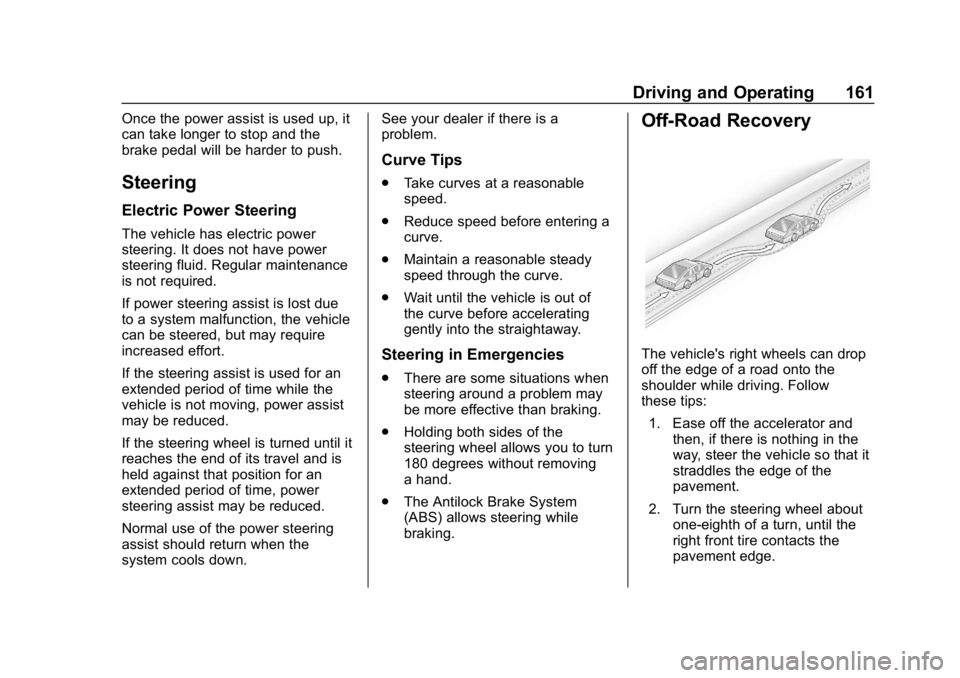
Off-Road Recovery
The vehicle's right wheels can drop
off the edge of a road onto the
shoulder while driving. Follow
these tips:
1. Ease off the accelerator and then, if there is nothing in the
way, steer the vehicle so that it
straddles the edge of the
pavement.
2. Turn the steering wheel about one-eighth of a turn, until the
right front tire contacts the
pavement edge.
Page 227 of 379

Chevrolet Cruze Owner Manual (GMNA-Localizing-U.S./Canada/Mexico-
12146336) - 2019 - crc - 10/22/18
226 Driving and Operating
Warning (Continued)
.Fill the container no more
than 95% full to allow for
expansion.
. Do not smoke, light
matches, or use lighters
while pumping fuel.
. Avoid using electronic
devices.
Trailer Towing
General Towing
Information
{Warning
Never tow a trailer with your
vehicle. It was not designed or
intended to tow a trailer.
Conversions and
Add-Ons
Add-On Electrical
Equipment
{Warning
The Data Link Connector
(DLC) is used for vehicle service
and Emission Inspection/
Maintenance testing. See
Malfunction Indicator Lamp
(Check Engine Light) 0124.
A device connected to the DLC —
such as an aftermarket fleet or
driver-behavior tracking device —
may interfere with vehicle
systems. This could affect vehicle
operation and cause a crash.
Such devices may also access
information stored in the vehicle’s
systems.
Page 232 of 379

Chevrolet Cruze Owner Manual (GMNA-Localizing-U.S./Canada/Mexico-
12146336) - 2019 - crc - 10/22/18
Vehicle Care 231
If equipped with remote vehicle
start, open the hood before
performing any service work to
prevent remote starting the vehicle
accidentally. SeeRemote Vehicle
Start 040.
Keep a record with all parts receipts
and list the mileage and the date of
any service work performed. See
Maintenance Records 0336.
Caution
Even small amounts of
contamination can cause damage
to vehicle systems. Do not allow
contaminants to contact the fluids,
reservoir caps, or dipsticks.
Hood
To open the hood:
1. Open the driver door and pull
the hood release handle. It is
on the lower left side of the
instrument panel between the
door and the steering wheel.
2. Release the handle, then pull the handle again to fully open
the hood.3. Go to the front of the vehicleand lift the hood and release
the hood prop from its retainer,
located above the radiator.
Securely place the hood prop
into the slot on the underside of
the hood.
To close the hood: 1. Before closing the hood, be sure all the filler caps are
properly installed.
2. Lift the hood to relieve pressure on the hood prop.
Remove the hood prop from
the slot on the underside of the
hood and return the prop to its
Page 242 of 379

Chevrolet Cruze Owner Manual (GMNA-Localizing-U.S./Canada/Mexico-
12146336) - 2019 - crc - 10/22/18
Vehicle Care 241
occurs, take the vehicle to your
dealer and have it repaired as soon
as possible.
The vehicle is not equipped with a
transmission fluid level dipstick.
There is a special procedure for
checking and changing the
transmission fluid. Because this
procedure is difficult, this should be
done at the dealer. Contact the
dealer for additional information.
Caution
Use of the incorrect automatic
transmission fluid may damage
the vehicle, and the damage may
not be covered by the vehicle
warranty. Always use the correct
automatic transmission fluid. See
Recommended Fluids and
Lubricants0333.
Change the fluid at the intervals
listed in Maintenance Schedule
0 324, and be sure to use the fluid
listed in Recommended Fluids and
Lubricants 0333.
Engine Air Cleaner/Filter
The engine air cleaner/filter is in the
engine compartment on the
passenger side of the vehicle. See
Engine Compartment Overview
0233.
When to Inspect the Engine Air
Cleaner/Filter
For intervals on changing and
inspecting the engine air cleaner/
filter, see Maintenance Schedule
0 324.
How to Inspect the Engine Air
Cleaner/Filter
Do not start the engine or have the
engine running with the engine air
cleaner/filter housing open. Before
removing the engine air cleaner/
filter, make sure that the engine air
cleaner/filter housing and nearby
components are free of dirt and
debris. Remove the engine air
cleaner/filter. Lightly tap and shake
the engine air cleaner/filter (away
from the vehicle), to release loose
dust and dirt. Inspect the engine air
cleaner/filter for damage, and replace if damaged. Do not clean
the engine air cleaner/filter or
components with water or
compressed air.
To inspect or replace the engine air
cleaner/filter:
1.4L L4 Engine (LE2) Shown, 1.6L
L4 Diesel Engine (LH7) Similar
1. Screws
2. Air Inlet Duct
3. Air Duct Clamp
4. Electrical Connector