2019 CHEVROLET CORVETTE Garage door
[x] Cancel search: Garage doorPage 21 of 367

Chevrolet Corvette Owner Manual (GMNA-Localizing-U.S./Canada/Mexico-
12032182) - 2019 - crc - 5/8/18
20 In Brief
worx:Press to move up or
down in a list.
oorp: Pressoto open
application menus on the left. Press
pto open interaction menus on the
right.
SEL : Press to open a menu or
select a menu item. Press and hold
to reset values on certain screens.
See Driver Information Center (DIC)
0 121.
Curb View Camera
If equipped, a view of the area in
front of the vehicle displays to aid
with parking and low-speed
maneuvers.
See "Curb View Camera" under
Assistance Systems for Parking or
Backing 0210.
Rear Vision
Camera (RVC)
If equipped, RVC displays a view of
the area behind the vehicle on the
infotainment display when the vehicle is shifted into R (Reverse) to
aid with parking and low-speed
backing maneuvers.
See
Assistance Systems for Parking
or Backing 0210.
Power Outlets
Use the accessory power outlet to
plug in electrical equipment, such as
a cell phone or MP3 player.
There are three accessory power
outlets:
.
Inside the center console
storage compartment.
. In front of the cupholder.
. In the rear compartment.
Lift the cover to access and replace
when not in use.
See Power Outlets 0101.
Universal Remote System
This system, if equipped, provides a
way to replace up to three remote
control transmitters used to activate
devices such as garage door
openers, security systems, and
home automation devices.
Read the instructions completely
before attempting to program the
Universal Remote system. Because
of the steps involved, it may be
helpful to have another person
available to assist you with
programming the Universal Remote
system.
Page 136 of 367

Chevrolet Corvette Owner Manual (GMNA-Localizing-U.S./Canada/Mexico-
12032182) - 2019 - crc - 5/8/18
Instruments and Controls 135
Restore Radio Settings
This allows selection to restore
radio settings.
Select Restore or Cancel.
Software Information
Select to update or view the
infotainment system current
software information.
Wi-Fi
Select and the following may
display:
.Wi-Fi
. Manage Wi-Fi Networks
Wi-Fi
This feature allows Wi-Fi networks
to be turned off or on.
Select Off or On.
Manage Wi-Fi Networks
Select to manage Wi-Fi networks.
Wi-Fi must be on for this feature to
be accessed.
Universal Remote
System
See Radio Frequency Statement
0 340.
The FCC Grant of Equipment
Authorization Certificate number is
NZLSAHL5B.
The Canadian Registration ID
number is 4112A-SAHL5B.
Universal Remote System
Programming
If equipped, these buttons are in the
driver sun visor.
This system can replace up to three
remote control transmitters used to
activate devices such as garage
door openers, security systems, and
home automation devices. These
instructions refer to a garage door
opener, but can be used for other
devices.
Do not use the Universal Remote
system with any garage door opener
that does not have the stop and
reverse feature. This includes any
garage door opener model
manufactured before April 1, 1982.
Read these instructions completely
before programming the Universal
Remote system. It may help to have
another person assist with the
programming process.
Keep the original hand-held
transmitter for use in other vehicles
as well as for future programming.
Erase the programming when
vehicle ownership is terminated.
Page 137 of 367
Chevrolet Corvette Owner Manual (GMNA-Localizing-U.S./Canada/Mexico-
12032182) - 2019 - crc - 5/8/18
136 Instruments and Controls
See“Erasing Universal Remote
System Buttons” later in this
section.
To program a garage door opener,
park outside directly in line with and
facing the garage door opener
receiver. Clear all people and
objects near the garage door.
Make sure the hand-held transmitter
has a new battery for quick and
accurate transmission of the
radio-frequency signal.
Programming the Universal
Remote System
For questions or programming help,
see www.homelink.com/gm or call
1-800-355-3515. For calls placed
outside the U.S., Canada, or Puerto
Rico, international rates will apply
and may differ based on landline or
mobile phone.
Programming involves
time-sensitive actions, and may time
out causing the procedure to be
repeated. To program up to three devices:
1. Hold the end of the hand-held transmitter about 3 to 8 cm (1
to 3 in) away from the
Universal Remote system
buttons with the indicator light
in view. The hand-held
transmitter was supplied by the
manufacturer of the garage
door opener receiver.
2. At the same time, press and hold both the hand-held
transmitter button and one of
the three Universal Remote
system buttons to be used to
operate the garage door. Do
not release either button until
the indicator light changes from
a slow to a rapid flash. Then
release both buttons.
Some garage door openers
may require substitution of
Step 2 with the procedure
under “Radio Signals for Some
Gate Operators” later in this
section. 3. Press and hold the newly
programmed Universal Remote
system button for five seconds
while watching the indicator
light and garage door
activation.
.If the indicator light stays on
continuously or the garage
door moves when the
button is pressed, then
programming is complete.
There is no need to
complete Steps 4–6.
. If the indicator light does
not come on or the garage
door does not move, a
second button press may
be required. For a second
time, press and hold the
newly programmed button
for five seconds. If the light
stays on or the garage door
moves, programming is
complete.
. If the indicator light blinks
rapidly for two seconds,
then changes to a solid light
Page 138 of 367
Chevrolet Corvette Owner Manual (GMNA-Localizing-U.S./Canada/Mexico-
12032182) - 2019 - crc - 5/8/18
Instruments and Controls 137
and the garage door does
not move, continue with
programming Steps 4–6.
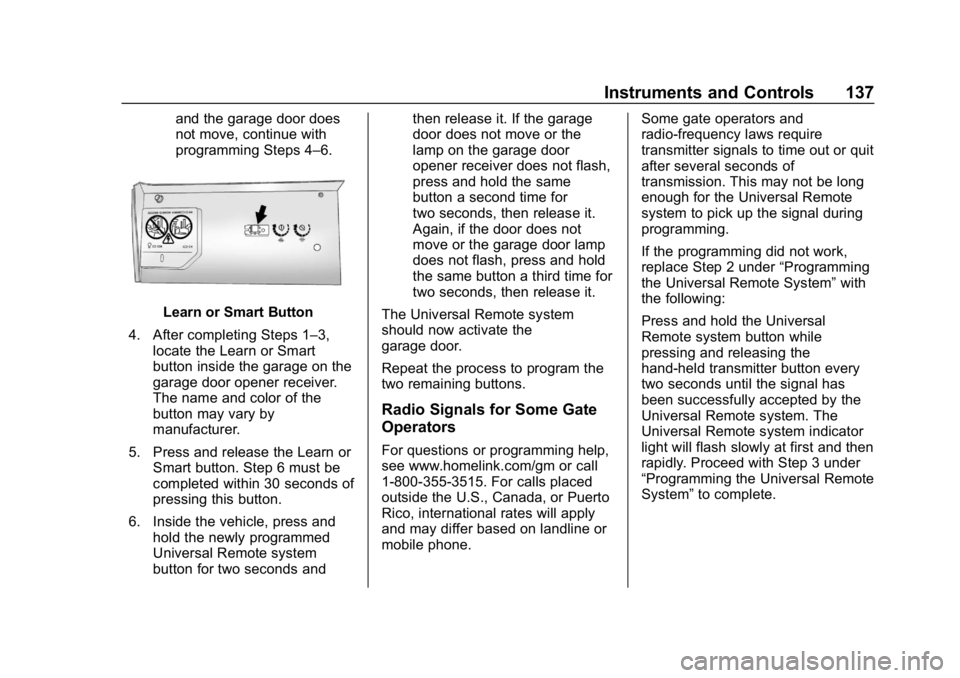
Learn or Smart Button
4. After completing Steps 1–3, locate the Learn or Smart
button inside the garage on the
garage door opener receiver.
The name and color of the
button may vary by
manufacturer.
5. Press and release the Learn or Smart button. Step 6 must be
completed within 30 seconds of
pressing this button.
6. Inside the vehicle, press and hold the newly programmed
Universal Remote system
button for two seconds and then release it. If the garage
door does not move or the
lamp on the garage door
opener receiver does not flash,
press and hold the same
button a second time for
two seconds, then release it.
Again, if the door does not
move or the garage door lamp
does not flash, press and hold
the same button a third time for
two seconds, then release it.
The Universal Remote system
should now activate the
garage door.
Repeat the process to program the
two remaining buttons.
Radio Signals for Some Gate
Operators
For questions or programming help,
see www.homelink.com/gm or call
1-800-355-3515. For calls placed
outside the U.S., Canada, or Puerto
Rico, international rates will apply
and may differ based on landline or
mobile phone. Some gate operators and
radio-frequency laws require
transmitter signals to time out or quit
after several seconds of
transmission. This may not be long
enough for the Universal Remote
system to pick up the signal during
programming.
If the programming did not work,
replace Step 2 under
“Programming
the Universal Remote System” with
the following:
Press and hold the Universal
Remote system button while
pressing and releasing the
hand-held transmitter button every
two seconds until the signal has
been successfully accepted by the
Universal Remote system. The
Universal Remote system indicator
light will flash slowly at first and then
rapidly. Proceed with Step 3 under
“Programming the Universal Remote
System” to complete.
Page 142 of 367

Chevrolet Corvette Owner Manual (GMNA-Localizing-U.S./Canada/Mexico-
12032182) - 2019 - crc - 5/8/18
Lighting 141
To turn off the DRL, turn the exterior
lamp control to
Oor shift into
P (Park). The DRL will stay off until
the control is toggled again or the
transmission is shifted out of
P (Park).
For vehicles first sold in Canada,
the DRL can only be turned off
when the vehicle is parked.
Automatic Headlamp
System
When the exterior lamp control is
set to AUTO and it is dark enough
outside, the headlamps and parking
lamps come on automatically.
There is a light sensor on top of the
instrument panel. Do not cover the
sensor, otherwise the headlamps
will come on when they are not
needed.
The system may also turn on the
headlamps and parking lamps when
driving through a parking garage or
tunnel.
If the vehicle is started in a dark
garage, the automatic headlamp
system comes on immediately. If it
is light outside when the vehicle
leaves the garage, there is a slight
delay before the automatic
headlamp system changes to the
DRL. During that delay, the
instrument cluster may not be as
bright as usual. Make sure the
instrument panel brightness control
is in the full bright position. See
Instrument Panel Illumination
Control 0143.
When it is bright enough outside,
the headlamps and parking lamps
will turn off or may change to
Daytime Running Lamps (DRL). The automatic headlamp system
turns off when the exterior lamp
control is turned to
Oor the ignition
is off.
To turn automatic headlamp system
back on, turn the band to
Oagain,
then release it.
If the automatic headlamp system
has the headlamps turned on and
you turn the ignition off, the
headlamps will turn off. When the
driver door is opened the
headlamps and parking lamps will
illuminate for a period of time.
The length of the delayed
illumination period can be changed.
See “Exit Lighting” underVehicle
Personalization 0128.
The regular headlamp system
should be turned on when needed.
Lights On with Wipers
If the windshield wipers are
activated in daylight with the engine
on and the exterior lamp control is in
AUTO, the headlamps, parking
lamps, and other exterior lamps will
come on. The time it takes for the
Page 349 of 367

Chevrolet Corvette Owner Manual (GMNA-Localizing-U.S./Canada/Mexico-
12032182) - 2019 - crc - 5/8/18
348 OnStar
access to all OnStar services,
except Virtual Advisor and OnStar
Turn-by-Turn Navigation.
OnStar Personal Identification
Number (PIN)
A PIN is needed to access some
OnStar services. The PIN will need
to be changed the first time when
speaking with an Advisor. To
change the OnStar PIN, contact an
OnStar Advisor by pressing
|or
calling 1-888-4ONSTAR.
Warranty
OnStar equipment may be
warranted as part of the vehicle
warranty.
Languages
The vehicle can be programmed to
respond in multiple languages.
Press
|and ask for an Advisor.
Advisors are available in English,
Spanish, and French. Available
languages may vary by country.
Potential Issues
OnStar cannot perform Remote
Door Unlock or Stolen Vehicle
Assistance after the vehicle has
been off continuously for 10 days
without an ignition cycle. If the
vehicle has not been started for
10 days, OnStar can contact
Roadside Assistance or a locksmith
to help gain access to the vehicle.
Global Positioning
System (GPS)
. Obstruction of the GPS can
occur in a large city with tall
buildings; in parking garages;
around airports; in tunnels and
underpasses; or in an area with
very dense trees. If GPS signals
are not available, the OnStar
system should still operate to
call OnStar. However, OnStar
could have difficulty identifying
the exact location.
. In emergency situations, OnStar
can use the last stored GPS
location to send to emergency
responders. A temporary loss of GPS can cause
loss of the ability to send a
Turn-by-Turn Navigation route. The
Advisor may give a verbal route or
may ask for a call back after the
vehicle is driven into an open area.
Cellular and GPS Antennas
Cellular reception is required for
OnStar to send remote signals to
the vehicle. Do not place items over
or near the antenna to prevent
blocking cellular and GPS signal
reception.
Unable to Connect to OnStar
Message
If there is limited cellular coverage
or the cellular network has reached
maximum capacity, this message
may come on. Press
|to try the
call again or try again after driving a
few miles into another cellular area.
Vehicle and Power Issues
OnStar services require a vehicle
electrical system, wireless service,
and GPS satellite technologies to be
available and operating for features
Page 361 of 367

Chevrolet Corvette Owner Manual (GMNA-Localizing-U.S./Canada/Mexico-
12032182) - 2019 - crc - 5/8/18
360 Index
G
Garage Door Opener . . . . . . . . . . . 135Programming . . . . . . . . . . . . . . . . . 135
Gas Strut(s) . . . . . . . . . . . . . . . . . . . . 255
Gauges Boost . . . . . . . . . . . . . . . . . . . . . . . . . .110
Engine CoolantTemperature . . . . . . . . . . . . . . . . .110
Fuel . . . . . . . . . . . . . . . . . . . . . . . . . . 109
Odometer . . . . . . . . . . . . . . . . . . . . . 108
Speedometer . . . . . . . . . . . . . . . . . 108
Tachometer . . . . . . . . . . . . . . . . . . . 108
Trip Odometer . . . . . . . . . . . . . . . . 108
Warning Lights and Indicators . . . . . . . . . . . . . . . . . . . 102
General Information Service and Maintenance . . . . . 310
Towing . . . . . . . . . . . . . . . . . . . . . . . . 216
Vehicle Care . . . . . . . . . . . . . . . . . . 219
Glove Box . . . . . . . . . . . . . . . . . . . . . . . 94
GM Mobility Reimbursement Program . . . . . . . . . . . . . . . . . . . . . . . 334
H
Hatch . . . . . . . . . . . . . . . . . . . . . . . . . . . . 38
Hazard Warning Flashers . . . . . . . 142
Head Restraints . . . . . . . . . . . . . . . . . 58
Head-up Display . . . . . . . . . . . . . . . . 123 Headlamps
Aiming . . . . . . . . . . . . . . . . . . . . . . . . 256
Automatic . . . . . . . . . . . . . . . . . . . . . 141
Bulb Replacement . . . . . . . . . . . . 257
Daytime Running
Lamps (DRL) . . . . . . . . . . . . . . . . 140
Flash-to-Pass . . . . . . . . . . . . . . . . . 140
High Intensity Discharge
(HID) Lighting . . . . . . . . . . . . . . . 257
High-Beam On Light . . . . . . . . . . 120
High/Low Beam Changer . . . . . 140
Lamps On Reminder . . . . . . . . . 120
Heated and Ventilated Front Seats . . . . . . . . . . . . . . . . . . . . . . . . . . 65
Heated Mirrors . . . . . . . . . . . . . . . . . . . 45
Heating . . . . . . . . . . . . . . . . . . . . . . . . . 151
High-Beam On Light . . . . . . . . . . . . 120
High-Speed Operation . . . . . . . . . . 275
Hill and Mountain Roads . . . . . . . . 173
Hill Start Assist (HSA) . . . . . . . . . . 197
Hood . . . . . . . . . . . . . . . . . . . . . . . . . . . 223
Horn . . . . . . . . . . . . . . . . . . . . . . . . . . . . . 99
How to Wear Seat Belts Properly . . . . . . . . . . . . . . . . . . . . . . . . 67
HVAC . . . . . . . . . . . . . . . . . . . . . . . . . . . 151
Hydraulic Clutch . . . . . . . . . . . . . . . . 239
I
Ignition Positions . . . . . . . . . . . . . . . 180
Immobilizer . . . . . . . . . . . . . . . . . . . . . . 43
Infants and Young Children, Restraints . . . . . . . . . . . . . . . . . . . . . . 86
Information Publication Ordering . . . . . . . . . . 339
Infotainment . . . . . . . . . . . . . . . . . . . . 145
Infotainment System . . . . . . . . . . . . 343
Instrument Cluster . . . . . . . . . . . . . . 103
Instrument Panel Storage Area . . . . . . . . . . . . . . . . . . . 94
Interior Rearview Mirrors . . . . . . . . . 45
Introduction . . . . . . . . . . . . . . . . . . . . . . . 2
J
Jump Starting - North America . . . . . . . . . . . . . . . . . . . . . . . 295
K
Keyless EntryRemote (RKE) System . . . . . . . . . 27
Keys . . . . . . . . . . . . . . . . . . . . . . . . . . . . . 25
L
Labeling, Tire Sidewall . . . . . . . . . . 269
Lamps Courtesy . . . . . . . . . . . . . . . . . . . . . . 143
Daytime Running (DRL) . . . . . . 140