2019 CHEVROLET BOLT EV ECU
[x] Cancel search: ECUPage 104 of 371
Chevrolet BOLT EV Owner Manual (GMNA-Localizing-U.S./Canada/Mexico-
12163003) - 2019 - crc - 5/18/18
Seats and Restraints 103
{Warning
A child in a rear-facing child
restraint can be seriously injured
or killed if the front outboard
passenger frontal airbag inflates.
This is because the back of the
rear-facing child restraint would
be very close to the inflating
airbag. A child in a forward-facing
child restraint can be seriously
injured or killed if the front
outboard passenger frontal airbag
inflates and the passenger seat is
in a forward position.
Even if the passenger sensing
system has turned off the front
outboard passenger airbag(s), no
system is fail-safe. No one can
guarantee that an airbag will not
deploy under some unusual
circumstance, even though the
airbag(s) are off.
Secure rear-facing child restraints
in a rear seat, even if the
airbag(s) are off. If you secure a(Continued)
Warning (Continued)
forward-facing child restraint in
the front outboard passenger
seat, always move the seat as far
back as it will go. It is better to
secure the child restraint in a
rear seat.
SeePassenger Sensing System
0 78 for additional information.
If the vehicle does not have a rear
seat that will accommodate a
rear-facing child restraint, a
rear-facing child restraint should not
be installed in the vehicle, even if
the airbag is off.
If the child restraint uses a top
tether, see Lower Anchors and
Tethers for Children (LATCH
System) 091 for top tether anchor
locations.
Do not secure a child restraint in a
position without a top tether anchor
if a national or local law requires
that the top tether be anchored, or if the instructions that come with the
child restraint say that the top tether
must be anchored.
In Canada, the law requires that
forward-facing child restraints have
a top tether, and that the tether be
attached.
When using the lap-shoulder belt to
secure the child restraint in this
position, follow the instructions that
came with the child restraint and the
following instructions:
1. Move the seat as far back as it will go before securing the
forward-facing child restraint.
Move the seat upward or the
seatback to an upright position,
if needed, to get a tight
installation of the child
restraint.
When the passenger sensing
system has turned off the front
outboard passenger frontal
airbag and knee airbag, the
OFF indicator on the
passenger airbag status
indicator should light and stay
Page 106 of 371
Chevrolet BOLT EV Owner Manual (GMNA-Localizing-U.S./Canada/Mexico-
12163003) - 2019 - crc - 5/18/18
Seats and Restraints 105
7. If the vehicle does not have arear seat and the child restraint
manufacturer recommends
using a top tether anchor,
attach the top tether to the top
tether anchor. Refer to the
instructions that came with the
child restraint and to Lower
Anchors and Tethers for
Children (LATCH System) 091.
8. Before placing a child in the child restraint, make sure it is
securely held in place. To
check, grasp the child restraint
at the seat belt path and
attempt to move it side to side
and back and forth. When the
child restraint is properly
installed, there should be no
more than 2.5 cm (1 in) of
movement.
If the airbags are off, the OFF
indicator in the passenger airbag
status indicator will come on and
stay on when the vehicle is started. If a child restraint has been installed
and the ON indicator is lit, see
“If
the On Indicator Is Lit for a Child
Restraint” underPassenger Sensing
System 078.
To remove the child restraint,
unbuckle the vehicle seat belt and
let it return to the stowed position.
If the top tether is attached to a top
tether anchor, disconnect it.
Page 108 of 371
Chevrolet BOLT EV Owner Manual (GMNA-Localizing-U.S./Canada/Mexico-
12163003) - 2019 - crc - 5/18/18
Storage 107
Center Console Storage
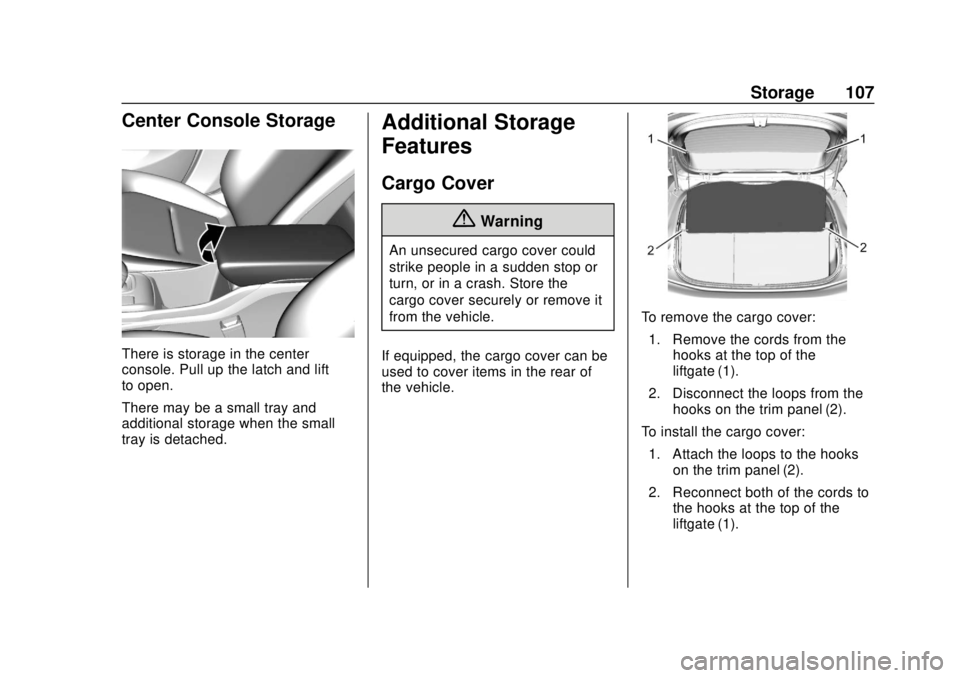
There is storage in the center
console. Pull up the latch and lift
to open.
There may be a small tray and
additional storage when the small
tray is detached.
Additional Storage
Features
Cargo Cover
{Warning
An unsecured cargo cover could
strike people in a sudden stop or
turn, or in a crash. Store the
cargo cover securely or remove it
from the vehicle.
If equipped, the cargo cover can be
used to cover items in the rear of
the vehicle.
To remove the cargo cover: 1. Remove the cords from the hooks at the top of the
liftgate (1).
2. Disconnect the loops from the hooks on the trim panel (2).
To install the cargo cover: 1. Attach the loops to the hooks on the trim panel (2).
2. Reconnect both of the cords to the hooks at the top of the
liftgate (1).
Page 109 of 371
Chevrolet BOLT EV Owner Manual (GMNA-Localizing-U.S./Canada/Mexico-
12163003) - 2019 - crc - 5/18/18
108 Storage
Cargo Management
System
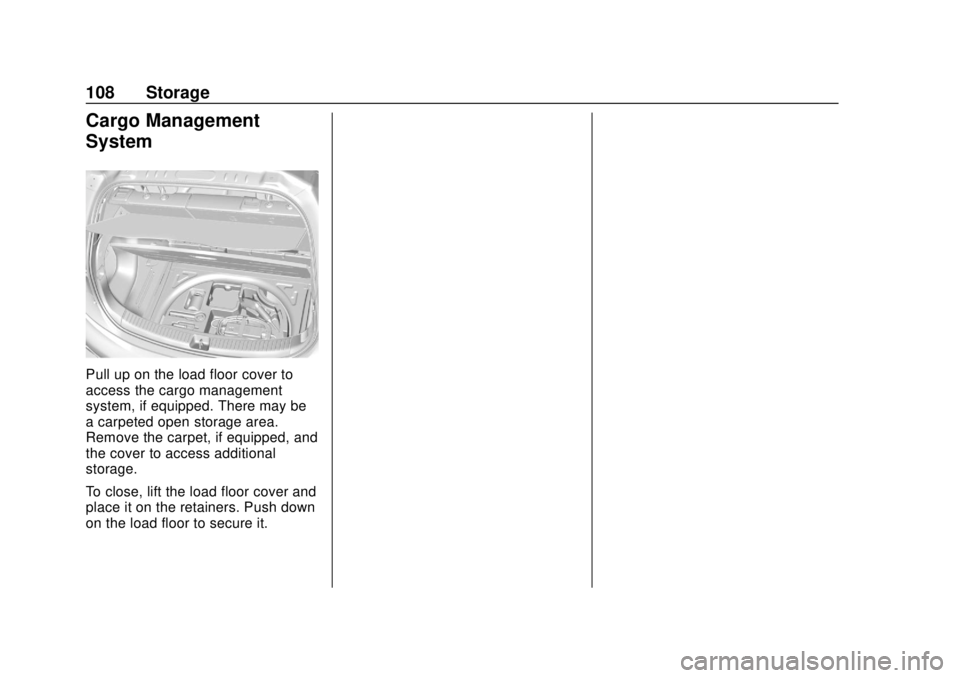
Pull up on the load floor cover to
access the cargo management
system, if equipped. There may be
a carpeted open storage area.
Remove the carpet, if equipped, and
the cover to access additional
storage.
To close, lift the load floor cover and
place it on the retainers. Push down
on the load floor to secure it.
Page 110 of 371
Chevrolet BOLT EV Owner Manual (GMNA-Localizing-U.S./Canada/Mexico-
12163003) - 2019 - crc - 5/18/18
Instruments and Controls 109
Instruments and
Controls
Controls
Steering Wheel Adjustment . . . 110
Steering Wheel Controls . . . . . . 110
Heated Steering Wheel . . . . . . . 111
Horn . . . . . . . . . . . . . . . . . . . . . . . . . . 111
Pedestrian Safety Signal . . . . . . 111
Windshield Wiper/Washer . . . . 112
Rear Window Wiper/Washer . . . . . . . . . . . . . . . . . . . . . . 113
Compass . . . . . . . . . . . . . . . . . . . . . 114
Clock . . . . . . . . . . . . . . . . . . . . . . . . . 114
Power Outlets . . . . . . . . . . . . . . . . 115
Wireless Charging . . . . . . . . . . . . 116
Warning Lights, Gauges, and
Indicators
Warning Lights, Gauges, and Indicators . . . . . . . . . . . . . . . . . . . 118
Instrument Cluster . . . . . . . . . . . . 119
Speedometer . . . . . . . . . . . . . . . . . 122
Odometer . . . . . . . . . . . . . . . . . . . . . 122
Trip Odometer . . . . . . . . . . . . . . . . 122
Battery Gauge (High Voltage) . . . . . . . . . . . . . . . . . . . . . 123
Driver Efficiency Gauge . . . . . . 123 Power Indicator Gauge . . . . . . . 124
Seat Belt Reminders . . . . . . . . . 124
Airbag Readiness Light . . . . . . . 125
Passenger Airbag Status
Indicator . . . . . . . . . . . . . . . . . . . . 125
Charging System Light (12-Volt Battery) . . . . . . . . . . . . . . . . . . . . . 126
Service Vehicle Soon Light . . . 127
Brake System Warning Light . . . . . . . . . . . . . . . . . . . . . . . . 127
Electric Parking Brake Light . . . . . . . . . . . . . . . . . . . . . . . . 127
Service Electric Parking Brake Light . . . . . . . . . . . . . . . . . . . . . . . . 128
Antilock Brake System (ABS) Warning Light . . . . . . . . . . . . . . . 128
Sport Mode Light . . . . . . . . . . . . . 128
Lane Keep Assist (LKA) Light . . . . . . . . . . . . . . . . . . . . . . . . 128
Vehicle Ahead Indicator . . . . . . 129
Pedestrian Ahead Indicator . . . 129
Traction Off Light . . . . . . . . . . . . . 129
StabiliTrak OFF Light . . . . . . . . . 129
Traction Control System (TCS)/ StabiliTrak Light . . . . . . . . . . . . . 130
Tire Pressure Light . . . . . . . . . . . 130
Security Light . . . . . . . . . . . . . . . . . 130
Vehicle Ready Light . . . . . . . . . . 131
High-Beam On Light . . . . . . . . . . 131
Lamps On Reminder . . . . . . . . . 131 Cruise Control Light . . . . . . . . . . 131
Door Ajar Light . . . . . . . . . . . . . . . 131
Information Displays
Power Flows . . . . . . . . . . . . . . . . . 132
Programmable Charging . . . . . . 132
Energy Information . . . . . . . . . . . 140
Charging Options . . . . . . . . . . . . . 142
Driver Information
Center (DIC) . . . . . . . . . . . . . . . . 143
Vehicle Messages
Vehicle Messages . . . . . . . . . . . . 145
Propulsion PowerMessages . . . . . . . . . . . . . . . . . . . 145
Vehicle Speed Messages . . . . . 145
Vehicle Personalization
Vehicle Personalization . . . . . . . 146
Page 131 of 371

Chevrolet BOLT EV Owner Manual (GMNA-Localizing-U.S./Canada/Mexico-
12163003) - 2019 - crc - 5/18/18
130 Instruments and Controls
This light comes on when the
StabiliTrak system is turned off.
If StabiliTrak is off, the Traction
Control System (TCS) is also off.
If StabiliTrak and TCS are off, the
system does not assist in controlling
the vehicle. Turn on the TCS and
the StabiliTrak systems, and the
warning light turns off.
SeeTraction Control/Electronic
Stability Control 0218.
Traction Control System
(TCS)/StabiliTrak Light
This light comes on briefly when the
vehicle is started.
If the light does not come on, have
the vehicle serviced by your dealer.
If the system is working normally,
the indicator light turns off. If the light is on and not flashing, the
TCS, and potentially the StabiliTrak/
Electronic Stability Control system
have been disabled.
If the indicator/warning light is on
and flashing, the TCS and/or the
StabiliTrak/ESC system is actively
working.
Tire Pressure Light
For vehicles with the Tire Pressure
Monitor System (TPMS), this light
comes on briefly when the vehicle is
started. It provides information
about tire pressures and the TPMS.
When the Light is On Steady
This indicates that one or more of
the tires are significantly
underinflated.
A message in the Driver Information
Center (DIC) may also display. Stop
as soon as possible, and inflate the
tires to the pressure value shown on
the Tire and Loading Information
label.
When the Light Flashes First and
Then Is On Steady
This indicates that there may be a
problem with the TPMS. The light
flashes for about one minute and
stays on steady until the vehicle is
off. This sequence repeats each
time the vehicle is started.
Security Light
The security light should come on
briefly as the vehicle is started. If it
does not come on, have the vehicle
Page 132 of 371
Chevrolet BOLT EV Owner Manual (GMNA-Localizing-U.S./Canada/Mexico-
12163003) - 2019 - crc - 5/18/18
Instruments and Controls 131
serviced by your dealer. If the
system is working normally, the
indicator light turns off.
If the light stays on and the vehicle
does not start, there could be a
problem with the theft-deterrent
system.
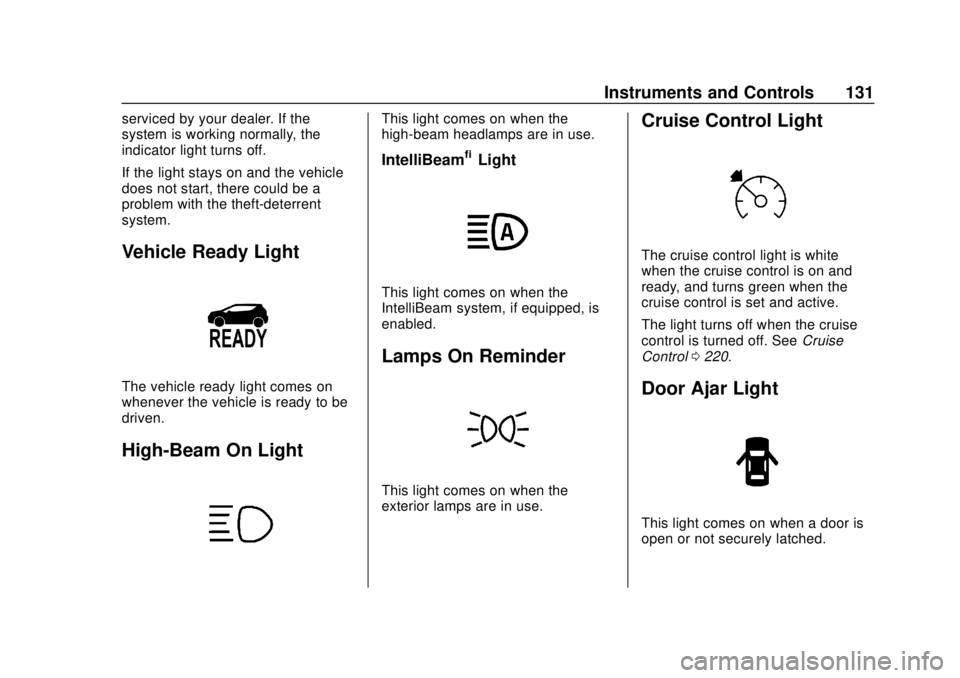
Vehicle Ready Light
The vehicle ready light comes on
whenever the vehicle is ready to be
driven.
High-Beam On Light
This light comes on when the
high-beam headlamps are in use.
IntelliBeam®Light
This light comes on when the
IntelliBeam system, if equipped, is
enabled.
Lamps On Reminder
This light comes on when the
exterior lamps are in use.
Cruise Control Light
The cruise control light is white
when the cruise control is on and
ready, and turns green when the
cruise control is set and active.
The light turns off when the cruise
control is turned off. SeeCruise
Control 0220.
Door Ajar Light
This light comes on when a door is
open or not securely latched.
Page 138 of 371
Chevrolet BOLT EV Owner Manual (GMNA-Localizing-U.S./Canada/Mexico-
12163003) - 2019 - crc - 5/18/18
Instruments and Controls 137
.Weekends are Saturday
and Sunday and use the
same rate schedule.
Both weekday and
weekend schedules must
be set. The rate schedule
only applies for a 24-hour
period, starting at 12 AM
and ending at 12 AM. There
can be five rate changes for
each day; not all must
be used.
Select Weekday or
Weekend.
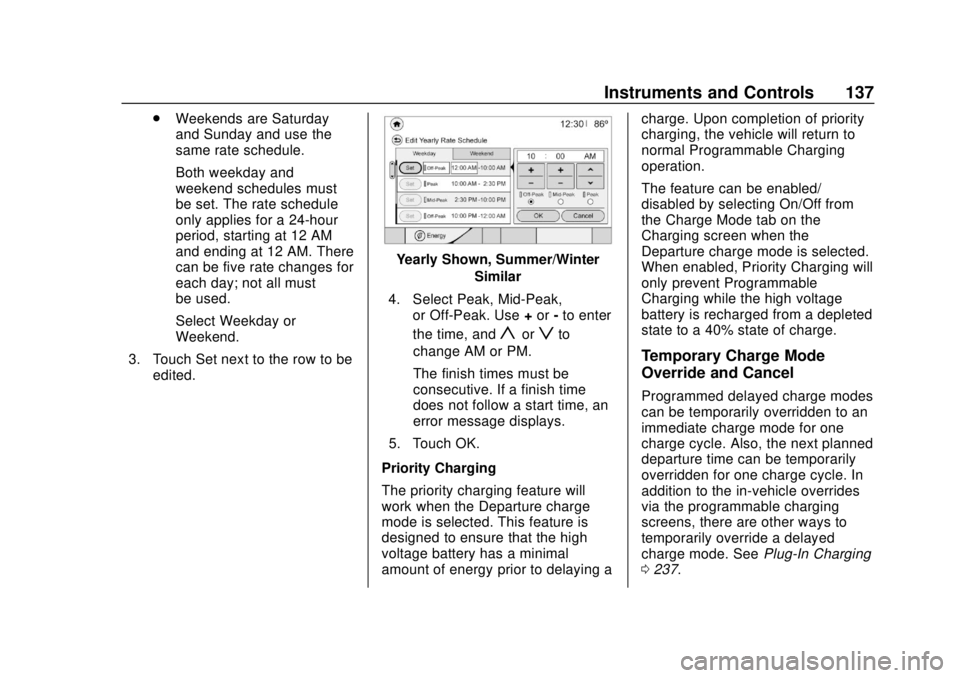
3. Touch Set next to the row to be edited.
Yearly Shown, Summer/Winter
Similar
4. Select Peak, Mid-Peak, or Off-Peak. Use +or -to enter
the time, and
yorzto
change AM or PM.
The finish times must be
consecutive. If a finish time
does not follow a start time, an
error message displays.
5. Touch OK.
Priority Charging
The priority charging feature will
work when the Departure charge
mode is selected. This feature is
designed to ensure that the high
voltage battery has a minimal
amount of energy prior to delaying a charge. Upon completion of priority
charging, the vehicle will return to
normal Programmable Charging
operation.
The feature can be enabled/
disabled by selecting On/Off from
the Charge Mode tab on the
Charging screen when the
Departure charge mode is selected.
When enabled, Priority Charging will
only prevent Programmable
Charging while the high voltage
battery is recharged from a depleted
state to a 40% state of charge.
Temporary Charge Mode
Override and Cancel
Programmed delayed charge modes
can be temporarily overridden to an
immediate charge mode for one
charge cycle. Also, the next planned
departure time can be temporarily
overridden for one charge cycle. In
addition to the in-vehicle overrides
via the programmable charging
screens, there are other ways to
temporarily override a delayed
charge mode. See
Plug-In Charging
0 237.